Office-js: OWA OnSend functionality varies depending on command button/dialogs being opened
Expected Behavior
OnSend event fires a JavaScript function when messages are sent when using a compose mode Mail Add-in that has an OnSend event.
Current Behavior
We have a compose mode Mail Add-in that has an OnSend event and command button that opens a dialog using Dialog API.
Using OWA in Office 365 with the Add-in enabled and composing a new message:
If the command button is not pressed before the message is sent then the OnSend event fires when the message is sent.
If the command button is pressed our dialog is opened. Closing the dialog and then sending the message results in the OnSend event not firing. The UI tells the user that our Add-in has blocked the message, but our HTML file that loads the JavaScript script for the OnSend never gets loaded and the function in the JavaScript never gets called. It appears that OWA is never even trying to load our HTML and JavaScript. Pressing the send button a second time does fire our OnSend event.
Why would opening a dialog through a command button effect the functionality of the OnSend event?
Steps to Reproduce, or Live Example
See Current Behaviour above.
Context
The OnSend event should always fire when messages are sent. It is not.
Your Environment
OWA in Office 365.
Useful logs
There are none as the files required for the OnSend event are not being loaded.
 duncan-smith-bj
All 16 comments
@exextoc please investigate and follow up. thanks!
 JuaneloJuanelo
on 8 May 2018
JuaneloJuanelo
on 8 May 2018
@duncan-smith-bj I'm investigating this issue. Would you be able to send me either your add-in or a simplified version of it, along with whatever else I might need to repro the issue including your command button? The demo add-ins I have all still work with OnSend so I need more information to repro.
 mamousch
on 14 May 2018
mamousch
on 14 May 2018
Hello,
The Add-in requires our custom server backend which I have running on an Office 365 instance. We can supply you with a login for this if you want to see the problem happen.
I will also create a simpler Add-in without our backend but that will take a bit more time.
We have now replicated the issue on multiple Office 365 tenants, but it never does it when the Add-in is installed into Exchange 2016.
duncan-smith-bj
on 16 May 2018
We are facing this same issue in our product development. Is there any updates or alternatives ?
 JaydevSolanki
on 6 Jun 2018
JaydevSolanki
on 6 Jun 2018
@JaydevSolanki We never received a version of the add-in which would let us repro the issue, so the investigation has stalled. We still can't repro it with any of our test add-ins.
mamousch
on 6 Jun 2018
Hello,
I managed to reproduce this problem with a simple small addin : There is one button triggering the onButton function that logs something, and a onSend function which should be called when message is sent. (No need to open a dialog or anything)
If we do nothing before sending the message, onSend logs. If we first click on the button, the send event is not fired and the e-mail is blocked. (if we re-send the message, then onSend event is fired and message is actually sent).
Nb : if in onButton function we complete the event with {allowEvent: true}, then sending the e-mail works, but onSend is not fired.
 gbottesi
on 24 Sep 2018
gbottesi
on 24 Sep 2018
Hi,
is there any progress on this issue?
(please say yes)
 uncleyear
on 8 Nov 2018
uncleyear
on 8 Nov 2018
Is the command you are using a UILess function that launches a dialog? OWA displays a dialog when a UILess command is still running in the background to prevent the user from navigating until the operation is complete. It should look something like this:
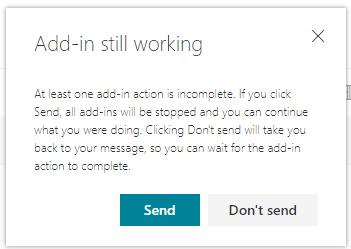
This dialog will always appear when a UILess function is running until it calls event.completed(). Once it's completed, onSend should run as expected.
Could you provide screenshots of what UI you're seeing that blocks sending without loading your script?
 exextoc
on 12 Nov 2018
exextoc
on 12 Nov 2018
Launching a dialog is not mandatory.
Here is a small video of the reproduction with the code I've sent you.
Regard,
Guillaume
gbottesi
on 14 Nov 2018
I am not able to reproduce the issue you are describing. In the video, it's unclear what the behavior of the test add-in is and what the issue is, the OnSend add-in appears to be running both times send is clicked, one blocks send though and the second time it doesn't. Is the command invoking event.completed() when it is done?
exextoc
on 14 Nov 2018
@exextoc
I am not able to reproduce the issue you are describing. In the video, it's unclear what the behavior of the test add-in is and what the issue is, the OnSend add-in appears to be running both times send is clicked, one blocks send though and the second time it doesn't. Is the command invoking event.completed() when it is done?
Hi exextoc.
Did you look at example presented by gbotessi that is dead simple and try to run it? Similar functionality is perfectly reproducible here in our environment.
uncleyear
on 14 Nov 2018
At first press send button the OnSend addin is not running at all and environment gives error on it - weird, but all this was already said.
uncleyear
on 14 Nov 2018
I didn't see the example attached by gbotessi, I'm able to repro using this add-in.
exextoc
on 15 Nov 2018
Thanks for reporting this issue regarding OnSend. The bug has been put on our backlog. We unfortunately have no timelines to share at this point.
exextoc
on 28 Nov 2018
Hi @exextoc,
When this fix will be available in production ?
Thanks a lot
 fabian-bouchy
on 14 Aug 2019
fabian-bouchy
on 14 Aug 2019
Wondering if a fix for this is available in the latest preview, which includes the ItemSend event type?
 ghost
on 24 Sep 2019
ghost
on 24 Sep 2019
Related issues
 wsoccorsi-yw
·
4Comments
wsoccorsi-yw
·
4Comments
 jacobx1
·
4Comments
jacobx1
·
4Comments
 barisbikmaz
·
4Comments
barisbikmaz
·
4Comments
 Alturos
·
4Comments
Alturos
·
4Comments
 gordonmleigh
·
3Comments
gordonmleigh
·
3Comments
Most helpful comment
Hello,
I managed to reproduce this problem with a simple small addin : There is one button triggering the
onButtonfunction that logs something, and aonSendfunction which should be called when message is sent. (No need to open a dialog or anything)If we do nothing before sending the message,
onSendlogs. If we first click on the button, the send event is not fired and the e-mail is blocked. (if we re-send the message, thenonSendevent is fired and message is actually sent).Nb : if in
onButtonfunction we complete the event with{allowEvent: true}, then sending the e-mail works, but onSend is not fired.repro_bug.zip