Office-js-docs-pr: Application does not run on HTTPS following provided instructions
I followed all of the instructions to create a an office task bar with vue, but I can't get my server to run on https:
λ npm run dev
Your application is running here: http://localhost:8080
This is my scripts in ./package.json:
  "scripts": {
    "dev": "webpack-dev-server --https --inline --progress --config build/webpack.dev.conf.js",
    "start": "npm run dev",
    "build": "node build/build.js"
  },
Additionally, if I try going to http://localhost:8080 it says I don't have a certificate, which makes sense I suppose but nothing in the "solution" for this works for me. I don't get a prompt from yo to install a certificate.
Versions:
I'm using Windows 10
λ npm list -g vue-cli yo generator-office
+-- [email protected]
+-- [email protected]
-- [email protected]
 mclean25
All 26 comments
@akrantz I can confirm that as of a week ago (using the React TS template), there is no prompt to trust a cert. You have to do it manually.
@mclean25 The workaround is to do it manually. Instructions here: SSL
 Rick-Kirkham
on 30 Aug 2019
Rick-Kirkham
on 30 Aug 2019
Thanks for the reply. The problem with doing it manually is I have no project_root/certs/ folder, and therefore no ca.crt file.
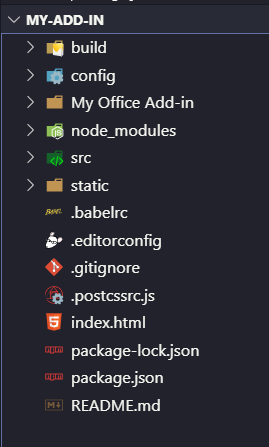
Am I missing something?
mclean25
on 30 Aug 2019
Well, that's the fundamental problem then. The Vue template should have that folder just like the React/Angular, etc. templates. Try the following: In another folder create one of the other project types. Copy the certs folder from the new project to the root of your Vue project, then go through the steps of the manual process.
Rick-Kirkham
on 30 Aug 2019
The Yo Office templates have a webpack config which uses office-addin-dev-certs to allow to easily create a certificate for https://localhost and trust the CA certificate for it. In the webpack config, it calls getHttpsServerOptions() which will do the required work and return the paths to the created certificates.
An easier way if you don't need this integrated is to just run:
npx office-addin-dev-certs install
This will create and install the dev certs and afterwards you can access https://localhost from the browser or within Office. Please note that you might need to restart the browser.
 akrantz
on 30 Aug 2019
akrantz
on 30 Aug 2019
@Rick-Kirkham You probably didn't get a prompt because you already had the certificate installed. It will definitely prompt when "npm start" is used if permission is needed to install the certificate.
akrantz
on 30 Aug 2019
@akrantz I'm not sure what you mean by "installed" (as distinct from "trusted"), but that's not it. I got errors when I started the add-in the first time because there was no trusted cert. I had to trust it manually. There was no prompt.
I've looked at all the webpack config files and there's no mention of getHttpsServerOptions(). In fact, I searched the project for that term and got no hits. I so see the following in the webpack.dev.js:
devServer: {
        publicPath: '/',
        contentBase: path.resolve('dist'),
        hot: true,
        https: {
            key: fs.readFileSync('./certs/server.key'),
            cert: fs.readFileSync('./certs/server.crt'),
            cacert: fs.readFileSync('./certs/ca.crt')
        },
But whatever this is doing, it does NOT seem to preclude the need to trust the cert, and I had to do that manually.
Rick-Kirkham
on 30 Aug 2019
@Rick-Kirkham Did you get the latest yo office version using npm install -g yo generator-office? What you are referring to is very old.
akrantz
on 30 Aug 2019
@Rick-Kirkham You probably didn't get a prompt because you already had the certificate installed. It will definitely prompt when "npm start" is used if permission is needed to install the certificate.
@akrantz I don't have any certificates installed and I don't get any prompts though?
mclean25
on 30 Aug 2019
@akrantz That was the problem. Installing the latest version of generator-office fixed it. But it looks like @mclean25 is already on the latest version, so that doesn't solve his issue.
Rick-Kirkham
on 30 Aug 2019
@Rick-Kirkham My answer above will work for him: https://github.com/OfficeDev/Office-Addin-TaskPane/issues/60#issuecomment-526700895
akrantz
on 30 Aug 2019
@akrantz so I ran npx office-addin-dev-certs install and it gave me the prompt (to which I clicked yes). It still doesn't work though and npm run dev still goes to http://localhost:8080 and I still get the uncertified warning when trying to go to the site on the browser.
mclean25
on 30 Aug 2019
The Yo Office templates have a webpack config which specifies https://localhost:3000. If you're using http and not https, then the certs aren't the issue.
Check the SourceLocation specified in the manifest.
You could use npx office-addin-manifest info manifest.xml to see that.
akrantz
on 30 Aug 2019
Here's the output:
λ npx office-addin-manifest info "My Office Add-in"/manifest.xml
npx: installed 19 in 2.922s
Manifest: My Office Add-in/manifest.xml
  Id: 918bd4fd-346e-43e9-b986-8dba5703b33d
  Name: My Office Add-in
  Provider: [Provider name]
  Type: TaskPaneApp
  Version: 1.0.0.0
  AppDomains: AppDomain1
  Default Locale: en-US
  Description: [Workbook Add-in description]
  High Resolution Icon Url: https://localhost:8080/assets/icon-80.png
  Hosts: Workbook
  Icon Url: https://localhost:8080/assets/icon-32.png
  Permissions: ReadWriteDocument
  Support Url:
  Default Settings:
    Requested Height:
    Requested Width:
    Source Location: https://localhost:8080/index.html
OK, so you're using https://localhost:8080/index.html. If you run the dev server using "npm run dev-server", does it start OK? If so, if you open the browser to "https://localhost:8080/index.html" can it show the html?
akrantz
on 30 Aug 2019
It doesn't display anything. The weird thing is that it keeps saying that it's running on **http**://localhost not **https**://localhost:
λ npm run dev

> [email protected] dev C:\Users\AlexMcLean\git\my-add-in
> webpack-dev-server --https --inline --progress --config build/webpack.dev.conf.js

 12% building modules 20/25 modules 5 active ...\AlexMcLean\git\my-add-in\src\App.vue{ parser: "babylon" } is deprecated; we now treat it as { parser: "babel" }.
 95% emitting

 DONE  Compiled successfully in 3183ms                                                                                        2:07:59 PM

 I  Your application is running here: http://localhost:8080
This is what I get if I try visiting https://localhost/index.html:

mclean25
on 30 Aug 2019
OK, so first the "Not secure" error for https needs to be sorted out. Does npx office-addin-dev-certs verify report that things are OK? The browser does not trust the Certificate Authority but the command should install it. Perhaps you need to restart the computer.
You can use Start, "Manage user Certificates" and go to Current User, Trust Root Certificate Authorities and see if the "Developer CA for Microsoft Add-ins" is installed.

akrantz
on 31 Aug 2019
As for why webpack-dev-server is not using https, compare your webpack config for devserver against https://github.com/OfficeDev/Office-Addin-TaskPane/blob/master/webpack.config.js#L62.
akrantz
on 31 Aug 2019
@akrantz @Rick-Kirkham FYI -- the Excel / Vue quick start uses the Vue CLI to create the Vue project, and then uses Yo Office only to create the add-in manifest for the project. This is because Yo Office doesn't currently support creating a Vue add-in project in entirety (therefore you have to use the Vue CLI to create the project and then use Yo Office to add a manifest for the project). So, the certificate-related problems that are reported in this issue have nothing to do with the way recent versions of Yo Office create/trust the cert. I'm going to transfer this issue back to OfficeDev/office-js-docs-pr, as @AlexJerabek is currently working to update this quick start (via a customer's pull request).
@mclean25 sorry that you're running into issues with the Vue quick start. PR # 1243 updates the Vue quick start fairly significantly. There's still a bit more that needs to happen before that PR gets merged (and the live docs get updated) -- but in the meantime, you might try to follow the instructions in the updated article (that's part of the PR), and seeing if that lets you avoid the certificate-related issues you've described.
 kbrandl
on 2 Sep 2019
kbrandl
on 2 Sep 2019
@AlexJerabek FYI, assigning this one to you (since it's related to PR #1243 which updates the Vue quick start). Thanks!
kbrandl
on 2 Sep 2019
Thanks for the detail @kbrandl. I've resorted to using the React template which was smooth sailing and was up and running in no time as I'm just exploring at this point in time. Look forward to the PR for Vue though as I believe that's what my team will want to use in the end.
mclean25
on 3 Sep 2019
Hi @mclean25,
The Vue quick start has been updated with PR https://github.com/OfficeDev/office-js-docs-pr/pull/1243. Those changes will be pushed to live soon.
Whenever you are able, could you confirm the updated Vue quick start addresses your concerns? Thanks!
 AlexJerabek
on 3 Sep 2019
AlexJerabek
on 3 Sep 2019
@mclean25 glad to hear that you had a better experience with the React quick start -- thanks for letting us know! Per @AlexJerabek's comment above, the updated Vue quick start should be published later this week (most likely tomorrow - Tuesday). You'll know when that's happened, because the date that appears directly below the article title will be recent than it currently is:
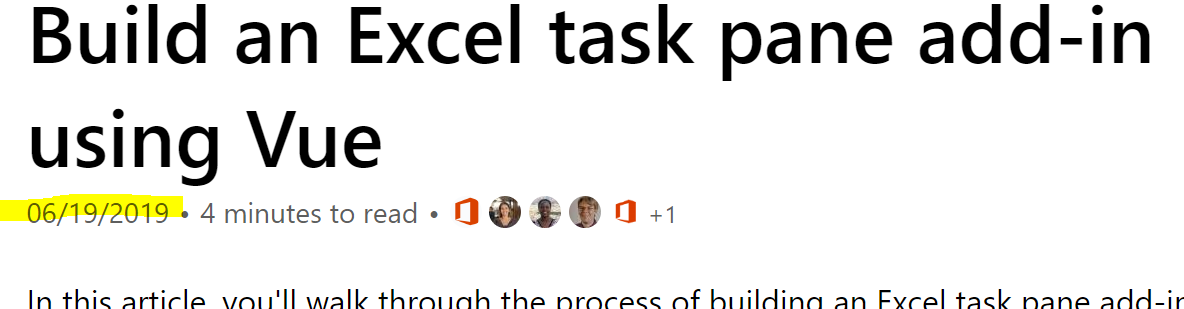
If possible, please do give that a run through after it's been updated, and let us know if it resolves the certificate-related issue you reported here. Thanks!
kbrandl
on 3 Sep 2019
@kbrandl @AlexJerabek Sounds good, I'll go over it tomorrow (assuming you mean Wednesday 😉) and will let you know how it goes.
mclean25
on 3 Sep 2019
@mclean25 ah yes -- the holiday threw me off -- today is already Tuesday, so doc updates will be published later today :)
kbrandl
on 3 Sep 2019
New docs work, thank you!
mclean25
on 4 Sep 2019
Related issues
 glr0221
·
6Comments
glr0221
·
6Comments
 hyoshioka0128
·
6Comments
hyoshioka0128
·
6Comments
 smozgur
·
8Comments
smozgur
·
8Comments
 beyphy
·
4Comments
beyphy
·
4Comments
 fitojb
·
3Comments
fitojb
·
3Comments
Most helpful comment
New docs work, thank you!