Office-docs-powershell: Add-TeamChannelUser Role Member is invalid
In this page; https://docs.microsoft.com/en-us/powershell/module/teams/add-teamchanneluser?view=teams-ps
Add-TeamChannelUser
   -GroupId <String>
   -DisplayName <String>
   -User <String>
   [-Role <String>]
   [<CommonParameters>]
The Role Parameter only specify and accept, Owner;
Type: | String
Position: | Named
Default value: | None
Accept pipeline input: | True
Accept wildcard characters: | False
But the powershell command, gives an error when executing, and it's not possible to provide:
-role Member
Using command:
Add-TeamChannelUser -GroupId $Team.GroupId -User $AddChannelMember.UserID -DisplayName $TeamPrivateChannel.DisplayName -Verbose
Error Message:
Add-TeamChannelUser : Error occurred while executing Add-TeamChannelUser
Code: BadRequest
Message: Role: 'member' is invalid. Valid values are 'Owner, Guest'
InnerError:
  RequestId: 798393ab-fd6c-415d-a8dd-62943fcb8672
  DateTimeStamp: 2020-11-02T13:15:12
HttpStatusCode: BadRequest
 markus-lassfolk
All 13 comments
Might this be a problem with the underlying Graph-API? Has something there been changed which broke the PowerShell script?
 hollandjg
on 2 Nov 2020
hollandjg
on 2 Nov 2020
I am impacted by this as well.
 gerane
on 3 Nov 2020
gerane
on 3 Nov 2020
I am using the same version of the module that has been working. I am guessing something has changed on the graph api.
gerane
on 3 Nov 2020
I'm not sure how this module is using the api, but this page shows roles should be empty unless the user is an owner or guest.
https://docs.microsoft.com/en-us/graph/api/conversationmember-update?view=graph-rest-beta&tabs=http
gerane
on 3 Nov 2020
impacted by this as well. More than one tenant in South Africa
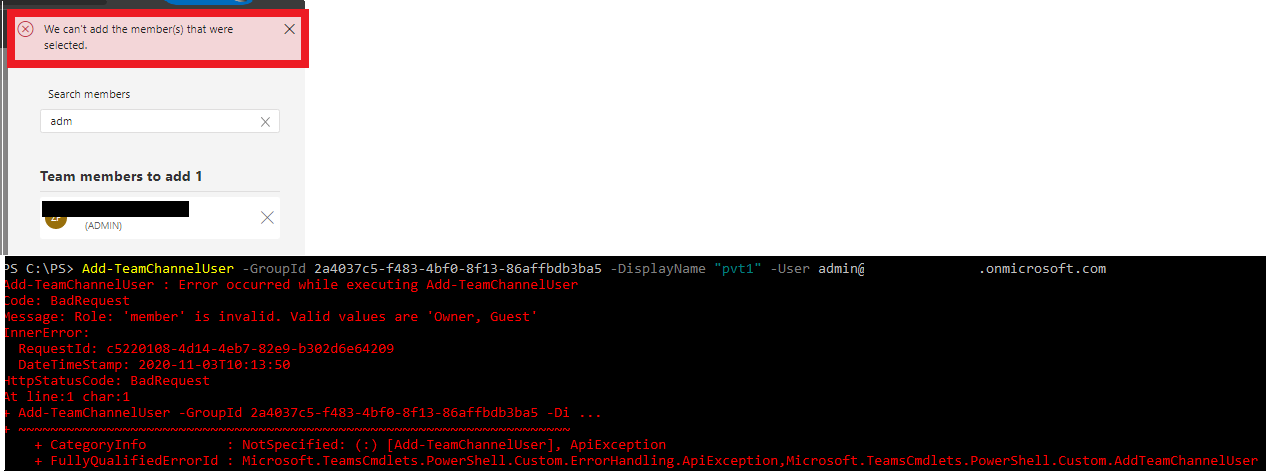
Unable to add members to private channel via PowerShell and Teams Admin center
 Zunade
on 3 Nov 2020
Zunade
on 3 Nov 2020
Same here in New Zealand, exactly the same issue, first script stopped working ('member' is invalid error), now can't add members to a channel in Teams admin Center.
 Bora-bora-boot
on 3 Nov 2020
Bora-bora-boot
on 3 Nov 2020
We have just realized that we're facing the same issue. We are using Graph API though but I'm sure it's the same when using PowerShell. What worked for us is to remove the roles parameter when waning to add a "member". You only need to specify this parameter when adding an "Owner" or a "Guest". We believe that our script broke around a week ago. It was working till then. I hope this helps some of you out there. Just to add, it's the same when adding to a Team or a channel.
 Eyadbaukhiran
on 3 Nov 2020
Eyadbaukhiran
on 3 Nov 2020
This is affecting me as well - just last week I was able to add members to private channels via powershell, but as of this am, the same scripts now return that error above.
 tmills1073
on 3 Nov 2020
tmills1073
on 3 Nov 2020
+1 for impacted users. This is super important since it's the only way to bulk add users currently.
 BHollowell-LCI
on 3 Nov 2020
BHollowell-LCI
on 3 Nov 2020
I just received the following info from Microsoft on a case I had raised for this issue yesterday:
Good day.
I just got the update that it’s an incident that ‘Admins may experience an error that prevents adding users to Microsoft Teams private channels using PowerShell cmdlets.’
‘We've identified a recent service update contained a code issue causing cmdlets to fail to find members, resulting in impact. We're developing a hotfix which is expected to deploy by Thursday, November 5, 2020.’
Next update by: Wednesday, November 4, 2020, at 8:00 PM UTC
In the meantime you can use Graph API add users to channels:
You'll need to give graph explorer or another service principal channelmember.read.all and channelmember.readwrite permissions and consent them as an Admin.
In this example Graph Explorer is used:
We need firstly add the user to the team because we cannot add the user to private channel directly.
Put the ‘https://graph.microsoft.com/v1.0/teams/#TeamID#/members’ in the query box.
In the Request Body:
{"@odata.type":"#microsoft.graph.aadUserConversationMember","roles":[],"[email protected]":"https://graph.microsoft.com/v1.0/users/#userUPN#"}
Put ‘https://graph.microsoft.com/v1.0/teams/#TeamID#/channels/#ChannelID#/members’ in the query list
And place UPN in the Request Body:
{
"@odata.type": "#microsoft.graph.aadUserConversationMember",
"roles": [],
"[email protected]": "https://graph.microsoft.com/v1.0/users/#userUPN#"
}
 TestinProd123
on 4 Nov 2020
TestinProd123
on 4 Nov 2020
Confirm.
This addteamschanneluser commandlet is very useful to add members to private channels by matching the members of dynamic groups which are based on some AD field.
This way I could have a private channel which contains members with some AD field in common like dept, city, etc
 suoko
on 4 Nov 2020
suoko
on 4 Nov 2020
Hello everyone on this thread.
As the cmdlet is still part of the public preview, it is subject to changes and testing, so in this case I would recommend to wait for the command to be available in the GA version of the module for the final version of it and also if you want to suggest changes to the cmdlet I would suggest uservoice, that way, it can reach the product team, as here, we are limited to documentation changes and fixes.
Thank you!
 get-itips
on 12 Nov 2020
get-itips
on 12 Nov 2020
@get-itips Thank you very much for the contribution and sharing this explanation. @markus-lassfolk Hope this comment is helpful for you. If you see a documentation update is required, please feel free to open an issue for the same. We proceed here to close it. Thanks for taking out some time to open the issue. Appreciate and encourage you to do the same in future also.
 yogkumgit
on 13 Nov 2020
yogkumgit
on 13 Nov 2020
Related issues
 kefujino
·
5Comments
kefujino
·
5Comments
 SamCosby
·
5Comments
SamCosby
·
5Comments
 tomresing
·
5Comments
tomresing
·
5Comments
 KevinNSTA
·
4Comments
KevinNSTA
·
4Comments
 aravindmunna
·
3Comments
aravindmunna
·
3Comments
Most helpful comment
I just received the following info from Microsoft on a case I had raised for this issue yesterday:
In the meantime you can use Graph API add users to channels:
You'll need to give graph explorer or another service principal channelmember.read.all and channelmember.readwrite permissions and consent them as an Admin.
In this example Graph Explorer is used:
We need firstly add the user to the team because we cannot add the user to private channel directly.
Put the ‘https://graph.microsoft.com/v1.0/teams/#TeamID#/members’ in the query box.
In the Request Body:
{"@odata.type":"#microsoft.graph.aadUserConversationMember","roles":[],"[email protected]":"https://graph.microsoft.com/v1.0/users/#userUPN#"}
Put ‘https://graph.microsoft.com/v1.0/teams/#TeamID#/channels/#ChannelID#/members’ in the query list
And place UPN in the Request Body:
{
"@odata.type": "#microsoft.graph.aadUserConversationMember",
"roles": [],
"[email protected]": "https://graph.microsoft.com/v1.0/users/#userUPN#"
}