Office-docs-powershell: Information on PowerShell v7 requirement missing
The document should contain information about the requirement for PowerShell V7.
The examples to install the preview version of EXO V2 module contain parameters that are not available in default Windows Server PS.
Install-Module -Name ExchangeOnlineManagement -RequiredVersion 2.0.3-Preview -AllowPrerelease
As clients tend to install the ExchangeOnlineManagement module on Exchange Servers, there should be a statement of installing PS V7 on an Exchange Server system.
Document Details
⚠ Do not edit this section. It is required for docs.microsoft.com ➟ GitHub issue linking.
- ID: de2836a0-0af3-c147-2d4a-78220ac4e0f1
- Version Independent ID: 2cde9735-6281-bb9f-bf07-b30b2f6c7f37
- Content: Exchange Online PowerShell with modern authentication using V2 Module
- Content Source: exchange/docs-conceptual/exchange-online-powershell-v2.md
- Service: exchange-online
- GitHub Login: @chrisda
- Microsoft Alias: chrisda
 Apoc70
All 9 comments
Hi @Apoc70, thank you for your feedback and help us to improve docs.microsoft.com.
I'm not sure if I understand it. I think there is no mention in this article about the preview version of the module, and there is a note about the supported PS version:
"Currently, the latest version of PowerShell that's supported for the EXO V2 module is PowerShell 5.1. Support for later versions of PowerShell (and by definition, support for Linux or Mac) is a work in progress."
The latest version that is mentioned in the article is: "Current release: Version 1.0.1". I understand that this version only supports PS 5.1.
Maybe you're talking about the following article, which is the one that I remember that has some information about the preview version:
https://docs.microsoft.com/powershell/exchange/app-only-auth-powershell-v2
Or maybe I'm missing something, please let me know.
Thank you again!
 dariomws
on 23 Jul 2020
dariomws
on 23 Jul 2020
Hi @dariomws,
The current release of the EXOv2 module is 1.0.1. That version does not require PowerShell 7, as far as I am aware now.
In the measure for disabling Basic Authentication in Exchange Online, the Exchange PG published a blog post describing the steps required to run automated PowerShell scripts using Modern Authentication. That post refers to https://docs.microsoft.com/powershell/exchange/app-only-auth-powershell-v2. Nevertheless, the Docs article https://docs.microsoft.com/en-us/powershell/exchange/exchange-online-powershell-v2 points to the PowerShell Gallery for installing the EXOv2 PowerShell module.
Even though that Version 2.0.3 of the module is in preview, there is no statement at all, that you need PowerShell 7 to install the module. This is not mentioned in any of the Docs article, or in the PowerShell Gallery.
Both options described to install the Prerelease version require PowerShell 7.
Install-Module -Name ExchangeOnlineManagement -AllowPrerelease
Install-Module -Name ExchangeOnlineManagement -RequiredVersion 2.0.3-Preview -AllowPrerelease
If there is a Note stating that requirement, a reader would benefit from that specific information. In addition, the Exchange PG should write a note if there are any requirements or constraints when using PowerShell 7 on an Exchange Server 2019 system.
Apoc70
on 24 Jul 2020
@Apoc70 thank you for your comment and kindly provide more detail.
Yes, EXOv2 module 1.0.1 is supported on PS 5.1. About the preview module, I didn't test it on PS 7 but I think it's not a requirement, it works on 5.1:
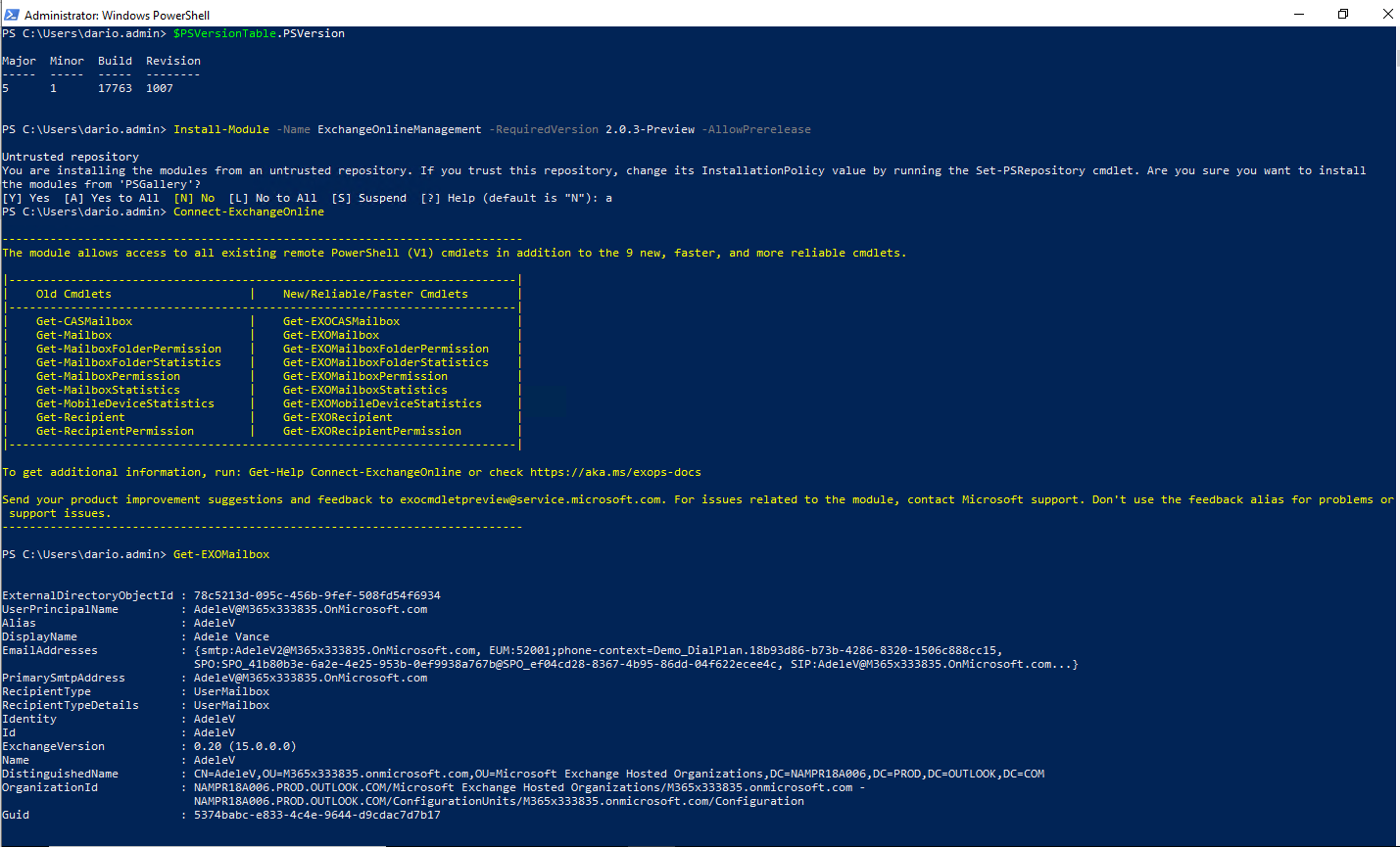
I understand that the preview module was announced to support unattended scripts with modern authentication:
https://techcommunity.microsoft.com/t5/exchange-team-blog/modern-auth-and-unattended-scripts-in-exchange-online-powershell/ba-p/1497387
And there wasn't an announcement about PS 7, I think that the product group is still working on support for PowerShell Core.
dariomws
on 24 Jul 2020
@dariomws, I tend to agree with you. The current production module only supports PowerShell v5.1 (not v6 or v7). It wouldn't surprise me that the v2.0.3 Preview module adds some level of support for later versions of PowerShell, but I would be shocked if the v2.0.3 module removes support for PowerShell v5.1.
@Apoc70, installing standalone (typically updated) versions of PowerShell (the Windows Management Framework) on an Exchange Server has always been a big no-no:
Exchange supportability matrix:
Exchange does not support the use of Windows Management Framework add-ons on any version of Windows PowerShell or Windows.
Exchange 2016 system requirements:
Exchange 2016 only supports the version of Windows Management Framework that's built in to the release of Windows that you're installing Exchange on. Don't install versions of Windows Management Framework that are made available as stand-alone downloads on servers running Exchange.
Exchange 2013 system requirements:
Exchange 2013 only supports the version of Windows Management Framework that's built into the release of Windows that you're installing Exchange on. Don't install versions of Windows Management Framework that are made available as stand-alone downloads on servers running Exchange.
 chrisda
on 24 Jul 2020
chrisda
on 24 Jul 2020
@dariomws and @chrisda Thank you very much for the contribution and sharing this explanation. @Apoc70 Hope this comment is helpful for you. If you see a documentation update is required, please feel free to open an issue for the same. We proceed here to close it. Thanks for taking out some time to open the issue. Appreciate and encourage you to do the same in future also.
 yogkumgit
on 26 Jul 2020
yogkumgit
on 26 Jul 2020
@Apoc70, @dariomws, I received official confirmation that the v2.0.3 version of the module does not require or even support PowerShell Core (v6 or v7).
chrisda
on 27 Jul 2020
@chrisda The primary issue, at this point, is not that the module itself needs PS v6/7.
The currently documented steps for installing that ExchangeOnlineManagement module using Install-Module use parameters that are not available in PS v5 on Windows Server 2019 or Windows 10.
The parameter AllowPrerelease is unknown, and a string as the version number is not supported.
Example on PowerShell Gallery:
Install-Module -Name ExchangeOnlineManagement _-AllowPrerelease_
Example on Microsoft Docs (https://docs.microsoft.com/en-us/powershell/exchange/app-only-auth-powershell-v2?view=exchange-ps):
Install-Module -Name ExchangeOnlineManagement -RequiredVersion _2.0.3-Preview_ -AllowPrerelease
Apoc70
on 28 Jul 2020
@Apoc70 Good find, thanks!
@chrisda What I see is that we don't have the -AllowPrerelease parameter before updating PowerShellGet. I tested it in a new Azure VM with Windows 10 and another one with Windows 2019. I think we should also add this line:
"Install or update the PowerShellGet module as described in Installing PowerShellGet"
To the following article:
https://docs.microsoft.com/powershell/exchange/app-only-auth-powershell-v2
PowerShellGet version 1.0.0.1 is installed on Windows 10 and 2019 by default, so we need to update it on these OS versions. It's not available in older versions so we need to update PS to 5.1 and update, or install PowerShellGet following the steps here:
https://docs.microsoft.com/powershell/scripting/gallery/installing-psget?view=powershell-7#for-computers-running-powershell-30-or-powershell-40
What do you think?
dariomws
on 28 Jul 2020
@dariomws, yes, that sounds fine.
chrisda
on 28 Jul 2020
Related issues
 BlasMS
·
5Comments
BlasMS
·
5Comments
 mrik23
·
5Comments
mrik23
·
5Comments
 TobieFysh
·
3Comments
BlasMS
·
4Comments
TobieFysh
·
3Comments
BlasMS
·
4Comments
 ykuijs
·
5Comments
ykuijs
·
5Comments
Most helpful comment
@dariomws, I tend to agree with you. The current production module only supports PowerShell v5.1 (not v6 or v7). It wouldn't surprise me that the v2.0.3 Preview module adds some level of support for later versions of PowerShell, but I would be shocked if the v2.0.3 module removes support for PowerShell v5.1.
@Apoc70, installing standalone (typically updated) versions of PowerShell (the Windows Management Framework) on an Exchange Server has always been a big no-no:
Exchange supportability matrix:
Exchange 2016 system requirements:
Exchange 2013 system requirements: