Office-docs-powershell: Hybrid Powershell Application Doesn't Work in Any Browser Except IE or Edge
The Hybrid Powershell Doesn't Work in Any Browser Except IE or Edge. Clicking Configure downloads the application code but that code doesn't run. I couldn't even get it to run in IE.
PLATFORM VERSION INFO
Windows : 6.3.9600.0 (Win32NT)
Common Language Runtime : 4.0.30319.42000
System.Deployment.dll : 4.8.3761.0 built by: NET48REL1
clr.dll : 4.8.4069.0 built by: NET48REL1LAST_B
dfdll.dll : 4.8.3761.0 built by: NET48REL1
dfshim.dll : 6.3.9600.16384 (winblue_rtm.130821-1623)
SOURCES
Deployment url : file:///C:/Data/Downloads/Microsoft.Online.CSE.PSModule.Client.application
IDENTITIES
Deployment Identity : Microsoft.Online.CSE.PSModule.Client.application, Version=16.0.3527.0, Culture=neutral, PublicKeyToken=45baf49ae30bdb15, processorArchitecture=msil
APPLICATION SUMMARY
* Installable application.
* Trust url parameter is set.
ERROR SUMMARY
Below is a summary of the errors, details of these errors are listed later in the log.
* Activation of C:Data\Downloads\Microsoft.Online.CSE.PSModule.Client.application resulted in exception. Following failure messages were detected:
+ Deployment and application do not have matching security zones.
COMPONENT STORE TRANSACTION FAILURE SUMMARY
No transaction error was detected.
WARNINGS
There were no warnings during this operation.
OPERATION PROGRESS STATUS
* [5/9/2020 4:35:50 PM] : Activation of C:Data\Downloads\Microsoft.Online.CSE.PSModule.Client.application has started.
* [5/9/2020 4:35:50 PM] : Processing of deployment manifest has successfully completed.
* [5/9/2020 4:35:50 PM] : Installation of the application has started.
ERROR DETAILS
Following errors were detected during this operation.
* [5/9/2020 4:35:50 PM] System.Deployment.Application.InvalidDeploymentException (Zone)
- Deployment and application do not have matching security zones.
- Source: System.Deployment
- Stack trace:
at System.Deployment.Application.DownloadManager.DownloadApplicationManifest(AssemblyManifest deploymentManifest, String targetDir, Uri deploymentUri, IDownloadNotification notification, DownloadOptions options, Uri& appSourceUri, String& appManifestPath)
at System.Deployment.Application.ApplicationActivator.DownloadApplication(SubscriptionState subState, ActivationDescription actDesc, Int64 transactionId, TempDirectory& downloadTemp)
at System.Deployment.Application.ApplicationActivator.InstallApplication(SubscriptionState& subState, ActivationDescription actDesc)
at System.Deployment.Application.ApplicationActivator.PerformDeploymentActivation(Uri activationUri, Boolean isShortcut, String textualSubId, String deploymentProviderUrlFromExtension, BrowserSettings browserSettings, String& errorPageUrl, Uri& deploymentUri)
at System.Deployment.Application.ApplicationActivator.PerformDeploymentActivationWithRetry(Uri activationUri, Boolean isShortcut, String textualSubId, String deploymentProviderUrlFromExtension, BrowserSettings browserSettings, String& errorPageUrl)
--- End of stack trace from previous location where exception was thrown ---
at System.Runtime.ExceptionServices.ExceptionDispatchInfo.Throw()
at System.Deployment.Application.ApplicationActivator.PerformDeploymentActivationWithRetry(Uri activationUri, Boolean isShortcut, String textualSubId, String deploymentProviderUrlFromExtension, BrowserSettings browserSettings, String& errorPageUrl)
at System.Deployment.Application.ApplicationActivator.ActivateDeploymentWorker(Object state)
COMPONENT STORE TRANSACTION DETAILS
No transaction information is available.
Document Details
⚠ Do not edit this section. It is required for docs.microsoft.com ➟ GitHub issue linking.
- ID: 65e527db-a4c2-782e-5a5f-ad8b3159a977
- Version Independent ID: f2de1272-5e37-c59f-fcb9-34fa66b0d268
- Content: Connect to Exchange Online PowerShell using multi-factor authentication
- Content Source: exchange/docs-conceptual/exchange-online/connect-to-exchange-online-powershell/mfa-connect-to-exchange-online-powershell.md
- Service: exchange-online
- GitHub Login: @chrisda
- Microsoft Alias: chrisda
 VNJoe
VNJoe
All 18 comments
@officedocsbot assign @yogkumgit
 yogkumgit
on 11 May 2020
yogkumgit
on 11 May 2020
Hi @VNJoe, thank you for your feedback.
In this article you can find the following sentence:
"The Exchange Online Remote PowerShell Module needs to be installed on your computer. You need to do the following steps in a browser that supports ClickOnce (for example, Internet Explorer or Edge):
Note: ClickOnce support is available in the Chromium-based version of Edge at edge://flags/#edge-click-once, and might not be enabled by default."
 dariomws
on 11 May 2020
dariomws
on 11 May 2020
@dariomws Thank you very much for the contribution and sharing this explanation. @VNJoe
Hope this comment is helpful for you. If you see a documentation update is required, please feel free to open an issue for the same. We proceed here to close it. Thanks for taking out some time to open the issue. Appreciate and encourage you to do the same in future also.
yogkumgit
on 12 May 2020
Please reopen. This is what happens in Internet Explorer. It doesn't work in IE either.
Cannot convert argument "0", with value: "UserProfile", for "GetFolderPath" to type "System.Environment+SpecialFolder": "Cannot convert value "UserProfile" to type "System.Environment+SpecialFolder" due to invalid enumeration values. Specify one of the following enumeration values and try again. The possible enumeration values are "Desktop, Programs, Personal, MyDocuments, Favorites, Startup, Recent, SendTo, StartMenu, MyMusic, DesktopDirectory, MyComputer, Templates, ApplicationData, LocalApplicationData, InternetCache, Cookies, History, CommonApplicationData, System, ProgramFiles, MyPictures, CommonProgramFiles"."At C:\Users\kpiadmin\AppData\Local\Apps\2.0\D6HATNR6.6PC\JNTTB289.MY4\micr..tion_1f16bd4ec4c2bb19_0010.0000_673f37c317fb5976\CreateExoPSSession.ps1:1 char:41+ $UserPath = [Environment]::GetFolderPath <<<< ("UserProfile") + CategoryInfo : NotSpecified: (:) [], MethodException + FullyQualifiedErrorId : MethodArgumentConversionInvalidCastArgument
Set-Location : Cannot process argument because the value of argument "path" is
null. Change the value of argument "path" to a non-null value.
At C:\Users\kpiadmin\AppData\Local\Apps\2.0\D6HATNR6.6PC\JNTTB289.MY4\micr..tio
n_1f16bd4ec4c2bb19_0010.0000_673f37c317fb5976\CreateExoPSSession.ps1:2 char:3
- cd <<<< $UserPath
- CategoryInfo : InvalidArgument: (:) [Set-Location], PSArgumentN
ullException - FullyQualifiedErrorId : ArgumentNull,Microsoft.PowerShell.Commands.SetLo
cationCommand
- CategoryInfo : InvalidArgument: (:) [Set-Location], PSArgumentN
Experience the fast and reliable Exchange PowerShell V2 Cmdlets via new PowerShe
llGallery module. Go to https://aka.ms/exops-docs
This PowerShell module allows you to connect to Exchange Online service.
To connect, use: Connect-EXOPSSession -UserPrincipalName
This PowerShell module allows you to connect Exchange Online Protection and Secu
rity & Compliance Center services also.
To connect, use: Connect-IPPSSession -UserPrincipalName
To get additional information, use: Get-Help Connect-EXOPSSession, or Get-Help C
onnect-IPPSSession
VNJoe
on 12 May 2020
From here, I've had to install WMI5.1. However, that installation in the download center has no installation instructions. I click 'Install' and it says 'CLick here to view release notes'. I do, and it's a 404 page.
This is getting very difficult when all I'm attemting to do is hide a group from the address book. Literally hours to get nowhere. If an option is only in Powershell and Powershell isn't working, the the option should be labeled Beta.
VNJoe
on 12 May 2020
@VNJoe Considering the nature of the issue, it is advised that please open a service ticket in your tenant and follow with them for the resolution. If you wish to know how to open the service ticket, please follow this link: https://docs.microsoft.com/office365/admin/contact-support-for-business-products
We will be very happy if you can share the outcome or resolution with us. We will certainly update this documentation with that valuable information. Thank you for taking out some time to open the issue. Appreciate and encourage you to do the same in future also.
dariomws
on 12 May 2020
I have run the link inside the Office Portal for Hybrid Configure with this Powershell installer on multiple systems and none of them work. It doesn't work on IE. That's a reproducible event, not a support ticket. I don't work for Microsoft. I only let you know when the products don't work and the products don't work. You can definitely reporduce this issue.
VNJoe
on 12 May 2020
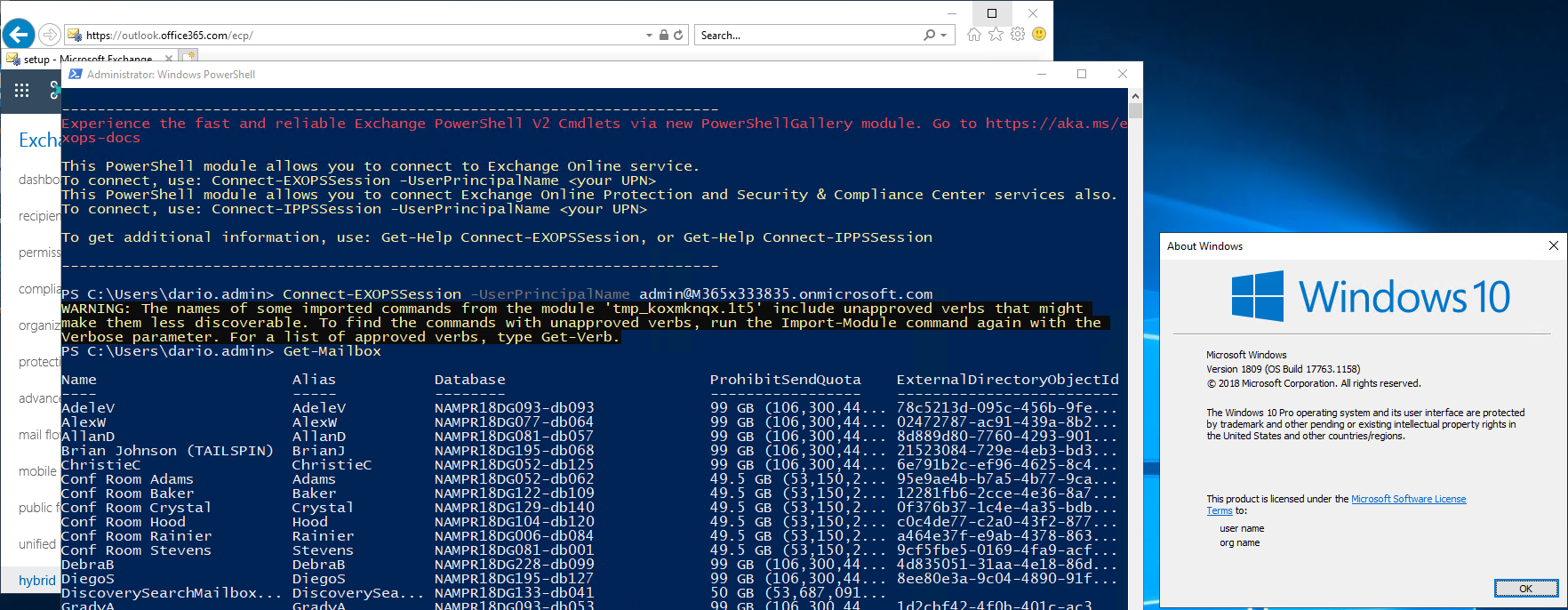
Tried it in a Windows 10 machine with IE11 and it works:
dariomws
on 12 May 2020
Windows 10 has Edge... 8.1, 2012... no go.
VNJoe
on 12 May 2020
This command is the next stop with an error - Install-Module PowershellGet -Force
This is the instructions of installing V2 manually.
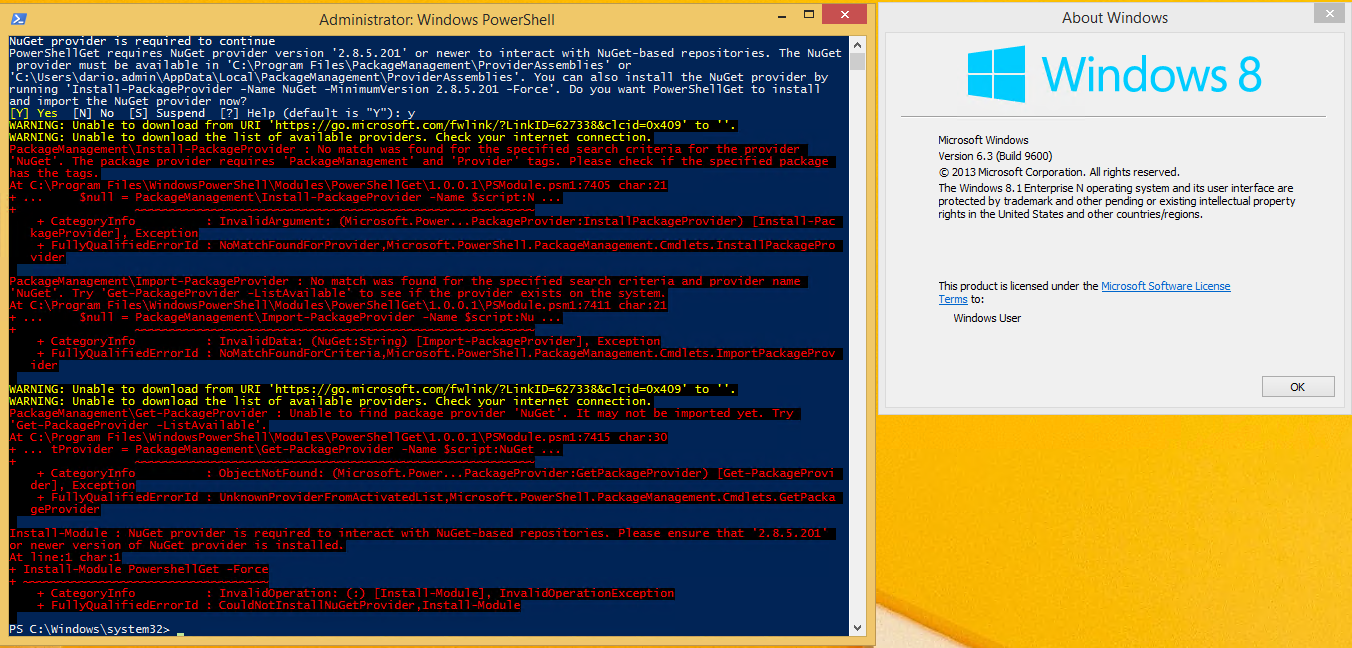
WARNING: Unable to download from URI 'https://go.microsoft.com/fwlink/?LinkID=627338&clcid=0x409' to ''.
WARNING: Unable to download the list of available providers. Check your internet connection.
PackageManagement\Install-PackageProvider : No match was found for the specified search criteria for the provider
'NuGet'. The package provider requires 'PackageManagement' and 'Provider' tags. Please check if the specified package
has the tags.
At C:\Program Files\WindowsPowerShell\Modules\PowerShellGet\1.0.0.1\PSModule.psm1:7405 char:21
- ... $null = PackageManagement\Install-PackageProvider -Name $script:N ...
~~~~~~~~~~~~~
- CategoryInfo : InvalidArgument: (Microsoft.Power...PackageProvider:InstallPackageProvider) [Install-Pac
kageProvider], Exception - FullyQualifiedErrorId : NoMatchFoundForProvider,Microsoft.PowerShell.PackageManagement.Cmdlets.InstallPackagePro
vider
- CategoryInfo : InvalidArgument: (Microsoft.Power...PackageProvider:InstallPackageProvider) [Install-Pac
PackageManagement\Import-PackageProvider : No match was found for the specified search criteria and provider name
'NuGet'. Try 'Get-PackageProvider -ListAvailable' to see if the provider exists on the system.
At C:\Program Files\WindowsPowerShell\Modules\PowerShellGet\1.0.0.1\PSModule.psm1:7411 char:21
- ... $null = PackageManagement\Import-PackageProvider -Name $script:Nu ...
~~~~~~~~~~~~~
- CategoryInfo : InvalidData: (NuGet:String) [Import-PackageProvider], Exception
- FullyQualifiedErrorId : NoMatchFoundForCriteria,Microsoft.PowerShell.PackageManagement.Cmdlets.ImportPackageProv
ider
VNJoe
on 12 May 2020
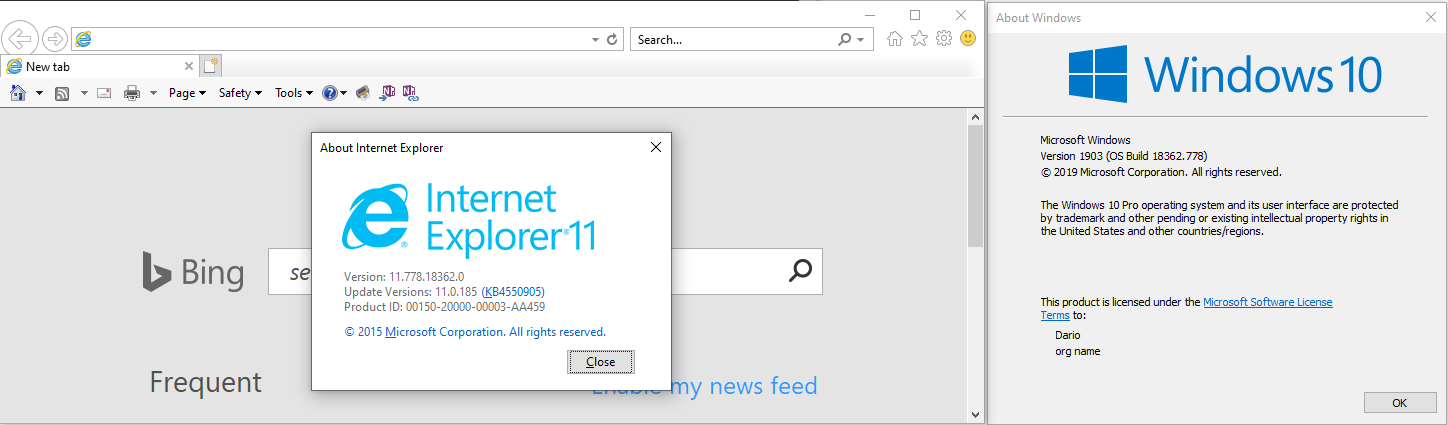
Edge is the default browser in Windows 10, but IE11 is included:
The Exchange Online PowerShell V2 module is currently in Preview. If you have any feedback, concerns, or are facing any issues with the EXO V2 module, contact us at exocmdletpreview[at]service[dot]microsoft[dot]com (email address intentionally obscured to help prevent spam).
dariomws
on 12 May 2020
Here's a summary: Install-Module PowershellGet -Force doesn't work and neither does any install from NuGet no matter the Execution Policy. The ONLY way I can get this to work is with a shortcut one of my tech's gave me. Apparently HE got it from a support call previously but the problem is THE DOCUMENTATION DOESN'T WORK.
If you try this on anything other than Win10/2016, none of it works out of the box.
VNJoe
on 12 May 2020
I appreciate you trying to resolve this on your time. My request is simply that the ClickOnce usage or whatever the link is inside the Office Portal works on only a select number of systems, and that there is a different method of a shortcut that pulls the correct version down that we had to get from support. THAT version works on everything, so make THAT the default instead of the current method. Incidentally, does this method on Portal require access to the Microsoft Store? That might be part of the issue as that isn't documented anywhere. Also, the link for instructions to run the V2 application doesn't have as a requirement WMI 5.1, but it is. Even then, attemmpting to install via Install-Modules is hit or miss (mostly miss), with the only method I found it to work in was Azure Cloud Shell.
It'd be best for everyone if you simply attach Azure Cloud Shell to the Office 365 Admin panel so as to avoid all this. If we're forced to use a console-based aplication to work with WINDOWS, it should be managed and delivered to Office users via the portal. Or simply put the features in the web portal...
Bottom line, the link in the portal doesn't work and neither do the instructions for EXO V2 on anything other than Windows Anywhere.
VNJoe
on 12 May 2020
Could you please detail the updates that you suggest on this specific article?
About V2, please use this information to contact the product group directly:
"The Exchange Online PowerShell V2 module is currently in Preview. If you have any feedback, concerns, or are facing any issues with the EXO V2 module, contact us at exocmdletpreview[at]service[dot]microsoft[dot]com (email address intentionally obscured to help prevent spam)."
dariomws
on 12 May 2020
I'll try again... if you log into the Exchange Online Admin center, you get a blue bar that says Manage your organization using the new, fast and reliable Powershell cmdlets {something I NEVER want to have to do, but I'm forced to..} and a button that says 'Check it here'. That button is a link to https://docs.microsoft.com/en-us/powershell/exchange/exchange-online/exchange-online-powershell-v2/exchange-online-powershell-v2?view=exchange-ps
On that page, the first step after you perform prerequisites is to Install PowershellGet, but that command has never worked for me on any computer other than in Azure Cloud Shell, so those instructions are a dead end.
If I stay in the Exchange Online Admin Portal and click 'Hybrid' - 'Setup', this is where I am forced to get the Exchange Online Powershell Module that downloads a .application file that, when runs, gives the errors detailed above. It doesn't work on Internet Explorer on Windows 8.1, and it doesn't work in any browser except Chrome (maybe) or Edge. I know this because one of my employees ALREADY had a ticket with Microsoft on this, and the technician sent him a link to a DIFFERENT file than the one in the portal, and that's the ONLY one that worked for me and for him.
We have no restrictions or limitations on our devices and are full admins on them. We only have Microsoft Store disabled.
Somewhere, someone messed up the prerequisites for these scripts and didn't update anything.
And most importantly, and the easiest answer ever: Put Azure Power Shell on the Office Portal so users never have to do any of this again.
VNJoe
on 13 May 2020
Hi @VNJoe, I really appreciate that you want to help us to improve docs.microsoft.com.
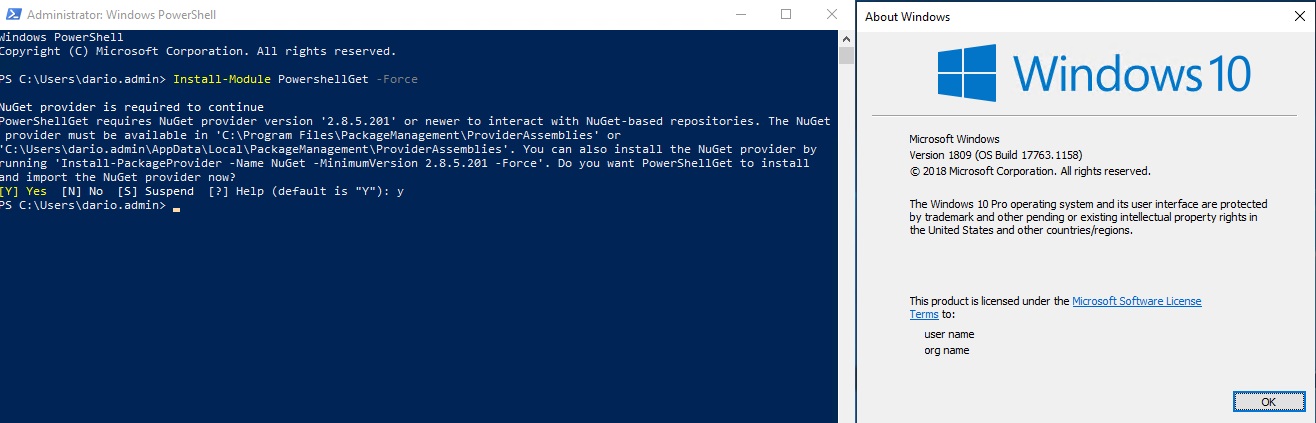
I have tried (again) to run "Install-Module PowershellGet -Force" on a clean Win 10 vm:
The same command in Win 8.1 fail, it´s true:
It´s related to:
https://github.com/MicrosoftDocs/PowerShell-Docs/issues/5725
I will update the document.
And to install the Exchange Module from the Admin Center in Win 10:
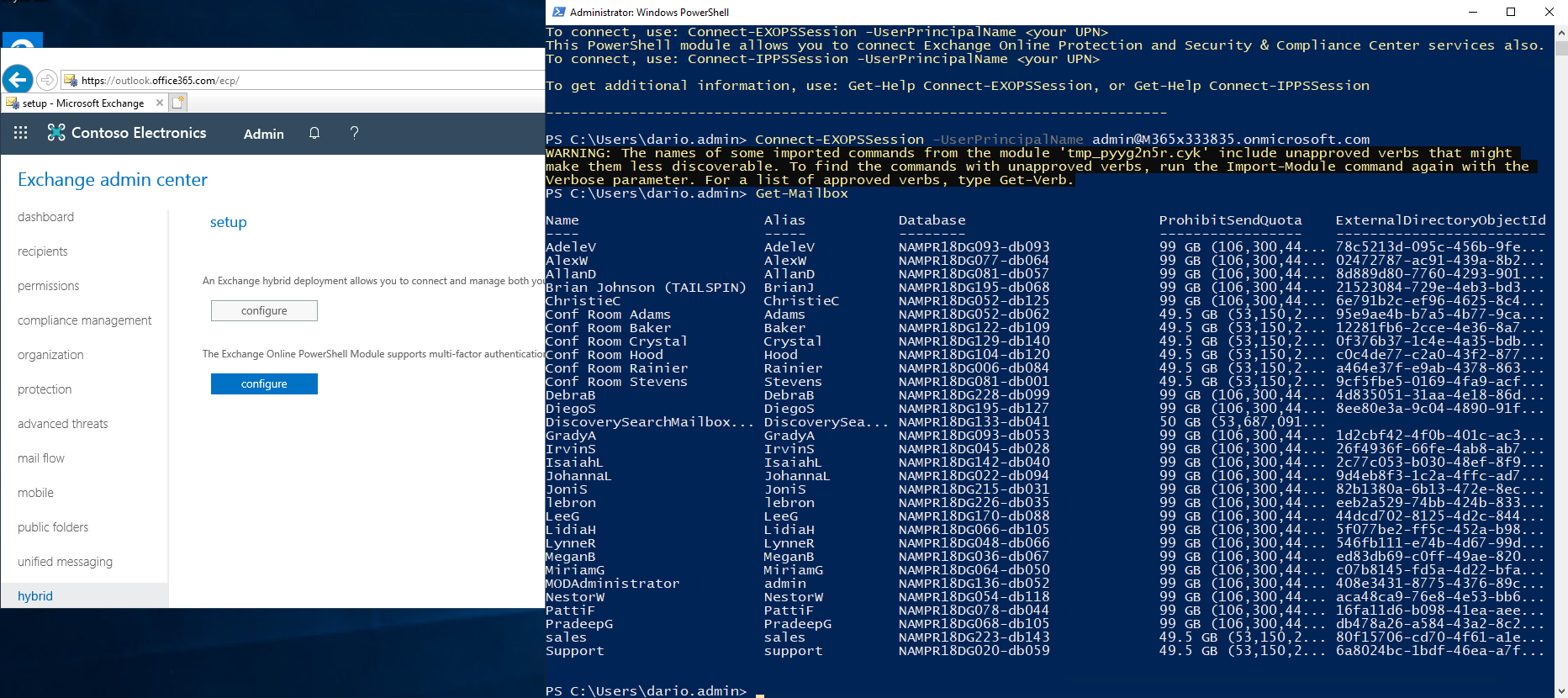
Win 8.1:
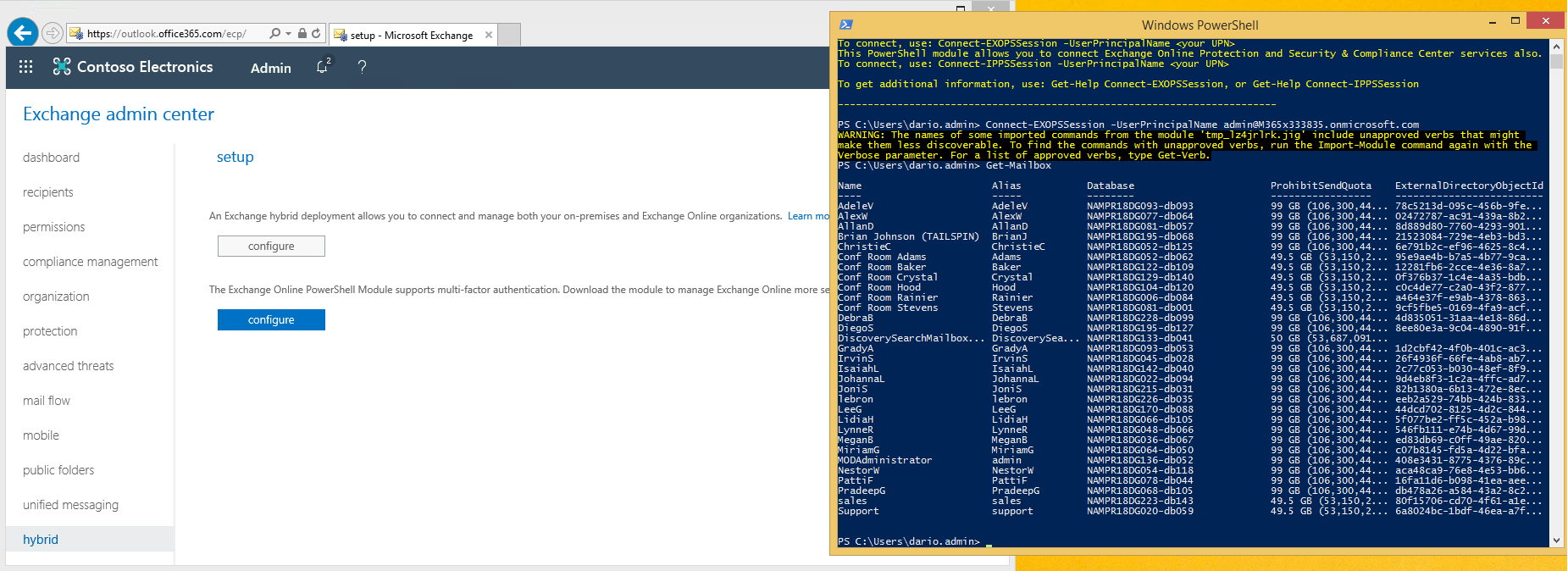
No issues here.
dariomws
on 13 May 2020
Hi @VNJoe, the article was updated based on this information. Now you are redirected to an article to install PowerShellGet depending on the version of OS/PowerShell.
Thanks again, for taking out some time to open the issue. Appreciate and encourage you to do the same in future also with this or other articles.
dariomws
on 19 May 2020
@dariomws Thank you very much for the contribution and sharing this explanation. @VNJoe
Hope this comment is helpful for you. If you see a documentation update is required, please feel free to open an issue for the same. We proceed here to close it.
yogkumgit
on 20 May 2020
Related issues
 andikrueger
·
5Comments
andikrueger
·
5Comments
 BlasMS
·
4Comments
BlasMS
·
4Comments
 KoenZomers
·
3Comments
KoenZomers
·
3Comments
 savusca
·
4Comments
savusca
·
4Comments
 SamCosby
·
5Comments
SamCosby
·
5Comments
Most helpful comment
Hi @VNJoe, the article was updated based on this information. Now you are redirected to an article to install PowerShellGet depending on the version of OS/PowerShell.
Thanks again, for taking out some time to open the issue. Appreciate and encourage you to do the same in future also with this or other articles.