Office-docs-powershell: The term 'Add-TeamChannelUser' is not recognized as the name of a cmdlet
Module "MicrosoftTeams" version 1.0.5 is installed, but this command is missing.
Document Details
⚠ Do not edit this section. It is required for docs.microsoft.com ➟ GitHub issue linking.
- ID: 74381d05-2e95-4751-4285-752a46eb025f
- Version Independent ID: 2481b258-b593-e323-90f0-e9ca6e7797bf
- Content: Add-TeamChannelUser (teams)
- Content Source: teams/teams-ps/teams/Add-TeamChannelUser.md
- Service: teams-powershell
- GitHub Login: @kenwith
- Microsoft Alias: kenwith
 JLambEJG
All 27 comments
@officedocsbot assign @yogkumgit
 yogkumgit
on 24 Mar 2020
yogkumgit
on 24 Mar 2020
This command is not included in the current version 1.0.5 of the MicrosoftTeams module. The 1.0.5 version is currently limited to these commands:
Add-TeamUser
Connect-MicrosoftTeams
Disconnect-MicrosoftTeams
Get-CsPolicyPackage
Get-CsUserPolicyPackage
Get-CsUserPolicyPackageRecommendation
Get-Team
Get-TeamChannel
Get-TeamHelp
Get-TeamsApp
Get-TeamUser
Grant-CsUserPolicyPackage
New-Team
New-TeamChannel
New-TeamsApp
Remove-Team
Remove-TeamChannel
Remove-TeamsApp
Remove-TeamUser
Set-Team
Set-TeamArchivedState
Set-TeamChannel
Set-TeamsApp
Get-CsBatchPolicyAssignmentOperation
Get-CsUserPolicyAssignment
New-CsBatchPolicyAssignmentOperation
 Bart-Hoofd
on 25 Mar 2020
Bart-Hoofd
on 25 Mar 2020
This command is listed in this document, which also links to this very same version (see the overview page). If the command is not contained within the version that you are documenting, then remove the command from the documentation. Otherwise, please provide a link to the module where this command is contained.
JLambEJG
on 25 Mar 2020
I have the same issue MicrosoftTeams Module version installed is 1.0.5, but the Add-TeamChannelUser' is not recognized as the name of a cmdlet
 Aysan-kore
on 25 Mar 2020
Aysan-kore
on 25 Mar 2020
Same issue for me, but channel doesn't have Group ID, it has own ID.
GroupId like this: 31f1ff6c-d48c-4f8a-b2e1-abca7fd399df
ID like this: 19:[email protected]
So, the paramater was incorrect.
 isty1974
on 25 Mar 2020
isty1974
on 25 Mar 2020
This command is integrated in the preview module, not this one.
You have to install the one from "https://www.poshtestgallery.com/packages/MicrosoftTeams/1.0.21"
if you run the powershell command, be sure to add the repository before.
 rlodev67
on 26 Mar 2020
rlodev67
on 26 Mar 2020
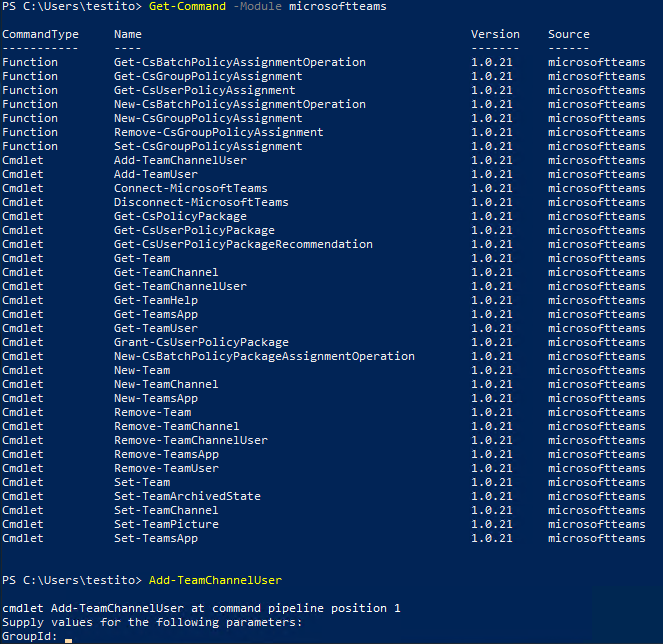
even in 10.0.21 Add-TeamChannelUser is not existing
CommandType Name Version Source
----------- ---- ------- ------
Function Get-CsBatchPolicyAssignmentOperation 1.0.21 MicrosoftTeams
Function Get-CsGroupPolicyAssignment 1.0.21 MicrosoftTeams
Function Get-CsUserPolicyAssignment 1.0.21 MicrosoftTeams
Function New-CsBatchPolicyAssignmentOperation 1.0.21 MicrosoftTeams
Function New-CsGroupPolicyAssignment 1.0.21 MicrosoftTeams
Function Remove-CsGroupPolicyAssignment 1.0.21 MicrosoftTeams
Function Set-CsGroupPolicyAssignment 1.0.21 MicrosoftTeams
Cmdlet Add-TeamUser 1.0.21 MicrosoftTeams
Cmdlet Connect-MicrosoftTeams 1.0.21 MicrosoftTeams
Cmdlet Disconnect-MicrosoftTeams 1.0.21 MicrosoftTeams
Cmdlet Get-CsPolicyPackage 1.0.21 MicrosoftTeams
Cmdlet Get-CsUserPolicyPackage 1.0.21 MicrosoftTeams
Cmdlet Get-CsUserPolicyPackageRecommendation 1.0.21 MicrosoftTeams
Cmdlet Get-Team 1.0.21 MicrosoftTeams
Cmdlet Get-TeamChannel 1.0.21 MicrosoftTeams
Cmdlet Get-TeamHelp 1.0.21 MicrosoftTeams
Cmdlet Get-TeamsApp 1.0.21 MicrosoftTeams
Cmdlet Get-TeamUser 1.0.21 MicrosoftTeams
Cmdlet Grant-CsUserPolicyPackage 1.0.21 MicrosoftTeams
Cmdlet New-Team 1.0.21 MicrosoftTeams
Cmdlet New-TeamChannel 1.0.21 MicrosoftTeams
Cmdlet New-TeamsApp 1.0.21 MicrosoftTeams
Cmdlet Remove-Team 1.0.21 MicrosoftTeams
Cmdlet Remove-TeamChannel 1.0.21 MicrosoftTeams
Cmdlet Remove-TeamsApp 1.0.21 MicrosoftTeams
Cmdlet Remove-TeamUser 1.0.21 MicrosoftTeams
Cmdlet Set-Team 1.0.21 MicrosoftTeams
Cmdlet Set-TeamArchivedState 1.0.21 MicrosoftTeams
Cmdlet Set-TeamChannel 1.0.21 MicrosoftTeams
Cmdlet Set-TeamsApp 1.0.21 MicrosoftTeams
 pemile
on 26 Mar 2020
pemile
on 26 Mar 2020
Hello everyone
Exactly, as the article says, the cmdlet is part of the PS INT gallery (beta module).
I can confirm that, installing the 1.0.21 version of the beta module, the cmdlet IS available:
Please also review this article
 get-itips
on 27 Mar 2020
get-itips
on 27 Mar 2020
Hi, After installing 1.0.21 AND disconnect / reconnect Add-TeamChannelUser is available.
Thank's a lot
pemile
on 27 Mar 2020
Hi, After installing 1.0.21 AND disconnect / reconnect Add-TeamChannelUser is available.
Thank's a lot
Thanks for getting back to give that information!
@yogkumgit please close this one now.
get-itips
on 27 Mar 2020
@get-itips Thank you very much for the contribution and sharing this explanation. @JLambEJG
Hope this comment is helpful for you. If you see a documentation update is required, please feel free to open an issue for the same. We proceed here to close it. Thanks for taking out some time to open the issue. Appreciate and encourage you to do the same in future also.
yogkumgit
on 30 Mar 2020
I struggled to get this working. I ended up deleting the module directory for the production version (1.0.7) and installing 1.1.3.
This is what worked for me:
PS C:WINDOWSsystem32> Install-Module -Name MicrosoftTeams -RequiredVersion 1.1.3-preview -AllowPrerelease -force -Allo
wClobber
PS C:WINDOWSsystem32> Import-Module microsoftteams
PS C:WINDOWSsystem32> get-command -Module microsoftteams
CommandType Name Version Source
----------- ---- ------- ------
Function Get-CsBatchPolicyAssignmentOperation 1.1.3 microsoftteams
Function Get-CsGroupPolicyAssignment 1.1.3 microsoftteams
Function Get-CsUserPolicyAssignment 1.1.3 microsoftteams
Function New-CsBatchPolicyAssignmentOperation 1.1.3 microsoftteams
Function New-CsGroupPolicyAssignment 1.1.3 microsoftteams
Function Remove-CsGroupPolicyAssignment 1.1.3 microsoftteams
Function Set-CsGroupPolicyAssignment 1.1.3 microsoftteams
Cmdlet Add-TeamChannelUser 1.1.3 microsoftteams
Cmdlet Add-TeamsAppInstallation 1.1.3 microsoftteams
Cmdlet Add-TeamUser 1.1.3 microsoftteams
Cmdlet Connect-MicrosoftTeams 1.1.3 microsoftteams
Cmdlet Disconnect-MicrosoftTeams 1.1.3 microsoftteams
Cmdlet Get-CsOnlinePowerShellEndpoint 1.1.3 microsoftteams
Cmdlet Get-CsPolicyPackage 1.1.3 microsoftteams
Cmdlet Get-CsUserPolicyPackage 1.1.3 microsoftteams
Cmdlet Get-CsUserPolicyPackageRecommendation 1.1.3 microsoftteams
Cmdlet Get-Team 1.1.3 microsoftteams
Cmdlet Get-TeamChannel 1.1.3 microsoftteams
Cmdlet Get-TeamChannelUser 1.1.3 microsoftteams
Cmdlet Get-TeamsApp 1.1.3 microsoftteams
Cmdlet Get-TeamsAppInstallation 1.1.3 microsoftteams
Cmdlet Get-TeamUser 1.1.3 microsoftteams
Cmdlet Grant-CsUserPolicyPackage 1.1.3 microsoftteams
Cmdlet New-CsBatchPolicyPackageAssignmentOperation 1.1.3 microsoftteams
Cmdlet New-CsOnlineSession 1.1.3 microsoftteams
Cmdlet New-Team 1.1.3 microsoftteams
Cmdlet New-TeamChannel 1.1.3 microsoftteams
Cmdlet New-TeamsApp 1.1.3 microsoftteams
Cmdlet Remove-Team 1.1.3 microsoftteams
Cmdlet Remove-TeamChannel 1.1.3 microsoftteams
Cmdlet Remove-TeamChannelUser 1.1.3 microsoftteams
Cmdlet Remove-TeamsApp 1.1.3 microsoftteams
Cmdlet Remove-TeamsAppInstallation 1.1.3 microsoftteams
Cmdlet Remove-TeamTargetingHierarchy 1.1.3 microsoftteams
Cmdlet Remove-TeamUser 1.1.3 microsoftteams
Cmdlet Set-Team 1.1.3 microsoftteams
Cmdlet Set-TeamArchivedState 1.1.3 microsoftteams
Cmdlet Set-TeamChannel 1.1.3 microsoftteams
Cmdlet Set-TeamPicture 1.1.3 microsoftteams
Cmdlet Set-TeamsApp 1.1.3 microsoftteams
Cmdlet Set-TeamTargetingHierarchy 1.1.3 microsoftteams
Cmdlet Update-TeamsAppInstallation 1.1.3 microsoftteams
 irideostriches
on 26 Aug 2020
irideostriches
on 26 Aug 2020
In case it helps anyone, I had the same problem and in the end I managed to solve it using the MaximunVersion parameter instead of RequiredVersion.
 oscamdroid
on 27 Sep 2020
oscamdroid
on 27 Sep 2020
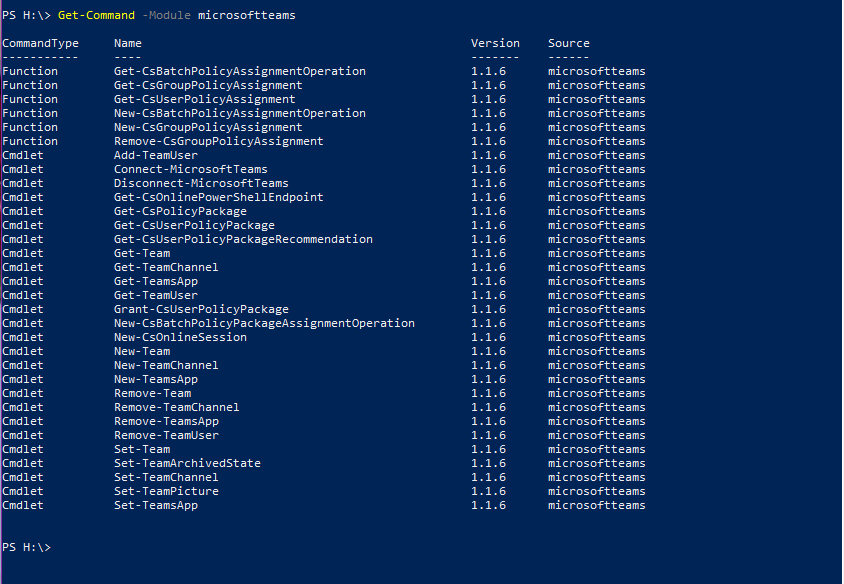
I updated to the "current" version of the Teams module, however it still does NOT have the Get-TeamChannelUser included:
 mrskaria
on 23 Oct 2020
mrskaria
on 23 Oct 2020
hello @mrskaria you have to be running 1.1.5-preview to have *-TeamChannelUser cmdlets
More information https://docs.microsoft.com/en-us/microsoftteams/teams-powershell-install
https://docs.microsoft.com/en-us/microsoftteams/teams-powershell-release-notes
get-itips
on 23 Oct 2020
Thank you for your quick response. I have tried to add that version to my powershell, but it does not like it.

mrskaria
on 23 Oct 2020
@mrskaria please try using " " double quotes while specifying the version.
get-itips
on 23 Oct 2020
It still does not like the -RequireVersion parameter

mrskaria
on 23 Oct 2020
@mrskaria Did you update PowerShellGet as the article I referenced says?
get-itips
on 23 Oct 2020
It allowed me to run the module install specifying the older version, however after disconnecting and reconnecting, it still still shows I am running v1.1.6. Ugh!
mrskaria
on 23 Oct 2020
It allowed me to run the module install specifying the older version, however after disconnecting and reconnecting, it still still shows I am running v1.1.6. Ugh!
Michelle, as the documentation says, you can only run one version of the module, so if you need to test the Preview version you would need to uninstall the 1.1.6 first.
For the best experience, use either General Availability (GA) or Public Preview modules - not both. They're not intended to work together.
Hope this gets you in the right direction.
get-itips
on 24 Oct 2020
Is PSGallery repo enough to enable this commandlet ?
I really need to add users to channels, can anyone write detailed instructions on how to proceed ?
Thanks
UPDATE
It looks solve with:
Uninstall-Module -Name MicrosoftTeams
Install-Module -Name MicrosoftTeams -RequiredVersion 1.1.5-preview -AllowPrerelease
 suoko
on 3 Nov 2020
suoko
on 3 Nov 2020
Same issue, I accidentally removed myself as owner of a private channel in Teams and could not add myself back. Here is what worked for me:
Deleted the current module for Teams (I had 1.1.6 installed) at C:Program FilesWindowsPowerShellModulesMicrosoftTeams
Installed version 1.1.3 with PS C:WINDOWSsystem32> Install-Module -Name MicrosoftTeams -RequiredVersion 1.1.3-preview -AllowPrerelease -force -Allo
wClobber
then imported the module
PS C:WINDOWSsystem32> Import-Module -Name MicrosoftTeams
then connected to Teams
PS C:WINDOWSsystem32> Connect-MicrosoftTeams
made sure the command was there with
PS C:WINDOWSsystem32> Get-Command

Then added myself to the channel first so I would be a member, then upgraded role to owner. Worked great, thank you!
 phild2015
on 4 Nov 2020
phild2015
on 4 Nov 2020
Having Owner as the only role possible is not that practical.
Do we have a solution to add a user as a member ? What about using graph api to do this, would it be possible ?
suoko
on 6 Nov 2020
Having Owner as the only role possible is not that practical.
Do we have a solution to add a user as a member ? What about using graph api to do this, would it be possible ?
If you do not specify -Role parameter, it will be added as regular user.
get-itips
on 6 Nov 2020
If you do not specify -Role parameter, it will be added as regular user.
Unfortunately no, it's not added at all.
I also noted another problem (minor in this case) with Public teams. You can't add a user to a channel if the user is not a Teams group member, I should add it as member first.
suoko
on 6 Nov 2020
If you do not specify -Role parameter, it will be added as regular user.
Unfortunately no, it's not added at all.
I also noted another problem (minor in this case) with Public teams. You can't add a user to a channel if the user is not a Teams group member, I should add it as member first.
Sorry, I misread your original inquiry, as the cmdlet is still part of the public preview, it is subject to changes and testing, so in this case I would recommend to wait for the command to be available in the GA version of the module for the final version of it and also if you want to suggest changes to the cmdlet I would suggest uservoice, that way, it can reach the product team. Thank you!
get-itips
on 6 Nov 2020
Related issues
 ykuijs
·
5Comments
ykuijs
·
5Comments
 CallMeByMyName
·
5Comments
CallMeByMyName
·
5Comments
 LindaSchaar
·
4Comments
LindaSchaar
·
4Comments
 federico-r-figueredo
·
5Comments
federico-r-figueredo
·
5Comments
 BlasMS
·
4Comments
BlasMS
·
4Comments