Office-docs-powershell: Programmatically download module
Why can't this module be put in the PowerShell Gallery or be made available to pull down programmatically?
Document Details
⚠ Do not edit this section. It is required for docs.microsoft.com ➟ GitHub issue linking.
- ID: 65e527db-a4c2-782e-5a5f-ad8b3159a977
- Version Independent ID: f2de1272-5e37-c59f-fcb9-34fa66b0d268
- Content: Connect to Exchange Online PowerShell using multi-factor authentication
- Content Source: exchange/docs-conceptual/exchange-online/connect-to-exchange-online-powershell/mfa-connect-to-exchange-online-powershell.md
- Service: exchange-online
- GitHub Login: @chrisda
- Microsoft Alias: chrisda
 jeremytbrun
All 17 comments
@jeremytbrun Thanks for your query. You will get your answer very soon.
@Chrisda Can you help on this one?
 nsshommo
on 25 Apr 2018
nsshommo
on 25 Apr 2018
In the same vein as the initial request, if it gets added to the PS Gallery, it would be fantastic to see in the Azure Automation module gallery as well, with support to run from there against the Exchange tenant (even on accounts with MFA). Would love to be able to use Azure for some automation. Later on maybe even partner account support for running against many tenants.
 jmppwsh-zz
on 26 Apr 2018
jmppwsh-zz
on 26 Apr 2018
The problem is that it's not a module. It's a clickonce app that drops a local copy of a script and a shortcut that runs the script. There's no reason it couldn't be a module. It would be a lot easier if it were a module.
 jordanmills
on 8 Jun 2018
jordanmills
on 8 Jun 2018
For the time being here is a little gem of a script I found on PowerShell Gallery to check for and install the EXO MFA "module" programmatically.
https://www.powershellgallery.com/packages/Load-ExchangeMFA
Of course ideally it should be in the gallery itself.
jeremytbrun
on 8 Jun 2018
I hope I don't get in trouble for this.. Try
Find-Module -Name "Microsoft.Exchange.Management.ExoPowershellModule" |
Install-Module;
Import-PsSession -Session (New-ExoPSSession -UserPrincipalName $Credential.Username -ConnectionUri 'https://outlook.office365.com/PowerShell-LiveId' -AzureADAuthorizationEndpointUri 'https://login.windows.net/common' -Credential $Credential);
jordanmills
on 8 Jun 2018
thanks @jordanmills that is great!!! Added it to my PSProfile a moment ago, also adding some logic to securely bring in my credentials.
 cdeli
on 10 Jul 2018
cdeli
on 10 Jul 2018
Glad it helps, @cdeli ... try this
Install-Module -Name VaultCredential
jordanmills
on 11 Jul 2018
Unable to get that module to load it seems.
cdeli
on 16 Jul 2018
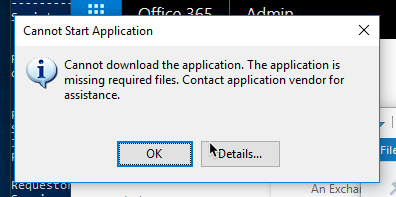
Great tip @jordanmills ... the click-once app keeps failing install for me, but your POSH script fixed it.
 andrewconnell
on 14 Sep 2018
andrewconnell
on 14 Sep 2018
Aaaaaand closed without comment. Thanks, Microsoft!
jordanmills
on 14 Sep 2018
@jordanmills Whoops! Sorry! I forgot the original nature of the issue (the success story of the last post fooled me). I'll leave it open.
 chrisda
on 14 Sep 2018
chrisda
on 14 Sep 2018
@jeremytbrun Thank you for this feedback.
I found a uservoice sugestoin for this and have upvoted for it. The uservoice url is https://sharepoint.uservoice.com/forums/330318-sharepoint-administration/suggestions/13660995-add-sharepoint-powershell-module-to-azure-gallery.
I know the product teams are always looking for user feedback and how to make the OneDrive / SharePoint better. They keep a close tab on User Voice https://sharepoint.uservoice.com and if you don't mind it would be awesome if you could look through and give your input in User Voice and if you don't see a similar request already you could open one. Let us know and we can up-vote your request too.
Thank you for your contribution to make the docs better! Much appreciated!
 AndreaBarr
on 20 Sep 2018
AndreaBarr
on 20 Sep 2018
@AndreaBarr I appreciate the information, but the SharePoint module is not the module I submitted this issue for. I'm talking about the MFA compatible Exchange Online module which you can only currently download manually from the Exchange Administration portal. I respectfully ask that you reopen this issue since the information you provided is not relevant to the issue originally submitted.
jeremytbrun
on 21 Sep 2018
@jeremytbrun I apologize for the misunderstanding. I have updated the issue in the backlog.
@chrisda I have added this to the backlog and assigned it to you.
AndreaBarr
on 21 Sep 2018
@AndreaBarr so is this being tracked in another issue? I only ask because it appears you've now closed it for a second time. Thanks.
jeremytbrun
on 21 Sep 2018
@jeremytbrun Yes this is being tracked in the backlog. We keep the GitHub issues at a closed state and when we have updated from the backlog item we comment here to give you updates.
AndreaBarr
on 21 Sep 2018
 ziesemer
on 2 Sep 2019
ziesemer
on 2 Sep 2019
Related issues
 tomresing
·
5Comments
tomresing
·
5Comments
 SamCosby
·
5Comments
SamCosby
·
5Comments
 TobieFysh
·
3Comments
TobieFysh
·
3Comments
 Archehandoro
·
4Comments
Archehandoro
·
4Comments
 KevinNSTA
·
4Comments
KevinNSTA
·
4Comments
Most helpful comment
I hope I don't get in trouble for this.. Try
Find-Module -Name "Microsoft.Exchange.Management.ExoPowershellModule" |
Install-Module;
Import-PsSession -Session (New-ExoPSSession -UserPrincipalName $Credential.Username -ConnectionUri 'https://outlook.office365.com/PowerShell-LiveId' -AzureADAuthorizationEndpointUri 'https://login.windows.net/common' -Credential $Credential);