Octoprint: Memory leak when there are updates availalbe.
What were you doing?
I was chasing memory usage problems on my system. (Windows 10 Pro x64)
Opera was the biggest usages with 2.8GB of RAM. This is more than Assassins Creed Origins was using (2.6GB)!
By using the built in Opera task manager (shift-esc) i saw that is was one of the 2 Octoprint tabs i had running...and that tab had 4 pop up windows about plugin updates that i had not read.
Marking them "read" made the usage drop back down to 370K.
What did you expect to happen?
System would not leak memory while waiting for me to clear pop ups.
What happened instead?
System used 2.8GB of memory
Did the same happen when running OctoPrint in safe mode?
Cannot test in safe mode, or at least, i dont know how to, other than switching to safe mode and then waiting for weeks for both an update to come out and then wait a week?
Version of OctoPrint
OctoPrint 1.3.12
Operating System running OctoPrint
OctoPi 0.15.1
Printer model & used firmware incl. version
Prussa MK3S MMU2S Machine is turned off though.
Browser and version of browser, operating system running browser
Opera Version:65.0.3467.78
running on Windows 10 Pro X64 Version 10.0.18363.535
Link to octoprint.log
https://termbin.com/m6i7
https://termbin.com/4u4h
https://termbin.com/vtgg
Link to contents of terminal tab or serial.log
Link to contents of Javascript console in the browser
I dont think this log has anything related, ive closed/opened the window...but:
https://pastebin.com/gRszhcA3
Screenshot(s)/video(s) showing the problem:
N/A
 MFHFozzy
All 26 comments
Hi @MFHFozzy,
It looks like there is some information missing from your bug report that will be needed in order to solve the problem. Read the Contribution Guidelines which will provide you with a template to fill out here so that your bug report is ready to be investigated (I promise I'll go away then too!).
If you did not intend to report a bug but wanted to request a feature or brain storm about some kind of development, please take special note of the title format to use as described in the Contribution Guidelines.
Please do not abuse the bug tracker as a support forum - that can be found at discourse.octoprint.org. Go there for any kind of issues with network connectivity, webcam functionality, printer detection or any other kind of such support requests or general questions.
Also make sure you are at the right place - this is the bug tracker of the official version of OctoPrint, not the Raspberry Pi image OctoPi nor any unbundled third party OctoPrint plugins or unofficial versions. Make sure too that you have read through the Frequently Asked Questions and searched the existing tickets for your problem - try multiple search terms please.
I'm marking this one now as needing some more information. Please understand that if you do not provide that information within the next two weeks (until 2020-01-08 02:00 UTC) I'll close this ticket so it doesn't clutter the bug tracker. This is nothing personal, so please just be considerate and help the maintainers solve this problem quickly by following the guidelines linked above. Remember, the less time the devs have to spend running after information on tickets, the more time they have to actually solve problems and add awesome new features. Thank you!
Best regards,
~ Your friendly GitIssueBot
PS: I'm just an automated script, not a human being, so don't expect any replies from me :) Your ticket is read by humans too, I'm just not one of them.
 GitIssueBot
on 25 Dec 2019
GitIssueBot
on 25 Dec 2019
i had not updates available.
had my win10 running al day with firefox and octoprint open
ended up by 5gb ram usage, 4gb was used by octoprint, nice.
my guess it is the camera picture/"fakestream".
its also eating alot of energy.
Version 1.4.0rc3
 reloxx13
on 29 Dec 2019
reloxx13
on 29 Dec 2019
I have 2 tabs open, 2 different octopie tabs (2 different 3d printers), each has a camera. Only the tab that had pending updates was leaking. Although, that tabs printer was also turned off.
MFHFozzy
on 29 Dec 2019
Since apparently some of the required information is still missing, I'm closing this now, sorry. Feel free to request a reopen of this or create a new issue once you can provide all required information.
This is nothing personal. Thank you for your collaboration.
GitIssueBot
on 9 Jan 2020
@foosel reopen this
reloxx13
on 9 Jan 2020
Yes sir.
 foosel
on 13 Jan 2020
foosel
on 13 Jan 2020
For the record, next time a "please" would be nice, I'm not a fan of being ordered to perform even valid requests in such a way, especially not when I get to read it the first day back in the office wading through a backlog from a nice and needed vacation ;)
foosel
on 13 Jan 2020
Welp, since its back....some more info:
2 tabs open, both have updates available, but tab 1 is not eating memory up.
Tab 2 is, and thats the one where the 3d printer is turned off.
Tab 2 has been open for < 4 hours, tab 1 has been open for days.
Tab 1 memory: 121,864 KB
Tab 2 memory: 425,464 KB
So the memory leak is real, but it may not be linked to the updates.
Going to apply updates and monitor again.
MFHFozzy
on 14 Jan 2020
24ish hours later:
Tab 1: 262,876 KB
Tab 2: 1,649,180 KB
Both up to date, no pending updates. Tab 2's machine is off seems to be the only difference?
MFHFozzy
on 16 Jan 2020
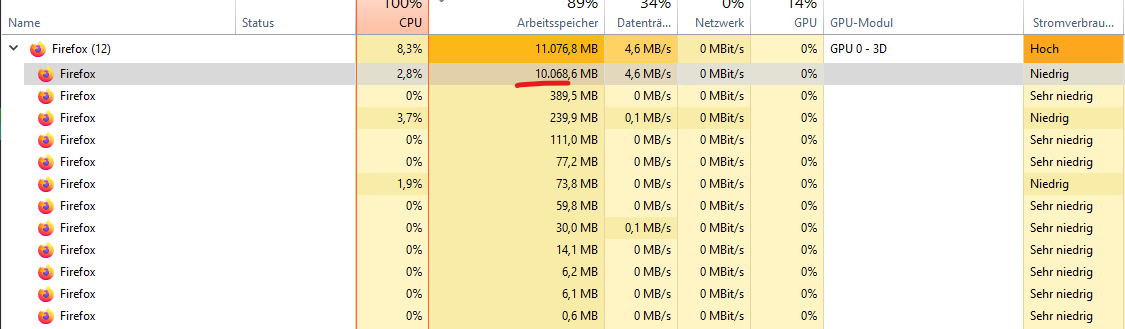
12hours, 10gb ram
no updates, latest rc5
btw, the printer and pi were off after ~6hours.
and this was on another pc.
reloxx13
on 13 Feb 2020
I believe my octoprint install is suffering from the same problem.
UI running overnight
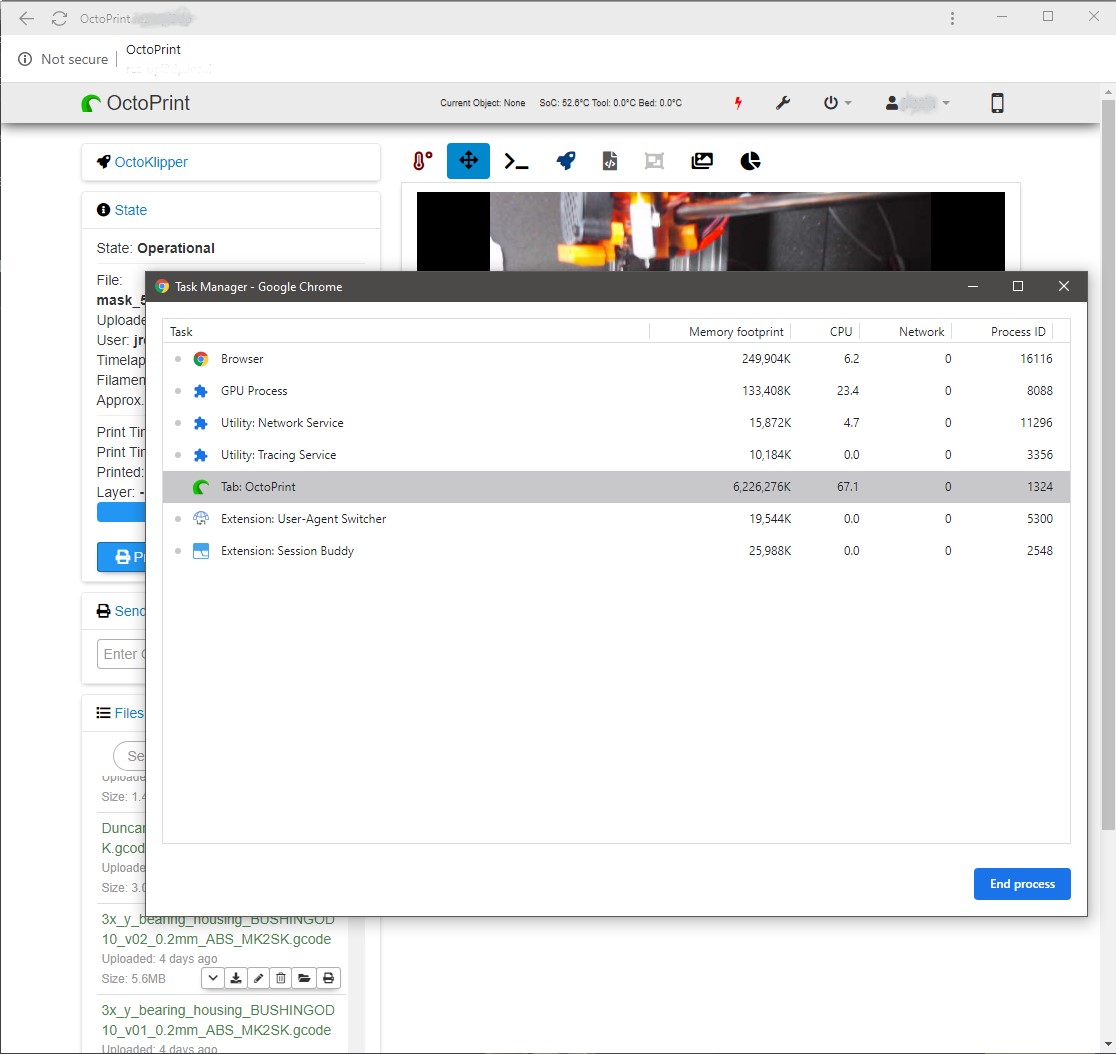
running OctoPrint Version 1.4.0, on octopi 0.17.0
installed plugins:
- Cancel Objects (0.4.1)
- Dragon Order (0.1.4)
- Fullscreen Plugin (0.0.4)
- Gcodebar Plugin (0.1.5)
- GcodeEditor (0.2.8)
- LayerDisplay (0.4.1)
- Navbar Temperature Plugin (0.13)
- OctoKlipper (0.2.5-JEL-0.1)
- Python 3 Check (0.1.2)
- Stateful Sidebar (0.1.2)
- Tab Order (0.5.6)
- Themeify (1.2.0)
- TouchUI (0.3.14)
- Wemo Switch (0.1.5)
In a case like that, how to proceed to debug and find the culprit?
 jrezin
on 1 Apr 2020
jrezin
on 1 Apr 2020
current, very basic, investigation points to
Tab Order (0.5.6) - /jneilliii/OctoPrint-TabOrder#33
as the culprit (at least) in my case... but I don't know how to properly debug a case like this, I'm just enabling and disabling plugins and waiting the memory consumption change.
jrezin
on 4 Apr 2020
@MFHFozzy and @reloxx13, do you guys have Bed Level Visualizer or the Tab Order plugin's installed?
Those are the two plugins of mine that have recently been identified as having memory/network leaks. The one with Bed Level Visualizer was related to the webcam loading and not disposing properly, I pushed an update that would only load the webcam while processing, but there is still an odd situation in Firefox that the network congestion remains even though the image is completely removed from the DOM. More details here.
As for Tab Order it was because of a library I was using to be able to force tabs into the pull-down (hidden). I ended up going back and just patching the default bootstrap-taborder to have that functionality and it seems to have resolved it for me, additional testing by @jrezin expected. More details can be seen here.
 jneilliii
on 4 Apr 2020
jneilliii
on 4 Apr 2020
I def had tab order installed, ill uninstall and check again
On 4/4/2020 12:29 PM, jneilliii wrote:
>
@MFHFozzy https://github.com/MFHFozzy and @reloxx13
https://github.com/reloxx13, do you guys have Bed Level Visualizer
or the Tab Order plugin's installed? Those are the two plugins of mine
that have recently been identified as having memory/network leaks. The
one with Bed Level Visualizer was related to the webcam loading and
not disposing properly, I pushed an update that would only load the
webcam while processing, but there is still an odd situation in
Firefox that the network congestion remains even though the image is
completely removed from the DOM. More details here
https://github.com/jneilliii/OctoPrint-BedLevelVisualizer/issues/208.As for Tab Order it was because of a library I was using to be able to
force tabs into the pull-down (hidden). I ended up going back and just
patching the default bootstrap-taborder to have that functionality and
it seems to have resolved it for me, additional testing by @jrezin
https://github.com/jrezin expected. More details can be seen here
https://github.com/jneilliii/OctoPrint-TabOrder/issues/33.—
You are receiving this because you were mentioned.
Reply to this email directly, view it on GitHub
https://github.com/OctoPrint/OctoPrint/issues/3405#issuecomment-609077952,
or unsubscribe
https://github.com/notifications/unsubscribe-auth/ABXIOQBMCFBID7PRQSSLOHTRK6DBRANCNFSM4J7BPMEA.
MFHFozzy
on 5 Apr 2020
Removed tab order and bed leveler:
after a couple days, 1 printer still off, the other has done a couple
prints:
91.25 MB (05.62%) ++ top(http://192.168.0.92/#temp, id=1593)
43.55 MB (02.68%) ++ top(http://192.168.0.93/#temp, id=1599) (printer off)
I will reinstall tab order and test again, but so far problem solved, i
think.
On 4/4/2020 12:29 PM, jneilliii wrote:
>
@MFHFozzy https://github.com/MFHFozzy and @reloxx13
https://github.com/reloxx13, do you guys have Bed Level Visualizer
or the Tab Order plugin's installed? Those are the two plugins of mine
that have recently been identified as having memory/network leaks. The
one with Bed Level Visualizer was related to the webcam loading and
not disposing properly, I pushed an update that would only load the
webcam while processing, but there is still an odd situation in
Firefox that the network congestion remains even though the image is
completely removed from the DOM. More details here
https://github.com/jneilliii/OctoPrint-BedLevelVisualizer/issues/208.As for Tab Order it was because of a library I was using to be able to
force tabs into the pull-down (hidden). I ended up going back and just
patching the default bootstrap-taborder to have that functionality and
it seems to have resolved it for me, additional testing by @jrezin
https://github.com/jrezin expected. More details can be seen here
https://github.com/jneilliii/OctoPrint-TabOrder/issues/33.—
You are receiving this because you were mentioned.
Reply to this email directly, view it on GitHub
https://github.com/OctoPrint/OctoPrint/issues/3405#issuecomment-609077952,
or unsubscribe
https://github.com/notifications/unsubscribe-auth/ABXIOQBMCFBID7PRQSSLOHTRK6DBRANCNFSM4J7BPMEA.
MFHFozzy
on 7 Apr 2020
Please join the thread over here. Make sure to test with the latest version 0.5.7 using the URL below in plugin manager. I have yet to be able to reliably reproduce the memory leak with just Tab Order installed.
https://github.com/jneilliii/OctoPrint-TabOrder/archive/0.5.7.zip
jneilliii
on 7 Apr 2020
Am I understanding this correctly that this can likely be closed (at least for now)?
foosel
on 8 Apr 2020
Give me a couple more days to verify
MFHFozzy
on 8 Apr 2020
I've been unable to reproduce the memory leak with the latest patched version of TabOrder linked above and latest version of Bed Level Visualizer (with the exception of FireFox). But I also don't believe I've received an update notice on anything either since installing them, so the issue could still be tied to update notices in combination with these plugins maybe.
jneilliii
on 8 Apr 2020
Anything new here?
foosel
on 28 Apr 2020
I'm still at a loss. I haven't been able to reproduce the extremely large memory usage reported by others reliably. I do have a version of the plugin that removes what we think is the culprit (knockout bound fontawesome iconpicker), which is linked below.
https://github.com/jneilliii/OctoPrint-TabOrder/archive/0.5.7_iconpicker_removed.zip
jneilliii
on 28 Apr 2020
Im sorry, i have not been able to get back to this as both printers have been printing PPE gear for covid efforts non-stop.
I do plan on getting back to this as soon as i can.
Currently, I think we need to do more deep diving into the details of what/where/how memory is being used.
Specifically, the major memory leak reporting seems to only show up in Chrome using its task manager.
I could not replicate on Waterfox/Firefox.
My next step will be to replicate the memory issue using Chrome (done), then re-test with the updated versions.
I probably will have time after Thursday.
MFHFozzy
on 28 Apr 2020
And again my question: Anything new here? :)
foosel
on 5 Jun 2020
So with the latest release of TabOrder people have reported that it resolved the high memory utilization for them, but I don't know if that is completely related to this issue or not.
jneilliii
on 5 Jun 2020
Hm... since I have never seen this myself and don't use TabOrder, I'm going to close it for now. If it shows up again we can always reopen.
foosel
on 12 Jun 2020
This issue has been mentioned on OctoPrint Community Forum. There might be relevant details there:
https://community.octoprint.org/t/possible-cpu-race-condition-in-chromium-based-browsers/24094/2
GitIssueBot
on 12 Sep 2020
Related issues
 LuisDiazUgena
·
4Comments
LuisDiazUgena
·
4Comments
 gege2b
·
3Comments
gege2b
·
3Comments
 Lino77
·
4Comments
foosel
·
4Comments
Lino77
·
4Comments
foosel
·
4Comments
 dkingsjr
·
5Comments
dkingsjr
·
5Comments
Most helpful comment
I believe my octoprint install is suffering from the same problem.
UI running overnight

running OctoPrint Version 1.4.0, on octopi 0.17.0
installed plugins:
In a case like that, how to proceed to debug and find the culprit?