What were you doing?
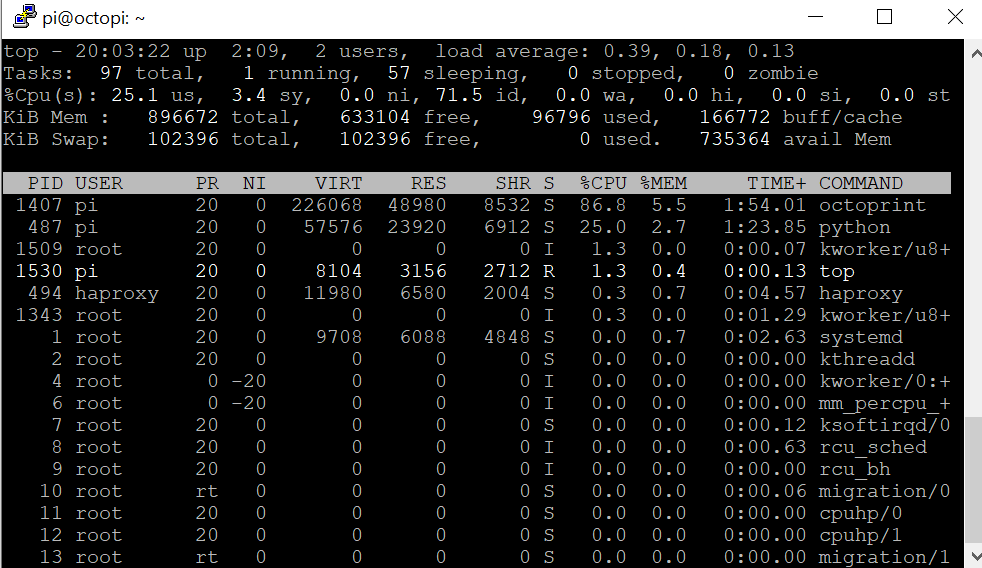
Printing circular perimeters at high speeds (~250 mm^s)
What did you expect to happen?
Octoprint would be able to cope with that many GCODE instructions
What happened instead?
The octoprint process eats up more than 80% of the CPU. The CPU by Octoprint seem to increase when the print speed increases
Did the same happen when running OctoPrint in safe mode?
Yes
Version of OctoPrint
OctoPrint 1.3.10
Operating System running OctoPrint
OctoPi 0.15.1
Printer model & used firmware incl. version
FDM Custom made Delta Printer
Browser and version of browser, operating system running browser
Any
Link to octoprint.log
Link to contents of terminal tab or serial.log
Link to contents of Javascript console in the browser
Screenshot(s)/video(s) showing the problem:
I have read the FAQ.
 smark-
All 16 comments
Can you share a screenshot of htop running? It'll show the multi-CPU stuff better.
Can you upload the gcode?
I looked through your octoprint.log, it looks okay, you're running on a Pi 3B+ that is running at full speed. So that's good.
 tedder
on 17 May 2019
tedder
on 17 May 2019
The faster you print (= a ton of very short segments, often shorted than it makes sense, over a very short duration), the faster OctoPrint has to process the lines it needs to send to the printer. That also includes a CPU bound calculation of a checksum of the line unless you have disabled that (which you only should do if you know your printer communication to be absolutely reliable since without that checksum no correction of transfer errors can be done). So on first look this behaviour is entirely to be expected.
Try running in safe mode and disabling checksums:

and see if that changes results for you.
 foosel
on 17 May 2019
foosel
on 17 May 2019
Hi,
I have exactly the same issue. I use Klipper firmware and Simplify3D.
I print at 50ms, from a Raspberry Pi 3. So it should not be a problem.
For wheel objects (circle on the plate), Octoprint goes to 100% of CPU usage and force Klipper to pause until it receives the commands to process from Octoprint.
This appears since the latest version of Octoprint. It never occurs before.
I have tried several fixes, like accepting more buffer from Octoprint, but it doesn't work. I still receive pause.
I have tried to use the Virtual SD Card, so bypass Octoprint and tell Klipper to directly print the gcode. And no more problem. But all my add-ons are not used during this process (Filament Manager, PrintTimeGenius, Progress bar ...). During this test, my CPUs usage was very low (< 10%).
I have tried to disable the checksum, and well, no more issue. It runs at full speed. I have also decreased the buffer to something more reasonable because otherwise, I've got a timeout from Octoprint.
It seems checksum computation are too slow during the printing. It would be great to precompute it before starting the printing or simplify the checksum computation or use a C binding module to have extreme speed on that part.
Thanks.
I hope this option off will not lead to bad issue for long-running print.
 celogeek
on 18 May 2019
celogeek
on 18 May 2019
It would be great to precompute it before starting the printing
Can't be done since it contains the line number which is only known right before printing. Partial checksum calculation was tested and didn't achieve any speedups.
use a C binding module
Was also tested, switching from Python to C caused enough overhead that the speedup of the actual code got fully eaten up.
I also want to add that there were no changes at all to the checksum calculation between 1.3.11 and prior versions. If you are only seeing this now, something else must have changed. And since you appear to be running quite a number of plugins, please make sure to test in safe mode as well.
foosel
on 20 May 2019
Hi,
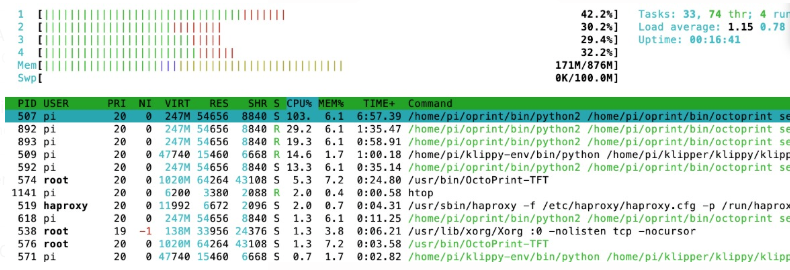
like the OP I'm on a RPi 3 using OctoPrint 1.3.10 on OctoPi 0.15.0, Cura for slicing and Klipper. I can reproduce the issue: no matter what Safe Mode and checksum I select, as long as I set the STL details and/or the printing speed high enough, the printer stutters or pause (eventually for few seconds).
Screenshot of htop showing the CPU load
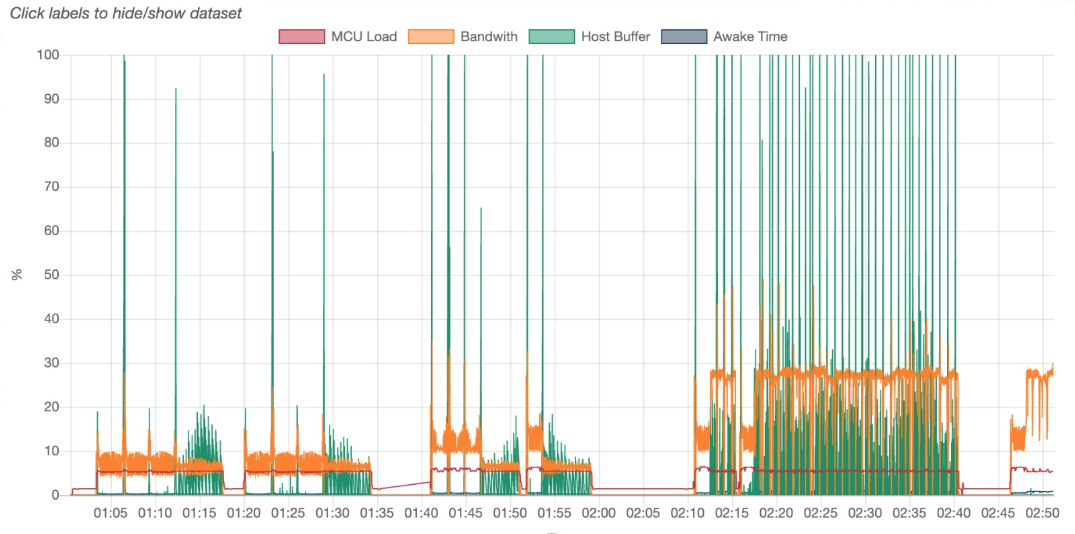
In the attempt of finding a benchmark to the problem I ran the same gcode file from Klipper's virtualSD (technically bypassing octoprint) with no issues.
Klipper performance graph shows spikes to 100% in the host buffer when operating in "normal mode" and smooth behavior when reading from virtual SD (last bit of the plot)
I'm wondering how differently OctoPrint handles the gcode from Klipper, and how/where the loss of performance happens. This is a major limitation when trying to achieve high print speeds.
I hope there might be a simple explanation and a quick fix to the problem.
Stef
 cooked
on 20 May 2019
cooked
on 20 May 2019
Klipper already handles the reliability between the RPI and the printer.
A print from the virtual sd card works without any issue. So it should be safe to disable the checksum in that case?
I have made 3 days of printing without any issue with corrupted communication.
Did the problem occur on marlin fw ?
 vincent-ogury
on 21 May 2019
vincent-ogury
on 21 May 2019
I hope there might be a simple explanation and a quick fix to the problem.
I'm really not sure what you are expecting here. There are more or less hard limits in place here. OctoPrint needs to send lines to the printer as fast as it can while also doing some preprocessing on them and potentially hooking in plugins (which - even if there are none - adds some processing overhead). At the same time it has to drive a web server. There is a limit to that, and if you slice STLs with ridiculously small segments (that often times don't even make sense) and/or up the speeds you will hit that limit faster.
Other than that I recommend reading this: https://github.com/foosel/OctoPrint/issues/2799#issuecomment-476575221
Long story short, If you are sending a lot of data to OctoPrint, yes, CPU load will increase, sometimes to the point stuff can no longer keep up and stutters occur. That is how things are at the moment, and I hope that rewriting the whole comm layer will help here, either directly or indirectly by opening up other possibilities to feed data to the printer. I don't know though, will have to experiment and see. One thing is sure though, there will always be a limit when feeding a printer via USB and printing from SD will always outperform this.
Until then, try experimenting with disabling checksums and not running any third party plugins that hook into the sending routines, slice at sensible segment lengths, don't expect to break any speed records (and if you do, print from SD please) and for the love of all that is holy stop expecting easy fixes to hard problems.
Closing this since things don't point at an immediate bug and we already have general issues with the comm layer tracked in #450 and delta specific in #2799. Sub to those to be notified of new developments please.
foosel
on 21 May 2019
I'm not sure the other tickets talk about the same issue.
- The problem occurs since the last release of octoprint 1.3.11 (no issue before 1.3.10).
- The problem is fixed without disabling anything by stopping the checksum on each line (< 10% CPU usage vs 100% CPU usage and long pause on printer causing blob ...).
- The print from virtual scard on Klipper is a print from the RPI. Instead of asking Octoprint to send the line to the virtual printer and then Klipper send it to the printer, we ask Klipper to read the file himself. In that case, it is still the same gcode that are sent to the printer other the serial port. And they are no slow down there.
So only 1 option here causes issue even at low speed (< 50mm /s in a circle), the checksum.
It is strange that even if nothing has changed on the option between 1.3.10 and 1.3.11 it became an issue.
celogeek
on 21 May 2019
@vincent-ogury The G-Code checksum calculated by octoprint is removed on the Klipper host. The communication between Klipper host and the klippy firmware in the printer is something completely different.
Both @smark- and @celogeek use Klipper. Klipper has a different timing on the serial data. This is caused by the G-Codes ending on the host. That different timing might have an influence on the CPU load. (Reasoning: If in a circle very many small segments are send then normal firmware will still have the normal delay of sending it out on serial and back again. Klipper can just read the data and reply faster than other the message would need to be send out on serial.)
As CRCs between Klipper and Octoprint is just a waste of performance and just disabling the CRC fixes the performance issue. I would say just do that. Problem solved, right?
Let us together hope that the new octoprint com layer takes firmware designs like Klipper into account so that these issues don't even come up.
 JustAnother1
on 22 May 2019
JustAnother1
on 22 May 2019
Is it possible to OctoPrint send G-Code to the printer SD card (even knowing it’s slow) before beginning to print? This way we can send G-Code from Cura (Windows or Mac) to OctoPrint and then shutdown the computer. Then OctoPrint store the file and send it all to the SD card before printing, to avoid problems with usb/serial bottleneck during print. I know now I can select “store in SD-card” option in Cura, but I think I must keep my computer turned on while streaming very slowly to SD-card
 Hesi-Re
on 6 Sep 2019
Hesi-Re
on 6 Sep 2019
If Cura uses the upload to SD feature of OctoPrint to do that (which I'm fairly sure it does), it happens exactly as you described - upload to OctoPrint's local storage, then OctoPrint streams it to the printer. So you should be safe to shut down your PC.
foosel
on 6 Sep 2019
Thank you. I thought if I shutdown my pc it would stop streaming. But since the connection between my pc and raspberry is fast, so I can begin printing from SD card as soon as OctoPrint streams G-Code file to SD card.
Hesi-Re
on 7 Sep 2019
tried @celogeek suggestion of sending checksums only when printing... does not help at all. to get the cpu usage down again i have to restart octoprint each time..
 gretel
on 9 Oct 2019
gretel
on 9 Oct 2019
@gretel you mean you have disabled the option right?
celogeek
on 10 Oct 2019
i was all wrong. when restarting in safe mode the cpu usage got all low again - made me suspicous - and figured it is the
https://github.com/amsbr/OctoPrint-Stats
plugin causing this. tried disabling and re-enabling it to check and yes.
gretel
on 10 Oct 2019
Thanks for following up, @gretel.
tedder
on 10 Oct 2019
Related issues
 Lino77
·
4Comments
Lino77
·
4Comments
 halkeye
·
4Comments
halkeye
·
4Comments
 dkingsjr
·
5Comments
dkingsjr
·
5Comments
 mrcg
·
5Comments
foosel
·
4Comments
mrcg
·
5Comments
foosel
·
4Comments