Octoprint: Unstable Connection to Sbase Smoothieware board.
What were you doing?
Trying to control my new printer running Sbase with Smoothieware. there is connection, i can control the printer and monitor it but connection is not stable. not like my rock solid connection to my other printer running MKS GEN 1.4 board running Marlin.
What did you expect to happen?
Have stable connection througout the print - not the case. print fails. when printing from SD all is well.
What happened instead?
Printer's nozzle temp dropped to zero resulting in clogged nozzle and ruined print(s).
Did the same happen when running OctoPrint in safe mode?
Yes.
[Try to reproduce your problem in safe mode. You can find information
on how to enable safe mode in the Contribution Guidelines.]
Version of OctoPrint
[Can be found in the lower left corner of the web interface. ALWAYS INCLUDE.]
Operating System running OctoPrint
OctoPrint 1.3.6, OctoPi 0.14
[OctoPi, Linux, Windows, MacOS, something else? With version please.
OctoPi's version can be found in /etc/octopi_version]
Printer model & used firmware incl. version
Little Monster, not sure about the firmware version.
[If applicable, always include if unsure.]
Browser and Version of Browser, Operating System running Browser
Chrome, Latest.
[If applicable, always include if unsure.]
Link to octoprint.log
[On gist.github.com or pastebin.com. ALWAYS INCLUDE and never truncate.
The Contribution Guidelines tell you where to find that.]
Link to contents of terminal tab or serial.log
[On gist.github.com or pastebin.com. If applicable, always include if unsure or
reporting communication issues. Never truncate.
serial.log is usually not written due to performance reasons and must be
enabled explicitly. Provide at the very least the FULL contents of your
terminal tab at the time of the bug occurrence, even if you do not have
a serial.log (which the Contribution Guidelines tell you where to find).]
Link to contents of Javascript console in the browser
[On gist.github.com or pastebin.com or alternatively a screenshot. If applicable -
always include if unsure or reporting UI issues.
The Contribution Guidelines tell you where to find that.]
Screenshot(s)/video(s) showing the problem:
[If applicable. Always include if unsure or reporting UI issues.]
I have read the FAQ.
 Thisismydigitalself
All 20 comments
Hi @Thisismydigitalself,
- Please supply logs.
- How are you connecting to the controller from OctoPrint?
- Connection settings?
 kantlivelong
on 16 Jan 2018
kantlivelong
on 16 Jan 2018
as well as the logs, please also provide the gcode that fails to make testing easier.
 ntoff
on 16 Jan 2018
ntoff
on 16 Jan 2018
USB @ 115200.
Thank you. I will print a test case, gather the needed information and report back.
Should OctoPrint manage Smoothieware "right out of the box" like with MKS GEN running Marlin or some modifications are needed beforehand?
Thisismydigitalself
on 16 Jan 2018
I use 250000 baud over USB with the official Smoothieboard without issues.
kantlivelong
on 16 Jan 2018
Just heads-up:
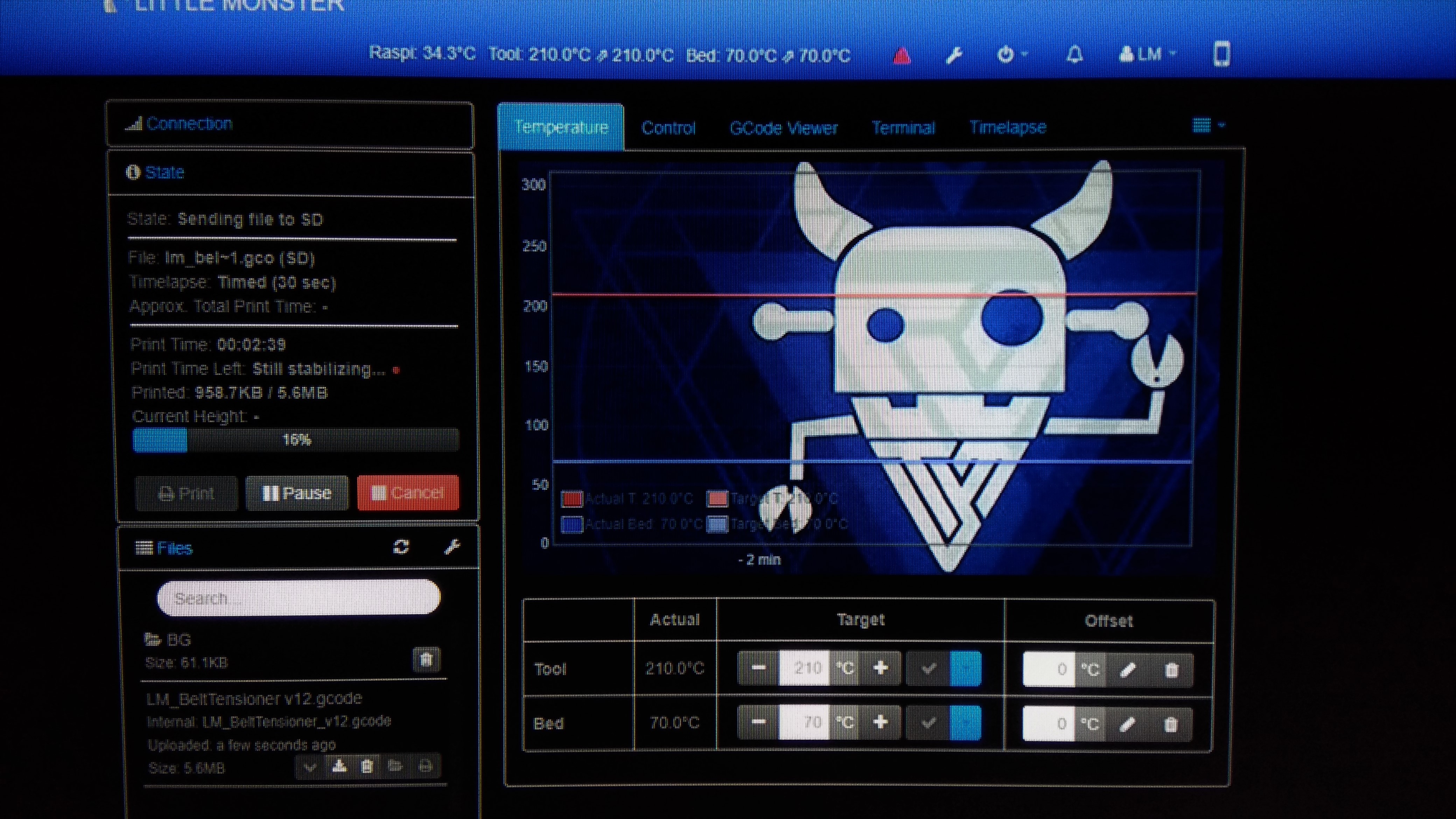
Sent a model from Cura using its built in API to OctoPrint. file loaded, but never finishes "Still Stabilizing" stage. after 2 minutes i Canceled printing and manually pressed the PRINT button on OctoPrint main page and printing started immediately and still going.
This is what i got while API-ing the file from Cura to OctoPrint. percentage goes up but printer did not start printing.
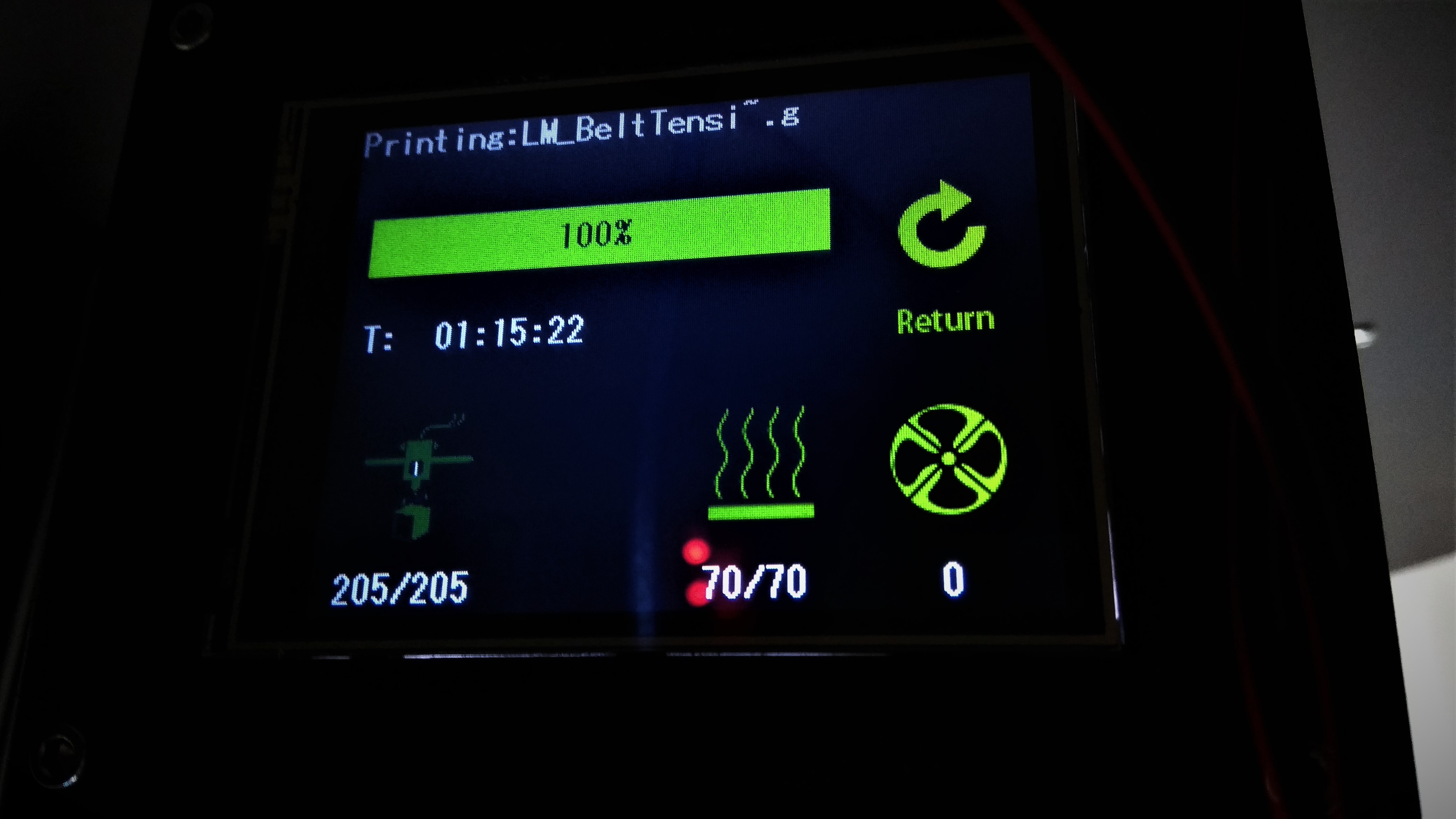
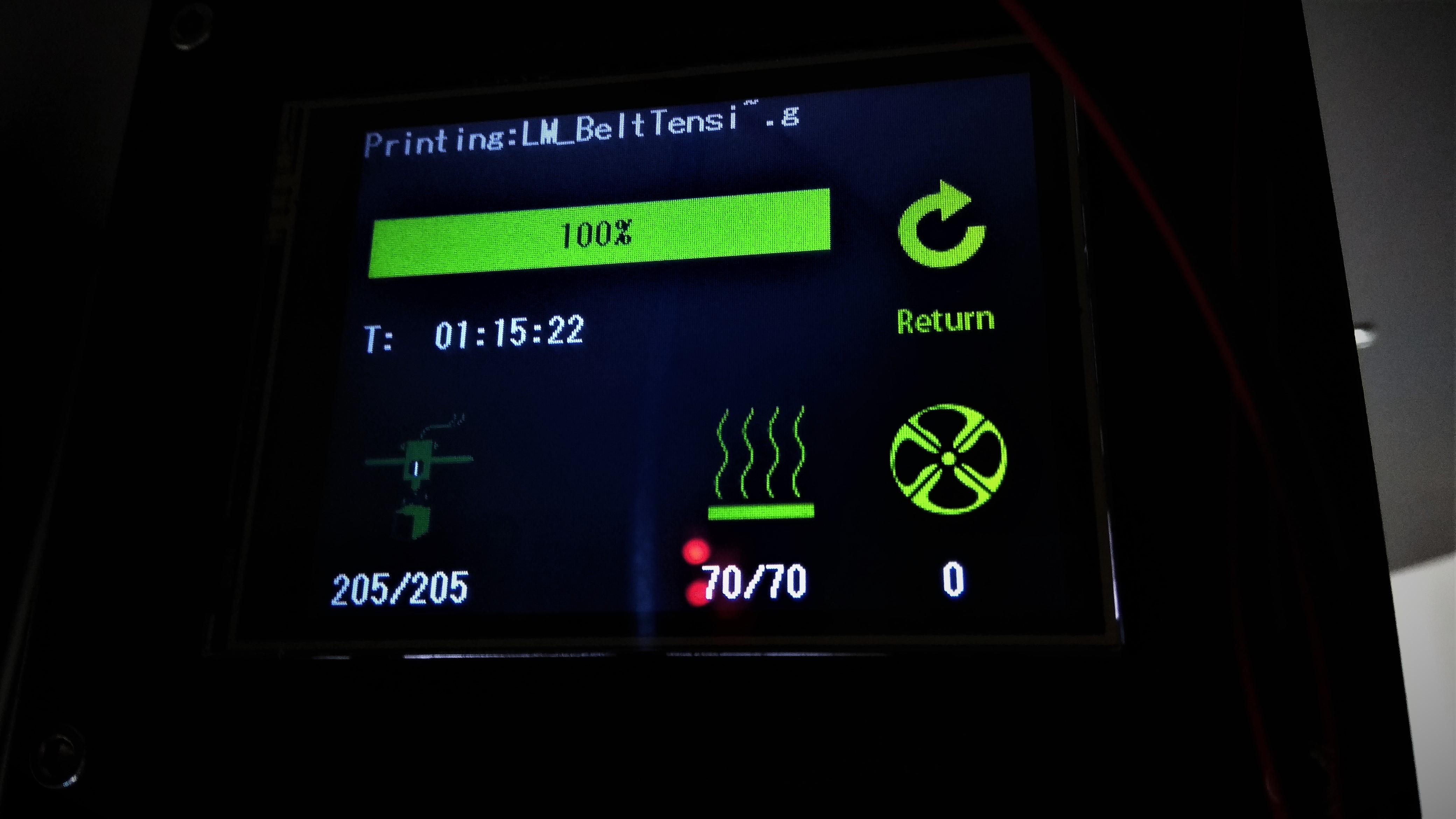
This is what i see on touch screen while printer is printing. frozen screen on 100%.
More will follow.
Thisismydigitalself
on 16 Jan 2018
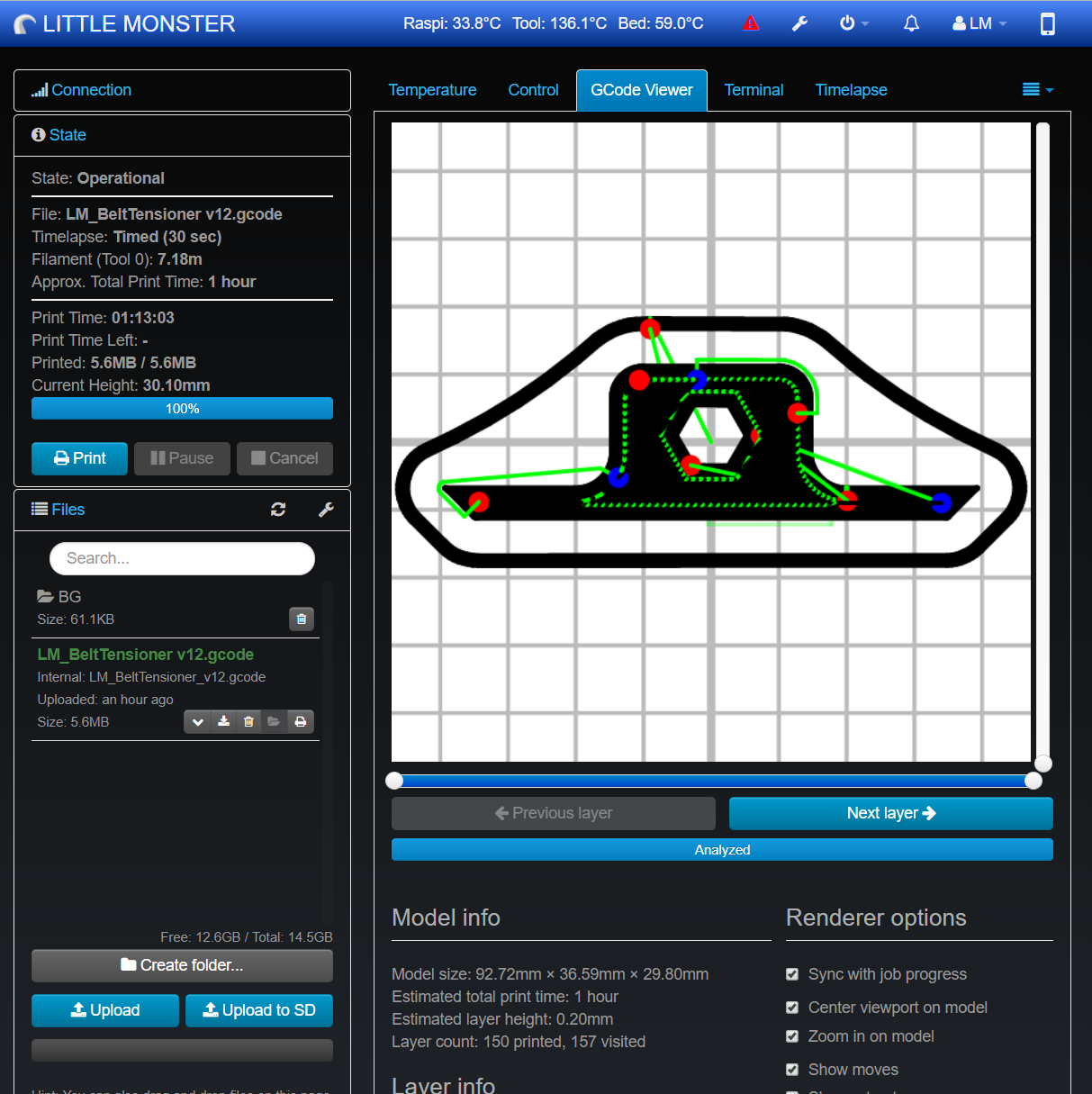
1 Hour print finished successfully.
What i don't understand is why i had to manually start the print and why Printer's touch screen is not being updated at all. this does not happen with my other printer running Marlin.
Thisismydigitalself
on 16 Jan 2018
logs?
kantlivelong
on 16 Jan 2018
Thisismydigitalself
on 16 Jan 2018
What happens if you print from OctoPrint instead of SD?
kantlivelong
on 16 Jan 2018
my last posts are showing printing from OctoPrint, not from SD unless i am missing something.
Are you saying that when I manually pressed Print on OctoPrint main page the file was streaming from SD?
Thisismydigitalself
on 16 Jan 2018
The first picture has "State: Sending files to SD". Is there an option in Cura to specify the upload target? Perhaps you have it set to SD.
kantlivelong
on 16 Jan 2018
Your first screenshot (the one with "still stabilizing") showed streaming a file to SD. The picture you made of your printer's display also only hinted at a file printed from SD. Your second screenshot ("1 hour print finished") shows an actual print via OctoPrint. I don't know about @kantlivelong but at least to me right now it's completely unclear with which operation mode you are having what problems.
 foosel
on 16 Jan 2018
foosel
on 16 Jan 2018
You stated that you had to cancel the print when it said "stabilizing." but in the same screenshot it says "Sending files to SD". The 3rd screenshot with the gcode viewer doesn't indicate that you are printing from SD. It certainly appears that you have Cura configured to print from SD.
Edit: Not sure why I posted this twice :man_facepalming:
kantlivelong
on 16 Jan 2018
Your first screenshot (the one with "still stabilizing") showed streaming a file to SD
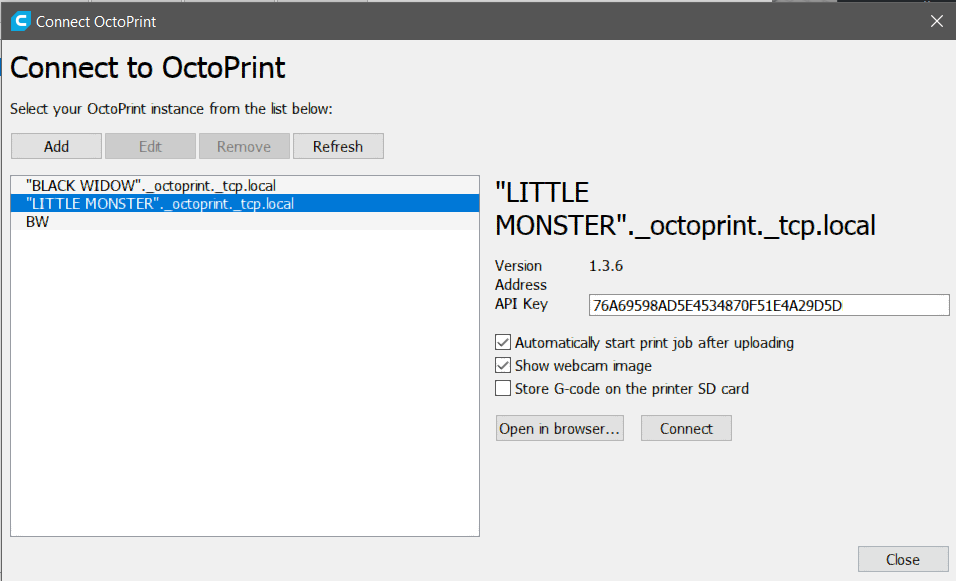
I guess this is it. i now see i left the "Store on Printer's SD card" check box checked on Cura's API.
this might be the culprit, I will uncheck it, test again and will report back.
Thank you.
Thisismydigitalself
on 16 Jan 2018
OK, To sum things up:
1.
The reason my printer did not start printing even after couple of minutes was related to Cura's API settings where the defaults include "Store G-Code on the printer SD card" which i left checked without knowing it has such an impact on performance and that it takes so long to copy a file to printer's SD card cause the file is not that big to begin with. i wish for octoprint to not say "stabilizing" while uploading file to SD - this confused me.
I still don't know why the other day my printer stopped mid-print dropping the nozzle temp down to zero and ruined the print.
I hope things will stay as they are now. looking good.
Cura & OctoPrint makes a great couple.
Thank you all for being here for me.
Take Care.
Thisismydigitalself
on 16 Jan 2018
If you're using the latest version of Cura, try a previous one. I've seen people here and on reddit having issues with the most recent version outputting incorrect gcodes related to temperatures.
https://github.com/foosel/OctoPrint/issues/2283#event-1420163871
While it might not be the exact same error (or maybe it is if it's temperature related), it wouldn't surprise me if there's more bugs undocumented "features" in the latest version of Cura.
ntoff
on 17 Jan 2018
Regarding Cura's "stability" issues, I myself filed many issues on Cura's github repository.
I still like to work with Cura and I hope they will iron out most of the "Undocumented features" sooner than later.
I still don't know why and how to fix the issue of my smoothie touch screen not getting updated with printer current status while streaming from OctoPrint.
This screenshot is showing the same, unchanging screen, while printing is taking place.
Maybe there's a OctoPrint plug for this? will look around..
Thisismydigitalself
on 17 Jan 2018
Generally the LCD only works with SD print but most firmware out there will allow a line of text or a progress indicator update. Check out the plugins repo
kantlivelong
on 17 Jan 2018
I checked but none worked. what i need to double check is why it works with my other printer running Marlin in oppose to Smoothieware. it might be that with the other one i use this save g-code to SD option or - Smoothieware does not support M73 nor M117 commands.
Thisismydigitalself
on 17 Jan 2018
Closing as this is not octoprint and it looks like the original issue is resolved.
kantlivelong
on 18 Jan 2018
Related issues
 dm3942
·
49Comments
foosel
·
58Comments
dm3942
·
49Comments
foosel
·
58Comments
 thedoble
·
85Comments
thedoble
·
85Comments
 gregopti
·
81Comments
gregopti
·
81Comments
 razerraz
·
88Comments
razerraz
·
88Comments
Most helpful comment
I use 250000 baud over USB with the official Smoothieboard without issues.