Octoprint: Upload to SD Greyed Out
This is a new install using the 0.13.0 image on a Raspberry Pi 3B. It is attached to an Anet A8 (Prusa i3 clone) 3D printer. I attach to the RPi via its built in wifi on my home wifi system. I use Firefox for my browser on Win10. The interface works great to "Upload Locally" and run a print job. When I try to drag and drop a gcode file to "Upload to SD", it says "SD Card Not Initialized". I have formatted the SD card in the Anet board using SD Formatter and it shows up normal on File Explorer.
Also, it appears that the monitoring and control functions work fine with the exception of the "Motors Off" button. I'll submit that as a seperate issue.
 barnold96
All 10 comments
Hi @barnold96,
It looks like there is some information missing from your bug report that will be needed in order to solve the problem. Read the Contribution Guidelines which will provide you with a template to fill out here so that your bug report is ready to be investigated (I promise I'll go away then too!).
If you did not intend to report a bug but wanted to request a feature or brain storm about some kind of development, please take special note of the title format to use as described in the Contribution Guidelines.
Please do not abuse the bug tracker as a support forum - if you have a question or otherwise need some kind of help or support refer to the Mailinglist or the G+ Community instead of here.
Also make sure you are at the right place - this is the bug tracker of the official version of OctoPrint, not the Raspberry Pi image OctoPi nor any unbundled third party OctoPrint plugins or unofficial versions. Make sure too that you have read through the Frequently Asked Questions and searched the existing tickets for your problem - try multiple search terms please.
I'm marking this one now as needing some more information. Please understand that if you do not provide that information within the next two weeks (until 2017-02-11 00:40 UTC) I'll close this ticket so it doesn't clutter the bug tracker. This is nothing personal, so please just be considerate and help the maintainers solve this problem quickly by following the guidelines linked above. Remember, the less time the devs have to spend running after information on tickets, the more time they have to actually solve problems and add awesome new features. Thank you!
Best regards,
~ Your friendly GitIssueBot
PS: I'm just an automated script, not a human being, so don't expect any replies from me :) Your ticket is read by humans too, I'm just not one of them.
 GitIssueBot
on 28 Jan 2017
GitIssueBot
on 28 Jan 2017
I submitted the issue on Octopi also.
barnold96
on 28 Jan 2017
I have this exact same printer without issues, so it's likely not a OctoPrint issue. What firmware are you using?
Edit: This also has nothing to do with OctoPi.
 KairuByte
on 31 Jan 2017
KairuByte
on 31 Jan 2017
I think this issue might be similar to #289.
I just happen to have the same problem, and it seems to be because the response from my printer (MP Select Mini) is OK instead of "SD Card Initialized".
I posted same details in the other issue. Marlin based firmware, It seems the fix implemented is not selectable from UI. (Not Repetier?)
Send: N2 M21*18
Recv: ok N2 P15 B15
Thanks!
 amd989
on 7 Feb 2017
amd989
on 7 Feb 2017
@amd989 I was able to fix this issue for my MP Select Mini, but it's usability doesn't seem that great. (Although I might have to change my MircoUSB cable and try again.)
As mentioned here: https://www.reddit.com/r/MPSelectMiniOwners/comments/5jhm7m/using_mp_select_minis_sd_card_with_octoprint/
SSH into our OctoPi, edited the config.yaml, and restart OctoPrint.
cd ~/.octoprint/
nano config.yaml
Add the following:
feature:
  sdAlwaysAvailable: true
The SD card now shows up in OctoPrint, but data transfers seem really slow.
 nokemono42
on 8 Feb 2017
nokemono42
on 8 Feb 2017
Or just do it via the settings:
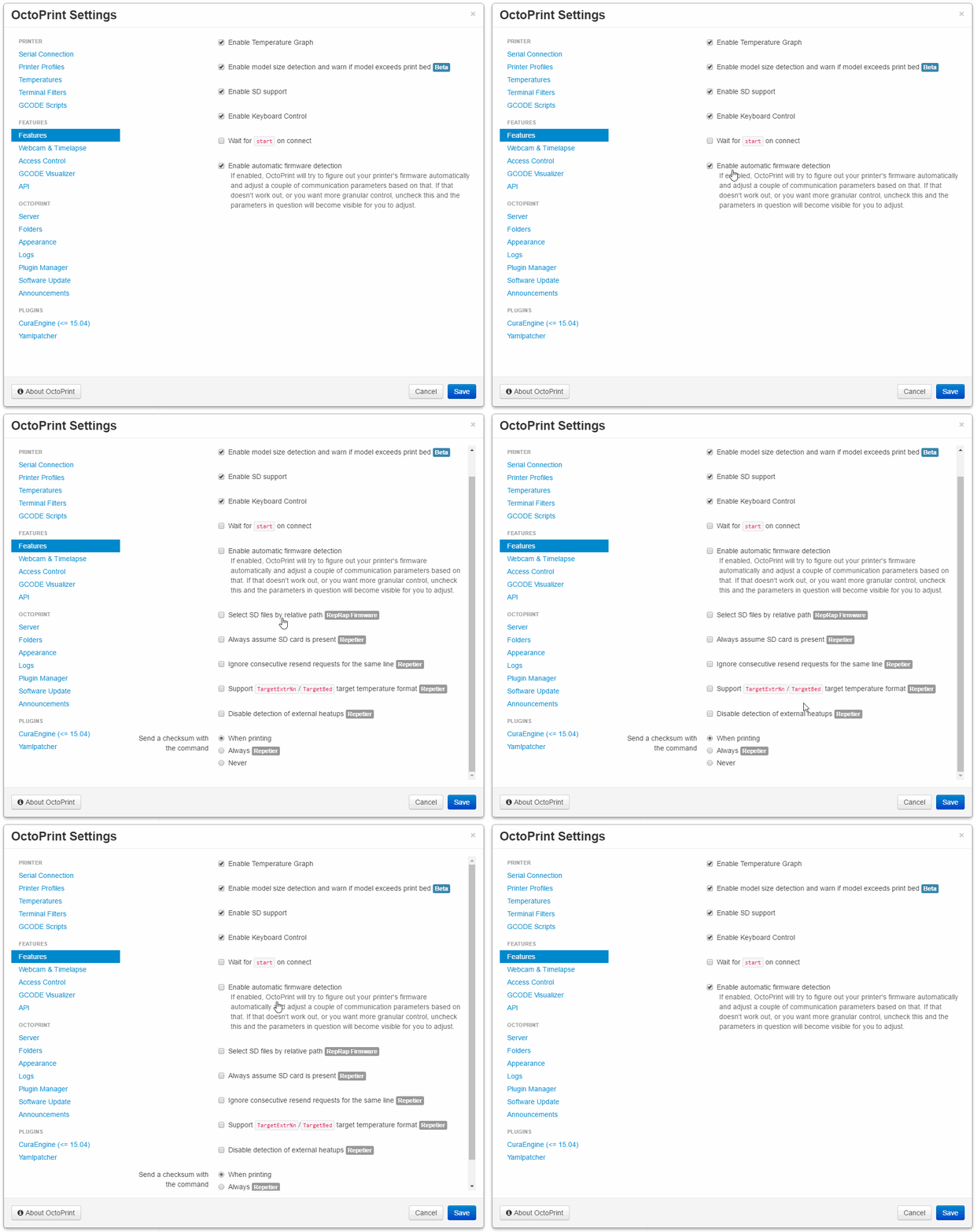
Auto detect depends on firmware behaving as advertised. If your firmware/printer vendor breaks stock functionality like this (and this is NOT regular behaviour for a Marlin firmware), you'll need to adjust stuff manually.
Btw, from the log excerpt above this looks more like behaviour of a Repetier firmware, the output looks different though. M115 - which OctoPrint issues on startup and logs the result of - should say more, but might be lying (vendors keep messing stuff up all the time). Sadly since not a single one of you has provided the logs necessary for looking into bug reports ahem, there is no way to say what firmware you are actually running here. In any case, not a bug but a firmware quirk you can work around via the more detailed settings shown above.
If anyone with an affected printer would be able to share the output of M115 with me here it might be possible to have OctoPrint detect this firmware variant as well and automatically apply the setting as needed. I'm closing this now though since it's essentially a duplicate of #289 and there is a workaround available.
data transfers seem really slow
Yes, because the serial connection is really slow compared to what you are normally used to, and the protocol needed to be spoken over it doesn't make this any better either. Nothing can be done about that. Don't use it if you are in a hurry.
 foosel
on 9 Feb 2017
foosel
on 9 Feb 2017
Ah, just found this
Send: N1 M115*39
Recv: NAME: Malyan VER: 2.9 MODEL: M200 HW: HA02
Recv: ok N1 P15 B15
in #289 provided by @amd989.
So another vendor who decided to throw out stock responses, including completely stripping the firmware identifier. Great job, who needs interoperability! m(
But at least that gives us something to go on. I'll add a special snowflake check for "Malyan" to enable this flag automatically.
The MP Select printers like @nokemono42 refers to are Wanhao rebrands afaik and those appear to be running Repetier firmware usually. Of course, if they modified the M115 output to say something differently that won't help a bit.
foosel
on 9 Feb 2017
Thank you @foosel and @nokemono42, The little hack allowed me to see the file contents, however after trying to upload a file, something went wrong.
...
Send: M20
Recv: Begin file list
Recv: cache.gc
Recv: wifi-setup.gcode
Recv: pid-bed.gcode
Recv: pid-heater.gcode
Recv: End file list
Recv: ok N0 P15 B15
Send: N1 M110 N0*124
Recv: ok N0 P15 B15
Send: M28 /test.gco
Recv: echo:Now fresh file: /test.gco
Recv: Writing to file: /test.gco
Changing monitoring state from 'Operational' to 'Sending file to SD'
Recv: ok N0 P15 B15
Send: N2 M190 S50.000000*113
Recv: Error:Line Number is not Last Line Number+1, Last Line: 0
Recv: Resend: 1
Recv: ok N0 P15 B16
Send: N1 M110 N0*124
Recv: ok
Send: N2 M190 S50.000000*113
Recv: Error:Line Number is not Last Line Number+1, Last Line: 0
Recv: Resend: 1
[Repeats forever]
...
Send: N2 M190 S50.000000*113
That line corresponds to the first line of the gcode file I'm trying to upload. Not sure why this happens.
Looking at other issues, seems like people have seen this as well. I generated the file using Cura 15.04.6, If it helps anything I have attached the file.
I guess at this point uploading locally will have to do.
Regards,
Attached
cable_brace-v2.zip
amd989
on 10 Feb 2017
@amd989 try checking "send all lines with checksums" please, see if that helps. Also, does regular printing (not via the printers sd) work? Where does the firmware on this printer come from (self compiled or from the vendor)?
foosel
on 10 Feb 2017
Small note: The Malyan M200/MP Select Mini appears to run some GRBL derivative extended with the Marlin instruction set (so NOT Marlin), see this reddit thread. Which explains the weird behaviours. Of course there is no source code available (yet?) that would allow to take a look at how that thing is supposed to behave.
I've opened up a request ticket for auto detection of this firmware variant at #1762. Let's continue troubleshooting anything related to this particular printer model and its firmware peculiarities over there (because this ticket was originally about an ANet A8 and the OP never replied with more information).
foosel
on 10 Feb 2017
Related issues
foosel
·
5Comments
 gege2b
·
3Comments
gege2b
·
3Comments
 LuisDiazUgena
·
4Comments
foosel
·
4Comments
LuisDiazUgena
·
4Comments
foosel
·
4Comments
 fake-name
·
4Comments
fake-name
·
4Comments