Octolapse: UI not rendering correctly, can not edit settings.
Version of Octolapse
Octolapse Version: Octolapse 0.4.1+u.88aa71f
Version of OctoPrint
OctoPrint Version: OctoPrint 1.5.0rc3
When you ran into the problem, did you have diagnostic logging enabled?
Diagnostic Logging was Enabled: No
What were you doing when the problem occurred
Issue is at all areas of the plugin, no specific steps were taken beyond installing OctoLapse.
What should have happened?
UI should render correctly, not missing elements and help buttons not all over the screen.
What happened instead?
The UI for OctoLapse has not rendered correctly. I appear to be missing a lot of the settings needed, the help buttons are all over the place and when clicking most fields it'll bring up the help popup which also removes the field selected. This prevents entering most settings. "Videos and Images..." also does not open anything. On the OctoLapse tab, "Loading OptoLapse..." is seen at the bottom at all times. I have tried this on multiple PCs and Browsers, including on the Pi itself, all render incorrectly.
To note, this happened on OctoPrint 1.4.2 and OctoLapse 0.4.0 as well, I am using the current versions now in hopes it would fix the issue.
Operating System running OctoPrint and Octolapse
OS Name: OctoPi
OS Version: 0.17.0
Screenshots and/or videos of the problem:
Screenshot/Video Links: https://imgur.com/a/m8MJSEl
 charredchar
All 30 comments
I need to see any errors in your browser's console window. F12 typically opens it. You can filter by error and put that in gist.github.com and leave a link here.
 FormerLurker
on 22 Nov 2020
charredchar
on 22 Nov 2020
FormerLurker
on 22 Nov 2020
charredchar
on 22 Nov 2020
Hmm.. Maybe try restoring the default settings? Looks like something got corrupted. Did you recently upgrade?
FormerLurker
on 22 Nov 2020
Defaults for OctoLapse or OctoPrint? I am currently running a 7 hour print so it'll be later I can test this. When I updated from 1.4.2 to 1.5.0rc1 (to fix a webcam permission issue in OctoPrint) I did not have OctoLapse installed as I had the same issue before then and gave up.
charredchar
on 22 Nov 2020
Hmm, unless you cleaned when you uninstalled, that might make sense. I'm talking about the Octolapse settings. You can reset them in the menu (maybe??? maybe not if the controls are messed up). If you have problems, uninstall Octolapse and clean it (you will have an option for this when you uninstall).
I haven't tested in 1.5 yet, fyi, but I will get to that soon.
FormerLurker
on 22 Nov 2020
I was able to select "Restore Defaults..." in the main settings but this did not change anything. I could attempt to completely remove every trace of OctoLapse before making another install attempt if you could provide directions to do this. Would it be best to SSH into the Pi and remove the files there after uninstalling from OctoPrint?
Just to note, I did see this in 1.4.2 as well, not just 1.5.
charredchar
on 23 Nov 2020
Let me dig into the log you sent a bit more. Ive never seen that particular error. I will review the code tomorrow. In the meantime you could try disabling your other plugins just to rule out some kind of unknown conflict
FormerLurker
on 23 Nov 2020
I to am getting this same behavior.. i havent had the add-on enable in a long time and have updated the octopi installation a few times while disabled... I fully uninstalled with cleanup as an attempt to straighten things up but did not help... i get the same behavior in 3 different browsers... I hope this nit of info can help 👍
 therealgroovemachine
on 23 Nov 2020
therealgroovemachine
on 23 Nov 2020
@therealgroovemachine, check your browser console for errors, post any you find to gist.github.com, and drop a link in here.
FormerLurker
on 23 Nov 2020
In the meantime you could try disabling your other plugins just to rule out some kind of unknown conflict
I also did not mention in my original post, and probably should have, I did attempt disabling every plugin I could while leaving OctoLapse enabled and it did not help.
charredchar
on 24 Nov 2020
@charredchar , that is extremely useful, thanks for letting me know!
FormerLurker
on 24 Nov 2020
Of course! As long as I am between prints I am happy to do what needs to be done to assist.
charredchar
on 25 Nov 2020
Facing the same issue 1.4.2 all ok 1.5.0 RC3 the layout is a mess.
Did now full clean install with the latest beta of Octolapse to see if all is ok.
 Prutsium
on 27 Nov 2020
Prutsium
on 27 Nov 2020
I did a new image of Octopi and as soon as I upgrade to 1.5.0RC Octolapse fails! It was only plugin I installed on new fresh image before I upgraded to the RC version of Octoprint. It pops up error windows some times but they are covered by the Reload window! 8^) But it is something about unable to load. ?
 kmanley57
on 28 Nov 2020
kmanley57
on 28 Nov 2020
Yeah, I haven't yet debugged with the RC (been really swamped). Any Octolapse related errors in either plugin_octolapse.log or octoprint.log would be helpful.
FormerLurker
on 28 Nov 2020
I turned on log EVERYTHNG in Octolapse and the only errors/differences I saw were connection errors that showed very rarely, which I think were from the error windows that popped up every once in a while, and they were in the plugin_octolapse.log about being unable to connect to the profile server. There were no differences, working or not in both files otherwise when I switched between 1.4.2 and 1.5.0RC. But I did not turn on any verbose logging in Octoprint itself.
kmanley57
on 28 Nov 2020
I have the same error here, apart from that I cant open Video and Images windows, it show me:
packed_plugins.js?8913daea:11577 No dialog has been found to open. Is the dialog id correct?
self.show @ packed_plugins.js?8913daea:11577
self.open @ packed_plugins.js?8913daea:13409
self.openTimelapseFilesDialog @ packed_plugins.js?8913daea:7708
(anonymous) @ packed_libs.js?ab739628:5
dispatch @ packed_libs.js?ab739628:1
v.handle @ packed_libs.js?ab739628:1
 aleacevedo
on 28 Nov 2020
aleacevedo
on 28 Nov 2020
OK, all, this is hot off the press: https://github.com/FormerLurker/Octolapse/archive/e5a1fba0ec5e667a681e6a4dbd15cff37a4d2226.zip
Install via the plugin manager with the above URL and let me know what works and what does not :) There was only one python issue (bad import for slugify that I thought I fixed in all cases, but did not), the rest were UI problems with the new version of knockout (it HATES self closing tags). There were a CRAP TON of changes, so let me know if you see any UI issues and please take a screen cap so I know exactly where to look.
Thanks!
FormerLurker
on 29 Nov 2020
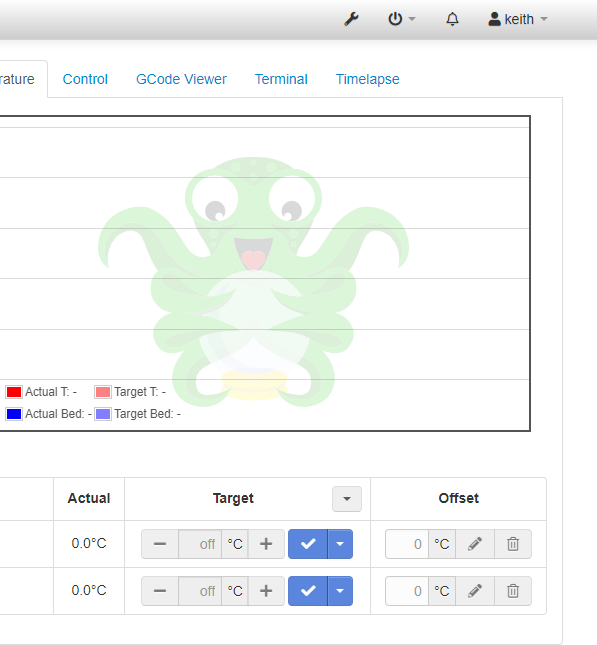
Just tried a fresh image, updated the OS files to latest, updated Octoprint to 1.5.0RC, then installed the zip file in the link with the Plugin manager, and POOF Octolapse was gone!
kmanley57
on 29 Nov 2020
@kmanley57, thanks for the report. Apparently my dev install of v1.5 had some lingering code that made it look like the Slugify import was working. I'm looking into that now, but if you check either plugin_octolapse.log or octoprint.log (not sure which one will show the error) there is probably an error realted to Slugify(). If you have time to check I would be most appreciative!
FormerLurker
on 29 Nov 2020
Hello,
You mean like this from Octoprint.log from the Octoprint server restart:
2020-11-29 18:21:05,493 - octoprint.plugin.core - ERROR - Error loading
plugin octolapse
Traceback (most recent call last):
File
"/home/pi/oprint/lib/python3.7/site-packages/octoprint/plugin/core.py",
line 1298, in _import_plugin
module = _load_module(module_name, spec)
File
"/home/pi/oprint/lib/python3.7/site-packages/octoprint/plugin/core.py",
line 69, in _load_module
return imp.load_module(name, f, filename, details)
File
"/home/pi/oprint/lib/python3.7/site-packages/octoprint/vendor/imp.py", line
238, in load_module
return load_package(name, filename)
File
"/home/pi/oprint/lib/python3.7/site-packages/octoprint/vendor/imp.py", line
212, in load_package
return _load(spec)
File "
File "
File "
File "
_call_with_frames_removed
File
"/home/pi/oprint/lib/python3.7/site-packages/octoprint_octolapse/__init__.py",
line 57, in
import octoprint_octolapse.stabilization_preprocessing
File
"/home/pi/oprint/lib/python3.7/site-packages/octoprint_octolapse/stabilization_preprocessing.py",
line 26, in
from octoprint_octolapse.stabilization_gcode import SnapshotPlan,
SnapshotGcodeGenerator
File
"/home/pi/oprint/lib/python3.7/site-packages/octoprint_octolapse/stabilization_gcode.py",
line 24, in
from octoprint_octolapse.position import Pos
File
"/home/pi/oprint/lib/python3.7/site-packages/octoprint_octolapse/position.py",
line 24, in
import octoprint_octolapse.utility as utility
File
"/home/pi/oprint/lib/python3.7/site-packages/octoprint_octolapse/utility.py",
line 118, in
_SLUGIFY = Slugify.Slugify()
AttributeError: type object 'Slugify' has no attribute 'Slugify'
kmanley57
on 29 Nov 2020
Yes, exactly that. I had some problems with my install of 1.5.0rc3. Development instances can be tricky because there is lots of extra stuff floating around. I had to create a new virtual environment to 100% eliminate all the old code. It seems like there was a package that was installed from an old version that made it work for me the first time. Once I trashed all of that it started behaving like yours (failing the initial import, trying again with the correct import). It turns out my import statement was slightly off.
Try installing from this link https://github.com/FormerLurker/Octolapse/archive/6b53072ddefee1a4121bf893a71d83454fdb9098.zip
Hopefully this is the one the works!
FormerLurker
on 29 Nov 2020
It looks like it works! Or at least no POOF, but I do not have a printer
attached to that Pi to start a print on to test it fully.
Keith
On Sun, Nov 29, 2020 at 1:48 PM FormerLurker notifications@github.com
wrote:
Yes, exactly that. I had some problems with my install of 1.5.0rc3.
Development instances can be tricky because there is lots of extra stuff
floating around. I had to create a new virtual environment to 100%
eliminate all the old code. It seems like there was a package that was
installed from an old version that made it work for me the first time. Once
I trashed all of that it started behaving like yours (failing the initial
import, trying again with the correct import). It turns out my import
statement was slightly off.Try installing from this link
https://github.com/FormerLurker/Octolapse/archive/6b53072ddefee1a4121bf893a71d83454fdb9098.zipHopefully this is the one the works!
—
You are receiving this because you were mentioned.
Reply to this email directly, view it on GitHub
https://github.com/FormerLurker/Octolapse/issues/629#issuecomment-735451634,
or unsubscribe
https://github.com/notifications/unsubscribe-auth/AKV4T3CSN56V3IVEPKWAPXDSSKXRBANCNFSM4T6ROJQA
.
kmanley57
on 29 Nov 2020
@kmanley57, thanks for testing thus far! Actually, the installation bit is really what I was wanting to test, that and the UI issues.
Anyone in this thread with a 3d printer attached, lol! It would be nice to get more confirmation.
FormerLurker
on 29 Nov 2020
I am 1-1/2 hours into a testing print with it enabled on a different Pi, but it is the older version of the OS(OctoPi 0.17.0 ) but running the latest Octoprint 1.5.0RC3 and it appears to be working so far. 220+ snapshots taken. Best I can do until tomorrow when I start work on the next printer.
kmanley57
on 30 Nov 2020
Wow, I'd say that is plenty for today!! Thanks so much.
FormerLurker
on 30 Nov 2020
I will also be able to install the last image linked tomorrow afternoon (about 20 hours from now) and see what it does on my currently running image and report back. Thanks for all of your hard work.
charredchar
on 30 Nov 2020
Since this https://github.com/FormerLurker/Octolapse/issues/633 and here where quite related i also run the latest patch.
And yes it installs again and seems to be working will move this now to my production system but during a test with a virtual printer it seems to be working and also all menu's came back.
As usual: Thanks for your work @FormerLurker
Prutsium
on 30 Nov 2020
So Octoprint 1.5.0 dropped today, and I'm going to have to rush pushing this to master lest I be inundated with issues. Thanks to everyone who helped test. Please continue to report your results here though, because there is still time to fix last minute issues. Thanks!!!!
FormerLurker
on 30 Nov 2020
The release has dropped. I might have goofed the version number if you installed one of the pre-release versions, which will prevent the software update from notifying you. Not much has changed aside from some formatting fixes, an added wiki link on the tab, and an about page update, but if you want to update to the official stable release, just install from this release URL and everything will be good: https://github.com/FormerLurker/Octolapse/archive/v0.4.1.zip
Otherwise updates will pick back up starting from 0.4.2.
Thanks!
Closed :)
FormerLurker
on 5 Dec 2020
Related issues
FormerLurker
·
16Comments
 brandonforty2
·
9Comments
brandonforty2
·
9Comments
 kyoungin90
·
18Comments
kyoungin90
·
18Comments
 dgcntrk
·
18Comments
dgcntrk
·
18Comments
 yoyo42
·
4Comments
yoyo42
·
4Comments