If this is a feature request describe it here
Is it possible to run a script, but not check if it is correct?
I think it would be very useful, to a lot of people, to be able to use an old smartphone to take photos, I currently have an HTC ONE 10 with a great camera, in a drawer. I want to use it to take photos with optolapse, but with my own script. This script will turn on the mobile, take a photo, send it to the PC and turn off the mobile screen.
Later, through other programs, it will be possible to mount a timelapse.
My script it is very simple, an it is runing ok:
!/bin/bash
adb shell input keyevent KEYCODE_WAKEUP
adb shell am start -a android.media.action.STILL_IMAGE_CAMERA
adb shell "input keyevent KEYCODE_FOCUS"
sleep 2
adb shell "input keyevent KEYCODE_CAMERA"
adb pull /mnt/sdcard/DCIM/100MEDIA /home/jose/Escritorio
adb shell input keyevent KEYCODE_SLEEP
exit
Version of Octolapse
Octolapse Version: 0.4.0
Version of OctoPrint
OctoPrint Version: 1.4.0
When you ran into the problem, did you have diagnostic logging enabled?
Diagnostic Logging was Enabled: Yes
What were you doing when the problem occurred
Currently I have tried to use the method for a DSLR camera, with gphoto2, but it is not possible to take photos. (capture is not supported)
I get the following:
jose @ ServerHA: ~ $ gphoto2 --auto-detect
Port Model
HTC HTC One (MTP + ADB +?) Usb: 001,003
jose @ ServerHA: ~ $ gphoto2 --abilities
Camera capabilities: HTC HTC One (MTP + ADB +?)
Serial port support: no
USB port support: yes
Capture options:
: Capture not supported by the driver
Configuration support: no
Delete selected files on camera: yes
Delete all files on camera: no
Thumbnail support: no
File submission support: yes
jose@ServerHA:~$ sudo gphoto2 --auto-detect --capture-image
Modelo Puerto
HTC HTC One (MTP+ADB+?) usb:001,003
* Error *
PTP Timeout
* Error *
Se ha producido un error en la biblioteca de entrada-salida («Tiempo de espera agotado leyendo de, o escribiendo en, el puerto»): No está disponible la descripción del error
ERROR: Could not capture image.
ERROR: Could not capture.
^C
Cancelando...
^C
Interrumpiendo...
Interrumpido.
jose@ServerHA:~$
What should have happened?
Octolapse start working, and execute script in every layer without check script
What happened instead?
Octolapse get an error, and print start fails
Operating System running OctoPrint and Octolapse
OS Name: Xubuntu (runing on HP Laptop)
Os Version: 19.10
Printer model & used firmware incl. version
Printer Model: Ender 3 with direct drive struder
Printer Firmware Version: Klipper
Browser and version of browser, operating system running browser
Browser: Chrome
Browser OS: Chrome
Link to octoprint.log
Link to octoprint.log:
2020-08-21 11:25:06,369 - octolapse.__init__ - INFO - Started logging to file.
2020-08-21 11:25:06,380 - octolapse.settings - INFO - Loading existing settings file from: /home/jose/.octoprint/data/octolapse/settings.json.
2020-08-21 11:25:06,717 - octolapse.settings - INFO - Creating settings from iterable.
2020-08-21 11:25:07,396 - octolapse.settings - INFO - Settings created from iterable.
2020-08-21 11:25:07,397 - octolapse.settings - INFO - Settings file loaded.
2020-08-21 11:36:56,170 - octolapse.__init__ - ERROR - Unable to start the timelapse.
Traceback (most recent call last):
File "/home/jose/OctoPrint/venv/local/lib/python2.7/site-packages/octoprint_octolapse/__init__.py", line 2423, in on_print_start
timelapse_settings = self.get_timelapse_settings()
File "/home/jose/OctoPrint/venv/local/lib/python2.7/site-packages/octoprint_octolapse/__init__.py", line 2652, in get_timelapse_settings
if not os.path.isfile(ffmpeg_path):
File "/home/jose/OctoPrint/venv/lib/python2.7/genericpath.py", line 37, in isfile
st = os.stat(path)
TypeError: coercing to Unicode: need string or buffer, NoneType found
2020-08-21 12:14:49,713 - octolapse.script - ERROR - The 'HTC - Snapshot Camera Script' process has timed out before completing. Attempting to kill the process.
2020-08-21 12:15:03,072 - octolapse.script - ERROR - Error output (stderr) for 'HTC - Snapshot Camera Script':
Warning: Activity not started, its current task has been brought to the front
The snapshot was not found in the expected directory: '/tmp/tmpafgosM/2e401803-7cc2-472c-9c1f-ca21e61e8cd5/2b23e706-2c87-43c8-bb71-46fd417a91a6/test_snapshot000000.jpg'
 jccf07
All 9 comments
The check script should only complain if the script doesn't return success or times out. Looks like it timed out in your case. I will take a closer look ASAP to see if I missed anything.
Also, thank you for filling out the issue template so well! Once I get more time to examine this I'll probably have the info I need to solve this.
 FormerLurker
on 25 Aug 2020
FormerLurker
on 25 Aug 2020
Thank you very much for your excellent work and your contribution to the community, it is amazing. I read a lot issues before post mine.
Please, if you need help with testing, I am available to help
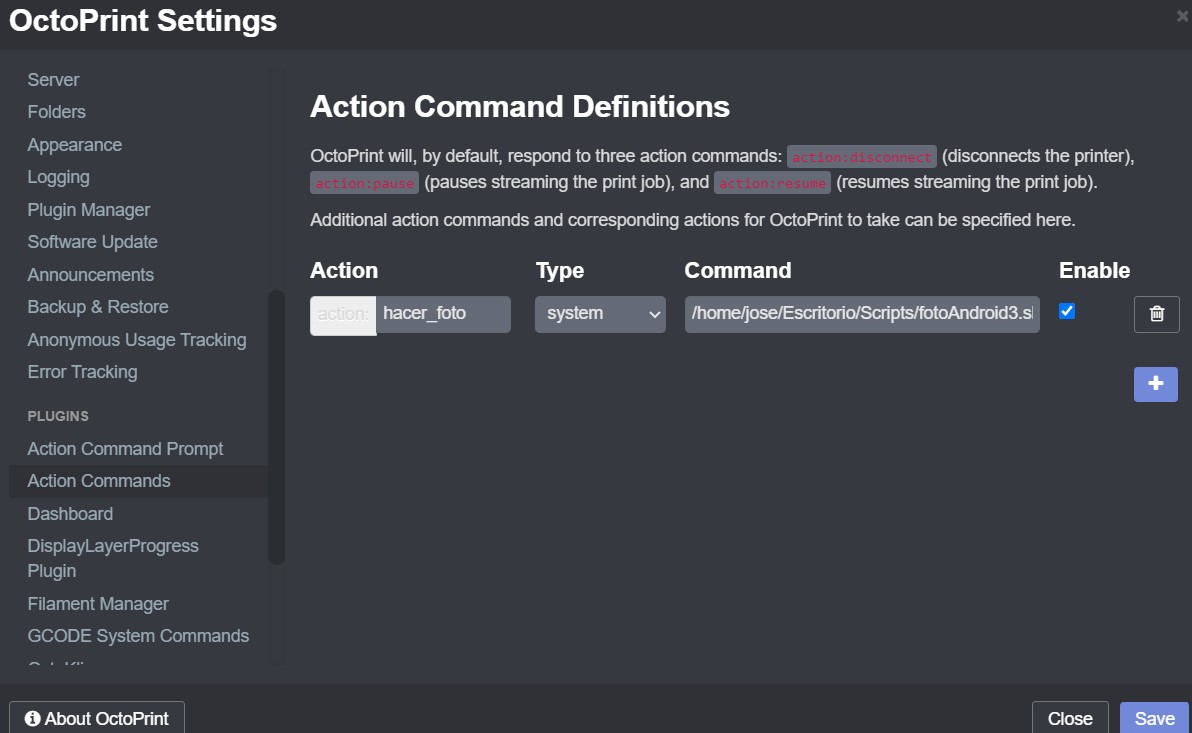
PS: Right now I'm using the "action command" plugin to send the OCTO1 command (which runs my script) after each layer (setting Cura and Simplify to do this job).
I'm going to try to make the Octolapse´s job manually for the moment. Can you share the gcode that Octolapse performs after each layer? I'm not sure if it just moves the extruder in XYZ or does a retract too
Thanks!
jccf07
on 25 Aug 2020
Octolapse can send gcodes after stabilization too, fyi. Add a new camera, and select the 'script camera' option. Not sure if the action commands plugin will be able to intercept the command, but it is worth a shot!
FormerLurker
on 25 Aug 2020
Oh, when I have time i will send a description of the gcodes octolapse generates. It depends a lot on the settings, but it can retract, lift, travel to the destination, wait for moves to finish (m400), take a snapshot, return, delift and deretract.
FormerLurker
on 25 Aug 2020
Octolapse can send gcodes after stabilization too, fyi. Add a new camera, and select the 'script camera' option. Not sure if the action commands plugin will be able to intercept the command, but it is worth a shot!
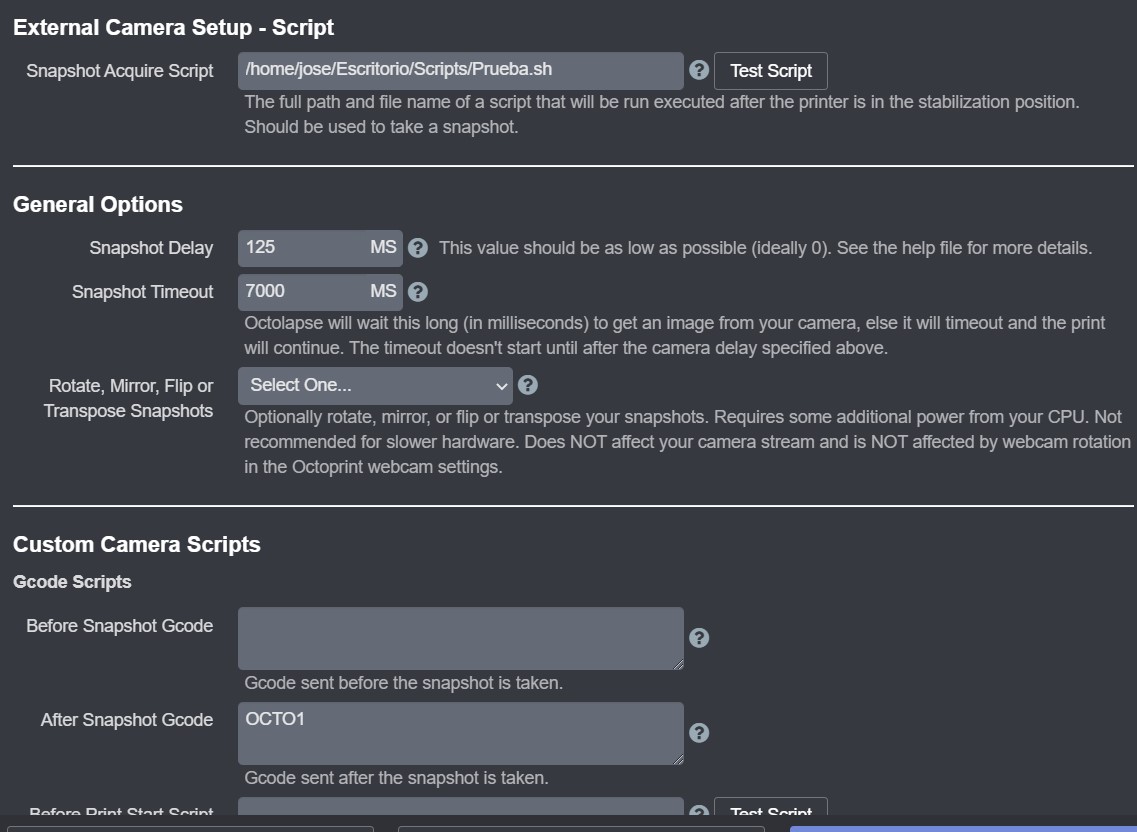
Thanks!! it is working now, I use a blank script, I just have this write inside:
!/bin/bash
exit 0
And then I use fyi, "After Snapshot Gcode" to write "OCTO1" (to run my own script with Acction Command Plugin). I attach screencapture
jccf07
on 26 Aug 2020
Excellent! Now I know that can work :) I will still try to figure out why the regular script camera isn't working for this (I think it should...).
Also, I recommend you set your Snapshot Delay to 0MS. That will shave a bit of time off of your print and marginally improve quality. If you notice shaky looking frames you can always turn it back up again.
Happy printing :)
FormerLurker
on 26 Aug 2020
Thanks again! I´m goint to set Delay to 0MS
only one more thing,
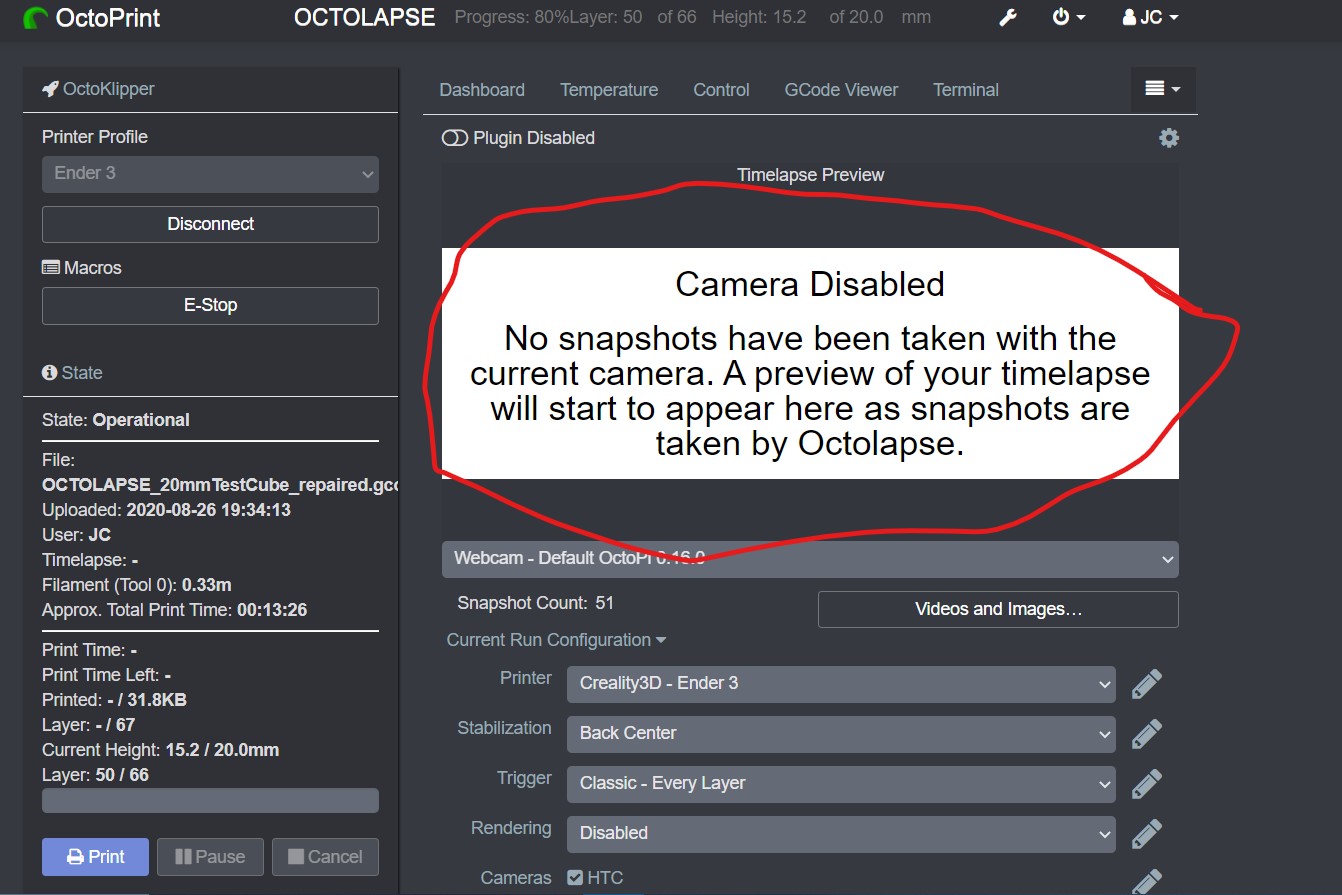
Is it possible that octolapse shows the last snapshot taken by my script? could I indicate a route and have octolapse show it?
jccf07
on 26 Aug 2020
You'll need to copy it down to your pi. This will be difficult since the gcode itself doesn't contain the file name you need to use. This is normally passed into the camera script as a parameter. However, it could be manually determined by exporting your camera profile. Look for the GUID value in the exported profile and put the image in the following location (assuming you are using OctoPi here as well as the default directories in the Octolapse main settings):
/home/pi/.octoprint/data/octolapse/tmp/octolapse_snapshots_tmp/latest_thumb_{camera_guid_here}.jpeg
The image should be scaled to 500px wide if possible. Not sure what will happen if you don't do this :) I believe it will be squished while maintaining the aspect ratio, but I am not 100% certain.
FormerLurker
on 26 Aug 2020
Thanks, I"ll try tomorrow and I write feedback
jccf07
on 26 Aug 2020
Related issues
 ME-Marty
·
18Comments
ME-Marty
·
18Comments
 ulitiy
·
3Comments
ulitiy
·
3Comments
 bradcozine
·
10Comments
FormerLurker
·
4Comments
bradcozine
·
10Comments
FormerLurker
·
4Comments
 Kesiunas
·
13Comments
Kesiunas
·
13Comments