Octolapse: V0.4.0rc1.dev2 Feedback
This issue is to be used for reporting your experience using V0.4.0rc1.dev2. If you are NOT using this version, please create a separate issue.
You can see the release details here. You can also find installation instructions here. Please let me know if the instructions need to be updated at all.
All feedback related to the newest release is welcome here! Feel free to report problems, successes, likes, dislikes, suggestions, or just let me know that you tried it out. ANY feedback is helpful, and I appreciate your time and effort.
If any issues are found (and I'm sure they will be), I will either ask you to create a new issue, or I will create one and send you a link. This will keep things clean and on-topic.
You might want to check here if you are experiencing any setup or installation issues. Please feel free to post any feedback about that guide here too!
THANK YOU SO MUCH for helping me out!
 FormerLurker
All 73 comments
I was about to start a print for the night with the new RC - but early on noticed weird behavior. I decided to cancel the print and will try to explore further tomorrow.
Setup: Prusa MK3S, Logitech C920
I tried setting a pretty short print (1.5h - this model) with stabilization set to back right, trigger to smart - high quality, rendering - mp4 60fps,
The extruder did go to the back right, and a snapshot was taken, but then it returned to my model about to start a new layer but just hanging on top of it for what felt like 1-2 seconds without doing anything. I felt this might cause blobbing or stringing so decided to abort and run it when I can monitor it on hand.
Also, a completely different issue - I noticed differences between the list when choosing a stabilization, and the dropdown panel in the stabilization config modal. I think the one in the modal is showing the previous config options (including one called "Does not exist - test option", which is not selectable)
Pretty early feedback, but I hope it might prove useful.
 tomrav
on 4 Sep 2019
tomrav
on 4 Sep 2019
@tomrav, thanks for reporting the stalling issue. I've seen it too but am not sure what's going on. It seems to happen only once for me, and usually at the beginning, but I've been seeing it with maybe 50% of the vase mode prints I've been testing. The printer responds with a 'Busy' message, then Octolapse resumes once the message is cleared.
I actually reported this issue a while back on the OctoPrint git page, but had trouble reproducing it so I closed the issue. I'm going to see if I can find a reliable way to reproduce this.
The next time you try, see if you can catch it in the act. If it's happening to you in the same way it's happening to me, you'll notice that it does NOT stall immediately after the the extruder moves back from the snapshot position, but rather a few gcodes after this.
Regarding the drop down issue, can you send a pic? I'm not sure I understand exactly what you are seeing. The 'Does not exist - test option' is actually in the profiles.json (I use it for testing errors), but will be removed after the build is promoted to a Release Candidate. However, it should be selectable, but it should throw an error when it is selected.
FormerLurker
on 4 Sep 2019
Hi @FormerLurker!
the pre-release fail to upgrade, failed in compile command.
 amsbr
on 4 Sep 2019
amsbr
on 4 Sep 2019
Hey there @amsbr! I see the errors. Oh the joys of getting all the different compilers all playing nicely together :)
I see the issue, and will try to push a hotfix to the same version. I'll let you know when it's complete.
FormerLurker
on 4 Sep 2019
@amsbr, can you try installing with the plugin manager using this link: https://github.com/FormerLurker/Octolapse/archive/devel.zip
I had to remove all enum scoping, and therefore had to do some renaming to prevent name clashing, which is most unfortunate. Refactoring generally goes without a hitch, but I didn't want to push a hotfix without some additional testing. I'll clean up the horrible enum names I had to use later :)
FormerLurker
on 4 Sep 2019
@FormerLurker I tried this but not worked.
I edited setup.py and added these flags to copt:
'unix': ['-fpermissive', '-std=c++0x']
now full compiled and installed. I go to try this version. :)
amsbr
on 4 Sep 2019
Ah, are you a c++ person? In any case, that's awesome! Once i understand
what you did, ill update setup.py. I will look into those flags and see
what they do, and hopefully I will learn something!
On Tue, Sep 3, 2019, 8:24 PM Anderson Silva notifications@github.com
wrote:
@FormerLurker https://github.com/FormerLurker I tried this but not
worked.I edited setup.py and added these flags to copt:
'unix': ['-fpermissive', '-std=c++0x']
now full compiled and installed. I go to try this version. :)
—
You are receiving this because you were mentioned.
Reply to this email directly, view it on GitHub
https://github.com/FormerLurker/Octolapse/issues/378?email_source=notifications&email_token=AH6RJOBRHXMICF3URNBU2KTQH4E4NA5CNFSM4ITJ5KMKYY3PNVWWK3TUL52HS4DFVREXG43VMVBW63LNMVXHJKTDN5WW2ZLOORPWSZGOD52BFEA#issuecomment-527700624,
or mute the thread
https://github.com/notifications/unsubscribe-auth/AH6RJOD2BYXKKFZEZF2XYNLQH4E4NANCNFSM4ITJ5KMA
.
FormerLurker
on 4 Sep 2019
Ah, are you a c++ person?
I try a little of everything :)
I had problems with others c++ codes in a64 boards, these and other flags helped to fix without change code.
c++0x for compatibility with another c++ standard and, fpermissive ignores nonconformant errors to warning (Downgrade some diagnostics about nonconformant code from errors to warnings. Thus, using -fpermissive will allow some nonconforming code to compile. -fpermissive ).
amsbr
on 4 Sep 2019
What board/os are you running exactly? In any case, i hope to make the c++ python extension installable via pip asap. I've no doubt it will be a can of worms...
Fyi, if both smart and classic triggers work, your c++ magic probably worked :)
FormerLurker
on 4 Sep 2019
I'm using an Orange Pi Win Plus with the aarch64 kernel in Armbian, other boards aarch64 is complicated some code builds
amsbr
on 4 Sep 2019
The installation failed on OctoPi 0.14.0, OctoPrint 1.13.11. Here is the log:
plugin_pluginmanager_console.log
Let me know what else you need.
 b-morgan
on 4 Sep 2019
b-morgan
on 4 Sep 2019
Thanks @b-morgan, that was helpful. I've used part of @amsbr's advice, in that I added a new compiler type called 'unix', and have added the C++11 specification. However, some of the refactoring I did yesterday (rather hastily) also have problems in some compilers. I pushed a fix that might work, but I can only test it on my dev machine right now since I'm printing a replacement part (if it fails I'm in trouble, lol!).
Feel free to try it out from this url: https://github.com/FormerLurker/Octolapse/archive/devel.zip
If it fails, send me the log and I can fix the issues one at a time. At some point I'll figure out how to request your compiler version so I can just test it from my pi and save you the trouble :)
FormerLurker
on 4 Sep 2019
@b-morgan and @amsbr, I think I have the C++ issues fixed. This appears to be an issue for anyone who has not updated their distribution, which is why not everyone is having the problem. To solve it I've added compiler arguments for the 'unix' compiler (it's only being reported as unix, but appears to be arm-linux-gnueabihf-gcc). Turns out the refactoring I did also was not 100% successful, and I had a parameter name equal to an enum type name (this is why you shouldn't do things at the last second and just push it in, lol!).
Long story short, I've been able to install it with the older compiler, and have done some tests that indicate the compilation is working.
Just reinstall to obtain the fix. I didn't bother pushing a new release since it's just a compile error. If you want to install from a URL use this: https://github.com/FormerLurker/Octolapse/archive/v0.4.0rc1.dev2.zip
I'm humbled and thankful for all of your efforts and reports! Please keep them coming!
FormerLurker
on 5 Sep 2019
@FormerLurker I installed it from URL and works fine!
amsbr
on 6 Sep 2019
I just wanted to add that I installed dev2 on top of v0.3 from the archive with no issues (I didn't try using the update manager).
I was having a lot of issues getting feature detection to work on v0.3 (layer height changes failing to trigger the snapshot) and the Smart - High Quality setting worked perfectly on v0.4 with no obvious degradation in print quality when compared to printing without OctoLapse.
The instructions for Cura and the Pi Cam worked perfectly and manual camera settings changes are persisting properly across reboots. Great work, thank you!
 rossbearman
on 7 Sep 2019
rossbearman
on 7 Sep 2019
Ok...followed the guides here, here and here to get 0.4.0rc1.d2 installed and working. Had success on the install, but could not get it to run with my slicer, Cura 4.2.1. After pasting the revised start gcode into my machine's settings and reslicing, I get this error when I try to print it: _"Octolapse Startup Failed Unable to start the timelapse. Cancelling print. Error: Unable to start the print. Some required slicer settings are missing or corrupt: Retract Before Move,Lift When Retracted"_
here is my gcode
here are my octolapse settings
here is what my machine start gcode looks like:
; Script based on an original created by tjjfvi (https://github.com/tjjfvi)
; An up-to-date version of the tjjfvi's original script can be found
; here: https://csi.t6.fyi/
; Note - This script will only work in Cura V4.2 and above!
; speed_z_hop = {speed_z_hop}
; retraction_amount = {retraction_amount}
; retraction_hop = {retraction_hop}
; retraction_hop_enabled = {retraction_hop_enabled}
; retraction_prime_speed = {retraction_prime_speed}
; retraction_retract_speed = {retraction_retract_speed}
; retraction_speed = {retraction_speed}
; speed_travel = {speed_travel}
; retraction_enable = {retraction_enable}
; layer_height = {layer_height}
; smooth_spiralized_contours = {smooth_spiralized_contours}
; magic_mesh_surface_mode = {magic_mesh_surface_mode}
G28 ;Home
G90 ; use absolute coordinates
M84 ; use absolute distances for extrusion
G92 E0 ; zero the extruded length
G1 X40 E25 F500 ; Extrude 25mm of filament in a 4cm line
G92 E0 ; zero the extruded length
G1 E-1 F500 ; Retract a little
G1 X80 F4000 ; Quickly wipe away from the filament line
G1 Z0.3 ; Raise and begin printing.
 monkeyprolabs
on 26 Sep 2019
monkeyprolabs
on 26 Sep 2019
For the oddest reason, whenever I use octolapse with this version, Octoprint just completely freezes up and wont let me cancel or do anything. I'd have to restart Octoprint in order to get out of the freeze
 NovaViper
on 12 Oct 2019
NovaViper
on 12 Oct 2019
@monkeyprolabs, just switch your slicer type to 'Automatic' and you should be good to go! I will try to clean up the error message you are seeing, which is letting you know there are some settings in your profile that have not been entered. The 'Cura' type profile expects you to manually enter the settings, but the automatic profile will pull the settings from your gcode. I may need to revisit that since this is the second time I've seen that problem. I think the short term fix is to make this more obvious in the guide, and to improve the error message, but eventually I'll probably need to revisit the 'Slicer Type' drop down and consider removing the manual configuration altogether, though that might cause another set of issues.
FormerLurker
on 12 Oct 2019
@NovaViper, I'm about to drop V0.4rc1.dev3, which has a fix that might solve your issue. If you want you could update from the dev branch using this link and see if that helps: https://github.com/FormerLurker/Octolapse/archive/devel.zip
FormerLurker
on 12 Oct 2019
Octolapse 0.4.0rc1.dev2 here:
I've just updated the stable one that I had. And after updating my g-code files from PS to use verbose, I'm still getting errors "Automatic settings extraction failed [...] Missing settings: Retraction Length, Retraction Speed, Deretraction Speed, Z Lift Height" (btw. those warning messages do dissapear really fast - had to restart the print and take a photo to read it). And afterwards a stabilization error after each layer.
Also on update my previous settings were not used - it atomatically changed to automatic detection.
 szafran81
on 21 Oct 2019
szafran81
on 21 Oct 2019
@szafran81, can you connect to your pi (sftp works nicely), browse to /home/pi/.octoprint/data/octolapse, download settings_backup_0.3.4.json, post it to gist.github.com and paste a link here? I'd like to import your settings run the migration process through my debugger.
Also, can you also post the gcode file you were using to gist and post a link to that as well? If there is not an obvious problem I might ask you to create a new issue.
Also, the missing settings error message isn't supposed to close itself, so I'm confused by that. However, I've done a TON of work on the error popups recently to try and deal with some of the confusion I've seen about the new settings extraction and gcode preprocessor. It could be that your issue has already been fixed in the devel branch. I'll probably ask you to update soon, but not before I take a look at your current issue.
Regarding automatic settings, this is the intended upgrade path for printer profiles using slic3r variants and simplify3d. This is the first time I've seen this kind of issue extracting settings for PrusaSlicer, so I'm hoping they haven't changed their program and broken settings extraction :(
FormerLurker
on 21 Oct 2019
0.3.4 backup: https://gist.github.com/szafran81/f71f9098b2ed2c3d7d9a43fa07e4389a
current settings: https://gist.github.com/szafran81/1ef23b5bda37ea887494b0924027f268
g-code: https://drive.google.com/open?id=1JN0OL-9k60P5KmfiSua3pfy4QhCVoXeo (gist didn't eat that one very well - truncated always at ~25k lines, and that's not even half).
szafran81
on 21 Oct 2019
UGGG.. They totally changed their settings on me between 2.0 and 2.1.. :( GRRRRR... Been stable for YEARS, now it's different. Ok, well that will take a while to fix. Going to have to add a new slicer type probably. Cura did the same darn thing, but much less severe (they only changed a couple names around).
FormerLurker
on 21 Oct 2019
@szafran81, can you try slicing something in single extruder mode and see how that works? I'm suspecting that the changes might just be for multi extruder mode. In any case, to make your gcode file work correctly I have to implement multiple extruder/multi material support, which is something I've been putting off due to the complexity. I'm not sure if I want to tackle that now or wait until later. I'll think about it.
FormerLurker
on 21 Oct 2019
Here you go: https://drive.google.com/open?id=1muFFkNvmHqVhcPnr59HW0PFBiKnEpo4u
But from what I've seen not much changes (except the start and end g-codes).
In single mode it generates Tc and Tx codes and in multi it generates proper T codes with a extruder number (I only use the numbered one even in single filament prints since I don't have to go to the printer and select which filament to use from the LCD panel).
szafran81
on 21 Oct 2019
Yup, it uses indexed settings when in multi extruder mode. Single extruder mode looks fine. At the minimum I'll add an error message for that. I'd like to just fix it, but it REALLY changes the UI for manual setting entry. It will probably take many months, and would need to be implemented for cura, simplify, and the 'other' slicer types too, including manual entry and settings extraction. Total bummer.
FormerLurker
on 21 Oct 2019
Here is a 5-filament calibration print if you'd like to play with it: https://drive.google.com/open?id=1uhDtBpOZP73fMX4vtAyQJ-CZePo-BbsL
I don't see that as a problem - I'll just use the manual settings as I did until now, and everything worked fine. But I think it would be nice if there would be a note stating that auto is a no go for mmu prints.
szafran81
on 21 Oct 2019
@szafran81, thanks for the gcode, and thanks for alerting me of the issue. I've been thinking about what changes will be necessary to support multi-material/multi-extruder prints, and I think the solutions are obvious for everything except manual settings entry. I'll put some thought into that and may post some ideas in a new thread. I'll mention you in any new thread I create.
FormerLurker
on 22 Oct 2019
I couldn't get the dev build to work with my Raspi Camera v2.1 due to Camera Test Failed.
An unknown webcam server type 'unknown' is being used for the 'Webcam - Default OctoPi 0.16.0' camera profile. Currently only MJPEGStreamer is supported. Unable to apply custom image preferences.
This is raised in _test_mjpg_streamer_control which fails to discern the server type of the request. This is apparently caused by the mjpg_streamer process crashing when ?action=command&id=-1 is requested. Opening webcam/?action=command&id=-1 in a browser yields a 502 error.
2019-10-29 19:16:25,468 - octolapse.camera - ERROR - An unknown webcam server type 'unknown' is being used for the 'Webcam - Default OctoPi 0.16.0' camera profile.  Currently only MJPEGStreamer is supported.  Unable to apply custom image preferences.
2019-10-29 19:16:25,468 - octolapse.camera - ERROR - An unexpected error was raised while testing custom image preferences for the 'Webcam - Default OctoPi 0.16.0' camera profile.
Traceback (most recent call last):
  File "/home/pi/oprint/local/lib/python2.7/site-packages/octoprint_octolapse/camera.py", line 350, in _test_mjpg_streamer_control
    raise CameraError('unknown-server-type', message)
CameraError: unknown-server-type: An unknown webcam server type 'unknown' is being used for the 'Webcam - Default OctoPi 0.16.0' camera profile.  Currently only MJPEGStreamer is supported.  Unable to apply custom image preferences.
I am not sure if this is related to webcam/control.htm only containing (null) HTTP output plugin.
See https://github.com/jacksonliam/mjpg-streamer/issues/171.
The camera stream itself works fine and I don't really need camera configuration besides the parameters supplied in /boot/octopi.txt.
Using OctoPrint 1.3.12 on OctoPi 0.15.0
 DiddiZ
on 29 Oct 2019
DiddiZ
on 29 Oct 2019
@DiddiZ, Are you getting this error when you click on the 'Test' button below the Snapshot Address Template in the Camera Profile?? If so this is probably a bug, unless somehow you have custom image preferences enabled:
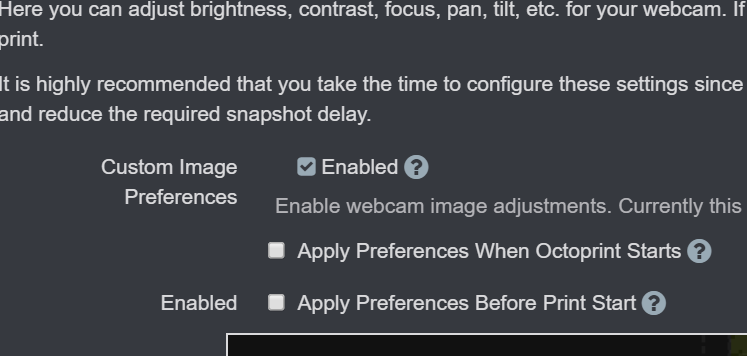
If this is checked, it may be a settings migration issue that I'll have to deal with somehow.
In the meanwhile, check out this guide that shows how to get a RPI cam running with custom image preferences , including unlocking control.htm. WARNING: I've gotten some reports that this does not work for every user, but I've not been able to pinpoint the cause yet. If you follow the guide, let me know how it goes. Any feedback is welcome!
FormerLurker
on 29 Oct 2019
@FormerLurker Yes, this happens when clicking the Test-button. Custom Image Preferences is _not_ checked.
I think _test_web_camera_image_preferences is called when pressing the button even if custom image preferences is not checked:
                elif not is_before_print_test or (
                    is_before_print_test and
                    camera_profile.enable_custom_image_preferences and
                    camera_profile.apply_settings_before_print
                ):
                    CameraControl._test_web_camera_image_preferences(camera_profile, timeout_seconds)
Thanks for the guide, I already followed it until step 6, where I couldn't progress. Will try step 7.
In step 4, I think it should be camera="raspi".
Edit: I can't even enable Custom Image Preferences, same error as above: The mjpg_streamer process crashes.
Edit 2: There are two steps 7 in the guide.
DiddiZ
on 29 Oct 2019
@DiddiZ, camera MUST = usb there or else it wont work. I will try to debug your error, thanks for providing such a complete description!
FormerLurker
on 29 Oct 2019
@FormerLurker With camera="usb" it works now. I guess I messed up the camera_usb_options before, so mjpg_streamer didn't start. Thanks :)
DiddiZ
on 29 Oct 2019
In normal situations that line should be raspi, but not when that driver is added to the module file. I will try to emphasize that in the guide.
FormerLurker
on 29 Oct 2019
@szafran81, you'll be happy to know that I added multi-extruder/shared extruder multi-material support to Octolapse! I thought it would take forever, but it wasn't so bad. I did stay up pretty late a few nights in a row to get it finished :)
I hate doing more settings migrations for release instances than I have to, so I figured it would be best to get this feature implemented and over with. That is doubly true since the settings are already WAY different than 0.3.4.
I still have to add some options for Slic3r/Slic3r PE/Slicer Prusa Edition for single material mode (default extruder or something, I haven't figured out which), but that only applies for manual settings entry (works fine with auto-configuration). Also, I haven't run any test prints yet, only via the debugger/virtual printer. I'm going to be tied up for the next week or so, but I'll create a new issue for this and will invite you (and anyone else with an MMU/multi-extruder printer) to help test once I'm a bit more confident that it won't just fail immediately :)
FormerLurker
on 30 Oct 2019
I manually selected the Slic3r/Slic3r PE/Slicer Prusa Edition slicer and it asked for me to fill in missing values. Once I entered them the print started normally. Running first print now, but it seems to be working. This is on a Prusa MK3s/MMU2s.
 x50arm
on 2 Nov 2019
x50arm
on 2 Nov 2019
@x50arm, you might want to check out the automatic slicer settings option. If you do, let me know how it works!
FormerLurker
on 2 Nov 2019
@FormerLurker his setup is the same as mine, so auto probably will do the same as in my case ;)
szafran81
on 2 Nov 2019
@FormerLurker his setup is the same as mine, so auto probably will do the same as in my case ;)
I initially had it set to automatic and I got missing information failure.
x50arm
on 2 Nov 2019
I see, so this is in an mmu setup. I JUST finished preliminary mmu/multi/shared extruder support. It is pushed to the devel branch. Ive only done one test print so far, but it should be debugged enough for testing in a week or so!
FormerLurker
on 2 Nov 2019
@FormerLurker that's nice. I've done some testing on the 0.4.0rc1.dev2 (still have some printing in the queue, so I can't do test prints right now, and I'm testing as I go through the queue) and haven't been able to get any snapshots/timelapses. I've tried the Smart-HQ and the Classic-Gcode without auto recognition of slicer settings. I see that the extruder is going to the correct position, and then it goes right back, instead of waiting 500ms (this is my stabilization delay) and taking a screenshot. The only errors I'm getting right now are those at the end of the prints that there were no spanshots recorded (x3 - one for each octlapse enabled camera).
szafran81
on 3 Nov 2019
@szfran81, I found some errors in the default settings json (dictionary key mismatches) in both the printer and snapshot profiles. I've since fixed these, and will be very careful not to make a similar mistake in the future. You could try the following for now to see if it helps:
- delete all printer and all but one trigger profiles. Octolapse won't let you delete an active trigger profile, but later steps will remedy this.
- Create a new printer profile and select your make and model, then save the profile.
- Create a new trigger profile and for testing select 'smart layer - compatibility' from the drop down list. Save that profile.
- Set the new trigger profile to the current one, and delete the other remaining trigger profile.
- Try another print.
I will be working on the next RC for the next couple days, so hopefully I can get it pushed out soon. If you'd rather wait for that all you'd have to do is restore the defaults to fix this issue. I'm going to try to add a fix in the settings migration for folks who are using 0.4.x as well, so it's possible that you won't need to clear your settings out at all.
FormerLurker
on 4 Nov 2019
Thanks for the steps. But I was unable to follow them since in my case the delete profile buttons were outside the options window, and cut off (so unavailable). I've even tried to disable Themeify plugin and multiple ctrl-F5 refreshes.
So I've loaded defaults, and configured everything from scratch. Right now I've tried the Gcode trigger. Nothing has changed - extruder goes where it's supposed to, then without any delay it comes back and resumes printing. No snapshots recorded. No errors during print displayed or recorded in logs (normal logging enabled).
I'll try the suggested 'smart layer - compatibility' with the next print and report the results. At least 12h until that - so all can do for now is wait.
If you would like to take a look:
My current settings.json: https://drive.google.com/open?id=1sgixZ7GmkWWQfhc9yW68ctpUc6dACT0Z
My current gcode: https://drive.google.com/open?id=1CNQ4-r9_fHuj1g20T8adhb2ADTw2tSra
EDIT:
So... Me being so great... I forgot to put supports in that g-code, on purpose ;)
That way I've checked the 'smart layer - compatibility' - the same outcome as above.
My current gcode: https://drive.google.com/open?id=1C1DTX1CSjLa9-XtCHQhHUWOaM5rMVdi-
and settings: https://drive.google.com/open?id=1OVFYfz50IZpWnPyGbAW4UyBhgN0ia--s
szafran81
on 5 Nov 2019
@szafran81, can you take a snapshot of the delete profile buttons? I need to see what it looks like in order to fix it. Also, what browser/os? FYI, I have themeify installad and it causes no issues, but I do NOT have access to Safari unfortunately.
Also, restoring the defaults won't fix the problem I mentioned above since the defaults have an issue.
When you say 'normal logging' what do you mean by that? The default setting (Live Print) logs only errors, and not all problems are errors per se. Select either 'Test Mode - Debug Issues' or 'Live Print - Debug Issues' to generate a full log.
I'm going to take a look at your settings, will try to find the GUID issues, and will post a corrected version that you can import via OctoPrint Settings->Octolapse->Import Settings.
FormerLurker
on 5 Nov 2019
@szafran81, regarding the missing buttons, check the zoom level in your browser. I found a zoom issue there in chrome and FF and just fixed it.
FormerLurker
on 5 Nov 2019
Hi @FormerLurker - just a bit of feedback for you... Spent ages yesterday getting my old Sony Z5 working with Octolapse. Thought the problem was with the video stream from IP Webcam but eventually realised it was a down to well documented trigger issues that I should have read about much earlier. Guessed you had addressed these in the dev version and with that installed and settings updated all my problems disappeared. Didn't help that my test model was a precision cube, sometimes in vase mode. Haven't checked with vase mode yet.
Testing the snapshot address reports a failure due to unknown server type but ignoring that still lets you save the settings. All works fine with IP Webcam stream set MP4. Didn't expect the custom preferences to work as that's a bit different and not really needed here as can all be done and more through browser window on IP Webcam stream.
I'll run through setting up rpi cam and a Panasonic mirrorless over the weekend if I get a mo and see how they go.
Great plugin - thanks!
 timncfc62
on 8 Nov 2019
timncfc62
on 8 Nov 2019
Hi, I tried dev2 and devel branch, both ends stuck after install and breaking all plugins. I only see the octolapse tab with "Loading Octolapse..." message. nevermind if I install from scratch or if I upgrade from version 0.3.4 (even I removed all octolapse's folders)
Also, at the settings menu, the save button has the spinning dots, not being able to save any config. The cancel button doesn't work either.
This is installed on a Raspberry 3, OctoPrint 1.3.12 running on OctoPi 0.15.1
Let me know if I can help to improve this awesome plugin.
Thanks in advance!
 sebaminguez
on 14 Nov 2019
sebaminguez
on 14 Nov 2019
@sebaminguez, it broke your entire instance!? Ug.. can you check tye log fille (plugin.octolapse.log and octoprint.log for uncaught exceptions) and see if there are any errors? Feel free to post them to gist.
FormerLurker
on 14 Nov 2019
I'm able to uninstall the plugin and recover the functionality, no worries.
I just install from devel url and end stuck in the same place.
In the logs I don't see any octolapse line :(
A new octopi version was released, I'll try a fresh install and I'll keep you posted.
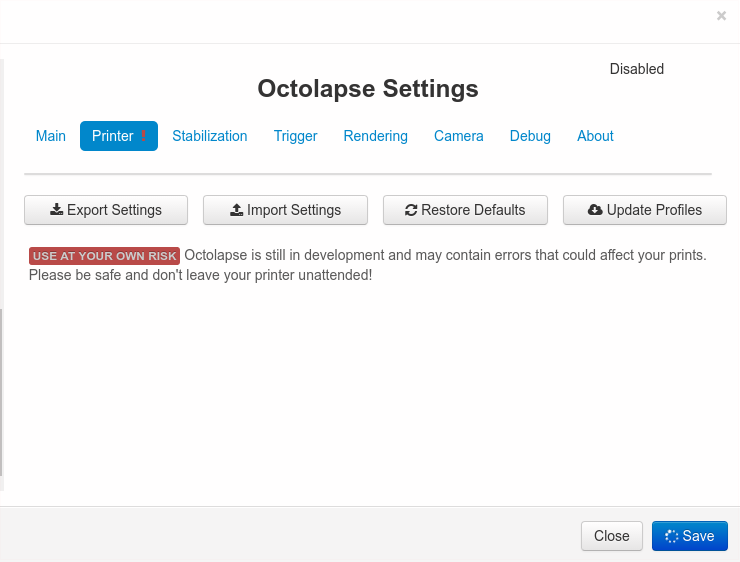 sebaminguez
on 16 Nov 2019
sebaminguez
on 16 Nov 2019
@timncfc62, anything in the browser console? I don't see anything in the logs :(
FormerLurker
on 16 Nov 2019
Sorry, not sure what you mean, as everything is working properly for me. FYI I did the setup for a rspi cam that went very smoothly - glad I can now adjust the setting from octolapse, but hit a dead end with the Panasonic (TZ70) when Gphoto reported is doesn't support capture.
timncfc62
on 16 Nov 2019
Sorry @timnfc62.. auto complete error. I meant to ask @sebaminguez if there were any console errors.
FormerLurker
on 16 Nov 2019
@timncfc62, anything in the browser console? I don't see anything in the logs :(
nothing :(
It's like all the system was waiting to octolapse to complete the initial setup. The browser interface ends like stock octoprint with the octolapse tab but any other plugin is not being shown or started.
Also, the buttons at octolapse settings page didn't trigger any action (export, import, restore defaults, etc)
plugin_pluginmanager_console.log
Do you recommend increase some log level?
sebaminguez
on 16 Nov 2019
@sebaminguez, can you export the octolapse settings and post them for me somewhere? Then try restoring the defaults, restart Octoprint, and see if that helps. Let me know.
Edit: this can all be done from Octoprint settings->Octolapse
FormerLurker
on 16 Nov 2019
The octoprint settings -> Octolapse buttons do not work.
I'm able to extract files from the command line
sebaminguez
on 16 Nov 2019
Sorrym I never used gist before. I hope you find the file settings.json in the following url https://gist.github.com/sebaminguez/b09d92b7ea881bd1cf893eb13cabae43
sebaminguez
on 16 Nov 2019
@sebaminguez , thanks for the settings! Unfortunately they both imported just find :(
Also, I notice you posted the pluginmanager console log earlier, and am just double checking that you looked at the browser console (F12). Please excuse me if you have already done this. It should look something like this:
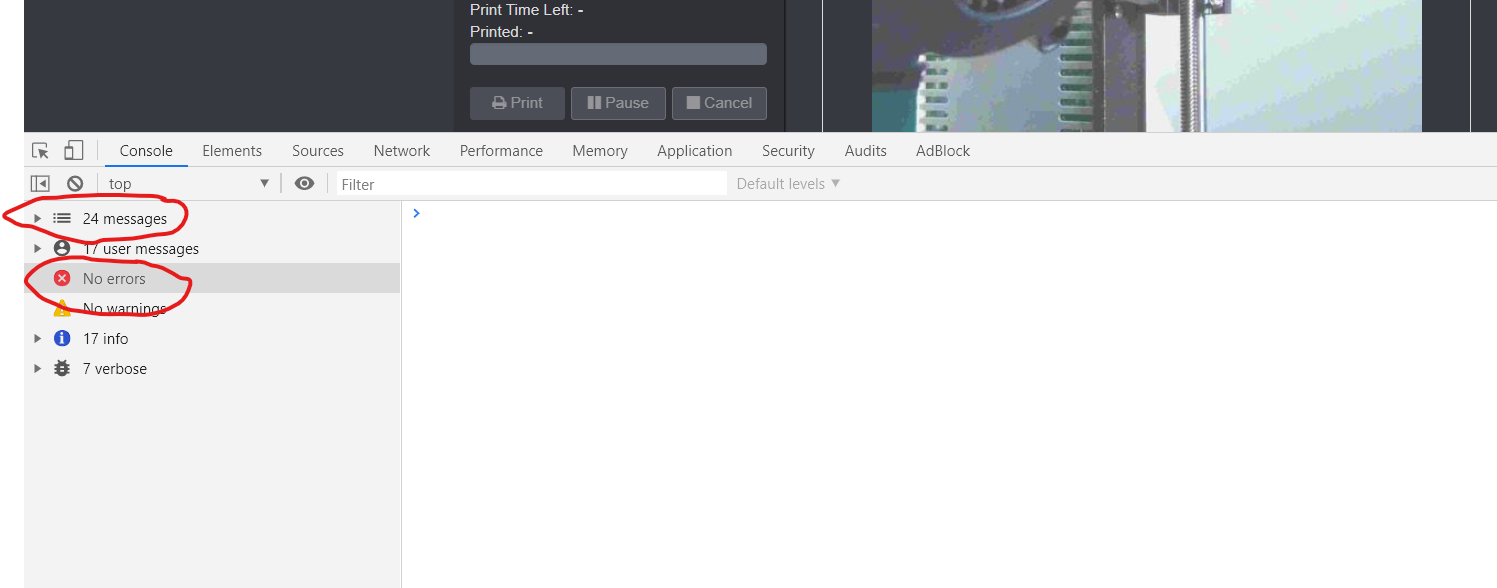
Also, it might be a good idea to disable your other plugins and reboot. I do see a lot of them in your log. It is possible that something is not playing nicely with Octolapse (or Octolapse is not playing nicely).
FormerLurker
on 16 Nov 2019
Oh! sorry! you were referring to the dev browser console!! my bad.
I disabled all plugins and removed and installed again from https://github.com/FormerLurker/Octolapse/archive/rc/devel.zip
but the same thing.
I found the following errors in the web console. I'll dig more into those
https://gist.github.com/sebaminguez/b09d92b7ea881bd1cf893eb13cabae43
sebaminguez
on 16 Nov 2019
Great!
The line 9609 of ./.octoprint/generated/webassets/packed_plugins.js file had an error, inluding a colon in the last function argument
on_complete: function (newValue, oldValue, wasConfirmed, wasIgnored,) {
I removed it
on_complete: function (newValue, oldValue, wasConfirmed, wasIgnored) {
And start working!!
sebaminguez
on 16 Nov 2019
do you want me to update to https://github.com/FormerLurker/Octolapse/archive/devel.zip?
sebaminguez
on 16 Nov 2019
Sweet! Let me see if i can find and fix that error before you update. Will msg you when finished.
FormerLurker
on 16 Nov 2019
@sebaminguez, it's fixed. My browsers must be a bit more lenient than yours, otherwise I would have found this :) You are good to go with the update. Thanks for the report!
FormerLurker
on 16 Nov 2019
Thanks for your support!
I updated to dev and works like a charm
Let me set the new smart stabilization and I'll send you a calicat timelapse video
sebaminguez
on 16 Nov 2019
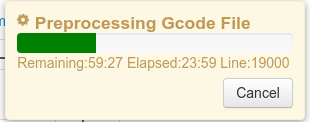
to print a calicat :(
sebaminguez
on 16 Nov 2019
Make sure your debug profile is set to 'log all errors'. My pi can parse 100mb in under 30 sec (pi3). Logging drastically increases the time
FormerLurker
on 16 Nov 2019
@sebaminguez, what OS are you running octoprint on? It could be that my C++ compilation flags are off if you already have logging enabled. I spent so much time on the fast preprocessor that it would be a shame if simple compiler flags are off.
FormerLurker
on 16 Nov 2019
I even disabled all logs and gets the same result. There is no IO disk while working but I have a lot of
2019-11-16 21:50:10,295 - octolapse.gcode_position - ERROR - The XYZ axis mode is not set, cannot update position.
2019-11-16 21:50:10,367 - octolapse.gcode_position - ERROR - The XYZ axis mode is not set, cannot update position.
OS: Description: Raspbian GNU/Linux 9.11 (stretch)
How can I verify the compilation flags?
From plugin_pluginmanager_console.log
2019-11-16 16:59:41,900 > Building wheels for collected packages: Octolapse
2019-11-16 16:59:41,901 > Building wheel for Octolapse (setup.py): started
2019-11-16 17:00:44,121 > Building wheel for Octolapse (setup.py): still running...
2019-11-16 17:01:44,677 > Building wheel for Octolapse (setup.py): finished with status 'done'
2019-11-16 17:01:44,678 > Created wheel for Octolapse: filename=Octolapse-0.4.0rc1.dev3-cp27-cp27mu-linux_armv7l.whl size=2024142 sha256=d81dcbc12e0c5b4c85cc85743307ca96c18611e2bc026614d1fdb469564d7d91
2019-11-16 17:01:44,678 > Stored in directory: /tmp/pip-ephem-wheel-cache-ypJnvy/wheels/f5/9f/78/3258a647d704cb959dcddaba971fc3566e375d117b17fb7bda
2019-11-16 17:01:44,679 > Successfully built Octolapse
Meanwhile, I'll double check the XYZ axis mode settings
sebaminguez
on 16 Nov 2019
Im not sure how to see what flags are used. Im travelling ATM, but will look into adding logging that.
Regarding the axis mode, see if your printer make/model exists in the octolapse printer profile drop down. If it does, a fully configured profile exists, and your axis mode error should go away.
FormerLurker
on 18 Nov 2019
Sadly still getting compile errors with dev2 and devel.zip when running python 3. While python2 still works it is scheduled to be removed from several distros after its EOS on January 1st.
PIP 19.3.1
Python 3.7.4
GCC 9.2.0
…
octoprint_octolapse/data/lib/c/python_helpers.o -O3 -std=c++11
octoprint_octolapse/data/lib/c/python_helpers.cpp: In function 'double PyFloatOrInt_AsDouble(PyObject*)':
octoprint_octolapse/data/lib/c/python_helpers.cpp:56:11: error: 'PyInt_CheckExact' was not declared in this scope; did you mean 'PyDict_CheckExact'?
56 |  else if (PyInt_CheckExact(py_double_or_int))
|           ^~~~~~~~~~~~~~~~
|           PyDict_CheckExact
octoprint_octolapse/data/lib/c/python_helpers.cpp:57:30: error: 'PyInt_AsLong' was not declared in this scope; did you mean 'PyLong_AsLong'?
57 |   return static_cast<double>(PyInt_AsLong(py_double_or_int));
|                              ^~~~~~~~~~~~
|                              PyLong_AsLong
octoprint_octolapse/data/lib/c/python_helpers.cpp:58:9: warning: converting to non-pointer type 'double' from NULL [-Wconversion-null]
58 |  return NULL;
|         ^~~~
error: command 'gcc' failed with exit status 1
 adlerweb
on 1 Dec 2019
adlerweb
on 1 Dec 2019
@adlerweb, i saw that the first python 3 rc just dropped. About six months ago I had Octolapse working in Python 3, so there shouldn't be too much to fix. I dont know enough about python 3 yet to write cross compatible code, but will start working on it soon. I recently discovered the six library, and have been using it extensively, but the c++ is much harder to deal with. The errors you pointed out are in a class that should contain python 2/3 compatible code, so I probably just need to fix a few things there. Im sure there will be a handful of other necessary changes too. I will let you know when I'm done 👍
FormerLurker
on 1 Dec 2019
@FormerLurker sorry for the rather large delay on my side.
This is how those buttons look on my side:
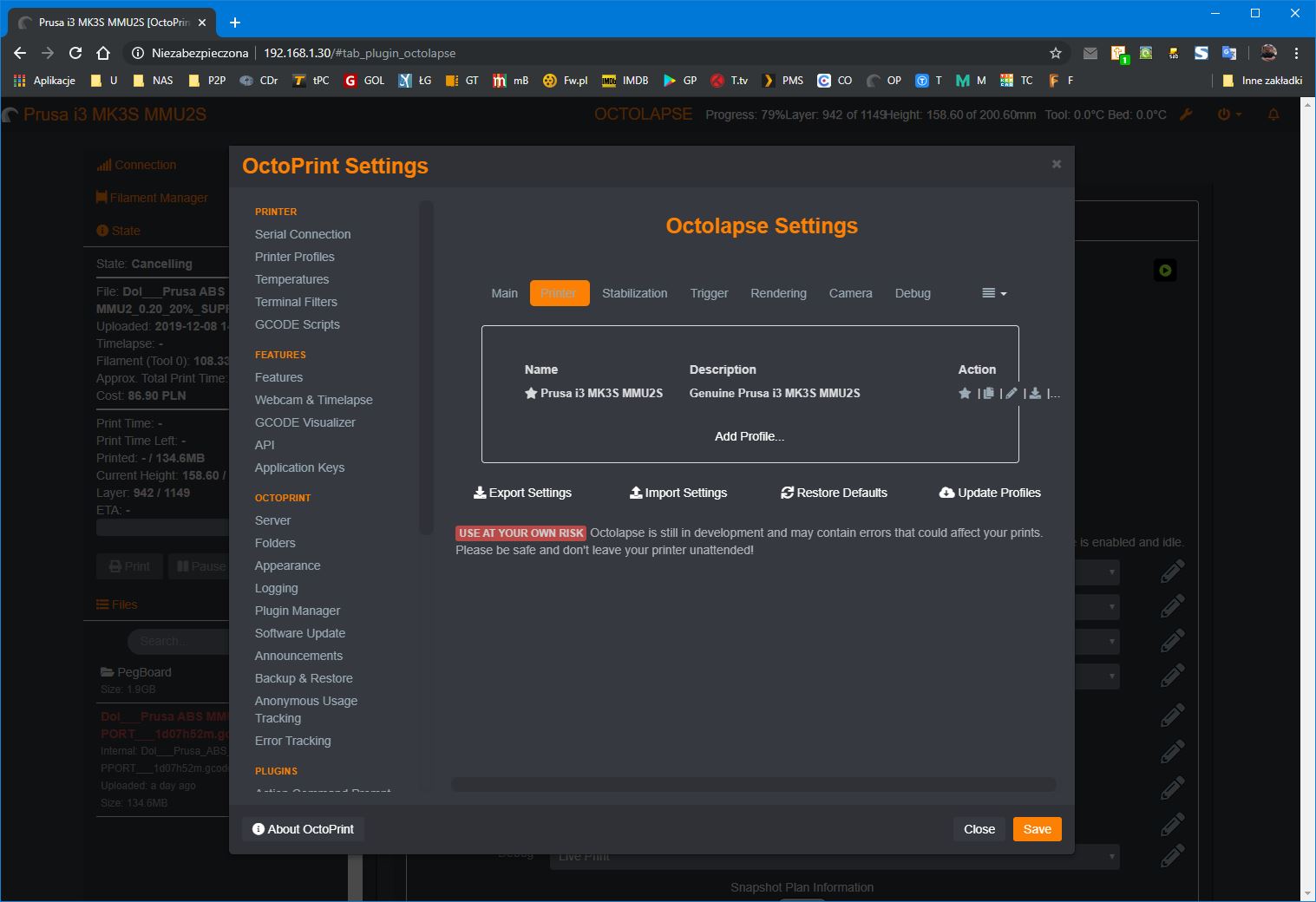
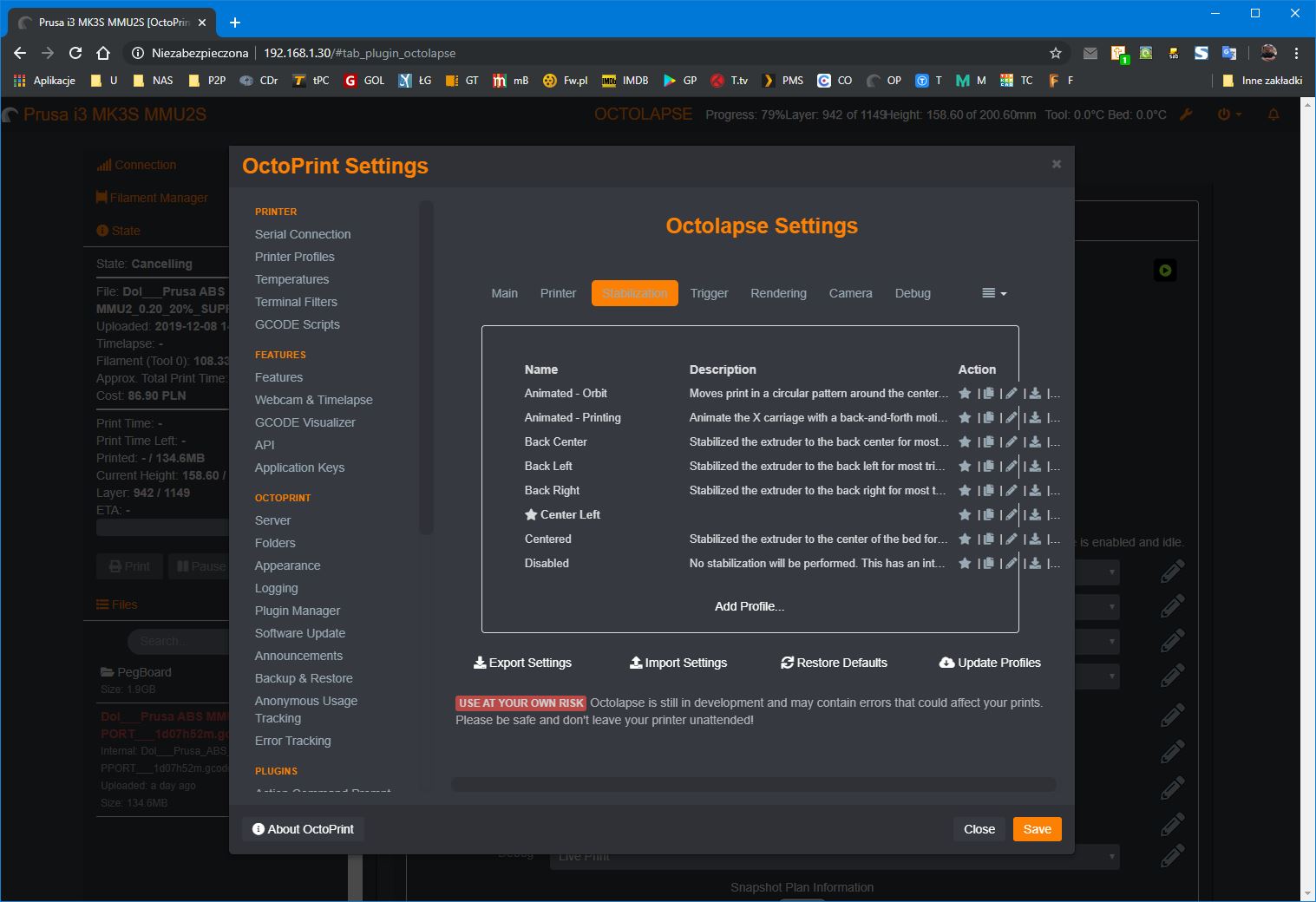
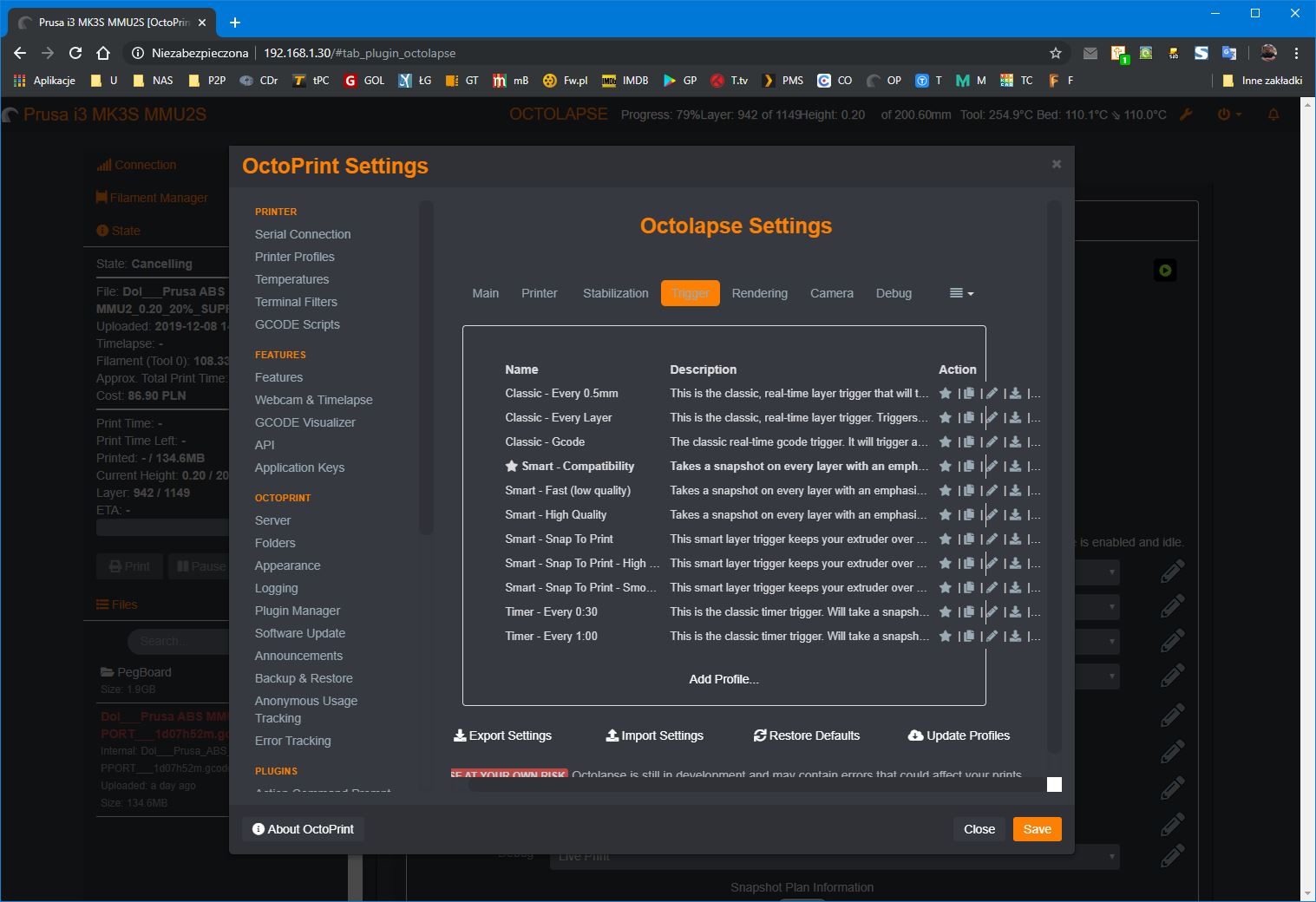
Scaling disabled in chrome - I've checked on 3 different PCs and 2 VMs with Win10 and chrome. Horizontal scrollbars move the tables just a couple of pixels.
Sorry but I had to go back to the stable version. I'm searching what's causing my web interface to have sometimes a couple of seconds lags. This is very annoying (more than annoying if I think that my OP setup runs on an i5 with 8GB of RAM and a SSD).
Also what I've noticed when the dev version was installed is that the errors that OL displayed at the end of print actually were displayed even up to about a minute before the printer ended printing. Same thing when I've cancelled a print - there was to much printed after the print was cancelled than it should (at least campared to how OP+OL behaved earlier). Just like something was creating an additional buffer that wasn't controlled properly. Weird things. I'll have more time to get more into testing this stuff during holidays/new year.
EDIT: Just checked - I can see all the buttons on stable version (but there are less of them - and they still go out of the line)
szafran81
on 9 Dec 2019
I had a lot of problems getting the current stable release working and seeing there might be some daylight on the other side I crossed the divide to good result so far:
- RaspPi B+, Cura 4.4, Artillery Sidewinder X1
- Loaded additional GCode into header
- Auto detection worked
- Test printed Matterhackers Astro Phil
https://www.dropbox.com/s/iwg50wl5uqnxb4c/CFFFP_Astronaut_Phil_A_Ment_20191229132302.mp4?dl=0
Yay! Looking forward to continued iterations.
 ciordia9
on 29 Dec 2019
ciordia9
on 29 Dec 2019
I neglected to close this issue after rc3 dropped (now rc4). Whoops! Closed :)
FormerLurker
on 26 Feb 2020
Related issues
 jccf07
·
9Comments
jccf07
·
9Comments
 gege2b
·
17Comments
gege2b
·
17Comments
 adcurtin
·
4Comments
adcurtin
·
4Comments
 systemik
·
14Comments
systemik
·
14Comments
 dgcntrk
·
18Comments
dgcntrk
·
18Comments