Octolapse: Feedback for new master release - v0.3.4
I've just pushed the first new master release since v0.3.1!
See the release notes here.
Please leave me installation feedback here, or comments about the new release. If you notice little issues, feel free to post them here. However, if you feel that there is a major bug, as in something that needs to be fixed ASAP, please create a new issue. This thread will be closed after I get enough feedback, and I want issue threads to stay open until they are resolved.
THANK YOU !
 FormerLurker
All 41 comments
First thing. I've updated (on latest OP rc) and rebooted my Odroid. Right after that had to run a print. Wasn't able to run any g-code. Turned off OL and print went fine.
The print will run for about 19h, so after it's finished I'll try again with OL tunred on, and then post some logs.
Sorry for the missing logs now, but had to run that print. Just putting it out there to see if I'm the only one with this problem.
EDIT: Just seen an error message on the screen I have connected directly to my Odroid. This didn't show on my PC when I've tried to start a print with OL turned on.
It said:
"Octolapse Startup Failed
Unable to start the timelapse. Cancelling print. Error: Your Octolapse printer profile has not been configured. Please copy your slicer settings into your printer profile and try again"
Note: I had a perfectly working config of OP/OL before that update.
 szafran81
on 15 Nov 2018
szafran81
on 15 Nov 2018
@szafran81, thanks for the comments! Did you get any error messages by chance, or it just wouldn't start?
FormerLurker
on 15 Nov 2018
@szafran81, check the Octolapse tab. I think there will be an error message there explaining that you have to configure your printer profile. There have been lots of changes to the settings, so you'll have to review them and save your changes before Octolapse will allow you to print.
FormerLurker
on 15 Nov 2018
@szafran81, you might find this tutorial useful. It explains how things have changed and shows you how to configure and use the new slicer based settings. I think you'll like it :)
FormerLurker
on 15 Nov 2018
@FormerLurker I'll do that after the print finishes. Sorry, but I've just done a quick update and reboot with this update - thought it would work OOB.
I've checked the OL tab and there were no messages before I've disabled it.
szafran81
on 15 Nov 2018
I updated today and I'm getting this error:
"XYZ movement was detected, but the axis mode has not been set. Please add a G90 or G91 to the top of your start gcode."
Already checked the gcode and the G90 is there. Any clue?
 psfbc
on 17 Nov 2018
psfbc
on 17 Nov 2018
@psfbc, are there any G0 or G1 movements before G90? If so, move g90 above them.
Or, change the default XYZ axis mode to Absolute within your octolapse printer profile.
Thanks for your post!
FormerLurker
on 17 Nov 2018
@psfbc, are there any G0 or G1 movements before G91? If so, move g90 above them.
Or, change the default XYZ axis mode to Absolute within your octolapse printer profile.
Thanks for your post!
I see some G1 movements before the G90. I attached the gcode in case you want to look at it:
MK3 PETG_C270_Camera_Mount.gcode.txt
Moving the G90 above them is a workaround or is it something I will need to do in the future?
Thanks.
psfbc
on 17 Nov 2018
It is a really good idea to set your axis mode before you make any movements, especially if you are printing from a host (like Octoprint). For example, some gcode could contain relative movements, or you could send a G91 manually through the terminal window. If you start a print, those g0/g1 commands that come before the g90 won't work correctly, and might crash your nozzle, or run into an end stop. That's really why that error is shown. Octolapse won't track movements or layer changes unless it know what the axis mode is.
I'm on mobile now, else I'd look at the gcode. I'll take a look tomorrow when I'm in front of my PC. I hope this was helpful in the meanwhile!
FormerLurker
on 17 Nov 2018
Would it be possible to simply disable whatever new functionality that needs the printer configuration updated rather than causing the whole printing process to fail.
This really sent me through a loop. I needed to get a print started and suddenly OctoPrint was simply canceling any print job I tried to start. Took quite a while to track the problem down to OctoLapse. Fortunately, I was able to simply disable OctoLapse to get back on track again.
Looks like some good new features. Look forward to possibility using some of them when I have the time to update the configuration.
 mountaintom
on 17 Nov 2018
mountaintom
on 17 Nov 2018
. . .
I'm on mobile now, else I'd look at the gcode. I'll take a look tomorrow when I'm in front of my PC. I hope this was helpful in the meanwhile!
If I understood you correctly the error message I'm getting is because some new protection code introduced in the new octolapse version, right? That code will check if there is movement commands before a G90/G91, right?
Anyway, I took a look at Slic3r PE "Original Prusa i3 MK3" printer settings and it contains the following start G-Code (the G-Code I sent before was generated with different profile, this one is the one that came with Slic3r PE, I think...):
_M115 U3.4.1 ; tell printer latest fw version
M83 ; extruder relative mode
M104 S[first_layer_temperature] ; set extruder temp
M140 S[first_layer_bed_temperature] ; set bed temp
M190 S[first_layer_bed_temperature] ; wait for bed temp
M109 S[first_layer_temperature] ; wait for extruder temp
G28 W ; home all without mesh bed level
G80 ; mesh bed leveling
G1 Y-3.0 F1000.0 ; go outside print area
G92 E0.0
G1 X60.0 E9.0 F1000.0 ; intro line
G1 X100.0 E12.5 F1000.0 ; intro line
G92 E0.0
M221 S{if layer_height==0.05}100{else}95{endif}_
There is G1 commends moving along X and Y only. Maybe I'm wrong, but wouldn't that be impossible to cause a crash?
Additionally I see a G28 command before the G1 commands, so even if there were G1 command moving along Z axe it would be safe, right?
I think this is original G-Code that came with Slic3r PE and since my knowledge of gcode is limited I feel uncomfortable changing it myself :)
Can you kindly comment please.
Thanks!
psfbc
on 17 Nov 2018
@mountaintom, did you not get a pretty detailed error popup from Octolapse when you tried to print? Also, did you not see a red error icon and message on the octolapse tab explaining that the printer profile needed to be adjusted?
I added that because so many people were trying to print without entering their slicer settings. This causes bad print quality and other errors, so I decided to.force users to adjust their settings before octolapse will work.
If you still want to bypass this, open your printer profile and click save. The error will go away.
FormerLurker
on 17 Nov 2018
@psfbc, this protection code is not new. Your code doesn't contain any z movements, so no nozzle crash problems. However, if your printer was in relative mode your second G1 would put your extruder at x160 y-3 instead of x100 y-3. That would not be good.
If I were you, I'd just put a G90 right above the g28.
FormerLurker
on 17 Nov 2018
@psfbc, fyi, I did submit an issue to prusa's GitHub about the missing G90. Previously their start gcode included one, but they removed it for unknown reasons. They have not yet responded to my request unfortunately.
FormerLurker
on 17 Nov 2018
The prints would cancel immediately after starting the print without any reason given, at least that I noticed on the default temperature page. I looked through the logs and the install log to see what what was going on and what the update was that I'd made as an auto reflex, and saw it was OctoLapse. When I went to the OctoLapse tab, at that point, I saw the message boxes. I tried disabling OctoLapse so see if that would let me proceed with my print-- until I have time to see what needs to be changed in my printer configuration and if there would be any unexpected side effects of making changes. Disabling works until I can make sure I understand the printer settings and make them correctly.
I only print files I slice externally, I'm under the (possibility incorrect) assumption that the detailed printer settings are for the cases where you let OctoPrint do the slicing. I'm OK with learning more about the printer settings in OctoPrint, just not in haste.
I believe you added the ability to add printer data/information captions to the time lapse. That is the feature I'm most looking forward to using. Thanks...
mountaintom
on 18 Nov 2018
@mountaintom, thanks for responding.
A popup error message should have been shown pretty much immediately after you clicked 'Print' like so:
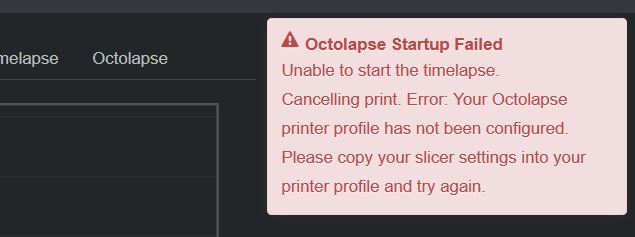
Would you mind going to the Octolapse tab, making sure that this printer error is showing:
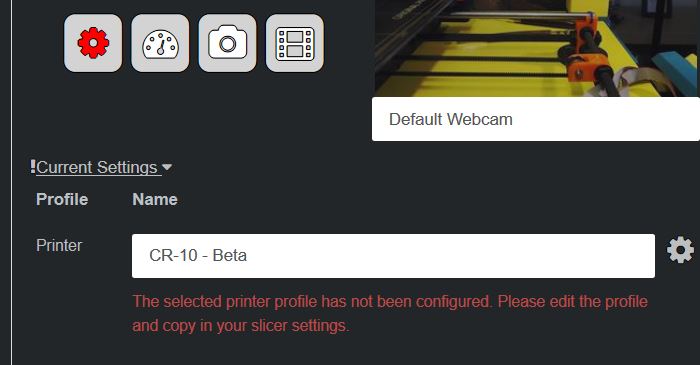
If it's not, select another printer profile and it should show up. Then click print. If you don't see the error pop-up, would you be willing to create a new issue? If that popup isn't displayed, that is a pretty big problem that I need to address ASAP since it will affect new users. It could be a browser issue, so please include any errors that show up in your javascript console. The plugin_ocotlapse.log file might also be helpful. Let me know if you need any help gathering that info.
FYI, Octolapse needs to know those slicer settings only so it can deduce the speed at which various features (infill, exterior perimeters, interior perimeters, supports, bridges, etc) are printed. This way Octolapse can prevent snapshots over critical parts of the print that can degrade quality. This is ONLY used if you are using one of the new 'High Quality' profiles, which use the new feature detection ability, which is one of my favorite new things in this version of Octolapse. It can nearly eliminate artifacts created by Octolapse. Unfortunately it requires a lot of info about your slicer to pull this off. It has nothing to do with slicing, though I can see why you thought this. Based on your report and those from some other folks, I realize that I need to somehow make this more clear, possibly by hiding those settings unless they are needed.
Regarding the printer data/information overly, you'll find this within the rendering settings. You need to manually install fontconfig if you are using a raspberry pi, else no fonts will be available. It works out of the box within Windows, and many flavors of Linux include this package by default, but if you don't see any available fonts, that's why. Only a few replacement tokens are included currently (print time, snapshot number, etc), but if you want any additional tokens, please let me know and I'll add them!
THANK YOU so much for your report! I'm looking forward to figuring out why this error message did not display and correcting it ASAP!
FormerLurker
on 18 Nov 2018
@psfbc, fyi, I did submit an issue to prusa's GitHub about the missing G90. Previously their start gcode included one, but they removed it for unknown reasons. They have not yet responded to my request unfortunately.
I don't think a one is needed there. The machine is homed before any moves. Doesn't matter where they go. If you go on minus then there are the endstops, and if go to big on plus then there are the software endstops. And if your machine after homing all axis allows to go more than it physically can then it is clear that you need to correct your FW config and reflash as soon as possible.
Anyways this code should work on every properly configured machine, so there is no reason for the G90 or for checking if it's there.
szafran81
on 18 Nov 2018
@szfran81, it is a subtle issue, but let's say for instance a program like Octolapse sends a G91 to the printer, and the command is received by the printer, but then the print is cancelled before octolapse sends a g90. Your printer will stay in relative mode even after you start the next print. Now your start gcode and all subsequent gcode that relies on. Absolute mode will be broken. I've witnessed this time and time again. If you use the 'default to absolute' setting for the XYZ axis mode, octolapse will function exactly as you are expecting. I've been doing a lot of thinking about this, and am leaning towards setting this as the default for all profiles, fyi. However, deep down i feel that this is not ideal since one simple start gcode could eliminate this issue. Also, i have submitted a feature request to the Marlin git allowing one to read the axis mode via gcode which would make solving this problem trivial. I welcome any feedback or suggestions here since it has been a thorn in my side since the beginning of octolapse.
FormerLurker
on 18 Nov 2018
@FormerLurker I have never seen this happen (which doesn't mean that it doesn't) since I've built my first printer using good old Sangu clone a lot of years ago. If you've experienced it then maybe it is a good idea to fix that situation.
BTW. I wanted to ask about all those new settings. Is it really a good idea to set those ? You can read the setup from Slic3rPE gcode file (at the end). This will all break if there is any change with a new config version from Prusa, or with a gcode file from another source, or even when I'll use a gcode from before 3 months when the config looked different.
szafran81
on 18 Nov 2018
Fresh install of both Octoprint and Octolapse running latest versions of both. For some reason, my rendered movies now appear to highly pixelized. Movies show the correct resolution (1280X720), but the data rate is very low. Any thoughts on where to look would be appreciated!
 steve220
on 18 Nov 2018
steve220
on 18 Nov 2018
Disregard. For some reason, the "K" behind 10000K for the bitrate was missing. All is good.
steve220
on 18 Nov 2018
Same issue here, had to resave some setting, but prints were getting canceled, now it says my WebCam is failing so had to disable the whole plugin :(
 cerw
on 19 Nov 2018
cerw
on 19 Nov 2018
@psfbc, this protection code is not new. Your code doesn't contain any z movements, so no nozzle crash problems. However, if your printer was in relative mode your second G1 would put your extruder at x160 y-3 instead of x100 y-3. That would not be good.
If I were you, I'd just put a G90 right above the g28.
@FormerLurker something is not right...
I didn't update Slic3r (printer firmware is the same also), so the error message I'm seeing started after I upgrade octolapse.
You are now tell me that this protection is not new and it was already presente in previous version of octolapse. So my question is: Why I was not seeing that message before?
Nevertheless I understand your point and it makes sense for octolapse to know if the printer is in absolute or relative mode before sending command for stabilization of extruder.
psfbc
on 19 Nov 2018
@psfbc, I'm not sure why you weren't seeing that warning before you upgraded. Sorry about the additional error you are having to deal with. I am definitely going to look at simplifying the setup for the next release.
FormerLurker
on 19 Nov 2018
@szafran81, I am currently working on reading the slicer settings directly from the gcode in Slic3r and Simplify3d (cura doesn't supply the settings within the gcode file unfortunately). For now these settings will need to be updated whenever your slicer settings change :(
FormerLurker
on 19 Nov 2018
@cerw, is this a new install or an upgrade? I'm not sure why your camera is failing. Could you supply me with the error message you are seeing as well as your camera settings? If you want you can just export your settings.json file from the Octolapse settings (OctoPrint settings (wrench/spanner)->Octolapse->Download Settings) or you can just include a few screenshots of your camera profile settings.
FormerLurker
on 19 Nov 2018
@psfbc, I'm not sure why you weren't seeing that warning before you upgraded. Sorry about the additional error you are having to deal with. I am definitely going to look at simplifying the setup for the next release.
@FormerLurker , no need to say sorry, I'm not complaining :), I appreciate your work and let me take the opportunity to say thank you for it. My goal was: first trying to understand and second trying to help by giving feed-back.
psfbc
on 19 Nov 2018
@psfbc, I know you aren't complaining, and your posts have been helpful. Please keep it up! I appreciate the feedback and will take it to heart.
FormerLurker
on 19 Nov 2018
Hello and thank you for the awesome plugin.
I've been having the same issue with the missing G90/91 in Slic3rPE with Prusa mk3. You seem to be saying that this printer uses absolute xyz axis mode, yes? So changing setting from "require explicit g90/G91" to "absolute" will resolve?
I can see that best practices would dictate that the setting be implemented via gcode, especially in a mixed environment with different printers, but would require attention to detail for the operator to make sure that it was in every printer preset within Slic3r. I'm happy to use the forced absolute setting within OL, given that I have exactly one printer; assuming Slic3r doesn't then change to a "relative" protocol.
So, Slic3r Prusa Edition uses "absolute"?
Erik
 ainuke
on 20 Nov 2018
ainuke
on 20 Nov 2018
@ainuke, yes, the default to absolute option will work fine.
However, fyi, using a single printer doesn't reduce the value of having a G90 before any G1/G0 commands. The main purpose is to prevent any previous print jobs or manual commands from affecting the current job.
FormerLurker
on 20 Nov 2018
IMHO I still believe there is no need for that G90 codes - there is simply no way the start code can hurt the printer (assuming it's configured properly) when the moves are just after homeing (going <0 and the endstops will stop you; going >X/Y/Z max and the software will stop you). So maybe it'll be a good idea not to check just for G90/G91 but for "G90 || G91 || homing G-codes".
szafran81
on 20 Nov 2018
@FormerLurker the webcam issue was not related sorry, but still getting some warning about the GCODE.
XYZ movement was detected, but the axis mode has not been set. Please add a G90 or G91 to the top of your start gcode. See this guide for details:
I am using Prusa i3 Mk3.
cerw
on 21 Nov 2018
@cerw, go into your printer profile and set the xyz axis mode to 'Default to Absolute'. That should take care of it. I'll be making this the default setting for the MK3 soon.
FormerLurker
on 27 Nov 2018
Hello FormerLuker
I have the problem that my Canon 550D goes into sleep mode as soon as the intervals between the photos are longer than 30sec.
Then I get the error message:
snapshot_script_error: The snapshot script failed with the following error message: * Error: No camera found. **
how can I wake up the camera befor the photo will taken?
do I have to do that in the script or is there a command in Octolapse?
Am a beginner in Linux.
Thank you for your help and the great Plug In
 HerrRossi-cgn
on 3 Jan 2019
HerrRossi-cgn
on 3 Jan 2019
@HerrRossi-cgn turn off the auto sleep on your camera, and use an AC power adapter
 ryanneufeld
on 3 Jan 2019
ryanneufeld
on 3 Jan 2019
Hi @HerrRossi-cgn! Check out page 139 of the 550d user manual for changing the auto sleep time. There is no way for gphoto2 to communicate with a camera that is sleeping to my knowledge. Let me know if that helps!
FormerLurker
on 3 Jan 2019
Thx @FormerLurker
it works.
@ryanneufeld the power supply is coming soon.
HerrRossi-cgn
on 3 Jan 2019
go into your printer profile and set the xyz axis mode to 'Default to Absolute'. That should take care of it. I'll be making this the default setting for the MK3 soon.
@FormerLurker Is there a reason that this wasn't done? I was just running into this with Octolapse 0.3.4 on my MK3s. Just wanted to insure that you didn't find a good reason not to...
Thanks for the plugin BTW
 oddlots
on 9 May 2019
oddlots
on 9 May 2019
@oddlots,
There hasn't been a new release since that post. Since then I've added another option, 'Force Absolute', which injects a G90 as the first gcode. I will use this as the default XYZ axis mode for most (maybe all) of the new profiles in the next release.
FYI, Prusa just notified me that they will be adding G90 back to the start gcode in the next slicer settings update. Apparently they agreed with me that not having one could cause problems with any gcode that includes a G91.
FormerLurker
on 9 May 2019
@FormerLurker, awesome. It's a good sign when project like this get stable enough to sit for a while. Thank you for all the hard work.
oddlots
on 9 May 2019
Wow, I can't believe this is still open. I've been neglecting issue clean up in order to make progress on V0.4, but it's time to bite the bullet since V0.4 is nearly ready! Thanks to EVERYONE for contributing to this, I really appreciate it!
Closed!
FormerLurker
on 12 Oct 2019
Related issues
 ulitiy
·
3Comments
FormerLurker
·
16Comments
ulitiy
·
3Comments
FormerLurker
·
16Comments
 brandonforty2
·
9Comments
brandonforty2
·
9Comments
 Simrien
·
10Comments
FormerLurker
·
16Comments
Simrien
·
10Comments
FormerLurker
·
16Comments
Most helpful comment
@HerrRossi-cgn turn off the auto sleep on your camera, and use an AC power adapter