Obs-studio: [BUG] Restart a stream doesn't work anymore in OBS Studio
Platform
Operating system and version: Windows 10 v1909 64bit
OBS Studio version: v25.0.8
Expected Behavior
Start Streaming = start the stream (it's ok and works today)
Stop Streaming = stop the stream (it's ok and works today)
Start Streaming again after a stop = shall start the stream as task 1 as with OBS Studio v24.0.3
Current Behavior
Start Streaming = start the stream (it's ok and works today)
Stop Streaming = stop the stream (it's ok and works today)
Start Streaming again after a stop = stream doesn't start, control button "Start/Stop Streaming" is totally grey and I can't do any thing with this button. Exit OBS studio works but the program still runs in background and process task need to be ended via Windows task manager. Thereafter can OBS Studio be started and used again until next stop.
OBS Studio v25.0.8 part of log file when issue occur
11:29:13.744: ---------------------------------
11:29:13.744: [FFmpeg aac encoder: 'avc_aac_stream'] bitrate: 320, channels: 2, channel_layout: 3
11:29:13.744:
11:29:13.746: [rtmp stream: 'adv_stream'] Connecting to RTMP URL rtmp://192.168.0.174/live/...
11:29:13.750: [rtmp stream: 'adv_stream'] Interface: Intel(R) 82574L Gigabit Network Connection (ethernet, 1000 mbps)
11:29:16.507: [rtmp stream: 'adv_stream'] Connection to rtmp://192.168.0.174/live/ successful
11:29:16.514: ==== Streaming Start ===============================================
11:29:52.048: [rtmp stream: 'adv_stream'] User stopped the stream
11:29:52.048: Output 'adv_stream': stopping
11:29:52.048: Output 'adv_stream': Total frames output: 880
11:29:52.048: Output 'adv_stream': Total drawn frames: 957
11:29:52.053: ==== Streaming Stop ================================================
11:29:52.116: warning: 2 frames left in the queue on closing
11:32:28.898: [jim-nvenc: 'streaming_h264'] settings:
11:32:28.898: rate_control: VBR
11:32:28.898: bitrate: 2500
11:32:28.898: cqp: 20
11:32:28.898: keyint: 125
11:32:28.898: preset: llhq
11:32:28.898: profile: high
11:32:28.898: width: 1920
11:32:28.898: height: 1080
11:32:28.898: 2-pass: false
11:32:28.898: b-frames: 2
11:32:28.898: lookahead: false
11:32:28.898: psycho_aq: true
11:32:28.898:
11:32:28.920: ---------------------------------
11:32:28.921: [FFmpeg aac encoder: 'avc_aac_stream'] bitrate: 320, channels: 2, channel_layout: 3
11:32:28.921:
11:32:28.922: [rtmp stream: 'adv_stream'] Connecting to RTMP URL rtmp://192.168.0.174/live/...
11:32:28.923: [rtmp stream: 'adv_stream'] Interface: Intel(R) 82574L Gigabit Network Connection (ethernet, 1000 mbps)
11:32:28.927: HandleInvoke, error decoding invoke packet
Steps to Reproduce
Start Streaming = start the stream
Stop Streaming = stop the stream
Start Streaming again after a stop = stream doesn't start
Additional information
Tested both v24.0.3 and v25.0.8 / uninstalled and installed 3 times and totally left the server side.
Version 24.0.3 works as a charm every time but 25.0.8 fails on the second "Start Streaming" all the time.
I refer to closed case #2849 and ask for a investigation before closing this new support ticket.
 DJ-PD
DJ-PD
All 20 comments
What RTMP server are you streaming to?
 notr1ch
on 4 May 2020
notr1ch
on 4 May 2020
MistServer
DJ-PD
on 4 May 2020
i can confirm, same issue with flussonic rtmp server
 armpdq
on 9 May 2020
armpdq
on 9 May 2020
The same issue is happening with Flussonic Media Servers, the exact same issue.
And I got the same in logs
21:30:54.208: [rtmp stream: 'adv_stream'] Connecting to RTMP URL rtmp://xx-xx/static...
21:30:54.444: HandleInvoke, error decoding invoke packet
 govz
on 9 May 2020
govz
on 9 May 2020
I can confirm such issue also occur when using Castr multistreaming service. The error log also ends at
HandleInvoke, error decoding invoke packet
before manually shutting down.
In our case, we have the same issue since v25.0 and all the way up to v25.0.8
 chgordonchoi
on 12 May 2020
chgordonchoi
on 12 May 2020
Same issue with Flussonic media server
Additional: https://obsproject.com/forum/threads/obs-multiplatform-refuses-to-start-stream-by-2nd-try.36394/
 ZloyDyadka
on 16 Jun 2020
ZloyDyadka
on 16 Jun 2020
I'm running into problems on v25.0.8 properly reconnecting to an nginx-rtmp-module streaming server. It sometimes will reconnect but other times will not. I am using rtmp:// and not rtmps://.
 eric
on 18 Jun 2020
eric
on 18 Jun 2020
Hi there! MistServer dev here.
I've found the reason for this bug: the librtmp state isn't being correctly reset on reconnect.
This causes the connection to be started with an incorrect max chunk size (whatever was in use when the last disconnect happened, and not the 128 byte RTMP default), and thus fails to parse multi-part chunks.
Most servers set a new max chunk size only right _after_ sending the _result response to the connect call, since some RTMP implementations fail if you do so before responding to the connect call.
In short: please reset the librtmp internal state in between reconnect attempts, as fixing this on the media server side will break other client implementations instead. 🙁
 Thulinma
on 21 Jun 2020
Thulinma
on 21 Jun 2020
Oh, I've been trying to find the culprit to this for ages... Google served me no luck and yet it was reported here all along! I'm glad the cause was narrowed down and I wasn't just going crazy. Hopefully it's an easy fix!
 Banderi
on 1 Jul 2020
Banderi
on 1 Jul 2020
I found that my issue was not this problem but was caused by #3078.
eric
on 2 Jul 2020
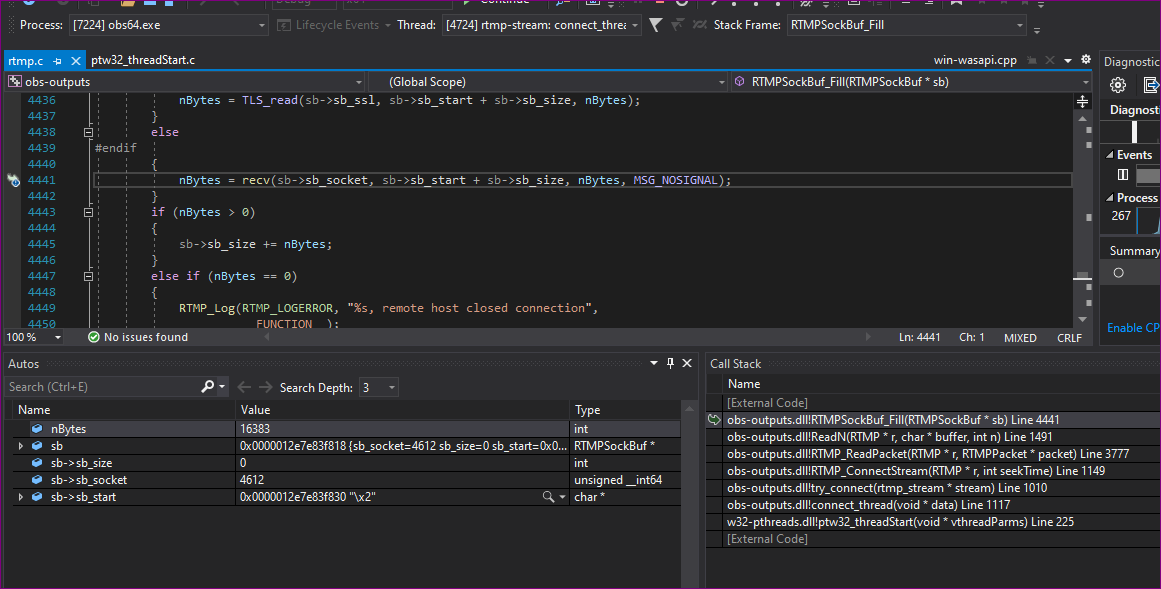
I've tested it on master and it still can't connect after one disconnect.
[rtmp stream: 'simple_stream'] Connecting to RTMP URL rtmp://stream.tokyo.[redacted]...
[rtmp stream: 'simple_stream'] Interface: Intel(R) PRO/1000 MT Desktop Adapter (ethernet, 1000 mbps)
[rtmp stream: 'simple_stream'] Connection to rtmp://stream.tokyo.[redacted] successful
obs_encoder_audio: Null 'encoder' parameter
==== Streaming Start ===============================================
[rtmp stream: 'simple_stream'] User stopped the stream
Output 'simple_stream': stopping
Output 'simple_stream': Total frames output: 311
Output 'simple_stream': Total drawn frames: 404
==== Streaming Stop ================================================
[rtmp stream: 'simple_stream'] Connecting to RTMP URL rtmp://stream.tokyo.[redacted]...
[rtmp stream: 'simple_stream'] Interface: Intel(R) PRO/1000 MT Desktop Adapter (ethernet, 1000 mbps)
RTMPSockBuf_Fill, remote host closed connection
[rtmp stream: 'simple_stream'] Connection to rtmp://stream.tokyo.[redacted] failed: -3
==== Streaming Stop ================================================
And in the rtmp server logs:
client connected '***.***.***.***'
too big message: 5242880, client: ***.***.***.***, server: 0.0.0.0:1935
disconnect, client: ***.***.***.***, server: 0.0.0.0:1935
deleteStream, client: ***.***.***.***, server: 0.0.0.0:1935
After increasing max_message to 10M on the server OBS just freezes while reconnecting.
[rtmp stream: 'simple_stream'] Connecting to RTMP URL rtmp://stream.tokyo.[redacted]...
[rtmp stream: 'simple_stream'] Interface: Intel(R) PRO/1000 MT Desktop Adapter (ethernet, 1000 mbps)
And after connecting for the 2nd time it just get's stuck at connecting.
 LosTigeros
on 19 Jul 2020
LosTigeros
on 19 Jul 2020
Any updates on this?
Banderi
on 21 Sep 2020
I have updated to 26.0.0 this morning and it seems as if the bug is gone! There have been tons of bugfixing in the version so I'm not sure if this was one of them, or one of them was tangential to this issue and was fixed as consequence, nonetheless I couldn't find it mentioned in the changelogs at first glance. I think we can set this as "solved" if anyone can confirm it was fixed?
Banderi
on 1 Oct 2020
This wasn't explicitly fixed in v26, but I can also confirm it's no longer crashing. One of the unrelated commits might be masking the issue.
notr1ch
on 1 Oct 2020
@Banderi what behavior were you seeing? Was OBS hanging and needed to be killed and restarted? If so, it's likely you were running into #3078 that was fixed in 26.0.0.
eric
on 1 Oct 2020
From what I understand it's not exactly the same bug, I saw the ticket you linked back in July but thought the behaviour fit better this issue here rather than that one. Nonetheless, it could be!
Banderi
on 1 Oct 2020
Looking at the changes, I don't think that particular pull request fixed this particular bug.
Probably something else that caused this problem to go away as a side effect.
If nobody else has been able to confirm this by next week, I'll try to make some time to confirm whether it was indeed solved.
Thulinma
on 1 Oct 2020
Hi all, unfortunately I do have and see the same problem in v26.0.0.
Upgraded from working version v24.0.3 to v26.0.0 and same problem is back.
Extra note, untouched OBS settings and server side.
- Start the stream = Works good
- Stop the stream = Works good
- Start the stream again = Start/stop streaming button changes to "connecting" thereafter game over, nothing happens which looks like a refuse of a new connection.
See below log (looks like we can see some more events after HandleInvoke error)...
12:54:50.186: [FFmpeg aac encoder: 'avc_aac_stream'] bitrate: 320, channels: 2, channel_layout: 3
12:54:50.186:
12:54:50.191: [rtmp stream: 'adv_stream'] Connecting to RTMP URL rtmp://192.168.0.174/live/...
12:54:50.195: [rtmp stream: 'adv_stream'] Interface: Intel(R) 82574L Gigabit Network Connection (ethernet, 1000 mbps)
12:54:52.953: [rtmp stream: 'adv_stream'] Connection to rtmp://192.168.0.174/live/ successful
12:54:52.971: ==== Streaming Start ===============================================
12:58:35.827: [rtmp stream: 'adv_stream'] User stopped the stream
12:58:35.827: Output 'adv_stream': stopping
12:58:35.827: Output 'adv_stream': Total frames output: 5563
12:58:35.827: Output 'adv_stream': Total drawn frames: 5641
12:58:35.874: ==== Streaming Stop ================================================
12:58:35.946: warning: 2 frames left in the queue on closing
12:59:29.657: [jim-nvenc: 'streaming_h264'] settings:
12:59:29.657: rate_control: VBR
12:59:29.657: bitrate: 2500
12:59:29.657: cqp: 20
12:59:29.657: keyint: 125
12:59:29.657: preset: llhq
12:59:29.657: profile: high
12:59:29.657: width: 1920
12:59:29.657: height: 1080
12:59:29.657: 2-pass: false
12:59:29.657: b-frames: 2
12:59:29.657: lookahead: false
12:59:29.657: psycho_aq: true
12:59:29.657:
12:59:29.683: ---------------------------------
12:59:29.683: [FFmpeg aac encoder: 'avc_aac_stream'] bitrate: 320, channels: 2, channel_layout: 3
12:59:29.683:
12:59:29.685: [rtmp stream: 'adv_stream'] Connecting to RTMP URL rtmp://192.168.0.174/live/...
12:59:29.685: [rtmp stream: 'adv_stream'] Interface: Intel(R) 82574L Gigabit Network Connection (ethernet, 1000 mbps)
12:59:29.689: HandleInvoke, error decoding invoke packet
13:04:30.285: RTMPSockBuf_Fill, remote host closed connection
13:04:30.286: RTMP_ReadPacket, failed to read RTMP packet body. len: 16711680
13:04:30.286: [rtmp stream: 'adv_stream'] Connection to rtmp://192.168.0.174/live/ failed: -3
Downgraded to v24.0.3 and all is good again.
DJ-PD
on 3 Oct 2020
It seems either I was having a different issue or the tangential fix only solved it for specific situations and not in the general case, I'd think. Still doesn't seem to me like #3078, my issue was perfectly described by the above and I do remember checking the logs gave me almost the same messages.
On the other hand it _could_ also be that the servers I'm streaming to now (Picarto.tv) just changed on their end, the same day version 26.0.0 came up for me.
Banderi
on 3 Oct 2020
@Banderi As I am one of the people maintaining the streaming software on Picarto's servers, I can confirm that we implemented a workaround for this OBS bug months ago. OBS will work there, despite this bug being present. You're welcome. 😉
Thulinma
on 4 Oct 2020
Related issues
 vilmibm
·
3Comments
vilmibm
·
3Comments
 marcan
·
9Comments
marcan
·
9Comments
 CodeYan01
·
4Comments
CodeYan01
·
4Comments
 zanyfly
·
5Comments
zanyfly
·
5Comments
 dapetcu21
·
8Comments
dapetcu21
·
8Comments
Most helpful comment
Hi there! MistServer dev here.
I've found the reason for this bug: the librtmp state isn't being correctly reset on reconnect.
This causes the connection to be started with an incorrect max chunk size (whatever was in use when the last disconnect happened, and not the 128 byte RTMP default), and thus fails to parse multi-part chunks.
Most servers set a new max chunk size only right _after_ sending the _result response to the connect call, since some RTMP implementations fail if you do so before responding to the connect call.
In short: please reset the librtmp internal state in between reconnect attempts, as fixing this on the media server side will break other client implementations instead. 🙁