Obs-mac-virtualcam: Test card
@johnboiles I'm looking for contribution opportunities for non-coders. can you use a test card for the output if obs is not sending a video-stream?
Technical requirements
- Format: SVG (will be rendered to PNG later)
- Fonts: as outline
- Proportion: 16:9
I would point people here
 signalwerk
All 29 comments
Wikimedia has a load here: https://commons.wikimedia.org/wiki/Category:Television_test_patterns
The following are SVGs:
- https://commons.wikimedia.org/wiki/File:EBU_Colorbars_HD.svg - Licence CC-By-SA
- https://commons.wikimedia.org/wiki/File:EBU_Colorbars.svg (768x576, seems darker than the above)
- https://commons.wikimedia.org/wiki/File:EIA_Resolution_Chart_1956.svg - Blank and white, 4:3, public domain dedication
- https://commons.wikimedia.org/wiki/File:FuBK_testcard_vectorized.svg - 768x576, License CC-By-SA
- https://commons.wikimedia.org/wiki/File:Metapost_test_card_random.svg - Nothing like a normal test card, transparent, could be used as part of a test card, public domain
- https://commons.wikimedia.org/wiki/File:Philips_PM5544.svg - Licence CC-By or GFDL
- https://commons.wikimedia.org/wiki/File:RCA_Indian_Head_Test_Pattern.svg - Black and white, Public domain, 4:3, based on old test card from RCA.
- https://commons.wikimedia.org/wiki/File:PM5644.svg - CC-By, 16:9
- https://commons.wikimedia.org/wiki/File:Telefunken_FuBK_test_pattern.svg - 4:3 public domain
- https://commons.wikimedia.org/wiki/File:TestChart_similar_to_old_TV_testscreens.svg - 16:10 aspect, Public domain or WTFPL.
- https://commons.wikimedia.org/wiki/File:TestScreen_square.svg - Square, Public domain or WTFPL
- https://commons.wikimedia.org/wiki/File:TestScreen_square_more_colors.svg - Square, Public domain or WTFPL
- https://commons.wikimedia.org/wiki/File:Tv.resolution.chart.0249.svg - 4:3, black and white, CC-By-SA
- https://commons.wikimedia.org/wiki/File:%D0%A3%D0%AD%D0%98%D0%A2.svg - 4:3, public domain
It would probably make the most sense to use something public domain, so that the licensing is definitely compatible. https://commons.wikimedia.org/wiki/File:TestChart_similar_to_old_TV_testscreens.svg is 16:10, so would need cropping or adjusting, but otherwise seems like the best:

 rjmunro
on 21 Apr 2020
rjmunro
on 21 Apr 2020
@rjmunro I think it's more important to have something useful and nice rather than something pure technical. I would also like to see OBS mentioned somewhere so people understand on what "video-channel" they are. And probably a short Information why the person is seeing that Test card (no streaming).
signalwerk
on 21 Apr 2020
+1 to not including something pure technical. In my mind I was just thinking it'd be the obs logo on a black background.
 johnboiles
on 21 Apr 2020
johnboiles
on 21 Apr 2020
But I could see utility for debugging in including some red green and blue. And maybe even a two frame animation so you could visually detect frame timing jitter.
johnboiles
on 21 Apr 2020
I would prefer seeing something simpler. Some text indicating that the image is the virtual cam output, but is currently not receiving an input. Maybe even mirrored + non-mirrored text indicating what you see in OBS preview vs what you see in other apps like Photo Booth/QT. I have a feeling that the reversed text (as seen in the gif on the main project page) would throw off a large number of people/uncessary troubleshooting steps.
 The19th
on 21 Apr 2020
The19th
on 21 Apr 2020
@The19th good point with the mirroring! I knew it's not all that simple and we need a crowd to solve it... 🤓
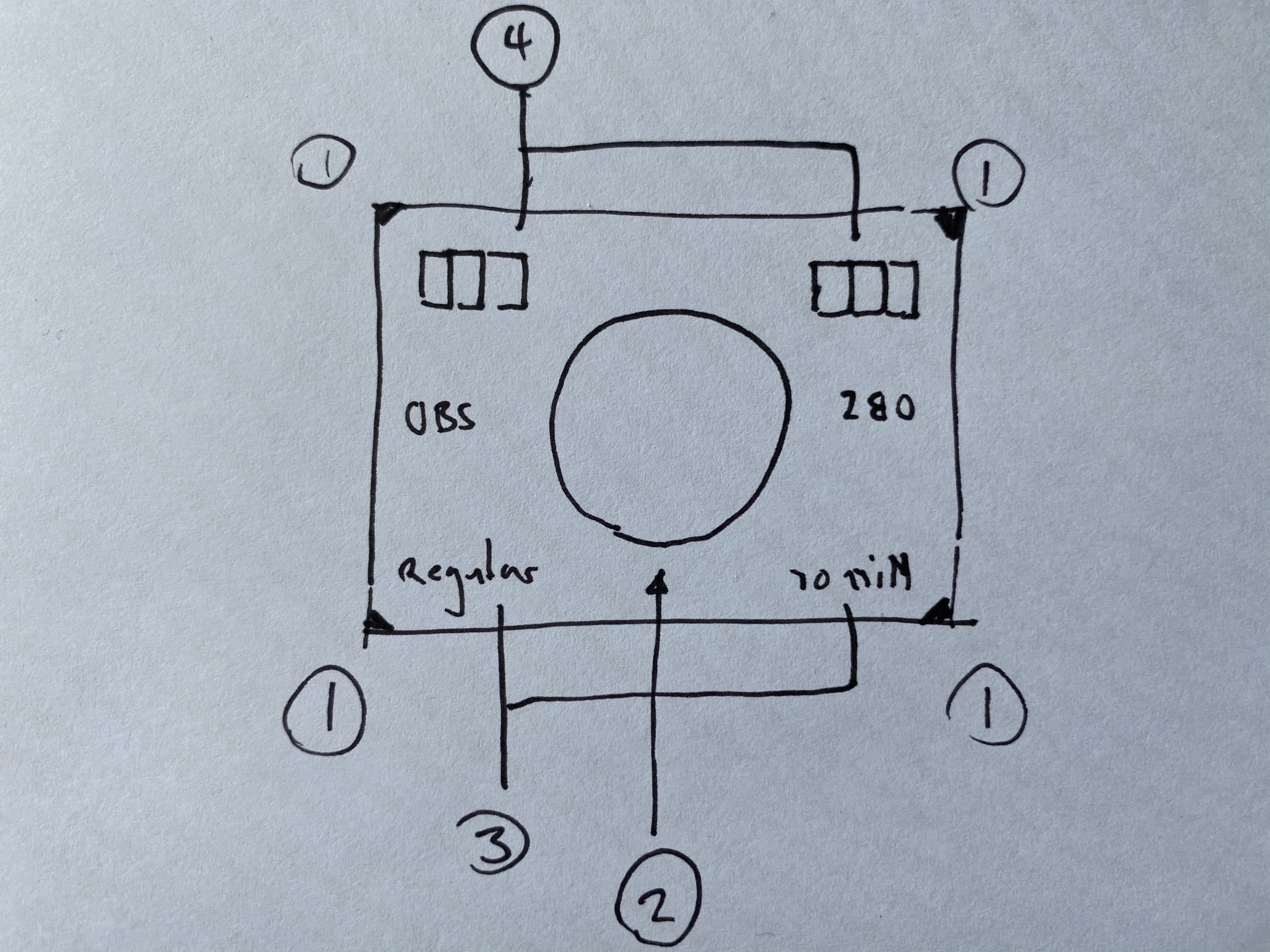
Here is my approach
- Little clever markers to figure out if your pic is cropped or good
- Centered circle tu figure out if your stream is distorted
- OBS-Logo with caption-text «regular»/«mirrored» to see that you have the OBS-Stream. Maybe even a text that explains what I'm currently seeng. «not streaming» or something...
- some basic color patches.
@johnboiles I like your frame timing jitter idea. ideally we would have a frame counter? but I guess as a MVP we can start with a normal png (made from the svg)
signalwerk
on 22 Apr 2020
I like it @signalwerk! We should also maybe include the resolution on there somewhere.
I used to be pretty handy with CoreGraphics/AppKit/UIKit. I could probably even layout / render this all to a NSView or CGLayer and then pass that out as a frame so we don't need to store a bunch of pngs at different sizes. But that's for later, I've got to fix my memory management issues in johnboiles/coremediaio-dal-minimal-example first!
johnboiles
on 22 Apr 2020
Including the resolution on a svg kinda destroys the reason for making it a svg, doesn't it?
 gxalpha
on 22 Apr 2020
gxalpha
on 22 Apr 2020
I can throw something together in Illustrator using the suggestions from https://github.com/johnboiles/obs-mac-virtualcam/issues/34#issuecomment-617938181 if that works.
 jasonappah
on 22 Apr 2020
jasonappah
on 22 Apr 2020
Sure, go for it!
gxalpha
on 22 Apr 2020
 jasonappah
on 22 Apr 2020
jasonappah
on 22 Apr 2020
Hey, very nice!
Although I disagree with the font as it is very thin and for that reason it is relatively hard to read compared to others.
gxalpha
on 22 Apr 2020
@jasonappah hank you for your draft! that's a great start!
Font
The "obs-font" is Open Sans you can Download it from here. On the Website there is the weight: 700
Text
I really like the explanation how to turn it on. Thats awesome.
I would go with the apple convention Choose [menu] > [item] > [submenu item]. it's more precise.
Corners
Like em. Maybe add a cross to the corner to even see it more precise. somethin like thatt (very drafty...):

Grid
Not sure if we need it. If so you could use it as an ordering element. as a swiss typographer I have to think of Bosshard
Meaning: the color patches are aligned to the grid. the text is the cross is the diagonale of the grid-cels, square is a multiply of the base-grid, ...
Let's do the best Test card ever for our purpose! 🤓
signalwerk
on 23 Apr 2020
@jasonappah oh btw: the format is 16:9 you have 16 squres in width but 10 in height. so I guess they are not squares
signalwerk
on 23 Apr 2020
Writing "Mirrored" backwards on the right hand side is brilliant.
So the HD version of the BBC test card that older UK people will remember fondly has <><>< marks at the sides, a V at the bottom and a ^ at the top to show where the borders of the screen should be. The <><>< shows 16:9 at the far left, then cropping to 14:9 and 4:3. If you see a point of a < chopped off, you know you are not getting the whole image. I think this is better than the corner markers that have been proposed.
Here's a 720p sized version of the image:
https://www.bbc.co.uk/rd/sites/50335ff370b5c262af000004/assets/5b4dd0cf06d63e093d0040e1/AQ-BBC_HD_TestCard_smallerx.png
Interestingly, they've put 16 vertical lines and 9 horizontal lines in the centres of imaginary boxes, rather than on the edges as @jasonappah did in his example. I don't know why they would have done this.
rjmunro
on 23 Apr 2020
@rjmunro this is actually a really nice Test Card! Never seen it before! I like how they solved the border marking. way better than my suggestion with the corners.
signalwerk
on 23 Apr 2020
I think it's important to think about what contexts this image will be shown in. This will pretty much always be seen when the user has forgotten to start the output, or simply has chosen to not yet start the output. Some questions to consider when making this image:
- How will this look in a small preview window, like the test video window in Zoom?
- How will this look to viewers of the output if you join a call or start a stream right away and forget to start the virtual output?
- What is the simplest, most tasteful way to tell the user "The output has not been started yet. Please start the output" while also not looking like some sort of error screen?
I think things like alignment grids and color bars are of limited usefulness in most situations where a virtualcam will be used, and would err on the side of something visually simple and aesthetically pleasing.
 dodgepong
on 23 Apr 2020
dodgepong
on 23 Apr 2020
Also, you may want to collaborate on this more, since if this is to be merged into OBS, then the other platforms' implementation of this feature will probably need to use the same card. Though with the way development has been going lately, it seems like you're more interested in making this a standalone third-party plugin instead of getting something that can be merged into OBS.
dodgepong
on 23 Apr 2020
I agree with keeping the simplicity in mind. With regards to the Virtual Cam, wouldn't the main purpose be to check if the Virtual Cam is receiving a feed from OBS? For example, if another app is using Virtual Cam as the video source but OBS isn't running, just a quick "heads up, open up OBS and start Virtual Cam"
I feel the alignment grids, SMPTE color bars, and/or any other other test elements the broadcaster would be focusing on could be added to a test scene that can easily be created in OBS.
The19th
on 23 Apr 2020
Also, you may want to collaborate on this more, since if this is to be merged into OBS, then the other platforms' implementation of this feature will probably need to use the same card.
I don't see a problem there. What is platform specific with this card?
If you mean collaborating with other developers: Of course, but is there any active development regarding the other platforms going on? Where can I find it?
Though with the way development has been going lately, it seems like you're more interested in making this a standalone third-party plugin instead of getting something that can be merged into OBS.
The thing is that first developing a third-party plugin is easier and can be tested / developed more quickly. As far as I know, the end goal is still to get it merged.
- How will this look to viewers of the output if you join a call or start a stream right away and forget to start the virtual output?
You got a point here.
gxalpha
on 23 Apr 2020
What is platform specific with this card?
There's nothing platform-specific about the card, but the discussion of how it should appear is currently contained to this specific repo. It seems more like something that should be defined in the spec/RFC, or at least further up the line somewhere. Unless you're trying to make a card that you would like to submit as the proposed card that all platforms should use.
It's probably not much use bikeshedding, as it's pretty easy to replace a PNG or what not if we need to.
dodgepong
on 23 Apr 2020
Loving the discussion here y'all keep it up!
From a technical perspective I'm thinking what i'll do is take the SVG y'all come up with and convert it to drawing code with something like https://www.paintcodeapp.com/. I think that would be more performant than parsing the SVG on plugin load and would also allow me to animate some part of the drawing if I wanted.
It's probably not much use bikeshedding, as it's pretty easy to replace a PNG or what not if we need to.
Yeah it should be easy to swap out the card if we want to in the future. Our goal here should be to come up with the best test card we possibly can. Then I imagine we could reuse a lot of the same design principles for a shared card at a future time.
johnboiles
on 23 Apr 2020
I think that would be more performant than parsing the SVG on plugin load and would also allow me to animate some part of the drawing if I wanted.
I'd say it depends on what sort of animation you might be thinking long-term - If you're going down the route of different test cards (static/dynamic which could be reasonable, thinking of projector mapping test animations à la wysiwyg) then we would need an interface to do that selection too. Might be worth doing some market research on options available at the mo'.
 Acen
on 24 Apr 2020
Acen
on 24 Apr 2020
I like the input of @dodgepong
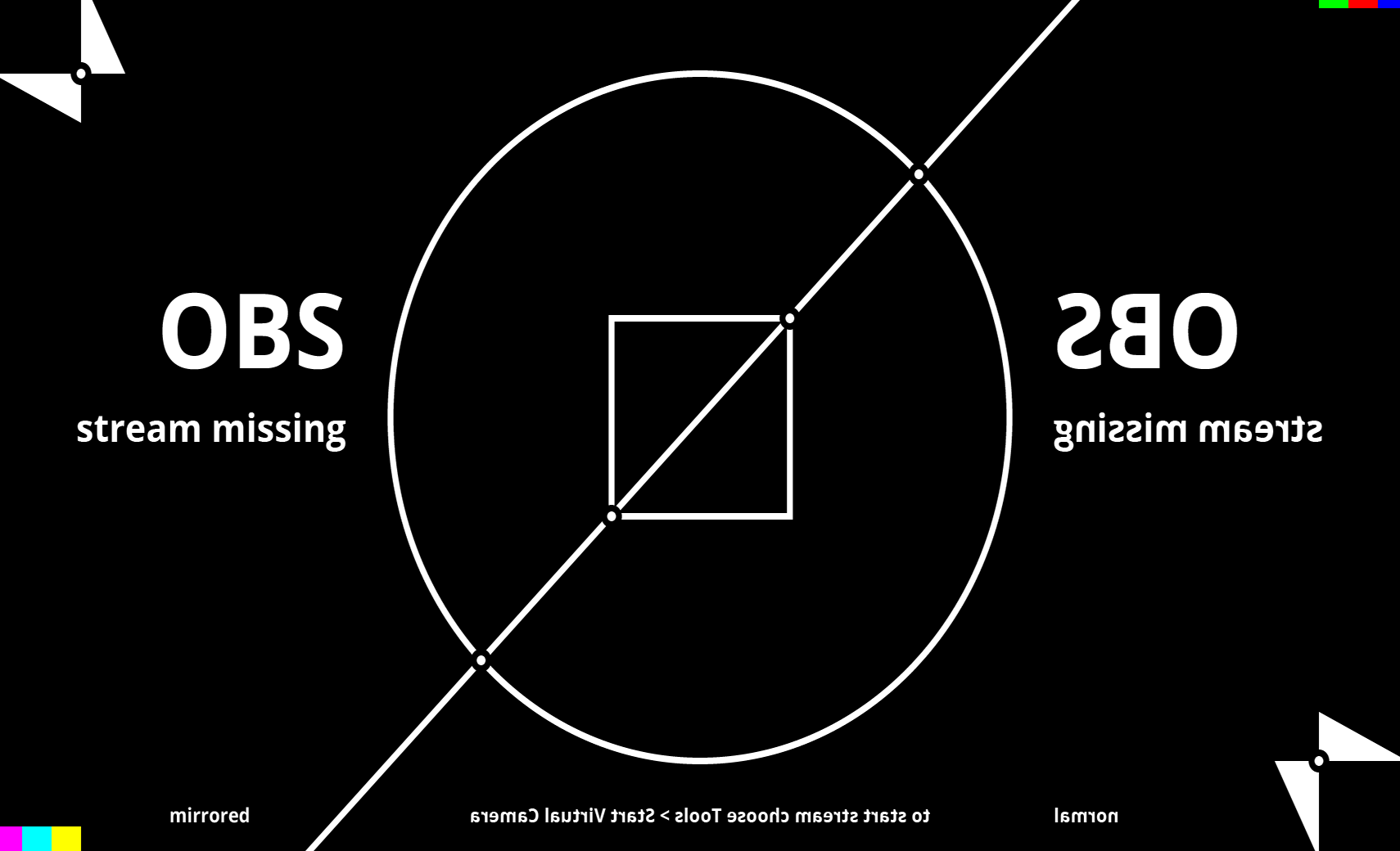
Maybe we just stream that pic out in the world. It might be more suddle. Maybe we also don't need to have everything readable for others.
👌
maybe something simple?

⚠️
if you distort, mirror and crop it. you might detect it:
signalwerk
on 24 Apr 2020
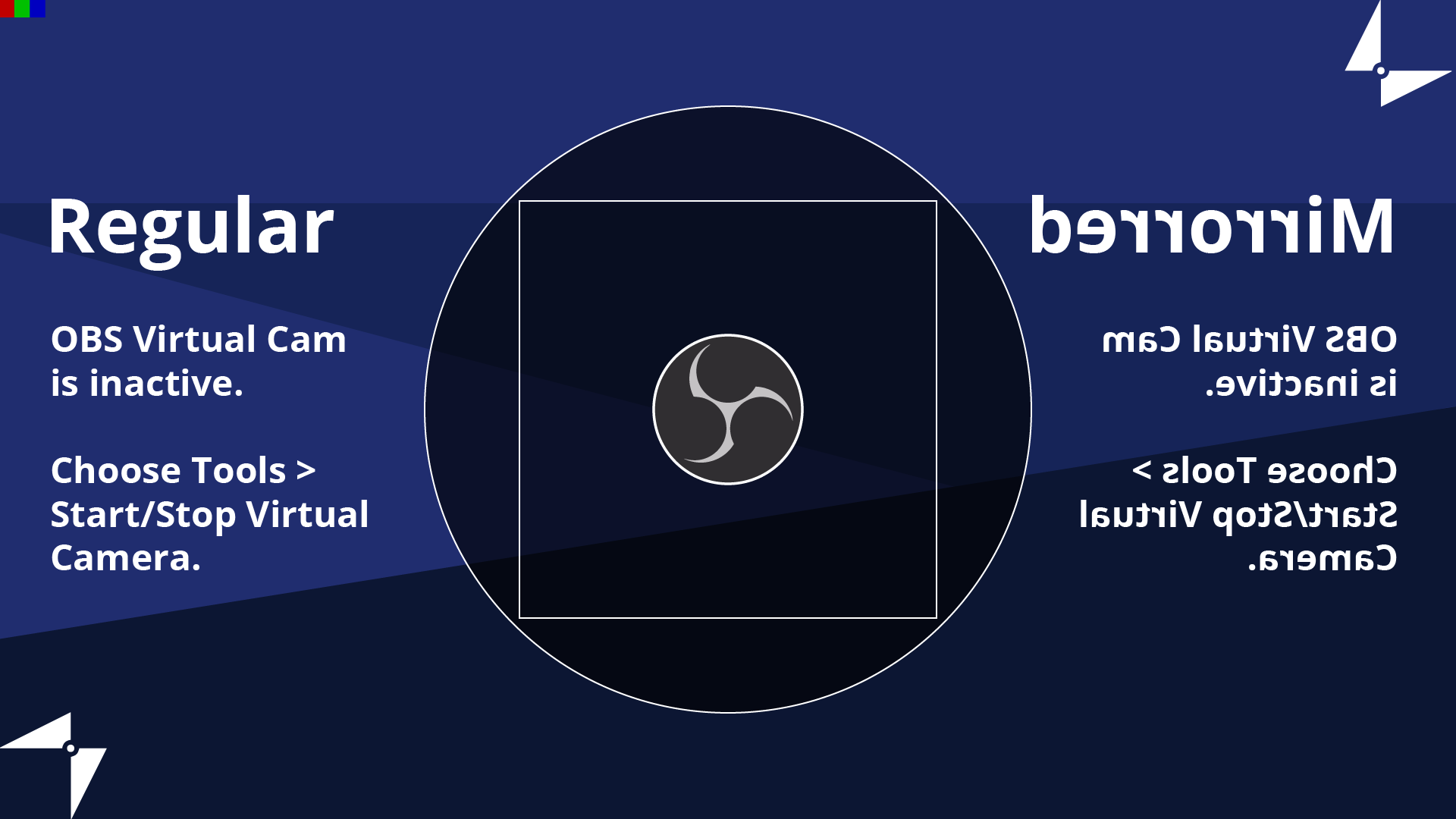
I like @signalwerk 's corner markers. I decided to ditch the grid and make it look a little nicer with a background similar to the one used as the default page of the browser source.
jasonappah
on 24 Apr 2020
Another thing worth noting is that this card should probably try its best to avoid needing to be localized, or otherwise have a localized version for every supported locale. Obviously not needing localization means that it can't have text, which does present a challenge.
dodgepong
on 24 Apr 2020
@signalwerk @jasonappah those are looking great!
@dodgepong good point to consider, though I don't think it should block getting some kind of test card set up. I wonder if we can get the system locale from inside the DAL plugin. If so, we could probably parse the SVG and localize the text inside the SVG before rendering.
johnboiles
on 24 Apr 2020
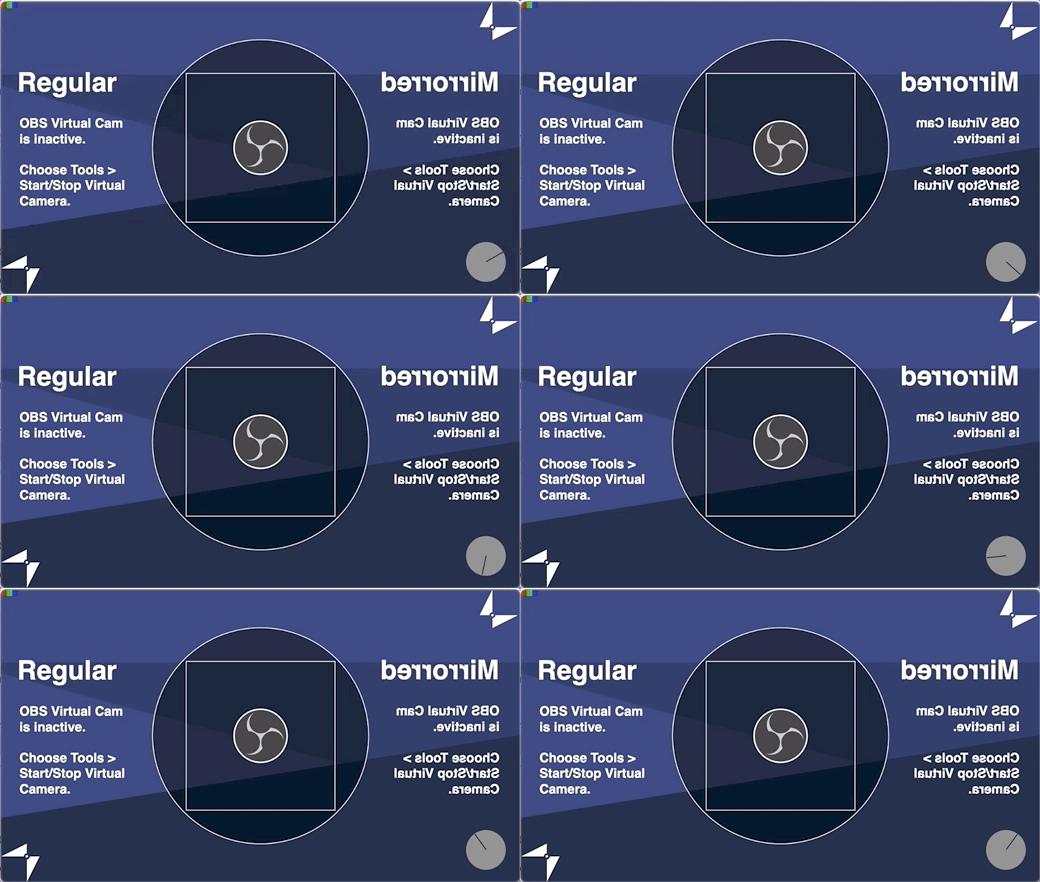
Here's what i've got running in my branch with the new DAL code!
johnboiles
on 9 May 2020
Going to close this as this test card is now merged into master 🎉
Feel free to open subsequent issues if you have ideas for improvements / changes! Thanks for all your collaboration and help y'all!
johnboiles
on 11 May 2020
Related issues
johnboiles
·
10Comments
 MatteAce
·
12Comments
MatteAce
·
12Comments
 alexandr-
·
14Comments
alexandr-
·
14Comments
 lisaross
·
9Comments
lisaross
·
9Comments
 technovangelist
·
4Comments
technovangelist
·
4Comments
Most helpful comment
I like @signalwerk 's corner markers. I decided to ditch the grid and make it look a little nicer with a background similar to the one used as the default page of the browser source.
SVG here.