I'm stuck in installing 'ng add XXX'
for example, https://github.com/angular/angularfire
The add command requires to be run in an Angular project, but a project definition could not be found.
NX recoomends to use NX-CLI not Angular CLI for working with other frameworks.
Okay..then What should I do to use 'ng add' Material, Firebase and so on..
Most of top library packages only support "ng add" schematics way recently..
Of course, there are ways to manually install but they started to get rid of manual install documentation because of 'ng add' popularity.
so, NX CLI should support 'nx add' because there is no angular.cli but workspace.json,
 curiouscod3
All 3 comments
I have the same question for @angular/material. I've also submitted an issue with @angular/material to see if there is a way to get support in Nx by creating a generate schematic alias for the ng add schematic logic: https://github.com/angular/components/issues/20675
 troywweber7
on 29 Sep 2020
troywweber7
on 29 Sep 2020
Hi folks,
I will take the angular material as an example of how to deal with ng add in NX workspace:
Add @angular/material using yarn or npm:
yarn add @angular/material
Now, let's take the advantage of nx list @angular/material. This fabulous command shows us all possibility of usage of @angular/material:
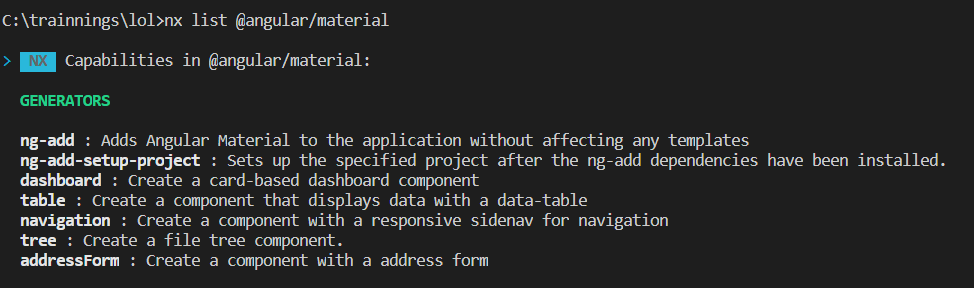
now let's add in our angular project:
nx g @angular/material:ng-add
That's all folks! Simple as that!
 samudiogo
on 25 Dec 2020
samudiogo
on 25 Dec 2020
Tank you @samudiogo, it works on my side, additionnaly, here is the associated help (of course, it is possible to specify the project):
yarn run nx generate @angular/material:ng-add --help
yarn run v1.21.1
$ nx generate @angular/material:ng-add --help

nx generate @angular/material:ng-add [options,...]

Options:
  --project               Name of the project.
  --theme                 The theme to apply (default: indigo-pink)
  --typography            Whether to set up global typography styles.
  --animations            Whether Angular browser animations should be set up. (default: true)
  --dryRun                Runs through and reports activity without writing to disk.
  --skip-nx-cache         Skip the use of Nx cache.
  --help                  Show available options for project target.

Done in 1.34s.
 hadrien-toma
on 27 Dec 2020
hadrien-toma
on 27 Dec 2020
Related issues
 IonFoXx
·
3Comments
IonFoXx
·
3Comments
 Svancara
·
3Comments
Svancara
·
3Comments
 vimalraj-a
·
3Comments
vimalraj-a
·
3Comments
 dereklin
·
3Comments
dereklin
·
3Comments
 zpydee
·
3Comments
zpydee
·
3Comments
Most helpful comment
Tank you @samudiogo, it works on my side, additionnaly, here is the associated help (of course, it is possible to specify the project):