Nx: Nrwl: Publishable library is not building as have imports from other library.
_Please make sure you have read the submission guidelines before posting an issue_
Prerequisites
Please answer the following questions for yourself before submitting an issue.
YOU MAY DELETE THE PREREQUISITES SECTION.
- [ ] I am running the latest version
- [ ] I checked the documentation and found no answer
- [ ] I checked to make sure that this issue has not already been filed
- [ ] I'm reporting the issue to the correct repository (not related to Angular, AngularCLI or any dependency)
Expected Behavior
Please describe the behavior you are expecting
Current Behavior
What is the current behavior?
Failure Information (for bugs)
Please help provide information about the failure if this is a bug. If it is not a bug, please remove the rest of this template.
Steps to Reproduce
Please provide detailed steps for reproducing the issue.
- step 1
- step 2
- ...
Context
Please provide any relevant information about your setup:
- version of Nx used
- 3rd-party libraries and their versions
- and most importantly - a use-case that fails
A minimal reproduce scenario using allows us to quickly confirm a bug (or point out coding problem) as well as confirm that we are fixing the right problem.
Failure Logs
Please include any relevant log snippets or files here.
Other
Any other relevant information that will help us help you.
 SWGeekPD
All 32 comments
@SWGeekPD Do you have a repo that reproduces this bug?
 jaysoo
on 29 Aug 2019
jaysoo
on 29 Aug 2019
@jaysoo . I just created a publishable lib called "abc". And than imported my another lib called shared in this abc lib.
Now when I am doing ng build --project abc
I am getting this error.
"error:- 'rootDir' is expected to contain all source files"
SWGeekPD
on 1 Sep 2019
@SWGeekPD could you point to a repository reproducing the issue?
 vsavkin
on 2 Sep 2019
vsavkin
on 2 Sep 2019
@vsavkin We have the same issue on one of our internal projects. I have created a sample repo to reproduce the issue:
https://github.com/mforesti/nx-build-issue-test
 mforesti
on 10 Sep 2019
mforesti
on 10 Sep 2019
@vsavkin @jaysoo Please find below repository to reproduce the issue.
https://github.com/SWGeekPD/NrWl_Lib
I created simple nrwl project with 2 apps. And added 2 libs called "login" and "shared"
and than imported shared lib into login and trying to build login using below command.
ng build --project login
getting below error.
D:\PROJECTS\NrWl\myworkspace>ng build --project login
Building Angular Package
Building entry point '@myworkspace/login'
Compiling TypeScript sources through ngc
ERROR: error TS6059: File 'D:/PROJECTS/NrWl/myworkspace/libs/shared/src/index.ts' is not under 'rootDir' 'D:\PROJECTS\NrWl\myworkspace\libs\login\src'. 'rootDir' is expected to contain all source files.
error TS6059: File 'D:/PROJECTS/NrWl/myworkspace/libs/shared/src/lib/shared.module.ts' is not under 'rootDir' 'D:\PROJECTS\NrWl\myworkspace\libs\login\src'. 'rootDir' is expected to contain all source files.
error TS6059: File 'D:/PROJECTS/NrWl/myworkspace/libs/shared/src/index.ts' is not under 'rootDir' 'D:\PROJECTS\NrWl\myworkspace\libs\login\src'. 'rootDir' is expected to contain all source files.
error TS6059: File 'D:/PROJECTS/NrWl/myworkspace/libs/shared/src/lib/shared.module.ts' is not under 'rootDir' 'D:\PROJECTS\NrWl\myworkspace\libs\login\src'. 'rootDir' is expected to contain all source files.
Error: error TS6059: File 'D:/PROJECTS/NrWl/myworkspace/libs/shared/src/index.ts' is not under 'rootDir' 'D:\PROJECTS\NrWl\myworkspace\libs\login\src'. 'rootDir' is expected to contain all source files.
error TS6059: File 'D:/PROJECTS/NrWl/myworkspace/libs/shared/src/lib/shared.module.ts' is not under 'rootDir' 'D:\PROJECTS\NrWl\myworkspace\libs\login\src'. 'rootDir' is expected to contain all source files.
at Object.<anonymous> (D:\PROJECTS\NrWl\myworkspace\node_modules\ng-packagr\lib\ngc\compile-source-files.js:73:19)
at Generator.next (<anonymous>)
at fulfilled (D:\PROJECTS\NrWl\myworkspace\node_modules\ng-packagr\lib\ngc\compile-source-files.js:4:58)
@jaysoo and @vsavkin Please suggest if you got a chance to look into repo.
SWGeekPD
on 19 Sep 2019
@jaysoo and @vsavkin can you please confirm if this is the existing bug and I should not create publishable library in NrWl-Nx.
SWGeekPD
on 26 Sep 2019
Duplicate of #602
 SebasG22
on 26 Sep 2019
SebasG22
on 26 Sep 2019
Version 9 is mostly working fine now, but does not work if you have secondary entrypoints.
https://github.com/ViceIce/nx-test
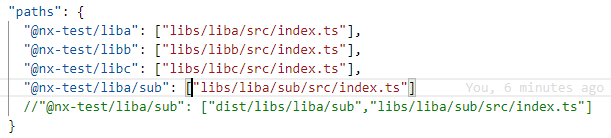
It will work if i switch the paths (add the dist folder)
yarn nx run-many --with-deps --target build --prod --projects libb
 viceice
on 17 Feb 2020
viceice
on 17 Feb 2020
I think there needs to be a check for secondary entrypoints.
for(const path of Object.keys(parsedTSConfig.options.paths)){
  if (path === libDep.scope ) {
    parsedTSConfig.options.paths[path] = [
        libDep.outputPath,
        ...parsedTSConfig.options.paths[path]
      ];
  } else if (path.startsWith(`${path}/`)) {
    parsedTSConfig.options.paths[path] = [
        libDep.outputPath.replace(libDep.scope, path),
        ...parsedTSConfig.options.paths[path]
      ];
  }
}
@SWGeekPD @ViceIce I think we should actually specify other packages as externals for the buildable library. Each build library should only be able to import other buildable libraries--and all of them should be published to the registry.
I think we'll be adding some more checks to nx workspace-lint to warn about importing non-buildable libs from buildable ones.
jaysoo
on 19 Feb 2020
I'm going to close this issue since we will not be supporting imports of non-buildable libraries from buildable ones. Instead, dependencies should be made buildable as well. This constraint makes sense if you think about shared libraries between two buildable parents.
    parent-1       parent-2
          \           /
          shared-child
In this case if both parent-1 and parent-2 are buildable, but shared-child is not, then you will end up with the child being bundled into both libraries. What you want in most cases if to publish shared-child as a separate package, and specify it in dependencies of both parent-1 and parent-2.
We have a lint rule to help with this:
"@nrwl/nx/enforce-module-boundaries": [
  "error",
  {
    "enforceBuildableLibDependency": true,
    "allow": [],
    "depConstraints": [
      { "sourceTag": "*", "onlyDependOnLibsWithTags": ["*"] }
    ]
  }
]
And we'll be releasing a feature in the next version to make buildable libraries easier to work with. For example, if you run nx run-many --target=build --projects=parent-1,parent-2 then it will make sure shared-child is built first before attempting the build.
jaysoo
on 20 Feb 2020
@jaysoo I have only buildabe libraries, but with secondary entrypoints. I i try to use something from the secondary entrypoint from a buildable library it will not work. See my repo for reproducing this error.
viceice
on 20 Feb 2020
We have the same issue like viceice shows in his repo. Hope the PR will be merged soon.
 jeroenklein
on 6 Mar 2020
jeroenklein
on 6 Mar 2020
@jaysoo your explanation makes sense, but where I'm seeing this in our code and why I don't feel like I need to publish the child package is that it's basically just interfaces and constants. Is there a way to disable the linting warnings for specific libs?
Edit: obviously I can just disable the linter warnings, but I mean with tags / scopes.
 mcblum
on 21 Apr 2020
mcblum
on 21 Apr 2020
@jaysoo I read this issue and others and wanted to ask about your reply
we will not be supporting imports of non-buildable libraries from buildable ones.
Buildable libraries are an excellent choice for react widgets. A react component that can be consumed by loading the umd into the browser and rendering it to the page.
In such a case, I do want it to:
- Bundle all the imported libraries and create a single umd file.
- Still leverage multiple libraries amazing capability and split my code into multiple libraries.
I agree this is not the common use-case, but it is still a valid one, is there a way to make it work?
 esakal
on 18 Aug 2020
esakal
on 18 Aug 2020
Wanted to chime in to say that we have a similar use case to what @esakal mentioned:
- we use NX for organizing/splitting our libraries and enforcing boundaries within different repos (i.e. each app is a "monorepo", keeping in mind that using NX will allow us later to merge into one single monorepo),
- but we want to bundle and package a lot of Services, Modules, Constants and Interfaces as a single Angular package using publishable libraries.
 ramarivera
on 18 Aug 2020
ramarivera
on 18 Aug 2020
Hi @ramarivera,
Do you have a temporary workaround for that? Or is it relevant to tasks later in your roadmap?
I was thinking of creating libraries without the buildable flag and adding my rollup & babel scripts under tools to bundle that library. I didn't have any luck, but this is what I'm trying to achieve.
If you did something else, I will be happy to try it out.
esakal
on 19 Aug 2020
It is relevant to tasks later in our roadmap. When we found out we couldn't bundle non buildable libs as easy as expected, we decided to leave it for now and review our scope for next sprint.
One thing we will take a look at later is the nx ngpackagr https://github.com/ng-packagr/nx-packaged. It's a bit outdated (last commit Feb 2019). We also will take a look at creating a custom builder that leverages the @nrwl packager one but aplies some custom logic to Tsconfig files and similar.
Unfortunately, I cannot provide any workaround right now, since we only have ideas for now. But if we get to something that works I'll try to share it if possible (and if not I'll share the general steps we took)
ramarivera
on 19 Aug 2020
@esakal I have the same issue with react apps. I was discussing that with some friends who already use Nx for a long time... And they have same answer as @ramarivera has.
Unfortunately , it does not work to react... So my workaround will be generate everything as publishable, I don't know if it will have any impacts on the future, any thoughts ?
 imcvakt
on 20 Aug 2020
imcvakt
on 20 Aug 2020
@ramarivera @imcvakt thanks for your insights.
@imcvakt the problem with publishable is that it creates separate libraries with dependencies between them instead of a single one. It is great for common use-cases and very needed. But in this use-case, I need to deploy only a single library that includes everything, while leveraging NX capabilities in terms of modularity, dev-ops scripts, migrations, code structure, etc. I love NX and think it has an amazing impact on the project thanks to its' powerful capabilities. So I will do my best to find a suitable workaround to achieve it with NX. I will update you about my progress.
@jaysoo how do you want to proceed with that as this issue is closed; should I create a followup one? Or continue updating here?
esakal
on 21 Aug 2020
@jaysoo should I open a new issue for this?
esakal
on 25 Aug 2020
@esakal did you create another issue for this? We have the exact same use case.
 paddyfay
on 14 Sep 2020
paddyfay
on 14 Sep 2020
Hi, no I didn't. We actually figure out how to bypass it, I'm not sure that it perfect but for us it seems to work. If it helps I can publish here the workaround that we did to support it.
esakal
on 16 Sep 2020
Hello @esakal, i'm very interested in how you managed to achieve that impossible workaround!
I have also a react library i want to build by itself before injecting into an angular project, but the rollup configuration of the @nrwl/web:package force the rootDir to the source dir of the entryFile (index.ts) from the library.
We have other non-buildable shared libraries imported in the react library and of course we have the "is not under 'rootDir'" error message from rollup.
I tried to create an other index.ts in the root of the libs/ directory and import the necessaries libraries into it, but it makes rollup to do an infinite bundle with all the sources in it, i don't understand well why.
Anyway, i'm interested in a workaround too ;)
 okamiconcept
on 17 Sep 2020
okamiconcept
on 17 Sep 2020
@esakal yes that would be very helpful. Thanks
paddyfay
on 17 Sep 2020
Hello @okamiconcept @paddyfay
I'm a teammate of @esakal
The easiest way to bypass that issue is to configure tsconfig.base.json and replace
"rootDir": ".", to "rootDirs": ["."],
That small change will allow you to compile buildable libs that import non-buildable libraries.
PS: Also, we specified custom _rollupConfig_ in workspace.json for our buildable library for extra features.
(used rollup-plugin-node-builtins, rollup-plugin-json, @rollup/plugin-alias etc)
 alanovyy
on 18 Sep 2020
alanovyy
on 18 Sep 2020
Hello @alanovyy
Thanks for posting this workaround, it is very helpful.
With this approach do you lose incremental builds, since Nx can only support this feature for libraries that are buildable?
paddyfay
on 18 Sep 2020
"rootDirs": ["."],
Hello @alanovyy
Thanks for posting it out, I am still facing the same issue after replacing
"rootDir": ".", to "rootDirs": ["."],
 rohanraj07
on 18 Sep 2020
rohanraj07
on 18 Sep 2020
@paddyfay I don't think we lost incremental builds but since our libraries are still small I cannot tell you for sure.
@rohanraj07 we changed our rootDir to
"rootDirs": [".", "libs"],
also as @alanovyy said we are using our own rollup file.
in workspace.json change project.build.options.rollupConfig to "tools/react-buildable-rollup.js" or somthing similar and create that file with the following:
'use strict';
const path = require('path');
const replace = require('@rollup/plugin-replace');
const alias = require('@rollup/plugin-alias');
const { uglify } = require('rollup-plugin-uglify');
const analyze = require('rollup-plugin-analyzer');
const {getPathsFromTsConfig} = require('./utils');
const {nodeResolve} = require('@rollup/plugin-node-resolve');
const json = require('rollup-plugin-json');
const globals = require('rollup-plugin-node-globals');
const builtins = require('rollup-plugin-node-builtins');

const ROOT_PATH = path.join(__dirname, '../');
const ENTRY_NAME = 'TypeHereYourEntryName'; // <------------- read below (*)

const replaceUpdatedPlugins = (predefined, custom) => {
  // with respect to the order of the plugins

  const toDictionary = (pluginsList) => pluginsList.reduce((plugins, plugin) => ({...plugins, [plugin.name]: plugin}), {});
  const predefinedPlugins = toDictionary(predefined);
  const customPlugins = toDictionary(custom);
  const resultPlugins = {...predefinedPlugins, ...customPlugins};

  return Object.keys(resultPlugins).map(key => resultPlugins[key]);
};

function getRollupOptions(options) {
  options.output.name = ENTRY_NAME;
  options.output.sourcemap = true;

  const paths = getPathsFromTsConfig(ROOT_PATH);
  const pathAlias = Object.keys(paths)
    .reduce((aliasPathResults, key) =>
        [...aliasPathResults, { find: key, replacement: paths[key] }],
      []);

  const customPlugins = [
    alias({
      entries: pathAlias
    }),
    json(),
    nodeResolve({
      preferBuiltins: true,
      extensions: ['.js', '.jsx', '.ts', '.tsx'],
      browser: true,
    }),
    globals(),
    builtins(),
  ];

  // uglify works only for 'umd'
  if (options.output.format === 'umd') {
    customPlugins.push(uglify({
      sourcemap: true
    }));
    customPlugins.push(analyze({summaryOnly: true}));
  }

  options.plugins.splice(0, 0,
    replace({
      'process.env.NODE_ENV': JSON.stringify('production')
    })
  );

  options.plugins = replaceUpdatedPlugins(options.plugins, customPlugins);

  return options;
}

module.exports = getRollupOptions;
note for line with (*) - we added this to customize the global variable. otherwise it will use the name of the lib by default. decide if you want to keep the default or override it.
You will need also to add some dependencies for roll-up libraries.
This is not ideal and might break with new versions of NRWL but hopefully they will decide to support it till than and for know if works fine for us
If you are getting an error about babel isModern of undefined or something similar (Cannot read property 'isModern' of undefined (While processing: "(...)/nx-examples/node_modules/@nrwl/web/babel.js")
let us know and we will write you how we workaround it.
esakal
on 19 Sep 2020
@esakal Updating "rootDirs" to your suggested fix allowed the build to complete and I can confirm that he buildable dependencies are now explicitly defined within the generated umd asset. This is great stuff; however the package.json of the publishable lib now contains peerDependencies to the buildable libs. Are you encountering this as well?
 mikechabot
on 29 Oct 2020
mikechabot
on 29 Oct 2020
@mikechabot I found a workaround for this, as I wouldn't like any consumers of the published package to have a peer dependency error for no reason.
Going by the original example where "abc" is the package which will be published and "shared" is a lib: add "shared": "*" to abc's package.json as a devDependency.
The script that puts together the package.json for abc will ignore anything that has already been defined by hand:
https://github.com/nrwl/nx/blob/master/packages/workspace/src/utils/buildable-libs-utils.ts#L268
P.S.: if the "shared" lib was set up as a publishable lib, use the importPath defined when setting it up (in the end, whatever is defined in shared's package.json name property)
 whythecode
on 28 Nov 2020
whythecode
on 28 Nov 2020
Related issues
 zpydee
·
3Comments
zpydee
·
3Comments
 IonFoXx
·
3Comments
IonFoXx
·
3Comments
 jasedwards
·
3Comments
jasedwards
·
3Comments
 kmkatsma
·
3Comments
kmkatsma
·
3Comments
 ZempTime
·
3Comments
ZempTime
·
3Comments
Most helpful comment
@ramarivera @imcvakt thanks for your insights.
@imcvakt the problem with publishable is that it creates separate libraries with dependencies between them instead of a single one. It is great for common use-cases and very needed. But in this use-case, I need to deploy only a single library that includes everything, while leveraging NX capabilities in terms of modularity, dev-ops scripts, migrations, code structure, etc. I love NX and think it has an amazing impact on the project thanks to its' powerful capabilities. So I will do my best to find a suitable workaround to achieve it with NX. I will update you about my progress.
@jaysoo how do you want to proceed with that as this issue is closed; should I create a followup one? Or continue updating here?