Nx: create-nx-workspace --preset=full-stack does not work
Expected Behavior
When running the command npx create-nx-workspace@next my-app --preset=full-stack i expect the workspace to work without any errors/warnings.
Current Behavior
When running npx create-nx-workspace@next my-app --preset=full-stack the application is created as it should without any warnings.
The problem occurs when running npm start, i will then get the following warning:
WARNING in Failed to read entry point info from C:/Development/successful-workspace/node_modules/@nestjs/schematics/lib/application/files/js/package.json with error SyntaxError: Unexpected token < in JSON at position 509.
I tried to ignore this error and visited localhost:4200 but then this error occurs and no data is fetched from the api:
[HPM] Error occurred while trying to proxy request /api/hello from localhost:4200 to http://localhost:3333 (ECONNREFUSED) (https://nodejs.org/api/errors.html#errors_common_system_errors)
Failure Information (for bugs)
WARNING in Failed to read entry point info from C:/Development/successful-workspace/node_modules/@nestjs/schematics/lib/application/files/js/package.json with error SyntaxError: Unexpected token < in JSON at position 509.
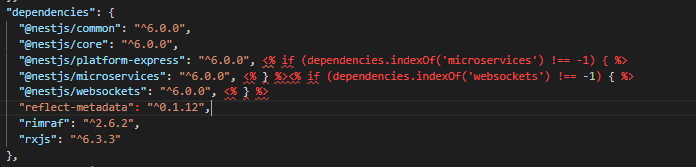
This error occurs because there is some 'templating' syntax in the package.json that doesn't get replaced.
[HPM] Error occurred while trying to proxy request /api/hello from localhost:4200 to http://localhost:3333 (ECONNREFUSED) (https://nodejs.org/api/errors.html#errors_common_system_errors)
I am not sure why this doesn't work, but it could be because of error 1.
Steps to Reproduce
Please provide detailed steps for reproducing the issue.
npx create-nx-workspace@next my-app --preset=full-stacknpm start
I also did:
npx create-nx-workspace@next my-app --preset=full-stacknpm installnpm start
and:
npx create-nx-workspace@next my-app --preset=full-stack- removed node_modules
npm installnpm start
Context
Please provide any relevant information about your setup:
- Angular CLI: 8.0.0-rc.3
- Node: 10.14.1
- OS: win32 x64
- Angular: 8.0.0-rc.4
... animations, common, compiler, compiler-cli, core, forms
... language-service, platform-browser, platform-browser-dynamic
... router - @nrwl/workspace": "8.0.0-rc.1
Package Version
- @angular-devkit/architect 0.800.0-rc.4
- @angular-devkit/build-angular 0.800.0-rc.4
- @angular-devkit/build-optimizer 0.800.0-rc.4
- @angular-devkit/build-webpack 0.800.0-rc.4
- @angular-devkit/core 8.0.0-rc.4
- @angular-devkit/schematics 8.0.0-rc.4
- @angular/cli 8.0.0-rc.3
- @ngtools/webpack 8.0.0-rc.4
- @schematics/angular 8.0.0-rc.4
- @schematics/update 0.800.0-rc.3
- rxjs 6.4.0
- typescript 3.4.5
- webpack 4.29.0
 stefan-karlsson
All 12 comments
Thanks for all the wonderful detail in this issue. However, I think the expectations about how the repo should work are mistaken due to our lack of explanation.
The frontend and the backend (api) are two different applications.
To run the frontend:
npm start`/`npm start -- my-app
To run the api:
npm start -- api
To run them both at the same time, either run them in separate terminals are use concurrently:
npx concurrently "npm start -- my-app" "npm start -- api"
What would be a better way of explaining this? Perhaps the preset should log this out?
 FrozenPandaz
on 25 May 2019
FrozenPandaz
on 25 May 2019
Thanks for the clarification @FrozenPandaz my post consists of 2 errors.
Problem 1: Compiling the application(s)
After your explanation I am now enable to run both backend and frontend applications! 👍
What would be a better way of explaining this? Perhaps the preset should log this out?
It would be awesome to log out the "how to start" information when using the --preset flag.
I also i think it would be nice to add a script in package.json that executes both environments.
Problem 2: Warnings when compiling API:
I am getting a warning when using the command npm start -- api
I expect this is a issue belongs to the @nestjs package and not the nx.
WARNING in Failed to read entry point info from C:/Development/successful-workspace/node_modules/@nestjs/schematics/lib/application/files/js/package.json with error SyntaxError: Unexpected token < in JSON at position 509.
Other thoughts (May be moved to a separate issue?)
Workspace structure
As I understand it, a NestJs project is handled as a app in the NX workspace, the reason that i think this is because the nestjs project lives in the apps/ folder.
I think it would be good to separate the backend from the frontend when working in a nx workpace:
- backend/
- apps/
- frontend/
- apps/
- libs/
Execute api as microservice's
A problem i can see with the current workspace setup is that it will be quite messy to start the application if i decide to create microservice apis. The port usage will also be a problem, but i guess this is not a NX issue, but it would be a nice feature in the future :)
- apps
- web-client-app
- user-api
- user-settings-api
- employee-api
- address-api
So to be able to run the web-client-app i will need to call:
npx concurrently "npm start -- web-client-app" "npm start -- user-api" "npm start -- user-settings-api" "npm start -- employee-api" "npm start -- address-api"
stefan-karlsson
on 29 May 2019
@stefan-karlsson you can separate backend and frontend apps as follows:
apps/
  backend/
    myapi
  frontend/
    myapp
There are many dimensions you can use to separate your apps and libs (e.g., where it runs: backend, frontend, nativescript, e2e, who owns it: my team, that team, etc..) You can devise your own folder structure to reflect that.
@FrozenPandaz we need to look at why nestjs schematics are accessed are used when running a nest app. They should not be.
 vsavkin
on 31 May 2019
vsavkin
on 31 May 2019
@vsavkin you can use also concurrently "npm:start-api-*"
and make some tasks like:
start-api-auth, start-api-clients, start-api-employees etc...
 TheAifam5
on 24 Jun 2019
TheAifam5
on 24 Jun 2019
Any progress or fixes regarding the warning:
WARNING in Failed to read entry point info from C:/Development/successful-workspace/node_modules/@nestjs/schematics/lib/application/files/js/package.json with error SyntaxError: Unexpected token < in JSON at position 509 ? ... as this makes development really slow, because I have to re-compile the whole app when I changed my code.
 svnba
on 14 Jul 2019
svnba
on 14 Jul 2019
@svnba for me it shows only once, after first build. Next builds does not print that "warning".
TheAifam5
on 14 Jul 2019
I ended up setting up a new project. I copied all the files over to the new project. Works like a charm.
svnba
on 17 Jul 2019
Context information setup
- Angular CLI: 8.1.2
- Node: 10.16.0
- OS: linux x64
- Angular: 8.1.2
... animations, cli, common, compiler, compiler-cli, core, forms
... language-service, platform-browser, platform-browser-dynamic
... router - @nrwl/workspace": "8.2.0,
Package Version
@angular-devkit/architect 0.800.1
@angular-devkit/build-angular 0.801.2
@angular-devkit/build-optimizer 0.801.2
@angular-devkit/build-webpack 0.800.1
@angular-devkit/core 8.0.1
@angular-devkit/schematics 8.0.1
@angular/cdk 8.1.1
@angular/material 8.1.1
@ngtools/webpack 8.1.2
@schematics/angular 8.0.1
@schematics/update 0.801.2
rxjs 6.5.2
typescript 3.4.5
webpack 4.29.0
Error
When running ng serve npm start -- app or ng serve app (angular application) error below is shown
WARNING in Failed to read entry point info from /home/user/Documents/projects/project/node_modules/@nestjs/schematics/lib/application/files/js/package.json with error SyntaxError: Unexpected token < in JSON at position 509.
When doing ng serve server (which is nestjs) no warnings occur.
 erhise
on 21 Jul 2019
erhise
on 21 Jul 2019
I got this warning when VSCode had auto-imported a class from a shared lib by it's relative path eg. import { MyInterface } from '../../../../libs/interfaces'.
Importing it via the correct scope fixes it, eg. import { MyInterface } from '@my-org/interfaces'.
It's very weird indeed that the error points toward @nestjs though it only happens when building an Angular app. Not very helpful. :)
 SpeedoPasanen
on 22 Jul 2019
SpeedoPasanen
on 22 Jul 2019
I ended up setting up a new project. I copied all the files over to the new project. Works like a charm.
If this is the solution it feels like a piece of work to go through. But this is getting pretty annoying I must say.
erhise
on 29 Jul 2019
Ran into this again. This time I can't find any import scope issues in my code. Look at the package.json pointed at by the error message, it's these kind of lines that cause the problem. Eg. node_modules/@nestjs/schematics/lib/application/files/ts/package.json
 "@nestjs/platform-express": "^6.0.0", <% if (dependencies.indexOf('microservices') !== -1) { %>
    "@nestjs/microservices": "^6.0.0", <% } %><% if (dependencies.indexOf('websockets') !== -1) { %>
    "@nestjs/websockets": "^6.0.0", <% } %>
I donno who's supposed to do something with those conditionals, but it's failing. If you remove all those non-json invalid stuff <% ... %> problem goes away. Now I'm perhaps always importing things I possibly don't need like microservices/websockets?
SpeedoPasanen
on 29 Jul 2019
Will close this since it is not a issue anymore
stefan-karlsson
on 30 Aug 2019
Related issues
 MichaelWarneke
·
3Comments
MichaelWarneke
·
3Comments
 olakara
·
3Comments
olakara
·
3Comments
 danieldanielecki
·
3Comments
danieldanielecki
·
3Comments
 ZempTime
·
3Comments
ZempTime
·
3Comments
 zachnewburgh
·
3Comments
zachnewburgh
·
3Comments