Nx: ng add @nrwl/schematics --> 'sourceRoot' undefined
When i use the command: ng add @nrwl/schematics to add @nrwl into my existing Angular Project. I get the bellow erorr:
"Installing packages for tooling via npm.
npm WARN @nguniversal/[email protected] requires a peer of @angular/common@^5.0.0 but none is installed. You must install peer dependencies yourself.
npm WARN @nguniversal/[email protected] requires a peer of @angular/core@^5.0.0 but none is installed. You must install peer dependencies yourself.
npm WARN @nguniversal/[email protected] requires a peer of @angular/platform-server@^5.0.0 but none is installed. You must install peer dependencies yourself.
npm WARN [email protected] requires a peer of @angular/compiler@^2.3.1 || >=4.0.0-beta <6.0.0 but none is installed. You must install peer dependencies yourself.
npm WARN [email protected] requires a peer of @angular/core@^2.3.1 || >=4.0.0-beta <6.0.0 but none is installed. You must install peer dependencies yourself.
npm WARN [email protected] requires a peer of @angular/platform-browser-dynamic@^2.3.1 || >=4.0.0-beta <6.0.0 but none is installed. You must install peer dependencies yourself.
npm WARN [email protected] requires a peer of @angular/platform-browser@^2.3.1 || >=4.0.0-beta <6.0.0 but none is installed. You must install peer dependencies yourself.
npm WARN [email protected] requires a peer of @angular/common@^2.3.1 || >=4.0.0-beta <6.0.0 but none is installed. You must install peer dependencies yourself.
npm WARN optional SKIPPING OPTIONAL DEPENDENCY: [email protected] (node_modules\fsevents):
npm WARN notsup SKIPPING OPTIONAL DEPENDENCY: Unsupported platform for [email protected]: wanted {"os":"darwin","arch":"any"} (current: {"os":"win32","arch":"x64"})
- @nrwl/[email protected]
added 38 packages from 28 contributors and audited 23569 packages in 161.116s
found 47 vulnerabilities (4 low, 32 moderate, 11 high)
runnpm audit fixto fix them, ornpm auditfor details
Installed packages for tooling via npm.
Cannot read property 'sourceRoot' of undefined"
========
Here is some information my Angular Project
"devDependencies": {
"@angular/cli": "6.0.8",
"@angular/compiler-cli": "6.0.9",
"@angular/language-service": "6.0.9",
"@types/jasmine": "~2.8.3",
"@types/jasminewd2": "~2.0.2",
"@types/node": "~6.0.60",
"codelyzer": "^4.0.1",
"jasmine-core": "~2.8.0",
"jasmine-spec-reporter": "~4.2.1",
"karma": "~2.0.0",
"karma-chrome-launcher": "~2.2.0",
"karma-coverage-istanbul-reporter": "^1.2.1",
"karma-jasmine": "~1.1.0",
"karma-jasmine-html-reporter": "^0.2.2",
"protractor": "~5.1.2",
"ts-node": "~4.1.0",
"tslint": "~5.9.1",
"typescript": "2.7.2",
"@angular-devkit/build-angular": "~0.6.8"
}
Please help me to solve this issue?
 huytq1
All 11 comments
Could you provide a repro? (something we can run ng add on)
 vsavkin
on 29 Jul 2018
vsavkin
on 29 Jul 2018
@vsavkin I'm running into the same issue. Steps to reproduce:
ng new regularApp
cd regularApp
ng add @nrwl/schematics
Output:
Installing packages for tooling via npm.
+ @nrwl/[email protected]
added 44 packages in 8.916s
Installed packages for tooling via npm.
Cannot read property 'sourceRoot' of undefined
Environment:
Angular CLI: 6.1.5
Node: 8.11.4
Angular: 6.1.4
 tilowestermann
on 24 Aug 2018
tilowestermann
on 24 Aug 2018
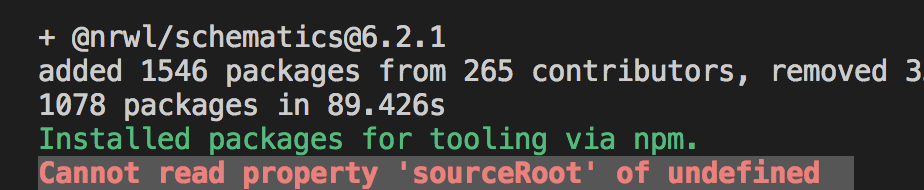
This is also the case for me, indicating that root is not defined
 crane168
on 25 Aug 2018
crane168
on 25 Aug 2018
Same issue here

Environment:
Angular CLI: 7.0.2
Node: 10.10.0
OS: darwin x64
Angular: 7.0.0
 dimpu
on 21 Oct 2018
dimpu
on 21 Oct 2018
Hi,
We recommend to create a new Nx workspace with the following command:
create-nx-workspace myWorkspaceName
You can see more information on the official documentation here.
Please, could you point the source where you saw how to do it like that?
We have updated our doc few releases back but it seems to be a big source of confusion.
Closing the ticket since it is old.
 bcabanes
on 2 Nov 2018
bcabanes
on 2 Nov 2018
@bcabanes I'm running into the same issue (as the others I need to add Nx to an existing application)
According to the documentation ...
"You can also add Nx capabilities to an existing CLI project by running:
ng add @nrwl/schematics
"
Angular CLI 7.0.4
Angular 7.0.2
nrwl/nx 7.0.0
 catellanir
on 5 Nov 2018
catellanir
on 5 Nov 2018
Hello @bcabanes , why this issue was closed?
I'm facing the same issue, and is not when I create new workspace, but when trying to add nx capabilities to an existing CLI project, as @catellanir says, it's in the official documentation.
 agusdutra
on 22 Nov 2018
agusdutra
on 22 Nov 2018
Same Problem: Cannot read property 'sourceRoot' of undefined
Angular CLI: 7.0.6
Node: 10.13.0
OS: darwin x64
Angular: 7.0.4
 Schrall
on 23 Nov 2018
Schrall
on 23 Nov 2018
This issue related to camel case project name in angular.json and snake case project name in package.json
 spidermon
on 14 Dec 2018
spidermon
on 14 Dec 2018
@vsavkin I'm running into the same issue. Steps to reproduce:
ng new regularApp
cd regularApp
ng add @nrwl/schematics
Output:
Installing packages for tooling via npm.
+ @nrwl/[email protected]
added 44 packages in 8.916s
Installed packages for tooling via npm.
Cannot read property 'sourceRoot' of undefined
Environment:
Angular CLI: 6.1.5
Node: 8.11.4
Angular: 6.1.4
Use small case for app creation will rectify this issue.
For Eg: ng new regular-app and then cd regular-app and ng add @nrwl/schematics
 jithil-kore
on 22 Jan 2019
jithil-kore
on 22 Jan 2019
@spidermon thanks I amended my angular.json project name to match and it worked like a charm :)
 FintanK
on 6 Feb 2019
FintanK
on 6 Feb 2019
Related issues
 kmkatsma
·
3Comments
kmkatsma
·
3Comments
 dereklin
·
3Comments
dereklin
·
3Comments
 Svancara
·
3Comments
Svancara
·
3Comments
 IonFoXx
·
3Comments
IonFoXx
·
3Comments
 sukei
·
3Comments
sukei
·
3Comments
Most helpful comment
This is also the case for me, indicating that root is not defined