nx-enforce-module-boundaries linting errors with directories
Import statement:
import { ImportedModule } from '@workspace/directory/imported/src';
triggers linting error: deep imports into libraries are forbidden (nx-enforce-module-boundaries)
The auto-generated code from schematics appears to conflict with itself. Looks like there are two choices:
1) remove the directory from the path name (ie., @workspace/imported)
2) change the linting options in nx-enforce-module-boundaries to accept the director
Looks like the choice needs to be made consistent in the generators. In the meanwhile, is there a stylistic preference we should follow?
 goelinsights
All 8 comments
@goelinsights does the schematic generate the import including /src? sadly I did not upgrade my workspace to v6 yet, but I am on it next week then I can share my experiences. in my opinion the /src is too much, the index.ts is one level up (at least in v1 workspaces). I do not use sub-directories in my workspace, so I am not sure if the sub-directory was included at the import statement for libs in sub-directories or if it was omitted (but I guess it was included, the tsconfig.json is pointing to libs/* for @myworkspace/* in v1). for me it would depend on the type of lib, number of libs I have, maybe want to change this as I like - but as I said, not using sub-directories at the moment... does @workspace/imported work for you if you change it manually? it should be @workspace/directory/imported (by default) in my opinion concerning tsconig.json from v1, or does it trigger the lint error too?
 skydever
on 5 Jun 2018
skydever
on 5 Jun 2018
@goelinsights could you provide a link to repro? and a series of commands you ran to create the repro?
 vsavkin
on 9 Jun 2018
vsavkin
on 9 Jun 2018
@vsavkin we're seeing this, too, with the new version of Nx we just installed. Basically the IDE and linter both think that the root of the feature lib is @namespace/libName but it's now been changed to be @namespace/libName/src. All imports generated by Intellij trigger an error because it points everything to the libName folder, and correcting it and adding /src fixes the import but then triggers a linting error.
We're on a totally fresh workspace.
 mcblum
on 11 Jun 2018
mcblum
on 11 Jun 2018
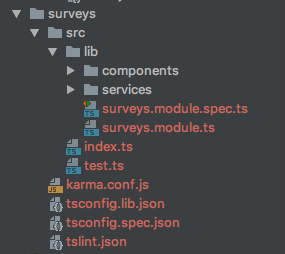
Here is the setup we get automatically when using the CLI to generate a lib:
And here's the linting error that we're seeing:

mcblum
on 11 Jun 2018
@mcblum can you share your tsconfig.json from the workspace root and the tsconfig.lib.json from surveys? I guess there is a missing /src in the paths section for @clients/surveys in tsconfig.json. when I created my nx v6 workspace it generated a paths entry for every lib I created (not near the code right now, but as far as I remember), and it is including the /src there in tsconfig.json. the index.ts was moved to the /src location and an additional folder lib was created, where all the lib content was moved into - one more dir was added basically, I guess to have the index.ts file under /src, because it is source. the index.ts is now exporting everything under lib instead of src. then the import should be @clients/surveys, without the /src for sure when you reference the lib, in my opinion.
... this brings me back to the directory issue. I am able to change the import paths for my libs as I like there at tsconfig.json, just like I mentioned in the first comment, when I got that right (did not play around yet). so the solution there would be to add the /src too I guess? and you can decide if you want to add the directory at the import statemens or not, only the name of the paths entry needs to be changed then I guess. or is this maybe still causing the lint error? if so I guess I can come up with a PR - but then I have one more question that is somehow related, is it ok to import within the same lib using the paths entry, like @myworkspace/mylib/lib/...? I always import relatively when I import from within the same lib, and use @myworkspace\... only when I reference to another lib - but sadly, vscode is not always thinking the way I am when auto importing, and the linter allows the deep imports when I am within the same lib ...
maybe a bit off-topic, but I am new to writing schematics. can a workspace schematic be created to customize such a behavior, like if the import path is including sub-directories or not? I don't want to copy the complete existing schematic for creating a lib to add my needs, I want to pipe myself in at some points, and for what I understand this is what workspace schematics are doing? but I have too less knowledge about my options there yet ...
skydever
on 12 Jun 2018
my tsconfig.json looks like this:
"paths": {
      "@my-workspace/*": [
        "libs/*"
      ],
      "@my-workspace/my-lib-one": [
        "libs/my-lib-one/src/index.ts"
      ],
      "@my-workspace/my-lib-two": [
        "libs/my-lib-two/src/index.ts"
      ],
In my opinion the first entry should be deleted now that the index.ts is under the src directory of a lib. This would also disallow imports including src or any other dynamic/deep import that maybe is causing troubles (only imports with an exact match to a path entry are allowed this way). imports using the scope are only allowed for things I explicitly export in the index.ts of a lib then (else typescript would complain with cannot find module), just like I would expect, and I can manage sub-paths there as I like too...
skydever
on 13 Jun 2018
I am as well able to reproduce this issue quite simply:
create-nx-workspace my-app --npm-scope=app --style=scss --routing --prefix=app --yarnng g app clientng g app componentsng g c messageBox --project=components --export- Open
app.module.tsofclientapp and auto importComponentsModule - Results in
@app/components/src- should result in@app/components
I came to the same conclusion as @skydever, by deleting @app/* from tsconfig.json, I get proper import @app/components via auto imports.
 klemenoslaj
on 9 Jul 2018
klemenoslaj
on 9 Jul 2018
This issue has been fixed here: https://github.com/nrwl/nx/commit/5daffc3cc7f1135b8c82bb70b2ff8c54a607f346
vsavkin
on 15 Apr 2019
Related issues
 about-code
·
3Comments
about-code
·
3Comments
 SWGeekPD
·
3Comments
SWGeekPD
·
3Comments
 sukei
·
3Comments
sukei
·
3Comments
 MichaelWarneke
·
3Comments
MichaelWarneke
·
3Comments
 ZempTime
·
3Comments
ZempTime
·
3Comments
Most helpful comment
my
tsconfig.jsonlooks like this:In my opinion the first entry should be deleted now that the
index.tsis under thesrcdirectory of a lib. This would also disallow imports includingsrcor any other dynamic/deep import that maybe is causing troubles (only imports with an exact match to a path entry are allowed this way). imports using the scope are only allowed for things I explicitly export in theindex.tsof a lib then (else typescript would complain with cannot find module), just like I would expect, and I can manage sub-paths there as I like too...