Recently I've switched to node 8.9.1 from 6 and this happens (np version 2.16.1)
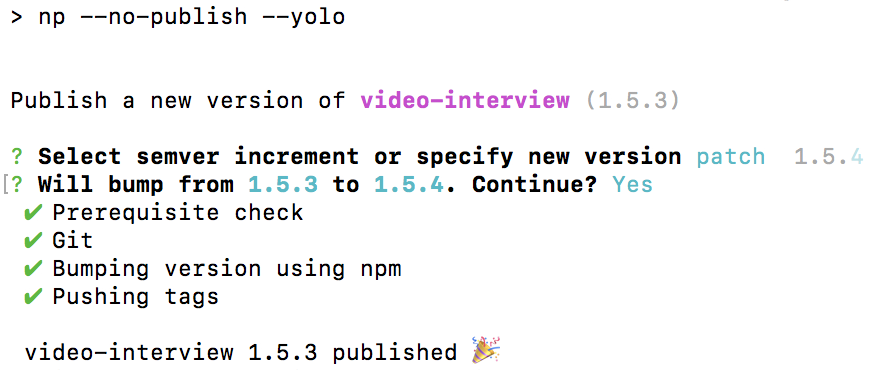
My initial version was 1.5.3, np --no-publish --yolo suggests to bump to 1.5.4
It correctly creates a 1.5.4 commit and tag which looks like this

but it doesn't push the commit or tag to my origin
As a matter of facts, in the first image, at the bottom you can see that the success message says video-interview 1.5.3 published 🎉
1.5.3 when it should instead be 1.5.4
 piuccio
All 9 comments
Getting the same issue here.
➜  medusa-lib git:(master) np

Publish a new version of medusa-lib (0.0.5)

? Select semver increment or specify new version patch  0.0.6
? Will bump from 0.0.5 to 0.0.6. Continue? Yes
 ✔ Prerequisite check
 ✔ Git
 ✔ Cleanup
 ✔ Installing dependencies using Yarn
 ✔ Running tests
 ✔ Bumping version using Yarn
 ✔ Publishing package
 ✔ Pushing tags

 medusa-lib 0.0.5 published 🎉
 OmgImAlexis
on 16 Nov 2017
OmgImAlexis
on 16 Nov 2017
I can't say about np not pushing to origin but can confirm that it shows pkg 0.0.5 published 🎉 where the version number is before it got bumped.
Also this is shown even if npm errors out later for some reason.
 NeekSandhu
on 18 Nov 2017
NeekSandhu
on 18 Nov 2017
For a while I couldn't understand why np works in some of my projects but it fails in others.
Today I noticed that in the projects where np is broken, the step Pushing tags happens while the pre-commit hooks are still running.
I use lint-staged to run eslint on every commit and this might take a while.
The task running npm version 1.2.3 doesn't seems to wait for the hooks to actually be called.
It's quite weird because if I call npm version 1.2.3 from cli, the command terminates after the commit is created
It might be related to #219
piuccio
on 26 Feb 2018
I have the same issue with 2.20.1 (private package).
It shows the old version as published, not the new.
With 2.20.1, it does not update the package.json version, does not create a corresponding version commit, and doesn't create a tag. Same when using --yolo.
> node -v
v8.9.4
> yarn -v
1.5.1
> npm -v
5.6.0
Under the same environment, 2.16.0 to 2.19.0 do create a tag and commit, but neither get pushed, and the old version still gets displayed as published instead of the new. I only tested back to 2.16.0 since that's what we started using np at.
exceptions:
2.18.{0..2} I couldn't properly test due to an npm auth check issue even though it's a private package (works as of 2.18.3)
2.20.0 I also couldn't test because it resulted in a different error Cannot read property 'url' of undefined.
 lapski
on 14 Mar 2018
lapski
on 14 Mar 2018
I have the exact same problems as @adamlapczynski with 2.20.1
 marcuslindfeldt
on 15 Mar 2018
marcuslindfeldt
on 15 Mar 2018
@adamlapczynski @marcuslindfeldt do you also have pre commit hooks?
piuccio
on 16 Mar 2018
In one project but not the other. Version hooks in both though that runs build and git add.
marcuslindfeldt
on 17 Mar 2018
We use Husky's precommit to run lint-staged, but I tried in a separate simpler project (same specs as above, and using 2.20.1) without any pre-commit hooks, and it still attempted to publish the old version, and didn't create the new tag. It does appear to push any new commits, but does not add a separate version commit with an updated package.json.
? Will bump from 0.0.4 to 0.0.5. Continue? Yes
 ✔ Prerequisite check
 ✔ Git
 ↓ Publishing package using Yarn [skipped]
   → Private package: not publishing to Yarn.
 ✔ Pushing tags

[project-name] 0.0.4 published 🎉
✨  Done in 6.51s.
It magically fixed itself in one of the updates. Works fine for me in node 8.11.2 and np 3.0.4
piuccio
on 3 Jul 2018
Related issues
 xxczaki
·
6Comments
xxczaki
·
6Comments
 janpio
·
6Comments
janpio
·
6Comments
 koppor
·
5Comments
koppor
·
5Comments
 jescalan
·
3Comments
jescalan
·
3Comments
 papb
·
6Comments
papb
·
6Comments
Most helpful comment
I can't say about np not pushing to origin but can confirm that it shows
pkg 0.0.5 published 🎉where the version number is before it got bumped.Also this is shown even if npm errors out later for some reason.