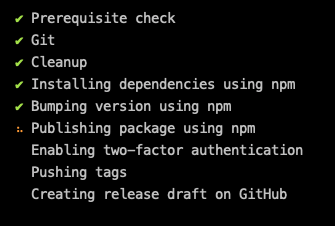
Np: Stuck at "Publishing package using npm"
Description
I have spent hours trying to figure out what is going on, but I have no idea. Running np simply gets stuck at the "Publishing package using npm" part.
Steps to reproduce
I would guess this is probably hard to reproduce. Clearly this works for everyone else, otherwise there would be several issues about it already (such a basic feature that is not working!)
My request
I wish there was an easy way to at least know what is the problem... Perhaps a --verbose option? Because I have no idea even on how to make progress on this.
Environment
Perhaps this has something to do with being on Windows 7?
np - 5.2.1 and 4.0.2 (same problem on both)
Node.js - v10.16.3
npm - 6.13.6
Git - 2.21.0.windows.1
OS - Windows 7 (Windows_NT x64 6.1.7601)
 papb
papb
All 6 comments
Wow. Windows. Nevermind... I had a prepack script which called del (from del-cli, however del is already a windows built-in, so it was being called instead of the node module. And it asks for a confirmation (are you sure? y/n), and this confirmation was not shown by np, and ended up waiting in the background forever. This is why it was stuck...
papb
on 15 Jan 2020
I have the same problem on mac too. Even though it got stuck at it. The package is published. But it is not passing from that step to next one.
 emjimadhu
on 19 Feb 2020
emjimadhu
on 19 Feb 2020
Hi @emjimadhu, that's weird, have you triple-checked your prepublish npm script (and the like)?
papb
on 19 Feb 2020
@papb I am really sorry, my problem was because of my stupidity. I named the npm script as publish.
emjimadhu
on 19 Feb 2020
Glad you figured it out, happens to all of us...
papb
on 20 Feb 2020
lol. What a coincidence that I also named my npm script as publish. If not for this issue, I would have been stuck on this too! Thanks!
 Himujjal
on 20 Mar 2021
Himujjal
on 20 Mar 2021
Related issues
 dotconnor
·
4Comments
dotconnor
·
4Comments
 janpio
·
6Comments
janpio
·
6Comments
 koppor
·
5Comments
koppor
·
5Comments
 sindresorhus
·
4Comments
sindresorhus
·
7Comments
sindresorhus
·
4Comments
sindresorhus
·
7Comments
Most helpful comment
@papb I am really sorry, my problem was because of my stupidity. I named the npm script as publish.