Notepads: (Fallback) Encoding Not Working As Expected
Describe the bug
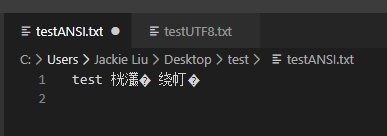
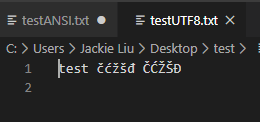
Fallback encoding not working as expected. Notepads is showing "garbage" characters.
To Reproduce
You can use the ZIP here:
https://drive.google.com/file/d/1dYAPwIdf_NSKoi0gCV4IvRFt0W-KZh1q/view?usp=sharing
There are two TXT files, one is ANSI (testANSI.txt - no encoding information, obviously), one is UTF-8 (testUTF8.txt - without BOM).
notepad.exe is using system ANSI encoding to show the file and it does so correctly.
UTF-8 is also shown correctly by notepad.exe
Notepads however, processes both ANSI and UTF-8 files incorrectly.
Sublime opens both text files without issues but since it doesn't use system ANSI encoding, the default ANSI encoding needs to be set in Preferences -> Settings ("fallback_encoding": "Central European (Windows 1250)" in Preferences.sublime-settings JSON).
Included are the screenshots of both notepad.exe and Notepads and also relevant Notepads Settings.
Expected behavior
Same behavior as notepad.exe or Sublime.
Screenshots
They are included in the ZIP above
Desktop (please complete the following information):
- OS: Windows 10, Version 2004 (OS Build 19041.113)
- Version: 1.1.0.0
Additional context
I also included screenshot showing result of System.Text.Encoding.GetEncoding(System.Threading.Thread.CurrentThread.CurrentCulture.TextInfo.ANSICodePage) call, which I noticed Notepads also use. It has correct encoding info (Windows-1250).
 SilentException
All 21 comments
The way I see it there are actually two issues at play:
Detection of UTF-8 encoding without BOM. Notepad.exe seems to do it without issues.
Using proper system ANSI encoding for non-UTF8 files.
Thanks for looking.
SilentException
on 3 Mar 2020
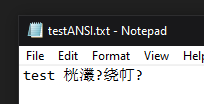
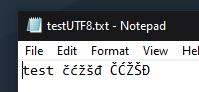
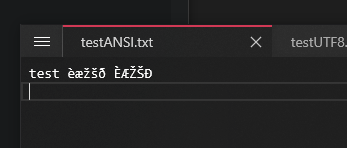
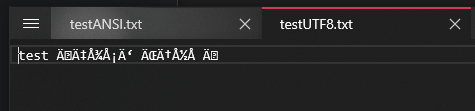
----- ignore this thread, I am pasting here for reference ------
 JasonStein
on 4 Mar 2020
JasonStein
on 4 Mar 2020
Can you try this:

Change from:
_editorDefaultDecoding = EncodingUtility.GetSystemCurrentANSIEncoding() ?? new UTF8Encoding(false);
To:
_editorDefaultDecoding = Encoding.GetEncoding(0) ?? new UTF8Encoding(false);
and see if it works as expected?
File path: Notepads\srcNotepads\Services\EditorSettingsService.cs Line 126
JasonStein
on 4 Mar 2020
You can also try code pages from this page: https://docs.microsoft.com/en-us/windows/win32/intl/code-page-identifiers
JasonStein
on 4 Mar 2020
Hey, yes that helps with testANSI.txt file. I get proper ANSI detection with proper code page (1250).
It is interesting that Encoding.GetEncoding(Thread.CurrentThread.CurrentCulture.TextInfo.ANSICodePage) returns different results inside UWP app and Window Forms app (which I gave you output from in the ZIP).
Perhaps it is related to this setting, as personally I don't use Windows or apps translated as it is highly confusing :)
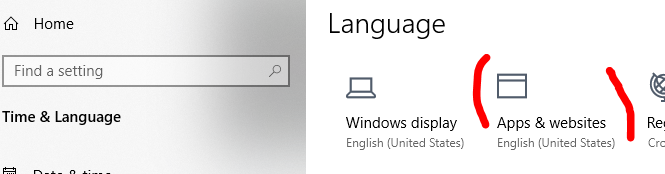
Anyhow, Encoding.GetEncoding(0) seems to work fine.
The UTF-8 file is still unrecognized as it is lacking BOM and should be detected in other ways. This is not a simple task as the only way seems to be to read the file to locate incorrect UTF-8 sequences...
SilentException
on 5 Mar 2020
Yeah, the whole UWP thingy (I mean WinRT specific) and Windows 10 is very confusing. A lot of black holes here and there.
I am planning to address the encoding issue by two steps:
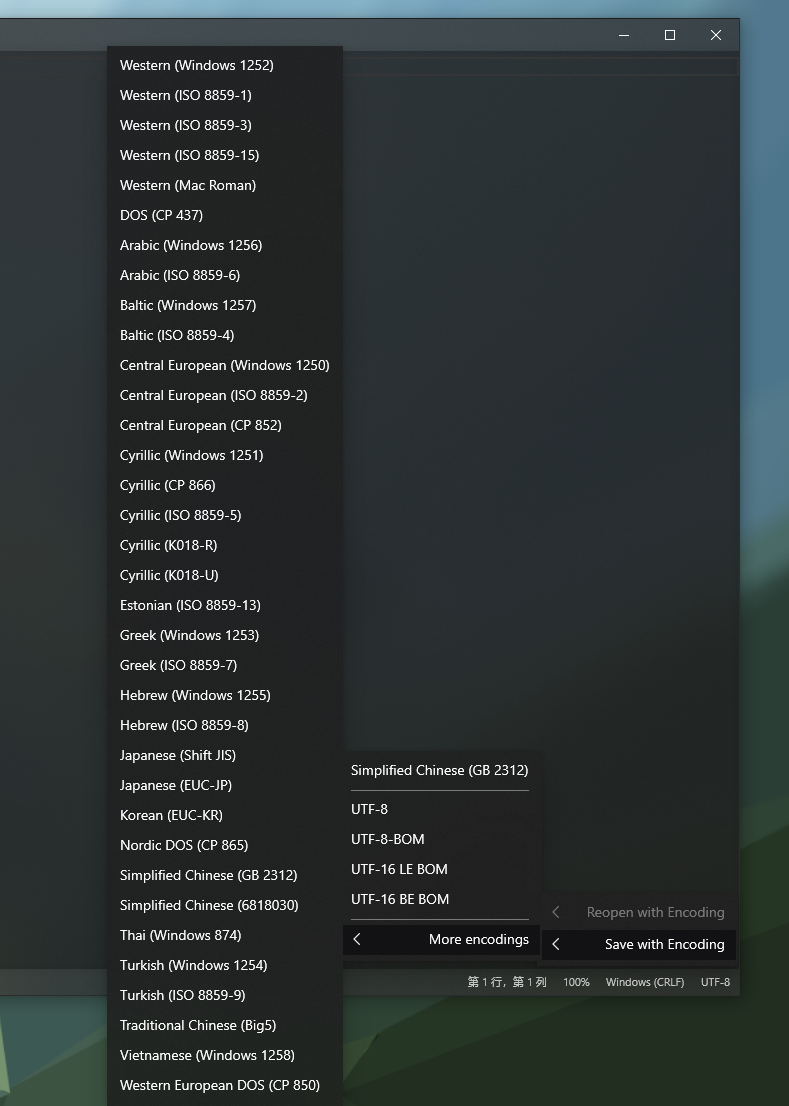
Offering an option to reload current file using popular ANSI encodings with "Encoding.GetEncoding(0)" and "Encoding.GetEncoding(Thread.CurrentThread.CurrentCulture.TextInfo.ANSICodePage)" showing at top of the list.
Offer region based auto detection. Introducing an option in the settings. Basically on top of UTF-8 and ANSI options we already have, I am going to add a third one, calling it "Auto".
It will not going to compare all kinds of ANSI code pages but instead, it will try detect if the file is UTF-8 or the current code page system is using. (So higher chance of success)
But still, a lot of manual work I need to do to make it feels nature and smart.
I can only guarantee on step 1. I need more time to test and prepare for step 2.
JasonStein
on 5 Mar 2020
If it is any help, this seems to work for both of the test files and others I have as well.
SilentException
on 5 Mar 2020
I am not sure if "Encoding.GetEncoding(0)" will work on all machines with different locales. I do not see much on the internet regarding to the explanation. I will try look into the source code first.
JasonStein
on 5 Mar 2020
JasonStein
on 10 Mar 2020
Hey, sorry for the late response. I just tested v1.1.3.0 and the intended behavior works as expected.
Because you added Encoding.Get(0), even "auto"-detection works without reopening the testANSI.txt file.
One thought, perhaps it would be good to add the same list to fallback encoding ANSI setting (+ Auto option on top which would simply select first one, for now).
SilentException
on 16 Mar 2020
Hey, sorry for the late response. I just tested v1.1.3.0 and the intended behavior works as expected.
Because you added Encoding.Get(0), even "auto"-detection works without reopening the testANSI.txt file.
One thought, perhaps it would be good to add the same list to fallback encoding ANSI setting (+ Auto option on top which would simply select first one, for now).
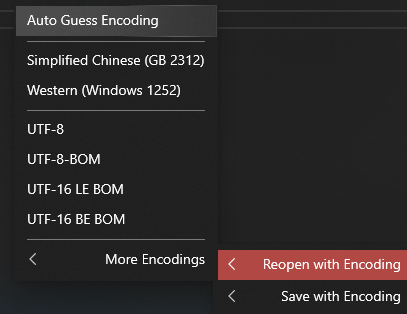

Wait for v1.1.4.0
JasonStein
on 16 Mar 2020
Ah, don't know if you noticed a patch ZIP in one of my comments. It includes a simple way of dealing with issue of opening UTF-8 files without BOM.
Basically, in the FileSystemUtility, the file needs to be loaded using UTF8Encoding constructed so it throws invalid character exception. In case Peek() or ReadToEnd() would fail, the fallback encoding would be used. Check it out if you haven't seen it.
SilentException
on 16 Mar 2020
Ah, don't know if you noticed a patch ZIP in one of my comments. It includes a simple way of dealing with issue of opening UTF-8 files without BOM.
Basically, in the FileSystemUtility, the file needs to be loaded using UTF8Encoding constructed so it throws invalid character exception. In case Peek() or ReadToEnd() would fail, the fallback encoding would be used. Check it out if you haven't seen it.
Can you sync with master and help do some testing yourself? The feature is implemented and need your help to verify if it is working as intended (Auto Guess Encoding).
JasonStein
on 16 Mar 2020
Did a quick test before I go to sleep with test files and few others I have.
Fallback setting to AUTO:
UTF-8 with BOM was opened correctly, no regressions there.
UTF-8 without BOM (testUTF8) was also opened and displayed correctly.
However, testANSI (ANSI in 1250 CP), was opened and incorrectly displayed as CP 1252. This is a a regression from version 1.1.3.0 where the file was correctly opened as 1250 without reopening. Reopening a file in certain encoding worked in both 1.1.3.0 and 1.1.4.0 (I could reopen the file in 1.1.3.0 to display it incorrectly (1252) or had to reopen it in 1.1.4.0 to display it correctly (1250).
Fallback setting to ANSI:
UTF8 BOM is OK
UTF8 without BOM - NOT OK (fallbacks to 1250)
ANSI is OK (1250).
SilentException
on 16 Mar 2020
Just a quick last note (really) :) CharsetDetector returns 0.47 for the certainty in testANSI.txt. I don't find that value all that good in percentages, perhaps implement threshold and use system values if result is below..
IMO CharsetDetector should also be more biased towards user regional system settings because this file has 70% local characters :) Maybe there is a way to "nudge" it there, haven't checked the docs.
SilentException
on 16 Mar 2020
Just a quick last note (really) :) CharsetDetector returns 0.47 for the certainty in testANSI.txt. I don't find that value all that good in percentages, perhaps implement threshold and use system values if result is below..
IMO CharsetDetector should also be more biased towards user regional system settings because this file has 70% local characters :) Maybe there is a way to "nudge" it there, haven't checked the docs.
That's true. I do not think there is an existing solution to take user locale into account which is exactly what we needed here. Looks like we have to do it ourselves. I agree to fall back to UTF-8 if certainty below certain threshold. This might increase the accuracy a little bit.
Also, remember the testANSI file you have shared, there are not many characters in it.
JasonStein
on 16 Mar 2020
Try to be biased on user's current ANSI code page: https://github.com/JasonStein/Notepads/commit/4feb2bf15280a3d4f08edddcd408e80362fe88bd
Logic:
Try iterate thru all detected encoding list to find a better match based on User's current Windows ANSI code page or UTF-8 if present with a priority of:
UTF-8 > SystemDefaultANSIEncoding (Codepage: 0) > CurrentCultureANSIEncoding
And then:
Fall back to UTF-8 and give it a try if no better match is found in the result:
    1. Detected Encoding is not UTF-8
    2. Detected Encoding is not SystemDefaultANSIEncoding (Codepage: 0)
    3. Detected Encoding is not CurrentCultureANSIEncoding
    4. Confidence of detected Encoding is below 50%
That should cover it! I tested latest master with a bunch of files I have at work, really mixed variant of everything and haven't noticed any odd ones yet. Great!
SilentException
on 16 Mar 2020
That should cover it! I tested latest master with a bunch of files I have at work, really mixed variant of everything and haven't noticed any odd ones yet. Great!
Great! Glad to hear. I spent quite a lot of time yesterday to tweak this logic. It should be good enough for most of the cases. Btw, v1.1.4.0 is on the store already.
JasonStein
on 16 Mar 2020
Closing this thread since v1.1.4.0 is released with "Auto Guess Encoding" feature.
JasonStein
on 16 Mar 2020
That should cover it! I tested latest master with a bunch of files I have at work, really mixed variant of everything and haven't noticed any odd ones yet. Great!
Great! Glad to hear. I spent quite a lot of time yesterday to tweak this logic. It should be good enough for most of the cases. Btw, v1.1.4.0 is on the store already.
Yeah, will let you know if I find anything unusual. Thanks for taking the time to look into all this!
SilentException
on 16 Mar 2020
Related issues
 michalsieron
·
5Comments
michalsieron
·
5Comments
 ItzNeviKat
·
4Comments
ItzNeviKat
·
4Comments
 validatedev
·
3Comments
validatedev
·
3Comments
 michaellewiswilson
·
3Comments
michaellewiswilson
·
3Comments
 frousselet
·
3Comments
frousselet
·
3Comments