Notepad3: Add a transparent mode for Minipath.
As Notepad3 and now grepWinNP3 have a transparent mode #2523, is is possible to add one to Minipath too ? 🤔
 hpwamr
All 7 comments
You can use Ctrl+U to toggle Transparency Mode. ( minipath.ini : [Settings2] OpacityLevel=75 ).
 RaiKoHoff
on 29 Sep 2020
RaiKoHoff
on 29 Sep 2020
I think about the same behavior as "grepWinNP3"
- losing the "focus", the opacity is 50%
- recover the "focus, the opacity is 100%
hpwamr
on 29 Sep 2020
Hi Rainer,
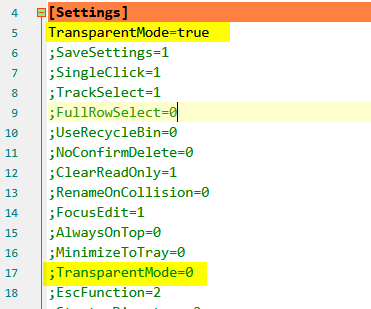
A little discrepancy ?
hpwamr
on 29 Sep 2020
The .ini-File Reader accepts for boolean values: "0/1" , "false/true", ("off/on"), the Writer always use "false/true".
RaiKoHoff
on 29 Sep 2020
PR #2920 adds your requested feature.
No introducing a behavior change, the default value for [Settings2] FocusLostOpacity= is 100 [%] means, no change of current transparency level. If MiniPath is in Transparency-Mode, losing focus will choose minimum of FocusLostOpacity vs. OpacityLevel.
RaiKoHoff
on 29 Sep 2020
PR #2920 adds your requested feature.
Hi @RaiKoHoff ,
With [Settings2] FocusLostOpacity=50, Minipath has the same behavior as "grepWinNP3". 👍
Thanks,
hpwamr
on 29 Sep 2020
Hello dear Notepad3 BETA/RC testers,
Feel free to test the "BETA/RC" version "Notepad3Portable_5.20.929.1_beta.paf" or higher, see below or issue #1129.
"Notepad3Portable BETA/RC paf" version can be used with or without ".7z" extension.
To update "Notepad3 Setup" version with the latest features/fixes from the "BETA/RC" version, see issue #1105.
Comments and suggestions are welcome... 😃
hpwamr
on 29 Sep 2020
Related issues
 rizonesoft
·
4Comments
rizonesoft
·
4Comments
 blackcrack
·
3Comments
blackcrack
·
3Comments
 vvyoko
·
3Comments
vvyoko
·
3Comments
 dlong500
·
3Comments
dlong500
·
3Comments
 tzleon
·
3Comments
tzleon
·
3Comments
Most helpful comment
PR #2920 adds your requested feature.
No introducing a behavior change, the default value for
[Settings2] FocusLostOpacity=is 100 [%] means, no change of current transparency level. If MiniPath is in Transparency-Mode, losing focus will choose minimum ofFocusLostOpacityvs.OpacityLevel.