Notepad3: Zoom % Display On Startup
Is there a way to disable the "Zoom % Display On Startup" ???
I have my Zoom set to 140%... but I don't want to be told on startup.
(also, if I press the ESC key, it will close the "Zoom display" but not exit...)
Thx!
 networkproblemsolver
All 15 comments
This issue has been debated with issue: #978
I think that the "Tooltip" (Zoom) is displaying for "3.2 sec." 😏
The behavior of "Esc" is depending of this setting:
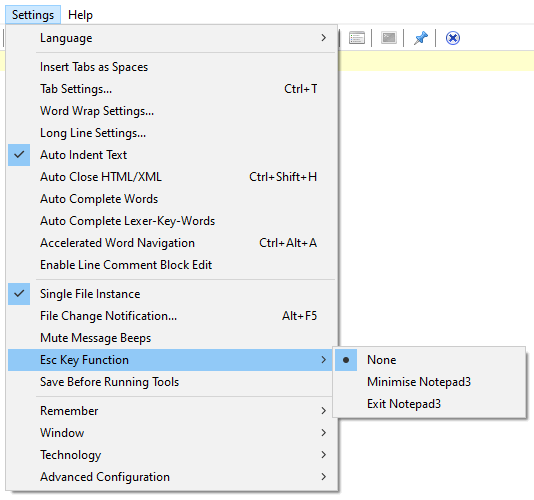
 hpwamr
on 3 Jun 2020
hpwamr
on 3 Jun 2020
REQUEST: Allow us to disable this tooltip.
networkproblemsolver
on 3 Jun 2020
Hello @RaiKoHoff ,
What about my suggestion: https://github.com/rizonesoft/Notepad3/issues/978#issuecomment-469681875
- default remains "3200" "
_DelayClearZoomCallTip(3200);" - "0" Tooltip "Zoom" would be disable. 🤔
hpwamr
on 3 Jun 2020
Here you are:
[Settings2] ZoomTooltipTimeout=3200; in [ms]
A setting of zero (0) (or less than 100 ms) wil disable the Tooltip display.
Feel free to test the BETA version "Notepad3Portable_5.20.603.1_BETA.paf.exe.7z" or higher.
See "Notepad3 BETA-channel access #1129" or here Notepad3Portable_5.20.603.1_BETA.paf.exe.7z
_Note1:_ "Notepad3Portable PAF" can be used in "2 flavors", see with or without extension ".7z".
_Note2:_ If you follow the instructions #1105, you can also update your "Notepad3 Installer version" with the latest BETA version (see #1129).
Your comments and suggestions are welcome... 😃
 RaiKoHoff
on 3 Jun 2020
RaiKoHoff
on 3 Jun 2020
Wow, I don't think I've ever had a developer respond/resolve a request this fast in my life. You are very kind, thank you so much!!!!
Ok, I tried the beta, set the zoom to 0, upon startup, the Zoom Tooltip still shows, but only for a 100ms flash... then disappears. I can live with that, but wanted to let you know, it's not quite disabled.
networkproblemsolver
on 3 Jun 2020
Further update -- turns out the "Disable Zoom Tooltip" doesn't work if you open a TXT file from the command line.
If you just run Notepad3, then the tooltip will "flash quickly away" but if you open a TXT file, the tooltip displays for 4.x seconds.
Sorry.
networkproblemsolver
on 4 Jun 2020
Hello @networkproblemsolver,
unfortunately, I can't reproduce your issue - please ensure you are using the correct version (newer or equal than v5.20.603.1 (BETA)). Maybe your command line path leads to an old version?
RaiKoHoff
on 4 Jun 2020
unfortunately, I can't reproduce your issue
I confirm the statements of @RaiKoHoff , [Settings2] ZoomTooltipTimeout=0; in [ms] is working correctly with "Notepad3Portable_5.20.603.1_BETA or higher and also from the command line for this BETA version or higher. 👍
_Note:_ If you follow the instructions #1105, you can also update your "Notepad3 Installer version" with the latest BETA version (see #1129), also be sure you replace your Notepad3.ini file (installer) or update it with the latest keys.
hpwamr
on 4 Jun 2020
**_Ok, I have verified the version (below). I am running the 5.20.603.1 beta.
I only have 1 version of Notepad3 installed, the "installer version" but copied the EXE files from the portable.7z file. Also, I use the notepad replacement registry entry, like this:_**
REGEDIT4

[HKEY_LOCAL_MACHINE\SOFTWARE\Microsoft\Windows NT\CurrentVersion\Image File Execution Options\notepad.exe]

"Debugger"="C:\Program Files\Notepad3\Notepad3.exe /z"
**_Then, I run notepad from cmd line or gui to get Notepad3. Now I get the zoom tooltip all the time for 5 seconds... : (
Note that I only updated the EXE files, I did not update the INI files from the portable.7z_**
Notepad3 (64-bit) v5.20.603.1 BETA (t7820-rk)

Compiler: MS Visual C++ 2019 v16.6.1 (VC v1926)

OS Version: Windows 10  Version 1909 (Build 18363)

Scintilla v433

Oniguruma v6.9.5
- Locale: en-US (CP:'ANSI (CP-1252)')
- Current Encoding = 'Unicode (UTF-8)'
- Screen-Resolution = 1920 x 1080 [pix]
- Display-DPI = 120 x 120 (Scale: 125%).
- Rendering-Technology = 'GDI'
- Zoom = 130%.
- Process is not elevated
- User is in Admin-Group.
- Current Lexer: 'Text Files'
networkproblemsolver
on 4 Jun 2020
Note that I only updated the EXE files, I did not update the INI files from the portable.7z_**
Question: If you do NOT update the Notepad3.ini file of the installation version, how can Notepad3 (Setup version) take into account this new parameter "[Settings2] ZoomTooltipTimeout=0;" 🤔
See "Note" in #1105 to properly update your "Notepad3.ini Install version file"
hpwamr
on 5 Jun 2020
I misspoke, I added the [Settings2] ZoomTooltipTimeout=0; line. I meant I didn't update the INI files from the .7z file. I'm going to uninstall and re-install.
networkproblemsolver
on 5 Jun 2020
In attachment a pristine "Notepad3.ini" for "Notepad3 Setup version "Notepad3Portable_5.20.603.1_BETA or higher"
_Attachment:_ Pristine Notepad3.ini (Installer version - Notepad3Portable_5.20.603.1_BETA or higher).zip
hpwamr
on 5 Jun 2020
Ok, after uninstalling the "installer version" and just installing the PAF version in my D:\PortableApps folder... the Zoom Tooltip has gone away (disabled by the new configuration settings2).
Thank you so much.
networkproblemsolver
on 5 Jun 2020
In a short time, I will publish new "Notepad3_BETA Installers" with all the new features and among others
- [Settings2] ZoomTooltipTimeout=3200; in [ms]
hpwamr
on 5 Jun 2020
Hello @networkproblemsolver ,
Feel free to test the "Portable BETA paf" version "Notepad3Portable_5.20.605.2_BETA.paf" or higher.
See the issue "Notepad3 BETA-channel access #1129" or hereunder:
Also, feel free to test the "Setup BETA" version "Notepad3_5.20.605.2_Setup_BETA" or higher.
See also the issue "Notepad3 BETA-channel access #1129" or hereunder:
_Note1:_ The "Notepad3Portable_paf" version can be used in "2 flavors", see with or without extension ".7z".
_Note2:_ If you follow the instructions in issue #1105 , you can also update your "Notepad3 Setup" version with the latest features/fixes of the "Portable BETA paf" version (see issue #1129).
Your comments and suggestions are welcome... 😃
hpwamr
on 5 Jun 2020
Related issues
 craigo-
·
3Comments
craigo-
·
3Comments
 blackcrack
·
3Comments
blackcrack
·
3Comments
 wmsrww
·
3Comments
wmsrww
·
3Comments
 dlong500
·
3Comments
dlong500
·
3Comments
 bravo-hero
·
3Comments
bravo-hero
·
3Comments
Most helpful comment
Here you are:
[Settings2] ZoomTooltipTimeout=3200; in [ms]
A setting of zero (0) (or less than 100 ms) wil disable the Tooltip display.
Feel free to test the BETA version "Notepad3Portable_5.20.603.1_BETA.paf.exe.7z" or higher.
See "Notepad3 BETA-channel access #1129" or here Notepad3Portable_5.20.603.1_BETA.paf.exe.7z
_Note1:_ "Notepad3Portable PAF" can be used in "2 flavors", see with or without extension ".7z".
_Note2:_ If you follow the instructions #1105, you can also update your "Notepad3 Installer version" with the latest BETA version (see #1129).
Your comments and suggestions are welcome... 😃