Notepad3: FR: Open Hyperlinks by Double-Click and MMB-Click
Add two ways to open links.
a. Double click to open the link.
b. Middle click to open the link.Column Editing like notepad++.
simply press and hold the Alt key, click and drag to select the lines whose columns you wish to edit, and begin typing.
refer : notepad++ Column Editing
Thank you!!!
Stay home,wash hands,wear mask. Hope everyone is healthy.
 Briy09
All 25 comments
Your 2nd wish is already implemented ?
 RaiKoHoff
on 29 Apr 2020
RaiKoHoff
on 29 Apr 2020
@RaiKoHoff Sorry, just forget 2nd wish. Hope Notepad3 is getting better and better.
Briy09
on 30 Apr 2020
Add Open Hyperlink by Double-Click implemented.
But I am not convinced, that this is a good idea, it does not "feel" right, since double-click is used as word-selection ... 🤔 - let's hear, what other users "feel" about this.
Feel free to test the BETA version "Notepad3Portable_5.20.430.2_BETA.paf.exe.7z" or higher.
See "Notepad3 BETA-channel access #1129" or here Notepad3Portable_5.20.430.2_BETA.paf.exe.7z
_Note1:_ "Notepad3Portable PAF" can be used in "2 flavors", see with or without extension ".7z".
_Note2:_ If you follow the instructions #1105, you can also update your "Notepad3 Installer version" with the latest BETA version (see #1129).
Your comments and suggestions are welcome... 😃
RaiKoHoff
on 30 Apr 2020
Add Open Hyperlink by Double-Click implemented.
But I am not convinced, that this is a good idea, it does not "feel" right, since double-click is used as word-selection ... 🤔 - let's hear, what other users "feel" about this.
Hello @RaiKoHoff ,
Personally, I don't like this "double click" behavior to open an Hyperlink. 👎
When I look at the other editors, the 2 behaviors exist.
For example:
- EditPadLite, Notepad++ : double click open Hyperlink.
- EditPlus, MS Code : double click select a word.
Hello @alexantr , @ltGuillaume , @jupester , @leeoniya , @craigo- , @engelhro , etc...
What is your opinion for this behavior ? 🤔
Your comments and suggestions are welcome... 😃
Voting: Like: 👍 or Don't like: 👎
 hpwamr
on 1 May 2020
hpwamr
on 1 May 2020
What is your opinion for this behavior ? 🤔
Resend to: @engelhro , @AlexIljin, @kofifus , @lhmouse , @maboroshin , etc..
hpwamr
on 1 May 2020
Hello, I suggest adding an option. Let users choose by themselves.
The double-click action:
- open Hyperlink.
If a sentence is a Hyperlink(maybe it containshttporwww), then open Hyperlink, else select a word. - always select a word.
Briy09
on 1 May 2020
For 20 years, DoubleClick is string selection. Also the original "Notepad.exe".
It should be an option.
 maboroshin
on 1 May 2020
maboroshin
on 1 May 2020
Hi @RaiKoHoff,
Notepad3Portable_5.20.430.2_BETA.paf.exe.7z tests good! Looking forward to MMB-Click to open an Hyperlink.
- For those who want double click to select a word, just check double-click action:always select a word.
and you can also useMMB-Clickorctrl+left-clickto open an Hyperlink. - For those who want double click to open an Hyperlink, just check double-click action:open Hyperlink, and in this case, if a sentence is not a hyperlink, then double-click is used as word-selection.and you can also use
MMB-Clickorctrl+left-clickto open an Hyperlink.
Briy09
on 1 May 2020
Personally I don't expect clicks to open URLs in any form as it can be triggered very unintentionally, so I have this feature turned off.
 lhmouse
on 1 May 2020
lhmouse
on 1 May 2020
Thank you for inviting me to this discussion!
Single click opening a link in the current window is the behavior we expect from our web browsers, it's their primary role.
But we are in a text editor. In a text editor single click places the text caret, which is an empty selection (shift + arrows extend it). Double click selects a word. Triple click selects a line/sentence/paragraph.
I don't think anyone would expect a link to be open in the same window anyway. I think that clicking a link is expected to open the page in a different window - namely, in the default browser.
So, since we are talking about opening a link in a new window, there are two common gestures to achieve that: Ctrl+Left Click and Middle Click. The former may be familiar to you if you worked in MS Word, the latter I always use in browsers, such as Firefox.
Personally, I always disable link highlighting and clicking support in my text editors, because it always gets in the way. The double click in Notepad++ is especially annoying, because it both selects the word and opens the link in the browser (triple click is also unusable in this case if the browser jumps to the foreground quickly enough).
 alex-ilin
on 1 May 2020
alex-ilin
on 1 May 2020
I think @AlexIljin has summed it up perfectly. I don’t think it makes sense for a double-click action in a text editor to open a hyperlink. (I still cringe when I see people do that in browsers!) Notepad3 now has two other options that have wide browser equivalents, use them.
I’m one of the users that _does_ appreciate and use the hyperlink feature 😀
 craigo-
on 1 May 2020
craigo-
on 1 May 2020
I also vote against double clicking.
One option I've seen editors do and liked is to pop up some bubble ie with an arrow sign whenever you hover over a link and then you can click on the bubble to open the link. This makes opening a link very smooth and intuitive without any shortcut but may be too much for a text editor like NP3
 kofifus
on 2 May 2020
kofifus
on 2 May 2020
Okay, I changed the behavior (if hyperlink indicator is active):
- Middle-Mouse-Button action (new, no modifier-keys yet):
- set caret to clicked position
- open hyperlink in default browser, if position is within active hyperlink
- Double-Click action:
- still select word at clicked position (not changed), except:
- if position is within active hyperlink: select complete hyperlink
(this is consistent to "copy hyperlink" while caret position within hyperlink or context menu)
Words at caret position within the hyperlink can still be selected by Ctrl-Spc.
Feel free to test the BETA version "Notepad3Portable_5.20.502.2_BETA.paf.exe.7z" or higher.
See "Notepad3 BETA-channel access #1129" or here Notepad3Portable_5.20.502.2_BETA.paf.exe.7z
_Note1:_ "Notepad3Portable PAF" can be used in "2 flavors", see with or without extension ".7z".
_Note2:_ If you follow the instructions #1105, you can also update your "Notepad3 Installer version" with the latest BETA version (see #1129).
Your comments and suggestions are welcome... 😃
RaiKoHoff
on 2 May 2020
Okay, I changed the behavior (if hyperlink indicator is active):
Hello @RaiKoHoff ,
I like very much the new behavior. 👍 💯
hpwamr
on 2 May 2020
a new idea: drag to open links,Just hold on your left mouse button, performing a drag-n-drop, yeah, links open in the default browser. like super-drag-for-google-chrome.
What about this?
Briy09
on 3 May 2020
a new idea: drag to open links,Just hold on your left mouse button, performing a drag-n-drop,
My opinion is NO ! 👎
Notepad3 is a "Coder-oriented" Text Editor and is not intended to become another super browser !
hpwamr
on 3 May 2020
I believe users are more used to:
double click=select word
triple click=select line
Ctrl+click=open hyperlink
 feeshy
on 3 May 2020
feeshy
on 3 May 2020
- if position is within active hyperlink: select complete hyperlink
But double click "select complete hyperlink" is very easy to copy or replace an url too. 🤔
hpwamr
on 3 May 2020
a new idea: drag to open links,Just hold on your left mouse button, performing a drag-n-drop, yeah, links open in the default browser. like super-drag-for-google-chrome.
What about this?
How about dragging mouse over text would perform text selection? Too crazy? : ))
Drag-and-drop gesture has two components: what is being dragged, and where it's being dropped.
If you triple-click a link to select a full URL and then start dragging the selected text, you can drop it to a browser, and the browser may be able to open it. You can drop it to another text editor to copy or move the text. You can drop it to the same Notepad3 instance to move the URL text to a new location.
If you want more ways to open a URL, I see at least two other options:
- add a context menu item "Open URL in default browser", which is only enabled when the mouse
  cursor at the click time points somewhere inside a URL;
- when text drag operation starts, and the text consists of a URL, display a drop target with text like "Drop here to open URL in the default browser". The drop target should not overlay any text area, which may be legitimate drop destination for the moved text piece, so best would be to place it over the toolbar area, or to open a new panel under the toolbar, which would temporarily displace the text area. Maybe an extra panel on the right side could be added as well, to shorten the drag distance and prevent inadvertent text scrolling while approaching the top of the window. In this case the two panels should visually indicate that their role is identical by, for example, haveing prominent dotted line around them.
Personally, I think dragging text is too much of a hassle for the task, but sometimes it's cool. So, basically, I sometimes implement such stuff as a kind of Easter Egg when I feel like it, in addition to the easier and more discoverable methods to do the same (like the context menu or the middle-click).
alex-ilin
on 3 May 2020
Hello,
If you want more ways to open a URL, I see at least two other options:
- add a context menu item "Open URL in default browser", which is only enabled when the mouse
cursor at the click time points somewhere inside a URL;
this is already implemented.
I think too, the hyperlink dragging stuff is too much hassle for this task ;-)
The only other convenience method I will add to current solution is:
clicking the Tooltip (popup) when hoovering the hyperlink (if activated View->Display->Show Hyperlink Tooltip) will open the link in default browser.
Feel free to test the BETA version "Notepad3Portable_5.20.503.1_BETA.paf.exe.7z" or higher.
See "Notepad3 BETA-channel access #1129" or here Notepad3Portable_5.20.503.1_BETA.paf.exe.7z
_Note1:_ "Notepad3Portable PAF" can be used in "2 flavors", see with or without extension ".7z".
_Note2:_ If you follow the instructions #1105, you can also update your "Notepad3 Installer version" with the latest BETA version (see #1129).
Your comments and suggestions are welcome... 😃
RaiKoHoff
on 3 May 2020
- if position is within active hyperlink: select complete hyperlink
But double click "select complete hyperlink" is very easy to copy or replace an url too. 🤔
Hello @RaiKoHoff ,
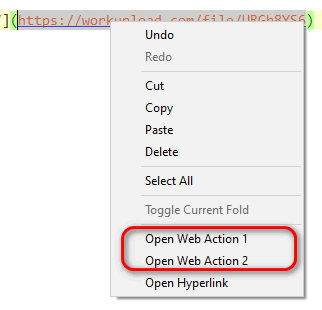
I suggest to grayed the those "Web Action.." when the full URL is selected.
hpwamr
on 3 May 2020
The only other convenience method I will add to current solution is:
clicking the Tooltip (popup) when hoovering the hyperlink (if activatedView->Display->Show Hyperlink Tooltip) will open the link in default browser.
Hello @RaiKoHoff ,
I like very much this new behavior too. 👍 💯
hpwamr
on 3 May 2020
New behavior is great but I disabled hyperlinks at all to have ability to select words by double click ewerywhere like usual.
 alexantr
on 27 May 2020
alexantr
on 27 May 2020
I find that double clicking on an hyperlinks to select the whole link is a great feature. 👍 😏
Maybe an option in Notepad3.ini to have both behavior ?
hpwamr
on 27 May 2020
@hpwamr it's not nessesary for me. I use hyperlinks rarely.
alexantr
on 27 May 2020
Related issues
 dlong500
·
3Comments
hpwamr
·
3Comments
craigo-
·
3Comments
dlong500
·
3Comments
hpwamr
·
3Comments
craigo-
·
3Comments
 wmsrww
·
3Comments
wmsrww
·
3Comments
 RaffaeleBianc0
·
3Comments
RaffaeleBianc0
·
3Comments
Most helpful comment
Thank you for inviting me to this discussion!
Single click opening a link in the current window is the behavior we expect from our web browsers, it's their primary role.
But we are in a text editor. In a text editor single click places the text caret, which is an empty selection (shift + arrows extend it). Double click selects a word. Triple click selects a line/sentence/paragraph.
I don't think anyone would expect a link to be open in the same window anyway. I think that clicking a link is expected to open the page in a different window - namely, in the default browser.
So, since we are talking about opening a link in a new window, there are two common gestures to achieve that: Ctrl+Left Click and Middle Click. The former may be familiar to you if you worked in MS Word, the latter I always use in browsers, such as Firefox.
Personally, I always disable link highlighting and clicking support in my text editors, because it always gets in the way. The double click in Notepad++ is especially annoying, because it both selects the word and opens the link in the browser (triple click is also unusable in this case if the browser jumps to the foreground quickly enough).