
Windows 7 x64 SP1, 3840x2160, dpi168 (27 inches monitor)
Notepad3 (64-bit) v5.19.815.2595
1) Toolbar icons are mixed from 2 neighbourhood pictures.
2) Customize toolbar dialog contains mixed icons.
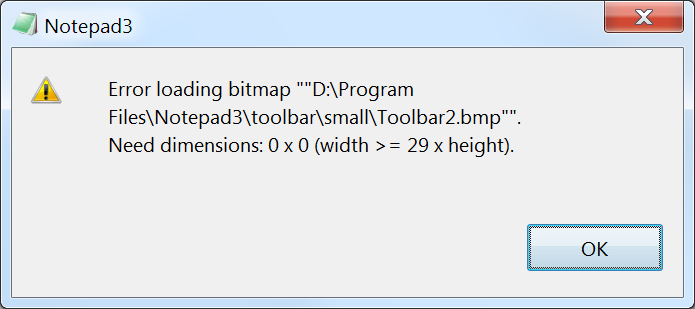
Loading toolbars taken from https://github.com/rizonesoft/Notepad3/tree/master/res leads to the error:
 rend3r
All 27 comments
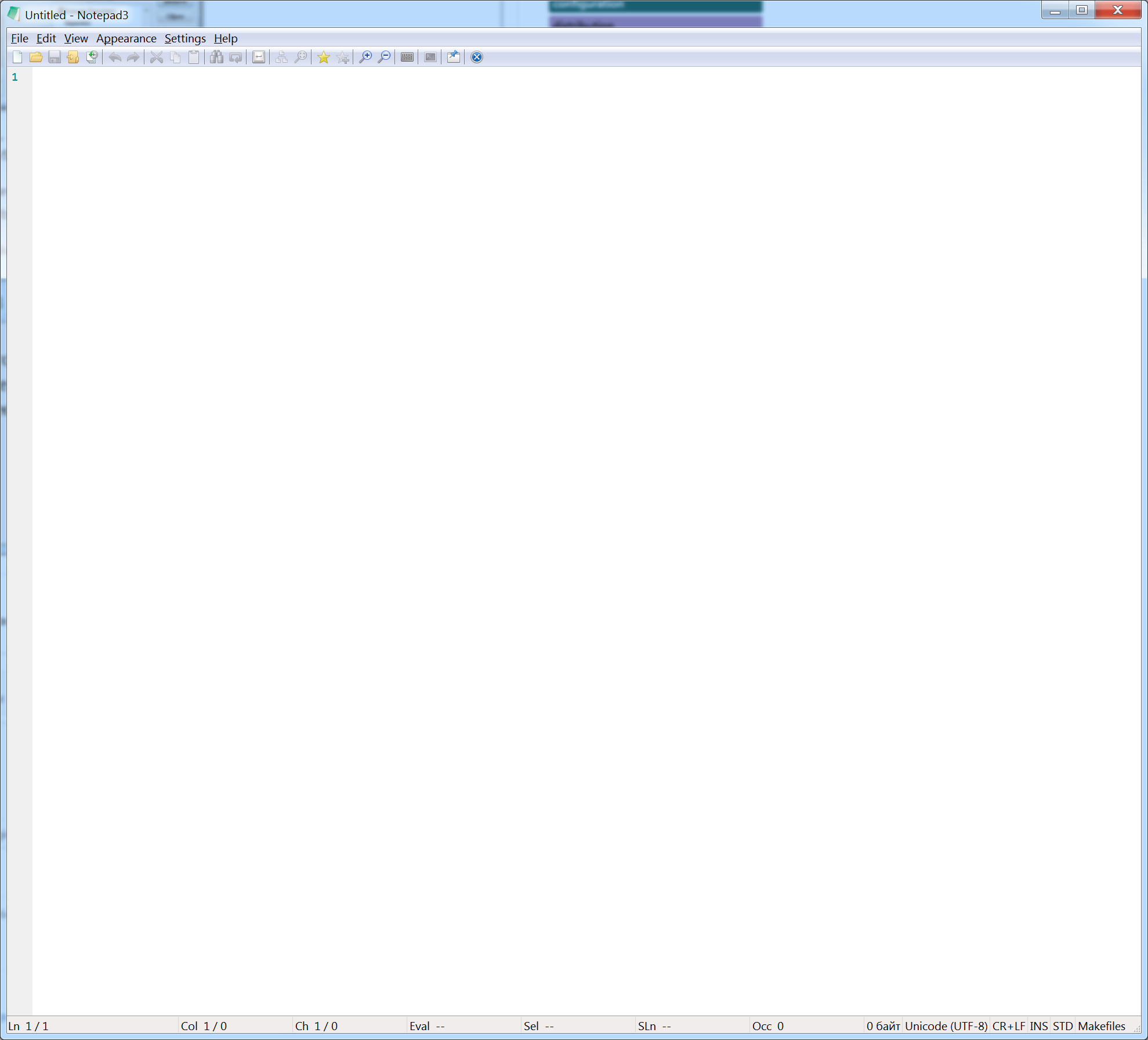
Buttons are small but without any glitches, scale problem after update to RC version Notepad3Portable_5.20.307.1_RC3.paf.exe.7z
rend3r
on 7 Mar 2020
Yes. I think, the scaled bitmap buttons are very ugly due to the scaling artifacts ("blurred").
Now it seems, that even the big bitmap buttons (24x24 pix) for the tollbar are still too small for your huge screen.
I see 2 possibilities:
- a menu switchable option to allow DPI bitmap scaling of these buttons (getting blurred images)
- create a 3rd bitmap with larger buttons (48x48 or 64x64 pix) and offer to toggle between 3 toolbars (getting sharp images)
🤔
 RaiKoHoff
on 7 Mar 2020
RaiKoHoff
on 7 Mar 2020
2\. create a 3rd bitmap with larger buttons (48x48 or 64x64 pix) and offer to toggle between 3 toolbars (getting sharp images)
Sounds pretty good and straightforward.
rend3r
on 7 Mar 2020
According to the first solution proposal, the toolbar gets another option to use DPI scaling (or not).
Designing the bigger toolbar will take a while ... (the scaled images are still ugly) 😬
Feel free to test the RC version "Notepad3Portable_5.20.307.2_RC3.paf.7z" or higher.
See "Notepad3 BETA-channel access issue #1129" or here Notepad3Portable_5.20.307.2_RC3.paf.7z.
Note: "Notepad3Portable RC" can be used in "2 flavors" (with or without the extension ".7z").
RaiKoHoff
on 7 Mar 2020

Displacement is still here (less than 5.19.815.2595) for DPI Scale Toolbar option on (zoom in image to see residues clearly)
rend3r
on 8 Mar 2020

Left part - scale option on.
Right part - scale option off.
Hovered button size (under the mouse cursor, doesn't captured) for left is 48x44, for right - 32x28.
They are not square. Very strange.
rend3r
on 8 Mar 2020

24x20 for small toolbar.
Magic 4 pixels for all cases are gone.
rend3r
on 8 Mar 2020
Feel free to test the RC version "Notepad3Portable_5.20.309.1_RC3.paf.7z" or higher.
See "Notepad3 BETA-channel access issue #1129" or here Notepad3Portable_5.20.309.1_RC3.paf.7z.
Note: "Notepad3Portable RC" can be used in "2 flavors" (with or without the extension ".7z").
RaiKoHoff
on 9 Mar 2020
Notepad3 (64-bit) v5.20.309.2 RC3 (dkt1-amr)

Toolbar is blurry but wihout any glitches. Ok for me now (better result could be reached with larger bitmap, right?)
One more suggestion - rewise right click context menu on toolbar. Now np3 has 4 options related to toolbar, maybe they should be accessible in View->Toolbar menu only? Maybe View->Toolbar menu should be rewised completely - it contains status bar, menu bar options. As dev, you are on your own.
rend3r
on 9 Mar 2020
@rend3r :
better result could be reached with larger bitmap, right?
Right - but this has to be delegated to our icon designer and may take a while ...
@hpwamr : If you find some time, you can create a separate issue for "blurry toolbar buttons" (I belive, there has been a related issue already). I think we need bitmap sizes 48x48 or/and 64x64.
Maybe the redesign of View -> Toolbar menu and Toolbar-context-menu could also be a job for you?
RaiKoHoff
on 9 Mar 2020
Maybe the redesign of
View -> Toolbarmenu and Toolbar-context-menu could also be a job for you?
I'm fine with it.
rend3r
on 9 Mar 2020
@rend3r : The "redesign" was meant to be done by @hpwamr - our Languages expert. 😀
RaiKoHoff
on 9 Mar 2020
I'll leave you both to work.
rend3r
on 9 Mar 2020
Maybe the redesign of
View -> Toolbarmenu and Toolbar-context-menu could also be a job for you?
The "redesign" was meant to be done by @hpwamr - our Languages expert. 😀
Hello @RaiKoHoff ,
Could you more elaborate on this change request? 😏 😺
 hpwamr
on 9 Mar 2020
hpwamr
on 9 Mar 2020
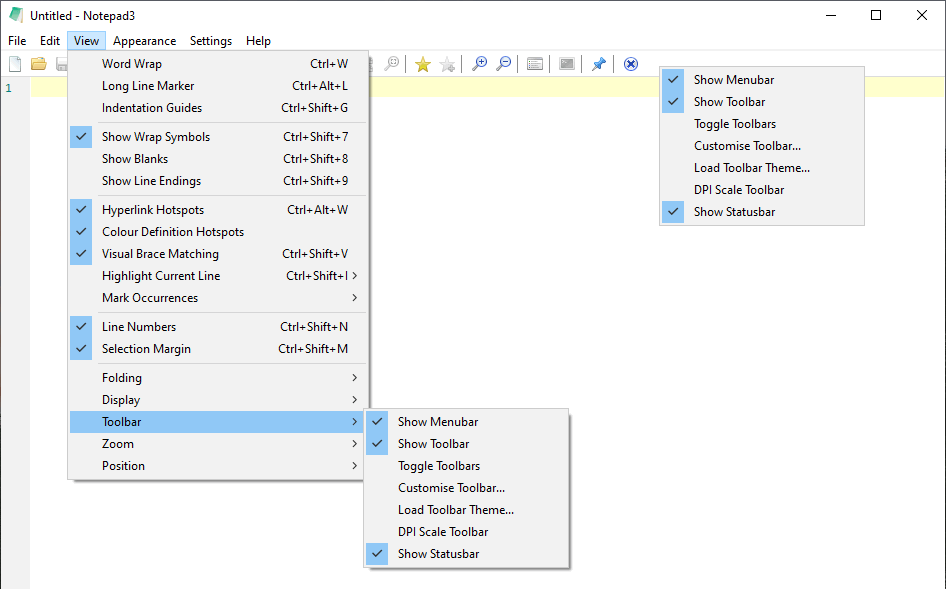
@hpwamr: I am quite fine with this menus, except the menu point "Toolbar" implies that it only handles the "Tool-bar", but it handles "Menu-bar" and "Status-bar" too 🤔
Better naming:
- Bars
- Win(dow) Bars
- GUI Bars
- I don't know Bars
🤔
RaiKoHoff
on 10 Mar 2020
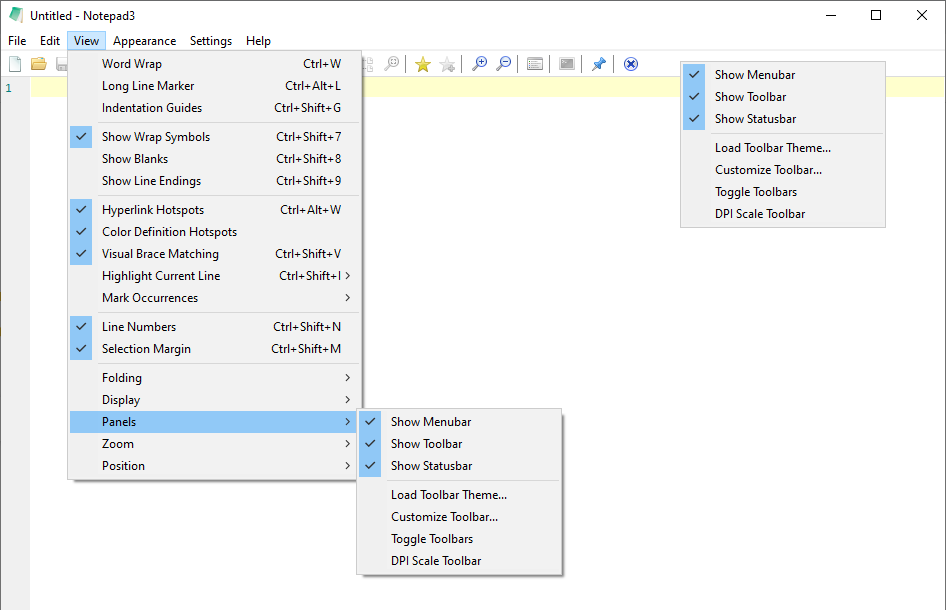
Panels -> show menubar
                show toolbar
                show statusbar
                options -> load toolbar theme
                                  customize toolbar
                                  toggle toolbar
                                  dpi scale toolbar
My 2 cents
rend3r
on 10 Mar 2020
Hello @RaiKoHoff and @rend3r ,
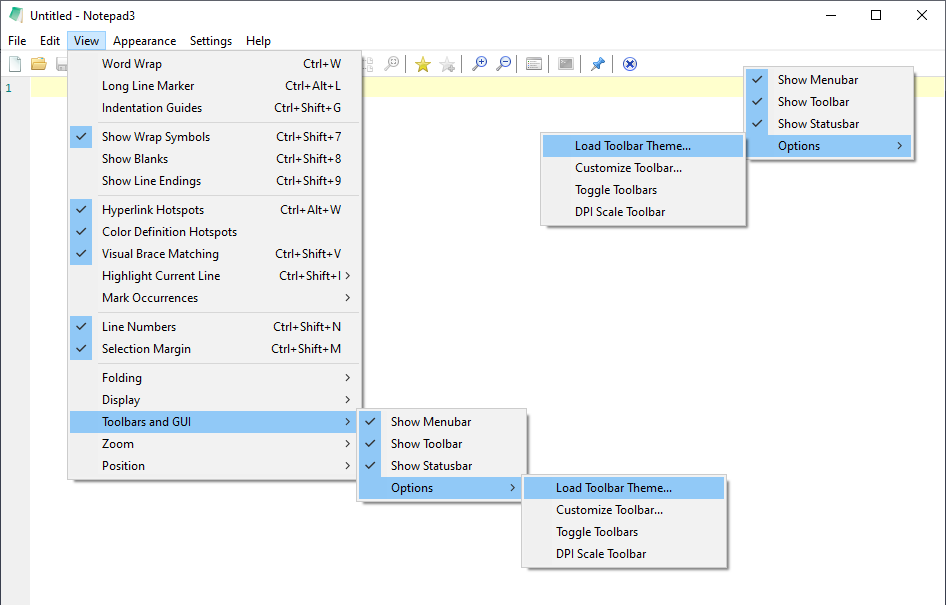
Here is a proposed change.
Your comments and suggestions are welcome... 😃
hpwamr
on 11 Mar 2020
I vote for "Panels" instead of "Toolbars and GUI".
I think a 3-staged sub-menu should only be used for long lists. The "Panels" menu is short enough to use only a horizontal separator instead of the "Options" sub-menu for Toolbar's actions.
RaiKoHoff
on 11 Mar 2020
I vote for "Panels" instead of "Toolbars and GUI".
Hi @RaiKoHoff , and now ? 🤔
hpwamr
on 11 Mar 2020
@hpwamr
I like last version with separator.
rend3r
on 11 Mar 2020
@hpwamr : me too 👍
RaiKoHoff
on 11 Mar 2020
Hello @rend3r ,
Feel free to test the RC version "Notepad3Portable_5.20.311.4_RC3.paf.exe.7z" or higher.
See "Notepad3 BETA-channel access #1129" or here Notepad3Portable_5.20.311.4_RC3.paf.exe.7z.7z
Note: "Notepad3Portable RC" can be used in "2 flavors", see with or without extension ".7z".
Your comments and suggestions are welcome... 😃
hpwamr
on 11 Mar 2020
@hpwamr ,
Tested, no regressions find.
rend3r
on 12 Mar 2020
without DPI scale toolbar, icon is sharp but small in my 4k screen.

with DPI scale toolbar, icon size is good, but little blurred.

I test this beta version, I think we need big size toolbar img with enough resolution, maybe can use waifu2x tool

 WanderMax
on 8 Apr 2020
WanderMax
on 8 Apr 2020
Attached, you will find the the big default toolbars scaled (2.0x) with waifu2x.
To load these icons, just set in .ini-file:
[Toolbar Images]
BitmapDefault=Toolbar2_48.bmp
BitmapHot=Toolbar2Hot_48.bmp
BitmapDisabled=Toolbar2Disabled_48.bmp
Cycle to this image set by "Toggle Toolbars"...
WAIFU2x_Toolbar2_48.zip
RaiKoHoff
on 8 Apr 2020
@RaiKoHoff
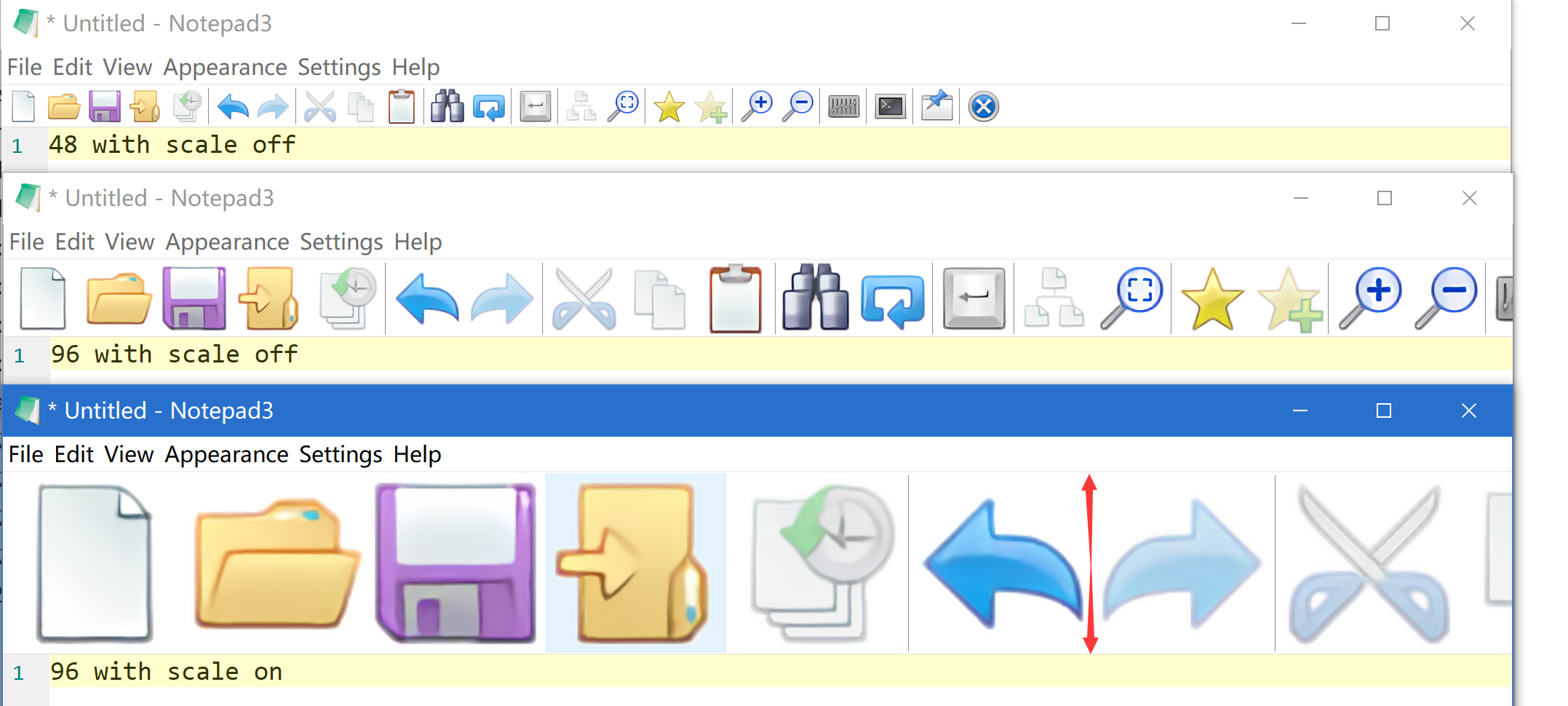
Here is the test snapshot for 48 height toolbar img with scale on/off in version v5.20.411.2 (cfaaee12)
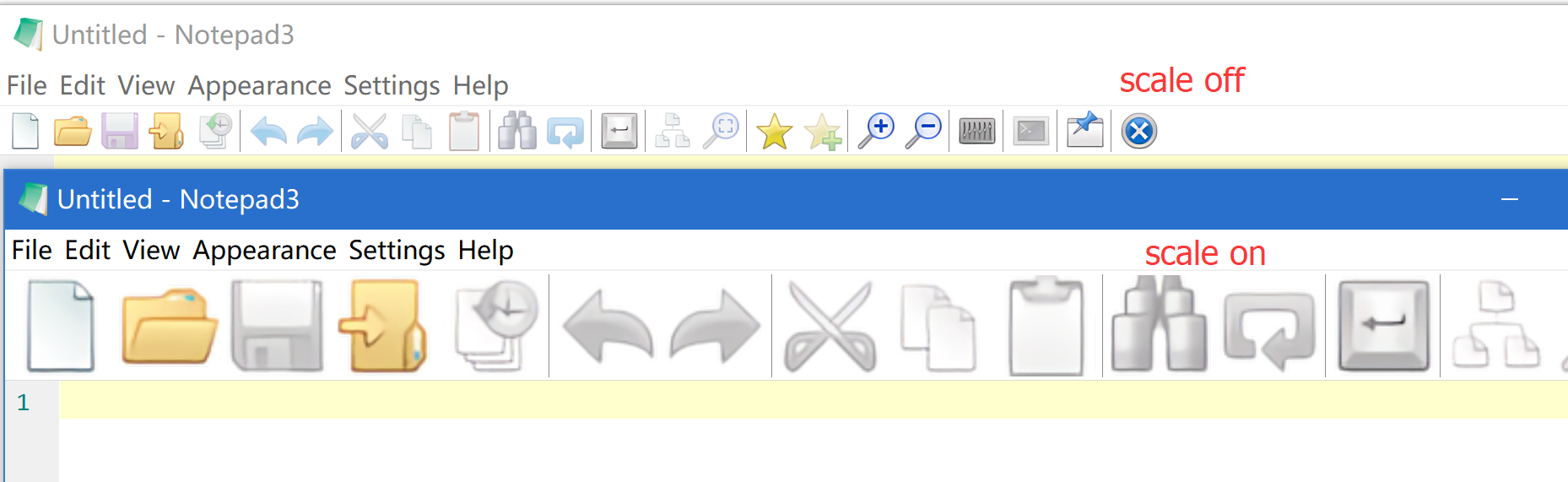
scale on will enlarge img based on system scale ratio, I think it should limit toolbar height for scale on or off (maybe need downscale large toolbar img)
WanderMax
on 12 Apr 2020
hmmmmmmm.....
https://github.com/zufuliu/notepad2/issues/173
@RaiKoHoff
using svg (scaling images) is maybe not the bad'est idea ..
best
Blacky
 blackcrack
on 12 Apr 2020
blackcrack
on 12 Apr 2020
Related issues
 rizonesoft
·
4Comments
rizonesoft
·
4Comments
 zb-z
·
3Comments
hpwamr
·
3Comments
blackcrack
·
3Comments
zb-z
·
3Comments
hpwamr
·
3Comments
blackcrack
·
3Comments
 ggordon-vispero
·
3Comments
ggordon-vispero
·
3Comments
Most helpful comment
@hpwamr ,
Tested, no regressions find.