Notepad3: Unknown file name extension warning
If I open a file that Notepad3 doesn't recognize the extension, it prompts me with a warning saying:
Unknown file name extension (hosts) !
Loading data anyway.
Is there a way to turn this off? If you're going to load the data anyway - just do it, Or save my response the first time so I don't get prompted time and again.
Thank you!
 wehnertb
All 5 comments
Hello @wehnertb ,
First tick the box "Don't display this message again" and then open the message by pressing "Yes".
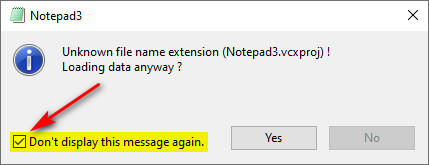
 hpwamr
on 10 Jan 2020
hpwamr
on 10 Jan 2020
OK - I've seen that message pop up at least twenty times today and do you think I saw that checkbox even once!??!
wehnertb
on 10 Jan 2020
I figured out why I never saw the checkbox.
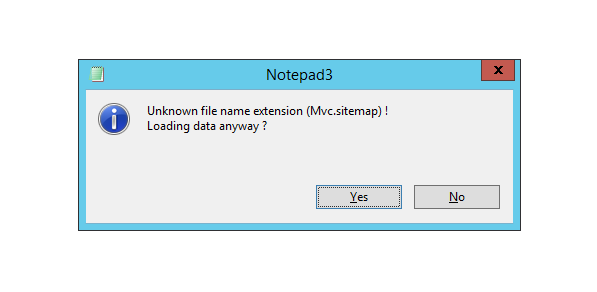
I didn't see the checkbox until I went to "Appearence | Customize Schemas" and just clicked OK. Then the next time I open the program, I see this option.
wehnertb
on 13 Jan 2020
I'm trying to imagine why your message box was not showing the small checkbox ?
Maybe, is your Notepad3.ini not correctly updated to the latest one version?
The current Notepad3.ini must be:
- [Settings] --> SettingsVersion=4
- Encoded as UTF-8 Signature
- Out-of-the-Box, Notepad3.ini has 154 lines
- And after first the run, Notepad3.ini becomes 163 lines
Feel free to test the BETA version "Notepad3Portable_5.20.113.2703_BETA.paf.exe.7z" or higher.
See "Notepad3 BETA-channel access #1129" or here Notepad3Portable_5.20.113.2703_BETA.paf.exe.7z.
Note: "Notepad3Portable BETA" can be used in "2 flavors" (with or without the extension ".7z").
Your comments and suggestions are always welcome... 😃
hpwamr
on 13 Jan 2020
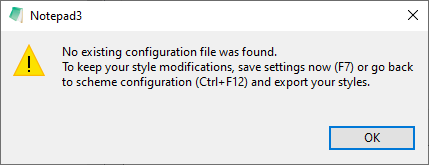
@wehnertb : If Notepad3.exe has no accompanying Notepad3.ini file (e.g. .exe copied to a place w/o .ini), it has no place to store the decision of the "Don't display this message again" checkbox, so the checkbox is not shown. Once the .ini file is created (e.g. F7), the checkbox should be available.
Menu Appearence -> Customize Schemas... | OK will show a dialog in case of missing .ini:
 RaiKoHoff
on 14 Jan 2020
RaiKoHoff
on 14 Jan 2020
Related issues
 ggordon-vispero
·
3Comments
ggordon-vispero
·
3Comments
 craigo-
·
3Comments
craigo-
·
3Comments
 bravo-hero
·
3Comments
bravo-hero
·
3Comments
 RaffaeleBianc0
·
3Comments
RaffaeleBianc0
·
3Comments
 vvyoko
·
3Comments
vvyoko
·
3Comments
Most helpful comment
@wehnertb : If

Notepad3.exehas no accompanyingNotepad3.inifile (e.g. .exe copied to a place w/o .ini), it has no place to store the decision of the "Don't display this message again" checkbox, so the checkbox is not shown. Once the .ini file is created (e.g.F7), the checkbox should be available.Menu
Appearence -> Customize Schemas... | OKwill show a dialog in case of missing .ini: