Notepad3: Insert Encoding Identifier (Ctrl+F8) not working
Insert > Encoding Identifier (Ctrl+F8)
I have never used this function, but during unrelated testing I noticed that it doesn't seem to function anymore, I tried old builds of 4.xx and it works, not sure exactly when it became unresponsive.
 jupester
All 17 comments
Thank you for reporting - feel free to test development beta version _5.19.829.2606_BETA.
(Change to prior versions: inserting same tag as shown in status bar).
 RaiKoHoff
on 29 Aug 2019
RaiKoHoff
on 29 Aug 2019
This looks to be inserting correctly now, one observation though, the inserted string is block selected afterwards, the same is true for GUID, but the other items like "Insert >" Path | Filename | Date etc, are unselected after insertion.
I have no preference either way, just thought it was worth mentioning.
jupester
on 29 Aug 2019
@jupester : Yes, I found this inconsistency too over some places.
I also have no really preference here - lets vote by the community:
- Selected after insertion (:+1:)
- Not Selected after insertion (:-1:)
- If the insertion replaces a previous selection then "yes", else (caret only insert) then "no" (:eyes:) ?
- No Preference (:+1: :-1:)
Maybe there are good reasons for mixture (special insertions I want copy to clipboard immediately)?
RaiKoHoff
on 29 Aug 2019
Yeah, I thought there might have been a reason too, I thought possibly you might have enlightened me with your reply, that's the only reason I mentioned it.
What I did noticed is with GUID it allows you to quickly re-generate different ones so makes sense in that instance, I doubt I will ever use that though.
Anyway I am happy for everything to stay as it is, I won't use these items frequently if you'd prefer let me know and I can close this issue now or you can, without voting or making any changes.
jupester
on 29 Aug 2019
Let's wait some time (collecting some voting or remarks) ...
RaiKoHoff
on 29 Aug 2019
In that case, since you aren't adverse to creating work by changing it, I'll cast a vote, which will be for selection after insertion, and here are my reasons if it helps anyone else decide:
- When inserting filename|fullpath you will probably want to copy it to clipboard afterwards anyway, so it will be pre-selected already, allowing easy copying without line breaks. (which may also go towards a solution for earlier feature request: #1567 )
- When inserting Date, it will allow you to quickly update the time if you need to update it, after for instance working in another window and then coming back, you can just re-insert/overwrite/update.
- It is easier to de-select with for example a quick right arrow press, than it is to manually select the inserted string afterwards when required.
jupester
on 29 Aug 2019
Hello @jupester ,
Thanks for your interest and your contributions to Notepad3. 😃
I would like to add you in the "Acknowledgments" list of Notepad3.
Do you agree ? 😉
 hpwamr
on 30 Aug 2019
hpwamr
on 30 Aug 2019
Sure, if you think the amount I have contributed is worthy, I'm unsure it is, but after saying that, I do also plan to continue contributing in the future, whether that will be helpful or not remains to be seen.
Thanks for the recognition, and all the work y'all put in.
jupester
on 30 Aug 2019
Feel free to test the dev beta ver _5.19.830.2609_BETA.
Changes:
Solution "Depend on Selection" has been implemented:
If the insertion replaces a selection, the inserted string is re-selected, if the insertion is done at caret position w/o selection (empty selection), the inserted string is not selected.
This solution allows several convenient workflows.
RaiKoHoff
on 30 Aug 2019
Looks good to me, seems better them all being consistent now.
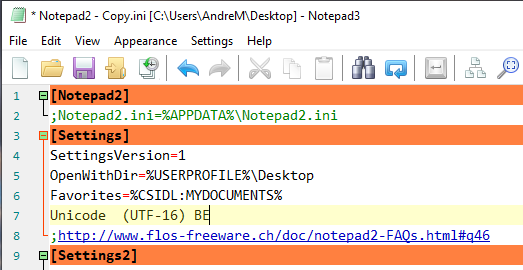
One tiny thing I noticed though, if you set the encoding to "Unicode (UTF-16) BE" and use Ctrl+F8, the string it inserts has 2 spaces after Unicode, none of the other Unicode entries are like this, and in the "Select Encoding" dialog there doesn't seem to be this difference.
jupester
on 30 Aug 2019
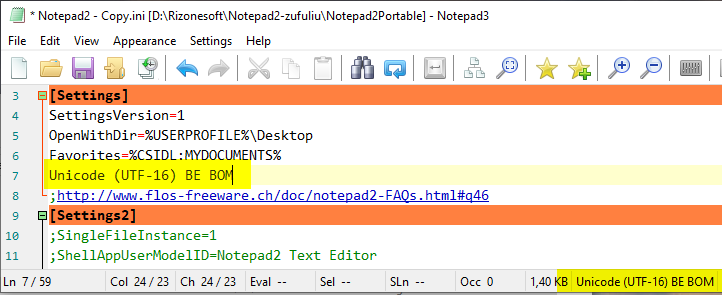
"Unicode (UTF-16) BE" and use Ctrl+F8, the string it inserts has 2 spaces after Unicode,
Tested Notepad3 (64-bit) v5.19.830.2609 BETA, I can not reproduce it ?
hpwamr
on 30 Aug 2019
It only happens on the entry without "BOM", and it is between the end of Unicode and the opening bracket.
jupester
on 30 Aug 2019
Yes, I see 😬
hpwamr
on 30 Aug 2019
@hpwamr : Strings are in encode_xx_yy.rc language files (IDS_ENC_UTF16BE), so maybe your domain ;-)
RaiKoHoff
on 30 Aug 2019
"Unicode (UTF-16) BE" and use Ctrl+F8, the string it inserts has 2 spaces after Unicode,
This minor fix is done and will appear in the next beta release. 😉
hpwamr
on 30 Aug 2019
Cool, I will take your word for it and close this issue, I wasn't sure it was even worth mentioning but since it didn't deviate from the topic too much I thought I might as well.
I think we can call this job done, nice work.
jupester
on 31 Aug 2019
Hello @jupester ,
Feel free to test the BETA version "Notepad3Portable_5.19.831.2611_BETA" or higher.
See "Notepad3 BETA-channel access #1129" or download it from Notepad3Portable_5.19.831.2611_BETA.
hpwamr
on 31 Aug 2019
Related issues
 RaffaeleBianc0
·
3Comments
RaffaeleBianc0
·
3Comments
 dlong500
·
3Comments
hpwamr
·
3Comments
hpwamr
·
3Comments
dlong500
·
3Comments
hpwamr
·
3Comments
hpwamr
·
3Comments
 blackcrack
·
3Comments
blackcrack
·
3Comments
Most helpful comment
Sure, if you think the amount I have contributed is worthy, I'm unsure it is, but after saying that, I do also plan to continue contributing in the future, whether that will be helpful or not remains to be seen.
Thanks for the recognition, and all the work y'all put in.