Notepad3: "Text Files" Scheme: Hierarchy/Inheritance?
Notepad3 v5.19.702.xxxx (e.g. RaiKoHoff: 2382-2393)
For the past few builds I have noticed a new "Text Files" scheme. I am a little confused as to how this new scheme is supposed to work and where it fits in relation to the existing "Default Text" / "2nd Default Text" schemes. I cannot find any discussion of this within the GitHub project or rizonesoft.com.
For example, with a vanilla Notepad3 configuration:
- Open Notepad3 and type something to save (scheme: "Default Text", using Consolas Regular 11)
- Save file somewhere and provide a filename - file gets a .txt extension (scheme: "Text File", using Segoe UI Regular 11)
Result: there is a noticeable difference between the scheme settings (and therefore the look) of a new buffer vs a default extension type.
If the list of associated filename extensions for the "Default Text" scheme are to move to the "Text Files" scheme, what is the "Default Text" scheme for? Shouldn't the "Text Files" scheme inherit the settings from "(2nd) Default Text", like other tier-2 schemes? If this is not the case, can someone please help me (and perhaps others) understand what is going on, and how this new scheme is supposed to work?
Thanks 😄
 craigo-
All 16 comments
Thank you for starting the discussion:
The idea behind this change is: Decoupling of lexer common settings (Default Text / 2nd Default Text) from a "pure text lexer". Before the change, if I want to change the font for a simple "pure" text file (better reading experiences), I had to change the common font, which changes the "default" font for all other lexers too :-1:.
Now, it makes sense to to change the names of Default Text / 2nd Default Text to, maybe Common Settings and 2nd Common Settings ?
It would also makes sense to disable the extensions configuration for these settings :thinking: .
 RaiKoHoff
on 16 Jul 2019
RaiKoHoff
on 16 Jul 2019
OK, have taken time to digest. I sort of thought that was what 2nd Default Text was for. That's how I have used it in the past, e.g. as a toggle between a monospaced and a proportional font, more or less regardless of the scheme selection. But I see what you are trying to achieve.
So the "Text Files" scheme _is_ hierarchical, dependent upon the top-level scheme, and is where the typical list of 'pure text' extensions should live. Cool.
I agree about changing the names of Default Text and 2nd Default Text, and I think your "Common Settings" suggestion will work well. I see sense in removing the ability to associate extensions with these schemes. "Common Settings" then becomes a catch-all for all scenarios not covered by another scheme, including a new buffer.
What I would advocate for, however, is that the default style for the"Text Files" scheme be blank such that it completely inherits its style from the top-level scheme. Two reasons:
- There is only one second-tier scheme that defines a default style (ANSI Art - and for a specific reason); every other scheme inherits the top-level font style
- The reason I initially raised: it is weird and disconnecting for me for a new buffer ("Common Settings") and 'pure text' ("Text Files") to change appearance so dramatically. I guess I'm just used to second-tier schemes largely restricting their formatting to colour and emphasis.
If a user wishes to customise the "Text Files" scheme, they have that ability.
craigo-
on 17 Jul 2019
That sounds reasonable.
I am going to rename the Schemes for Default Text (STD) and 2nd Default Text (2ND), but not sure for naming, maybe Common Styles and 2nd Common Styles is more intuitive :thinking:.
I will keep the "Segoe UI" font for Text Files on initial new installations and "transfer" the existing Default Text settings to new Text Files "lexer" for existing Notepad3.ini configs.
We are loosing the settings of 2nd Default Text if the font&size is different to Default Text.
(file name ext have to be merged into Text Files from STD & 2ND).
Ed.: Every "second-tier" scheme inherits the default font style from top-level style, but all of them are free to override it by their own "default" font style.
RaiKoHoff
on 17 Jul 2019
I am going to rename the Schemes for Default Text (STD) and 2nd Default Text (2ND), but not sure for naming, maybe Common Styles and 2nd Common Styles is more intuitive 🤔.
Yes, in retrospect 'Common Settings' isn't quite right, particularly when its name is displayed in the status bar. ("Common Settings? What's that? Sounds like a way to open an application settings dialogue... Nope.")
'Common Styles'? I don't think that sits quite right either. I'm still thinking that it is not telling me the file's current scheme, it's a button to select one of these 'Common Styles' I want. (Of course it does both, but that phrasing doesn't convey the message very well.)
When I describe how 'Default Text' works, I either use vertical terms such as 'Base', 'Bottom', 'Top'; or origin terms such as 'Default', 'Standard', 'Template', 'Prototype', 'Starter'. 'Bottom' and 'Top' just sound/look weird... We use 'Standard' and 'Base' elsewhere, so that's grounds for exclusion. 'Prototype': what am I, an engineer with a CNC and a 3D printer? 'Starter': Who put me in a Notepad3 wizard? I want Advanced Mode!" Shortlist:
- Default
- Template
My favourite is simply the word 'Default'. It still pays homage to the project's Notepad2 origins, yet decouples it from 'Text', where you want 'pure text' styling to occur. "Ooh, it says 'Default'... OK, I've got some sort of default styling going on, but it hasn't yet applied any custom styling based on what the file is. Let's save it as a txt file. Ooh, now it says 'Text Files' - it knows!" :smile:
I'm not unhappy with the word 'Template', but I think it has less going for it than 'Default'.
I will keep the "Segoe UI" font for Text Files on initial new installations and "transfer" the existing Default Text settings to new Text Files "lexer" for existing Notepad3.ini configs.
I don't think this is the right way to go, for the same reasons as before. Let me turn it around: what is the reason for the 'Text Files' scheme's out-of-the-box behaviour to be inconsistent compared to almost all the other schemes? I think it is better for the 'Text Files' scheme to inherit the default (top-level) scheme's styling. And you then don't have to worry about one-time migration from two schemes to one, and all that shenanigans.
craigo-
on 17 Jul 2019
Feel free to test beta version _5.19.717.2395_BETA.
Naming in this version (2nd) Default Text => (2nd) Common Base,
reason: "base" is well known as base-class on class inheritance hierarchy.
Keeping the "Segoe UI" font for Text Files on fresh new scratch installations,
preserving/transferring old Default Text scheme settings for Text Files on upgrade (SettingsFileVersion: v3 => v4).
RaiKoHoff
on 18 Jul 2019
Naming in this version (2nd) Default Text => (2nd) Common Base,
reason: "base" is well known as base-class on class inheritance hierarchy.
OK, that's fine. It might be a good idea to update the "2nd Default Scheme" menu item (under "Appearance") to the new phrasing.
Keeping the "Segoe UI" font for Text Files on fresh new scratch installations,
preserving/transferring old Default Text scheme settings for Text Files on upgrade (SettingsFileVersion: v3 => v4).
:disappointed:
I run Notepad3 betas around 99% of the time. With each update I start with a brand new installation, using a script to apply customisations. It's just cleaner that way, and the script also helps flush out bugs as it exercises the UI. But it does mean that sensible defaults are quite important to me, as it reduces the amount of customisation I have to perform.
Some of my customisations are personal preference; I do not think they are sensible defaults. Some customisations exist because I mildly disagree with the default setting but not enough to warrant bringing it to the community. But I will raise things that strongly disagree with; things that I don't think should be a customisation.
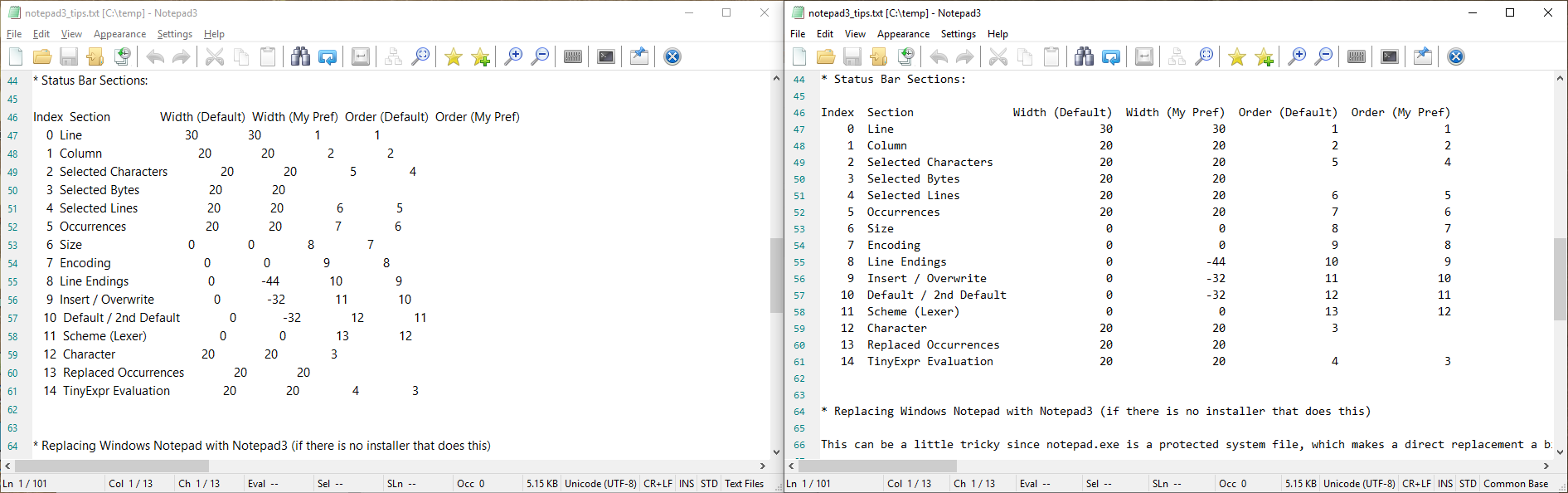
Here's the thing: I don't think that a proportional font is a sensible default for a text editor's core file types. But I guess you do..? I started compiling a list of text editors that use a monospaced font by default, but I stopped, struggling to find any that don't.

craigo-
on 19 Jul 2019
Hello @craigo- ,
You make a point ! 👍
Me too, I do NOT like proportional font for my .txt or .log files ! 😢
 hpwamr
on 19 Jul 2019
hpwamr
on 19 Jul 2019
I run Notepad3 betas around 99% of the time. With each update I start with a brand new installation, using a script to apply customisations.
That definitely has sparked my intererest – can you provide some details on your script (language/tool) and how you run/apply it? That sounds really useful to keep a configuration file tidy: just use the default provided, apply personal overrides defined separately, and done!
Looks like I could make use of such functionality for a few over config files as well…
Thanks for a short hint (as this is probably off topic in this issue).
 engelhro
on 19 Jul 2019
engelhro
on 19 Jul 2019
@craigo- : Your examples are not simple text documents - that are tables.
For this, a non-proportional (mono-spaced) font makes sense - a special lexer like Makefile for text tables (comment highlighting, etc.) would be fine, so special file name extension for text tables makes sense.
For long prose text (License.txt , "fairy tales", ...) a proportional font like Segoe UI increases the readability.
_To finalize this discussion_:
Please vote this comment by +:smiley: button for the upcoming default font for Text Files:
- thumbs down (:-1:) for proportional font (Segoe UI)
- thumbs up (:+1:) for non-proportional mono-spaced font (default 'Consolas')
Highest counting wins :smile:
RaiKoHoff
on 19 Jul 2019
@RaiKoHoff
For long prose text (License.txt , "fairy tales", ...) a proportional font like Segoe UI increases the readability.
I'm not sure that holds true. Most license files I've seen are written with a fixed line length (read: fixed number of characters per line) in mind, as if the authors used monospaced fonts themselves… For readmes, licenses and such files this totally makes sense as you usually don't have reflow capabilities in simple standard text editors (who reads such documents e.g. in a full-fledged Office suite?) and work with hard line breaks instead.
So (dependent on the actual fonts and their attributes the readers/target audience use) the visual line length of such documents can vary a lot with variable width fonts – this looks distracting and decreases the readability.
My stance: I think monospace should definitely be the default, also for regular (read: non-tabular) text files.
engelhro
on 19 Jul 2019
... convinced :grin:
Question on initial default for Text Files : inherit from Common Base or pre-defined font like "ANSI Art"?
RaiKoHoff
on 19 Jul 2019
Question on initial default for Text Files : inherit from Common Base or pre-defined font like "ANSI Art"?
I think it's better from Commun Base :thinking:
hpwamr
on 19 Jul 2019
Thanks, @RaiKoHoff.
I agree with @hpwamr, for the reason I mentioned above... For a default, I think it best for schemes to inherit the common base styles (unless there is a good reason not to, e.g. the 'ANSI Art' scheme).
@engelhro, I use AutoIt. I've written it to configure as much as possible using Notepad3's UI (menu items, buttons, keyboard shortcuts), and what cannot be done that way I do by scripting Notepad3 to edit its own settings file. To run, drag and drop the Notepad3 executable onto the script (you have to perform a registry edit to enable the file handler for drag and drop to work). At present it takes a little over a minute to complete.
It's not perfect. In fact it's pretty rough in parts. It doesn't handle Windows display scaling, so unless Windows is at 100% scaling it'll probably get lost in an endless loop... But it more or less does what I currently need it to do.
Happy to share the code - do you have access to Google Drive? Alternatively, if someone were to grant me write access to the project's Dropbox, I could put it there. (I should probably host it on GitHub at some point 😄)
craigo-
on 20 Jul 2019
Hello @craigo- , you can use our Exchange_Place (MS OneDrive or Google Drive), see #1129 to transmit your code to @engelhro ...
If you want to share it permanently, then I can move it to our Share_Place/Utilities. :thinking:
hpwamr
on 20 Jul 2019
Have uploaded an archive file to the Exchange_Place on Google Drive.
craigo-
on 20 Jul 2019
Have uploaded an archive file to the Exchange_Place on Google Drive.
Hello @craigo-: thanks a lot! Just downloaded the script and will have a look at it soon (once I have more time to study it – and then of course I need to learn at least the basics AutoIT 😄).
But that's probably a great starting point!
engelhro
on 24 Jul 2019
Related issues
 vvyoko
·
3Comments
craigo-
·
3Comments
craigo-
·
4Comments
vvyoko
·
3Comments
craigo-
·
3Comments
craigo-
·
4Comments
 zb-z
·
3Comments
zb-z
·
3Comments
 tzleon
·
3Comments
tzleon
·
3Comments
Most helpful comment
@craigo- : Your examples are not simple text documents - that are tables.
For this, a non-proportional (mono-spaced) font makes sense - a special lexer like
Makefilefor text tables (comment highlighting, etc.) would be fine, so special file name extension for text tables makes sense.For long prose text (License.txt , "fairy tales", ...) a proportional font like Segoe UI increases the readability.
_To finalize this discussion_:
Please vote this comment by +:smiley: button for the upcoming default font for
Text Files:Highest counting wins :smile: