Notepad3: Add to Menu Language Selector
See example from another notepad:
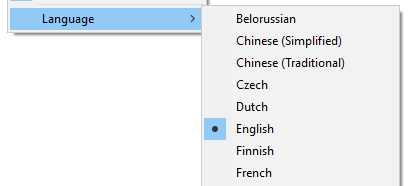
 alexantr
All 19 comments
I think that an "Administration Tool" with a "Language Selection" is at the top of the "To Do" list. 🤔
 hpwamr
on 11 Nov 2018
hpwamr
on 11 Nov 2018
Why tool for editing Notepad3's advanced settings named as "Administration Tool"?
alexantr
on 12 Nov 2018
Hello @alexantr,
The name "Administration Tool" can still evolve into for "example":
"Administration Manager", "Configuration Tool", "Configuration Manager", "Settings Manager", "Settings Preferences", "Preferences Manager", "Customize Tool", "Notepad3 Options" etc...
The Name list is still open. 🤔
hpwamr
on 13 Nov 2018
Is this tool for absolutely all preferences? What about just "Preferences..."?
alexantr
on 13 Nov 2018
Currently, I am not involved in this project, but I read somewhere that the main goal is to easily manage the [Settings2] of Notepad3.ini. 🤔
hpwamr
on 13 Nov 2018
What is the the use-case for having a language selector in menu?
In other words: why do someone need to switch the language of a tool often/frequently?
 RaiKoHoff
on 21 Feb 2019
RaiKoHoff
on 21 Feb 2019
Hello @RaiKoHoff , Ok, you can say, it's a nice to have. 😆
But it's really easier to switch to another language (and back) from a Languages Menu that go to Advanced Configuration... to edit the a [Setting2] parameter,
When: eg:
- your mother language is anther language that the displaying language
- you will choose another language that the Local Machine or the Fall Back
- you do not understand very well a translation of a function and you will go to another language to see the original wordings or another translation
I can imagine a "Languages Selector" as a Sub-Menu under "Administration Tool"
But not a menu list in English as above but a menu list aka" NP++" or "PAPPS" in Localized languages.
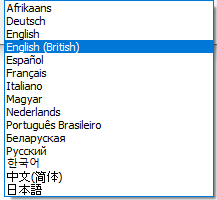
The language list could be add ONCE in "common_res.rc".
For readability, I propose to add a language code as suffix at the entry language :eg: "(de-DE) Deutsch", "(hu-HU) Magyar", etc..
The list will be sorted on the language code, but with the (en-US) English (internal default) will stay on top.
Attachement: Langues Selector.txt
hpwamr
on 22 Feb 2019
Another use-case can be to find the name of an option in English (to find help, submit an error...)
 jczanfona
on 22 Feb 2019
jczanfona
on 22 Feb 2019
Hello @RaiKoHoff ,
Hereunder another testimony from the site "Notepad3/Support" who pleads for a "Language Selector":
[Rizonesoft] Support
Hi, I very like Notepad3, it's my favorite notepad since years. Now, I use version 5.18.1106.1434. I'd like to know if it is possible to change manually the language UI? My computer is ES-MX, to help me learn spanish, but my softwares are mostly in French. Notepad ask me to help translating in ES-MX, I prefer it in French, if possible. Other computers here are FR-CA, and Notepad3 ask me to help to translate in FR-CA, but FR-FR is OK. I hope my English is not so bad. Thanks for your great software! Jonathan
Perhaps a "temporary solution" is to add in Notepad3.ini [Setting2] the list of all currently available languages:
;PreferredLanguageLocaleName=en-US
;PreferredLanguageLocaleName=af-ZA
;PreferredLanguageLocaleName=be-BY
;PreferredLanguageLocaleName=de-DE
;PreferredLanguageLocaleName=en-GB
;PreferredLanguageLocaleName=es-ES
;PreferredLanguageLocaleName=fr-FR
;PreferredLanguageLocaleName=hu-HU
;PreferredLanguageLocaleName=it-IT
;PreferredLanguageLocaleName=ko-KR
;PreferredLanguageLocaleName=ja-JP
;PreferredLanguageLocaleName=nl-NL
;PreferredLanguageLocaleName=pt-BR
;PreferredLanguageLocaleName=ru-RU
;PreferredLanguageLocaleName=zh-CN
@hpwamr : Yes this would be a first step (go ahead and make the change).
A next step to make a menu entry for a language selector is not too difficult - if one can live with the drawback of (auto-)restarting Notepad3 after changed selection (which needs the current file to be saved and reload after restart, automatically).
To make a language change "on the fly", it needs some "architectural" changes within Notepad3 ... :thinking:.
RaiKoHoff
on 26 Feb 2019
- if one can live with the drawback of (auto-)restarting Notepad3 after changed selection
Currently, with the "Notepad3.ini" solution, we have to restart Notepad3 too... 🤔
Naturally, "on the fly" as NP++, it's a "dream" solution 😃
hpwamr
on 26 Feb 2019
Please test development beta version _5.19.227.1622_develop.
(For beta channel, see issue #160) or download from my Google Drive.
RaiKoHoff
on 27 Feb 2019
Looks fine!
Good job 👍
jczanfona
on 27 Feb 2019
@RaiKoHoff
Wonderful, 👍
Now I can remove my add in Notepad3.ini 🤔
hpwamr
on 27 Feb 2019
Language Menu refactoring to dynamic build (instead of disabled items):
Please test development beta version _5.19.227.1623_develop.
(For beta channel, see issue #160) or download from my Google Drive.
RaiKoHoff
on 27 Feb 2019
If you press Alt+F5 and set 'Display message' and then press Ctrl+F7 to open the INI file, I understand that when you change the Language you should have a warning... Am I wrong?
jczanfona
on 27 Feb 2019
@jczanfona : Notepad3 recognizes that you want to change the settings manually (Ctrl+F7) and disables the "Save Settings" feature. An Exception exists for "Settings2", which are usually written to the .ini-file if they are switched. I disabled this in version _5.19.227.1623 for the preferred language selection.
Maybe we should enable it (also for consistency reasons) ... :thinking:
RaiKoHoff
on 27 Feb 2019
I think so...
jczanfona
on 27 Feb 2019
I think I can close this issue. We have nice menu to change language on the fly.
alexantr
on 27 Mar 2019
Related issues
 tzleon
·
3Comments
tzleon
·
3Comments
 blackcrack
·
3Comments
blackcrack
·
3Comments
blackcrack
·
3Comments
blackcrack
·
3Comments
 rizonesoft
·
4Comments
rizonesoft
·
4Comments
 bravo-hero
·
3Comments
bravo-hero
·
3Comments
Most helpful comment
Please test development beta version _5.19.227.1622_develop.
(For beta channel, see issue #160) or download from my Google Drive.