Notepad3: Stripping characters awfully slow
Version
Notepad3 (64-bit) v.3.18.113.828
Steps to Reproduce
- Create an empty file and add many lines of text, or simply use a file that has some content (some dozen lines are enough).
- Without making a selection (so the whole content is processed), press ALT + Z or ALT + U to strip the first resp. last character of each line.
- Wait. Wait some more…
Behavior Expected
The stripping should happen almost instantly. At least it used to be like that in the past (don't now which version was the last one working), even for files with thousands of lines. Now working with a file just a few hundred lines long is painful.
Behavior Observed
Apparently each line is processed somehow after characters are removed (or added). Have a look at the fast incrementing line counter in the status bar, or the size calculation getting updated several times. The whole status bar is flickering from way too many updates.
As a result, also an undo (CTRL + Z) takes ages.
Addition
After a stripping activity as described above without any selection before, everything is selected afterwards (contributing to the status bar delay, as now also a selection size calculation takes place). I'm quite sure it was not like this in the past, these operations didn't change the selection.
 engelhro
All 18 comments
Tested and confirmed using beta build 836 and a 19000-line file. Notepad3 is very busy for 17 seconds (100% CPU), after which the entire file is selected. (It's not so noticeable using a test 128-line file; control is returned in much less than half a second.)
This happens as far back as beta build 745, on/about 15 December 2017. Beta build 744 and earlier are OK (fast, and does not select the entire file). Notepad2-mod 4.2.25.998 is also fine.
 craigo-
on 23 Jan 2018
craigo-
on 23 Jan 2018
Ok, this is related to a quite complex interchanging behavior of the new features.
The solution was not that easy and might have introduced new "side-effects" ... 🤔
Please try beta version 3.18.124.837.
 RaiKoHoff
on 24 Jan 2018
RaiKoHoff
on 24 Jan 2018
Beta build 837: we are back to instantaneous stripping, so that's good.
Regression 1: Dirty file indicators not working
Steps to Reproduce:
- Open a file
- Use
Delto delete something (the title bar asterisk appears and "Save" toolbar icon becomes active) - Undo with
Ctrl+Z(the title bar asterisk and "Save" toolbar icon do not change)
Expected behaviour: the title bar asterisk should disappear and the "Save" toolbar icon should become inactive.
The expected behaviour occurs in previous builds (from 836 and prior), and Notepad2-mod.
craigo-
on 24 Jan 2018
@craigo- : Please check beta .124.838.
If you have some time left, please have a closer look on the "text operations on selection" and put your focus (beside the functionality) on adjusted selection after performing the operation.
(Due to massive changes in .837)
Thanx in advance :smiley:
RaiKoHoff
on 24 Jan 2018
@engelhro , @craigo- : New beta .124.839 available.
RaiKoHoff
on 24 Jan 2018
I can confirm that the original issue is indeed solved (low performance of stripping of characters), and the dirty file indicator as mentioned by @craigo- above has been fixed as well.
I also went through all Edit > Block > … operations and tested their selection behavior. There are no oddities, with one exception: "Compress Whitespace" (ALT + P) occasionally makes a selection from the cursor position to the end of the file. It seems to depend on the existence of leading or trailing whitespace in the current line.
I don't know what exactly this function is supposed to do (there's a separate "Strip Trailing Blanks", ALT + W feature which I often use), but the current behavior seems to be strange for my uninformed eye.
Anway, it was a good exercise to go through all these useful little features and get to know them – still not using half the power Notepad3 offers :laughing:
engelhro
on 24 Jan 2018
I had also found the oddities concerning "Compress Whitespace".
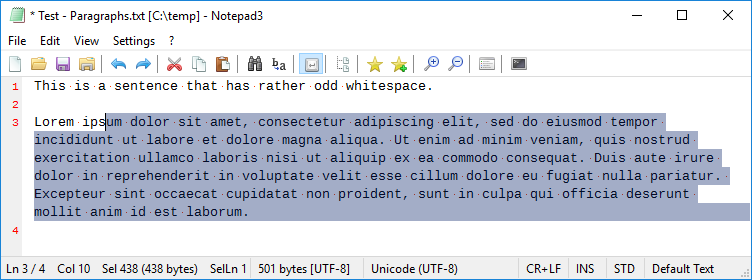
"Compress Whitespace" (Alt+P) on a document with odd whitespace (e.g. double or triple spacing) with no selection results in highlighted text. Additionally, if the odd whitespace occurs _before_ the caret, the resultant selection is incomplete - it does not select some characters at the beginning of the line the caret was on.
In Notepad2-mod, calling this function in this manner, with no selection, does not result in a selection - and it moves the caret to the beginning of the document (I don't think I like this last part...)
Steps to reproduce:
- Use the following as test text:
This is  a  sentence  that   has rather    odd  whitespace.

Lorem ipsum dolor sit amet, consectetur adipiscing elit, sed do eiusmod tempor incididunt ut labore et dolore magna aliqua. Ut enim ad minim veniam, quis nostrud exercitation ullamco laboris nisi ut aliquip ex ea commodo consequat. Duis aute irure dolor in reprehenderit in voluptate velit esse cillum dolore eu fugiat nulla pariatur. Excepteur sint occaecat cupidatat non proident, sunt in culpa qui officia deserunt mollit anim id est laborum.
- Place the caret at the beginning of line 2 and press
Alt-P:
craigo-
on 24 Jan 2018
I can confirm that the original issue is indeed solved (low performance of stripping of characters), and the dirty file indicator as mentioned by @craigo- above has been fixed as well.
...And yes, confirmed here also. Thanks.
craigo-
on 24 Jan 2018
I'll leave the issue open for tracking the "Compress Whitespace" issue, okay?
I'm not sure whether it is possible (and if so, how to do that) to move certain parts of this thread into a separate issue, and I don't want to recreate the bug description in a new issue without context from the conversation above.
engelhro
on 25 Jan 2018
@engelhro , @craigo- : In general you should keep the issues open, until they are solved in a release version by @rizonesoft 😃
Please try beta version 3.18.125.840.
RaiKoHoff
on 25 Jan 2018
Cheers, @RaiKoHoff.
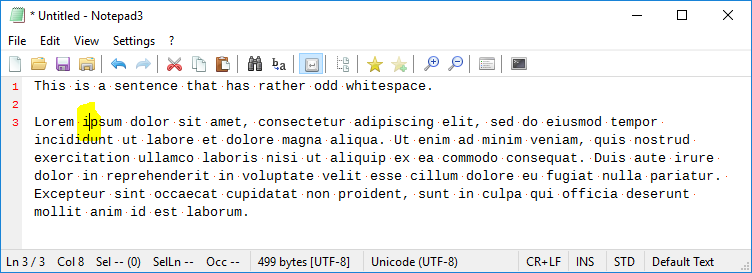
Beta build 840: not bad... The "Compress Whitespace" function no longer results in a selection, but it does leave the caret in a different position. Using the same steps above results in this:
craigo-
on 25 Jan 2018
... Upps 😬 - forgot the case: compress w/o selection, caret not at doc begin ... 😓 - tomorrow ...
RaiKoHoff
on 25 Jan 2018
Please try beta version 3.18.125.841.
RaiKoHoff
on 25 Jan 2018
Beta build 841: "Compress Whitespace" now behaves well under all tests I can think of :)
craigo-
on 25 Jan 2018
@craigo- : Did You include the test of reverse block selection (drawing the selection from back to front) having the caret at the beginning of the selection ? I checked it for "Compress Whitespace", but not for all other "selection block text operations" - I think we will find other issues here.
(By the way: What should be the correct position of the caret after operation? At the beginning of the selection, where it has been, or at the end of the replaced selection, to be able to step further in text, or depending on operation type 🤔 mhhh?)
RaiKoHoff
on 25 Jan 2018
@RaiKoHoff I honestly don't remember; I'll have to try again. Will report back with any oddities.
Good last question. I retried the "Compress Whitespace" function with a right-to-left selection (caret at beginning), and the result is the caret moves to the selection end. That seems weird to me.
Both Notepad2 and Notepad2-mod retain the caret position as it stands after making the selection (at least for the "Compress Whitespace" function); that seems logical to me.
Since the original issue is resolved, it's probably time to flag this as closable... I'll open another issue for the reverse block selection stuff.
craigo-
on 25 Jan 2018
Correct "Compress Whitespace" behavior confirmed by me as well :heavy_check_mark: (now that I understand its purpose). I'll close the issue after the next release.
engelhro
on 29 Jan 2018
Solved with release of version 3.18.131.862. Issue closed.
engelhro
on 1 Feb 2018
Related issues
 blackcrack
·
3Comments
blackcrack
·
3Comments
 hpwamr
·
4Comments
hpwamr
·
4Comments
 dlong500
·
3Comments
blackcrack
·
3Comments
dlong500
·
3Comments
blackcrack
·
3Comments
 valhristov
·
3Comments
valhristov
·
3Comments