Notepad3: Customize Scheme Improvements
Customizing a scheme is a little tricky to get the colours right the way you want them.
So, you load a file, in my case, an autohotkey file, and you push the Preview button to apply the colours to the file you opened so you can, well, preview them.
Problems with this:
- You can't scroll or interact with the window containing your preview text - so, if the text you want to see isn't in the window already, then you can't see it.
- Although you can move the Customize Schemes window, you can't move the text window. I think it would help if the Customize Schemes window was not modal.
It would be much nicer if the preview text could be shown right in the Customize Shchemes window (I know - that would mean you'd have to provide sample text for all the languages; ugh).
Also, if you open np3 (and no other instances are open) and select View > Customize Schemes, there is a long lag before the Customize Schemes window is populated. During this time, the application is frozen. This was always a problem in Notepad2, as well, and np3 seems to have inherited the issue.
 BGMcoder
All 17 comments
Interesting feedback regarding this feature. I think I've simply become used to how it works, such that I no longer notice its perceived shortcomings.
@BGMcoder, I do not experience a delay when selecting View -> Customize Schemes. It is more or less instantaneous, on a pretty modest system. What happens when you try this using a fresh copy of the portable version?
 craigo-
on 14 Dec 2017
craigo-
on 14 Dec 2017
Thanks for asking! I have an i7 and 24GB RAM; with iRST running and cache-boosted with an SSD. not too modest. If I Customize Schemes and close it, and leave at least one instance of np3 open, then the panel opens instantaneously. It only drags the first time I open the panel after np3 is launched. But if I close all instances and then open np3, then the panel drags the first time all over again.
It's always been this way, even when I first installed it.
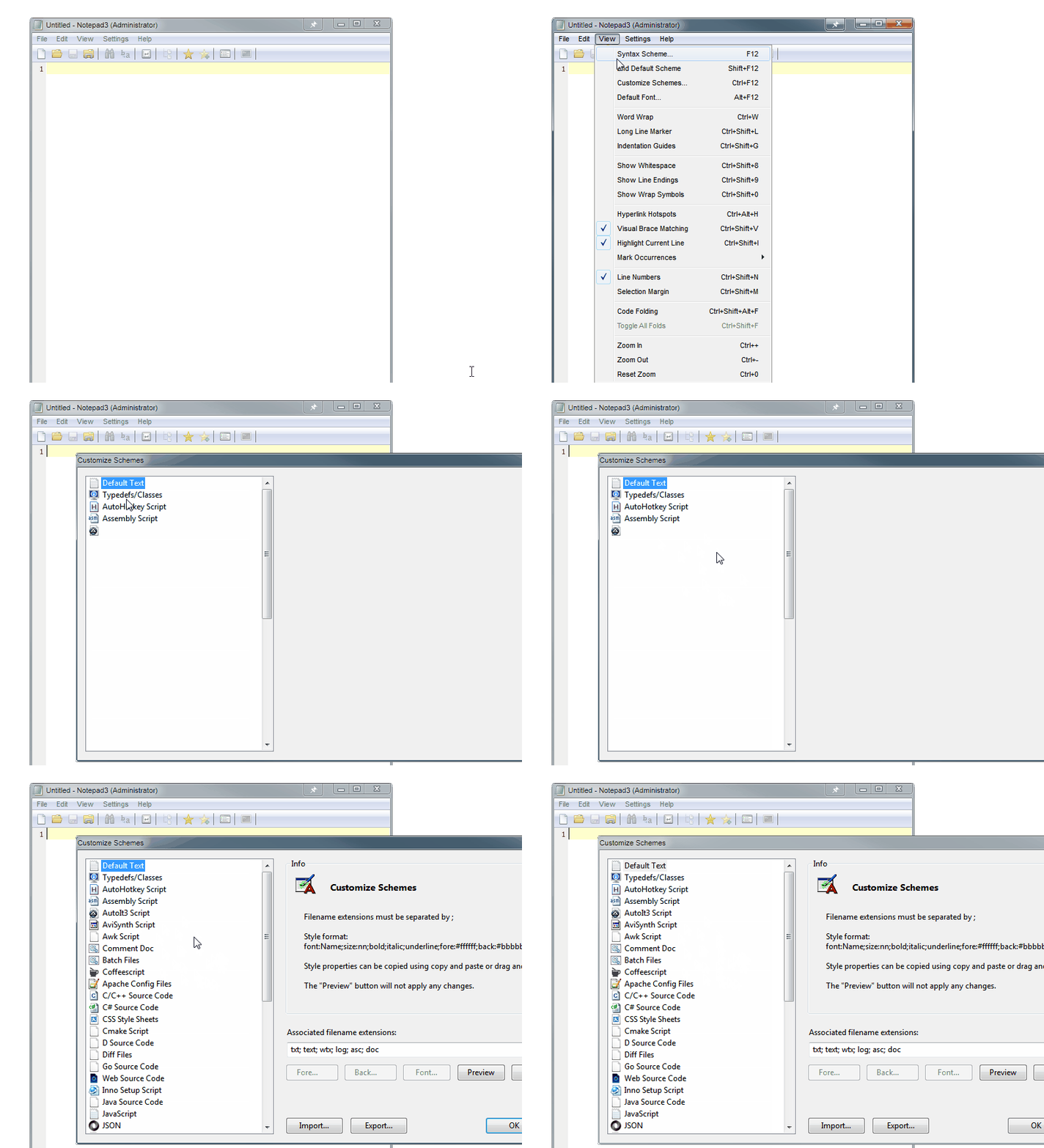
It's as if it has some difficulting loading all the schemes into the panel. The first four schemes show and just the icon for AutoIt3 Script - and it hangs until everything populates. np2 did the same thing - always did. And actually, the hanging - for about 2 or 3 seconds, I can't click on anything on the entire screen. It seems to drag everything, not just np3. Or at least, I can't interact with anything until the hanging is over.
The portable version? I'll have to take time to test it.
BGMcoder
on 14 Dec 2017
I do not experience this pause/hang that you describe, @BGMcoder... This is what appears pretty much instantaneously at all times:

Thinking about it, some of the icons that are displayed above are the result of some of the choices I have made on my system. Is your computer struggling to find a resource file icon to load? The fact that it hangs on/after the AutoIt3 Script node might suggest that it is something to do with either AutoIt3 or AviSynth? Do you have those installed? I don't, which presumably is the reason I do not see icons for them on my system.
I'm still interested in what happens in Notepad3 portable, but wondering also what happens if you uninstall AutoIt and/or AviSynth, repair them (that might fix associations/icons)... Or try installing Notepad3 on a test system without these programs installed.
craigo-
on 14 Dec 2017
I do have AutoIt installed, but not AviSynth. So I uninstalled AutoIt (I don't hardly use it anyway), and it still hangs in the same spot. It looks like I might have had Avisynth at one time, and the icon for that filetype had an invalid icon source. So, upon your last suggestion, I went and deleted the path to that file icon for the avs filetype, and Voila! Now it is instantaneous!
So it was a missing icon resource for the .avs filetype being loaded for the AviSynth Script.
However, I recorded a little gif for you to see the lag whilst loading that avs icon.
BGMcoder
on 14 Dec 2017
Hi,
the described behavior is related to systems caching behavior (1st load slow, 2nd fast).
The dialog asks the system to provide the icons for the file types and waits for response.
I can take a look into the sources, if there is some timeout settings which can be improved ... :-)
 RaiKoHoff
on 14 Dec 2017
RaiKoHoff
on 14 Dec 2017
... there is no such thing as timeout, to speed things up ... :-/
The call retrieving the file type information is:
SHGetFileInfo(pszFile,FILE_ATTRIBUTE_NORMAL,&shfi,sizeof(SHFILEINFO),
    SHGFI_SMALLICON | SHGFI_SYSICONINDEX | SHGFI_USEFILEATTRIBUTES);
Remarks
You should call this function from a background thread. Failure to do so could cause the UI to stop responding.
... and this is _not_ done within the code base.
RaiKoHoff
on 14 Dec 2017
... I will take it on my ToDo list: running "Customize Schemes" dialog in separate thread ...
(this will not solve the icon caching delay, but keep the editor responsive).
RaiKoHoff
on 15 Dec 2017
@BGMcoder raised some usability changes to the Customise Scheme dialogue that have not been fully discussed. Just flagging that, potentially for a future release.
craigo-
on 16 Dec 2017
@BGMcoder , @craigo- , @hpwamr :
"Beta" version 3.18.308.920 changes Customize Schemes... dialog to _non modal_ version (like the Find/Replace dialog). Now you are able to Preview new settings at different document positions.
Running the Schemes dialog in a different thread will be another task, and should be a separate issue.
RaiKoHoff
on 8 Mar 2018
"Beta" version 3.18.309.921 tries to optimize the slow shell icon retrieval described in this issue.
RaiKoHoff
on 9 Mar 2018
by the way, the colors should update and setting up like
them "old" notepad-mod and/or flo's orginal collors..
(like the css and batch schemes gnh..)
the actual colors be really unusual/unfamiliar .. uahh..
it would really pretty nice if you are reconfiguring
the standard color schemes to the "old" standard colors ..
best regards
Blacky
 blackcrack
on 9 Mar 2018
blackcrack
on 9 Mar 2018
@blackcrack : there has been a major tidy-up of Scheme and Style naming. Unfortunately, the Scheme and Style naming has been (and still is) used for persisting settings within the Notepad3.ini file. As a result old (and Notepad2-mod) .ini files are not compatible anymore. On the other hand, you can delete all the Styles of a Lexer section within the .ini file, which forces Notepad2/3 to use the hard-coded internal fallback values for the corresponding Style. This should be (mostly ~99%) the same as the good old Notepad2(-mod) styling. Except all new Lexers and Styles, which, of cause, get new styling, e.g. the (recommended by Scintilla) new Brace Matching Style or the new Bookmarks and Folding Style or new Occurrences Marker Style or Hyperlink Hotspot Style or Compressing Extra Line Spacing (ups that has no colors) or ...
Ed.: I can't see any differences in (internal fallback/reset) coloring of CCS and Batch styling schemes between Notepad2-mod and Notepad3.
RaiKoHoff
on 9 Mar 2018
The customize scheme window sure opens a lot faster now! You've solved the lag problem.
I downloaded version 3.1.223.908, however, and you still can't interact with the main window if the customize schemes dialogue is open. Raikohoff, you said I could push the "preview" button to interact with the main window? I don't see that this dialogue is non-modal. Does it matter if "on-top" is active? Maybe I'm missing something.
BGMcoder
on 10 Mar 2018
I downloaded version 3.1.223.908 ......
Maybe I'm missing something.
@BGMcoder, Yes, you're missing some explanations. 😕
- The version 3.1.223.908 is the official version on of February, 23th.
- To improve the quality, we are working with a "Versioning system". (#395 and #397)
- At this moment, we are in a "Freeze period" till normally March, 12th
- Because this "Freezing period", the dialog to
"non modal"change will normally not be integrated in next "Official" release but on the following next "Official" version. - If you want it, you can test the dialog to
"non modal"improvement with the portable develop version ("pre-beta" version) : Notepad3Portable_develop_3.18.309.923.zip
 hpwamr
on 10 Mar 2018
hpwamr
on 10 Mar 2018
@hpwamr : thank you for your profound explanation and the provision of the current development (beta) version of Notepad3.
@BGMcoder : The version you are referencing (release 3.18.223.908) does not include the performance enhancement to address the "lag problem". The described speedup leads me to the assumption, that it is a problem of your machine. The candidate with the highest probability is the operating system's (Windows) caching system. Maybe an empty cache after a deep cleaning of the system.
In the provided video, the scheme tree loading lags while searching for the "AviSynth Script" icon.
Obviously, there is an application registered for the AviSynth file extensions (avs; avsi). Is the registered application still valid? What has changed since then?
RaiKoHoff
on 10 Mar 2018
@BGMcoder : as @hpwamr mentioned, the development (beta) version 3.18.309.923 enhancements for the Customize Schemes... dialog will not be part of the next release, cause they have not been tested thoroughly. Making the dialog "non modal" forces me to disable some options of the main window, e.g. Global Default Font... (Alt+F12) and Current Scheme's Default Font... (Ctrl+Alt+F12) while the dialog is open to avoid concurrency access to same resources. I hope I did not forgot some stuff, so please test it thoroughly. Thank you in advance.
RaiKoHoff
on 10 Mar 2018
Closing this issue.
Last remaining enhancement would be to have the "Customize Scheme..." dialog running in separate thread, but this should be revisited, if it is really needed.
RaiKoHoff
on 24 Apr 2018
Related issues
 dlong500
·
3Comments
hpwamr
·
3Comments
dlong500
·
3Comments
hpwamr
·
3Comments
 valhristov
·
3Comments
valhristov
·
3Comments
 RaffaeleBianc0
·
3Comments
RaffaeleBianc0
·
3Comments
 ggordon-vispero
·
3Comments
ggordon-vispero
·
3Comments
Most helpful comment
"Beta" version 3.18.309.921 tries to optimize the slow shell icon retrieval described in this issue.