Notebook: Jupyter Notebook won't load on Github
This morning I am getting the same error in all Jupyter notebooks currently saved in my Github account:
Sorry, something went wrong. Reload?
I have logged in Github and opened them from different web browsers, I have cleared my browsing history and logged in back again, and have tried accessing them while logged out. Same error.
From my personal computer and Jupyter-based servers the notebooks are fine, is just Github that will not display them. All was fine as of yesterday.
Please direct me to the adequate resource if this is not the right forum.
Thank you.
 lfunderburk
All 100 comments
Does this notebook render for you? (That's just a random example I found). There might have been some issue on Github's side - they have their own server to render notebooks.
 takluyver
on 22 Apr 2018
takluyver
on 22 Apr 2018
Thank you for your response @takluyver .
It does. I tried again and they seem to be working now.
This issue may be closed.
lfunderburk
on 22 Apr 2018
Closed. LGF April 21 2018
lfunderburk
on 22 Apr 2018
Turns out this is a recurring problem. Right now some of my notebooks won't render (they do in nbviewer). After searching, I found others having the same issue, and it eventually resolves, meaning you try again at a later time and the notebooks render.
If this happens again to you, search for "jupyter notebook not rendering on github." You will find other issues like this, and many will give links to repos they believe should render. For me, right now, NONE of these render. Therefore, I conclude that github sproadically has trouble rendering notebooks, and all you can do is wait.
 abalter
on 9 Jul 2018
abalter
on 9 Jul 2018
I have been having this problem for the last few days, on ALL my notebooks on github.
 jamesafoster
on 17 Oct 2018
jamesafoster
on 17 Oct 2018
I have been having this problem for the last few days, on ALL my notebooks on github.
I am having this problem as well with my notebooks on Github
 chrisfs
on 17 Oct 2018
chrisfs
on 17 Oct 2018
I am having this same issue with all of mine, and it appears worse as of late, and has nothing to do with the size or complexity of the notebook in question...
 pmaji
on 17 Nov 2018
pmaji
on 17 Nov 2018
Same thing happened today to me.
 dizhu1991
on 21 Nov 2018
dizhu1991
on 21 Nov 2018
Happened to me just now.
 hobson
on 27 Nov 2018
hobson
on 27 Nov 2018
This here still does not load for me btw.: https://github.com/jupyter/notebook/blob/master/docs/source/examples/Notebook/Distributing%20Jupyter%20Extensions%20as%20Python%20Packages.ipynb
 PhilipMay
on 12 Dec 2018
PhilipMay
on 12 Dec 2018
Happening for me as well for the past two days. Very annoying github bug which stops you from sharing your notebook with others. 😏
 amitsaxena
on 13 Dec 2018
amitsaxena
on 13 Dec 2018
If this is an obstacle for you, remember that you can copy and paste the URL from Github to http://nbviewer.jupyter.org/
takluyver
on 13 Dec 2018
@takluyver That doesn't work for private repos I believe?
amitsaxena
on 13 Dec 2018
No, it doesn't.
You probably want to file a support request to Github itself, especially if you're paying for private repositories. The rendering of Jupyter notebooks is a service they run - it uses Jupyter code, but the Jupyter project can't see any logs or fix anything if it's going wrong.
takluyver
on 13 Dec 2018
I did! They said they are aware of the issue and are working on a fix, but did not provide an ETA.
amitsaxena
on 13 Dec 2018
A month later and it's still happening!
 apf99
on 22 Jan 2019
apf99
on 22 Jan 2019
I'm having same problem too. I can't open my [notebooks].(https://github.com/enesdemirag/python_lectures)
It says, Sorry, something went wrong. Reload?
 enesdemirag
on 18 Feb 2019
enesdemirag
on 18 Feb 2019
It's kind of random I believe. My (same) notebook started loading fine a few days later.
amitsaxena
on 18 Feb 2019
Having this issue as well. Can't open my notebooks or notebooks from other users.
 scumulder
on 26 Feb 2019
scumulder
on 26 Feb 2019
Happening to me now
 iDataist
on 8 Mar 2019
iDataist
on 8 Mar 2019
Not able to load any of my notebooks right now!!
 DenimPatel
on 8 Mar 2019
DenimPatel
on 8 Mar 2019
Happening with my notebook now, as well. Go figure issue closed....but still exists
 DataDavD
on 8 Mar 2019
DataDavD
on 8 Mar 2019
Yes, this issue is still around. It happens infrequently. After some time it loads again
 tomalbrecht
on 27 Mar 2019
tomalbrecht
on 27 Mar 2019
Having smae issue with me
 bghanchi
on 28 Mar 2019
bghanchi
on 28 Mar 2019
Having this issue currently. nbviewer workaround is not working.
 S-Ashcroft
on 1 Apr 2019
S-Ashcroft
on 1 Apr 2019
same here
 JonasMedu
on 1 Apr 2019
JonasMedu
on 1 Apr 2019
Suddenly it works.
This doesn't fill me with optimism for using Jupiter Notebooks through GitHub...
S-Ashcroft
on 1 Apr 2019
Same here. Sometimes the jupyter notebook won't load. One day later the same notebook will load again. No modifications were done to this notebook.
tomalbrecht
on 7 Apr 2019
Happening to me now.
 ebishoff
on 17 Apr 2019
ebishoff
on 17 Apr 2019
I'm having this issue as well with ipynb notebooks. "Sorry, something went wrong. Reload?"
 Santosh-Gupta
on 22 Apr 2019
Santosh-Gupta
on 22 Apr 2019
"Sorry, something went wrong. Reload?" for the notebooks. Please have a look.
 manishchalana
on 22 Apr 2019
manishchalana
on 22 Apr 2019
Having the same issue here :(
 raniloptus
on 23 Apr 2019
raniloptus
on 23 Apr 2019
This is also happening to me.
 trystanmortimer
on 23 Apr 2019
trystanmortimer
on 23 Apr 2019
I had this issue a couple of days ago. The next day they loaded. Now they aren't loading again. It just seems to be random when they load and don't load for me.
ebishoff
on 23 Apr 2019
This just started happening to me as well in the past 3 to 4 days with my notebooks. Can't tell if there is anything different about them.
 adantonison
on 25 Apr 2019
adantonison
on 25 Apr 2019
The same is happening to me , none of my notebooks are opening!! Why wont they just fix this issue.
Is there anyway to work around this issue , I have to submit my resume tomorrow and none of the github notebooks I have linked will open. I might lose the opportunity.
 MistryWoman
on 26 Apr 2019
MistryWoman
on 26 Apr 2019
@MistryWoman - you should link to them via nbviewer it renders much better there in any case!
 dhirschfeld
on 26 Apr 2019
dhirschfeld
on 26 Apr 2019
@MistryWoman - you should link to them via nbviewer it renders much better there in any case!
Thank you @dhirschfeld it worked splendidly !!
MistryWoman
on 26 Apr 2019
I found it happening after I have been logged in for many days. Log out and log back in fixes the issue for me.
 diegoscarabelli
on 6 May 2019
diegoscarabelli
on 6 May 2019
Relogging to Github solved the problem for me too!
 sgsaikat
on 11 Jul 2019
sgsaikat
on 11 Jul 2019
For me at least this has been occurring more frequently over the past month or so. Logging out, restarting browser, clearing cache, and even switching browsers has no impact on the problem.
 magic-lantern
on 15 Jul 2019
magic-lantern
on 15 Jul 2019
same for me, and definitely seeing it more often in the last month. I don't think it is Jupyter issue, as the same notebook is bing rendered fine in gitlab
 yifanxie
on 24 Jul 2019
yifanxie
on 24 Jul 2019
The issue is still going
https://github.com/mak705/Python_ELK/blob/master/ELK_Python.ipynb not loading
when i open https://nbviewer.jupyter.org/github/mak705/Python_ELK/blob/master/ELK.ipynb , then
its working fine. You can acknowledge that there is issue
 mak705
on 1 Aug 2019
mak705
on 1 Aug 2019
As pointed out above and in the similar issue https://github.com/jupyter/notebook/issues/3035#issuecomment-510920285, this is an issue with GitHub. We have no control over how GitHub renders notebooks. Project Jupyter controls the nbviewer platform, and apparently that is working fine.
If you'd like to raise an issue about GitHub rendering, please file a support request with GitHub: https://github.com/contact
 jasongrout
on 1 Aug 2019
jasongrout
on 1 Aug 2019
Perhaps this issue could be locked to prevent necro-posting by people who don't even bother reading the existing posts.
To restate the conclusions for future readers:
This is an issue with GitHub not with jupyter notebooks.
dhirschfeld
on 2 Aug 2019
Submitted a ticket via https://github.com/contact
Hopefully they look into it :) will post here as soon as I hear back from The GitHub Developer Support Team.
Cheers!
lfunderburk
on 2 Aug 2019
I don't think it's of much use. I had raised a support ticket with Github support in December 2018 and this is what they had said then.

The problem still persists (though mine went away when I duplicated the file as a separate jupyter notebook which rendered fine after a few attempts) and looks like it's at the bottom of their priority list.
amitsaxena
on 4 Aug 2019
This is still happening to me. Github seems committed to ignore this issue. Does anyone know of an alternative to GitHub that doesn't make you download Jupyter files to view them?
 baregawi
on 8 Aug 2019
baregawi
on 8 Aug 2019
FWIW, sadly, little change after so long. Here is another reply from today. It does at least mention a "rendering queue" as part of the problem.
Thanks for reaching out to GitHub Support, and sorry for the trouble.
Sorry for the trouble here, we've flagged this with our engineering team who are currently investigating rendering of these notebooks. Although unfortunately we don't currently have an ETA on resolution for this I'm afraid.
However we do often see that this is a transient issue that does resolve itself over time. Occasionally the rendering queue can get backed up, causing this to timeout as you are seeing, as the queue clears these become subsequently available again.
As mentioned our engineering team are continuing to investigate the root cause.
 nealmcb
on 8 Aug 2019
nealmcb
on 8 Aug 2019
Submitted a ticket via https://github.com/contact
Hopefully they look into it :) will post here as soon as I hear back from The GitHub Developer Support Team.
Cheers!
Dozens if not hundreds of tickets have been made about this issue. They have all been systematically ignored. Something is not right in GitHub about this issue. I've been dealing with it for a year. I just have to download the files start up a jupyter server and view them that way. I don't get why they won't even explain what is happening.
baregawi
on 8 Aug 2019
This is still happening to me. Github seems committed to ignore this issue. Does anyone know of an alternative to GitHub that doesn't make you download Jupyter files to view them?
@baregawi You can copy and paste the URL from Github where your notebooks are to http://nbviewer.jupyter.org/
No need to download notebooks to preview them.
lfunderburk
on 8 Aug 2019
This is still happening to me. Github seems committed to ignore this issue. Does anyone know of an alternative to GitHub that doesn't make you download Jupyter files to view them?
@baregawi You can copy and paste the URL from Github where your notebooks are to http://nbviewer.jupyter.org/
No need to download notebooks to preview them.
Unfortunately I cannot do that for private notbooks.
EDIT: we pay for GitHub and have not been able to get them to solve or explain this issue.
baregawi
on 8 Aug 2019
FWIW, sadly, little change after so long. Here is another reply from today. It does at least mention a "rendering queue" as part of the problem.
Thanks for reaching out to GitHub Support, and sorry for the trouble.
Sorry for the trouble here, we've flagged this with our engineering team who are currently investigating rendering of these notebooks. Although unfortunately we don't currently have an ETA on resolution for this I'm afraid.However we do often see that this is a transient issue that does resolve itself over time. Occasionally the rendering queue can get backed up, causing this to timeout as you are seeing, as the queue clears these become subsequently available again.
As mentioned our engineering team are continuing to investigate the root cause.
That's the exact same answer I received....
lfunderburk
on 8 Aug 2019
FWIW, sadly, little change after so long. Here is another reply from today. It does at least mention a "rendering queue" as part of the problem.
Thanks for reaching out to GitHub Support, and sorry for the trouble.
Sorry for the trouble here, we've flagged this with our engineering team who are currently investigating rendering of these notebooks. Although unfortunately we don't currently have an ETA on resolution for this I'm afraid.However we do often see that this is a transient issue that does resolve itself over time. Occasionally the rendering queue can get backed up, causing this to timeout as you are seeing, as the queue clears these become subsequently available again.
As mentioned our engineering team are continuing to investigate the root cause.That's the exact same answer I received....
Oh wow, that is interesting. So it kind of looks like an issue that exacerbates itself. If the rendering queue starts to times-out, a large portion of the clients in queue will hit "render" again, nearly doubling the amount of jobs in the queue. But unless they have a way to cancel render jobs created by the same client, the next wave of render jobs would just time-out as well. And keep the problem going until people start to give up and the queue gets short enough to prevent timeouts.
Are parts of the GitHub code open source? I'm happy to try to spend a bit of time to help here. I just want Jupyter notebooks to render lol.
baregawi
on 8 Aug 2019
Same issue here... I really can't understand that, at this point, with the popularity of Notebooks, that Github isn't more Notebooks friendly... I mean, not only I am expecting to be able to render it, but why not run it... but no... :(
 adumont
on 13 Aug 2019
adumont
on 13 Aug 2019
Github still have rendering problems. Suggestions by @lfunderburk is a good bypass - use the nbviewer
 ruizhi92
on 21 Aug 2019
ruizhi92
on 21 Aug 2019
why is this issue closed?
 julietsitron
on 3 Sep 2019
julietsitron
on 3 Sep 2019
@julietsitron because this is not a Jupyter notebook issue, but rather a GitHub issue.
lfunderburk
on 3 Sep 2019
For solution kindly go through this link https://medium.com/@pg170898/problem-facing-at-github-ipynb-is-not-loading-f986a04649f3
 priyanshgupta1998
on 17 Sep 2019
priyanshgupta1998
on 17 Sep 2019
A little experimentation (with small sample size) leads me to believe that this may be more prevalent in "private" repos. At the moment, a notebook in a public repo of mine will render, while the same file in a private repo will not. Two cents, there.
 drewsaunders
on 19 Sep 2019
drewsaunders
on 19 Sep 2019
Having the same problem (in private repo), did some investigation and found out multiple HTTP GET request to s3 failed (returns 404), e.g.
https://github-render.s3.amazonaws.com/prod/<hash id>.html?AWSAccessKeyId=<id>&Signature=<Signature value>&Expires=1568924413
 aiqingyuyan
on 19 Sep 2019
aiqingyuyan
on 19 Sep 2019
I have the same problem when uploading jupyter notebook files, so this problem hasn't been fixed?
 EmperoR1127
on 23 Sep 2019
EmperoR1127
on 23 Sep 2019
Got same problem. When I used debugger tool for HTTP calls, I got following errors consistently for the problem, not sure if it helps. It looks like tries to generate the HTML from notebook and then display it, but the html is missing on the request many times.
NoSuchKey
Thanks,
Prasanna
 K2Prasanna
on 24 Sep 2019
K2Prasanna
on 24 Sep 2019
same here. My notebook is not rendering
https://github.com/vinhngx/DeepLearningExamples/blob/vinhn_unet_industrial_demo/TensorFlow/Segmentation/UNet_Industrial/notebooks/TensorFlow_UNet_Industrial_Colab_train_and_inference.ipynb
 vinhngx
on 26 Sep 2019
vinhngx
on 26 Sep 2019
Is github management intentionally ignoring this problem. I first experienced this 7 months ago and it still persist even today. I used nbviewer now. render fast but this is just effort duplication.
 barywhyte
on 6 Oct 2019
barywhyte
on 6 Oct 2019
Here You will find the solution ....just go through this link
https://medium.com/@pg170898/problem-facing-at-github-ipynb-is-not-loading-f986a04649f3
On Sun, 6 Oct 2019 at 22:48, barywhyte notifications@github.com wrote:
Is github management intentionally ignoring this problem. I first
experienced this 7 months ago and it still persist even today. I used
nbviewer now. render fast but this is just effort duplication.—
You are receiving this because you commented.
Reply to this email directly, view it on GitHub
https://github.com/jupyter/notebook/issues/3555?email_source=notifications&email_token=AI77RAV3YKYKISB5VWKNQS3QNIMV3A5CNFSM4E334WC2YY3PNVWWK3TUL52HS4DFVREXG43VMVBW63LNMVXHJKTDN5WW2ZLOORPWSZGOEAOPEEY#issuecomment-538767891,
or mute the thread
https://github.com/notifications/unsubscribe-auth/AI77RAT5BUFNBOQEIVZZOC3QNIMV3ANCNFSM4E334WCQ
.
--
Priyansh
priyanshgupta1998
on 6 Oct 2019
Dirty workaround for private repos: if you have your repo synced on Dropbox, you can copy the Dropbox sharing link and use it in nbviewer.
This issue is just ridiculous anyway. I might as well switch to GitLab for the class I'm teaching.
 korg91
on 11 Oct 2019
korg91
on 11 Oct 2019
May be someone should create an online petition for github and collect signatures to highlight this even more 😉
If that doesn't work we can organize a protest march to get this fixed. I am certain that this will work as no organization wants bad PR! 😜
amitsaxena
on 11 Oct 2019
same problem reoccurring, whenever we don't need it, thanks to Murphy 's law
https://github.com/theofil/CompPhysics/tree/master/examples
 theofil
on 14 Oct 2019
theofil
on 14 Oct 2019
This is still occurring, can we open up this issue again until it can be resolved? I was working through analyzing the code of a Python project and the Jupyter notebook won't load on any web browser.
 puddlejumper90
on 21 Oct 2019
puddlejumper90
on 21 Oct 2019
@tdelozie read through the comments. This isn't a problem with Jupyter notebook but an issue with Github.
amitsaxena
on 22 Oct 2019
I am getting this error when i am trying to open a ipynb notebook.
"Sorry, something went wrong. Reload?"
please pass on suitable solution
 vandan2397
on 23 Oct 2019
vandan2397
on 23 Oct 2019
Still facing the same issue.
 Mandar89
on 24 Oct 2019
Mandar89
on 24 Oct 2019
Does anyone know how to pass this issue to official Github?
aiqingyuyan
on 24 Oct 2019
I don't feel like it happens to everyone at once. I have it running on Manjaro with Chromium right now.
puddlejumper90
on 25 Oct 2019
Does anyone know how to pass this issue to official Github?
amitsaxena
on 25 Oct 2019
I contacted the support a few hours ago and got the following answer:
Hi Thomas,
Thanks for writing in to GitHub Support!
Sorry for the trouble here; we've flagged this with our engineering team who are currently investigating the rendering of these notebooks. Although, unfortunately, we don't currently have an ETA on resolution for this I'm afraid.
However, we do often see that this is a transient issue that does resolve itself over time. Occasionally the rendering queue can get backed up, causing this to timeout as you are seeing. As the queue clears these become subsequently available again. Rest assured, our engineering team are continuing to investigate the root cause.
In the meantime, please do let us know if you need anything else!
Cheers,
Simon
GitHub Support
tomalbrecht
on 25 Oct 2019
I am having this issue just now. Pls help GitHub team
 rylp
on 9 Apr 2020
rylp
on 9 Apr 2020
I am having this issue. Is this still a common occurrence?
 millsm278
on 6 May 2020
millsm278
on 6 May 2020
I am having this issue.
 iagsav
on 1 Jun 2020
iagsav
on 1 Jun 2020
Same guys!
 giugot87
on 4 Jun 2020
giugot87
on 4 Jun 2020
same thing and it hinders the usage of google colab with the notebook
 omar-3
on 6 Jun 2020
omar-3
on 6 Jun 2020
Same right when I needed it
 seifuntara
on 14 Jul 2020
seifuntara
on 14 Jul 2020
Same here. Does not work since 2+ hours. Tested 10+ times.
https://github.com/kubeflow/pipelines/blob/master/samples/core/lightweight_component/lightweight_component.ipynb

tomalbrecht
on 14 Jul 2020
This is a very common occurrence. This is a general GitHub issue. I have been saving my code to .py files unless I absolutely need a notebook for an analytics process.
puddlejumper90
on 18 Jul 2020
Same problem here (and any other notebook I've tried, for that matter). The usual message warning about problems and prompting to reload is not there, though.
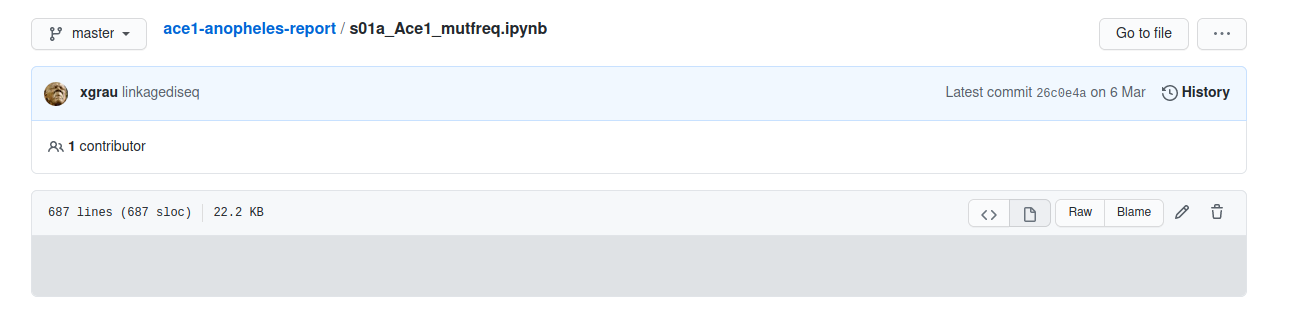
Cheers
 xgrau
on 27 Aug 2020
xgrau
on 27 Aug 2020
Having same problem to all my jupyter notebook files '.ipynb', 2 months back I was able to load all of them but not now. I have very crucial files over there which I uploaded while thinking that my files would be save, secure and accessible, now I feel very afraid to upload files over there, please someone help me to get all of them back.
 PrakharS11
on 27 Aug 2020
PrakharS11
on 27 Aug 2020
Same problem here (and any other notebook I've tried, for that matter). The usual message warning about problems and prompting to reload is not there, though.
Cheers
I have seen this as well. I haven't seen any resolution to the issue. I believe I did initially search online to see if there was a solution, but it was an issue at Github's end.
puddlejumper90
on 27 Aug 2020
Having the same issue today - all of my notebooks do not render.
 blueprints-for-text-analytics-python
on 10 Sep 2020
blueprints-for-text-analytics-python
on 10 Sep 2020
It’s the end of 2020 and nothing changed. I look from time to time on my repo, and it never loads. It did only the first week of existence
 Artyb-Data
on 25 Oct 2020
Artyb-Data
on 25 Oct 2020
I am having the same issue happen as well...... Although in my instance as well, my
https://github.com/billp-data-science/R_datacamp_DS/blob/master/Intro_to_R.ipynb
does not show in nbviewer
 billp-data-science
on 28 Oct 2020
billp-data-science
on 28 Oct 2020
In the last 10 days, I am having the same problem. I hope that it can be fixed soon.
 rcasaluce
on 6 Nov 2020
rcasaluce
on 6 Nov 2020
This happen to me with most of the Notebooks.
I need to reload 5,6 times then only it renders.
Can't it be solved?
 sunilpanday
on 25 Nov 2020
sunilpanday
on 25 Nov 2020
I'm not sure why an organization with a huge user base is taking so long to fix this bug. It's frustrating sometimes. Hope the GitHub team would look into this issue and get it resolved ASAP.
 kishan0725
on 27 Nov 2020
kishan0725
on 27 Nov 2020
Same issue
 Vleyked
on 30 Nov 2020
Vleyked
on 30 Nov 2020
My notebook does not render properly :(
 marqidox
on 1 Dec 2020
marqidox
on 1 Dec 2020
Same Issue
 rimoun-g
on 9 Dec 2020
rimoun-g
on 9 Dec 2020
Same here at 10th dec
 Anubhav1107
on 10 Dec 2020
Anubhav1107
on 10 Dec 2020
Same here, 18th December 2020 and this issue was opened in April 2018.
 imkeines
on 18 Dec 2020
imkeines
on 18 Dec 2020
I wrote to the github support and got an answer within a couple of hours:
`Thanks for writing in to GitHub Support!
Sorry for the trouble here; we've flagged this with our engineering team who are currently investigating the rendering of these notebooks. I know that this has been an issue for users for some time, but unfortunately we don't currently have an ETA on a resolution for this I'm afraid.
However, we do often see that this is a transient issue that does resolve itself over time. Occasionally the rendering queue can get backed up, causing this to timeout as you are seeing. As the queue clears these become subsequently available again. Rest assured, our engineering team are continuing to investigate the root cause.
I'm really sorry that I can't give you more of an answer at this stage.
In the meantime, please do let us know if you need anything else!
Thanks,`
So, in the meantime I use JN_viewer
imkeines
on 18 Dec 2020
Related issues
 pylang
·
3Comments
pylang
·
3Comments
 uolter
·
3Comments
uolter
·
3Comments
 mikepqr
·
3Comments
mikepqr
·
3Comments
 fonnesbeck
·
3Comments
fonnesbeck
·
3Comments
 harshinielath
·
3Comments
harshinielath
·
3Comments
Most helpful comment
If this is an obstacle for you, remember that you can copy and paste the URL from Github to http://nbviewer.jupyter.org/