Notebook: Repeated presses of tab should cycle through autocomplete options
Tab in notebook brings up the autocomplete options as expected, but pressing tab again does not cycle through the options. The pane containing the list of options blinks and is redrawn but the cursor stays stuck on the first option.
This is true in a brand new environment with notebook installed from master, i.e.
$ jupyter --version
4.3.0
$ jupyter notebook --version
5.1.0rc1
$ python --version
Python 3.6.1
It's also true in all a brand new Python 2.7.13 environment and all my old environments, most of which are 4.3.0, notebook 5.0.0 and Python 3.6.1.
The same thing happens in both Chrome Version 60.0.3112.90 on Safari Version 10.1.2 (12603.3.8). This is on macOS 10.12.6.
I was unable to bisect my way to when this changed, but it was definitely working on my system a couple of weeks ago. Perhaps the change from 10.12.5 to 10.12.6?
 mikepqr
All 3 comments
I can replicate this, but I don't recall tab ever working to cycle through the completions. I'm not sure if that's just because I didn't try to use it like that.
 takluyver
on 8 Aug 2017
takluyver
on 8 Aug 2017
@takluyver you can see how multiple tab presses are supposed to work in command line iPython.
mikepqr
on 8 Aug 2017
OK, asking around, it turns out notebook _never_ did this, and I've dreamed it, so I'm making this a feature request ;-)
To make what I'm talking about clearer, here's what you see in terminal ipython after pressing a<TAB><TAB><TAB><TAB>:

The first <TAB> opens the list of options but doesn't select any of them. Subsequent presses highlight successive items in the list, and place them at the cursor. Hit <RETURN> to close the popup and add the selection to your line. This is how autocomplete works in many editors.
Here's what you see in notebook after pressing a<TAB><TAB><TAB><TAB>. The first <TAB> opens the popup, but subsequent presses do nothing. To select you have to use the arrow keys (which is slower than continuing to hit tab, and extra slow because they're far from the home row on a standard keyboard).
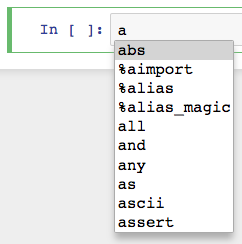
So: would it be possible to make repeated presses of the <TAB> key in notebook cycle through autocomplete options as they do in ipython?
mikepqr
on 23 Oct 2017
Related issues
 ehossain1982
·
3Comments
ehossain1982
·
3Comments
 arbaazsama
·
3Comments
arbaazsama
·
3Comments
 cancan101
·
3Comments
cancan101
·
3Comments
 uolter
·
3Comments
uolter
·
3Comments
 fonnesbeck
·
3Comments
fonnesbeck
·
3Comments
Most helpful comment
OK, asking around, it turns out notebook _never_ did this, and I've dreamed it, so I'm making this a feature request ;-)
To make what I'm talking about clearer, here's what you see in terminal ipython after pressing
a<TAB><TAB><TAB><TAB>:The first
<TAB>opens the list of options but doesn't select any of them. Subsequent presses highlight successive items in the list, and place them at the cursor. Hit<RETURN>to close the popup and add the selection to your line. This is how autocomplete works in many editors.Here's what you see in notebook after pressing
a<TAB><TAB><TAB><TAB>. The first<TAB>opens the popup, but subsequent presses do nothing. To select you have to use the arrow keys (which is slower than continuing to hit tab, and extra slow because they're far from the home row on a standard keyboard).So: would it be possible to make repeated presses of the
<TAB>key in notebook cycle through autocomplete options as they do in ipython?