Notebook: Jupyter terminal using different sys.path from Jupyter notebook (running on same server, same conda env)
I was having a common package import issue that was mostly resolved by several similar issues (https://github.com/jupyter/notebook/issues/2359, https://github.com/jupyter/notebook/issues/397, https://github.com/jupyter/notebook/issues/2898), but now I have a new issue that I don't think has been mentioned here. I am using conda on macOS 10.12.
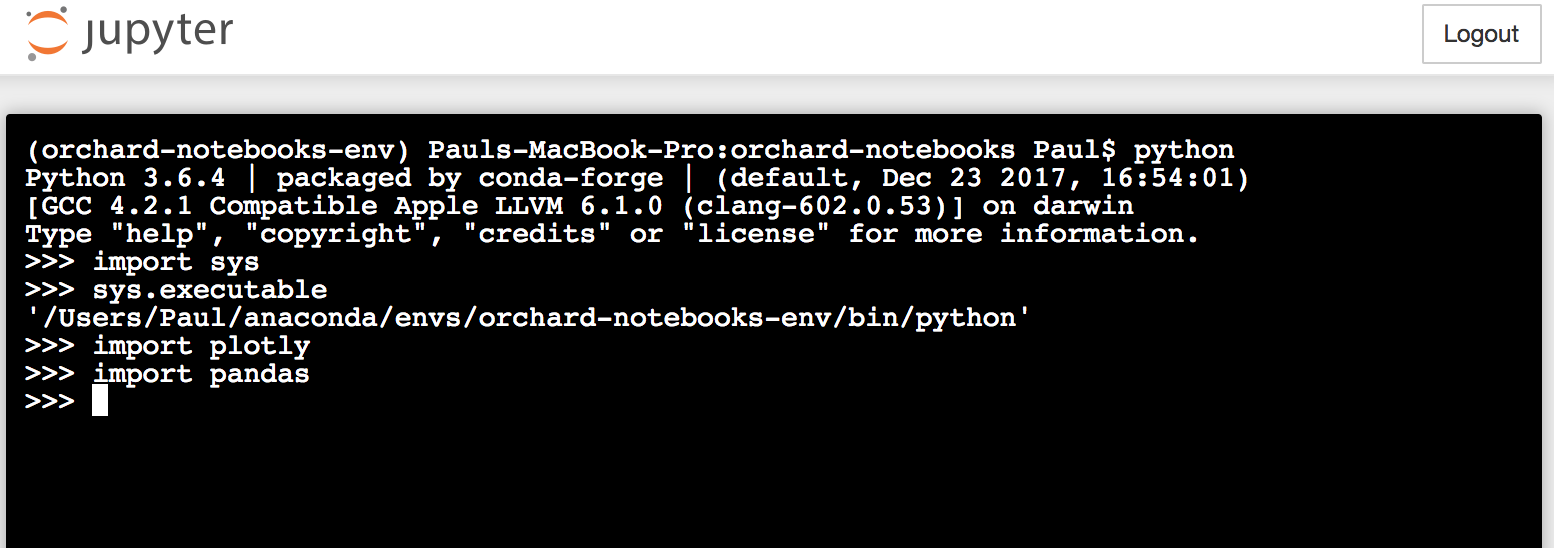
If activate a conda env with source activate $envname, then run python from my local terminal, I can easily import the packages that I have installed in my envname.yml file. From this conda env I can start a jupyter notebook and run a _Jupyter_ terminal. In the Jupyter terminal, sys.executable returns the same result as in my local terminal, and I can import all the same packages. HOWEVER, if I start a new Jupyter notebook from the same launcher, running side-by-side the functioning Jupyter terminal on the same server, sys.executable returns a DIFFERENT path (one that I thought I had deleted). Of course, this means I cannot import the package I hope to use in the notebook. Not only that, but the list of sys.path locations in the Jupyter terminal versus the Jupyter notebook are completely non-overlapping---see screenshots below.
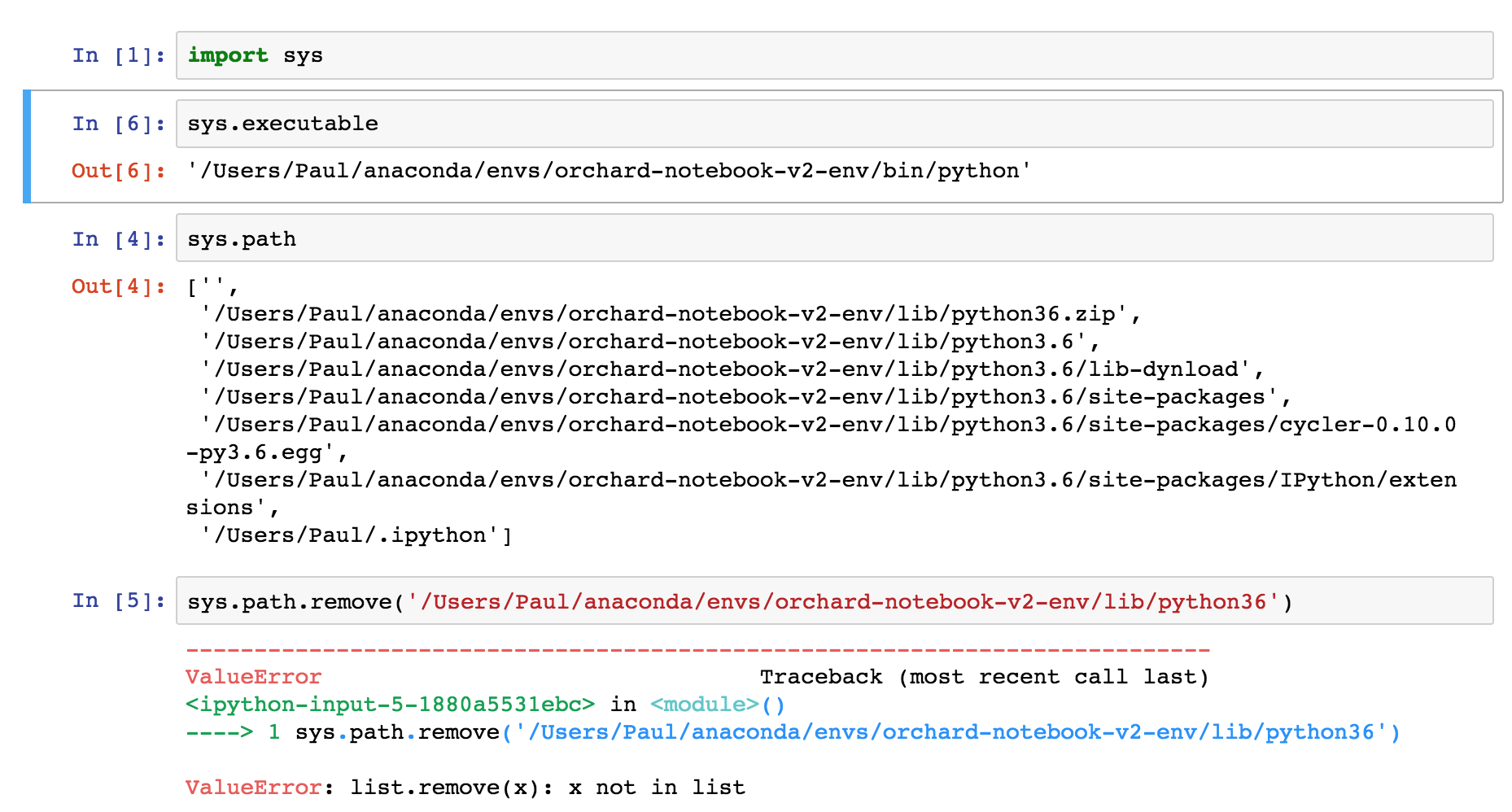

It seems from the above screenshots that the Jupyter terminal is choosing to run python from a different conda env than the Jupyter notebook. To solve this problem I removed the wrong env that the notebook was using as sys.path with conda env remove. Now, there are no kernel errors when I start the Jupyter launcher or a Jupyter terminal, but starting a notebook returns a kernel error, as if it is expecting to work only with the path listed in the removed conda env.
 whittredge
All 13 comments
You've installed a kernelspec at some point which points to the other environment. Run jupyter kernelspec list to see where it is. If you delete it, it should fall back to running a kernel in the same Python that the notebook server is running in.
 takluyver
on 6 Feb 2018
takluyver
on 6 Feb 2018
Thanks for the speedy reply. I ran jupyter kernelspec list, then navigated to the dir listed for python3, then deleted the file kernel.json.
Unfortunately the Jupyter terminal and notebook are still in disagreement, as started from a new Jupyter launcher from the desired conda env:

whittredge
on 6 Feb 2018
Update:
I made a new dir, and created a new conda env. Now, the Jupyter terminal and notebook are in agreement that sys.executable is '/Users/.../anaconda/bin/python', which I think is wrong. The local terminal in the same conda env correctly identifies sys.executable as '/Users/.../anaconda/envs/new-env-name/bin/python'. Naturally I cannot import packages in the notebook that have been installed with conda install and confirmed present in the new-env-name.yml output.
whittredge
on 6 Feb 2018
Have you installed Jupyter in the env you're talking about?
takluyver
on 7 Feb 2018
With the conda env activated, which jupyter from my local terminal returned the expected path,
/Users/.../anaconda/envs/correct-env/bin/jupyter.
However, in a Jupyter terminal run from that env, which jupyter returned the root installation, so I'm not sure if this means I had the correct Jupyter installed in the env or not.
This issue was ultimately resolved by installing the package nb_conda
(https://docs.anaconda.com/anaconda/user-guide/tasks/use-jupyter-notebook-extensions). Now, when I launch Jupyter from the conda env and click the "New" dropdown, I am presented with the notebook kernel choices "Python 2", and "Python [correct-env]". The Jupyter terminal also returns the expected path for which jupyter.
Thanks for your help!
whittredge
on 7 Feb 2018
I had the same issue, and nb_conda fixed it for me. Essentially, as whittredge explained, Jupyter was looking into a path different than my virtual environment. After installing nb_conda, I was able to start Jupyter notebook and then select the specific kernel I wanted it to access (in my case, the specific virtual env I had created).
It works now. Thanks for the tip, whittredge.
 K539
on 21 Jul 2018
K539
on 21 Jul 2018
Hi,
I am still experiencing this issue. I installed nb_conda again and what I see is that
pip is using the root conda installation : /opt/conda/bin/pip
sys.executable shows: '/home/jovyan/conda-envs/python3.7.1/bin/python'
which jupyter shows: /opt/conda/bin/jupyter
The issues I encounter are only in the notebook and not in the terminal. The terminal shows correct paths.


 apano
on 12 Nov 2018
apano
on 12 Nov 2018
I was able to solve the problem by installing jupyter notebook within my new environment.
First acitvate your environment:
activate py36 (I called my environment py36)
Seconnd install jupyter notebook within that environment:
pip install jupyter notebook
Then launch our jupyter notebook
jupyter notebook
 Man7hano
on 12 Dec 2018
Man7hano
on 12 Dec 2018
delete kernel.json did the trick for me.
 y-x-c
on 24 Apr 2019
y-x-c
on 24 Apr 2019
Thanks @swissrapperswil. I have both Canopy and Anaconda, and due to an update, the default switched to Canopy. For this reason, the conda packages, while running smoothly using bash would be unrecognizable in jupyter notebooks. Simply installing the jupyter notebook in the default (canopy) environment solved it.
 rsatijaUT
on 27 May 2019
rsatijaUT
on 27 May 2019
Have you installed Jupyter in the env you're talking about?
Actually, such a problem comes when you have conda environment and you install jupyter via pip instead of conda. It happened to me, I had jupyter running but couldn't import libraries.
 engmubarak48
on 19 Jul 2019
engmubarak48
on 19 Jul 2019
Changing the executable path of jupyter (in the kernel.json) worked in my case.
For details see https://stackoverflow.com/a/57274684/3521099 .
 rraadd88
on 30 Jul 2019
rraadd88
on 30 Jul 2019
With the conda env activated,
which jupyterfrom my local terminal returned the expected path,
/Users/.../anaconda/envs/correct-env/bin/jupyter.
However, in a Jupyter terminal run from that env,which jupyterreturned the root installation, so I'm not sure if this means I had the correct Jupyter installed in the env or not.This issue was ultimately resolved by installing the package
nb_conda
(https://docs.anaconda.com/anaconda/user-guide/tasks/use-jupyter-notebook-extensions). Now, when I launch Jupyter from the conda env and click the "New" dropdown, I am presented with the notebook kernel choices "Python 2", and "Python [correct-env]". The Jupyter terminal also returns the expected path forwhich jupyter.Thanks for your help!
This saved my life! Thank you so much!
 theccalderon
on 10 Nov 2019
theccalderon
on 10 Nov 2019
Related issues
 cancan101
·
3Comments
cancan101
·
3Comments
 ehossain1982
·
3Comments
ehossain1982
·
3Comments
 mikepqr
·
3Comments
mikepqr
·
3Comments
 Foadsf
·
3Comments
Foadsf
·
3Comments
 cmesro
·
3Comments
cmesro
·
3Comments
Most helpful comment
With the conda env activated,
which jupyterfrom my local terminal returned the expected path,/Users/.../anaconda/envs/correct-env/bin/jupyter.However, in a Jupyter terminal run from that env,
which jupyterreturned the root installation, so I'm not sure if this means I had the correct Jupyter installed in the env or not.This issue was ultimately resolved by installing the package
nb_conda(https://docs.anaconda.com/anaconda/user-guide/tasks/use-jupyter-notebook-extensions). Now, when I launch Jupyter from the conda env and click the "New" dropdown, I am presented with the notebook kernel choices "Python 2", and "Python [correct-env]". The Jupyter terminal also returns the expected path for
which jupyter.Thanks for your help!