Hi,
When opening any jupyter notebook, even one with no code in, I get the 'Dead kernal' message:
The kernel has died, and the automatic restart has failed. It is possible the kernel cannot be restarted. If you are not able to restart the kernel, you will still be able to save the notebook, but running code will no longer work until the notebook is reopened.
My terminal window shows the following:
[I 07:56:47.888 NotebookApp] [nb_conda_kernels] enabled, 1 kernels found
[I 07:56:48.230 NotebookApp] The port 8888 is already in use, trying another port.
[I 07:56:48.438 NotebookApp] [nb_anacondacloud] enabled
[I 07:56:48.456 NotebookApp] [nb_conda] enabled
[I 07:56:48.874 NotebookApp] ✓ nbpresent HTML export ENABLED
[W 07:56:48.874 NotebookApp] ✗ nbpresent PDF export DISABLED: No module named 'nbbrowserpdf'
[I 07:56:48.886 NotebookApp] Serving notebooks from local directory: /Users/jedgecombe
[I 07:56:48.886 NotebookApp] 0 active kernels
[I 07:56:48.886 NotebookApp] The Jupyter Notebook is running at: http://localhost:8889/
[I 07:56:48.887 NotebookApp] Use Control-C to stop this server and shut down all kernels (twice to skip confirmation).
[W 07:57:08.143 NotebookApp] Notebook Dropbox/Python/AB_testing/template/ab_test_template.ipynb is not trusted
[I 07:57:08.694 NotebookApp] Kernel started: 8743e528-acb5-488f-8e46-456675500373
[W 07:57:08.723 NotebookApp] 404 GET /kernelspecs/Python%20[Root]/logo-64x64.png (::1) 25.64ms referer=http://localhost:8889/notebooks/Dropbox/Python/AB_testing/template/ab_test_template.ipynb
Traceback (most recent call last):
File "/Users/jedgecombe/anaconda3/lib/python3.5/runpy.py", line 184, in _run_module_as_main
"__main__", mod_spec)
File "/Users/jedgecombe/anaconda3/lib/python3.5/runpy.py", line 85, in _run_code
exec(code, run_globals)
File "/Users/jedgecombe/anaconda3/lib/python3.5/site-packages/ipykernel/__main__.py", line 2, in
from ipykernel import kernelapp as app
File "/Users/jedgecombe/anaconda3/lib/python3.5/site-packages/ipykernel/kernelapp.py", line 98, in
ConnectionFileMixin):
TypeError: metaclass conflict: the metaclass of a derived class must be a (non-strict) subclass of the metaclasses of all its bases
[I 07:57:11.695 NotebookApp] KernelRestarter: restarting kernel (1/5)
Traceback (most recent call last):
File "/Users/jedgecombe/anaconda3/lib/python3.5/runpy.py", line 184, in _run_module_as_main
"__main__", mod_spec)
File "/Users/jedgecombe/anaconda3/lib/python3.5/runpy.py", line 85, in _run_code
exec(code, run_globals)
File "/Users/jedgecombe/anaconda3/lib/python3.5/site-packages/ipykernel/__main__.py", line 2, in
from ipykernel import kernelapp as app
File "/Users/jedgecombe/anaconda3/lib/python3.5/site-packages/ipykernel/kernelapp.py", line 98, in
ConnectionFileMixin):
TypeError: metaclass conflict: the metaclass of a derived class must be a (non-strict) subclass of the metaclasses of all its bases
It tries to restart 5 times (so some repeated code from above) then shows the following:
[W 07:57:23.735 NotebookApp] KernelRestarter: restart failed
[W 07:57:23.735 NotebookApp] Kernel 8743e528-acb5-488f-8e46-456675500373 died, removing from map.
ERROR:root:kernel 8743e528-acb5-488f-8e46-456675500373 restarted failed!
[W 07:57:23.757 NotebookApp] Kernel deleted before session
[W 07:57:23.757 NotebookApp] 410 DELETE /api/sessions/d129aa7e-fc50-4cfd-9e5d-aab57ff7b49e (::1) 1.74ms referer=http://localhost:8889/notebooks/Dropbox/Python/AB_testing/template/ab_test_template.ipynb
I've tried pip uninstalling and re-installing, also tried this with conda but no luck and can't see similar problems online. Would be extremely grateful for any help!
 jslug1000
All 57 comments
Can you try uninstalling all of:
- ipykernel
- ipython
- jupyter_client
- jupyter_core
- traitlets
- ipython_genutils
And then install again. If you're doing this inside a conda env, it might be easiest to create a new environment and start from scratch. Also, if you're going to install with conda, run conda clean -tipsy to clean up conda caches before you start.
 takluyver
on 14 Nov 2016
takluyver
on 14 Nov 2016
fixed it! Thank you so much - I've been searching for hours for an answer! Really appreciate it.
jslug1000
on 14 Nov 2016
You're welcome. For the record, my guess is that it was incompatible versions of some of those packages being installed. It probably wasn't necessary to reinstall them all, but it's easier to do that than try to work it out more closely.
takluyver
on 14 Nov 2016
thanks so much, i 've tried several solutions, but didn't work until i found uninstall ipykernel, and reinstalled it, it worked,thanks.
 sainttelant
on 29 Sep 2017
sainttelant
on 29 Sep 2017
Brilliant, worked straight away.
Cheers
Jonny
 jonnyhtw
on 25 Jan 2018
jonnyhtw
on 25 Jan 2018
I am trying to work with jupyter notebook, but when I open a file I receive the following error:
The kernel has died, and the automatic restart has failed. It is possible the kernel cannot be restarted. If you are not able to restart the kernel, you will still be able to save the notebook, but running code will no longer work until the notebook is reopened.
In the CMD I see the following:
(base) C:UsersDan Eran>jupyter notebook [W 19:05:33.006 NotebookApp] Error loading server extension jupyterlab Traceback (most recent call last): File "C:UsersDan EranAppDataRoamingPythonPython36site-packagesnotebooknotebookapp.py", line 1451, in init_server_extensions mod = importlib.import_module(modulename) File "C:Anaconda3libimportlib__init__.py", line 126, in import_module return _bootstrap._gcd_import(name[level:], package, level) File "", line 994, in _gcd_import File "", line 971, in _find_and_load File "", line 953, in _find_and_load_unlocked ModuleNotFoundError: No module named 'jupyterlab' [I 19:05:33.122 NotebookApp] Serving notebooks from local directory: C:UsersDan Eran [I 19:05:33.122 NotebookApp] 0 active kernels [I 19:05:33.122 NotebookApp] The Jupyter Notebook is running at: [I 19:05:33.122 NotebookApp] http://localhost:8888/?token=99a355c23c6617857e387f53d0af607ae26b89c20598336e [I 19:05:33.122 NotebookApp] Use Control-C to stop this server and shut down all kernels (twice to skip confirmation). [C 19:05:33.122 NotebookApp]
Copy/paste this URL into your browser when you connect for the first time,
to login with a token:
http://localhost:8888/?token=99a355c23c6617857e387f53d0af607ae26b89c20598336e
[I 19:05:33.247 NotebookApp] Accepting one-time-token-authenticated connection from ::1 [I 19:05:42.699 NotebookApp] Creating new notebook in [I 19:05:43.563 NotebookApp] Kernel started: 1433cbbf-f4b9-4dd3-be19-e91d7ee3d82f Traceback (most recent call last): File "C:Anaconda3librunpy.py", line 193, in _run_module_as_main "main", mod_spec) File "C:Anaconda3librunpy.py", line 85, in _run_code exec(code, run_globals) File "C:Anaconda3libsite-packagesipykernel_launcher.py", line 15, in from ipykernel import kernelapp as app File "C:Anaconda3libsite-packagesipykernel__init__.py", line 2, in from .connect import * File "C:Anaconda3libsite-packagesipykernelconnect.py", line 13, in from IPython.core.profiledir import ProfileDir ModuleNotFoundError: No module named 'IPython' [I 19:05:46.555 NotebookApp] KernelRestarter: restarting kernel (1/5), new random ports Traceback (most recent call last): File "C:Anaconda3librunpy.py", line 193, in _run_module_as_main "main", mod_spec) File "C:Anaconda3librunpy.py", line 85, in _run_code exec(code, run_globals) File "C:Anaconda3libsite-packagesipykernel_launcher.py", line 15, in from ipykernel import kernelapp as app File "C:Anaconda3libsite-packagesipykernel__init__.py", line 2, in from .connect import * File "C:Anaconda3libsite-packagesipykernelconnect.py", line 13, in from IPython.core.profiledir import ProfileDir ModuleNotFoundError: No module named 'IPython' [I 19:05:49.591 NotebookApp] KernelRestarter: restarting kernel (2/5), new random ports Traceback (most recent call last): File "C:Anaconda3librunpy.py", line 193, in _run_module_as_main "main", mod_spec) File "C:Anaconda3librunpy.py", line 85, in _run_code exec(code, run_globals) File "C:Anaconda3libsite-packagesipykernel_launcher.py", line 15, in from ipykernel import kernelapp as app File "C:Anaconda3libsite-packagesipykernel__init__.py", line 2, in from .connect import * File "C:Anaconda3libsite-packagesipykernelconnect.py", line 13, in from IPython.core.profiledir import ProfileDir ModuleNotFoundError: No module named 'IPython' [I 19:05:52.620 NotebookApp] KernelRestarter: restarting kernel (3/5), new random ports Traceback (most recent call last): File "C:Anaconda3librunpy.py", line 193, in _run_module_as_main "main", mod_spec) File "C:Anaconda3librunpy.py", line 85, in _run_code exec(code, run_globals) File "C:Anaconda3libsite-packagesipykernel_launcher.py", line 15, in from ipykernel import kernelapp as app File "C:Anaconda3libsite-packagesipykernel__init__.py", line 2, in from .connect import * File "C:Anaconda3libsite-packagesipykernelconnect.py", line 13, in from IPython.core.profiledir import ProfileDir ModuleNotFoundError: No module named 'IPython' [W 19:05:53.595 NotebookApp] Timeout waiting for kernel_info reply from 1433cbbf-f4b9-4dd3-be19-e91d7ee3d82f [I 19:05:55.632 NotebookApp] KernelRestarter: restarting kernel (4/5), new random ports WARNING:root:kernel 1433cbbf-f4b9-4dd3-be19-e91d7ee3d82f restarted Traceback (most recent call last): File "C:Anaconda3librunpy.py", line 193, in _run_module_as_main "main", mod_spec) File "C:Anaconda3librunpy.py", line 85, in _run_code exec(code, run_globals) File "C:Anaconda3libsite-packagesipykernel_launcher.py", line 15, in from ipykernel import kernelapp as app File "C:Anaconda3libsite-packagesipykernel__init__.py", line 2, in from .connect import * File "C:Anaconda3libsite-packagesipykernelconnect.py", line 13, in from IPython.core.profiledir import ProfileDir ModuleNotFoundError: No module named 'IPython' [W 19:05:58.671 NotebookApp] KernelRestarter: restart failed [W 19:05:58.671 NotebookApp] Kernel 1433cbbf-f4b9-4dd3-be19-e91d7ee3d82f died, removing from map. ERROR:root:kernel 1433cbbf-f4b9-4dd3-be19-e91d7ee3d82f restarted failed! [W 19:05:58.705 NotebookApp] 410 DELETE /api/sessions/fd456273-adb3-48cd-92f8-d531c9b8f7a8 (::1): Kernel deleted before session [W 19:05:58.709 NotebookApp] Kernel deleted before session [W 19:05:58.709 NotebookApp] 410 DELETE /api/sessions/fd456273-adb3-48cd-92f8-d531c9b8f7a8 (::1) 4.00ms referer=http://localhost:8888/notebooks/Untitled11.ipynb?kernel_name=python3
I have tried to uninstall and then reinstall the modules you've mentioned. However, I was not able to solve the problem. any ideas? THANKS!!
 Dan-Git-source
on 16 Mar 2018
Dan-Git-source
on 16 Mar 2018
I can not fix this problem 😢
 ShixiangWang
on 19 Mar 2018
ShixiangWang
on 19 Mar 2018
It must be a keras specific issue, tensorflow alone works fine on my machine but keras keeps crashing it.
 paulmattheww
on 8 Apr 2018
paulmattheww
on 8 Apr 2018
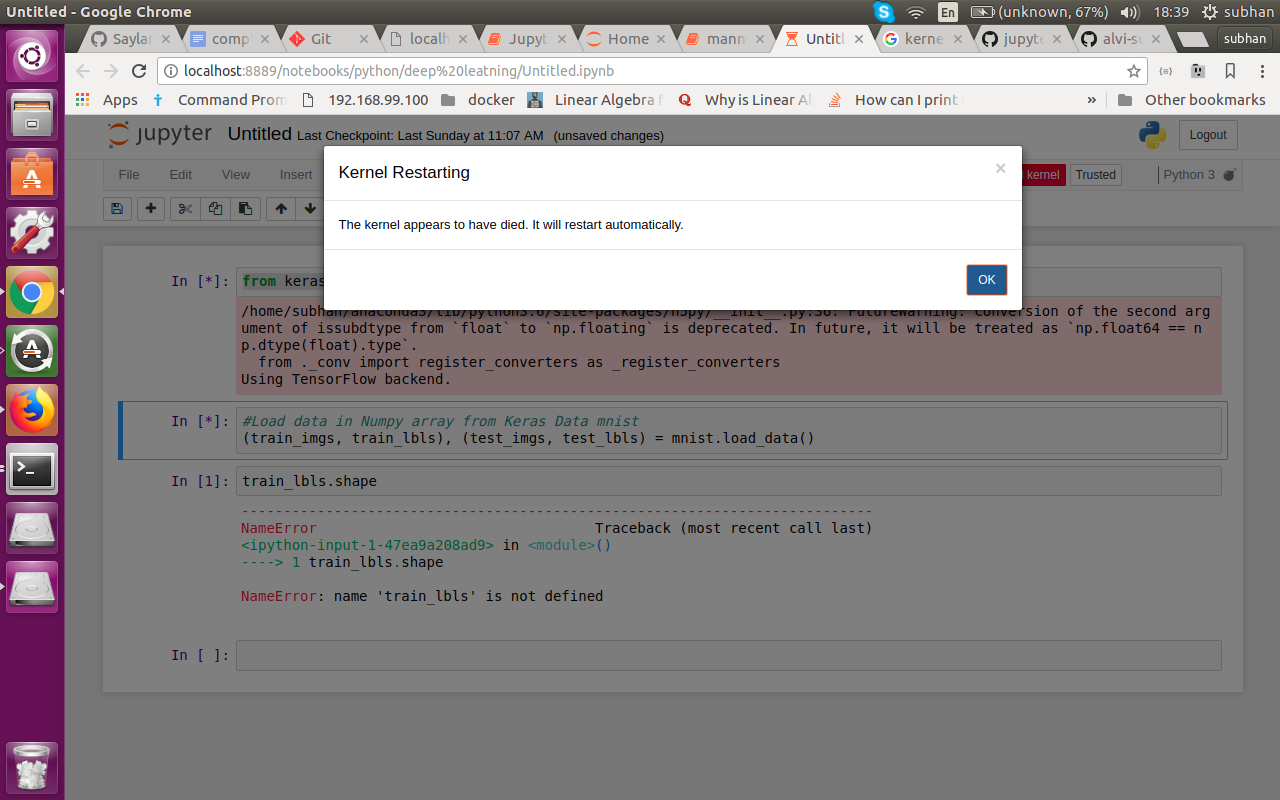
i am having this issue whenever i try to run keras or tensorflow it keeps crashing while its working perfectly with other libraries.
 alvi-subhan
on 10 May 2018
alvi-subhan
on 10 May 2018
Remove the ipykernel using conda remove ipykernel
and then resinstall with lower version with pip install ipykernel ==4.2.2
Worked for me.
 gunjannaik
on 30 May 2018
gunjannaik
on 30 May 2018
thankyou so much :)
On Wed, May 30, 2018, 4:16 PM Gunjan Naik notifications@github.com wrote:
Remove the ipykernl using conda remove ipykernel
and then resinstall with lower version with pip install ipykernel ==4.2.2Worked for me.
—
You are receiving this because you commented.
Reply to this email directly, view it on GitHub
https://github.com/jupyter/notebook/issues/1892#issuecomment-393123918,
or mute the thread
https://github.com/notifications/unsubscribe-auth/AhsClxJV9FajcyIJhQXvMsj5mSne2rXpks5t3n-qgaJpZM4KxC7D
.
alvi-subhan
on 12 Jun 2018
if anyone facing the issue regarding .. kernel failure
it may be probably due to ipython failure
you can fix it by reinstalling ipython and its dependencies on your machine
$ pip install ipython[all]
you can see kernel working properly in jupyter
it worked for me
 fazzalll
on 21 Jun 2018
fazzalll
on 21 Jun 2018
if you're using anaconda then run this in anaconda prompt "conda clean -tipsy" then conda install the package. for e.g. if you're working with Numpy package, then run conda install numpy
 thetrailblazer4
on 18 Aug 2018
thetrailblazer4
on 18 Aug 2018
In my case, When I tried running the cells, they were working fine untill reached to the training cell, where the kernel showed an error:

 Sakshi2018
on 26 Sep 2018
Sakshi2018
on 26 Sep 2018
However, the jupyter notebook looks like:

Any help will be greatly appreciated
Sakshi2018
on 26 Sep 2018
thanks a lot.
i have a problem about dead kernel
but it solved
 park-moonkyu
on 30 Oct 2018
park-moonkyu
on 30 Oct 2018
I got that problem, I first conda remove ipykernel then pip install ipykernel==4.2.2
I got errors: ModuleNotFoundError: No module named 'traitlets'
I install 'traitlets' by: conda install traitlets successfully
but then I type "jupyter notebook"
ModuleNotFoundError: No module named 'traitlets'
 AliceDinh
on 11 Jan 2019
AliceDinh
on 11 Jan 2019
I guess Conda installed libraries are not accessible to your ipykernel (which is installed using pip).
Install it using pip install traitlets.
gunjannaik
on 11 Jan 2019
I did try with pip install traitlets but still raising that error

AliceDinh
on 14 Jan 2019
Hi,
I followed again the instruction made by @takluyver and it's working now, thanks all
AliceDinh
on 23 Jan 2019
Thanks @takluyver. Just reinstalling the ipykernel did the trick.
I think what @takluyver is trying to say in his above post is that, try to reinstall these libraries one by one and hopefully it'll resolve the problem (don't just panic when you see a bunch of libraries re-installation tackle them one by one).
And I would personally suggest to go with the ipykernel first.
Other than that, if you're getting an error like this: failed to create cublas handle: CUBLAS_STATUS_ALLOC_FAILED
Then try allowing memory growth:
config = tf.ConfigProto()
config.gpu_options.allow_growth = True
session = tf.Session(config=config)
Taken from link (https://github.com/tensorflow/tensorflow/issues/7072#issuecomment-306061314). Commented by @shingte
Cheers!
 BishnoiAmit
on 22 Feb 2019
BishnoiAmit
on 22 Feb 2019
I've tried every fix recommended here and none of them have worked.
 Gravypan
on 29 Apr 2019
Gravypan
on 29 Apr 2019
I got the same issue. Tried all of this but none worked. Trying to run the python code in jupyter notebook gave a new error "The kernel appears to have died. It will restart automatically". By googling this error I found a new solution:
pip install tensorflow==1.5
I've tried to install other versions of tensorflow before, but they didn't do the trick. Also make sure to have the latest version of numpy.
pip install --upgrade numpy
 joeltorby
on 12 Jun 2019
joeltorby
on 12 Jun 2019
To augment @takluyver's helpful note:
pip uninstall ipykernel ipython jupyter_client jupyter_core traitlets ipython_genutils -y
pip install ipykernel ipython jupyter_client jupyter_core traitlets ipython_genutils
 duhaime
on 19 Jun 2019
duhaime
on 19 Jun 2019
thanks so much, i 've tried several solutions, but didn't work until i found uninstall ipykernel, and reinstalled it, it worked,thanks.
Only uninstalling/installing this single library (ipykernel) seems to be enough.
 AzimAhmadzadeh
on 20 Jun 2019
AzimAhmadzadeh
on 20 Jun 2019
Thanks, I tried updating ipykernel and it works again now!
 nataliele
on 10 Jul 2019
nataliele
on 10 Jul 2019
Hello, Guy, i solve the problem with this command
sudo -H pip3 install fs
sudo -H pip3 install prompt-toolkit --force-reinstall
pip3 install prompt-toolkit --force-reinstall
 alfredolopez80
on 3 Aug 2019
alfredolopez80
on 3 Aug 2019
in case it helps someone, my similar problem is solved by running the followings that I had seen somewhere else:
on Ubuntu terminal:
$ jupyter kernelspec list
$ rm -r /home/me/.local/share/jupyter/kernels/python3
$ python -m ipykernel install --user
 altayg
on 5 Oct 2019
altayg
on 5 Oct 2019
Hello,
I have tried every fix recommended and none of them solved the issue. Any help would be appreciated.
Thanks in advance
 adi5krish
on 8 Oct 2019
adi5krish
on 8 Oct 2019
Hi @adi5krish - Since these kinds of issues can manifest themselves in a million different ways, it might be helpful to get specific information. Could you please provide the following and perhaps others will have some helpful ideas? Thanks.
- What python (version, conda, etc.) and operating system?
- The output of
jupyter kernelspec list. - Reproduced with
--debugenabled. - The complete console output of the Notebook server with
--debugenabled.
 kevin-bates
on 8 Oct 2019
kevin-bates
on 8 Oct 2019
Hii kevin,
The python version i am using is 3.6.9 and the operating system i am running in is Windows 10
This is the output i am getting when i run jupyter kernelspec list is
Available kernels:
python3 C:UsersapulikonAppDataRoamingjupyterkernelspython3
I am sorry, i couldn't understand what exactly you meant about reproduced with --debug enabled.
I am sharing the error i am getting when i try to run the code

Let me know if you need anything else
adi5krish
on 8 Oct 2019
I'm sorry, I should have been more clear. If you start notebook as follows: jupyter notebook --debug, it will produce debug output. That said, I doubt we're going to see much more in the console, but it never hurts.
It looks like your kernel knows something about tensorflow and gpus. Is it getting this "idea" based on the execution of a cell? Or is something baked into your argv stanza of the kernelspec? I suspect the former, which would imply the kernel is starting up, but then some action (presumably the cell that just executed) is causing the kernel process to die. Notebook server then detects that the kernel process is no longer running and enters its auto-restart sequence.
Unless others have more direct advice, I suggest you try to narrow things down by starting from a base configuration and adding things (like tensorflow, then gpu, etc.) until the kernel dies.
kevin-bates
on 8 Oct 2019

Don't know what is happening before it was just fine. I tried a reinstall of anaconda but didn't helped.
 BHARATBHUSHAN9923
on 21 Oct 2019
BHARATBHUSHAN9923
on 21 Oct 2019
I've the same issue. In the command prompt I saw the ImportError: cannot import name 'create_prompt_application' issue after that just ran pip3 install ipython than worked for me.
 berkai
on 31 Oct 2019
berkai
on 31 Oct 2019
conda clean -tipsy by itself worked for me, thank you!
 LACoderDeBH
on 12 Nov 2019
LACoderDeBH
on 12 Nov 2019
i am having this issue whenever i try to run keras or tensorflow it keeps crashing while its working perfectly with other libraries.
did you get the solution?
if yes please revert back to me.
 awais0005
on 13 Nov 2019
awais0005
on 13 Nov 2019
I tried to continue working on an Ipython in another PC, but even after doing pipenv's, I still get the kernel died issue.
what's more, I uploaded the said IPython file to Google Colab, and it's still dying inside there too.
Very strange.
 maulberto3
on 13 Jan 2020
maulberto3
on 13 Jan 2020
Getting the same error. Not using conda. Tried everything above but no luck. Any further idea?
 eyildiz-ugoe
on 24 Jan 2020
eyildiz-ugoe
on 24 Jan 2020
Now I face the problem of dead kernel in jupyter notebook when I reach 43-epoch because there is 50-epoch in my code. It took two nights to reach 43-epoch by using two GPUs. I run it two times but it didn't work. I want to get the last epoch. Please advise me what I need to do.
 may-phyu
on 13 Feb 2020
may-phyu
on 13 Feb 2020
Hi @may-phyu - this sounds very frustrating. Unfortunately, there isn't much to go on here. You'll need to figure out why the kernel is dying after 43 epochs.
- Is the kernel out of resources?
- In both runs, has it died after the 43rd epoch? If so, is there anything special about 43 (besides being one more than 42 - the answer to Life, the universe and everything! [Sorry, bad time for that.])?
- Do you have access to other resources that better support your training run?
- How does the notebook (kernel) come into play relative to the epochs? Notebooks are typically interactive - perhaps converting the code into a straight python application is better suited for this situation at this point?
- Is the kernel running local to the Notebook server?
- Is the Notebook server/kernel running in a container environment?
Should you decide to run your current experiment again via Notebook, I would restart the Notebook server with the --debug flag and capture the command console's output (redirect to a file, etc.). Then, assuming the kernel dies again, include that command console output (all of it!) in a response.
Good luck.
kevin-bates
on 13 Feb 2020
conda uninstall ipykernel
them conda install ipykernel
solved my resolve
 SaurabhTripathi62
on 23 Feb 2020
SaurabhTripathi62
on 23 Feb 2020

igot this error please help me
 nani-samireddy
on 23 Feb 2020
nani-samireddy
on 23 Feb 2020
@LACoderDeBH
conda clean -tipsy by itself worked for me, thank you!
Your so called command removed all my updated anaconda packages. I wish I could kill you.
 furqan4545
on 21 Mar 2020
furqan4545
on 21 Mar 2020
in my case
it is saying that

nani-samireddy
on 26 Mar 2020
can anyone help me
plzzzzzzzzzzzzzz
nani-samireddy
on 26 Mar 2020
Re install The following
- ipykernel
- ipython
- jupyter_client
- jupyter_core
- traitlets
- ipython_genutils
On Thu, Mar 26, 2020, 1:22 PM nani samireddy notifications@github.com
wrote:
can anyone help me
plzzzzzzzzzzzzzz—
You are receiving this because you commented.
Reply to this email directly, view it on GitHub
https://github.com/jupyter/notebook/issues/1892#issuecomment-604293404,
or unsubscribe
https://github.com/notifications/unsubscribe-auth/AL7UYYBJRYLCVRDJ3CC4P23RJMGEDANCNFSM4CWEF3BQ
.
furqan4545
on 26 Mar 2020
do you mean uninstalling and installing
??????
nani-samireddy
on 26 Mar 2020
Yess exactly. And try working in a conda environmemt
On Thu, Mar 26, 2020, 1:31 PM nani samireddy notifications@github.com
wrote:
do you mean uninstalling and installing
??????—
You are receiving this because you commented.
Reply to this email directly, view it on GitHub
https://github.com/jupyter/notebook/issues/1892#issuecomment-604297368,
or unsubscribe
https://github.com/notifications/unsubscribe-auth/AL7UYYFLNFDTDF5XQEMNNLLRJMHHBANCNFSM4CWEF3BQ
.
furqan4545
on 26 Mar 2020
bro make a new env then reinstall it works
SaurabhTripathi62
on 26 Mar 2020
Tried all the options didn't work. Ran notebook with Python3 worked for me.
python3 -m notebook
 gqlo
on 2 Apr 2020
gqlo
on 2 Apr 2020
https://stackoverflow.com/questions/59576397/python-kernel-dies-on-jupyter-notebook-with-tensorflow-2/62658027#62658027
I have mentioned the solution that worked for me with tensorflow 2.
 Ashishtyagi-smsd
on 30 Jun 2020
Ashishtyagi-smsd
on 30 Jun 2020
Can you try uninstalling all of:
- ipykernel
- ipython
- jupyter_client
- jupyter_core
- traitlets
- ipython_genutils
And then install again. If you're doing this inside a conda env, it might be easiest to create a new environment and start from scratch. Also, if you're going to install with conda, run
conda clean -tipsyto clean up conda caches before you start.
Where Do I exactly run this?
 vasunagpal1
on 30 Aug 2020
vasunagpal1
on 30 Aug 2020
Hello
I am also facing the same issue. The kernel in jupyter notebook is not starting.
I tried upgrading all packages and also uninstalling and reinstalling all those mentioned above. But that too didn't work for me. Is there any other method to solve this?
Thank You!
 Pavithra2001
on 22 Oct 2020
Pavithra2001
on 22 Oct 2020
I am also facing an issue of dead kernel. All cells are running except the cell that contains model.fit() function(training).
Details:
Windows 10
ipykernel version 5.3.4
python 3.7.9
tensorflow 2.1.0
keras 2.3.1
Please suggest me how to solve this.
 Jyothsna131
on 6 Nov 2020
Jyothsna131
on 6 Nov 2020
Hi @Jyothsna131 - please see https://github.com/jupyter/notebook/issues/1892#issuecomment-585802775
I suspect you're running out of resources and that terminates the kernel process. Is there any output produced in the notebook or in the console window in which you started the notebook server?
You might try monitoring resources (CPU/Memory) prior to the kernel process crashing.
Does your notebook code run to completion outside of notebook (i.e., via python directly) in that same environment?
kevin-bates
on 6 Nov 2020
@ Kevin-bates
Maybe that's the reason, sir. Thank you so much for your reply.
Jyothsna131
on 9 Nov 2020
Hi ,
I am using GCP compute engine for running jupyter notebook with 8 cores and 32 GB RAM
I am running Randimized Search CV for XGBoost with around (139999,754) data for training
I have been trying to fix this since long. Any Help would be greatful. :)
 harry7171
on 22 Nov 2020
harry7171
on 22 Nov 2020
Related issues
 cancan101
·
3Comments
cancan101
·
3Comments
 Foadsf
·
3Comments
Foadsf
·
3Comments
 toasteez
·
3Comments
toasteez
·
3Comments
 arbaazsama
·
3Comments
arbaazsama
·
3Comments
 itoed
·
3Comments
itoed
·
3Comments
Most helpful comment
Can you try uninstalling all of:
And then install again. If you're doing this inside a conda env, it might be easiest to create a new environment and start from scratch. Also, if you're going to install with conda, run
conda clean -tipsyto clean up conda caches before you start.