Node-red-contrib-homekit-bridged: CameraControl
Cameras works fine on 1.0.0:dev2 but after 1.0.1 stops working.
Readded bridge and so on, same config and no idea what to do. I have a clean RTSP stream which does not require encoding, so codec is set to copy. In logs default error фев 25 17:58:18 dragon-hub Node-RED[11490]: ERROR: FFmpeg exited with code 1 =)
Command to run ffmpeg (grabbed thru ps ax) is ffmpeg -rtsp_transport tcp -re -i rtsp://192.168.100.20:80/ch0_0.264 -map 0:0 -vcodec copy -pix_fmt yuv420p -r 12 -f rawvideo -tune zerolatency -vf none -b:v 299k -bufsize 299k -maxrate 299k -payload_type 99 -ssrc 7169503 -f rtp -srtp_out_suite AES_CM_128_HMAC_SHA1_80 -srtp_out_params E6Yey/5+gu/LowbDNwtGA2Ha4bzJJV+eWmPQBez3 srtp://192.168.1.165:49895?rtcpport=49895&localrtcpport=49895&pkt_size=1316, looks fine, no error when trying to run it manually.
[{"id":"326e4084.81f3d","type":"homekit-service","z":"9887f1.f262281","isParent":true,"bridge":"b0ff7533.c1993","parentService":"","name":"CAM1","serviceName":"CameraControl","topic":"","filter":false,"manufacturer":"sarmatt","model":"Default Model","serialNo":"001","cameraConfigVideoProcessor":"ffmpeg","cameraConfigSource":"-rtsp_transport tcp -re -i rtsp://192.168.100.20:80/ch1_0.264","cameraConfigStillImageSource":"-i /tmp/CAMS/CAM1-latest.jpg","cameraConfigMaxStreams":2,"cameraConfigMaxWidth":1280,"cameraConfigMaxHeight":720,"cameraConfigMaxFPS":"12","cameraConfigMaxBitrate":"2500","cameraConfigVideoCodec":"copy","cameraConfigAudioCodec":"libfdk_aac","cameraConfigAudio":false,"cameraConfigPacketSize":1316,"cameraConfigVerticalFlip":false,"cameraConfigHorizontalFlip":false,"cameraConfigMapVideo":"0:0","cameraConfigMapAudio":"0:1","cameraConfigVideoFilter":"none","cameraConfigAdditionalCommandLine":"-tune zerolatency","cameraConfigDebug":true,"cameraConfigSnapshotOutput":"disabled","cameraConfigInterfaceName":"","characteristicProperties":"{}","x":314,"y":216,"wires":[[],[],[]]},{"id":"b0ff7533.c1993","type":"homekit-bridge","z":"","bridgeName":"CAM1","pinCode":"111-11-111","port":"","allowInsecureRequest":false,"manufacturer":"NRCHKB-1.0.1","model":"camera","serialNo":"0001","customMdnsConfig":false,"mdnsMulticast":true,"mdnsInterface":"","mdnsPort":"","mdnsIp":"","mdnsTtl":"","mdnsLoopback":true,"mdnsReuseAddr":true,"allowMessagePassthrough":true}]
Any ideas?
 ptath
ptath
All 15 comments
Maybe it’s about this aka #194
Please set debug option on Camera Service and run node-red in debug mode
DEBUG=NRCHKB* node-red
There should be more logs then. Remember to remove secret informations from log if you copy here.
 Shaquu
on 25 Feb 2020
Shaquu
on 25 Feb 2020
Any ideas?
I also did not immediately figure out a similar problem. Stream no longer works with video filter "none", leave the video filter line blank
 daddvok
on 26 Feb 2020
daddvok
on 26 Feb 2020
I also did not immediately figure out a similar problem. Stream no longer works with video filter "none", leave the video filter line blank
Oh I've read it too late =) Already run in debug mode and it definitely tell about bad filter.
Anyway, blank line in node makes it red and shows an error while deploying:
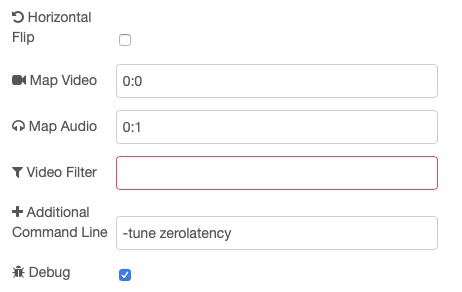
ptath
on 27 Feb 2020
@ptath @daddvok should be fixed in 1.0.3
Shaquu
on 1 Mar 2020
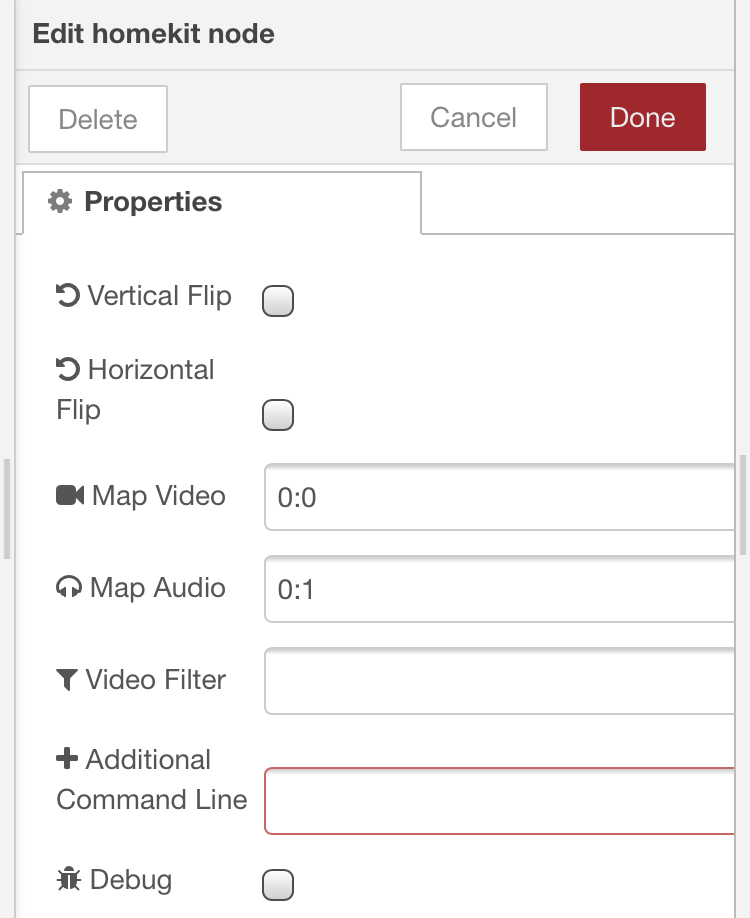
@ptath @daddvok should be fixed in 1.0.3
everything is fine with the video filter line, but can you do the same for the additional command line? if not difficult
daddvok
on 3 Mar 2020
Sure
Shaquu
on 3 Mar 2020
@Shaquu
This probably doesn't belong here but it's along the topic of mandatory fields.
Should "bridge" be a mandatory field? It's letting me deploy without a warning if I don't choose any bridge. Then I get an error in the debug panel.
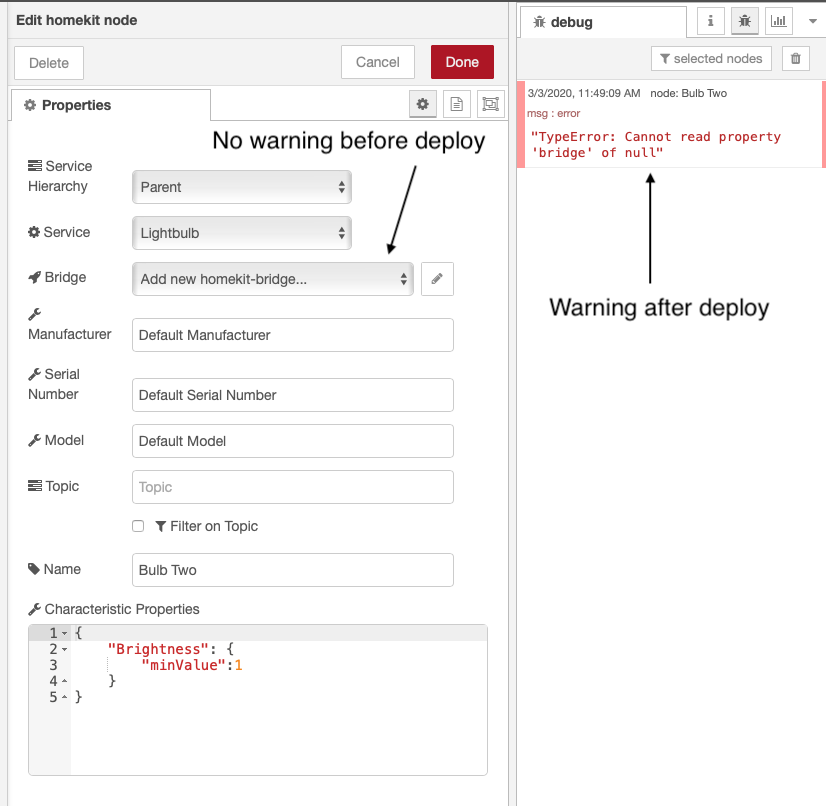
Not choosing a service looks like:
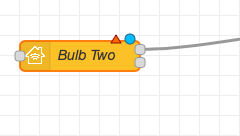
But if I choose "Parent" for "Service Hierarchy" and no bridge then there is no red warning on the node. And if I choose "Linked" with no Parent, again no warning.
Not sure if it's difficult to add or if it matters since the error will pop up once you hit deploy...
 crxporter
on 3 Mar 2020
crxporter
on 3 Mar 2020
Sure
can i ask? how soon to wait for the update, otherwise it’s impossible to use my camera on the copy codec yet
daddvok
on 3 Mar 2020
I am suppose to sleep but let’s fix it before it. Give me a minute.
Shaquu
on 3 Mar 2020
I am suppose to sleep but let’s fix it before it. Give me a minute.
Thank you so much
daddvok
on 3 Mar 2020
@daddvok @crxporter
1.0.4 is published, should be soon in node-red. If you want it faster then you can install it manually.
Additional Command Line should be now optional.
And there should be warning if you try to deploy without bridge (Parent) and without Parent Service (Linked).
Have a good night. Please make a noise if I broke something.
Shaquu
on 4 Mar 2020
Excellent work, sir.
crxporter
on 4 Mar 2020
Just tried and the little red triangle 🔺 shows up now if there’s no bridge selected. It’s a nicer warning to see “are you sure you want to deploy” instead of errors in the debug after deploy.
Thanks!!
crxporter
on 4 Mar 2020
Additional Command Line should be now optional.
Are both options really optional now? If the line video filter and the additional command line is empty, then it is not reset to the default value? (scale=1280:720, -tune zerolatency). For some reason, the stream does not start on the new version with the same parameters. There is a feeling that default values are substituted in VF and Additional Command Line.
daddvok
on 4 Mar 2020
Is it still the issue?
If it is then please run in debug mode and provide logs (obfuscated).
Shaquu
on 18 Apr 2020
Related issues
 TristanMW
·
11Comments
TristanMW
·
11Comments
 sjorge
·
7Comments
sjorge
·
7Comments
 Kowy54
·
3Comments
Kowy54
·
3Comments
 Supergiovane
·
9Comments
Supergiovane
·
9Comments
 mtjoernelund
·
8Comments
mtjoernelund
·
8Comments
Most helpful comment
@daddvok @crxporter
1.0.4 is published, should be soon in node-red. If you want it faster then you can install it manually.
Additional Command Line should be now optional.
And there should be warning if you try to deploy without bridge (Parent) and without Parent Service (Linked).
Have a good night. Please make a noise if I broke something.