Node-red-contrib-homekit-bridged: If at least one device does not respond, all devises on bridge do not respond
Some devices do not connect to nr immediately after the start of the system and because of this constantly "No Response" on all devises on bridge. If i injected {"On":"NO_RESPONSE"} for one device see the same problem.
node-red - 1.0.2
node-red-contrib-homekit-bridged - 1.0.0-dev.1
 daddvok
All 54 comments
Please share you flow with us or tell more about your devices set.
 Shaquu
on 27 Dec 2019
Shaquu
on 27 Dec 2019
Please share you flow with us or tell more about your devices set.
I use deconz and node-red-contrib-deconz plugin, sometimes after restart of my rpi some devices do not connect immediately and my deconz node sent into homekit-node “param”: “NO_RESPONSE”, after this i see on all devises on my bridge no response
daddvok
on 28 Dec 2019
Same here.
On IOS the lightbulb status is not updated, but I can see the status is changed in NR flow.
ON NR the node does not send any message to its output when I turn the light ON/OFF on IOS.
Restart NR solves the problem.
I'm under development with upyhome to control micropython with NR.
12 Jan 16:03:53 - [info] Node-RED version: v1.0.3
12 Jan 16:03:53 - [info] Node.js version: v13.5.0
12 Jan 16:03:53 - [info] Darwin 19.2.0 x64 LE
12 Jan 16:03:54 - [debug] Module: node-red-contrib-homekit-bridged 0.8.0
 ng-galien
on 12 Jan 2020
ng-galien
on 12 Jan 2020
I think it is a home.app bug, if I send a NO_RESPONSE to one device it indeed marks all devices as not responding. But other apps like home4 or eve only that one device as not responding.
 sjorge
on 12 Jan 2020
sjorge
on 12 Jan 2020
@Shaquu the problem still remained on 1.0.0-dev.7
daddvok
on 27 Jan 2020
Didn't tried No response on the dev version, but on 0.8.0 it works as it should. Only that Accessory goes into NO_RESPONSE state on which you specified this.
 radokristof
on 29 Jan 2020
radokristof
on 29 Jan 2020
Maybe there is a problem when there are more then one Accessories on one Bridge?
Just wondering. @daddvok can you share exact flow so we could reproduce the issue?
Shaquu
on 29 Jan 2020
Maybe there is a problem when there are more then one Accessories on one Bridge?
Naturally, the problem manifests itself when there are many/several devices on the bridge and when i inject into anyone device, for example "On":"NO_RESPONSE", i see on all devises on this bridge no response in home app
daddvok
on 29 Jan 2020
Well I am afraid it can be a correct behaviour.
I have made a test. Recording on YouTube.
node-red flow here!
[
    {
        "id": "8ab9e9d2.9c5e28",
        "type": "tab",
        "label": "NRCHKB NO_RESPONSE",
        "disabled": false,
        "info": "# NRCHKB NO_RESPONSE TEST\nTest being made with two services \n(two accessories) on one Bridge."
    },
    {
        "id": "baac7383.8b5d68",
        "type": "homekit-service",
        "z": "8ab9e9d2.9c5e28",
        "isParent": true,
        "bridge": "63cce30f.dd8954",
        "parentService": "",
        "name": "Light_A",
        "serviceName": "Lightbulb",
        "topic": "",
        "filter": false,
        "manufacturer": "Light_A",
        "model": "Light_A",
        "serialNo": "Light_A",
        "cameraConfigVideoProcessor": "ffmpeg",
        "cameraConfigSource": "",
        "cameraConfigStillImageSource": "",
        "cameraConfigMaxStreams": 2,
        "cameraConfigMaxWidth": 1280,
        "cameraConfigMaxHeight": 720,
        "cameraConfigMaxFPS": 10,
        "cameraConfigMaxBitrate": 300,
        "cameraConfigVideoCodec": "libx264",
        "cameraConfigAudioCodec": "libfdk_aac",
        "cameraConfigAudio": false,
        "cameraConfigPacketSize": 1316,
        "cameraConfigVerticalFlip": false,
        "cameraConfigHorizontalFlip": false,
        "cameraConfigMapVideo": "0:0",
        "cameraConfigMapAudio": "0:1",
        "cameraConfigVideoFilter": "scale=1280:720",
        "cameraConfigAdditionalCommandLine": "-tune zerolatency",
        "cameraConfigDebug": false,
        "cameraConfigSnapshotOutput": "disabled",
        "cameraConfigInterfaceName": "",
        "characteristicProperties": "{}",
        "x": 520,
        "y": 160,
        "wires": [
            [],
            []
        ]
    },
    {
        "id": "dba79c26.cdd28",
        "type": "homekit-service",
        "z": "8ab9e9d2.9c5e28",
        "isParent": true,
        "bridge": "63cce30f.dd8954",
        "parentService": "",
        "name": "Light_B",
        "serviceName": "Lightbulb",
        "topic": "",
        "filter": false,
        "manufacturer": "Light_B",
        "model": "Light_B",
        "serialNo": "Light_B",
        "cameraConfigVideoProcessor": "ffmpeg",
        "cameraConfigSource": "",
        "cameraConfigStillImageSource": "",
        "cameraConfigMaxStreams": 2,
        "cameraConfigMaxWidth": 1280,
        "cameraConfigMaxHeight": 720,
        "cameraConfigMaxFPS": 10,
        "cameraConfigMaxBitrate": 300,
        "cameraConfigVideoCodec": "libx264",
        "cameraConfigAudioCodec": "libfdk_aac",
        "cameraConfigAudio": false,
        "cameraConfigPacketSize": 1316,
        "cameraConfigVerticalFlip": false,
        "cameraConfigHorizontalFlip": false,
        "cameraConfigMapVideo": "0:0",
        "cameraConfigMapAudio": "0:1",
        "cameraConfigVideoFilter": "scale=1280:720",
        "cameraConfigAdditionalCommandLine": "-tune zerolatency",
        "cameraConfigDebug": false,
        "cameraConfigSnapshotOutput": "disabled",
        "cameraConfigInterfaceName": "",
        "characteristicProperties": "{}",
        "x": 520,
        "y": 340,
        "wires": [
            [],
            []
        ]
    },
    {
        "id": "8e3f0b5b.539118",
        "type": "inject",
        "z": "8ab9e9d2.9c5e28",
        "name": "{\"On\":\"NO_RESPONSE\"}",
        "topic": "",
        "payload": "{\"On\":\"NO_RESPONSE\"}",
        "payloadType": "json",
        "repeat": "",
        "crontab": "",
        "once": false,
        "onceDelay": 0.1,
        "x": 270,
        "y": 160,
        "wires": [
            [
                "baac7383.8b5d68"
            ]
        ]
    },
    {
        "id": "5948f48b.4a960c",
        "type": "inject",
        "z": "8ab9e9d2.9c5e28",
        "name": "{\"On\":\"NO_RESPONSE\"}",
        "topic": "",
        "payload": "{\"On\":\"NO_RESPONSE\"}",
        "payloadType": "json",
        "repeat": "",
        "crontab": "",
        "once": false,
        "onceDelay": 0.1,
        "x": 270,
        "y": 340,
        "wires": [
            [
                "dba79c26.cdd28"
            ]
        ]
    },
    {
        "id": "96e11542.e38ee",
        "type": "inject",
        "z": "8ab9e9d2.9c5e28",
        "name": "{\"On\":true}",
        "topic": "",
        "payload": "{\"On\":true}",
        "payloadType": "json",
        "repeat": "",
        "crontab": "",
        "once": false,
        "onceDelay": 0.1,
        "x": 220,
        "y": 200,
        "wires": [
            [
                "baac7383.8b5d68"
            ]
        ]
    },
    {
        "id": "94b1b80e.5822d8",
        "type": "inject",
        "z": "8ab9e9d2.9c5e28",
        "name": "{\"On\":true}",
        "topic": "",
        "payload": "{\"On\":true}",
        "payloadType": "json",
        "repeat": "",
        "crontab": "",
        "once": false,
        "onceDelay": 0.1,
        "x": 220,
        "y": 380,
        "wires": [
            [
                "dba79c26.cdd28"
            ]
        ]
    },
    {
        "id": "63cce30f.dd8954",
        "type": "homekit-bridge",
        "z": "",
        "bridgeName": "RESPONSE_TEST_BRIDGE",
        "pinCode": "111-11-111",
        "port": "",
        "allowInsecureRequest": false,
        "manufacturer": "RESPONSE_TEST_BRIDGE",
        "model": "RESPONSE_TEST_BRIDGE",
        "serialNo": "RESPONSE_TEST_BRIDGE",
        "customMdnsConfig": false,
        "mdnsMulticast": true,
        "mdnsInterface": "",
        "mdnsPort": "",
        "mdnsIp": "",
        "mdnsTtl": "",
        "mdnsLoopback": true,
        "mdnsReuseAddr": true,
        "allowMessagePassthrough": true
    }
]
It looks like unfortunately if you have one or more Accessories on one Bridge then if you set one as NO_RESPONSE then all Accessories will be displayed as NO_RESPONSE in Home.app
And until you mark all Accessories as correct then NO_RESPONSE will stay in Home.app for all Accessories.
If anyone have a proof that HomeKit (or native device) works differently in that matter then please stand up.
Shaquu
on 29 Jan 2020
I think this is an iOS 13 change, 3rd party apps like home2.app and evehome.app still have the old behavior IIRC
sjorge
on 29 Jan 2020
I confirm. Eve.app is keeping NO_RESPONSE separate.
So it is a problem with Home.app implementation I guess (or we obviously do something in a bad manner and Eve doesn't care about it but Home does).
Shaquu
on 29 Jan 2020
I no longer have an iOS 12 device, but I'm pretty sure the homekit overhaul they did in iOS 13 is to blame... there is so much stuff still broken (looks at color selection bug on lamps, statusfault not clearing unless hard killing home.app, ...)
sjorge
on 29 Jan 2020
So @daddvok I guess we are going to close this issue.
Shaquu
on 29 Jan 2020
As far as I remember, it worked fine through the hombridge, it's strange to create a bridge for each device (because i have over 30 devices)
daddvok
on 29 Jan 2020
I hope that Apple is changing a little bit around HomeKit development... It is really far behind, in terms of bugs and functions also.
radokristof
on 29 Jan 2020
I'm not sure what we are doing, but it looks like homebridge uses this https://github.com/nfarina/homebridge/blob/46fdf3dabde70793f991cb344dda5ffe1dca006c/lib/platformAccessory.js#L125
I tried looking where this methode is defined but could not find it... so it might be upstream HAP?
sjorge
on 29 Jan 2020
It's upstream HAP and it is deprecated and a noop, https://github.com/KhaosT/HAP-NodeJS/blob/bace3b682fa664993a1d5504ffed42b5c08fed4c/src/lib/Accessory.ts#L358 ¯_(ツ)_/¯
sjorge
on 29 Jan 2020
@daddvok please check it on Homebridge then. And if it works there then tell us with what plugins etc. It will be easier to fix it for us.
It's deprecated for a long time. I am deleting it from our code.
Shaquu
on 29 Jan 2020
@daddvok please check it on Homebridge then. And if it works there then tell us with what plugins etc.
I no longer use a hombridge, unfortunately
daddvok
on 29 Jan 2020
If anyone have a proof that HomeKit (or native device) works differently in that matter then please stand up.
Native device: Chamberlain homekit hub
Accessory 1: Heidi Garage door
Accessory 2: Garrett Garage door
I unplugged Garrett (my door) from the garage ceiling. The hub and Heidi's door still respond fine. My door clicked right over to "No Response"
Screenshot:

 crxporter
on 29 Jan 2020
crxporter
on 29 Jan 2020
@crxporter wait but I think in your case there is no Bridge?
And both Garage Doors are native devices, single Accessories?
Shaquu
on 29 Jan 2020
No, the doors are indeed connected through a bridge.

The hub connects to homekit over WiFi. The doors connect to the hub through chamberlain proprietary MyQ wireless protocol.
crxporter
on 29 Jan 2020
Okay, so all of these are official Accessories?
Shaquu
on 29 Jan 2020
Correct. Link: Chamberlain bridge
crxporter
on 29 Jan 2020
Okay. So there musy be a way.
I have spend some time on it today and noticed that it behaves differently if accessories are split into different rooms.
Other thing is that I found some issues from Homebridge where it is said that one plugin were blocking all other plugins so situation similar to ours.
Shaquu
on 30 Jan 2020
Everyone, just to add to the conversation
The behaviour from homebridge is that a single accessory per instance can be set to "Not Repsonding". Code is here
https://github.com/NorthernMan54/homebridge-sensor-stub
This particular plugin turns on and off the various accessory status's like low battery, fault and error in a contact sensor.

 NorthernMan54
on 30 Jan 2020
NorthernMan54
on 30 Jan 2020
any news? on 1.0.3 the problem is still there
daddvok
on 3 Mar 2020
@daddvok sorry, didn't focus on this matter. I will try too look at this again in coming days.
Shaquu
on 3 Mar 2020
Running version 1.0.4.
I can't seem to get "no response" to trigger on any of my lights. I'm sending payload {"On":"NO_RESPONSE"} to light bulb and fan service items.
crxporter
on 6 Mar 2020
Update: went back to the pi I'm phasing out running 0.6.2 and it's working correctly there. Even showing just one "No Response" with multiple items on the bridge.
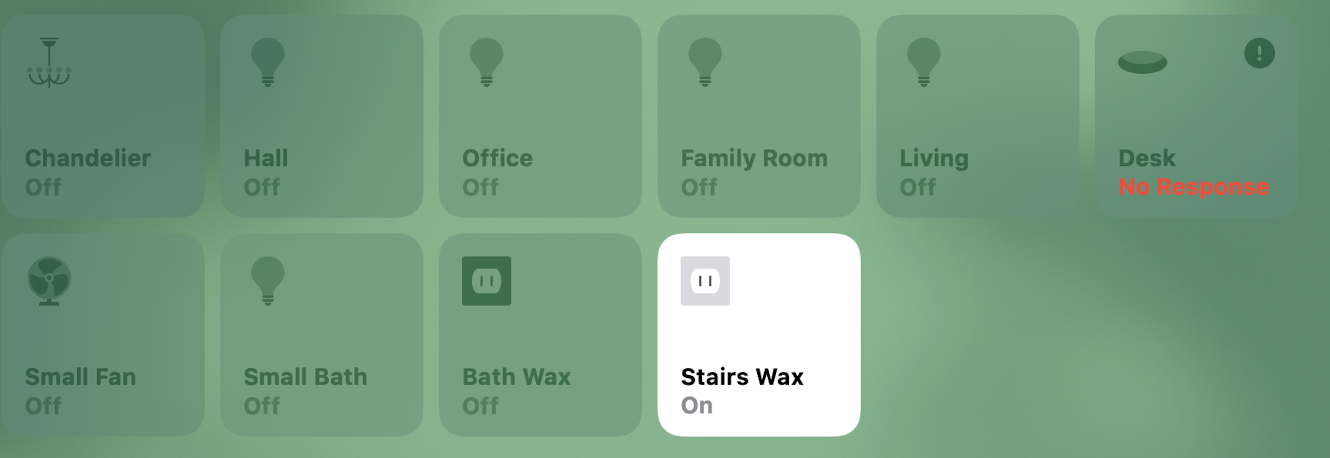
All items in screenshot are on the same NRCHKB bridge.
crxporter
on 6 Mar 2020
Please look if latest dev gives solutions with #227
Shaquu
on 8 Apr 2020
Thank you @shaquu and @radionoise I'll set up a dev branch and test later today.
crxporter
on 8 Apr 2020
Testing with a pair of light bulbs.
With #227 things are back to working as described in this issue, still not quite right.
Sending {"On":"NO_RESPONSE"} does not immediately trigger, must close and re-open home app.
Once I've closed and re-opened, all devices on the bridge show "No Response" in red until the non responding item is updated with "On" true/false.
crxporter
on 8 Apr 2020
Update - it appears the no response state is not cleared until close and re-open home app.
This is also not preferred as if things get fixed it would be nice to have it show immediately.
@radionoise since this is your little project, has anything changed since 0.6.2? It was working great back then.
crxporter
on 8 Apr 2020
@crxporter You are right that No Response was triggered individually for accessory in 0.6.2. I'll try to investigate why it's not the case in latest dev branch.
Unfortunately, in 0.6.2 No Response status was not displayed immediately rather than after Home.app is reopened too. Maybe this is an expected behavior?
 radionoise
on 9 Apr 2020
radionoise
on 9 Apr 2020
@radionoise going back to my "homekit official" bridge of garage door openers, I just went and did a quick test.
If I disconnect one of the two doors while the home app is open - it does not immediately show "no response". If I try to open the unplugged door, homekit shows that it's trying to open.
It is not until I swipe to another room and back to the garage that I see "no response" status. But I do not have to quit the app for it to show, only swipe to another room and back.
In my opinion, the best setup would be:
- To allow individual accessories to show "no response"
- Have it update as easily as possible whether that be immediately or switching away from the room and back
Please let me know if you have another branch for testing, I can load it up so we can try stuff before it's merged to dev here.
crxporter
on 9 Apr 2020
I think you will get No Response not only after reopening an application but just after switching the room too as you did with official bridge. Can you check it please?
radionoise
on 9 Apr 2020
No, current dev version for me (1.1.0) is doing the following:
If the light is “on” and I send “on”:”no_response” while having the home app open, it immediately sets the light to “off” but still accepts on/off commands and sends them to node red.
If I switch rooms and back, it does not change to no response.
No response does not show for me until I’ve quit the app.
crxporter
on 9 Apr 2020
I found something in homebridge issues.
https://github.com/homebridge/homebridge/issues/2459#issuecomment-615159309
Looks like hap-nodejs could broke something regarding no-response
And also hap-nodejs got it fixed:
https://github.com/homebridge/homebridge/commit/925544a7873fe058a0d8f6e33beff9599b0eb088
Shaquu
on 18 Apr 2020
@Shaquu
Can you update hap-nodejs to that version? If I'm right we are still using v0.5.x right?
What do you think is 0.6.x is good enough for a version bump?
If not, at least we should test it...
radokristof
on 18 Apr 2020
I am doing it right now. I will release new dev in a minute but still will have to make more fixes in a code. #245
npm i [email protected]
Shaquu
on 18 Apr 2020
(booting up my dev pi now)
crxporter
on 18 Apr 2020
This is progress I think. Still not quite perfect.
No response payload being sent is alway{"On":"NO_RESPONSE"}
This is what I see:
Starting with "Home" app open. On/off control works great. Sending no response will make the light show "off" immediately but will not show "No Response" until quitting and re-opening. Will still accept commands until it's been quit and re-opened. The improvement is that now when re-opening Home, only the single item on the bridge shows "no response" all other items work as normal. This is excellent.
When not in the "Home" app: Sending no response works completely as expected. Opening home app shows the one item as no response. Sending "On":true will cause it to refresh as a native item (I.e. when swiping to another room and back).
So the question is why doesn't it work properly when no response is sent while the home app is open?
crxporter
on 18 Apr 2020
@crxporter I have an idea and I will try it. Would you send me your flow you were testing on?
Shaquu
on 18 Apr 2020
Here is a video from me while testing NO_RESPONSE. Long pause is when I go to node-red to shoot some random values/no-response status.
https://youtu.be/H9H6xHMJ-J4
What I noticed:
- If I trigger NO_RESPONSE in node-red it doesn't appear in Home.app right away. I have to click change value in Home.app (click) then I receive exclamation mark only.
- Then I cannot change value from NO_RESPONSE to correct one in Home.app. I have to trigger value change inside of node-red which will not be reflected (or will be?) to Home.app until I change a value again (click in Home.app).
- Changing value from NO_RESPONSE to correct one in node-red make this value refresh in Home.app but exclamation mark is still there until I refresh by changing value (click).
- For red No response to appear I had to do hard refresh which is reopen app (doesnt have to kill an app, also changing room in Home.app should work I guess).
- When there is No response in Home.app and we change NO_RESPONSE to correct value in node-red then it won't reflect in Home.app even if we try to refresh (click). We have to reopen an app.
@crxporter please tell me if it works better by seeing video and reading my messy description.
If yes then good and I will push to dev. If not then tell me what has to change.
Shaquu
on 18 Apr 2020
@Shaquu I'm gonna be honest, I'm not sure I did the install quite right. I'm going to run a fresh install of everything on this pi (who knows what I messed up) and try installing with your command above:
npm i [email protected]
crxporter
on 19 Apr 2020
@Shaquu I'm gonna be honest, I'm not sure I did the install quite right. I'm going to run a fresh install of everything on this pi (who knows what I messed up) and try installing with your command above:
npm i [email protected]
I have might mislead you. My test included some code change :)
Shaquu
on 19 Apr 2020
I have might mislead you. My test included some code change :)
Well I haven't done anything yet. Is that still the right install command?
crxporter
on 19 Apr 2020
I have might mislead you. My test included some code change :)
Well I haven't done anything yet. Is that still the right install command?
Sure, this one should work correctly.
I just wanted to underline that my post is about the change which is not yet available on dev branch.
Shaquu
on 19 Apr 2020
I think I understand now.
Yes - your video shows expected behavior.
crxporter
on 19 Apr 2020
Okay, pushed the change to dev so please test (also @radokristof ) on .4
npm i [email protected]
Shaquu
on 19 Apr 2020
I will test it thanks!
radokristof
on 19 Apr 2020
How is it?
Shaquu
on 20 Apr 2020
Oh right I forgot to report back on this one before trying qr branch.
This works great for me in dev.4 branch.
crxporter
on 20 Apr 2020
Related issues
 Kowy54
·
3Comments
Kowy54
·
3Comments
 MartiMan79
·
8Comments
MartiMan79
·
8Comments
 a2sky
·
7Comments
a2sky
·
7Comments
 djiwondee
·
4Comments
djiwondee
·
4Comments
 thomasssso
·
10Comments
thomasssso
·
10Comments
Most helpful comment
Everyone, just to add to the conversation
The behaviour from homebridge is that a single accessory per instance can be set to "Not Repsonding". Code is here
https://github.com/NorthernMan54/homebridge-sensor-stub
This particular plugin turns on and off the various accessory status's like low battery, fault and error in a contact sensor.