Node-red-contrib-homekit-bridged: [FEATURE] Manual status update/synch?
Is your feature request related to a problem? Please describe.
First, some background... I already have a homebridge instance set up (which I've been using for around a year now) but I've had many issues with it. I suspect its problems may be the communication between iOS and homebridge or the problems are just from iOS in general, so I installed node-red-contrib-homekit-bridged and node-red-contrib-homebridge-automation in order to try and rule out a communication issue between iOS and homebridge. My hope is that the next time I start having an issue with homebridge devices not responding or not being found, I can try out using a node-red-contrib-homekit-bridged copy of the unresponsive device and if it doesn't exhibit the same problematic behavior, I can conclude that iOS/homebridge communication is the source of my problems (and just completely switch over the node-red-contrib-homekit-bridged and uninstall homebridge). I added a node-red-contrib-homebridge-automation node for each device and connected each one to a node-red-contrib-homekit-bridged node so that I can control my homebridge devices from node-red.
Everything seems to be working now, but I had an issue with initial states of the devices. I had to create an inject node (which I must trigger manually after deploy/restart) to query homebridge for its current state and send it to your homekit node so that the device states for the node-red-contrib-homekit-bridged devices and the homebirdge devices in the home app are synchronized (because without doing that, all the node-red-contrib-homekit-bridged devices in the home app all start in the off state regardless of the actual state of the device). I didn't expect to have to do this...
Following the garage door example, I tried creating an inject-once node (after 2 seconds) to initialize the home app state (before I created the manual synch portion of the flow), but every device in the flow started in an error state and was only fixed by my manual synch. Honestly, I don't understand how the initial state of each node (and the buttons in the home app) is supposed to work. Maybe I'm doing it wrong.
So my problem is either a documentation issue (where I wasn't able to understand how to set things up so that the initial state of each device reflects that actual state of the physical device) or it's a bug where the state of each device's node is in error.
Describe the solution you'd like
First, I think the documentation should describe how a device's state is synchronized with the node-red representation (both in node red and in the home app) so that users know how to handle the case where the state of the home app button does not reflect the state of the actual device.
Second, it seems to me like there is no mechanism(?) for polling the device state so that it can stay synchronized with the actual device state. If a device's state is changed via some external means (outside of node-red or the home app, such as an RF remote for an RF outlet). Homebridge devices' states do stay synchronized regardless of how the device's state is changed because I can define a "powerstate get" method for each device, which is then polled at some interval. For my RF outlets for example, I can set up a receiver on my breadboard that can listen for the RF remote signal and update a state file I keep for each device when that outlet's on/off signal is detected, and my "powerstate get" method for homebridge just cats that file. It's not clear to me that that's possible with node-red-contrib-homekit-bridged or if it is, I couldn't find it in the documentation.
Describe alternatives you've considered
My work-around is to use node-red-contrib-homekit-bridged in conjunction with homebridge and use the hb event node from node-red-contrib-homebridge-automation to update node-red-contrib-homekit-bridged nodes. The hb event node gets triggered when homebridge's polling detects a state change, which doesn't seem possible with node-red-contrib-homekit-bridged. I could certainly monitor state changes with my RF receiver, but I don't know how to trigger that state change in node red without the hb event homebridge node.
I haven't played around with other devices to see if their states are updated when changes happen outside of node-red/the home app. E.g. if I use the wemo app to turn on/off a wemo outlet, does the state in node red and the home app update?
Additional context
It's entirely possible that I'm just not understanding how things are supposed to work or my issue is related to some some newbie mistake. Perhaps I just need a longer delay for the inject-once node in order to get the correct initial state? Note that if the initial state is wrong, I had trouble controlling the device from the home app. A manual synch using the inject node seems to fix it. Here's how I currently have things set up:

I have roughly 2 dozen devices set up in homebridge.
 hepcat72
All 31 comments
First of all thanks for using node-red-contrib-homekit-bridged (nrchkb).
Please remember that we and homebridge depends on the same communication api called Hap-NodeJS but indeed our product is different. Homebridge utilise existing plugins which help you connect to existing devices and nrchkb is only about giving user tools to mostly do the plugins yourself by using other node-red plugins like ours.
I’m calling @crxporter as he is a master of design here.
 Shaquu
on 24 Sep 2019
Shaquu
on 24 Sep 2019
OK, so here's a concrete example where the 2 are out of synch. Currently, these buttons on my home app show:
        actual  hb-button   nrchkb-button
lights      on  on      off
couch fan   on  on      off/not-responding
TV      on  on      off
stereo      on  on      off/not-responding
garage      closed  closed      opened/no-response
Interestingly, the nrchkb lights and TV do not have an exclamation point in the home app (indicating not-responding). The couch fan, stereo, and garage do have an exclamation point and when you hard-press the button, they say "not responding".
I'm working from home today because a guy was coming to fix my mower. Here's the order of events that lead to the states above (they were all previously in synch):
- Opened the garage door using siri
- Turned off my wifi on my iPhone because it was being slow while I was outside
- Closed the garage door using the garage door remote & went back inside
- Changed the inject-once delay to 5 seconds
- Deployed the change in node red
- Restarted both node red and homebridge using
pm2 restart all - Turned my iPhone wifi back on
- Noticed the status of the buttons in the home app reported above
- I noted that I could use the nrchkb couch fan button in the home app to control the couch fan even though the no-response status stayed the same (the first tap changed the button to be "on" and the fan remained "on" and the second & third tap turned the fan off & on) (Note, when the homebridge buttons say no response, they refuse to work at all - so that's good that the nrchkb buttons work despite the no-response status.)
- After typing the above, I checked and all the no-response statuses are gone from the home app buttons but other than the couch fan, the statuses are still out of synch.
- The hb retrieve status nodes are all in error in node red:

- Clicked the Synch all inject node and all the nrchkb home app buttons now show the correct status (and the error states went away)
So it seems that the nrchkb home app buttons are definitely not being updated via a polling method and are not initializing based on actual device status after deploy/restart. The homebridge home app buttons do always appear to reflect the actual device status, which I believe is due to polling for the device status.
I suspect that I could manually synchronize those buttons that were out of synch by doing what I did with the couch fan (e.g. toggle the buttons in the home app manually). I can also go to the workflow and click the synch-all button. Perhaps I should create a "device" that initiates the synch as if I've clicked the inject node. However, it would be nice if nrchkb synched itself at some configurable interval.
hepcat72
on 24 Sep 2019
Okay, I don’t work from home today and I’m going to sleep so I don’t have that time to write very long answer like you did (which is great actually as you give a lot of data to me) :)
I’m not sure if you get that that nrchkb devices don’t have persist state.
They have state on runtime. After you restart node-red and you don’t inject Service nodes with some data then they all should be in off status.
So it’s up to you to sync. It’s what node-red is really about, you make all logic and nrchkb is just a door for HoneKit to use that logic somehow.
Do I get that right or I misinterpret your words?
My example of tv volume control switch:
Every time node-ref starts it ask tv for volume level and sets volume on my switch.
Then every x seconds tv is asked for volume level and sync with switch (logic made with node-red).
If I change volume in HomeKit then I send new value to the tv.
Shaquu
on 24 Sep 2019
OK, that makes sense. I guess I was accustomed to the homebridge paradigm and thought of this in the same way, thus I thought I hadn't set it up right. I just need to do my own polling for device state. I can certainly do that for things I've scripted (like the RF outlets). I'll have to figure out how to do that for devices for which I rely on the homebridge plugin for (e.g. the garage door, wemo outlets, etc). That is, if I eventually decide to switch fully over to node red and uninstall homebridge.
Feel free to close this issue, unless you want to use it for documenting a polling for device state example...
hepcat72
on 24 Sep 2019
I suspect the same.
Node-RED is an event-driven environment - so in an ideal place you don't poll the states.
I don't know how these homebridge nodes work, but when you start Node-RED after initialization, these nodes should send it's state to the HomeKit nodes, so it will get the current state. After state initialization, it should work the same. The other nodes sends a new state to the HomeKit node so you don't need to poll the state.
In my opinion every node should just do what it supposed to do. So for example if you need persistance to restore HomeKit device states after restart/power loss, it should be a different node, and not the HomeKit node should contain some rather complex persistance. This is also true for polling. It could be done, but this is not how it should work, but you can achieve this with other nodes. I saw that you wrote that inject only works when you manually press it. However the inject after ... does the same and should work the same. If you can post your code here or provide more on this we could help. I also use this inject after method for some HomeKit items to get proper startup state.
 radokristof
on 24 Sep 2019
radokristof
on 24 Sep 2019
I agree - I don't like polling either. It's a bunch of wasted cycles. But unless the device is set up to communicate its state change back to subscribers, you just have to ask it to get it to tell you via polling or try and catch all the ways the state can be changed. I can tell homebridge polls because if I change my state files manually, the buttons in the home app update within a second or 2.
Currently, I have a bunch of dumb (or somewhat dumb) devices that I've rigged myself or have ways other than node-red and the home app to change their state: a 433mhz transmitter & receiver to control 8 RF outlets with remotes, a 27mhz transmitter to control my bose stereo, an IR blaster that controls 5 other devices (including the TV) which doesn't save state, my garage door (including its RF remotes and a proprietary app - which don't communicate their state change), etc.. I've rigged my own way to capture state changes for certain things, like the RF receiver and I wrote a script to use garage door emails as state change triggers. I can't get state changes for my IR devices though. I don't have an IR receiver.
I'm not sure why the inject once isn't working. I've tried it up to a 5 second delay now. Maybe it just takes homebridge awhile to start up. By "post your code", do you mean the workflow?
hepcat72
on 25 Sep 2019
I see. Maybe then if you want to fully move to Node-RED you could somehow store these devices state in Node-RED.
You can select multiple nodes on your workflow, or by dragging while mouse is clicked and there is an export option in the menu. That generates a code we can import, so that we can see every node, its settings, etc...
radokristof
on 25 Sep 2019
I selected 3 rows to show as an example. The air conditioner is an IR-controlled device from my Broadlink RM Mini IR blaster. The bed fan is plugged into a 433Mhz Etekcity outlet controlled via my RF transmitter plugged into my breadboard. The Stereo is Bose and is controlled via a simple wire plugged into the breadboard using my fork of the pi-rc project to create a pi-bose executable (https://github.com/hepcat72/pi-rc).
node-red workflow
[
   {
      "id":"1f846e74.27c802",
      "type":"inject",
      "z":"4e8e4629.b245f",
      "name":"Synch All",
      "topic":"",
      "payload":"{}",
      "payloadType":"json",
      "repeat":"",
      "crontab":"",
      "once":true,
      "onceDelay":"5",
      "x":120,
      "y":100,
      "wires":[
         [
            "89bf838e.759b",
            "e25a2d3c.73a68",
            "f0e49c51.67e538",
            "3175f757.b979b8",
            "4bdf0547.8dde04",
            "e4542c8b.14e9a8",
            "2365c216.1896ee",
            "7e6e05e3.b3f55c",
            "432b58ed.2e2628",
            "4ad1cb15.380d3c",
            "69271c35.639674",
            "28b30d79.f84222",
            "b500f262.cafb98",
            "12981ce6.508913",
            "3eece8eb.9b7528",
            "8096e72.afd2c98",
            "bb2ddec9.a89dc8",
            "786e0dd9.a7f774",
            "32b45098.90fa5",
            "48de812c.e27258",
            "afa2573c.12bbf",
            "76cf3fa7.8043b8",
            "7ea65936.3abc4",
            "23051f95.4e73f8",
            "4905c7a6.9cc4b8",
            "115dbf3d.a5ddb1"
         ]
      ]
   },
   {
      "id":"ed808f9.c8bb17",
      "type":"comment",
      "z":"4e8e4629.b245f",
      "name":"Manually Synchronize with Homebridge",
      "info":"",
      "x":170,
      "y":40,
      "wires":[

      ]
   },
   {
      "id":"ecdacaee.33fa3",
      "type":"comment",
      "z":"4e8e4629.b245f",
      "name":"Controls",
      "info":"",
      "x":580,
      "y":40,
      "wires":[

      ]
   },
   {
      "id":"bac24dc8.c8856",
      "type":"comment",
      "z":"4e8e4629.b245f",
      "name":"Updates from Homebridge",
      "info":"",
      "x":930,
      "y":40,
      "wires":[

      ]
   },
   {
      "id":"592f8e75.a6af48",
      "type":"comment",
      "z":"4e8e4629.b245f",
      "name":"Node Red HomeKit Control",
      "info":"",
      "x":1180,
      "y":40,
      "wires":[

      ]
   },
   {
      "id":"870fd5ee.e6c4c8",
      "type":"comment",
      "z":"4e8e4629.b245f",
      "name":"Homebridge Control",
      "info":"",
      "x":1470,
      "y":40,
      "wires":[

      ]
   },
   {
      "id":"52c38f48.f55fc8",
      "type":"debug",
      "z":"4e8e4629.b245f",
      "name":"",
      "active":true,
      "tosidebar":true,
      "console":false,
      "tostatus":false,
      "complete":"false",
      "x":1710,
      "y":100,
      "wires":[

      ]
   },
   {
      "id":"aa776b2d.d106e8",
      "type":"hb-control",
      "z":"4e8e4629.b245f",
      "name":"bed fan",
      "Homebridge":"Homebridge",
      "Manufacturer":"Rocks",
      "Service":"Outlet",
      "device":"HomebridgeCC:22:3D:E3:CE:22Rocksbed fan00000047",
      "conf":"36d199aa.555d2e",
      "x":1440,
      "y":380,
      "wires":[

      ]
   },
   {
      "id":"7aeb0c5e.ec03bc",
      "type":"homekit-service",
      "z":"4e8e4629.b245f",
      "isParent":true,
      "bridge":"f2691ed1.345838",
      "parentService":"",
      "name":"Node Red Bed Fan",
      "serviceName":"Outlet",
      "topic":"",
      "filter":false,
      "manufacturer":"Default Manufacturer",
      "model":"Default Model",
      "serialNo":"0001",
      "characteristicProperties":"{\"On\":true}",
      "x":1150,
      "y":380,
      "wires":[
         [
            "aa776b2d.d106e8",
            "52c38f48.f55fc8"
         ]
      ]
   },
   {
      "id":"ca72fb86.8f24a8",
      "type":"hb-event",
      "z":"4e8e4629.b245f",
      "name":"bed fan",
      "Homebridge":"Homebridge",
      "Manufacturer":"Rocks",
      "Service":"Outlet",
      "device":"HomebridgeCC:22:3D:E3:CE:22Rocksbed fan00000047",
      "conf":"36d199aa.555d2e",
      "x":990,
      "y":380,
      "wires":[
         [
            "7aeb0c5e.ec03bc"
         ]
      ]
   },
   {
      "id":"8f55a230.21271",
      "type":"inject",
      "z":"4e8e4629.b245f",
      "name":"Off",
      "topic":"",
      "payload":"{\"On\":false}",
      "payloadType":"json",
      "repeat":"",
      "crontab":"",
      "once":false,
      "onceDelay":0.1,
      "x":730,
      "y":380,
      "wires":[
         [
            "7aeb0c5e.ec03bc"
         ]
      ]
   },
   {
      "id":"995fb3d.87b84d",
      "type":"inject",
      "z":"4e8e4629.b245f",
      "name":"On",
      "topic":"",
      "payload":"{\"On\":true}",
      "payloadType":"json",
      "repeat":"",
      "crontab":"",
      "once":false,
      "onceDelay":0.1,
      "x":590,
      "y":380,
      "wires":[
         [
            "7aeb0c5e.ec03bc"
         ]
      ]
   },
   {
      "id":"32b45098.90fa5",
      "type":"hb-status",
      "z":"4e8e4629.b245f",
      "name":"bed fan",
      "Homebridge":"Homebridge",
      "Manufacturer":"Rocks",
      "Service":"Outlet",
      "device":"HomebridgeCC:22:3D:E3:CE:22Rocksbed fan00000047",
      "conf":"36d199aa.555d2e",
      "x":320,
      "y":380,
      "wires":[
         [
            "7aeb0c5e.ec03bc"
         ]
      ]
   },
   {
      "id":"d95af85b.99f818",
      "type":"hb-control",
      "z":"4e8e4629.b245f",
      "name":"Air Conditioner",
      "Homebridge":"Homebridge",
      "Manufacturer":"Broadlink",
      "Service":"Outlet",
      "device":"HomebridgeCC:22:3D:E3:CE:22BroadlinkAir Conditioner00000047",
      "conf":"36d199aa.555d2e",
      "x":1460,
      "y":160,
      "wires":[

      ]
   },
   {
      "id":"73ddc434.469034",
      "type":"homekit-service",
      "z":"4e8e4629.b245f",
      "isParent":true,
      "bridge":"f2691ed1.345838",
      "parentService":"",
      "name":"Node Red First Floor Air Conditioner",
      "serviceName":"Outlet",
      "topic":"",
      "filter":false,
      "manufacturer":"AC",
      "model":"Default Model",
      "serialNo":"0001",
      "characteristicProperties":"{\"On\":true}",
      "x":1210,
      "y":160,
      "wires":[
         [
            "d95af85b.99f818",
            "52c38f48.f55fc8"
         ]
      ]
   },
   {
      "id":"574139ce.674908",
      "type":"hb-event",
      "z":"4e8e4629.b245f",
      "name":"Air Conditioner",
      "Homebridge":"Homebridge",
      "Manufacturer":"Broadlink",
      "Service":"Outlet",
      "device":"HomebridgeCC:22:3D:E3:CE:22BroadlinkAir Conditioner00000047",
      "conf":"36d199aa.555d2e",
      "x":960,
      "y":160,
      "wires":[
         [
            "73ddc434.469034"
         ]
      ]
   },
   {
      "id":"67a820cb.65d61",
      "type":"inject",
      "z":"4e8e4629.b245f",
      "name":"Off",
      "topic":"",
      "payload":"{\"On\":false}",
      "payloadType":"json",
      "repeat":"",
      "crontab":"",
      "once":false,
      "onceDelay":0.1,
      "x":730,
      "y":160,
      "wires":[
         [
            "73ddc434.469034"
         ]
      ]
   },
   {
      "id":"d6e36a1d.bcd448",
      "type":"inject",
      "z":"4e8e4629.b245f",
      "name":"On",
      "topic":"",
      "payload":"{\"On\":true}",
      "payloadType":"json",
      "repeat":"",
      "crontab":"",
      "once":false,
      "onceDelay":0.1,
      "x":590,
      "y":160,
      "wires":[
         [
            "73ddc434.469034"
         ]
      ]
   },
   {
      "id":"23051f95.4e73f8",
      "type":"hb-status",
      "z":"4e8e4629.b245f",
      "name":"Air Conditioner",
      "Homebridge":"Homebridge",
      "Manufacturer":"Broadlink",
      "Service":"Outlet",
      "device":"HomebridgeCC:22:3D:E3:CE:22BroadlinkAir Conditioner00000047",
      "conf":"36d199aa.555d2e",
      "x":340,
      "y":160,
      "wires":[
         [
            "73ddc434.469034"
         ]
      ]
   },
   {
      "id":"8096e72.afd2c98",
      "type":"hb-status",
      "z":"4e8e4629.b245f",
      "name":"stereo",
      "Homebridge":"Homebridge",
      "Manufacturer":"Rocks",
      "Service":"Outlet",
      "device":"HomebridgeCC:22:3D:E3:CE:22Rocksstereo00000047",
      "conf":"36d199aa.555d2e",
      "x":310,
      "y":520,
      "wires":[
         [
            "7d21a805.e6ee1"
         ]
      ]
   },
   {
      "id":"3ed80d38.132b6a",
      "type":"inject",
      "z":"4e8e4629.b245f",
      "name":"On",
      "topic":"",
      "payload":"{\"On\":true}",
      "payloadType":"json",
      "repeat":"",
      "crontab":"",
      "once":false,
      "onceDelay":0.1,
      "x":590,
      "y":520,
      "wires":[
         [
            "7d21a805.e6ee1"
         ]
      ]
   },
   {
      "id":"ffa6c73d.9eb948",
      "type":"inject",
      "z":"4e8e4629.b245f",
      "name":"Off",
      "topic":"",
      "payload":"{\"On\":false}",
      "payloadType":"json",
      "repeat":"",
      "crontab":"",
      "once":false,
      "onceDelay":0.1,
      "x":730,
      "y":520,
      "wires":[
         [
            "7d21a805.e6ee1"
         ]
      ]
   },
   {
      "id":"5c5d1d27.c9c664",
      "type":"hb-event",
      "z":"4e8e4629.b245f",
      "name":"stereo",
      "Homebridge":"Homebridge",
      "Manufacturer":"Rocks",
      "Service":"Outlet",
      "device":"HomebridgeCC:22:3D:E3:CE:22Rocksstereo00000047",
      "conf":"36d199aa.555d2e",
      "x":990,
      "y":520,
      "wires":[
         [
            "7d21a805.e6ee1"
         ]
      ]
   },
   {
      "id":"7d21a805.e6ee1",
      "type":"homekit-service",
      "z":"4e8e4629.b245f",
      "isParent":true,
      "bridge":"f2691ed1.345838",
      "parentService":"",
      "name":"Node Red Stereo",
      "serviceName":"Outlet",
      "topic":"",
      "filter":false,
      "manufacturer":"Default Manufacturer",
      "model":"Default Model",
      "serialNo":"0001",
      "characteristicProperties":"{\"On\":true}",
      "x":1150,
      "y":520,
      "wires":[
         [
            "2a4c34cf.b6dbbc",
            "52c38f48.f55fc8"
         ]
      ]
   },
   {
      "id":"2a4c34cf.b6dbbc",
      "type":"hb-control",
      "z":"4e8e4629.b245f",
      "name":"stereo",
      "Homebridge":"Homebridge",
      "Manufacturer":"Rocks",
      "Service":"Outlet",
      "device":"HomebridgeCC:22:3D:E3:CE:22Rocksstereo00000047",
      "conf":"36d199aa.555d2e",
      "x":1430,
      "y":520,
      "wires":[

      ]
   },
   {
      "id":"36d199aa.555d2e",
      "type":"hb-conf",
      "z":"",
      "username":"031-45-154"
   },
   {
      "id":"f2691ed1.345838",
      "type":"homekit-bridge",
      "z":"",
      "bridgeName":"Example Bridge",
      "pinCode":"111-11-111",
      "port":"",
      "allowInsecureRequest":false,
      "manufacturer":"Default Manufacturer",
      "model":"Default Model",
      "serialNo":"Default Serial Number"
   }
]
I just tried a 10 second delay for the inject-once node. And actually, here's a specific error:
"Homebridge not initialized: HomebridgeCC:22:3D:E3:CE:22Default-ManufacturerAttic Air Conditioner00000049"
@hepcat72 it looks like an issue with another library/plugin
Homebridge seems to not be connected/initialized
Looks like homebridge didn't emit Ready event or homebridge is not started.
Shaquu
on 25 Sep 2019
I see you saw. I created an issue for this in the Homebridge node repo. It’s weird because Homebridge never stopped running in this scenario. Looks like Homebridge ought to catch deploy/restart events and synchronized its own state. ;)
I’m thinking a workable work around might be to inject twice with a delay in between. I’m assuming that my manual injection is working because the inject once already encountered the error and it recovered.
hepcat72
on 25 Sep 2019
I will look at this when I am back home. We will definitely try to solve your problem :)
Wiadomość napisana przez Robert Leach notifications@github.com w dniu 25.09.2019, o godz. 16:32:
I see you saw. I created an issue for this in the Homebridge node repo. It’s weird because Homebridge never stopped running in this scenario. Looks like Homebridge ought to catch deploy/restart events and synchronized its own state. ;)I’m thinking a workable work around might be to inject twice with a delay in between. I’m assuming that my manual injection is working because the inject once already encountered the error and it recovered.
—
You are receiving this because you commented.
Reply to this email directly, view it on GitHub, or mute the thread.
Shaquu
on 25 Sep 2019
Here’s a question. It may possibly be related to my long term issues that prompted me to try your node... I have an old iPhone 4s rigged as a smart speaker with Hey Siri enabled. Why does Siri on that 4s know nothing about all my node red devices set up via your node but will respond to commands about Homebridge devices? Would you have an idea from your node’s perspective why that might be?
hepcat72
on 25 Sep 2019
@hepcat72 it shouldn't be any difference.
homebridge and nrchkb both uses Hap-NodeJS for HomeKit communication.
- It's believed that Home.app sometimes need some time to refresh it's devices
- It can be a matter of naming
- It can be a matter of device type (Service type)
- So when you have Switch called Light in nrchkb and said 'Turn Light on' in Siri it says she can't do it since Light is not recognized?
Shaquu
on 25 Sep 2019
Another thing happened to me:
I wanted to share my Home with one member who only had an old iPad at that time in his account (so you couldn’t update the iPad because it became outdated). After adding a new Macbook to his account I was able to invite and after adding it on the Macbook, everything appered on the iPad as well...
radokristof
on 25 Sep 2019
@radokristof looks like Home.app or HomeKit issue on Apple side for me.
Shaquu
on 25 Sep 2019
This has happened with multiple accounts/also with my friend on a completely different setup. It looked like me that Apple doesnt want to allow to use older devices for this. It just said when sending the invitation that this email is not associated with an Apple ID...
radokristof
on 25 Sep 2019
- So when you have Switch called Light in nrchkb and said 'Turn Light on' in Siri it says she can't do it since Light is not recognized?
I named all the devices in nrchkb as "node red 4s Siri's response is something akin to "I couldn't find anything like that". I am also inclined to call this an apple issue. For some time, I've been meaning to try debugging by seeing where the communication breakdown is (when my "not responding" issue crops up). I see a couple possibilities: 1. my iPhone isn't successfully sending the command, 2. the command isn't going to the right place, or 3. homebridge is stuck and not processing the command. I have some circumstantial evidence for either 1 or 2, but I also have some for 3. None of the evidence is conclusive or consistent. And given I don't know how to debug mDSN/bonjour communication, the hurdle of just trying nrchkb seems to be the path with less resistance. PS. It's taking Siri (on both 4s and 6s) some time to get used to devices named "node red
hepcat72
on 25 Sep 2019
Regarding potentially new nrchkb features related to this issue... my understanding of current functionality is that you can send a device status to a nrchkb node to update its status (both in node red and its representation in the home app). I understand that there does not exist a way for nrchkb on its own to query a physical device (because all it knows about is the flow it's connected to), but this is something homekit does - and that feature is not mirrored in nrchkb. Devices compatible with homekit (presumably) have a way to receive state requests and respond to them. So what I'm thinking of is a way to tell a nrchkb node to "query the physical device to obtain its state".
Homebridge does this with plugins which know how to talk to specific physical devices. The plugin can receive the state request, query the physical device, process the response from the device, and (in turn) respond to homebridge with the state, which then pushes that state out to the home app. There are no nodes I'm aware of (for example a Liftmaster garage door) to which you can send a state request and get it to output a nrchkb-compatible state response.
So perhaps what could be done is to create some sort of config node (an analog to homebridge plugins) inside which you select a device that was created via an existing nrchkb node. It would output a request to retrieve state and the "plugin node" for a specific device type (e.g. garage door) would talk to the physical device and output a payload reflecting the physical device's state. That "plugin node" would be specific to the brand of device (e.g, liftmaster), but would also conform to nrchkb's state requirements for the device type.
I understand that currently, it's up to the user to create a custom flow that achieves this. For someone like me, who has 2 dozen devices set up in homebridge, that's a pretty big barrier. I'm just saying it would be very useful to have some curated list of device-specific and nrchkb-compatible nodes that can tell nrchkb actual physical device states. For example, I can search npm for "homebridge-plugins", install them, and simply use the hb-status node from the node-red-contrib-homebridge-automation project to get this functionality, but doing so requires 2 identical homekit setups.
hepcat72
on 25 Sep 2019
@hepcat72 have you tried to name homebridge devices like 'homebridge light' and try to call it with Siri?
About plugins for nrchkb with ready schemes for devices thats a good idea and require some thinking how to do it.
Shaquu
on 25 Sep 2019
You probably don't need the "config node" I was envisioning. That's an over-complication now that I think about it. All you would need is the "plugin node" that "speaks nrchkb" and can be triggered by an injection.
Another possibility is an analog to node-red-contrib-homebridge-automation's hb-event node. So if I open my garage door using its RF remote (instead of using the home app or a node-red inject node), the state in node-red/home app can be updated. So the liftmaster "plugin" would provide those 2 nodes that I can connect to my nrchkb node. (It's pretty much exactly how I have it configured using node-red-contrib-homebridge-automation, except each row would have a "plugin node" for the device type/brand.
hepcat72
on 25 Sep 2019
Incidentally, I'm remembering my garage door setup incorrectly. My garage door does tell homebridge when it is opened/closed via its RF remote in a homekit compatible way and my (homebridge-created) button in my home app is getting updated (without my script).
I'm recalling now though that my script was created in order to use those events as triggers to make other things happen in node-red. I have a Mail.app rule to run the script when I get an email from my garage which emails IFTTT and IFTTT then triggers a node-red flow via webhook-relay.
I have 2 flow paths where when it opens on a weekday morning, it updates my slack status to commuting and when it opens on a weekday evening, it turns on my AC (which also turns on via geofence - but only when I'm not on a phone call because I'm on a cdma network).
And I just realized that I can scrap all that and use an hb-event node (or the aforementioned feature suggestion) to trigger those flow paths.
hepcat72
on 25 Sep 2019
I created an issue on node-red-contrib-homebridge-automation about all my hb-event nodes being "disconnected", but in looking into that, I also noticed an issue with node-red-contrib-homekit-bridged that is related to this inject strategy...
Out of my roughly 2 dozen devices, only 5 seem to currently be responding to an injection (i.e. I noticed that when I manually injected, only 5 debug messages appeared) and I noticed it's the same 5 that show their node status as 11-111-111 with a yellow square icon, 2 of which can be seen in this screenshot:
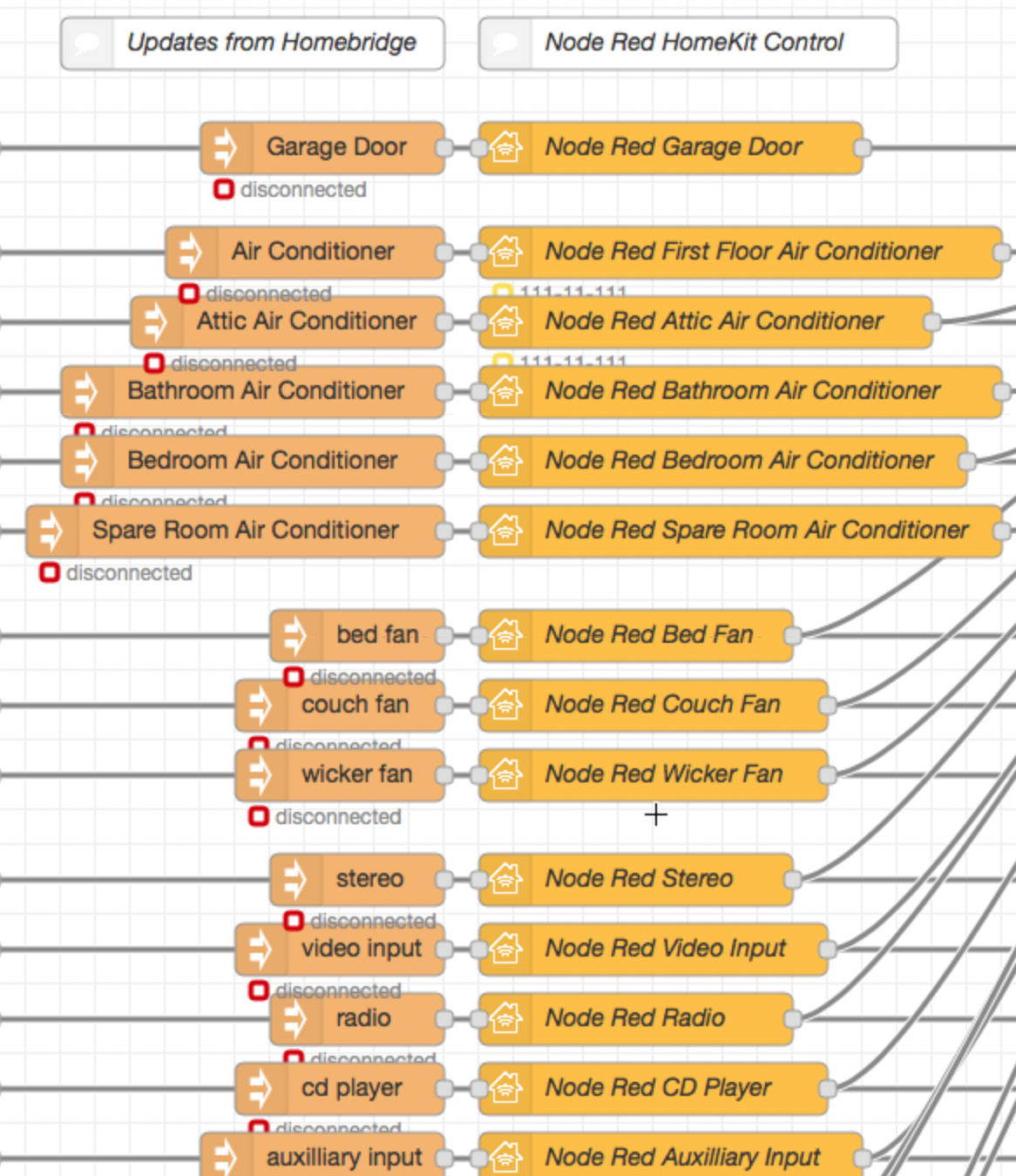
So first of all, why do only 5 homekit nodes show the 11-111-111 status and secondly, why are the remaining not responding to an injection? They all were responding when I initially created this flow.
hepcat72
on 1 Oct 2019
First of all not sure why :) can you share your flow? At least nrchkb nodes?
Second thing is that nrchkb is going through some issues and I’m working on that to fix that. Until that it is useful to follow this topic from time to time: #118
Shaquu
on 1 Oct 2019
They're included in the flow I posted in this comment:
https://github.com/NRCHKB/node-red-contrib-homekit-bridged/issues/144#issuecomment-535022789
hepcat72
on 1 Oct 2019
Missing output might be fixed with node-red 1.0.x
Can you try with new version?
Shaquu
on 12 Oct 2019
Didn't get to it this weekend. I'll get to it and report back.
hepcat72
on 13 Oct 2019
Some people noticed that node-red 1.0.x with nrchkb 0.7.x is faster and works more fluently since previous release. So I hope you will be fine as well.
Shaquu
on 13 Oct 2019
@hepcat72 tried already?
Shaquu
on 28 Jan 2020
Yeah, I believe this is fixed. I will close.
hepcat72
on 29 Jan 2020
Incidentally, regarding the slowness in responding, I recently discovered a potential cause: the pilight-daemon sometimes takes a ton of processor because it may be processing background RF. I have a plan to turn off the receiver. Just haven’t implemented it yet.
hepcat72
on 29 Jan 2020
Related issues
 mtjoernelund
·
8Comments
mtjoernelund
·
8Comments
 MartiMan79
·
8Comments
MartiMan79
·
8Comments
 djiwondee
·
11Comments
Shaquu
·
9Comments
djiwondee
·
11Comments
Shaquu
·
9Comments
 Torben80
·
8Comments
Torben80
·
8Comments