Node-red-contrib-homekit-bridged: Characteristics Properties has no effect on Television/InputSource service

Characteristic Properties not effect.
I try to create a television remote control accessory. Has added all required characteristics in node. It does not effect. It only effect if we inject the characteristics in separate.
Attach please find the sample which
- Television is parent service.
- PS4/PS3/AppleTV is the linked service and should link to appleTV
- All inputSource only available from home.app if click all separate characteristics injection.
 MyOzCam
All 85 comments
Characteristic properties don’t set values, only define what values homekit should look for.
For example, adding brightness:5 won’t ever set the bulb to 5, it will instead just set homekit to show a dimmable bulb.
The brightness characteristic property could also limit the bulb to 5% steps, limit the brightness range to 25-75%, etc.
The wiki page about characteristic property tries to explain this. Either it needs to be explained more or people aren’t reading it as the question arises often.
However I understand this setup will be updated in a future version to allow for default and/or persist values. For now though, property values must be injected as you’ve seen.
PS- I have never seen the tv item. What does it do?! I need to try it!
 crxporter
on 30 Mar 2019
crxporter
on 30 Mar 2019
Thanks. That is me not reading it carefully.
TV accessories is a new item to emulate a TV remote. Available only after IOS 12.2.
MyOzCam
on 30 Mar 2019
Cool!
Can you post a screenshot here of what this looks like on your phone?
crxporter
on 30 Mar 2019
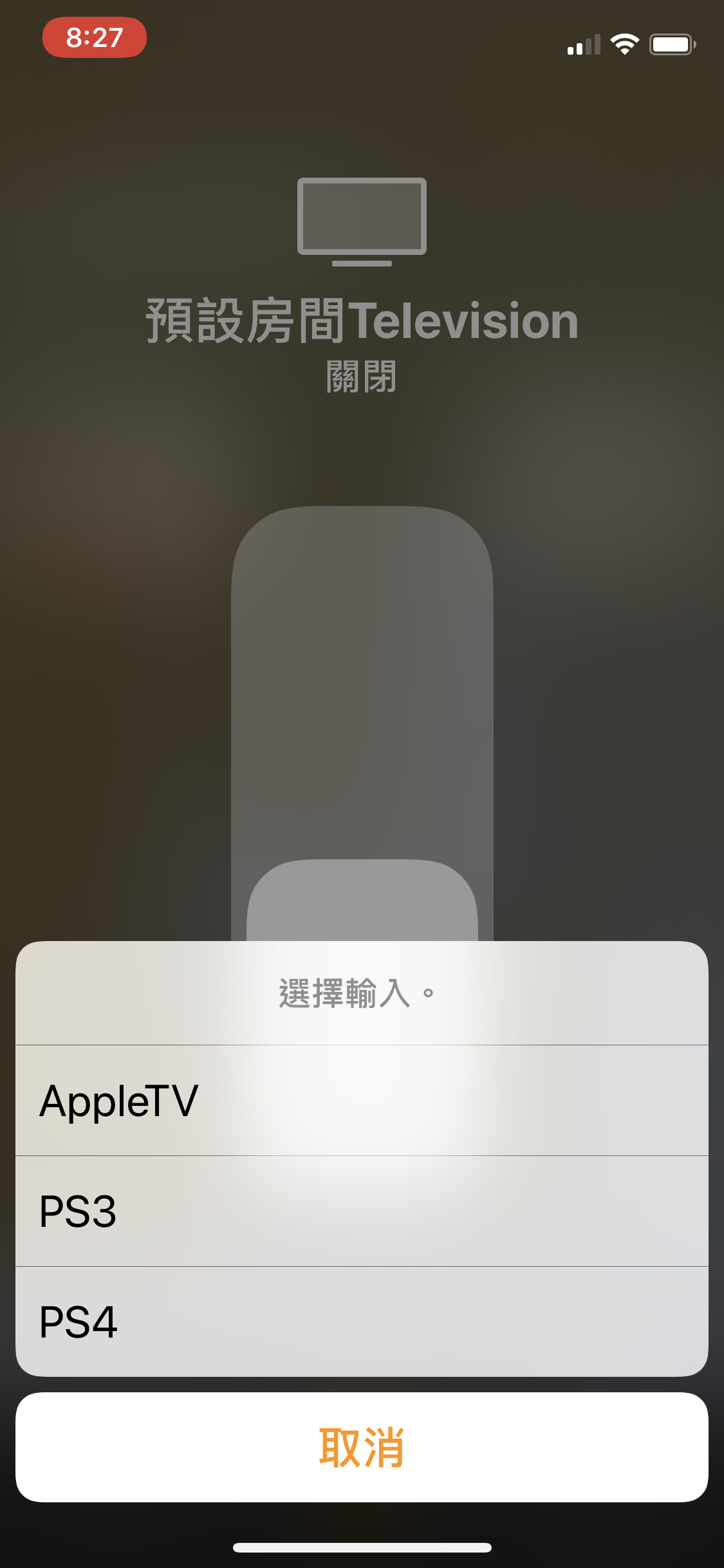
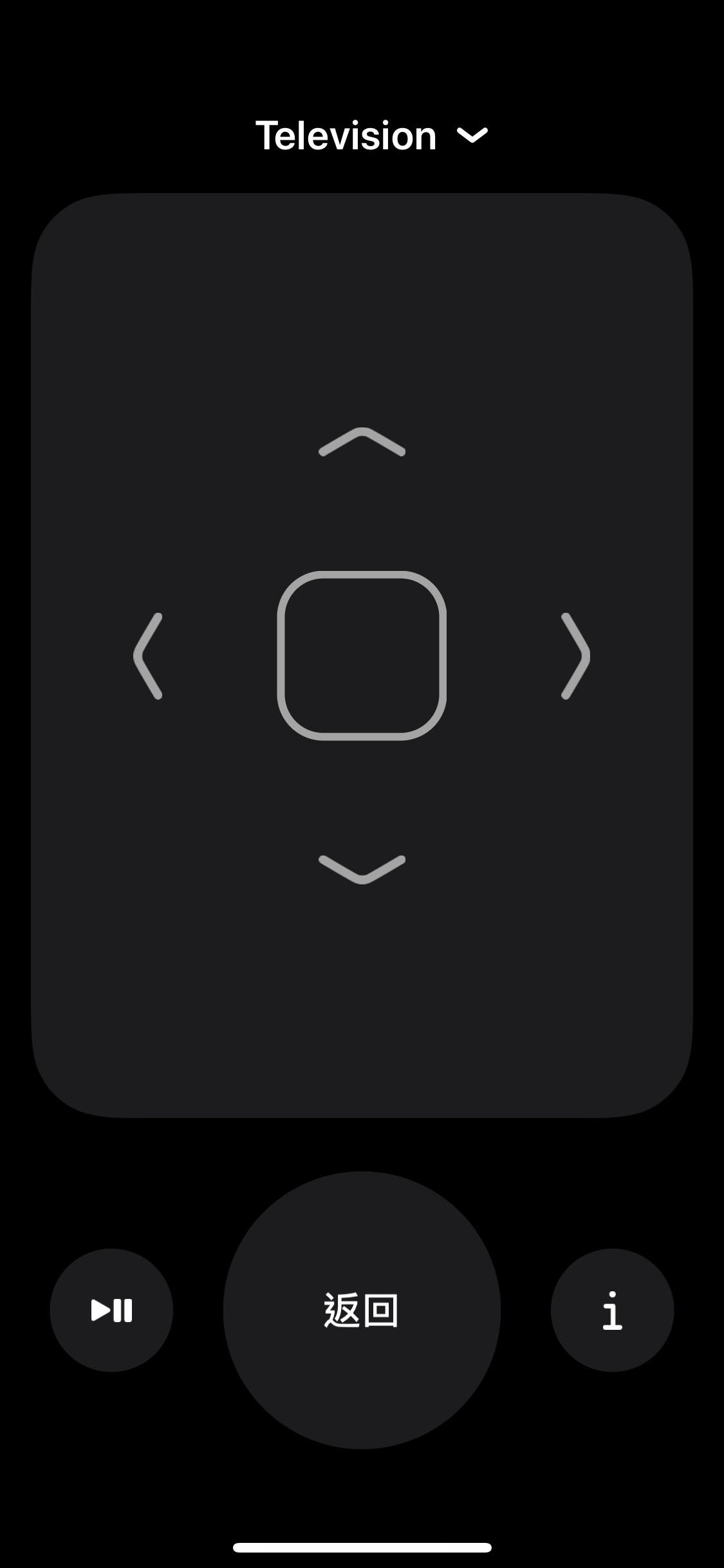
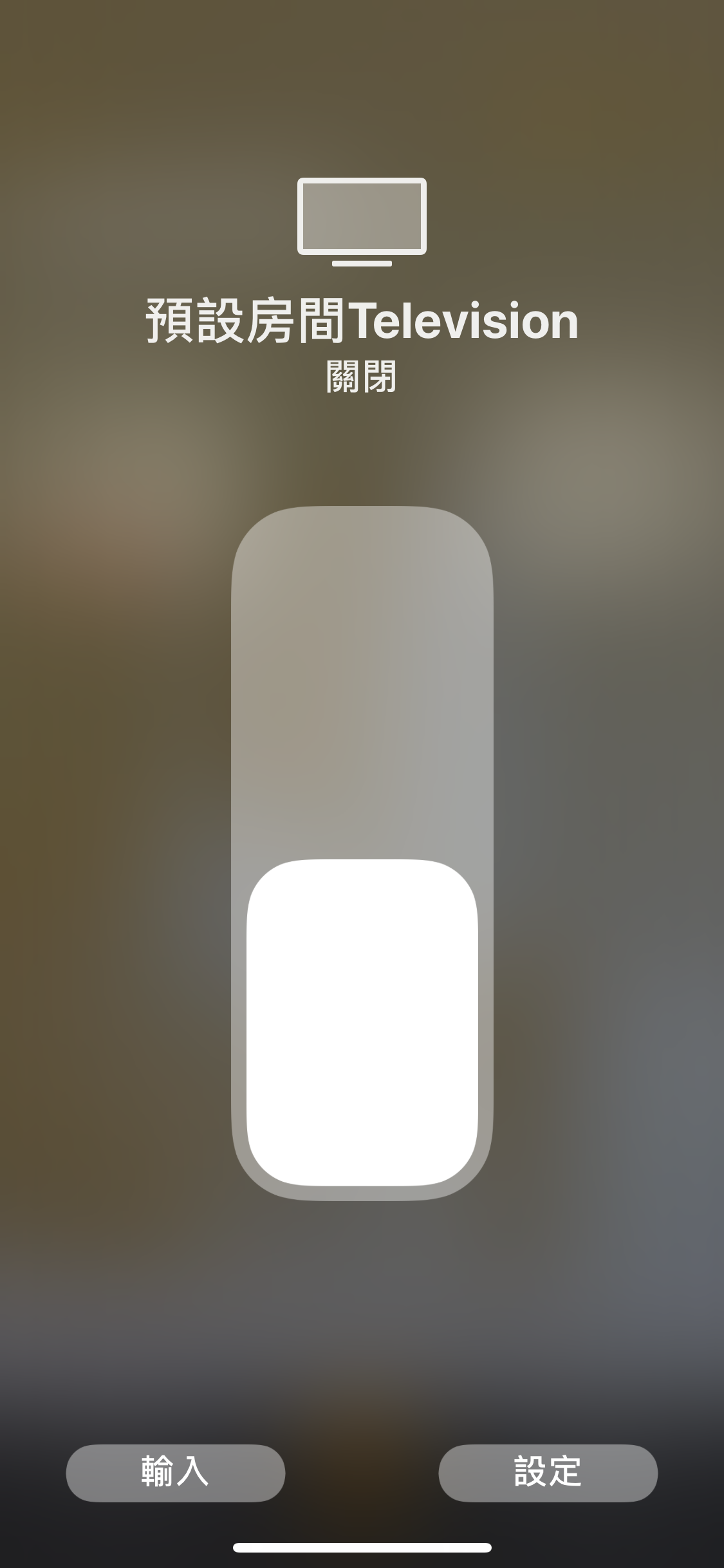
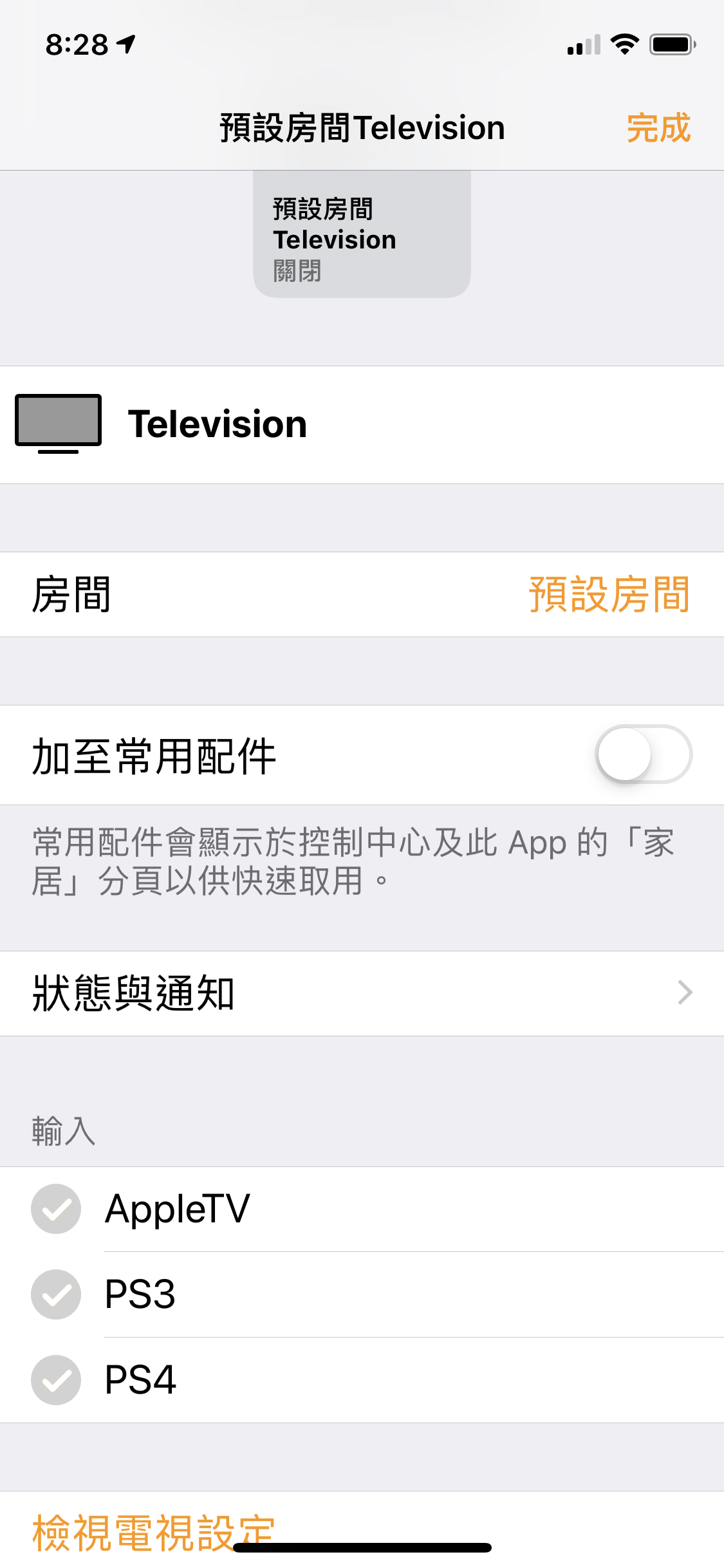
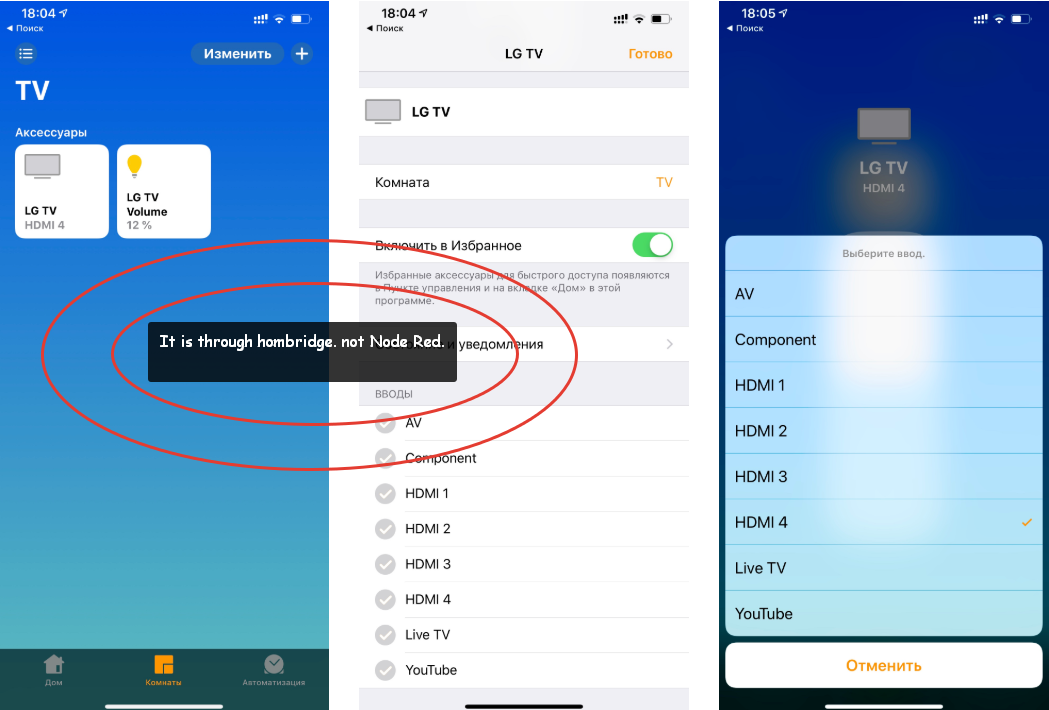
Here it is. I am try to remote by LG TV
MyOzCam
on 31 Mar 2019
I'm trying to control the volume. I can not... -----.txt

 NikitaGerasimov
on 31 Mar 2019
NikitaGerasimov
on 31 Mar 2019
Is that volume service compatible with the tv service?
The volume service may be for volume control of two-way audio cameras. I haven’t tested but that’s my first thought.
I’ll take some time to fiddle with the tv service this afternoon and come back with comments later.
crxporter
on 31 Mar 2019
I tried "homebridge-webos-tv" today (https://github.com/merdok/homebridge-webos-tv/blob/master/index.js). I did: turned on, turned off, change the volume, select the input.
But we need it in the node red, and not in homebridge :)
NikitaGerasimov
on 31 Mar 2019
I understood! In the homebridge plugin, the volume in the form of a dimmable light bulb :)
NikitaGerasimov
on 31 Mar 2019
@Dalbadel - there is a TelevisionSpeaker service, have you tried that one? It supports payloads like mute, volume, etc.
I couldn't get it to work but I'm working on the QR code test right now so I might be having different problems that you aren't. I'll get back to the release version later today and try it out.
Edit
I just pasted your code from above and realized that's what you were using.
I don't know how to make the volume "appear" in the Home app (if it's even possible)... I put together a pretty full example and have input selection working well.
Has anyone figured out how to get output from the Control Center remote?
Has anyone figured out if it's possible to do anything with Volume control?
crxporter
on 31 Mar 2019
Perhaps someone who knows more javascript than me could look at homebridge-bravia who seems to have volume control figured out.
crxporter
on 31 Mar 2019
@Dalbadel - there is a TelevisionSpeaker service, have you tried that one? It supports payloads like mute, volume, etc.
I couldn't get it to work but I'm working on the QR code test right now so I might be having different problems that you aren't. I'll get back to the release version later today and try it out.
Edit
I just pasted your code from above and realized that's what you were using.I don't know how to make the volume "appear" in the Home app (if it's even possible)... I put together a pretty full example and have input selection working well.
Has anyone figured out how to get output from the Control Center remote?
Has anyone figured out if it's possible to do anything with Volume control?
I did. You can refer to another issue as there is problem about emit output only when characteristic-change.
Learnt from HAP-NodeJS sample TV_accessory.js, the Control Center remote will set characteristic "RemoteKey" for every button you pressed. Additionally, if you have linked with a TelevisionSpeaker service, the physical volume up/down button on your IOS device will also set characteristic "VolumeSelector".
Unfortunately, if you press the same button multiple time, it just repeatedly set the characteristic with same value and no characteristic-change event trigger, thus no output from node after the first time pressed.
MyOzCam
on 2 Apr 2019
Bump. Should it still be open and we should work on that?
 Shaquu
on 25 Apr 2019
Shaquu
on 25 Apr 2019
@shaquu let me know if the code works for repeated presses (volume, remote button, etc) and if yes I’ll add this to my test list.
If not... someone’s got a bit of programming to do...
crxporter
on 25 Apr 2019
How you add input sources to the Television Service? I have added InputSource Service linked to a Television Parent Service but it is only appearing as a standalone thing in the Home app and I can't see it under Inputs
 radokristof
on 7 May 2019
radokristof
on 7 May 2019
I have left it there for a night and now that InputSource is added to the TV service... weird. I have added additional InputSources, they also appear as standalone things.
radokristof
on 8 May 2019
Also is it possible to show that remote controller for not just an Apple TV? If yes, how?
radokristof
on 8 May 2019
I would like to see what flow you have deployed. I'm also spend some time with that topic to get a remote for my receiver using the Television Service Property:
[{"id":"95fbf1cc.2c3a","type":"inject","z":"755d7c8e.995f8c","name":"","topic":"","payload":"{\"foo\" : \"bar\" }","payloadType":"json","repeat":"","crontab":"","once":false,"onceDelay":0.1,"x":810,"y":740,"wires":[["a65d1e82.fb3498","e32fd921.99856"]]},{"id":"3ed538a1.abcf8","type":"debug","z":"755d7c8e.995f8c","name":"","active":true,"tosidebar":true,"console":false,"tostatus":false,"complete":"false","x":1210,"y":740,"wires":[]},{"id":"a65d1e82.fb3498","type":"homekit-service","z":"755d7c8e.995f8c","isParent":true,"bridge":"e933973b.f891d","parentService":"","name":"AVR","serviceName":"Television","topic":"","filter":false,"manufacturer":"Default Manufacturer","model":"Default Model","serialNo":"Default Serial Number","characteristicProperties":"{\n \"Active\" : {\n \"validValues\": [0,1]\n }\n}\n","x":990,"y":700,"wires":[["3ed538a1.abcf8"]]},{"id":"e32fd921.99856","type":"homekit-service","z":"755d7c8e.995f8c","isParent":false,"bridge":"890aedc6.d0b418","parentService":"a65d1e82.fb3498","name":"AVR Volume","serviceName":"Speaker","topic":"","filter":false,"manufacturer":"Default Manufacturer","model":"Default Model","serialNo":"Default Serial Number","characteristicProperties":"{\n \"Mute\" : {\n \"validValues\": [false, true]\n },\n \"Volume\" : {\n \"minValue\": 0,\n \"maxValue\": 100\n }\n}\n","x":1010,"y":780,"wires":[["3ed538a1.abcf8"]]},{"id":"e933973b.f891d","type":"homekit-bridge","z":"","bridgeName":"Node-Red-HAP-Bridge-01","pinCode":"111-11-111","port":"","allowInsecureRequest":false,"manufacturer":"Default Manufacturer","model":"Default Model","serialNo":"Default Serial Number"},{"id":"890aedc6.d0b418","type":"homekit-bridge","z":"","bridgeName":"Node-Red-HAP-Bridge-02","pinCode":"222-22-222","port":"","allowInsecureRequest":false,"manufacturer":"Default Manufacturer","model":"Default Model","serialNo":"Default Serial Number"}]
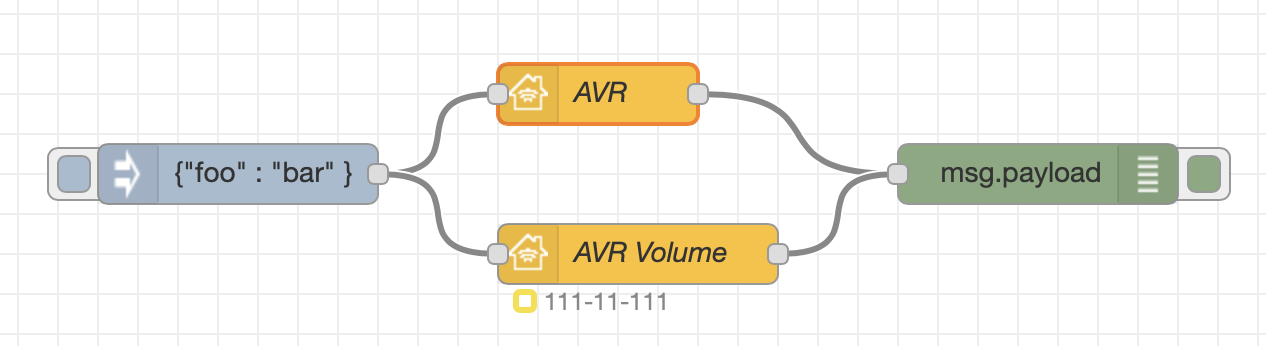
But I've newer seen a remote on my home app. Only that switch:
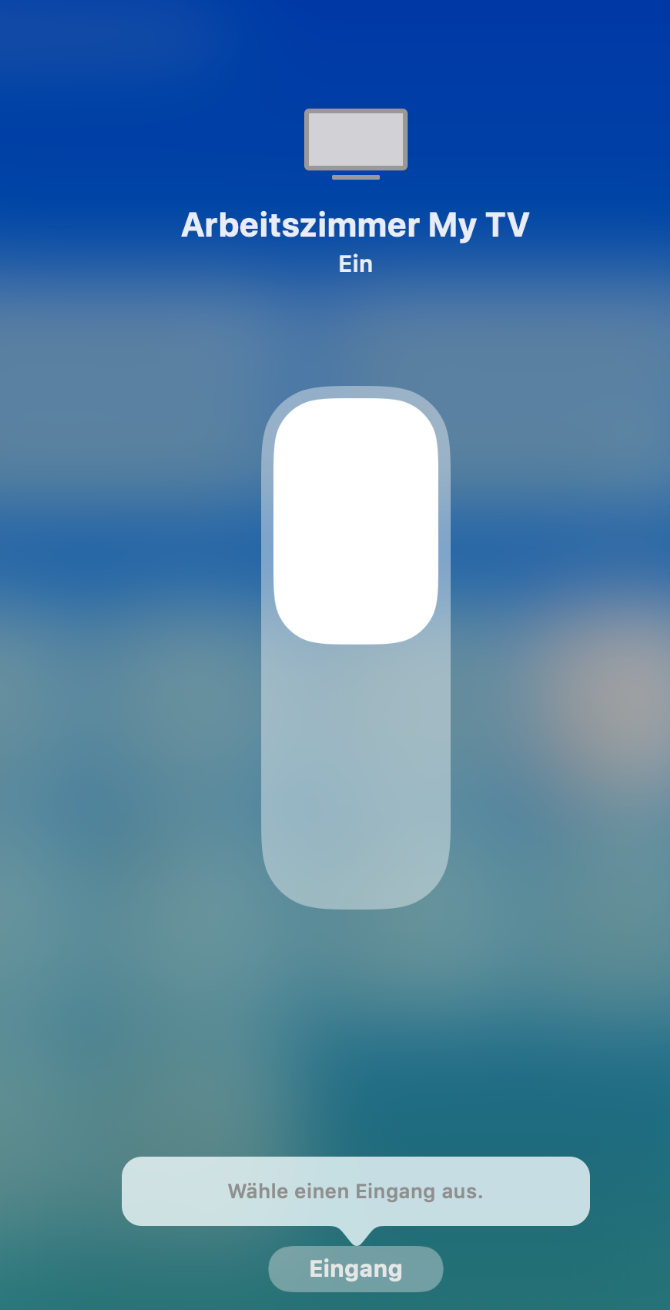
I wondering, the option to chose an input source is available but I haven't found a way to add sources.
Unfortunately I cannot find any description for the characteristics:
ActiveIdentifier, ConfiguredName, SleepDiscoveryMode, Brightness, ClosedCaptions, DisplayOrder, CurrentMediaState, TargetMediaState, PictureMode even I did some guesses based on the informations and links from above. This was the most helpful here.
 djiwondee
on 8 May 2019
djiwondee
on 8 May 2019
I have figured it out, ON/OFF and input switching works. I didn't had time to have a look at Volume/Remote Control.
radokristof
on 11 May 2019
@radokristof
and input switching works
and how does it work? Please post an example!
djiwondee
on 11 May 2019
I have used the the flow provided here above. I have created Linked InputSources and I inject the needed atributes upon starting (like configuredName, etc...) to the InputSource nodes. When you change the input from HomeKit, on the TV (so on the Parent Service) the ActiveIdentifier changes (int values). You have to set an Identifier (from 1...) for every InputSource.
[{"id":"6ecf49c9.fd79f8","type":"homekit-service","z":"dfde00c8.7446","isParent":true,"bridge":"3f1baccd.7029b4","parentService":"","name":"Nappali TV","serviceName":"Television","topic":"","filter":false,"manufacturer":"Logitech","model":"Harmony Hub","serialNo":"111","characteristicProperties":"{\n \"RemoteKey\" : true\n}","x":830,"y":920,"wires":[["582e3275.67dfcc"]]},{"id":"6e352619.a953c8","type":"function","z":"dfde00c8.7446","name":"openHAB to HomeKit","func":"if(msg.payload == \"PowerOff\") {\n msg.payload = {\n \"Active\" : 0,\n \"ActiveIdentifier\": 2,\n \"ConfiguredName\": \"TV & AMP\",\n \"SleepDiscoveryMode\": 0\n };\n}\nelse if(msg.payload == \"Watch TV\") {\n msg.payload = {\n \"Active\" : 1,\n \"ActiveIdentifier\": 2,\n \"ConfiguredName\": \"TV & AMP\",\n \"SleepDiscoveryMode\": 0\n };\n}\nelse if(msg.payload == \"Listen to Music\") {\n msg.payload = {\n \"Active\" : 1,\n \"ActiveIdentifier\": 3,\n \"ConfiguredName\": \"TV & AMP\",\n \"SleepDiscoveryMode\": 0\n };\n}\nelse if(msg.payload == \"Watch a Movie\") {\n msg.payload = {\n \"Active\" : 1,\n \"ActiveIdentifier\": 1,\n \"ConfiguredName\": \"TV & AMP\",\n \"SleepDiscoveryMode\": 0\n };\n}\n\nelse if(msg.payload == \"AMP only\") {\n msg.payload = {\n \"Active\" : 1,\n \"ActiveIdentifier\": 4,\n \"ConfiguredName\": \"TV & AMP\",\n \"SleepDiscoveryMode\": 0\n };\n}\n\nelse if(msg.payload == \"Chromecast\") {\n msg.payload = {\n \"Active\" : 1,\n \"ActiveIdentifier\": 5,\n \"ConfiguredName\": \"TV & AMP\",\n \"SleepDiscoveryMode\": 0\n };\n}\n\nelse if(msg.payload == \"Watch TV+AMP\") {\n msg.payload = {\n \"Active\" : 1,\n \"ActiveIdentifier\": 6,\n \"ConfiguredName\": \"TV & AMP\",\n \"SleepDiscoveryMode\": 0\n };\n}\nreturn msg;","outputs":1,"noerr":0,"x":600,"y":920,"wires":[["6ecf49c9.fd79f8"]]},{"id":"582e3275.67dfcc","type":"function","z":"dfde00c8.7446","name":"HomeKit to openHAB","func":"if(msg.hap.context !== undefined) {\n if(msg.payload.Active == 1) {\n msg.payload = \"Watch TV\"\n }\n else if(msg.payload.Active === 0) {\n msg.payload = \"PowerOff\";\n }\n \n else if(msg.payload.ActiveIdentifier == 1) {\n msg.payload = \"Watch a Movie\";\n }\n else if(msg.payload.ActiveIdentifier == 2) {\n msg.payload = \"Watch TV\";\n }\n else if(msg.payload.ActiveIdentifier == 3) {\n msg.payload = \"Listen to Music\";\n }\n else if(msg.payload.ActiveIdentifier == 4) {\n msg.payload = \"AMP only\";\n }\n else if(msg.payload.ActiveIdentifier == 5) {\n msg.payload = \"Chromecast\";\n }\n else if(msg.payload.ActiveIdentifier == 6) {\n msg.payload = \"Watch TV+AMP\";\n }\n return msg;\n}","outputs":1,"noerr":0,"x":1040,"y":920,"wires":[["191a378a.cedd78"]]},{"id":"d94b42c7.5d4e7","type":"homekit-service","z":"dfde00c8.7446","isParent":false,"bridge":"3f1baccd.7029b4","parentService":"6ecf49c9.fd79f8","name":"Watch a Movie","serviceName":"InputSource","topic":"","filter":false,"manufacturer":"Logitech","model":"Kodi","serialNo":"111","characteristicProperties":"{}","x":840,"y":1000,"wires":[[]]},{"id":"d824fb66.4c1bc8","type":"function","z":"dfde00c8.7446","name":"openHAB to HomeKit","func":"\nmsg.payload = {\n \"IsConfigured\" : 1,\n \"ConfiguredName\": \"Watch a Movie\",\n};\n\nreturn msg;","outputs":1,"noerr":0,"x":600,"y":1000,"wires":[["d94b42c7.5d4e7"]]},{"id":"c474ca98.776a98","type":"homekit-service","z":"dfde00c8.7446","isParent":false,"bridge":"3f1baccd.7029b4","parentService":"6ecf49c9.fd79f8","name":"Watch TV","serviceName":"InputSource","topic":"","filter":false,"manufacturer":"Logitech","model":"Default Model","serialNo":"Default Serial Number","characteristicProperties":"{}","x":820,"y":1060,"wires":[[]]},{"id":"3692ddfb.afbaf2","type":"homekit-service","z":"dfde00c8.7446","isParent":false,"bridge":"3f1baccd.7029b4","parentService":"6ecf49c9.fd79f8","name":"Listen to Music","serviceName":"InputSource","topic":"","filter":false,"manufacturer":"Logitech","model":"Default Model","serialNo":"Default Serial Number","characteristicProperties":"{}","x":840,"y":1100,"wires":[[]]},{"id":"7e6ae487.fa6cfc","type":"homekit-service","z":"dfde00c8.7446","isParent":false,"bridge":"3f1baccd.7029b4","parentService":"6ecf49c9.fd79f8","name":"AMP only","serviceName":"InputSource","topic":"","filter":false,"manufacturer":"Logitech","model":"Default Model","serialNo":"Default Serial Number","characteristicProperties":"{}","x":820,"y":1140,"wires":[[]]},{"id":"b00d5fda.efd95","type":"homekit-service","z":"dfde00c8.7446","isParent":false,"bridge":"3f1baccd.7029b4","parentService":"6ecf49c9.fd79f8","name":"Chromecast","serviceName":"InputSource","topic":"","filter":false,"manufacturer":"Logitech","model":"Default Model","serialNo":"Default Serial Number","characteristicProperties":"{}","x":830,"y":1180,"wires":[[]]},{"id":"e7676513.5a2318","type":"homekit-service","z":"dfde00c8.7446","isParent":false,"bridge":"3f1baccd.7029b4","parentService":"6ecf49c9.fd79f8","name":"Watch TV + AMP","serviceName":"InputSource","topic":"","filter":false,"manufacturer":"Logitech","model":"Default Model","serialNo":"Default Serial Number","characteristicProperties":"{}","x":850,"y":1220,"wires":[[]]},{"id":"fa887bb.f551588","type":"function","z":"dfde00c8.7446","name":"openHAB to HomeKit","func":"msg.payload = {\n \"IsConfigured\" : 1,\n \"ConfiguredName\": \"Watch TV\"\n};\nreturn msg;","outputs":1,"noerr":0,"x":600,"y":1060,"wires":[["c474ca98.776a98"]]},{"id":"af98fe0f.2f933","type":"function","z":"dfde00c8.7446","name":"openHAB to HomeKit","func":"\nmsg.payload = {\n \"IsConfigured\" : 1,\n \"ConfiguredName\": \"Listen to Music\",\n};\nreturn msg;","outputs":1,"noerr":0,"x":600,"y":1100,"wires":[["3692ddfb.afbaf2"]]},{"id":"32883d26.3da102","type":"function","z":"dfde00c8.7446","name":"openHAB to HomeKit","func":"\nmsg.payload = {\n \"IsConfigured\" : 1,\n \"ConfiguredName\": \"AMP only\"\n};\nreturn msg;","outputs":1,"noerr":0,"x":600,"y":1140,"wires":[["7e6ae487.fa6cfc"]]},{"id":"2ddf6362.71fe2c","type":"function","z":"dfde00c8.7446","name":"openHAB to HomeKit","func":"\nmsg.payload = {\n \"IsConfigured\" : 1,\n \"ConfiguredName\": \"Chromecast\"\n};\nreturn msg;","outputs":1,"noerr":0,"x":600,"y":1180,"wires":[["b00d5fda.efd95"]]},{"id":"6b8bbeea.4e525","type":"function","z":"dfde00c8.7446","name":"openHAB to HomeKit","func":"\nmsg.payload = {\n \"IsConfigured\" : 1,\n \"ConfiguredName\": \"Watch TV + AMP\"\n};\nreturn msg;","outputs":1,"noerr":0,"x":600,"y":1220,"wires":[["e7676513.5a2318"]]},{"id":"c6ee4dd4.8ec94","type":"function","z":"dfde00c8.7446","name":"Filter messages","func":"if(msg.payload != \"NULL\" || msg.payload !== \"\") {\n flow.set(\"CurrentActivity\", msg.payload)\n return msg;\n}","outputs":1,"noerr":0,"x":380,"y":960,"wires":[["6e352619.a953c8"]]},{"id":"3981d4cb.fb94bc","type":"inject","z":"dfde00c8.7446","name":"","topic":"","payload":"","payloadType":"date","repeat":"","crontab":"","once":true,"onceDelay":"2","x":350,"y":1220,"wires":[["d824fb66.4c1bc8","fa887bb.f551588","af98fe0f.2f933","32883d26.3da102","2ddf6362.71fe2c","6b8bbeea.4e525"]]},{"id":"d877afa2.59275","type":"openhab-v2-in","z":"dfde00c8.7446","name":"","controller":"427d851b.f7e23c","item":"CurrentActivityHub","ohCompatibleTimestamp":false,"eventTypes":["ItemStateChangedEvent"],"outputAtStartup":true,"storeStateInFlow":false,"x":190,"y":1000,"wires":[["c6ee4dd4.8ec94"],[]]},{"id":"191a378a.cedd78","type":"openhab-v2-out","z":"dfde00c8.7446","name":"","controller":"427d851b.f7e23c","item":"CurrentActivityHub","topic":"ItemCommand","topicType":"oh_cmd","payload":"payload","payloadType":"msg","storeStateInFlow":false,"x":1290,"y":920,"wires":[]},{"id":"3f1baccd.7029b4","type":"homekit-bridge","z":"","bridgeName":"openHAB - 2","pinCode":"111-11-111","port":"","allowInsecureRequest":false,"manufacturer":"Node-RED","model":"HomeKit v2.0","serialNo":"111","customMdnsConfig":false,"mdnsMulticast":true,"mdnsInterface":"","mdnsPort":"","mdnsIp":"","mdnsTtl":"","mdnsLoopback":true,"mdnsReuseAddr":true},{"id":"427d851b.f7e23c","type":"openhab-v2-controller","z":"","name":"openhab2","protocol":"http","host":"localhost","port":"8080","path":"","username":"","password":"","allowRawEvents":true}]
radokristof
on 11 May 2019
Hello @radokristof
thanks learnt a lesson how to use InputSourceService type setup in node red.
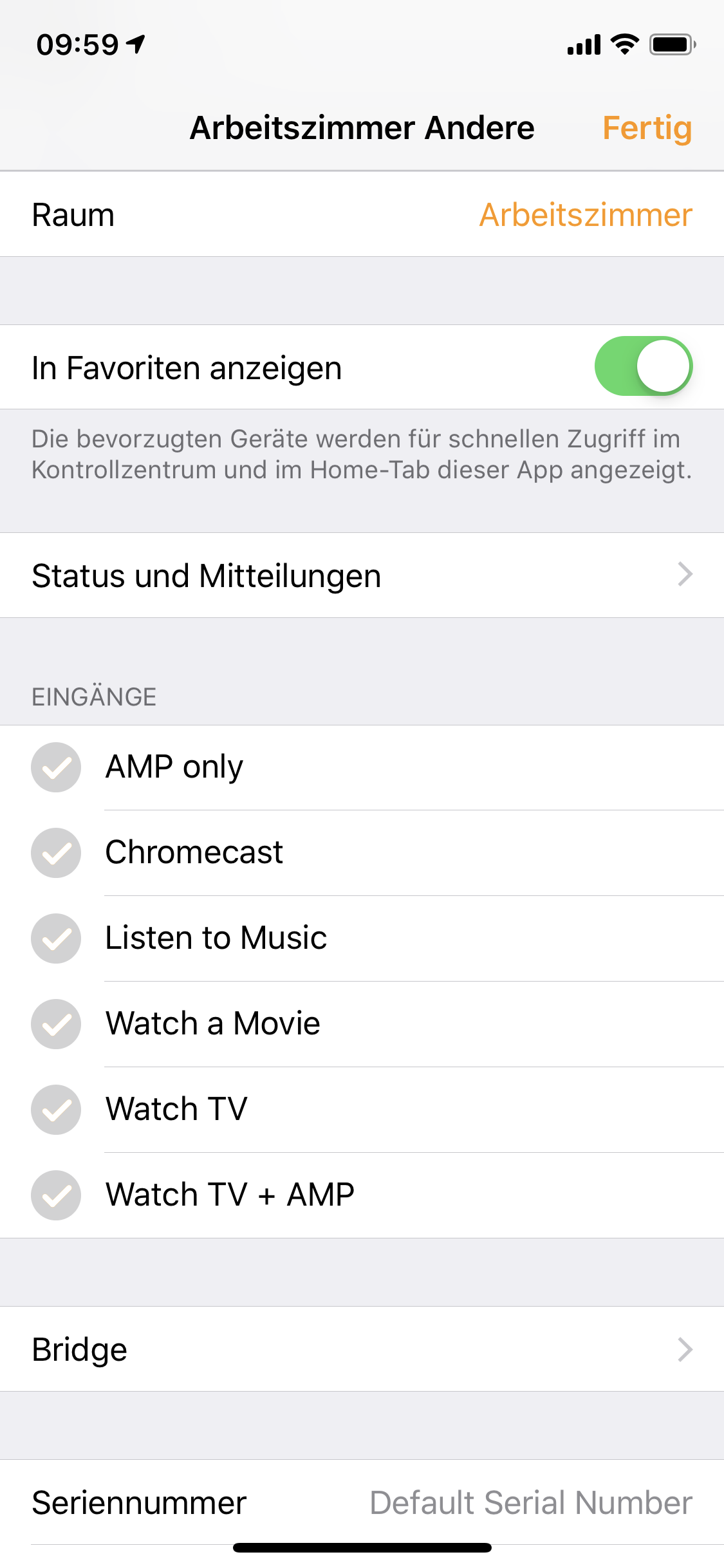
But I'm still not able to select an input in the HomeApp even (see picture in that post)
What version of node-red-contrib-homekit-bridgedare you using?
djiwondee
on 12 May 2019
You can select the input when you press on the TV thing. It is in the left lower corner. You cat select inputs from this page I think you can only enable/disable the inputs.
Now I see your linked post... it is weird if these inputs are not showing up in that section... I’ll have a look at it.
radokristof
on 12 May 2019
@MyOzCam could you let me know how you were able to enable that Remote Control thing?
radokristof
on 13 May 2019
Remote Control you can find in Control Panel. You should add Apple TV Remote to Control Panel in iPhone settings previously.
Apple TV Remote found my TV and sent "Active":1 characteristic to configured Television HomeKit node, when I pushed any button (my TV was OFF). I tried to push all buttons but I did not saw any other msg. in debug from HomeKit configured as Television and InputSource.
 Nazarbayevv
on 15 May 2019
Nazarbayevv
on 15 May 2019
Hello @crxporter,
referring to your post above
I don't know how to make the volume "appear" in the Home app (if it's even possible)... I put together a pretty full example and have input selection working well.
Can you please give an advice _how_ you get input selection working well? Does it required a newer version of rather than recent stable release as node-red-contrib-homekit-bridged (0.6.2)
I'm playing with that several times but I was never able to select an input in the Home.App. Thanks in advance!
djiwondee
on 23 May 2019
I've just now again tested the flow up at the very top of this thread (text file 'sample.txt') - first post. The key is injecting each of the following:
IsConfigured
InputSourceType
Identifier
Before I inject those for each of the 3 sources - I have no input option.
After injecting those things - I show the following:
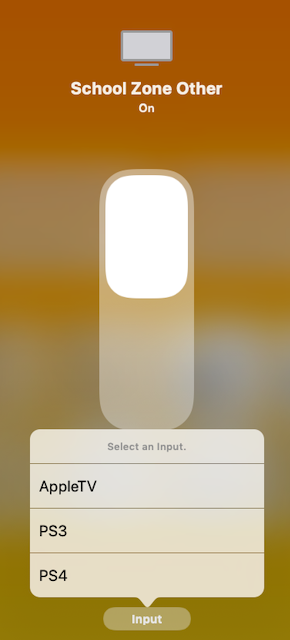
My recommendation would be have them inject after 5 seconds so your initial setup works. I haven't seen @Shaquu for a few days but whenever the characteristic properties is updated to allow for initial state, this is another place that will be useful.
For now - inject each time node red starts and you should be closer to functioning.
crxporter
on 23 May 2019
@djiwondee - also make sure your input source items are linked services. That doesn't come in properly when you paste from the above example.
Also forgot to mention I'm running 0.6.2
crxporter
on 23 May 2019
@crxporter Yes this is what I also figured out. I have created a function node which sends the initial parameters to each InputService. I just trigger that automatically with the inject node, upon startup.... It works nice. Only I don't know if I can use that Remote Controller thing, or it is just limited to Apple TVs?
radokristof
on 23 May 2019
@radokristof the remote controller kind of works. There's an issue with repeated commands not going through. I think that may be fixed with #113 though.
@northernman54 do repeated commands (volume, remote commands) come "out of homekit" with your latest PR?
crxporter
on 23 May 2019
Hello @crxporter ,
thanks, got it. Exactly this four:
ConfiguredName
IsConfigured
InputSourceType
Identifier
and probably nothing else. I wondering, I was testing some more/other since I found
/**
 * Service "Input Source"
 */

Service.InputSource = function(displayName, subtype) {
  Service.call(this, displayName, '000000D9-0000-1000-8000-0026BB765291', subtype);

  // Required Characteristics
  this.addCharacteristic(Characteristic.ConfiguredName);
  this.addCharacteristic(Characteristic.InputSourceType);
  this.addCharacteristic(Characteristic.IsConfigured);
  this.addCharacteristic(Characteristic.CurrentVisibilityState);

  // Optional Characteristics
  this.addOptionalCharacteristic(Characteristic.Identifier);
  this.addOptionalCharacteristic(Characteristic.InputDeviceType);
  this.addOptionalCharacteristic(Characteristic.TargetVisibilityState);
  this.addOptionalCharacteristic(Characteristic.Name);
};
on Master branch of HAP-NodeJS/lib/gen/HomeKitTypes-Television.js
djiwondee
on 23 May 2019
@crxporter Thanks! But how can I make the remote controller to appear at the television thing?
radokristof
on 23 May 2019
Are you trying to get the remote to appear in the control center? It's in the control center, not the home app...
I would test/verify for you now and send screenshots but I'm at work and control center can't see the TV over VPN...
crxporter
on 23 May 2019
All - it looks like #113 was just approved. Try out the dev branch, the volume control might work over there!
crxporter
on 23 May 2019
@crxporter Just to keep things clear. I don't own an Apple TV but it would be great if I can have a controller like this (earlier post) to control my other stuff
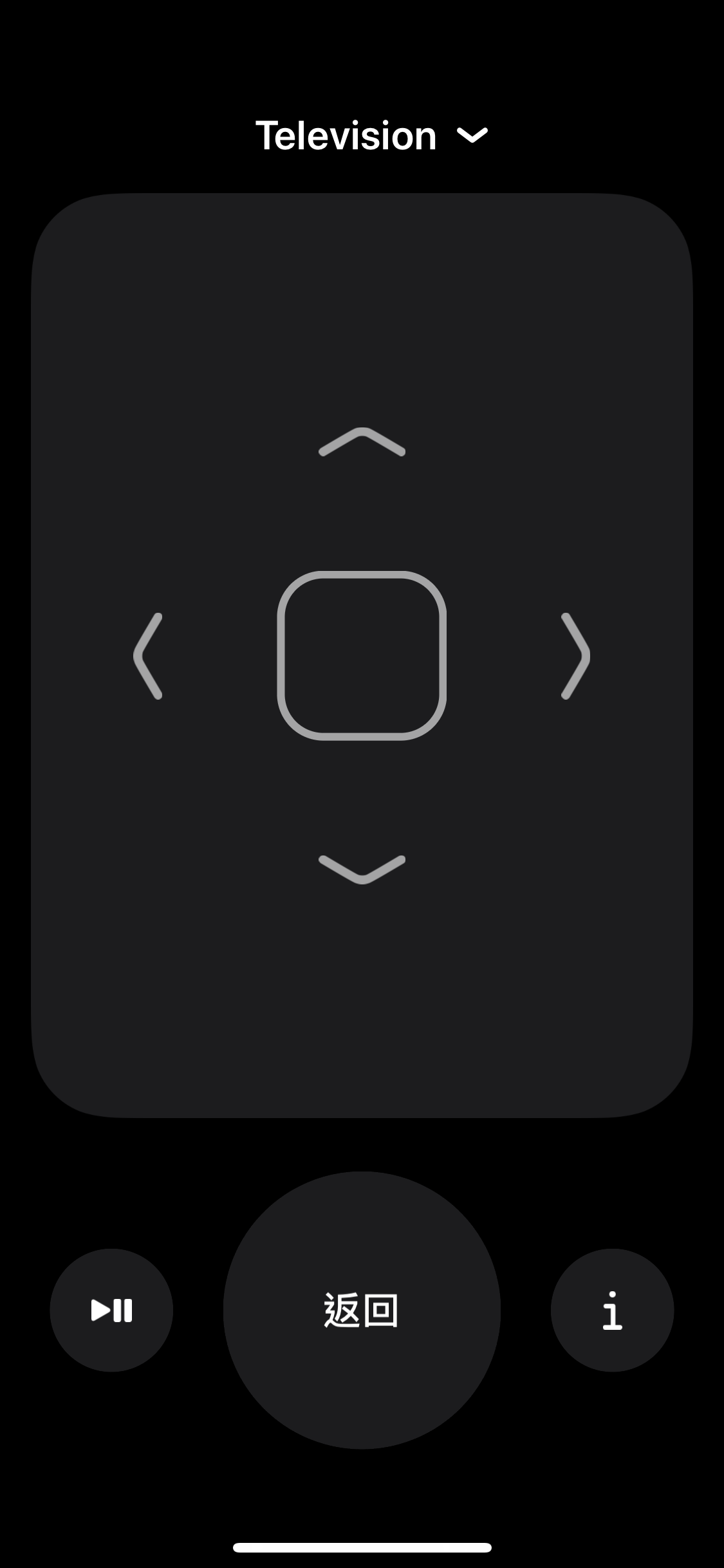
Or is this screenshot not from the Home app?
radokristof
on 23 May 2019
Or is this screenshot not from the Home app?
From the control center. On iPhone x or newer pull down from the clock, click remote. iPhone before x- pull up from the bottom, click remote. Go to settings and enable remote if you don't see remote in the control center.
crxporter
on 23 May 2019
@crxporter Ah thanks... never thought about this...
radokristof
on 23 May 2019
Hello @crxporter ,
thanks, got it. Exactly this four:
ConfiguredName
IsConfigured
InputSourceType
Identifier
and probably nothing else. I wondering, I was testing some more/other since I found
/**
 * Service "Input Source"
 */

Service.InputSource = function(displayName, subtype) {
  Service.call(this, displayName, '000000D9-0000-1000-8000-0026BB765291', subtype);

  // Required Characteristics
  this.addCharacteristic(Characteristic.ConfiguredName);
  this.addCharacteristic(Characteristic.InputSourceType);
  this.addCharacteristic(Characteristic.IsConfigured);
  this.addCharacteristic(Characteristic.CurrentVisibilityState);

  // Optional Characteristics
  this.addOptionalCharacteristic(Characteristic.Identifier);
  this.addOptionalCharacteristic(Characteristic.InputDeviceType);
  this.addOptionalCharacteristic(Characteristic.TargetVisibilityState);
  this.addOptionalCharacteristic(Characteristic.Name);
};
on this GitHub site.
djiwondee
on 27 May 2019
 Shaquu
on 23 Jun 2019
Shaquu
on 23 Jun 2019
I close the Issue due to inactivity.
If you come back here and still have a problem then feel free to comment here or open new Issue.
Shaquu
on 23 Jun 2019
If you come back here and still have a problem then feel free to comment here.
Unfortunately, if you press the same button multiple time, it just repeatedly set the characteristic with same value and no characteristic-change event trigger, thus no output from node after the first time pressed.
@Shaquu,
1. I set up the remote control and volume control, but the problem is that the NRCHKB node does not send events after the first click on the same button is saved. Could you allow skipping repeating events for the service of "Television" and the "TelevisionSpeaker"?
2. The “TV settings” item inside the device’s homepage (Home app) does not send an event, although it should send a RemoteKey event.
 cacherocks
on 18 Oct 2019
cacherocks
on 18 Oct 2019
@Shaquu Any other data or clarifications are required from me?
cacherocks
on 22 Oct 2019
Well I can see it will require some redesign in our characteristics events flow.
I assume we should catch a change in set event but current flow relies on change event.
On 22 Oct 2019, 23:46 +0200, Alexey notifications@github.com, wrote:
@Shaquu Any other data or clarifications are required from me?
—
You are receiving this because you were mentioned.
Reply to this email directly, view it on GitHub, or unsubscribe.
Shaquu
on 23 Oct 2019
OK, should we expect the necessary improvements in 0.9.0?
Without them, the remote control is essentially inoperative because the node does not skip repeating events.
cacherocks
on 28 Oct 2019
@cacherocks I could try to do it in 0.9.0
I just lost few days due to studies and there are public holidays coming soon so it won't be that fast.
Shaquu
on 28 Oct 2019
@cacherocks from latest dev version you should be able to choose to use or skip repeating events.
163
Shaquu
on 28 Jan 2020
@Shaquu another about repeated events. Should close it.
crxporter
on 2 Mar 2020
Hi All,
Can someone update the wiki, so it would be more clear how to set up television and television speaker.
I was reading through this thread, but frankly speaking so far it is to me in majority a copy paste “to do” information, however I made my tv to appear and be able to switch off (on is not possible with this Samsung model).
I would like to understand what and how needs to be done.
Thank you in advance (köszi)
 TheNON75
on 7 Apr 2020
TheNON75
on 7 Apr 2020
Well I hope someone can :)
Calling air support @NRCHKB/documentation
Shaquu
on 8 Apr 2020
I may have time in the next couple of days to put all of the above research into a wiki page.
I've had each piece of it working before in testing but I don't actually use the television service in my house...
@TheNON75 - I'll put together an example the following:
-on/off
-input
-speaker (volume up or down, no volume display)
Please add to the list if I forgot anything. The homekit screen and control center remote should work.
.......now where did I put that extra pi zero......
crxporter
on 8 Apr 2020
@TheNON75 I've put together (what I think is) a pretty good example for Television.
Please check the television wiki page and let us know if you need extra help.
crxporter
on 8 Apr 2020
Thanks @crxporter, it is very nice and detailed.
I’ve copied it to nodered, but did not link yet to my real tv items, currently trying to understand it. The coding is really nice especially for the inputs.
What I did not understood (but I guess) is the volume adjustment. Is it done in the control center remote?
Furthermore the TV does not show up in the control center remote. Did I miss something? My own, very basic tv implementation appears there, but this one not.
Thank you again very very much
TheNON75
on 9 Apr 2020
What I did not understood (but I guess) is the volume adjustment. Is it done in the control center remote?
Yes - volume is adjusted in the control center. Simply open the control center remote and press your phone volume buttons, you will see payloads of {"VolumeSelector":1} or {"VolumeSelector":0} coming from the speaker service.
For my setup (node red running on a pi zero w, not docker) I was able to see the control center remote with nothing more than what is in the wiki example I made yesterday.
crxporter
on 9 Apr 2020
@crxporter many thanks again, more and more things are wired now properly (the only issue is my old and stupid y2014 samsung tv itself)
In the meanwhile I was reading some other discussions and basically many were sharing the experience that only 1 television appears in the control center remote, the 2nd and others don't. So it could be an issue elsewhere e.g. HAP nodejs. I can leave without it, the only benefit could have been for testing a flow or configuration.
Did you or anyone else mange to get the control center remote keys work? In my case any of the buttons return _Active: 1_
Any help would be welcome, thanks
TheNON75
on 16 Apr 2020
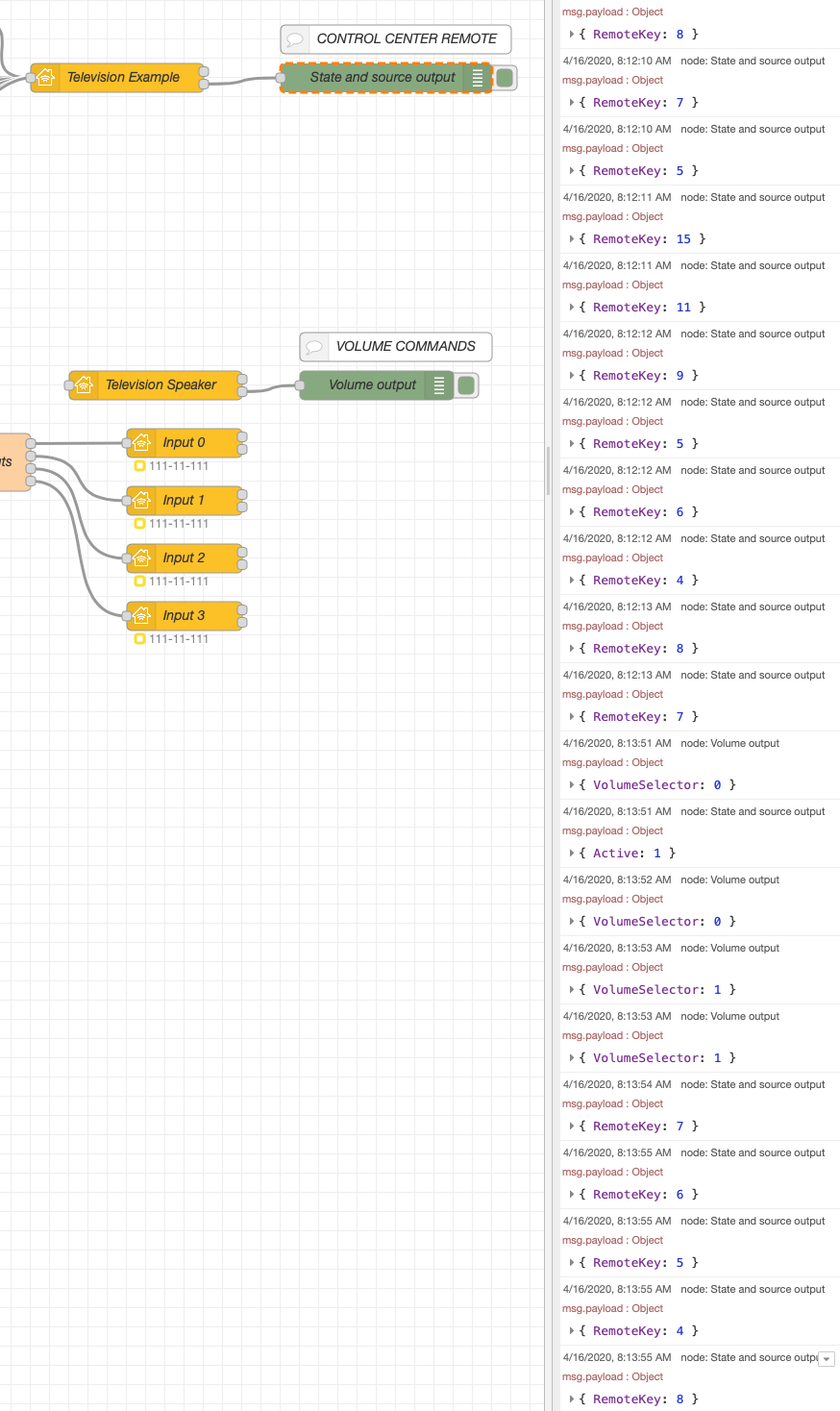
Yes the control center buttons should be working. Those commands should have the JSON key of RemoteKey. See this screenshot with no changes from the wiki page example I put together last week. All of the RemoteKey payloads are coming from the second output of the node with Television Service.
crxporter
on 16 Apr 2020
@crxporter
Yes the control center buttons should be working.
How did you manage that the control center appears on the iPhone? I only get this screen
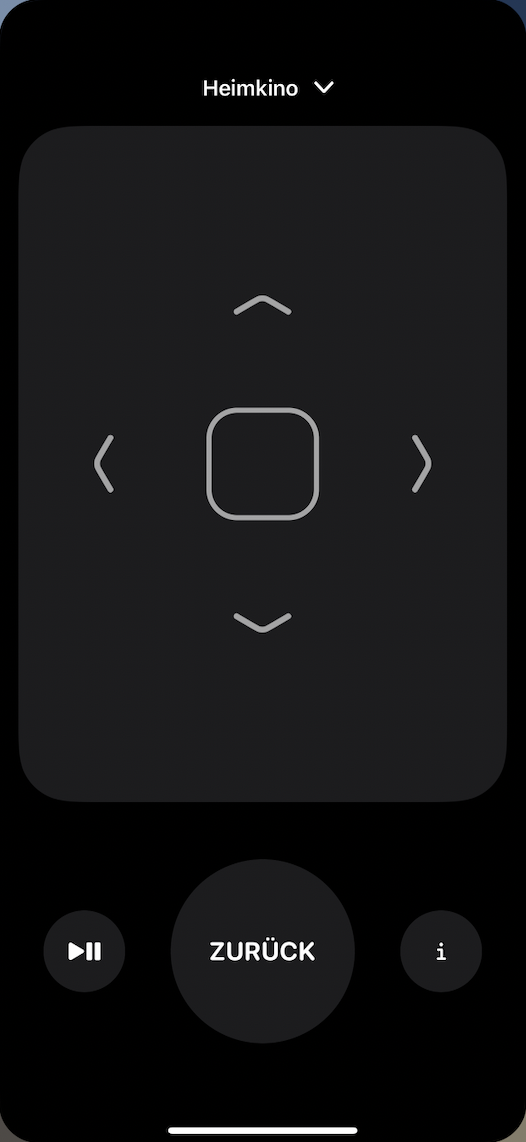
The only message passes thru using this is the volume payload associated with the iPhone volume button on the left site of the iPhone.
djiwondee
on 16 Apr 2020
@djiwondee yes this is the screen that appears when I get RemoteKey buttons to return. The remote does not appear in the Home app, Home app only shows power and input selector. The control center remote for me is the same as yours (except mine is english)
The RemoteKey payloads come from the second output of the Television Service node:
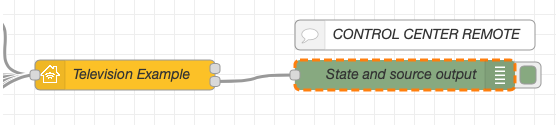
The VolumeSelector payloads come from the second output of the Speaker Service node:

Are you running version 1.0.x?
crxporter
on 16 Apr 2020
@crxporter
when I get
RemoteKeybuttons to return
What do you mean with that? What remote-key button? From your TV's Remote?
I'm using 1.0.4since a couple of time.
djiwondee
on 16 Apr 2020
See my debug panel 2 comments up. The payload coming back is {"RemoteKey":8} (keys are 5 through 15)
When pressing the control center buttons the payload JSON key from Television Service is RemoteKey
crxporter
on 16 Apr 2020
Actually I am using 1.0.4
Tested with the wiki code unchanged (only the configuration node was set to mine), but on the 2nd output of the tv only the active: 1 Json data comes out (only once, after restarting the nodes and pressing any of the buttons)
I also tried to enable pass through on the configuration node, no change
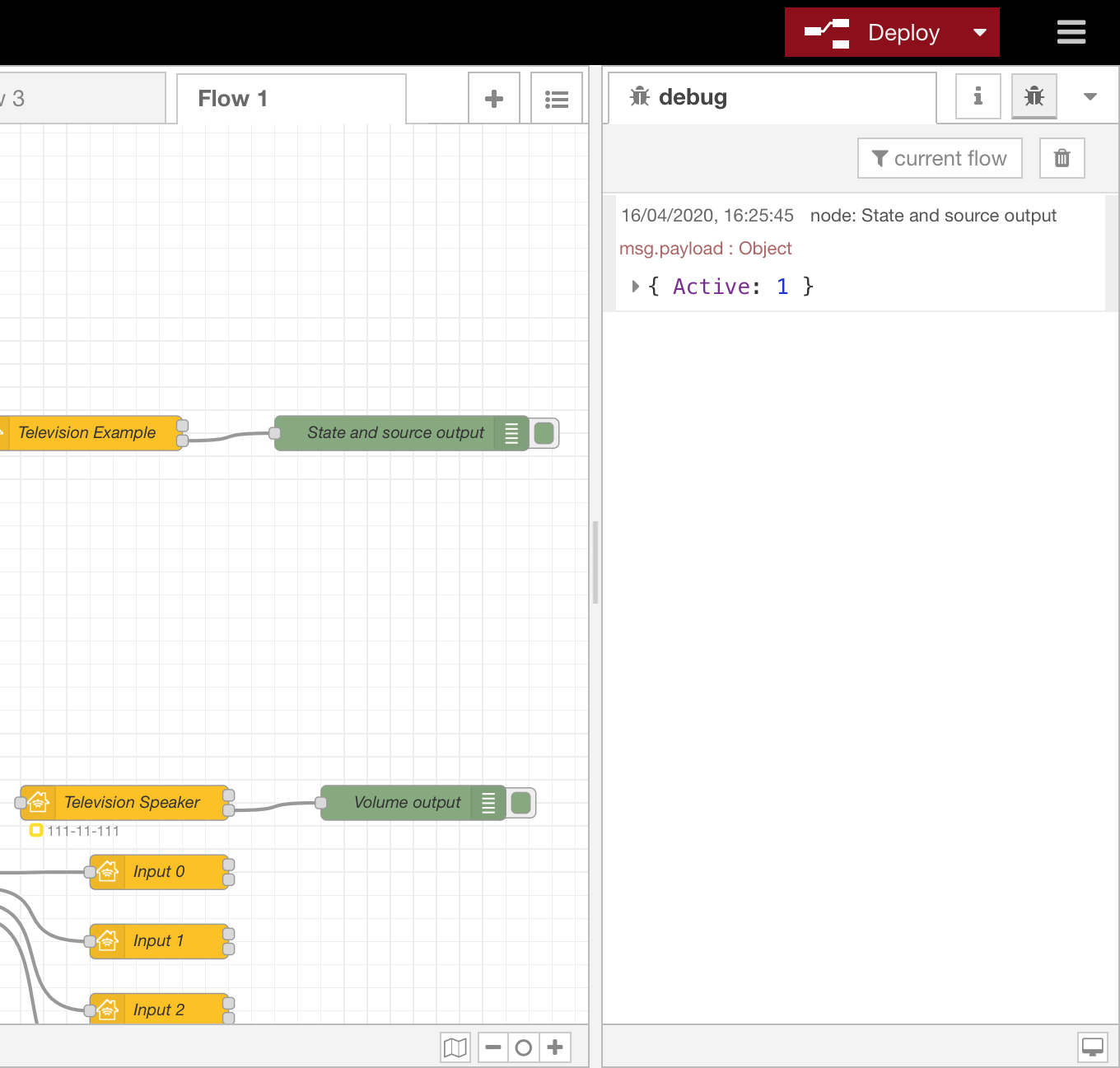
TheNON75
on 16 Apr 2020
@TheNON75 to be sure, have you clicked the inject button for "TV Setup" and "Source Setup" node? These run some configurations that may be necessary.
crxporter
on 16 Apr 2020
So I just remembered I made these examples running the 1.1 dev branch. Give me a couple of minutes, I'll bump the wiki example back to 1.0.4.
Some small change might be causing problems...
crxporter
on 16 Apr 2020
Ok - I redid the example running 1.0.4. I'm still getting the payloads as described above.
I'm running:
Pi zero w
Node Red: 1.0.4
HomeKit plugin: 1.0.4
crxporter
on 16 Apr 2020
Ok - I redid the example running 1.0.4. I'm still getting the payloads as described above.
With an exact copy of your example ---> There is no RemoteKey output
djiwondee
on 16 Apr 2020
I'll copy it to another pi (pi 4).
My steps:
1- triple click the wiki example, copy
2- import to node red, paste from clipboard
3- choose correct parent node for speaker and input nodes
4- deploy
5- add bridge to homekit
6- test control center remote
Well shoot now I don't get any RemoteKey outputs!! The VolumeSelector is working just fine.
7- delete "Television" node
8- drag in new node, assign it to "Television Service", call it "Television Two"
9- re-assign speaker and inputs to use "Television Two" as a parent
10- deploy modified nodes
11- inject TV Setup and Source Setup
12- test
Very interesting. Still nothing.
I'm going to clear out this bridge on my pi 4 and see if I can get it working...
crxporter
on 16 Apr 2020
Don't you need "RemoteKey" in the characteristic properties of the TV?
[{"id":"8ef640a7.737c1","type":"homekit-service","z":"42846943.2b4b38","isParent":true,"bridge":"99f4cba3.7a5b5","parentService":"","name":"Heimkino","serviceName":"Television","topic":"","filter":false,"manufacturer":"Default Manufacturer","model":"Default Model","serialNo":"Default Serial Number","cameraConfigVideoProcessor":"","cameraConfigSource":"","cameraConfigStillImageSource":"","cameraConfigMaxStreams":"","cameraConfigMaxWidth":"","cameraConfigMaxHeight":"","cameraConfigMaxFPS":"","cameraConfigMaxBitrate":"","cameraConfigVideoCodec":"","cameraConfigAudioCodec":"","cameraConfigAudio":false,"cameraConfigPacketSize":"","cameraConfigVerticalFlip":false,"cameraConfigHorizontalFlip":false,"cameraConfigMapVideo":"","cameraConfigMapAudio":"","cameraConfigVideoFilter":"","cameraConfigAdditionalCommandLine":"","cameraConfigDebug":false,"cameraConfigInterfaceName":"","characteristicProperties":"{\n \"RemoteKey\": null\n}","x":360,"y":380,"wires":[["2f0e365c.8986f2","3e68572c.be386"],["8f7452c6.6a5a","480c736a.2a0bec"]]},{"id":"99f4cba3.7a5b5","type":"homekit-bridge","z":"","bridgeName":"RaspberryPi","pinCode":"111-11-111","port":"","manufacturer":"Default Manufacturer","model":"Default Model","serialNo":"Default Serial Number","allowMessagePassthrough":true}]
 jonathanschneider
on 16 Apr 2020
jonathanschneider
on 16 Apr 2020
@jonathanschneider for the win!
Interesting. I was about to call out the big guns (@shaquu) to report a bug but adding that JSON has things working.
It's curious that it works fine without that in 1.1.dev2 but not 1.0.4... I didn't think this had been changed.
Anyway, @djiwondee and @TheNON75 - please add the following to your characteristic properties on the parent node:
{
    "RemoteKey":null
}
And test again. Should look like this:
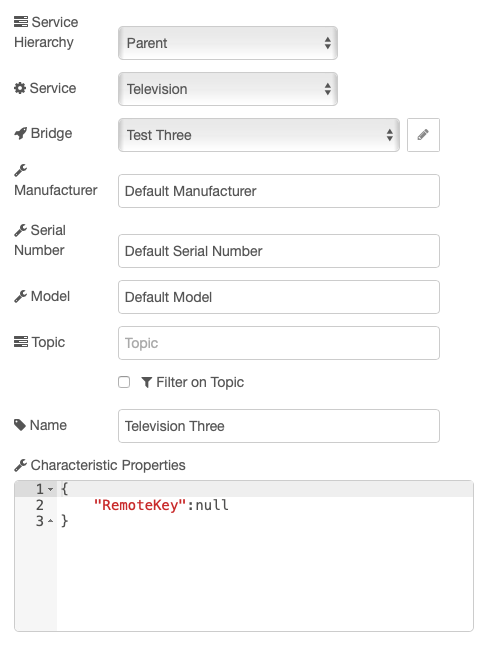
(wiki page updated as well)
crxporter
on 16 Apr 2020
@jonathanschneider hats off! It make sense to me, but this also doesn't solve the issue. Now every key provides an output!
@crxporter and @Shaquu - referring to the roadmap that was issued these days: An idea I have is to consolidate the characteristics setup in one place: Init node _or_ characteristics field. This would stop that confusion!
djiwondee
on 16 Apr 2020
Thanks guys, sounds great! Later on I will test it, now I am a bit busy with our baby
TheNON75
on 16 Apr 2020
I am happy you solved it!! :)
@jonathanschneider for the win!
Interesting. I was about to call out the big guns (@shaquu) to report a bug but adding that JSON has things working.
It's curious that it works fine without that in 1.1.dev2 but not 1.0.4... I didn't think this had been changed.
Mind the hap-nodejs version difference :)
I can see that I need to keep more attention to changelog...
Shaquu
on 16 Apr 2020
@djiwondee, I updated the roadmap with things I've seen discussed, mostly a "these things could happen!" I'm sure you know by now, I'm not a developer but more a power user. I try to contribute to documentation and helping with issues...
If Shaquu decides to focus on a characteristics GUI, that would be pretty cool. I'm not sure what (if any) progress has been made on that.
crxporter
on 16 Apr 2020
@crxporter and @Shaquu - referring to the roadmap that was issued these days: An idea I have is to consolidate the characteristics setup in one place: Init node _or_ characteristics field. This would stop that confusion!
I believe that in "characteristic properties" you enable additional properties whereas you set start values with init nodes. "RemoteKey" needs to be enabled but doesn't need a start value. The same applies to a light bulb with the property "Brightness": I want my light bulb to be dimmable but I don't want Node-RED to turn it on or off when it starts. Thus a characteristic property but no init node.
jonathanschneider
on 16 Apr 2020
@jonathanschneider as I understand, they're for enabling and/or limiting options... enabling colored bulbs, limiting a valve type to "sprinkler", limiting max brightness, enabling remote key, etc.
My most successful are:
- Setting a lightbulb to scale to max brightness to 99
{
    "Brightness": {
        "maxValue": 99
    }
}
- Setting properties of my sprinklers:
{
    "ValveType":
    {
        "minValue":1,
        "maxValue":1
    },
    "SetDuration":
    {
        "minValue":300,
        "maxValue":1800
    }
}
- Setting up a colored light:
{
    "Brightness":{
        "maxValue":255
    },
    "Saturation":true,
    "Hue": true
}
I've tried other things with mixed success. Perhaps we should move these comments to a new issue if anyone is interested in digging deeper into the characteristic properties stuff...
crxporter
on 16 Apr 2020
@jonathanschneider as I understand, they're for enabling and/or limiting options... enabling colored bulbs, limiting a valve type to "sprinkler", limiting max brightness, enabling remote key, etc.
That’s true. I would set the sprinkler type through an init node though.
jonathanschneider
on 16 Apr 2020
I would set the sprinkler type through an init node though.
That's how I did it at first. Then I did the min/max value. Takes out a couple of nodes and forces it to always show as "sprinkler".
I'm putting together a new issue now to gather successful configurations and start writing better documentation on this stuff.
crxporter
on 16 Apr 2020
Cool, remotekey works!
Many thanks!
TheNON75
on 16 Apr 2020
I have a question on RemoteKey, and this issue seems the best place to ask -- there are more values identified in the Wiki than buttons in the on-screen remote (i.e, Rev/FF, next/prev, and exit, values 0-3 and 10). Are these simply defined in HomeKit but not implemented in Apple's UI? (for those unaware, these keys are also not on the AppleTV hardware remote, but the AppleTV can learn the IR codes for these buttons and some others from a universal remote)
 mishakim
on 14 Sep 2020
mishakim
on 14 Sep 2020
@mishakim that wiki page was most recently updated by a regular on our discord server. We were working on it a month or two ago - he would be the one to ask about this. I’d recommend heading over there (link on readme) and flagging the user @S474N who will probably have better suggestions for you!
Let’s flag him here too, see if we can get his attention @s474n
crxporter
on 14 Sep 2020
@mishakim: how buttons don't exists? If you for example play video and use Control Center (swipe down), then here you have them.
 S474N
on 15 Sep 2020
S474N
on 15 Sep 2020
Ah, I see -- the playback controls when media is playing. I was only looking at the remote control widget in control center. What I'm trying to do is control a TiVo (sending IR commands over HTTP), so there's nothing showing in the playback control widget.
mishakim
on 15 Sep 2020
@mishakim I don't understand, where is problem? I'm using this with Broadlink RM-PRO (IR/RF sender) and no problems with remote controling TV, AC, etc.
S474N
on 15 Sep 2020
What I want to do is bring up the remote control in control center, and tell the TiVo to skip commercials or FF/Rewind within a show (because the TiVo app is a pain to use for that). I have no problem sending the commands to the TiVo, the issue is having some way to input the desired action on the iPhone. The remote control in control center doesn't have buttons for those actions. They are in the media control, as you pointed out, but since the iPhone doesn't show what the TiVo is playing, it doesn't present any controls, like it would if i were using an AppleTV for playback, or playing something on the phone. As far as I know there's no way to add a third-party playback device to the media control widget, it just shows on-device media apps, and AirPlay-compatible hardware.
That is, there's no problem we can fix here, it's just a matter of Apple not giving the controls I need to do what I want.
mishakim
on 15 Sep 2020
And you tested it? Simply send IR command. Command goes from NR/HB directly to your device and then to AppleTV.
If I understand correctly, that you have some IR device and AppleTV.
S474N
on 15 Sep 2020
AppleTV isn't involved, just a TiVo. What I'm actually doing is using NR to send TCP commands to the TiVo, which cause it to react as if it received IR commands. That part works fine, and I can create virtual buttons that appear in HomeKit and do what I want. I was just looking for a way for the remote control widget in control center to send transport controls.
mishakim
on 15 Sep 2020
OK, you want control your TiVo via iPhone with Control Center ATV remote. So you can use only buttons, which here are.
S474N
on 15 Sep 2020
Exactly, and it works for the arrows, select, back, play/pause. My original question was just wondering why there were also RemoteKey codes for the other buttons, when they're not in the UI.
mishakim
on 15 Sep 2020
Related issues
 MartiMan79
·
8Comments
djiwondee
·
7Comments
MartiMan79
·
8Comments
djiwondee
·
7Comments
 sjorge
·
7Comments
sjorge
·
7Comments
 Supergiovane
·
9Comments
djiwondee
·
11Comments
Supergiovane
·
9Comments
djiwondee
·
11Comments
Most helpful comment
@djiwondee, I updated the roadmap with things I've seen discussed, mostly a "these things could happen!" I'm sure you know by now, I'm not a developer but more a power user. I try to contribute to documentation and helping with issues...
If Shaquu decides to focus on a characteristics GUI, that would be pretty cool. I'm not sure what (if any) progress has been made on that.