node-gyp: EPERM: operation not permitted, read
- Node Version:
node -v: v10.16.0andnpm -v: 6.9.0 - Platform:
OS Name:                   Microsoft Windows 10 Home Single Language
OS Version:                10.0.17763 N/A Build 17763
System Type:              x64-based PC
- Compiler:
msbuild : The term 'msbuild' is not recognized as the name of a cmdlet, function, script file, or operable program.
Check the spelling of the name, or if a path was included, verify that the path is correct and try again.
- Module:
robotjs
Verbose output (from npm or node-gyp):
C:\Projects\Kawosu!>npm i robotjs

> [email protected] install C:\Projects\Kawosu!\node_modules\robotjs
> prebuild-install || node-gyp rebuild

prebuild-install WARN install No prebuilt binaries found (target=10.16.0 runtime=node arch=x64 platform=win32)

C:\Projects\Kawosu!\node_modules\robotjs>if not defined npm_config_node_gyp (node "C:\Program Files\nodejs\node_modules\npm\node_modules\npm-lifecycle\node-gyp-bin\\..\..\node_modules\node-gyp\bin\node-gyp.js" rebuild )  else (node "C:\Program Files\nodejs\node_modules\npm\node_modules\node-gyp\bin\node-gyp.js" rebuild )
gyp ERR! UNCAUGHT EXCEPTION
gyp ERR! stack Error: EPERM: operation not permitted, read
gyp ERR! stack     at Object.readSync (fs.js:498:3)
gyp ERR! stack     at tryReadSync (fs.js:332:20)
gyp ERR! stack     at Object.readFileSync (fs.js:361:19)
gyp ERR! stack     at Object.Module._extensions..js (internal/modules/cjs/loader.js:786:20)
gyp ERR! stack     at Module.load (internal/modules/cjs/loader.js:653:32)
gyp ERR! stack     at tryModuleLoad (internal/modules/cjs/loader.js:593:12)
gyp ERR! stack     at Function.Module._load (internal/modules/cjs/loader.js:585:3)
gyp ERR! stack     at Module.require (internal/modules/cjs/loader.js:690:17)
gyp ERR! stack     at require (internal/modules/cjs/helpers.js:25:18)
gyp ERR! stack     at Object.<anonymous> (C:\Program Files\nodejs\node_modules\npm\node_modules\request\index.js:18:15)
gyp ERR! System Windows_NT 10.0.17763
gyp ERR! command "C:\\Program Files\\nodejs\\node.exe" "C:\\Program Files\\nodejs\\node_modules\\npm\\node_modules\\node-gyp\\bin\\node-gyp.js" "rebuild"
gyp ERR! cwd C:\Projects\Kawosu!\node_modules\robotjs
gyp ERR! node -v v10.16.0
gyp ERR! node-gyp -v v3.8.0
gyp ERR! This is a bug in `node-gyp`.
gyp ERR! Try to update node-gyp and file an Issue if it does not help:
gyp ERR!     <https://github.com/nodejs/node-gyp/issues>
npm WARN [email protected] No description
npm WARN [email protected] No repository field.

npm ERR! code ELIFECYCLE
npm ERR! errno 7
npm ERR! [email protected] install: `prebuild-install || node-gyp rebuild`
npm ERR! Exit status 7
npm ERR!
npm ERR! Failed at the [email protected] install script.
npm ERR! This is probably not a problem with npm. There is likely additional logging output above.

npm ERR! A complete log of this run can be found in:
npm ERR!     C:\Projects\caches\npm-cache\_logs\2019-07-16T21_08_00_580Z-debug.log

C:\Projects\Kawosu!>
It says that this is a node-gyp bug. That's all I know. I don't know which directory it tries to access.
 KittyLe
All 19 comments
That's not a happy error, it seems to be saying it can't read necessary files from your node install. You could try reinstalling Node.js (delete it first), or maybe npm install npm -g (upgrade npm in place which should reinstall these files) and see how that goes.
 rvagg
on 17 Jul 2019
rvagg
on 17 Jul 2019
Upgrading npm did nothing, going to try reinstalling Node
C:\Projects\Kawosu!>npm install npm -g
C:\Projects\caches\npm\npx -> C:\Projects\caches\npm\node_modules\npm\bin\npx-cli.js
C:\Projects\caches\npm\npm -> C:\Projects\caches\npm\node_modules\npm\bin\npm-cli.js
+ [email protected]
added 433 packages from 823 contributors in 11.661s

C:\Projects\Kawosu!>npm i robotjs

> [email protected] install C:\Projects\Kawosu!\node_modules\robotjs
> prebuild-install || node-gyp rebuild

prebuild-install WARN install No prebuilt binaries found (target=10.16.0 runtime=node arch=x64 platform=win32)

C:\Projects\Kawosu!\node_modules\robotjs>if not defined npm_config_node_gyp (node "C:\Projects\caches\npm\node_modules\npm\node_modules\npm-lifecycle\node-gyp-bin\\..\..\node_modules\node-gyp\bin\node-gyp.js" rebuild )  else (node "C:\Projects\caches\npm\node_modules\npm\node_modules\node-gyp\bin\node-gyp.js" rebuild )
gyp ERR! UNCAUGHT EXCEPTION
gyp ERR! stack Error: EPERM: operation not permitted, read
...
Deleted it, installing 10.16.0 now
C:\Projects\Kawosu!>npm
'npm' is not recognized as an internal or external command,
operable program or batch file.

C:\Projects\Kawosu!>node
'node' is not recognized as an internal or external command,
operable program or batch file.

C:\Projects\Kawosu!>
Nothing changed, still this error.
KittyLe
on 17 Jul 2019
@KittyLe looks like you broken your Node installation, try reinstalling it. The robotjs doc says you need a compiler, make sure you have run npm install --global --production windows-build-tools from an elevated prompt as described in their doc.
If the problem persists, please provide verbose log by running npm i robotjs --verbose
 bzoz
on 17 Jul 2019
bzoz
on 17 Jul 2019
@bzoz I already reinstalled it, rvagg said me to do that.
Also, there are logs.
PS C:\Windows\system32> npm install --global --production windows-build-tools

> [email protected] postinstall C:\Projects\caches\npm\node_modules\windows-build-tools
> node ./dist/index.js

fs.js:114
    throw err;
    ^

Error: EPERM: operation not permitted, read
    at Object.readSync (fs.js:498:3)
    at tryReadSync (fs.js:332:20)
    at Object.readFileSync (fs.js:361:19)
    at Object.Module._extensions..js (internal/modules/cjs/loader.js:786:20)
    at Module.load (internal/modules/cjs/loader.js:653:32)
    at tryModuleLoad (internal/modules/cjs/loader.js:593:12)
    at Function.Module._load (internal/modules/cjs/loader.js:585:3)
    at Module.require (internal/modules/cjs/loader.js:690:17)
    at require (internal/modules/cjs/helpers.js:25:18)
    at Object.<anonymous> (C:\Projects\caches\npm\node_modules\windows-build-tools\node_modules\request\index.js:18:15)
npm ERR! code ELIFECYCLE
npm ERR! errno 1
npm ERR! [email protected] postinstall: `node ./dist/index.js`
npm ERR! Exit status 1
npm ERR!
npm ERR! Failed at the [email protected] postinstall script.
npm ERR! This is probably not a problem with npm. There is likely additional logging output above.

npm ERR! A complete log of this run can be found in:
npm ERR!     C:\Projects\caches\npm-cache\_logs\2019-07-17T19_28_04_146Z-debug.log
PS C:\Windows\system32>
I see you have C:\Projects\caches\. That is something that is not standard. Could you share the result of env? Also, can you rerun the windows-build-tools installation with --verbose?
bzoz
on 17 Jul 2019
@bzoz, I don't know where to run env. Tried running it in npm and PowerShell.
This is the output of windows-build-tools --verbose
npm info lifecycle [email protected]~postinstall: [email protected]
npm info lifecycle [email protected]~postinstall: [email protected]
npm info lifecycle [email protected]~postinstall: [email protected]
npm info lifecycle [email protected]~postinstall: [email protected]
npm info lifecycle [email protected]~postinstall: [email protected]
npm info lifecycle [email protected]~postinstall: [email protected]
npm info lifecycle [email protected]~postinstall: [email protected]

> [email protected] postinstall C:\Projects\caches\npm\node_modules\windows-build-tools
> node ./dist/index.js

fs.js:114
    throw err;
    ^

Error: EPERM: operation not permitted, read
    at Object.readSync (fs.js:498:3)
    at tryReadSync (fs.js:332:20)
    at Object.readFileSync (fs.js:361:19)
    at Object.Module._extensions..js (internal/modules/cjs/loader.js:786:20)
    at Module.load (internal/modules/cjs/loader.js:653:32)
    at tryModuleLoad (internal/modules/cjs/loader.js:593:12)
    at Function.Module._load (internal/modules/cjs/loader.js:585:3)
    at Module.require (internal/modules/cjs/loader.js:690:17)
    at require (internal/modules/cjs/helpers.js:25:18)
    at Object.<anonymous> (C:\Projects\caches\npm\node_modules\windows-build-tools\node_modules\request\index.js:18:15)
npm verb lifecycle [email protected]~postinstall: unsafe-perm in lifecycle true
npm verb lifecycle [email protected]~postinstall: PATH: C:\Projects\caches\npm\node_modules\npm\node_modules\npm-lifecycle\node-gyp-bin;C:\Projects\caches\npm\node_modules\windows-build-tools\node_modules\.bin;C:\Projects\caches\npm\node_modules\.bin;C:\Program Files (x86)\Embarcadero\Studio\19.0\bin;C:\Users\Public\Documents\Embarcadero\Studio\19.0\Bpl;C:\Program Files (x86)\Embarcadero\Studio\19.0\bin64;C:\Users\Public\Documents\Embarcadero\Studio\19.0\Bpl\Win64;C:\Program Files (x86)\Common Files\Oracle\Java\javapath;C:\Windows\system32;C:\Windows;C:\Windows\System32\Wbem;C:\Windows\System32\WindowsPowerShell\v1.0\;C:\Windows\System32\OpenSSH\;C:\Program Files\PuTTY\;C:\Program Files\NVIDIA Corporation\NVIDIA NvDLISR;C:\Program Files (x86)\NVIDIA Corporation\PhysX\Common;C:\Program Files\Git\cmd;C:\Program Files\Java\jre1.8.0_211\bin;C:\Program Files\Java\jre1.8.0_60\bin;C:\Program Files\Java\jdk-12.0.1\bin;C:\Program Files\Java\jdk1.8.0_60\bin;C:\Program Files\nodejs\;C:\Users\KittyLe\AppData\Local\Microsoft\WindowsApps;C:\Users\KittyLe\AppData\Local\GitHubDesktop\bin;C:\Users\KittyLe\AppData\Local\atom\bin;C:\Users\KittyLe\AppData\Roaming\npm
npm verb lifecycle [email protected]~postinstall: CWD: C:\Projects\caches\npm\node_modules\windows-build-tools
npm info lifecycle [email protected]~postinstall: Failed to exec postinstall script
npm timing action:postinstall Completed in 515ms
npm verb unlock done using C:\Projects\caches\npm-cache\_locks\staging-812899af8a9afb84.lock for C:\Projects\caches\npm\node_modules\.staging
npm timing stage:rollbackFailedOptional Completed in 291ms
npm timing stage:runTopLevelLifecycles Completed in 10134ms
npm verb stack Error: [email protected] postinstall: `node ./dist/index.js`
npm verb stack Exit status 1
npm verb stack     at EventEmitter.<anonymous> (C:\Projects\caches\npm\node_modules\npm\node_modules\npm-lifecycle\index.js:301:16)
npm verb stack     at EventEmitter.emit (events.js:198:13)
npm verb stack     at ChildProcess.<anonymous> (C:\Projects\caches\npm\node_modules\npm\node_modules\npm-lifecycle\lib\spawn.js:55:14)
npm verb stack     at ChildProcess.emit (events.js:198:13)
npm verb stack     at maybeClose (internal/child_process.js:982:16)
npm verb stack     at Process.ChildProcess._handle.onexit (internal/child_process.js:259:5)
npm verb pkgid [email protected]
npm verb cwd C:\Windows\system32
npm verb Windows_NT 10.0.17763
npm verb argv "C:\\Program Files\\nodejs\\node.exe" "C:\\Projects\\caches\\npm\\node_modules\\npm\\bin\\npm-cli.js" "install" "--global" "--production" "windows-build-tools" "--verbose"
npm verb node v10.16.0
npm verb npm  v6.10.1
npm ERR! code ELIFECYCLE
npm ERR! errno 1
npm ERR! [email protected] postinstall: `node ./dist/index.js`
npm ERR! Exit status 1
npm ERR!
npm ERR! Failed at the [email protected] postinstall script.
npm ERR! This is probably not a problem with npm. There is likely additional logging output above.
npm verb exit [ 1, true ]
npm timing npm Completed in 10915ms

npm ERR! A complete log of this run can be found in:
npm ERR!     C:\Projects\caches\npm-cache\_logs\2019-07-17T23_03_37_444Z-debug.log
PS C:\Windows\system32>
Output of npm i robotjs --verbose
npm info lifecycle [email protected]~install: [email protected]
npm info lifecycle [email protected]~install: [email protected]
npm info lifecycle [email protected]~install: [email protected]
npm info lifecycle [email protected]~install: [email protected]
npm info lifecycle [email protected]~install: [email protected]
npm info lifecycle [email protected]~install: [email protected]
npm info lifecycle [email protected]~install: [email protected]

> [email protected] install C:\Projects\Kawosu!\node_modules\robotjs
> prebuild-install || node-gyp rebuild

prebuild-install info begin Prebuild-install version 2.5.3
prebuild-install info looking for local prebuild @ prebuilds\robotjs-v0.5.1-node-v64-win32-x64.tar.gz
prebuild-install info looking for cached prebuild @ C:\Projects\caches\npm-cache\_prebuilds\https-github.com-octalmage-robotjs-releases-download-v0.5.1-robotjs-v0.5.1-node-v64-win32-x64.tar.gz
prebuild-install http request GET https://github.com/octalmage/robotjs/releases/download/v0.5.1/robotjs-v0.5.1-node-v64-win32-x64.tar.gz
prebuild-install http 404 https://github.com/octalmage/robotjs/releases/download/v0.5.1/robotjs-v0.5.1-node-v64-win32-x64.tar.gz
prebuild-install WARN install No prebuilt binaries found (target=10.16.0 runtime=node arch=x64 platform=win32)

C:\Projects\Kawosu!\node_modules\robotjs>if not defined npm_config_node_gyp (node "C:\Projects\caches\npm\node_modules\npm\node_modules\npm-lifecycle\node-gyp-bin\\..\..\node_modules\node-gyp\bin\node-gyp.js" rebuild )  else (node "C:\Projects\caches\npm\node_modules\npm\node_modules\node-gyp\bin\node-gyp.js" rebuild )
gyp info it worked if it ends with ok
gyp verb cli [ 'C:\\Program Files\\nodejs\\node.exe',
gyp verb cli   'C:\\Projects\\caches\\npm\\node_modules\\npm\\node_modules\\node-gyp\\bin\\node-gyp.js',
gyp verb cli   'rebuild' ]
gyp info using [email protected]
gyp info using [email protected] | win32 | x64
gyp verb command rebuild []
gyp verb command clean []
gyp verb clean removing "build" directory
gyp verb command configure []
gyp verb find Python Python is not set from command line or npm configuration
gyp verb find Python Python is not set from environment variable PYTHON
gyp verb find Python checking if "python2" can be used
gyp verb find Python - executing "python2" to get executable path
gyp verb find Python - "python2" is not in PATH or produced an error
gyp verb find Python checking if "python" can be used
gyp verb find Python - executing "python" to get executable path
gyp verb find Python - "python" is not in PATH or produced an error
gyp verb find Python checking if the py launcher can be used to find Python 2
gyp verb find Python - executing "py.exe" to get Python 2 executable path
gyp verb find Python - "py.exe" is not in PATH or produced an error
gyp verb find Python checking if Python 2 is installed in the default location
gyp verb find Python - executing "C:\Python27\python.exe" to get version
gyp verb find Python - version is "2.7.6"
gyp info find Python using Python version 2.7.6 found at "C:\Python27\python.exe"
gyp verb get node dir no --target version specified, falling back to host node version: 10.16.0
gyp verb command install [ '10.16.0' ]
gyp ERR! UNCAUGHT EXCEPTION
gyp ERR! stack Error: EPERM: operation not permitted, read
gyp ERR! stack     at Object.readSync (fs.js:498:3)
gyp ERR! stack     at tryReadSync (fs.js:332:20)
gyp ERR! stack     at Object.readFileSync (fs.js:361:19)
gyp ERR! stack     at Object.Module._extensions..js (internal/modules/cjs/loader.js:786:20)
gyp ERR! stack     at Module.load (internal/modules/cjs/loader.js:653:32)
gyp ERR! stack     at tryModuleLoad (internal/modules/cjs/loader.js:593:12)
gyp ERR! stack     at Function.Module._load (internal/modules/cjs/loader.js:585:3)
gyp ERR! stack     at Module.require (internal/modules/cjs/loader.js:690:17)
gyp ERR! stack     at require (internal/modules/cjs/helpers.js:25:18)
gyp ERR! stack     at Object.<anonymous> (C:\Projects\caches\npm\node_modules\npm\node_modules\request\index.js:18:15)
gyp ERR! System Windows_NT 10.0.17763
gyp ERR! command "C:\\Program Files\\nodejs\\node.exe" "C:\\Projects\\caches\\npm\\node_modules\\npm\\node_modules\\node-gyp\\bin\\node-gyp.js" "rebuild"
gyp ERR! cwd C:\Projects\Kawosu!\node_modules\robotjs
gyp ERR! node -v v10.16.0
gyp ERR! node-gyp -v v5.0.2
gyp ERR! This is a bug in `node-gyp`.
gyp ERR! Try to update node-gyp and file an Issue if it does not help:
gyp ERR!     <https://github.com/nodejs/node-gyp/issues>
npm verb lifecycle [email protected]~install: unsafe-perm in lifecycle true
npm verb lifecycle [email protected]~install: PATH: C:\Projects\caches\npm\node_modules\npm\node_modules\npm-lifecycle\node-gyp-bin;C:\Projects\Kawosu!\node_modules\robotjs\node_modules\.bin;C:\Projects\Kawosu!\node_modules\.bin;C:\Program Files (x86)\Embarcadero\Studio\19.0\bin;C:\Users\Public\Documents\Embarcadero\Studio\19.0\Bpl;C:\Program Files (x86)\Embarcadero\Studio\19.0\bin64;C:\Users\Public\Documents\Embarcadero\Studio\19.0\Bpl\Win64;C:\Program Files (x86)\Common Files\Oracle\Java\javapath;C:\Windows\system32;C:\Windows;C:\Windows\System32\Wbem;C:\Windows\System32\WindowsPowerShell\v1.0\;C:\Windows\System32\OpenSSH\;C:\Program Files\PuTTY\;C:\Program Files\NVIDIA Corporation\NVIDIA NvDLISR;C:\Program Files (x86)\NVIDIA Corporation\PhysX\Common;C:\Program Files\Git\cmd;C:\Program Files\Java\jre1.8.0_211\bin;C:\Program Files\Java\jre1.8.0_60\bin;C:\Program Files\Java\jdk-12.0.1\bin;C:\Program Files\Java\jdk1.8.0_60\bin;C:\Program Files\nodejs\;C:\Users\KittyLe\AppData\Local\Microsoft\WindowsApps;C:\Users\KittyLe\AppData\Local\GitHubDesktop\bin;C:\Users\KittyLe\AppData\Local\atom\bin;C:\Users\KittyLe\AppData\Roaming\npm
npm verb lifecycle [email protected]~install: CWD: C:\Projects\Kawosu!\node_modules\robotjs
npm info lifecycle [email protected]~install: Failed to exec install script
npm timing action:install Completed in 1518ms
npm verb unlock done using C:\Projects\caches\npm-cache\_locks\staging-498819d0fde4f459.lock for C:\Projects\Kawosu!\node_modules\.staging
npm timing stage:rollbackFailedOptional Completed in 106ms
npm timing stage:runTopLevelLifecycles Completed in 6208ms
npm WARN [email protected] No description
npm WARN [email protected] No repository field.

npm verb stack Error: [email protected] install: `prebuild-install || node-gyp rebuild`
npm verb stack Exit status 7
npm verb stack     at EventEmitter.<anonymous> (C:\Projects\caches\npm\node_modules\npm\node_modules\npm-lifecycle\index.js:301:16)
npm verb stack     at EventEmitter.emit (events.js:198:13)
npm verb stack     at ChildProcess.<anonymous> (C:\Projects\caches\npm\node_modules\npm\node_modules\npm-lifecycle\lib\spawn.js:55:14)
npm verb stack     at ChildProcess.emit (events.js:198:13)
npm verb stack     at maybeClose (internal/child_process.js:982:16)
npm verb stack     at Process.ChildProcess._handle.onexit (internal/child_process.js:259:5)
npm verb pkgid [email protected]
npm verb cwd C:\Projects\Kawosu!
npm verb Windows_NT 10.0.17763
npm verb argv "C:\\Program Files\\nodejs\\node.exe" "C:\\Projects\\caches\\npm\\node_modules\\npm\\bin\\npm-cli.js" "i" "robotjs" "--verbose"
npm verb node v10.16.0
npm verb npm  v6.10.1
npm ERR! code ELIFECYCLE
npm ERR! errno 7
npm ERR! [email protected] install: `prebuild-install || node-gyp rebuild`
npm ERR! Exit status 7
npm ERR!
npm ERR! Failed at the [email protected] install script.
npm ERR! This is probably not a problem with npm. There is likely additional logging output above.
npm verb exit [ 7, true ]
npm timing npm Completed in 6993ms

npm ERR! A complete log of this run can be found in:
npm ERR!     C:\Projects\caches\npm-cache\_logs\2019-07-17T23_06_56_064Z-debug.log
PS C:\Projects\Kawosu!>
@KittyLe here's why that's an odd error and why we're saying your node install is "broken":
gyp ERR! stack Error: EPERM: operation not permitted, read
gyp ERR! stack     at Object.readSync (fs.js:498:3)
gyp ERR! stack     at tryReadSync (fs.js:332:20)
gyp ERR! stack     at Object.readFileSync (fs.js:361:19)
gyp ERR! stack     at Object.Module._extensions..js (internal/modules/cjs/loader.js:786:20)
gyp ERR! stack     at Module.load (internal/modules/cjs/loader.js:653:32)
gyp ERR! stack     at tryModuleLoad (internal/modules/cjs/loader.js:593:12)
gyp ERR! stack     at Function.Module._load (internal/modules/cjs/loader.js:585:3)
gyp ERR! stack     at Module.require (internal/modules/cjs/loader.js:690:17)
gyp ERR! stack     at require (internal/modules/cjs/helpers.js:25:18)
gyp ERR! stack     at Object.<anonymous> (C:\Projects\caches\npm\node_modules\npm\node_modules\request\index.js:18:15)
gyp ERR! System Windows_NT 10.0.17763
gyp ERR! command "C:\\Program Files\\nodejs\\node.exe" "C:\\Projects\\caches\\npm\\node_modules\\npm\\node_modules\\node-gyp\\bin\\node-gyp.js" "rebuild"
there's a package called "request" inside of node-gyp, which is inside of npm, that does simple HTTP requests to download headers tarballs for compiles. In that package, its index.js file is doing this on line 15: var cookies = require('./lib/cookies'), i.e. it's just loading a file of its own, located at C:\Projects\caches\npm\node_modules\npm\node_modules\request\lib\cookies.js. That's where the EPERM error is coming from, a standard Node require() call which simply loads a text file (that happens to contain JavaScript).
So, the user that's running npm i robotjs --verbose doesn't seem to have permission to read that particular file on your system.
Probably the most interesting thing here is _why_ it's doing anything in C:\Projects\caches and not C:\Program Files\nodejs\ where npm should actually be installed. Maybe the EPERM is more about the file not existing than not having permission. You may have some environment variable set that's redirecting it to a different location. Which is why you're being asked for an env. Run that in a cmd.exe window and paste the output here -- run your eye over it first to make sure there's nothing sensitive.
rvagg
on 18 Jul 2019
Which is why you're being asked for an
env. Run that in acmd.exewindow and paste the output here
C:\Windows\system32>env
'env' is not recognized as an internal or external command,
operable program or batch file.

C:\Windows\system32>
Also, I can provide things from Windows built-in program.
Here is System's Path variable
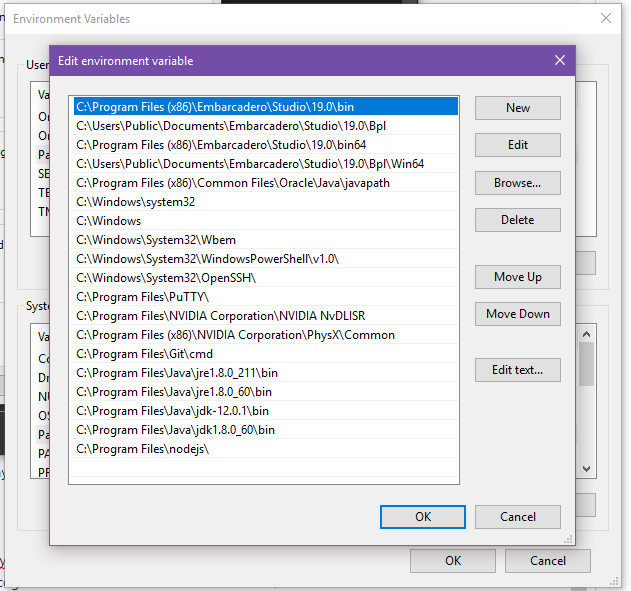
Here is User's Path variable

KittyLe
on 18 Jul 2019
yeah.. env is not normally on a Windows box :)
Can you run set from the cmd command prompt?
bzoz
on 18 Jul 2019
@bzoz,
C:\Windows\system32>set
ALLUSERSPROFILE=C:\ProgramData
APPDATA=C:\Users\KittyLe\AppData\Roaming
CommonProgramFiles=C:\Program Files\Common Files
CommonProgramFiles(x86)=C:\Program Files (x86)\Common Files
CommonProgramW6432=C:\Program Files\Common Files
COMPUTERNAME=DESKTOP-0LA4UPO
ComSpec=C:\Windows\system32\cmd.exe
DriverData=C:\Windows\System32\Drivers\DriverData
HOMEDRIVE=C:
HOMEPATH=\Users\KittyLe
LOCALAPPDATA=C:\Users\KittyLe\AppData\Local
LOGONSERVER=\\DESKTOP-0LA4UPO
NUMBER_OF_PROCESSORS=4
OneDrive=C:\Users\KittyLe\OneDrive
OneDriveConsumer=C:\Users\KittyLe\OneDrive
OS=Windows_NT
Path=C:\Program Files (x86)\Embarcadero\Studio\19.0\bin;C:\Users\Public\Documents\Embarcadero\Studio\19.0\Bpl;C:\Program Files (x86)\Embarcadero\Studio\19.0\bin64;C:\Users\Public\Documents\Embarcadero\Studio\19.0\Bpl\Win64;C:\Program Files (x86)\Common Files\Oracle\Java\javapath;C:\Windows\system32;C:\Windows;C:\Windows\System32\Wbem;C:\Windows\System32\WindowsPowerShell\v1.0\;C:\Windows\System32\OpenSSH\;C:\Program Files\PuTTY\;C:\Program Files\NVIDIA Corporation\NVIDIA NvDLISR;C:\Program Files (x86)\NVIDIA Corporation\PhysX\Common;C:\Program Files\Git\cmd;C:\Program Files\Java\jre1.8.0_211\bin;C:\Program Files\Java\jre1.8.0_60\bin;C:\Program Files\Java\jdk-12.0.1\bin;C:\Program Files\Java\jdk1.8.0_60\bin;C:\Program Files\nodejs\;C:\Users\KittyLe\AppData\Local\Microsoft\WindowsApps;C:\Users\KittyLe\AppData\Local\GitHubDesktop\bin;C:\Users\KittyLe\AppData\Local\atom\bin;C:\Users\KittyLe\AppData\Roaming\npm
PATHEXT=.COM;.EXE;.BAT;.CMD;.VBS;.VBE;.JS;.JSE;.WSF;.WSH;.MSC
PROCESSOR_ARCHITECTURE=AMD64
PROCESSOR_IDENTIFIER=Intel64 Family 6 Model 58 Stepping 9, GenuineIntel
PROCESSOR_LEVEL=6
PROCESSOR_REVISION=3a09
ProgramData=C:\ProgramData
ProgramFiles=C:\Program Files
ProgramFiles(x86)=C:\Program Files (x86)
ProgramW6432=C:\Program Files
PROMPT=$P$G
PSModulePath=C:\Program Files\WindowsPowerShell\Modules;C:\Windows\system32\WindowsPowerShell\v1.0\Modules
PUBLIC=C:\Users\Public
SEE_MASK_NOZONECHECKS=1
SystemDrive=C:
SystemRoot=C:\Windows
TEMP=C:\Users\KittyLe\AppData\Local\Temp
TMP=C:\Users\KittyLe\AppData\Local\Temp
USERDOMAIN=DESKTOP-0LA4UPO
USERDOMAIN_ROAMINGPROFILE=DESKTOP-0LA4UPO
USERNAME=KittyLe
USERPROFILE=C:\Users\KittyLe
VBOX_MSI_INSTALL_PATH=C:\Program Files\Oracle\VirtualBox\
windir=C:\Windows

C:\Windows\system32>
And npm config list?
bzoz
on 18 Jul 2019
C:\Users\KittyLe>npm config list
; cli configs
metrics-registry = "https://registry.npmjs.org/"
scope = ""
user-agent = "npm/6.10.1 node/v10.16.0 win32 x64"

; userconfig C:\Users\KittyLe\.npmrc
cache = "C:\\Projects\\caches\\npm-cache"
msvs_version = "2017"
prefix = "C:\\Projects\\caches\\npm"

; builtin config undefined

; node bin location = C:\Program Files\nodejs\node.exe
; cwd = C:\Users\KittyLe
; HOME = C:\Users\KittyLe
; "npm config ls -l" to show all defaults.


C:\Users\KittyLe>
One thing I have noticed, windows-build-tools installed successfully on my laptop with Win8.1. And robotjs installed too and works fine.
KittyLe
on 19 Jul 2019
@KittyLe it's the prefix that's causing problems. Run npm config delete prefix and it'll go back to using C:\Program Files\nodejs\node_modules (I think) as its global install location, which is where node-gyp should be located (inside npm).
rvagg
on 20 Jul 2019
Nothing changed.
PS C:\Projects\Kawosu!> npm config delete prefix
PS C:\Projects\Kawosu!> npm i windows-build-tools -g

> [email protected] postinstall C:\Users\KittyLe\AppData\Roaming\npm\node_modules\windows-build-tools
> node ./dist/index.js

fs.js:114
    throw err;
    ^

Error: EPERM: operation not permitted, read
    at Object.readSync (fs.js:498:3)
    at tryReadSync (fs.js:332:20)
    at Object.readFileSync (fs.js:361:19)
    at Object.Module._extensions..js (internal/modules/cjs/loader.js:786:20)
    at Module.load (internal/modules/cjs/loader.js:653:32)
    at tryModuleLoad (internal/modules/cjs/loader.js:593:12)
    at Function.Module._load (internal/modules/cjs/loader.js:585:3)
    at Module.require (internal/modules/cjs/loader.js:690:17)
    at require (internal/modules/cjs/helpers.js:25:18)
    at Object.<anonymous> (C:\Users\KittyLe\AppData\Roaming\npm\node_modules\windows-build-tools\node_modules\request\index.js:18:15)
npm ERR! code ELIFECYCLE
npm ERR! errno 1
npm ERR! [email protected] postinstall: `node ./dist/index.js`
npm ERR! Exit status 1
npm ERR!
npm ERR! Failed at the [email protected] postinstall script.
npm ERR! This is probably not a problem with npm. There is likely additional logging output above.

npm ERR! A complete log of this run can be found in:
npm ERR!     C:\Projects\caches\npm-cache\_logs\2019-07-20T18_26_31_713Z-debug.log
PS C:\Projects\Kawosu!> npm i robotjs

> [email protected] install C:\Projects\Kawosu!\node_modules\robotjs
> prebuild-install || node-gyp rebuild

prebuild-install WARN install No prebuilt binaries found (target=10.16.0 runtime=node arch=x64 platform=win32)

C:\Projects\Kawosu!\node_modules\robotjs>if not defined npm_config_node_gyp (node "C:\Program Files\nodejs\node_modules\npm\node_modules\npm-lifecycle\node-gyp-bin\\..\..\node_modules\node-gyp\bin\node-gyp.js" rebuild )  else (node "C:\Program Files\nodejs\node_modules\npm\node_modules\node-gyp\bin\node-gyp.js" rebuild )
gyp ERR! UNCAUGHT EXCEPTION
gyp ERR! stack Error: EPERM: operation not permitted, read
gyp ERR! stack     at Object.readSync (fs.js:498:3)
gyp ERR! stack     at tryReadSync (fs.js:332:20)
gyp ERR! stack     at Object.readFileSync (fs.js:361:19)
gyp ERR! stack     at Object.Module._extensions..js (internal/modules/cjs/loader.js:786:20)
gyp ERR! stack     at Module.load (internal/modules/cjs/loader.js:653:32)
gyp ERR! stack     at tryModuleLoad (internal/modules/cjs/loader.js:593:12)
gyp ERR! stack     at Function.Module._load (internal/modules/cjs/loader.js:585:3)
gyp ERR! stack     at Module.require (internal/modules/cjs/loader.js:690:17)
gyp ERR! stack     at require (internal/modules/cjs/helpers.js:25:18)
gyp ERR! stack     at Object.<anonymous> (C:\Program Files\nodejs\node_modules\npm\node_modules\request\index.js:18:15)
gyp ERR! System Windows_NT 10.0.17763
gyp ERR! command "C:\\Program Files\\nodejs\\node.exe" "C:\\Program Files\\nodejs\\node_modules\\npm\\node_modules\\node-gyp\\bin\\node-gyp.js" "rebuild"
gyp ERR! cwd C:\Projects\Kawosu!\node_modules\robotjs
gyp ERR! node -v v10.16.0
gyp ERR! node-gyp -v v3.8.0
gyp ERR! This is a bug in `node-gyp`.
gyp ERR! Try to update node-gyp and file an Issue if it does not help:
gyp ERR!     <https://github.com/nodejs/node-gyp/issues>
npm WARN [email protected] No description
npm WARN [email protected] No repository field.

npm ERR! code ELIFECYCLE
npm ERR! errno 7
npm ERR! [email protected] install: `prebuild-install || node-gyp rebuild`
npm ERR! Exit status 7
npm ERR!
npm ERR! Failed at the [email protected] install script.
npm ERR! This is probably not a problem with npm. There is likely additional logging output above.

npm ERR! A complete log of this run can be found in:
npm ERR!     C:\Projects\caches\npm-cache\_logs\2019-07-20T18_27_03_559Z-debug.log
PS C:\Projects\Kawosu!>
ok, but now you have this unset, can you first try: npm install npm@latest -g to see if we can get npm properly reinstalled at that location. And second, if that still doesn't work, try uninstalling Node and reinstalling it again.
rvagg
on 22 Jul 2019
Can you please continue. I am getting the same error. Please help.
 hellojt9040
on 25 Dec 2020
hellojt9040
on 25 Dec 2020
Related issues
 Hao-Wu
·
84Comments
Hao-Wu
·
84Comments
 felixfbecker
·
64Comments
felixfbecker
·
64Comments
 operator-bot
·
65Comments
operator-bot
·
65Comments
 shkfnly
·
64Comments
shkfnly
·
64Comments
 yfuks
·
39Comments
yfuks
·
39Comments