I'm using Windows 10, node 7.7.2, npm 4.1.2
I get this error when running node-gyp rebuild for after installing the binding module leveldown (My objective is to rebuild it for electron). The specific error is...
MSBUILD : error MSB4025: The project file could not be loaded. Root element is missing.
I searched for this error but it seemed to be specific to visual studio projects and xml files. I don't have a lot of context since I'm not usually a windows user. Somewhere I found that you can specific --msvs_version=2013, that did not work. But I tried with 2017 (because that's the latest download) and I got the following error.
Traceback (most recent call last):
  File "C:\Users\Gebruiker\AppData\Roaming\npm\node_modules\node-gyp\gyp\gyp_main.py", line 16, in <module>
    sys.exit(gyp.script_main())
  File "C:\Users\Gebruiker\AppData\Roaming\npm\node_modules\node-gyp\gyp\pylib\gyp\__init__.py", line 545, in script_main
    return main(sys.argv[1:])
  File "C:\Users\Gebruiker\AppData\Roaming\npm\node_modules\node-gyp\gyp\pylib\gyp\__init__.py", line 538, in main
    return gyp_main(args)
  File "C:\Users\Gebruiker\AppData\Roaming\npm\node_modules\node-gyp\gyp\pylib\gyp\__init__.py", line 514, in gyp_main
    options.duplicate_basename_check)
  File "C:\Users\Gebruiker\AppData\Roaming\npm\node_modules\node-gyp\gyp\pylib\gyp\__init__.py", line 98, in Load
    generator.CalculateVariables(default_variables, params)
  File "C:\Users\Gebruiker\AppData\Roaming\npm\node_modules\node-gyp\gyp\pylib\gyp\generator\msvs.py", line 1900, in CalculateVariables
    generator_flags.get('msvs_version', 'auto'))
  File "C:\Users\Gebruiker\AppData\Roaming\npm\node_modules\node-gyp\gyp\pylib\gyp\MSVSVersion.py", line 434, in SelectVisualStudioVersion
    versions = _DetectVisualStudioVersions(version_map[version], 'e' in version)
KeyError: '2017'
If anyone has any idas I would be very grateful!
-S
 operator-bot
All 65 comments
VS 2017 isn't supported yet (see WIP in #1130) but if you install 2015 and pass --msvs_version=2015, it should work.
 bnoordhuis
on 14 Mar 2017
bnoordhuis
on 14 Mar 2017
Except it uses the msbuild.exe on the path by default, so you need to either ensure the v14.0 msbuild in %PROGRAM_FILES(x86)%\MSBuild\v14.0\Bin is the one it finds, or install the v140 C++ toolchain in VS 2017. Ugh.
 simonbuchan
on 30 Mar 2017
simonbuchan
on 30 Mar 2017
Except it uses the msbuild.exe on the path by default, so you need to either ensure the v14.0 msbuild in %PROGRAM_FILES(x86)%\MSBuild\v14.0\Bin is the one it finds, or install the v140 C++ toolchain in VS 2017. Ugh.
3.6.0 supports VS2017
You can install Build Tools for Visual Studio 2017, make sure to select C++ tools, Windows 10 SDK and MSBuild and your set.
This bug can be closed /cc @rvagg
Edit
for [email protected] do not install any of the special SDKs (red) only any of the greens

P.S. you only need one, and best tested is 10393
 refack
on 30 Mar 2017
refack
on 30 Mar 2017
I'm still getting this error with Windows 10, node 7.8.0, npm 4.2.0 and node-gyp 3.6.0.
Also, setting the msvc_version config to 2017 gets some python error.
 madcampos
on 17 Apr 2017
madcampos
on 17 Apr 2017
@refack after installing VS 2017 C++ Build Tools as u mention side by side with VS2017 community edition.
`> node-gyp rebuild
C:Users\himad\Desktop\testProjectnode_modules\sharp>if not defined npm_config_node_gyp (node "C:Users\himad\AppData\Roamingnpmnode_modulesnpmbinnode-gyp-bin\....node_modulesnode-gypbinnode-gyp.js" rebuild ) else (node "" rebuild )
Traceback (most recent call last):
File "C:Users\himad\AppData\Roamingnpmnode_modulesnpmnode_modulesnode-gypgypgyp_main.py", line 16, in
sys.exit(gyp.script_main())
File "C:Users\himad\AppData\Roamingnpmnode_modulesnpmnode_modulesnode-gypgyp\pylibgyp__init__.py", line 545, in script_main
return main(sys.argv[1:])
File "C:Users\himad\AppData\Roamingnpmnode_modulesnpmnode_modulesnode-gypgyp\pylibgyp__init__.py", line 538, in main
return gyp_main(args)
File "C:Users\himad\AppData\Roamingnpmnode_modulesnpmnode_modulesnode-gypgyp\pylibgyp__init__.py", line 514, in gyp_main
options.duplicate_basename_check)
File "C:Users\himad\AppData\Roamingnpmnode_modulesnpmnode_modulesnode-gypgyp\pylibgyp__init__.py", line 98, in Load
generator.CalculateVariables(default_variables, params)
File "C:Users\himad\AppData\Roamingnpmnode_modulesnpmnode_modulesnode-gypgyp\pylibgyp\generator\msvs.py", line 1918, in CalculateVariables
generator_flags.get('msvs_version', 'auto'))
File "C:Users\himad\AppData\Roamingnpmnode_modulesnpmnode_modulesnode-gypgyp\pylibgyp\MSVSVersion.py", line 434, in SelectVisualStudioVersion
versions = _DetectVisualStudioVersions(version_map[version], 'e' in version)
KeyError: '2017'
gyp ERR! configure error
gyp ERR! stack Error: gyp failed with exit code: 1
gyp ERR! stack at ChildProcess.onCpExit (C:Users\himad\AppData\Roamingnpmnode_modulesnpmnode_modulesnode-gyp\lib\configure.js:336:16)
gyp ERR! stack at emitTwo (events.js:106:13)
gyp ERR! stack at ChildProcess.emit (events.js:194:7)
gyp ERR! stack at Process.ChildProcess._handle.onexit (internal/child_process.js:215:12)
gyp ERR! System Windows_NT 10.0.15063
gyp ERR! command "C:\Program Files\nodejs\node.exe" "C:\Users\himad\AppData\Roaming\npm\node_modules\npm\node_modules\node-gyp\bin\node-gyp.js" "rebuild"
gyp ERR! cwd C:Users\himad\Desktop\testProjectnode_modules\sharp
gyp ERR! node -v v7.9.0
gyp ERR! node-gyp -v v3.6.0
gyp ERR! not ok
npm WARN [email protected] No repository field.
npm ERR! code ELIFECYCLE
npm ERR! errno 1
npm ERR! [email protected] install: node-gyp rebuild
npm ERR! Exit status 1
npm ERR!
npm ERR! Failed at the [email protected] install script 'node-gyp rebuild'.
npm ERR! Make sure you have the latest version of node.js and npm installed.
npm ERR! If you do, this is most likely a problem with the sharp package,
npm ERR! not with npm itself.
npm ERR! Tell the author that this fails on your system:
npm ERR! node-gyp rebuild
npm ERR! You can get information on how to open an issue for this project with:
npm ERR! npm bugs sharp
npm ERR! Or if that isn't available, you can get their info via:
npm ERR! npm owner ls sharp
npm ERR! There is likely additional logging output above.
npm ERR! A complete log of this run can be found in:
npm ERR! C:Users\himad\AppData\Roamingnpm-cache_logs2017-04-17T20_28_15_807Z-debug.log'`
 himadrinath
on 17 Apr 2017
himadrinath
on 17 Apr 2017
@himadrinath checking...
P.S. You don't have to install the Buildtools side by side, just make sure you have the three features installed in the "community edition" Instance
refack
on 17 Apr 2017
@himadrinath try and set GYP_MSVS_VERSION=2015 before you npm i
(At the time of the release of 3.6.0 GYP did not know what 2017 was)
refack
on 17 Apr 2017
@refack after set GYP_MSVS_VERSION=2015 getting this one
C:\Users\himad\Desktop\testProject\node_modules\sharp\build\libvips-cpp.vcxproj(20,3): error MSB4019: The imported proj
ect "C:\Microsoft.Cpp.Default.props" was not found. Confirm that the path in the <Import> declaration is correct, and t
hat the file exists on disk.
gyp ERR! build error
gyp ERR! stack Error:
C:\Program Files (x86)MSBuild\14.0binmsbuild.exefailed with exit code: 1
gyp ERR! stack at ChildProcess.onExit (C:\Users\himad\AppData\Roaming\npm\node_modules\npm\node_modules\node-gyp\lib\build.js:285:23)
gyp ERR! stack at emitTwo (events.js:106:13)
gyp ERR! stack at ChildProcess.emit (events.js:194:7)
gyp ERR! stack at Process.ChildProcess._handle.onexit (internal/child_process.js:215:12)
gyp ERR! System Windows_NT 10.0.15063
gyp ERR! command "C:\\Program Files\\nodejs\\node.exe" "C:\\Users\\himad\\AppData\\Roaming\\npm\\node_modules\\npm\\node_modules\\node-gyp\\bin\\node-gyp.js" "rebuild"
gyp ERR! cwd C:\Users\himad\Desktop\testProject\node_modules\sharp
gyp ERR! node -v v7.9.0
gyp ERR! node-gyp -v v3.6.0
gyp ERR! not ok
npm WARN [email protected] No repository field.
npm ERR! code ELIFECYCLE
npm ERR! errno 1
npm ERR! [email protected] install:node-gyp rebuild`
npm ERR! Exit status 1
npm ERR!
npm ERR! Failed at the [email protected] install script 'node-gyp rebuild'.
npm ERR! Make sure you have the latest version of node.js and npm installed.
npm ERR! If you do, this is most likely a problem with the sharp package,
npm ERR! not with npm itself.
npm ERR! Tell the author that this fails on your system:
npm ERR! node-gyp rebuild
npm ERR! You can get information on how to open an issue for this project with:
npm ERR! npm bugs sharp
npm ERR! Or if that isn't available, you can get their info via:
npm ERR! npm owner ls sharp
npm ERR! There is likely additional logging output above.
npm ERR! A complete log of this run can be found in:
npm ERR! C:Users\himad\AppData\Roamingnpm-cache_logs2017-04-17T22_17_30_270Z-debug.log`


himadrinath
on 18 Apr 2017
Everything seems file...
Could you run
cd /d C:\Users\himad\AppData\Roaming\npm\node_modules\npm\node_modules\node-gyp\lib\
powershell.exe -ExecutionPolicy Unrestricted -Command "&{Add-Type -Path 'Find-VS2017.cs'; [VisualStudioConfiguration.Main]::Query(); }"
You should see some JSON output similar to:
{"log":"Found installation at: D:\\bin\\dev\\VS\\2017\\BuildTools\n - Found Microsoft.VisualStudio.Component.VC.Tools.x86.x64\n - Found Microsoft.VisualStudio.Component.Windows10SDK.14393\n - Found Microsoft.VisualStudio.VC.MSBuild.Base\n - Using this installation with Windows 10 SDK","path":"D:\\bin\\dev\\VS\\2017\\BuildTools","sdk":"10.0.14393.0"}
Could you post it?
refack
on 18 Apr 2017
@refack
`Exception calling "Query" with "0" argument(s): "Input string was not in a correct format."
At line:1 char:36
- ... -Path 'Find-VS2017.cs'; [VisualStudioConfiguration.Main]::Query(); }
~~~~~~~~~
- CategoryInfo : NotSpecified: (:) [], MethodInvocationException
- FullyQualifiedErrorId : FormatException`
himadrinath
on 18 Apr 2017
Seems like you have a non "canonical" node-gyp. Do:
cd /d C:\Users\himad\AppData\Roaming\npm\node_modules\npm
npm rm node-gyp
npm i [email protected] --no-link
@refack
`C:Users\himad\AppData\Roamingnpmnode_modulesnpm>npm rm node-gyp
- [email protected] node_modules\balanced-match
- [email protected] node_modules\concat-map
- [email protected] node_modules\brace-expansion
- [email protected] node_modules\minimatch
- [email protected] node_modulesnode-gypnode_modules\nopt
- [email protected] node_modulesnode-gyp
C:Users\himad\AppData\Roamingnpmnode_modulesnpm>npm i [email protected] --no-link
[email protected] C:Users\himad\AppData\Roamingnpmnode_modulesnpm
-- [email protected]
  +-- [email protected]
  |
-- [email protected]
| +-- [email protected]
| -- [email protected]
-- [email protected]`
himadrinath
on 18 Apr 2017
That's it. Now try and npm i your testProject
refack
on 18 Apr 2017
@refack after following the process as you told. one of my other machine i just installed VS 2017 C++ Build Tools and test it. its work fine

but still getting the same result into another machine where i just installed VS2017 Community
`Exception calling "Query" with "0" argument(s): "Input string was not in a correct format."
At line:1 char:36
- ... -Path 'Find-VS2017.cs'; [VisualStudioConfiguration.Main]::Query(); }
~~~~~~~~~
- CategoryInfo : NotSpecified: (:) [], MethodInvocationException
- FullyQualifiedErrorId : FormatException`
himadrinath
on 18 Apr 2017
This is quite strange since in the code that was distributed with [email protected] Query take 0 arguments.
So my intuition was that you have a non-release version of node-gyp somewhere. But further investigation says different. I think that there's an error _in_ the .cs file. We haven't seen that before...
There are a few thing we could try to solve this, and a few to try and figure out what's wrong:
To solve:
- try to run from an "as Administrator" cmd.exe. Maybe it'll help
- try to run from a "VS dev console" (you get shortcuts installed in the start menu by the Visual Studio Installer)
To figure out:
- do a sanity check for COM
powershell.exe -ExecutionPolicy Unrestricted -Command "if (Test-Path 'Registry::HKEY_CLASSES_ROOT\CLSID\{177F0C4A-1CD3-4DE7-A32C-71DBBB9FA36D}') { echo 'found' } else {echo 'not found'}"
This should yield found
download
vswhereby Microsoft https://github.com/Microsoft/vswhere, follow the readme, and see if it can find the VS installationWe could coordinate a remote access session (TeamViewer / RDP / VNC), and I'll try to find what fails.
refack
on 18 Apr 2017
@refack

himadrinath
on 18 Apr 2017
Thanks.🤔🤔🤔
refack
on 18 Apr 2017
@refack but the problem is on............................
himadrinath
on 18 Apr 2017
🤔🤔🤔🤔 Still thinking...
(did you check is vswhere works?)
refack
on 18 Apr 2017
@refack working on that...........
himadrinath
on 18 Apr 2017
Another helpful test would be for you to clone https://github.com/node4good/windows-autoconf
and run
Tools\try_powershell.cmd
and paste the resulting JSON
or
Tools\try_powershell.cmd > out.josn
and upload out.json (just drag&drop it here)
refack
on 18 Apr 2017
@refack
`Add-Type : c:Users\himad\AppData\Local\Temp\px25s2n1.0.cs(31) : The type or namespace name 'VSInstance' could not be
found (are you missing a using directive or an assembly reference?)
c:Users\himad\AppData\Local\Temp\px25s2n1.0.cs(30) :
c:Users\himad\AppData\Local\Temp\px25s2n1.0.cs(31) : >>> public static string ToJSON(VSInstance inst)
c:Users\himad\AppData\Local\Temp\px25s2n1.0.cs(32) : {
At line:1 char:5
- & { Add-Type (Out-String -InputObject (Get-Content '..\tools**.cs')) ...
~~~~~~~~~~~~~
- CategoryInfo : InvalidData: (Microsoft.Power...peCompilerError:AddTypeCompilerError) [Add-Type], Except
ion - FullyQualifiedErrorId : SOURCE_CODE_ERROR,Microsoft.PowerShell.Commands.AddTypeCommand
- CategoryInfo : InvalidData: (Microsoft.Power...peCompilerError:AddTypeCompilerError) [Add-Type], Except
Add-Type : c:Users\himad\AppData\Local\Temp\px25s2n1.0.cs(65) : The type or namespace name 'VSInstance' could not be
found (are you missing a using directive or an assembly reference?)
c:Users\himad\AppData\Local\Temp\px25s2n1.0.cs(64) :
c:Users\himad\AppData\Local\Temp\px25s2n1.0.cs(65) : >>> public static string ToJSON(IEnumerable
insts)
c:Users\himad\AppData\Local\Temp\px25s2n1.0.cs(66) : {
At line:1 char:5
- & { Add-Type (Out-String -InputObject (Get-Content '..\tools**.cs')) ...
~~~~~~~~~~~~~
- CategoryInfo : InvalidData: (Microsoft.Power...peCompilerError:AddTypeCompilerError) [Add-Type], Except
ion - FullyQualifiedErrorId : SOURCE_CODE_ERROR,Microsoft.PowerShell.Commands.AddTypeCommand
- CategoryInfo : InvalidData: (Microsoft.Power...peCompilerError:AddTypeCompilerError) [Add-Type], Except
Add-Type : Cannot add type. Compilation errors occurred.
At line:1 char:5
- & { Add-Type (Out-String -InputObject (Get-Content '..\tools**.cs')) ...
~~~~~~~~~~~~~
- CategoryInfo : InvalidData: (:) [Add-Type], InvalidOperationException
- FullyQualifiedErrorId : COMPILER_ERRORS,Microsoft.PowerShell.Commands.AddTypeCommand
Unable to find type [VisualStudioConfiguration.Program].
At line:1 char:72
- ... ntent '..\tools**.cs')); [VisualStudioConfiguration.Program]::Query( ...
~~~~~~~
- CategoryInfo : InvalidOperation: (VisualStudioConfiguration.Program:TypeName) [], RuntimeException
- FullyQualifiedErrorId : TypeNotFound
`
himadrinath
on 18 Apr 2017
My bad, I'm using git sub-modules, you need to pull them as well
git submodule update --init --recursive
@refack how can i gave u team viewer credentials securely. so u can test your self
himadrinath
on 18 Apr 2017
refack
on 18 Apr 2017
@refack send
himadrinath
on 18 Apr 2017
@refack i don't know how to thank you. it's been more then 5 to 7 days i was trying to solve it. this is my first time in node and first package i installed. thank you is not enough...........
himadrinath
on 18 Apr 2017
@joaocgreis we have a bug in Find-VS2017.cs#L232
New SDK moniker is 10.0.15063.Desktop ParseInt borkes out :) I'm making a PR.
refack
on 18 Apr 2017
@refack i don't know how to thank you. it's been more then 5 to 7 days i was trying to solve it. this is my first time in node and first package i installed. thank you is not enough...........
@himadrinath Ohh man, what a hard first time. I've seen like 100,000 package installs first time it's so hard. If you are a bug magnet I want to hire you as QA 😜
refack
on 18 Apr 2017
@himadrinath could you open a new issue here in node-gyp: "v3.6.0 incompatible with super new SDKs 10.0.15063.Desktop"
And ref this one
refack
on 18 Apr 2017
I think this has been answered; it certainly digressed. Closing.
bnoordhuis
on 12 May 2017
@refack Sorry, just checking, has this bug been fixed in [email protected]? I'm seeing the same problems with node-gyp as @himadrinath. I'm running 3.6.1. How do I proceed?
 skynode
on 13 May 2017
skynode
on 13 May 2017
Not fixed yet, you need to uninstall the new SDK version...
for [email protected] do not install any of the special SDKs (red) only any of the greens
P.S. you only need one, and best tested is 14393
refack
on 13 May 2017
Thank you. I'm currently uninstalling Win10SDK_10.0.15063.Desktop.
I need to know, with multiple versions, in my case:

Which one gets selected?
P.S. I need 10586.0 in order to run native Python workloads.
skynode
on 13 May 2017
Still getting the errors. Please what should be the contents of .npmrc?
skynode
on 13 May 2017
@skynode I'll need some information from your computer, so it's best that you open a new issue and post it there.
- a good "sanity check" for VS2017 is to run
powershell.exe -ExecutionPolicy Unrestricted -Command "if (Test-Path 'Registry::HKEY_CLASSES_ROOT\CLSID\{177F0C4A-1CD3-4DE7-A32C-71DBBB9FA36D}') { echo 'found' } else {echo 'not found'}"and make sure it outputsfound - Put the whole error output you get (like https://github.com/nodejs/node-gyp/issues/1144#issuecomment-294585334). You can attach it as text file or a GitHub Gist.
- clone or
npm iwindows-autoconf(if you clone use--recurse-submodulessince I have submodules there)
Then from inside thewindows-autoconfdirectory runTools\try_powershell.cmd > skynode.jsonand attach the saved json file - Take a wider screenshot of the selection in your VSInstaller
- run
npm config listand paste the output.
refack
on 13 May 2017
Okay. Here goes:
Outputs
foundSee error output in this gist
Done this. See this gist

See gist
skynode
on 13 May 2017
@skynode if you are handy with git, fetch the fix #1198 unto your node-gyp installation (C:\Program Files (x86)\nodejs\node_modules\npm\node_modules\node-gyp)
The more direct way is to right click this link and save as...
C:\Program Files (x86)\nodejs\node_modules\npm\node_modules\\node gyp\lib\Find-VS2017.cs
refack
on 13 May 2017
@refack After replacing fetching and replacing Find-VS2017.cs , see new error here.
Guess I may have to reinstall SDK-15063 ?
Using WSL successfully in the meantime.
skynode
on 14 May 2017
Guess I may have to reinstall SDK-15063 ?
I suppose so, it didn't get uninstalled completely enough, VSInstaller still reported it as available.
If it's your own addon you're trying to build, you can add
  "target_defaults": {
    "msvs_windows_target_platform_version": "10.0.14393.0"
  },
To the head of the binding.gyp file
refack
on 14 May 2017
I had the same issue and I found to be related to having installed USB Device Connectivity
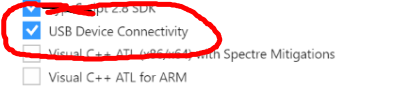
Uninstalling that component fixed the issue. I'm going to submit a small PR to fix the issue even if you install that component.
 Loghorn
on 30 Jul 2018
Loghorn
on 30 Jul 2018
KeyError: '2017' is present in @3.8.0
C:\Development\TypeScript\projects\<project>>npm i -S better-sqlite3

> [email protected] install C:\Development\TypeScript\projects\<project>\node_modules\integer
> node-gyp rebuild


C:\Development\TypeScript\projects\<project>\node_modules\integer>if not defined npm_config_node_gyp (node "C:\Users\<User>\AppData\Roaming\npm\node_modules\npm\node_modules\npm-lifecycle\node-gyp-bin\\..\..\node_modules\node-gyp\bin\node-gyp.js" rebuild )  else (node "C:\Users\<User>\AppData\Roaming\npm\node_modules\npm\node_modules\node-gyp\bin\node-gyp.js" rebuild )
Traceback (most recent call last):
  File "C:\Users\<User>\AppData\Roaming\npm\node_modules\npm\node_modules\node-gyp\gyp\gyp_main.py", line 16, in <module>
    sys.exit(gyp.script_main())
  File "C:\Users\<User>\AppData\Roaming\npm\node_modules\npm\node_modules\node-gyp\gyp\pylib\gyp\__init__.py", line 545, in script_main
    return main(sys.argv[1:])
  File "C:\Users\<User>\AppData\Roaming\npm\node_modules\npm\node_modules\node-gyp\gyp\pylib\gyp\__init__.py", line 538, in main
    return gyp_main(args)
  File "C:\Users\<User>\AppData\Roaming\npm\node_modules\npm\node_modules\node-gyp\gyp\pylib\gyp\__init__.py", line 514, in gyp_main
    options.duplicate_basename_check)
  File "C:\Users\<User>\AppData\Roaming\npm\node_modules\npm\node_modules\node-gyp\gyp\pylib\gyp\__init__.py", line 98, in Load
    generator.CalculateVariables(default_variables, params)
  File "C:\Users\<User>\AppData\Roaming\npm\node_modules\npm\node_modules\node-gyp\gyp\pylib\gyp\generator\msvs.py", line 1916, in CalculateVariables
    generator_flags.get('msvs_version', 'auto'))
  File "C:\Users\<User>\AppData\Roaming\npm\node_modules\npm\node_modules\node-gyp\gyp\pylib\gyp\MSVSVersion.py", line 434, in SelectVisualStudioVersion
    versions = _DetectVisualStudioVersions(version_map[version], 'e' in version)

KeyError: '2017'
gyp ERR! configure error
gyp ERR! stack Error: `gyp` failed with exit code: 1
gyp ERR! stack     at ChildProcess.onCpExit (C:\Users\<User>\AppData\Roaming\npm\node_modules\npm\node_modules\node-gyp\lib\configure.js:345:16)
gyp ERR! stack     at ChildProcess.emit (events.js:182:13)
gyp ERR! stack     at Process.ChildProcess._handle.onexit (internal/child_process.js:237:12)
gyp ERR! System Windows_NT 6.1.7601
gyp ERR! command "C:\\Program Files\\nodejs\\node.exe" "C:\\Users\\<User>\\AppData\\Roaming\\npm\\node_modules\\npm\\node_modules\\node-gyp\\bin\\node-gyp.js" "rebuild"
gyp ERR! cwd C:\Development\TypeScript\projects\<project>\node_modules\integer
gyp ERR! node -v v10.4.0
gyp ERR! node-gyp -v v3.8.0
gyp ERR! not ok
npm WARN <project>@0.0.1 No description
npm WARN <project>@0.0.1 No repository field.
npm WARN optional SKIPPING OPTIONAL DEPENDENCY: [email protected] (node_modules\fsevents):
npm WARN notsup SKIPPING OPTIONAL DEPENDENCY: Unsupported platform for [email protected]: wanted {"os":"darwin","arch":"any"} (current: {"os":"win32","arch":"x64"})

npm ERR! code ELIFECYCLE
npm ERR! errno 1
npm ERR! [email protected] install: `node-gyp rebuild`
npm ERR! Exit status 1
npm ERR!
npm ERR! Failed at the [email protected] install script.
npm ERR! This is probably not a problem with npm. There is likely additional logging output above.

npm ERR! A complete log of this run can be found in:
npm ERR!     C:\Users\<User>\AppData\Roaming\npm-cache\_logs\2018-08-24T20_38_31_982Z-debug.log
 MadOPcode
on 24 Aug 2018
MadOPcode
on 24 Aug 2018
With windows sdk v10.0.14393.795, it works correctly. This should be at the home page, IMO.
 jzatarain
on 6 Sep 2018
jzatarain
on 6 Sep 2018
> [email protected] install C:\Users\Pavan\Desktop\TodayServer\node_modules\fs-ext
> node-gyp configure build


C:\Users\Pavan\Desktop\TodayServer\node_modules\fs-ext>if not defined npm_config_node_gyp (node "C:\Program Files\nodejs\node_modules\npm\node_modules\npm-lifecycle\node-gyp-bin\\..\..\node_modules\node-gyp\bin\node-gyp.js" configure build )  else (node "C:\Program Files\nodejs\node_modules\npm\node_modules\node-gyp\bin\node-gyp.js" configure build )
Building the projects in this solution one at a time. To enable parallel build, please add the "/m" switch.
  fs-ext.cc
  win_delay_load_hook.cc
..\fs-ext.cc(108): warning C4996: 'Nan::NanErrnoException': was declared deprecated [C:\Users\Pavan\Desktop\TodayServer\node_modules\fs-ext\build\fs-ext.vcxp
roj]
  C:\Users\Pavan\Desktop\TodayServer\node_modules\nan\nan.h(862): note: see declaration of 'Nan::NanErrnoException'
..\fs-ext.cc(195): error C3861: 'fcntl': identifier not found [C:\Users\Pavan\Desktop\TodayServer\node_modules\fs-ext\build\fs-ext.vcxproj]
..\fs-ext.cc(297): warning C4996: 'Nan::NanErrnoException': was declared deprecated [C:\Users\Pavan\Desktop\TodayServer\node_modules\fs-ext\build\fs-ext.vcxp
roj]
  C:\Users\Pavan\Desktop\TodayServer\node_modules\nan\nan.h(862): note: see declaration of 'Nan::NanErrnoException'
..\fs-ext.cc(339): warning C4996: 'Nan::NanErrnoException': was declared deprecated [C:\Users\Pavan\Desktop\TodayServer\node_modules\fs-ext\build\fs-ext.vcxp
roj]
  C:\Users\Pavan\Desktop\TodayServer\node_modules\nan\nan.h(862): note: see declaration of 'Nan::NanErrnoException'
..\fs-ext.cc(374): error C3861: 'fcntl': identifier not found [C:\Users\Pavan\Desktop\TodayServer\node_modules\fs-ext\build\fs-ext.vcxproj]
..\fs-ext.cc(375): warning C4996: 'Nan::NanErrnoException': was declared deprecated [C:\Users\Pavan\Desktop\TodayServer\node_modules\fs-ext\build\fs-ext.vcxp
roj]
  C:\Users\Pavan\Desktop\TodayServer\node_modules\nan\nan.h(862): note: see declaration of 'Nan::NanErrnoException'
..\fs-ext.cc(433): warning C4996: 'Nan::NanErrnoException': was declared deprecated [C:\Users\Pavan\Desktop\TodayServer\node_modules\fs-ext\build\fs-ext.vcxp
roj]
  C:\Users\Pavan\Desktop\TodayServer\node_modules\nan\nan.h(862): note: see declaration of 'Nan::NanErrnoException'
gyp ERR! build error
gyp ERR! stack Error: `C:\Program Files (x86)\MSBuild\14.0\bin\msbuild.exe` failed with exit code: 1
gyp ERR! stack     at ChildProcess.onExit (C:\Program Files\nodejs\node_modules\npm\node_modules\node-gyp\lib\build.js:262:23)
gyp ERR! stack     at emitTwo (events.js:126:13)
gyp ERR! stack     at ChildProcess.emit (events.js:214:7)
gyp ERR! stack     at Process.ChildProcess._handle.onexit (internal/child_process.js:198:12)
gyp ERR! System Windows_NT 10.0.17134
gyp ERR! command "C:\\Program Files\\nodejs\\node.exe" "C:\\Program Files\\nodejs\\node_modules\\npm\\node_modules\\node-gyp\\bin\\node-gyp.js" "configure" "build"
gyp ERR! cwd C:\Users\Pavan\Desktop\TodayServer\node_modules\fs-ext
gyp ERR! node -v v8.12.0
gyp ERR! node-gyp -v v3.8.0
gyp ERR! not ok
npm WARN [email protected] No description
npm WARN [email protected] No repository field.
npm WARN optional SKIPPING OPTIONAL DEPENDENCY: [email protected] (node_modules\fs-ext):
npm WARN optional SKIPPING OPTIONAL DEPENDENCY: [email protected] install: `node-gyp configure build`
npm WARN optional SKIPPING OPTIONAL DEPENDENCY: Exit status 1

audited 2342 packages in 8.417s
found 3 vulnerabilities (2 low, 1 moderate)
  run `npm audit fix` to fix them, or `npm audit` for details
Please Help me :( ;(
How i fixed this error guys!!!
 pavanIT1996
on 19 Oct 2018
pavanIT1996
on 19 Oct 2018
..\fs-ext.cc(195): error C3861: 'fcntl': identifier not found [C:Users\Pavan\Desktop\TodayServernode_modules\fs-ext\build\fs-ext.vcxproj]
@pavanIT1996 You need a later version of fs-ext that includes https://github.com/baudehlo/node-fs-ext/pull/70: https://github.com/baudehlo/node-fs-ext/issues/57
 richardlau
on 19 Oct 2018
richardlau
on 19 Oct 2018
@richardlau after excute npm install fs-ext
PS C:\Users\Pavan\Desktop\TodayServer> npm install fs-ext

> [email protected] install C:\Users\Pavan\Desktop\TodayServer\node_modules\qlobber-fsq\node_modules\fs-ext
> node-gyp configure build


C:\Users\Pavan\Desktop\TodayServer\node_modules\qlobber-fsq\node_modules\fs-ext>if not defined npm_config_node_gyp (node "C:\Program Files\nodejs\node_modules\npm\node_modules\npm-lifecycle\node-gyp-bin\\..\..\node_modules\node-gyp\bin\node-gyp.js" configure build )  else (node "C:\Program Files\nodejs\node_modules\npm\node_modules\node-gyp\bin\node-gyp.js" configure build )
Building the projects in this solution one at a time. To enable parallel build, please add the "/m" switch.
  fs-ext.cc
  win_delay_load_hook.cc
..\fs-ext.cc(108): warning C4996: 'Nan::NanErrnoException': was declared deprecated [C:\Users\Pavan\Desktop\TodayServer\node_modules\qlobber-fsq\node_modules
\fs-ext\build\fs-ext.vcxproj]
  C:\Users\Pavan\Desktop\TodayServer\node_modules\nan\nan.h(862): note: see declaration of 'Nan::NanErrnoException'
..\fs-ext.cc(195): error C3861: 'fcntl': identifier not found [C:\Users\Pavan\Desktop\TodayServer\node_modules\qlobber-fsq\node_modules\fs-ext\build\fs-ext.v
cxproj]
..\fs-ext.cc(297): warning C4996: 'Nan::NanErrnoException': was declared deprecated [C:\Users\Pavan\Desktop\TodayServer\node_modules\qlobber-fsq\node_modules
\fs-ext\build\fs-ext.vcxproj]
  C:\Users\Pavan\Desktop\TodayServer\node_modules\nan\nan.h(862): note: see declaration of 'Nan::NanErrnoException'
..\fs-ext.cc(339): warning C4996: 'Nan::NanErrnoException': was declared deprecated [C:\Users\Pavan\Desktop\TodayServer\node_modules\qlobber-fsq\node_modules
\fs-ext\build\fs-ext.vcxproj]
  C:\Users\Pavan\Desktop\TodayServer\node_modules\nan\nan.h(862): note: see declaration of 'Nan::NanErrnoException'
..\fs-ext.cc(374): error C3861: 'fcntl': identifier not found [C:\Users\Pavan\Desktop\TodayServer\node_modules\qlobber-fsq\node_modules\fs-ext\build\fs-ext.v
cxproj]
..\fs-ext.cc(375): warning C4996: 'Nan::NanErrnoException': was declared deprecated [C:\Users\Pavan\Desktop\TodayServer\node_modules\qlobber-fsq\node_modules
\fs-ext\build\fs-ext.vcxproj]
  C:\Users\Pavan\Desktop\TodayServer\node_modules\nan\nan.h(862): note: see declaration of 'Nan::NanErrnoException'
..\fs-ext.cc(433): warning C4996: 'Nan::NanErrnoException': was declared deprecated [C:\Users\Pavan\Desktop\TodayServer\node_modules\qlobber-fsq\node_modules
\fs-ext\build\fs-ext.vcxproj]
  C:\Users\Pavan\Desktop\TodayServer\node_modules\nan\nan.h(862): note: see declaration of 'Nan::NanErrnoException'
gyp ERR! build error
gyp ERR! stack Error: `C:\Program Files (x86)\MSBuild\14.0\bin\msbuild.exe` failed with exit code: 1
gyp ERR! stack     at ChildProcess.onExit (C:\Program Files\nodejs\node_modules\npm\node_modules\node-gyp\lib\build.js:262:23)
gyp ERR! stack     at emitTwo (events.js:126:13)
gyp ERR! stack     at ChildProcess.emit (events.js:214:7)
gyp ERR! stack     at Process.ChildProcess._handle.onexit (internal/child_process.js:198:12)
gyp ERR! System Windows_NT 10.0.17134
gyp ERR! command "C:\\Program Files\\nodejs\\node.exe" "C:\\Program Files\\nodejs\\node_modules\\npm\\node_modules\\node-gyp\\bin\\node-gyp.js" "configure" "build"
gyp ERR! cwd C:\Users\Pavan\Desktop\TodayServer\node_modules\qlobber-fsq\node_modules\fs-ext
gyp ERR! node -v v8.12.0
gyp ERR! node-gyp -v v3.8.0
gyp ERR! not ok

> [email protected] install C:\Users\Pavan\Desktop\TodayServer\node_modules\fs-ext
> node-gyp configure build


C:\Users\Pavan\Desktop\TodayServer\node_modules\fs-ext>if not defined npm_config_node_gyp (node "C:\Program Files\nodejs\node_modules\npm\node_modules\npm-lifecycle\node-gyp-bin\\..\..\node_modules\node-gyp\bin\node-gyp.js" configure build )  else (node "C:\Program Files\nodejs\node_modules\npm\node_modules\node-gyp\bin\node-gyp.js" configure build )
Building the projects in this solution one at a time. To enable parallel build, please add the "/m" switch.
  fs-ext.cc
  win_delay_load_hook.cc
     Creating library C:\Users\Pavan\Desktop\TodayServer\node_modules\fs-ext\build\Release\fs-ext.lib and object C:\Users\Pavan\Desktop\TodayServer\node_modu
  les\fs-ext\build\Release\fs-ext.exp
  Generating code
  Finished generating code
  fs-ext.vcxproj -> C:\Users\Pavan\Desktop\TodayServer\node_modules\fs-ext\build\Release\\fs-ext.node
  fs-ext.vcxproj -> C:\Users\Pavan\Desktop\TodayServer\node_modules\fs-ext\build\Release\fs-ext.pdb (Full PDB)
npm WARN [email protected] No description
npm WARN [email protected] No repository field.
npm WARN optional SKIPPING OPTIONAL DEPENDENCY: [email protected] (node_modules\qlobber-fsq\node_modules\fs-ext):
npm WARN optional SKIPPING OPTIONAL DEPENDENCY: [email protected] install: `node-gyp configure build`
npm WARN optional SKIPPING OPTIONAL DEPENDENCY: Exit status 1

+ [email protected]
added 2 packages from 9 contributors and audited 2344 packages in 20.647s
found 3 vulnerabilities (2 low, 1 moderate)
  run `npm audit fix` to fix them, or `npm audit` for details
The version of fs-ext in C:\Users\Pavan\Desktop\TodayServer\node_modules\qlobber-fsq\node_modules\fs-ext is [email protected]:
[email protected] install C:\Users\Pavan\Desktop\TodayServer\node_modules\qlobber-fsq\node_modules\fs-ext
It looks like [email protected] in C:\Users\Pavan\Desktop\TodayServer\node_modules\fs-ext built with no errors. In any case this doesn't look like an issue with node-gyp.
richardlau
on 19 Oct 2018
@richardlau My package have versions have like this
{
  "name": "todayserver",
  "version": "1.0.0",
  "description": "",
  "main": "server.js",
  "scripts": {
    "test": "echo \"Error: no test specified\" && exit 1",
    "start": "node server.js"
  },
  "author": "",
  "license": "ISC",
  "dependencies": {
    "express": "^4.16.4",
    "fs-ext": "^1.2.1",
    "mosca": "^2.8.3",
    "mqtt": "^2.18.8",
    "node-gyp": "^3.8.0",
    "path": "^0.12.7",
    "windows-build-tools": "^5.0.0"
  }
}
PS C:\Users\Pavan\Desktop\TodayServer> npm install mosca --save
npm WARN deprecated [email protected]: Please upgrade to 2.2.19 or higher
npm WARN deprecated [email protected]: Use uuid module instead

> [email protected] install C:\Users\Pavan\Desktop\TodayServer\node_modules\qlobber-fsq\node_modules\fs-ext
> node-gyp configure build


C:\Users\Pavan\Desktop\TodayServer\node_modules\qlobber-fsq\node_modules\fs-ext>if not defined npm_config_node_gyp (node "C:\Program Files\nodejs\node_modules\npm\node_modules\npm-lifecycle\node-gyp-bin\\..\..\node_modules\node-gyp\bin\node-gyp.js" configure build )  else (node "C:\Program Files\nodejs\node_modules\npm\node_modules\node-gyp\bin\node-gyp.js" configure build )
Building the projects in this solution one at a time. To enable parallel build, please add the "/m" switch.
  fs-ext.cc
  win_delay_load_hook.cc
..\fs-ext.cc(108): warning C4996: 'Nan::NanErrnoException': was declared deprecated [C:\Users\Pavan\Desktop\TodayServer\node_modules\qlobber-fsq\node_modules
\fs-ext\build\fs-ext.vcxproj]
  C:\Users\Pavan\Desktop\TodayServer\node_modules\nan\nan.h(862): note: see declaration of 'Nan::NanErrnoException'
..\fs-ext.cc(195): error C3861: 'fcntl': identifier not found [C:\Users\Pavan\Desktop\TodayServer\node_modules\qlobber-fsq\node_modules\fs-ext\build\fs-ext.v
cxproj]
..\fs-ext.cc(297): warning C4996: 'Nan::NanErrnoException': was declared deprecated [C:\Users\Pavan\Desktop\TodayServer\node_modules\qlobber-fsq\node_modules
\fs-ext\build\fs-ext.vcxproj]
  C:\Users\Pavan\Desktop\TodayServer\node_modules\nan\nan.h(862): note: see declaration of 'Nan::NanErrnoException'
..\fs-ext.cc(339): warning C4996: 'Nan::NanErrnoException': was declared deprecated [C:\Users\Pavan\Desktop\TodayServer\node_modules\qlobber-fsq\node_modules
\fs-ext\build\fs-ext.vcxproj]
  C:\Users\Pavan\Desktop\TodayServer\node_modules\nan\nan.h(862): note: see declaration of 'Nan::NanErrnoException'
..\fs-ext.cc(374): error C3861: 'fcntl': identifier not found [C:\Users\Pavan\Desktop\TodayServer\node_modules\qlobber-fsq\node_modules\fs-ext\build\fs-ext.v
cxproj]
..\fs-ext.cc(375): warning C4996: 'Nan::NanErrnoException': was declared deprecated [C:\Users\Pavan\Desktop\TodayServer\node_modules\qlobber-fsq\node_modules
\fs-ext\build\fs-ext.vcxproj]
  C:\Users\Pavan\Desktop\TodayServer\node_modules\nan\nan.h(862): note: see declaration of 'Nan::NanErrnoException'
..\fs-ext.cc(433): warning C4996: 'Nan::NanErrnoException': was declared deprecated [C:\Users\Pavan\Desktop\TodayServer\node_modules\qlobber-fsq\node_modules
\fs-ext\build\fs-ext.vcxproj]
  C:\Users\Pavan\Desktop\TodayServer\node_modules\nan\nan.h(862): note: see declaration of 'Nan::NanErrnoException'
gyp ERR! build error
gyp ERR! stack Error: `C:\Program Files (x86)\MSBuild\14.0\bin\msbuild.exe` failed with exit code: 1
gyp ERR! stack     at ChildProcess.onExit (C:\Program Files\nodejs\node_modules\npm\node_modules\node-gyp\lib\build.js:262:23)
gyp ERR! stack     at emitTwo (events.js:126:13)
gyp ERR! stack     at ChildProcess.emit (events.js:214:7)
gyp ERR! stack     at Process.ChildProcess._handle.onexit (internal/child_process.js:198:12)
gyp ERR! System Windows_NT 10.0.17134
gyp ERR! command "C:\\Program Files\\nodejs\\node.exe" "C:\\Program Files\\nodejs\\node_modules\\npm\\node_modules\\node-gyp\\bin\\node-gyp.js" "configure" "build"
gyp ERR! cwd C:\Users\Pavan\Desktop\TodayServer\node_modules\qlobber-fsq\node_modules\fs-ext
gyp ERR! node -v v8.12.0
gyp ERR! node-gyp -v v3.8.0
gyp ERR! not ok
npm WARN [email protected] No description
npm WARN [email protected] No repository field.
npm WARN optional SKIPPING OPTIONAL DEPENDENCY: [email protected] (node_modules\qlobber-fsq\node_modules\fs-ext):
npm WARN optional SKIPPING OPTIONAL DEPENDENCY: [email protected] install: `node-gyp configure build`
npm WARN optional SKIPPING OPTIONAL DEPENDENCY: Exit status 1

+ [email protected]
updated 1 package and audited 2539 packages in 135.208s
found 3 vulnerabilities (2 low, 1 moderate)
  run `npm audit fix` to fix them, or `npm audit` for details
Any Guide!!! :( ;(
pavanIT1996
on 19 Oct 2018
@richardlau My package have versions have like this
{
  "name": "todayserver",
  "version": "1.0.0",
  "description": "",
  "main": "server.js",
  "scripts": {
    "test": "echo \"Error: no test specified\" && exit 1",
    "start": "node server.js"
  },
  "author": "",
  "license": "ISC",
  "dependencies": {
    "express": "^4.16.4",
    "fs-ext": "^1.2.1",
    "mosca": "^2.8.3",
    "mqtt": "^2.18.8",
    "node-gyp": "^3.8.0",
    "path": "^0.12.7",
    "windows-build-tools": "^5.0.0"
  }
}
One of those dependencies is dependent on (or dependent on something else that is dependent on) an older version of qlobber-fsq, which in turn is dependent on an older fs-ext.
npm WARN optional SKIPPING OPTIONAL DEPENDENCY: [email protected] (node_modules\qlobber-fsq\node_modules\fs-ext):
npm WARN optional SKIPPING OPTIONAL DEPENDENCY: [email protected] install: `node-gyp configure build`
These lines indicate that fs-ext is an optional dependency anyway, so the failure to install [email protected] may not be a problem.
richardlau
on 19 Oct 2018
So who really solved this problem and how? I've tried everything still this error.
 ElectronicLove
on 27 Oct 2018
ElectronicLove
on 27 Oct 2018
still same error.how to resolve
 hengkx
on 30 Nov 2018
hengkx
on 30 Nov 2018
@hengkx Check this comment
https://github.com/nodejs/node-gyp/issues/1144#issuecomment-290253041
 abdelrady
on 8 Dec 2018
abdelrady
on 8 Dec 2018
@hengkx Check this comment
#1144 (comment)
Tried no effect
hengkx
on 10 Dec 2018
I literally tested everything above , everything ! doesn't work and I had to uninstall node js and it's components completely, installed it again and now everything is working nice and smooth ! believe me I tried everything, that was the best solution for me
 VavRe
on 28 Dec 2018
VavRe
on 28 Dec 2018
I solved this error by running npm install --global --production windows-build-tools --vs2015 (note the --vs2015)
 endnch
on 31 Dec 2018
endnch
on 31 Dec 2018
As @MadOPcode already pointed out, KeyError: '2017' is present in 3.8.0.
Quite sure this error did not occur in the past.
Windows 10, VS2017, Python2.7 installed.
I performed all suggested actions, including uninstalling all the Windows for UWP, x64 and x86, etc. toolkits.
Run of node-gyp configure --verbose in some directory:
gyp info it worked if it ends with ok
gyp verb cli [ 'C:\Program Files\nodejs\node.exe',
gyp verb cli '...\npm\node_modules\node-gyp\bin\node-gyp.js',
gyp verb cli 'configure',
gyp verb cli '--verbose' ]
gyp info using [email protected]
gyp info using [email protected] | win32 | x64
gyp verb command configure []
gyp verb check python checking for Python executable "python2" in the PATH
gyp verb which failed Error: not found: python2
gyp verb which failed at getNotFoundError (...npmnode_modulesnode-gypnode_moduleswhichwhich.js:13:12)
gyp verb which failed at F (...npmnode_modulesnode-gypnode_moduleswhichwhich.js:68:19)
gyp verb which failed at E (...npmnode_modulesnode-gypnode_moduleswhichwhich.js:80:29)
gyp verb which failed at ...npmnode_modulesnode-gypnode_moduleswhichwhich.js:89:16
gyp verb which failed at ...npmnode_modulesnode-gypnode_modules\isexe\index.js:42:5
gyp verb which failed at ...npmnode_modulesnode-gypnode_modules\isexe\windows.js:36:5
gyp verb which failed at FSReqWrap.oncomplete (fs.js:154:21)
gyp verb which failed python2 { Error: not found: python2
gyp verb which failed at getNotFoundError (...npmnode_modulesnode-gypnode_moduleswhichwhich.js:13:12)
gyp verb which failed at F (...npmnode_modulesnode-gypnode_moduleswhichwhich.js:68:19)
gyp verb which failed at E (...npmnode_modulesnode-gypnode_moduleswhichwhich.js:80:29)
gyp verb which failed at ...npmnode_modulesnode-gypnode_moduleswhichwhich.js:89:16
gyp verb which failed at ...npmnode_modulesnode-gypnode_modules\isexe\index.js:42:5
gyp verb which failed at ...npmnode_modulesnode-gypnode_modules\isexe\windows.js:36:5
gyp verb which failed at FSReqWrap.oncomplete (fs.js:154:21)
gyp verb which failed stack:
gyp verb which failed 'Error: not found: python2 at getNotFoundError (...\npm\node_modules\node-gyp\node_modules\which\which.js:13:12) at F (...\npm\node_modules\node-gyp\node_modules\which\which.js:68:19)\n at E (...\npm\node_modules\node-gyp\node_modules\which\which.js:80:29) at ...\npm\node_modules\node-gyp\node_modules\which\which.js:89:16 at ...\npm\node_modules\node-gyp\node_modules\isexe\index.js:42:5 at ...\npm\node_modules\node-gyp\node_modules\isexe\windows.js:36:5 at FSReqWrap.oncomplete (fs.js:154:21)',
gyp verb which failed code: 'ENOENT' }
gyp verb check python checking for Python executable "python" in the PATH
gyp verb which succeeded python C:\Python27\python.EXE
gyp verb check python version C:\Python27\python.EXE -c "import sys; print "2.7.14</br>
gyp verb check python version .%s.%s" % sys.version_info[:3];" returned: %j
gyp verb get node dir no --target version specified, falling back to host node version: 10.15.0
gyp verb command install [ '10.15.0' ]
gyp verb install input version string "10.15.0"
gyp verb install installing version: 10.15.0
gyp verb install --ensure was passed, so won't reinstall if already installed
gyp verb install version is already installed, need to check "installVersion"
gyp verb got "installVersion" 9
gyp verb needs "installVersion" 9
gyp verb install version is good
gyp verb get node dir target node version installed: 10.15.0
gyp verb build dir attempting to create "build" dir: C:\WINDOWS\system32\build
gyp verb build dir "build" dir needed to be created? C:\WINDOWS\system32\build
gyp verb Not using VS2017: Could not use PowerShell to find VS2017
And goes on to complain that this directory actually is not a node project.
 lksriemer
on 2 Jan 2019
lksriemer
on 2 Jan 2019
I am also getting KeyError: '2017'
About to try what @endnch suggested, will update when finished.
UPDATE: I get a different error when using 2015:
..\src\integer.cpp(370): warning C4804: '-': unsafe use of type 'bool' in operation [C:\Users\Noxillio\Documents\GitHub\yum\node_modules\integer\build\integer.vcxproj]
C:\Users\Noxillio\.node-gyp\10.15.0\x64\node.lib : fatal error LNK1106: invalid file or disk full: cannot seek to 0x2262F2 [C:\Users\Noxillio\Documents\GitHub\yum\node_modules\integer\build\integer.vcxproj]
gyp ERR! build error
gyp ERR! stack Error: `C:\Program Files (x86)\MSBuild\14.0\bin\msbuild.exe` failed with exit code: 1
gyp ERR! stack     at ChildProcess.onExit (C:\Program Files\nodejs\node_modules\npm\node_modules\node-gyp\lib\build.js:262:23)
gyp ERR! stack     at ChildProcess.emit (events.js:182:13)
gyp ERR! stack     at Process.ChildProcess._handle.onexit (internal/child_process.js:240:12)
gyp ERR! System Windows_NT 10.0.17763
gyp ERR! command "C:\\Program Files\\nodejs\\node.exe" "C:\\Program Files\\nodejs\\node_modules\\npm\\node_modules\\node-gyp\\bin\\node-gyp.js" "rebuild"
gyp ERR! cwd C:\Users\Noxillio\Documents\GitHub\yum\node_modules\integer
gyp ERR! node -v v10.15.0
gyp ERR! node-gyp -v v3.8.0
gyp ERR! not ok
How is this problem still going on and why is it all of a sudden occurring when I've never had any trouble with this before?
 Noxillio
on 17 Jan 2019
Noxillio
on 17 Jan 2019
@Noxillio
1691 Is the same problem. For me the solution was to npm config delete msvs_version and npm config delete msvs_version -g
 Chrissie
on 15 Mar 2019
Chrissie
on 15 Mar 2019
For my case, i just want to install bcrypt in angular 8 app,
here is how is the story i finally get it work:
First, this is what the error I get:

It say can't find python, then I try run this in administrator terminal:
npm install --global --production windows-build-tools
npm install node-gyp
Then i try install bcrypt, i get some header files missing:

After google, i get my Windows 10 SDK via Visual Studio Installer

Then i try again install bcrypt, get another error "MSBUILD : error MSB4025: The project file could not be loaded. Root element is missing", which lead me here:

Finally, i run this command from https://github.com/nodejs/node-gyp/issues/1144#issuecomment-450620159, it get me works:
npm install --global --production windows-build-tools --vs2015
npm install node-gyp
npm install node-gyp -g
Result:

 WatchingOn9
on 17 Jun 2019
WatchingOn9
on 17 Jun 2019
node_modules\nan\nan.h(911)
: error C2661: 'v8::Value::ToString': no overloaded function takes 0 arguments
(compiling source file ..\srcleveldown_async.cc
 SabariCG
on 7 Aug 2019
SabariCG
on 7 Aug 2019
1691 Is the same problem. For me the solution was to
npm config delete msvs_versionandnpm config delete msvs_version -g
@Chrissie Thanks a lot. This worked for me. (I had VS2017 build tools installed)
 HarshKumar01
on 17 Aug 2019
HarshKumar01
on 17 Aug 2019
I solved this error by running
npm install --global --production windows-build-tools --vs2015(note the--vs2015)
note that this should be run in PowerShell with Administrator Privileges
 thargenediad
on 21 Aug 2019
thargenediad
on 21 Aug 2019
For my case, i just want to install bcrypt in angular 8 app,
here is how is the story i finally get it work:First, this is what the error I get:
It say can't find python, then I try run this in administrator terminal:
npm install --global --production windows-build-tools
npm install node-gyp
Then i try install bcrypt, i get some header files missing:
After google, i get my Windows 10 SDK via Visual Studio Installer
Then i try again install bcrypt, get another error "MSBUILD : error MSB4025: The project file could not be loaded. Root element is missing", which lead me here:
Finally, i run this command from #1144 (comment), it get me works:
npm install --global --production windows-build-tools --vs2015
npm install node-gyp
npm install node-gyp -g
Result:
This works like a charm! I was stubborn to keep on using npm install --global --production windows-build-tools --vs2017 and --vs2019 as I am using those Visual Studio versions, finally when I used the version suggested by the author --vs2015 everything began to work!
 frlzjosh
on 22 May 2020
frlzjosh
on 22 May 2020
https://www.npmjs.com/package/bcrypt is v4.0.1
 cclauss
on 22 May 2020
cclauss
on 22 May 2020
Related issues
 chen4393
·
3Comments
chen4393
·
3Comments
 jlchereau
·
3Comments
jlchereau
·
3Comments
 alexeyvo
·
3Comments
alexeyvo
·
3Comments
 swaj
·
3Comments
swaj
·
3Comments
 j4y
·
4Comments
j4y
·
4Comments
Most helpful comment
3.6.0 supports VS2017
You can install
Build Tools for Visual Studio 2017, make sure to selectC++ tools,Windows 10 SDKandMSBuildand your set.This bug can be closed /cc @rvagg
Edit
for

[email protected]do not install any of the special SDKs (red) only any of the greensP.S. you only need one, and best tested is 10393