Nlog: Threads blocked - waiting to enter a .NET Lock
Hello, i have an issue with NLog 4.5.11. Our setup is an ASP.net MVC + WebApi solution with different projects.
-Site
-API
-Security
-Business layer
We have the business project where our custom class Logger.cs resides. This class handles our custom log methods calls, tries to change settings for the Nlog configuration and eventually logs using LogManager.GetCurrentClassLogger().Info() - Debug() - etc...
Site, API and Security has each an Nlog.config file where some vars are set. Depending on these vars and parameters that are passed to the log methods in Logger.cs the filepath and connection string is changed.
The problem is that when we load test our application, after a while we run into high load of an IIS worker thread for API (sometimes Security). When i debugged the process with ProcDump and DebugDiag the stacktrace points us to Nlog lines with the following message:
_The following threads in w3wp.exe_190128_114229.dmp are waiting to enter a .NET Lock_

_--
[[GCFrame]]
[[GCFrame]]
[[HelperMethodFrame] (System.Threading.Monitor.Enter)] System.Threading.Monitor.Enter(System.Object)
NLog.Targets.Target.NLog.Internal.ISupportsInitialize.Initialize(NLog.Config.LoggingConfiguration)+42
NLog.Config.LoggingConfiguration.InitializeAll()+da
NLog.LogFactory.ReconfigExistingLoggers()+62
inConnexion.Business.Logger.Logger.SetDataBase(System.String)+d1
inConnexion.Business.Logger.Logger.DoLog(System.String, inConnexion.Business.Logger.LogLevels, System.String, System.Exception)+c12
inConnexion.Business.Logger.LogWrapper.Debug(System.String, System.String, System.Exception)+63
inConnexion.Business.Repositories.MaintenanceService.GetActiveLanguages()+49
inConnexion.Business.Repositories.MessagesRepository..ctor(System.String, Int32, System.Collections.Generic.List`1)+d8_
Since i think the problem is the fact we change the configuration constantly, I post my Logger.cs class here:
```c#
public static class Logger
{
private static readonly ILogger InConnexionLogger = LogManager.GetCurrentClassLogger();
    #region Public EndPoints.
    // --------------------------------------------------------------------------------
    // TRACE
    // --------------------------------------------------------------------------------
    public static void Trace(string message, bool isSecurityDb = false, string tenantId = "", Exception ex = null)
    {
        DoLog(message, LogLevels.TRACE, isSecurityDb, tenantId, ex);
    }

    // --------------------------------------------------------------------------------
    // DEBUG
    // --------------------------------------------------------------------------------

    public static void Debug(string message, bool isSecurityDb = false, string tenantId = "", Exception ex = null)
    {
        DoLog(message, LogLevels.DEBUG, isSecurityDb, tenantId, ex);
    }

    // --------------------------------------------------------------------------------
    // INFO
    // --------------------------------------------------------------------------------
    public static void Info(string message, bool isSecurityDb = false, string tenantId = "", Exception ex = null)
    {
        DoLog(message, LogLevels.INFO, isSecurityDb, tenantId, ex);
    }

    // --------------------------------------------------------------------------------
    // WARN
    // --------------------------------------------------------------------------------
    public static void Warn(string message, bool isSecurityDb = false, string tenantId = "", Exception ex = null)
    {
        DoLog(message, LogLevels.WARN, isSecurityDb, tenantId, ex);
    }

    // --------------------------------------------------------------------------------
    // ERROR
    // --------------------------------------------------------------------------------
    public static void Error(string message, bool isSecurityDb = false, string tenantId = "", Exception ex = null)
    {
        DoLog(message, LogLevels.ERROR, isSecurityDb, tenantId, ex);
    }

    // --------------------------------------------------------------------------------
    // FATAL
    // --------------------------------------------------------------------------------
    public static void Fatal(string message, bool isSecurityDb = false, string tenantId = "", Exception ex = null)
    {
        DoLog(message, LogLevels.FATAL, isSecurityDb, tenantId, ex);
    }

    // --------------------------------------------------------------------------------
    // ACCESS LOG
    // --------------------------------------------------------------------------------
    public static void AccessLog(string message, string tenantId)
    {
        // Always log the access logs to info, omit the nlog config.
        var currentSecurityApplication = ConnectionStringHelper.GetCurrentSecurityApplication(tenantId);

        if (currentSecurityApplication != null)
        {
            using (SqlConnection connection = new SqlConnection(currentSecurityApplication.ConnectionString))
            {
                var sql = "insert into foundation.logMessages(Message, LogLevelId, LogCategoryId, TimeStamp, Details, mailstate, smsstate) values (@Message, @LogLevelId, @LogCategoryId, @TimeStamp, @Details, 0, 0)";
                connection.ExecuteNonQuery(sql, new List<object>()
                {
                    new SqlParameter("Message", message),
                    new SqlParameter("LogLevelId", LogLevels.INFO),
                    new SqlParameter("LogCategoryId", LogCategories.AccessLogs),
                    new SqlParameter("TimeStamp", DateTime.Now),
                    new SqlParameter("Details", "")
                });
            }
        }
    }
    #endregion

    private static void DoLog(string message, LogLevels level, bool securityDb, string tenantId = "", Exception ex = null)
    {
        if (HttpContext.Current != null)
        {
            message = HttpContext.Current.Request.UserHostAddress + " > " + message;
        }

        var logCategoryId = Convert.ToInt32(LogManager.Configuration.Variables["logcategoryid"].Text);

        // If we should log to security DB.
        if (securityDb || logCategoryId == (int)LogCategories.Security)
        {
            var currentSecurityApplication = ConnectionStringHelper.GetCurrentSecurityApplication(tenantId) ??
                                             ConnectionStringHelper.GetCurrentSecurityApplication();

            if (currentSecurityApplication != null)
            {
                var logFileName = "inConnexion_" + Enum.GetName(typeof(LogCategories), logCategoryId);

                // Add the log category + security application name.
                SetLogFileName(logFileName + "_" + currentSecurityApplication.Name);
                // Log to specific security application database.
                SetDataBase(currentSecurityApplication.ConnectionString);
            }
            else
            {
                var logFileName = "inConnexion_" + Enum.GetName(typeof(LogCategories), logCategoryId);

                SetLogFileName(logFileName);
                SetDataBase(ConfigurationManager.ConnectionStrings["MainSecurityDBConnectionString"].ConnectionString);
            }
        }
        else if (logCategoryId == (int)LogCategories.Site || logCategoryId == (int)LogCategories.Api)
        {
            var currentApplication = ConnectionStringHelper.GetCurrentApplication(tenantId) ??
                                     ConnectionStringHelper.GetCurrentApplication();

            if (currentApplication != null)
            {
                var logFileName = "inConnexion_" + Enum.GetName(typeof(LogCategories), logCategoryId);

                SetLogFileName(logFileName + "_" + currentApplication.Name);
                SetDataBase(currentApplication.ConnectionString);
            }
            else
            {
                var logFileName = "inConnexion_" + Enum.GetName(typeof(LogCategories), logCategoryId);

                SetLogFileName(logFileName);
                SetDataBase(ConfigurationManager.ConnectionStrings["MainApplicationDBConnectionString"].ConnectionString);
            }
        }

        LogManager.Configuration.Variables["loglevelid"] = ((int)level).ToString();
        LogManager.Configuration.Variables["details"] = ex == null ? "" : ex.Message;

        LogManager.ReconfigExistingLoggers();


        Nlog(level, message, ex);
    }
    private static void Nlog(LogLevels level, string message, Exception ex)
    {
        try
        {
            switch (level)
            {
                case LogLevels.TRACE:
                    InConnexionLogger.Trace(message);
                    break;
                case LogLevels.DEBUG:
                    InConnexionLogger.Debug(message);
                    break;
                case LogLevels.INFO:
                    InConnexionLogger.Info(message);
                    break;
                case LogLevels.WARN:
                    InConnexionLogger.Warn(message);
                    break;
                case LogLevels.ERROR:
                    InConnexionLogger.Error(message);
                    break;
                case LogLevels.FATAL:
                    // Log stacktrace also if not null.
                    if (ex != null)
                    {
                        InConnexionLogger.Fatal(message + Environment.NewLine + "* START DUMP STACKTRACE " +
                                                new string('*', 120) + Environment.NewLine + ex.StackTrace +
                                                Environment.NewLine + "* END DUMP STACKTRACE " +
                                                new string('*', 122));
                    }
                    else
                    {
                        InConnexionLogger.Fatal(message);
                    }

                    break;
            }

        }
        catch
        {
        }
    }


    **public static void SetLogFileName(string filename)
    {
        var fileTarget = (FileTarget)LogManager.Configuration.FindTargetByName("logfile");
        var logPath = Path.GetDirectoryName(fileTarget.FileName.ToString().Replace("'", ""));

        fileTarget.FileName = $"{logPath}\\{filename}.log";
        fileTarget.ArchiveFileName = $"{logPath}\\{filename}.{{#}}.log";
    }

    public static void SetDataBase(string connString)
    {
        var dbTarget = (DatabaseTarget)LogManager.Configuration.FindTargetByName("database");
        dbTarget.ConnectionString = connString;
        dbTarget.KeepConnection = false;
    }**
}
}
And the nlog.config example

```xml
<nlog xmlns="http://www.nlog-project.org/schemas/NLog.xsd"
      xmlns:xsi="http://www.w3.org/2001/XMLSchema-instance"
      xsi:schemaLocation="http://www.nlog-project.org/schemas/NLog.xsd NLog.xsd"
      autoReload="true"
      throwExceptions="false"
      internalLogLevel="Warn" internalLogFile="c:\temp\nlog-internal.log">
  <variable name="logcategoryid" value="2" />
  <variable name="loglevelid" value="" />
  <variable name="details" value="" />
  <targets>
    <target name="logfile" xsi:type="File"
            fileName="d:/inConnexion/Logs/inConnexion_Api.log"
            layout="${uppercase:${level}:padding=-5:padCharacter= }  ${shortdate}  ${time}  ${message}  ${var:details}"
            archiveFileName="d:/inConnexion/Logs/inConnexion_Api.{#}.log"
            archiveEvery="Day"
            archiveNumbering="Date"
            maxArchiveFiles="100"
            concurrentWrites="true"
            keepFileOpen="false"
            encoding="iso-8859-2"
            archiveDateFormat="yyyy-MM-dd"/>
    <target xsi:type="Database" name="database"
                keepConnection="false"
                dbProvider="System.Data.SqlClient"
                connectionString="data source=localhost;initial catalog=inConnexion;integrated security=True"
                commandText="insert into foundation.logMessages(Message, LogLevelId, LogCategoryId, TimeStamp, Details, mailstate, smsstate) values (@Message, @LogLevelId, @LogCategoryId, @TimeStamp, @Details, 0, 0)">
      <parameter name="@Message" layout="${message}" />
      <parameter name="@LogLevelId" layout="${var:loglevelid}" />
      <parameter name="@LogCategoryId" layout="${logcategoryid}" />
      <parameter name="@TimeStamp" layout="${date:format=yyyy-MM-dd HH\:mm\:ss.fff}" />
      <parameter name="@Details" layout="${var:details}" />
    </target>

  </targets>

  <rules>
    <logger name="*" minlevel="Trace" writeTo="logfile" />
    <logger name="*" minlevel="Warn" writeTo="database" />
  </rules>
</nlog>```

It seems the problem after a while is located at

```c#
ReconfigExistingLoggers()
?
How can i correctly change the file target and connection string without having thread blocking issues?
Thanks a lot for your help & advice,
 Verthosa
All 6 comments
I tried again with removing the ReconfigExistingLoggers() and the issue persists.
see an "process explorer" stacktrace:
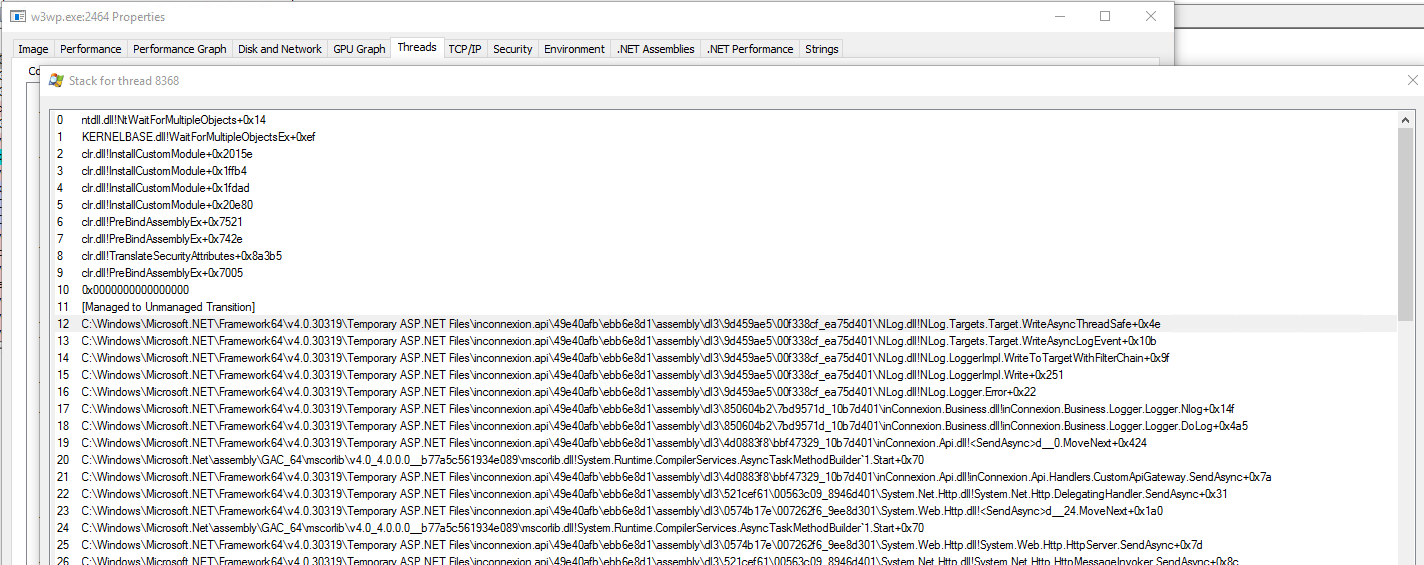
see screenshot, there are a whole bunch of threads like this in the w3wp.exe process of the hanging worker
Verthosa
on 28 Jan 2019
Hi,
While logging is thread-safe, changing your config isn't.
You should not change your config every log call, that's bad practice.
Instead of changing the config, use one of the context classes (gdc, mdc, event-properties etc), see https://nlog-project.org/config/?tab=layout-renderers&search=context
- When you need the context for all threads, use the GDC.
- When you need the context for one thread, use the MDC.
- When you work with async, use the MDLC.
- If the context is different for every message, use the [Log event properties](EventProperties-Layout-Renderer
e.g. instead of change the config, use
<target name="file" xsi:type="File" fileName="${gdc:item=myFilePath}" />
 304NotModified
on 28 Jan 2019
304NotModified
on 28 Jan 2019
Agree with @304NotModified that one should NEVER change the target-settings during normal operations (But only at app-startup or config-reload).
I would probably use the Logger-name instead like this:
```c#
public static class Logger
{
static readonly Logger DefaultLogger = LogManager.GetLogger("Api");
static readonly ConcurrentDictionary
ConcurrentDictionary
 Logger GetLogger(LogCategories logCategory, string tenantId = "")
 {
     switch (logCategory)
     {
         case LogCategories.Site:
         case LogCategories.Api:
         case LogCategories.Security:
         {
            var currentApplication = ConnectionStringHelper.GetCurrentApplication(tenantId) ??
                                  ConnectionStringHelper.GetCurrentApplication();
            string appName = currentApplication?.Name ?? string.Empty;
            if (!Loggers.TryGetValue(new KeyValuePair<string,LogCategories>(appName, logCategory), out Logger logger))
            {
                string loggerName = string.Empty;
                if (!string.IsNullOrEmpty(tenantId))
                    loggerName += tenantId + ".";
                loggerName += Enum.GetName(typeof(LogCategories));
                if (!string.IsNullOrEmpty(appName))
                    loggerName += "_" + appName.Replace(".", "_");
                logger = LogManager.GetLogger(loggerName);
                Loggers[new KeyValuePair<string,LogCategories>(appName, logCategory)] = logger;
            }
            return logger;
         }
         default: return DefaultLogger;
    }
}
}
Then for logfile-Target use `${logger:shortName=true}` in FileName, and `${exception}` in Layout:

```xml
    <target name="logfile" xsi:type="File"
            fileName="d:/inConnexion/Logs/inConnexion_${logger:shortName=true}.log"
            layout="${uppercase:${level}:padding=-5:padCharacter= }  ${shortdate}  ${time}  ${message}  ${exception}"
            archiveFileName="d:/inConnexion/Logs/inConnexion_${logger:shortName=true}.{#}.log"
            archiveEvery="Day"
            archiveNumbering="Date"
            maxArchiveFiles="100"
            concurrentWrites="true"
            keepFileOpen="false"
            encoding="iso-8859-2"
            archiveDateFormat="yyyy-MM-dd"/>
To make the connectionstring work for database-target, then I would probably make a special layoutrenderer, that converts LogEventInfo.Logger-name into the wanted connectionString using your ConnectionStringHelper.
https://github.com/NLog/NLog/wiki/How-to-write-a-custom-layout-renderer
Then register that layout-renderer and use it in the database-target (Ex. ${customConnectionStringLookup}). Have as a bonus for you updated parameter-Layout values for you:
    <target xsi:type="Database" name="database"
                keepConnection="false"
                dbProvider="System.Data.SqlClient"
                connectionString="${customConnectionStringLookup}"
                commandText="insert into foundation.logMessages(Message, LogLevelId, LogCategoryId, TimeStamp, Details, mailstate, smsstate) values (@Message, @LogLevelId, @LogCategoryId, @TimeStamp, @Details, 0, 0)">
      <parameter name="@Message" layout="${message}" />
      <parameter name="@LogLevelId" layout="${level:format=ordinal}" />
      <parameter name="@LogCategoryId" layout="${logger}" />
      <parameter name="@TimeStamp" layout="${date:format=yyyy-MM-dd HH\:mm\:ss.fff}" />
      <parameter name="@Details" layout="${exception}" />
    </target>
Example of possible ${customConnectionStringLookup} implementation:
```c#
LayoutRenderer.Register("customConnectionStringLookup", (logEvent) => {
 string tenantId = logEvent.Logger.IndexOf('.') > 0 ?
          logEvent.Logger.SubString(logEvent.Logger.IndexOf('.')) : string.Empty;
 var currentApplication = ConnectionStringHelper.GetCurrentApplication(tenantId) ??
                                     ConnectionStringHelper.GetCurrentApplication();
 if (currentApplication != null)
 {
        return currentApplication.ConnectionString;
 }
 if (logEvent.Logger.IndexOf("Security") >= 0)
 {
        return ConfigurationManager.ConnectionStrings["MainSecurityDBConnectionString"].ConnectionString;
 }
 return ConfigurationManager.ConnectionStrings["MainApplicationDBConnectionString"].ConnectionString;
});
```
 snakefoot
on 28 Jan 2019
snakefoot
on 28 Jan 2019
Thanks for the wonderful replies, i'm going to work on it today and will try the suggestions! Great help!
Verthosa
on 29 Jan 2019
(@snakefoot thanks for the stackoverflow edits! :) )
304NotModified
on 29 Jan 2019
Hello,
just wanting to let you know i changed the way it works by setting event properties through LogEventInfo class in code, and then using those variables in nlog.config as ${event-properties:item=AppName} and ${event-properties:item=AppConnectionString}.
Everything works as expected and no thread blocking has occured after 1h30 of load testing.
Thanks a lot @304NotModified for the quick response and @snakefoot for all very useful code postings!
Verthosa
on 29 Jan 2019
Related issues
 JustArchi
·
3Comments
JustArchi
·
3Comments
 linmasaki
·
3Comments
linmasaki
·
3Comments
 imanushin
·
3Comments
imanushin
·
3Comments
 Sam13
·
3Comments
Sam13
·
3Comments
 geedsen
·
3Comments
geedsen
·
3Comments
Most helpful comment
Hello,
just wanting to let you know i changed the way it works by setting event properties through LogEventInfo class in code, and then using those variables in nlog.config as ${event-properties:item=AppName} and ${event-properties:item=AppConnectionString}.
Everything works as expected and no thread blocking has occured after 1h30 of load testing.
Thanks a lot @304NotModified for the quick response and @snakefoot for all very useful code postings!