Nixpkgs: MESA-LOADER: failed to open $driver
On latest nixos-unstable (a45f68c) and master (b0edcfd09bbf9e8571704cf5df8d68956c79af44) sway fails with the following errors:
$ sway -d
2020-07-31 12:42:07 - [sway/main.c:152] Linux AMD-Workstation 5.4.50 #1-NixOS SMP Tue Jun 30 20:21:55 UTC 2020 x86_64 GNU/Linux
2020-07-31 12:42:07 - [sway/main.c:168] Contents of /etc/os-release:
2020-07-31 12:42:07 - [sway/main.c:152] NAME=NixOS
2020-07-31 12:42:07 - [sway/main.c:152] ID=nixos
2020-07-31 12:42:07 - [sway/main.c:152] VERSION="20.09.20200731.b0edcfd (Nightingale)"
2020-07-31 12:42:07 - [sway/main.c:152] VERSION_CODENAME=nightingale
2020-07-31 12:42:07 - [sway/main.c:152] VERSION_ID="20.09.20200731.b0edcfd"
2020-07-31 12:42:07 - [sway/main.c:152] PRETTY_NAME="NixOS 20.09 (Nightingale)"
2020-07-31 12:42:07 - [sway/main.c:152] LOGO="nix-snowflake"
2020-07-31 12:42:07 - [sway/main.c:152] HOME_URL="https://nixos.org/"
2020-07-31 12:42:07 - [sway/main.c:152] DOCUMENTATION_URL="https://nixos.org/learn.html"
2020-07-31 12:42:07 - [sway/main.c:152] SUPPORT_URL="https://nixos.org/community.html"
2020-07-31 12:42:07 - [sway/main.c:152] BUG_REPORT_URL="https://github.com/NixOS/nixpkgs/issues"
2020-07-31 12:42:07 - [sway/main.c:140] LD_LIBRARY_PATH=(null)
2020-07-31 12:42:07 - [sway/main.c:140] LD_PRELOAD=(null)
2020-07-31 12:42:07 - [sway/main.c:140] PATH=/nix/store/jd3pdmjdz8kjisb5ryw6kdgfg4i7j5gr-swaybg-1.0/bin:/nix/store/jd3pdmjdz8kjisb5ryw6kdgfg4i7j5gr-swaybg-1.0/bin:/run/wrappers/bin:/home/balsoft/.nix-profile/bin:/etc/profiles/per-user/balsoft/bin:/nix/var/nix/profiles/default/bin:/run/current-system/sw/bin:/home/balsoft/.zsh/plugins/zsh-nix-shell:/home/balsoft/.zsh/plugins/zsh-autosuggestions:/home/balsoft/.zsh/plugins/you-should-use
2020-07-31 12:42:07 - [sway/main.c:140] SWAYSOCK=/run/user/1000/sway-ipc.1000.23481.sock
2020-07-31 12:42:07 - [sway/server.c:40] Preparing Wayland server initialization
2020-07-31 12:42:07 - [backend/wayland/backend.c:255] Creating wayland backend
2020-07-31 12:42:07 - [backend/wayland/backend.c:100] Remote wayland global: wl_shm v1
2020-07-31 12:42:07 - [backend/wayland/backend.c:100] Remote wayland global: zwp_linux_dmabuf_v1 v3
2020-07-31 12:42:07 - [backend/wayland/backend.c:100] Remote wayland global: wl_drm v2
2020-07-31 12:42:07 - [backend/wayland/backend.c:100] Remote wayland global: wl_compositor v4
2020-07-31 12:42:07 - [backend/wayland/backend.c:100] Remote wayland global: wl_subcompositor v1
2020-07-31 12:42:07 - [backend/wayland/backend.c:100] Remote wayland global: wl_data_device_manager v3
2020-07-31 12:42:07 - [backend/wayland/backend.c:100] Remote wayland global: zwlr_gamma_control_manager_v1 v1
2020-07-31 12:42:07 - [backend/wayland/backend.c:100] Remote wayland global: gtk_primary_selection_device_manager v1
2020-07-31 12:42:07 - [backend/wayland/backend.c:100] Remote wayland global: zxdg_output_manager_v1 v3
2020-07-31 12:42:07 - [backend/wayland/backend.c:100] Remote wayland global: org_kde_kwin_idle v1
2020-07-31 12:42:07 - [backend/wayland/backend.c:100] Remote wayland global: zwp_idle_inhibit_manager_v1 v1
2020-07-31 12:42:07 - [backend/wayland/backend.c:100] Remote wayland global: zwlr_layer_shell_v1 v2
2020-07-31 12:42:07 - [backend/wayland/backend.c:100] Remote wayland global: xdg_wm_base v2
2020-07-31 12:42:07 - [backend/wayland/backend.c:100] Remote wayland global: zwp_tablet_manager_v2 v1
2020-07-31 12:42:07 - [backend/wayland/backend.c:100] Remote wayland global: org_kde_kwin_server_decoration_manager v1
2020-07-31 12:42:07 - [backend/wayland/backend.c:100] Remote wayland global: zxdg_decoration_manager_v1 v1
2020-07-31 12:42:07 - [backend/wayland/backend.c:100] Remote wayland global: zwp_relative_pointer_manager_v1 v1
2020-07-31 12:42:07 - [backend/wayland/backend.c:100] Remote wayland global: zwp_pointer_constraints_v1 v1
2020-07-31 12:42:07 - [backend/wayland/backend.c:100] Remote wayland global: wp_presentation v1
2020-07-31 12:42:07 - [backend/wayland/backend.c:100] Remote wayland global: zwlr_output_manager_v1 v1
2020-07-31 12:42:07 - [backend/wayland/backend.c:100] Remote wayland global: zwlr_export_dmabuf_manager_v1 v1
2020-07-31 12:42:07 - [backend/wayland/backend.c:100] Remote wayland global: zwlr_screencopy_manager_v1 v2
2020-07-31 12:42:07 - [backend/wayland/backend.c:100] Remote wayland global: zwlr_data_control_manager_v1 v2
2020-07-31 12:42:07 - [backend/wayland/backend.c:100] Remote wayland global: zwp_primary_selection_device_manager_v1 v1
2020-07-31 12:42:07 - [backend/wayland/backend.c:100] Remote wayland global: zwp_virtual_keyboard_manager_v1 v1
2020-07-31 12:42:07 - [backend/wayland/backend.c:100] Remote wayland global: zwlr_virtual_pointer_manager_v1 v1
2020-07-31 12:42:07 - [backend/wayland/backend.c:100] Remote wayland global: zwlr_input_inhibit_manager_v1 v1
2020-07-31 12:42:07 - [backend/wayland/backend.c:100] Remote wayland global: wl_seat v7
2020-07-31 12:42:07 - [backend/wayland/backend.c:100] Remote wayland global: zwp_pointer_gestures_v1 v1
2020-07-31 12:42:07 - [backend/wayland/backend.c:100] Remote wayland global: wl_output v3
2020-07-31 12:42:07 - [backend/wayland/backend.c:100] Remote wayland global: wl_output v3
2020-07-31 12:42:07 - [backend/wayland/wl_seat.c:569] seat 0x63bb80 offered pointer
2020-07-31 12:42:07 - [backend/wayland/wl_seat.c:582] seat 0x63bb80 offered keyboard
libEGL warning: MESA-LOADER: failed to open radeonsi (search paths /run/opengl-driver/lib/dri)

2020-07-31 12:42:07 - [EGL] command: eglInitialize, error: 0x3003, message: "DRI2: failed to load driver"
libEGL warning: MESA-LOADER: failed to open swrast (search paths /run/opengl-driver/lib/dri)

libEGL warning: MESA-LOADER: failed to open swrast (search paths /run/opengl-driver/lib/dri)

2020-07-31 12:42:07 - [EGL] command: eglInitialize, error: 0x3001, message: "eglInitialize"
2020-07-31 12:42:07 - [render/egl.c:184] Failed to initialize EGL
2020-07-31 12:42:07 - [EGL] command: eglMakeCurrent, error: 0x3008, message: "Invalid display (nil)"
2020-07-31 12:42:07 - [render/wlr_renderer.c:221] Could not initialize EGL
2020-07-31 12:42:07 - [backend/wayland/backend.c:324] Could not create renderer
2020-07-31 12:42:07 - [backend/noop/backend.c:51] Creating noop backend
2020-07-31 12:42:07 - [sway/server.c:47] Unable to create backend
If I don't restart sway, glxgears do actually work, as do other opengl apps like blender.
To Reproduce
Steps to reproduce the behavior:
- Update to b0edcfd
- Run
swayeither as a client of a wayland compositor or as a standalone compositor - It doesn't start and prints out the log similar to the one above.
Expected Behaviour
Sway starts and works correctly
Additional context
hwinfo section for the GPU:
39: PCI 700.0: 0300 VGA compatible controller (VGA)
  [Created at pci.386]
  Unique ID: aK5u.iUpPjqlt8XB
  Parent ID: w+J7.0mdkldd4FZB
  SysFS ID: /devices/pci0000:00/0000:00:03.1/0000:07:00.0
  SysFS BusID: 0000:07:00.0
  Hardware Class: graphics card
  Model: "ATI Baffin [Radeon RX 460/560D / Pro 450/455/460/555/555X/560/560X]"
  Vendor: pci 0x1002 "ATI Technologies Inc"
  Device: pci 0x67ef "Baffin [Radeon RX 460/560D / Pro 450/455/460/555/555X/560/560X]"
  SubVendor: pci 0x148c "Tul Corporation / PowerColor"
  SubDevice: pci 0x2385
  Revision: 0xe5
  Driver: "amdgpu"
  Driver Modules: "amdgpu"
  Memory Range: 0xe0000000-0xefffffff (ro,non-prefetchable)
  Memory Range: 0xf0000000-0xf01fffff (ro,non-prefetchable)
  I/O Ports: 0xe000-0xe0ff (rw)
  Memory Range: 0xfce00000-0xfce3ffff (rw,non-prefetchable)
  Memory Range: 0x000c0000-0x000dffff (rw,non-prefetchable,disabled)
  IRQ: 100 (1743487 events)
  Module Alias: "pci:v00001002d000067EFsv0000148Csd00002385bc03sc00i00"
  Config Status: cfg=new, avail=yes, need=no, active=unknown
  Attached to: #24 (PCI bridge)
Notify maintainers
@primeos @Synthetica9 @Ma27
Metadata
- system:
"x86_64-linux" - host os:
Linux 5.4.50, NixOS, 20.09.20200731.b0edcfd (Nightingale) - multi-user?:
yes - sandbox:
yes - version:
nix-env (Nix) 2.4pre20200701_6ff9aa8 - channels(root):
"" - channels(balsoft):
"" - nixpkgs:
/etc/nixpkgs
Maintainer information:
# a list of nixpkgs attributes affected by the problem
attribute: sway
# a list of nixos modules affected by the problem
module: programs.sway
 balsoft
All 22 comments
Weston and cage do start, so the problem is specifically with sway.
balsoft
on 31 Jul 2020
Just noticed that it was discussed in https://github.com/NixOS/nixpkgs/pull/76787 and https://github.com/swaywm/sway/issues/4898 . Interestingly, a commit that works for me (bdac777becdbb8780c35be4f552c9d4518fe0bdb) was later than this update, so probably something else broke in the meantime.
balsoft
on 31 Jul 2020
Fixed by pinning mesa_drivers to the version from bdac777.
balsoft
on 31 Jul 2020
@balsoft I have the same problem. How did you pin your mesa_drivers? Could you share a snippet?
 Algram
on 31 Jul 2020
Algram
on 31 Jul 2020
I'm using flakes, so probably not relevant to your config, but:
- Add a separate nixpkgs version: https://code.balsoft.ru/balsoft/nixos-config/src/branch/master/flake.nix#L6
- Override
mesa_driversandswayso that both packages are taken from that old version: https://code.balsoft.ru/balsoft/nixos-config/src/branch/master/modules/packages.nix#L24 - Override
hardware.opengl.packagebecause of a NixOS module system quirk (AFAIU the option evaluation happens before overlay application, which results in default package being different from the one available inpkgs): https://code.balsoft.ru/balsoft/nixos-config/src/branch/master/modules/hardware.nix#L15
balsoft
on 31 Jul 2020
If you want something a bit more conventional, try
  nixpkgs.overlays = [
    (self: super:
      let
        nixpkgs-mesa = builtins.fetchTarball
          "https://github.com/nixos/nixpkgs/archive/bdac777becdbb8780c35be4f552c9d4518fe0bdb.tar.gz";
      in { mesa_drivers = (import nixpkgs-mesa { }).mesa_drivers; })
  ];
Most likely a driver specific Mesa issue as you've already figured it out. I probably cannot reproduce this on my systems (I'm currently running Sway 1.5 but still with Mesa 20.0.2) so I guess you're unfortunately on your own. However, this should hopefully be fixed soon im Mesa anyway.
bdac777becdbb8780c35be4f552c9d4518fe0bdb still provides Mesa 20.0.8 so this probably broke with Mesa 20.1.
a45f68ccac476dc37ddf294530538f2f2cce5a92 and b0edcfd09bbf9e8571704cf5df8d68956c79af44 are still on Mesa 20.1.3 while we already have 2.1.4 in staging (#93708), but it doesn't seem like 20.1.4 contains related fixes. You could also try removing ~/.cache/mesa_shader_cache/ as that recently also caused some issues (though only with Vulkan so far - see #93946).
 primeos
on 31 Jul 2020
primeos
on 31 Jul 2020
@primeos thanks for the suggestion! I'll try it out
balsoft
on 31 Jul 2020
I am seeing the same issue with qemu when trying to start Redox OS:
SDL_VIDEO_X11_DGAMOUSE=0 qemu-system-x86_64 -display sdl -d cpu_reset -d guest_errors -smp 4 -m 2048 -chardev stdio,id=debug,signal=off,mux=on,"" -serial chardev:debug -mon chardev=debug -machine q35 -device ich9-intel-hda -device hda-d\
        -drive file=build/harddrive.bin,format=raw \
        -drive file=build/extra.bin,format=raw
libGL error: MESA-LOADER: failed to open radeonsi (search paths /run/opengl-driver/lib/dri)
libGL error: failed to load driver: radeonsi
libGL error: MESA-LOADER: failed to open radeonsi (search paths /run/opengl-driver/lib/dri)
libGL error: failed to load driver: radeonsi
libGL error: MESA-LOADER: failed to open swrast (search paths /run/opengl-driver/lib/dri)
libGL error: failed to load driver: swrast
X Error of failed request:  GLXBadContext
  Major opcode of failed request:  152 (GLX)
  Minor opcode of failed request:  6 (X_GLXIsDirect)
  Serial number of failed request:  111
  Current serial number in output stream:  110
make: *** [mk/qemu.mk:61: qemu] Error 1
(Obviously qemu without graphics still works)
 jD91mZM2
on 3 Aug 2020
jD91mZM2
on 3 Aug 2020
Yeah, seems like some strange things are going on here. E.g. with Mesa 2.0.2 I cannot run glxgears with iris (i965 works):
$ glxgears
libGL error: MESA-LOADER: failed to open iris (search paths /run/opengl-driver/lib/dri)
libGL error: failed to load driver: iris
libGL error: MESA-LOADER: failed to open swrast (search paths /run/opengl-driver/lib/dri)
libGL error: failed to load driver: swrast
X Error of failed request:  GLXBadContext
  Major opcode of failed request:  150 (GLX)
  Minor opcode of failed request:  6 (X_GLXIsDirect)
  Serial number of failed request:  38
  Current serial number in output stream:  37
With Mesa 2.1.3 glxgears works again with iris but now mpv crashes with a similar error (forgot to save a copy).
I just ran it again with LIBGL_DEBUG=verbose (https://docs.mesa3d.org/envvars.html) which is more useful:
$ LIBGL_DEBUG=verbose glxgears
libGL: Can't open configuration file /etc/drirc: No such file or directory.
libGL: Can't open configuration file /home/michael/.drirc: No such file or directory.
libGL: Can't open configuration file /etc/drirc: No such file or directory.
libGL: Can't open configuration file /home/michael/.drirc: No such file or directory.
libGL: pci id for fd 4: XXXX:XXXX, driver iris
libGL: MESA-LOADER: failed to open /run/opengl-driver/lib/dri/iris_dri.so: /nix/store/jx19wa4xlh9n4324xdl9rjnykd19mmq3-glibc-2.30/lib/librt.so.1: undefined symbol: __clock_nanosleep, version GLIBC_PRIVATE
libGL error: MESA-LOADER: failed to open iris (search paths /run/opengl-driver/lib/dri)
libGL error: failed to load driver: iris
libGL: MESA-LOADER: failed to open /run/opengl-driver/lib/dri/swrast_dri.so: /nix/store/jx19wa4xlh9n4324xdl9rjnykd19mmq3-glibc-2.30/lib/librt.so.1: undefined symbol: __clock_nanosleep, version GLIBC_PRIVATE
libGL error: MESA-LOADER: failed to open swrast (search paths /run/opengl-driver/lib/dri)
libGL error: failed to load driver: swrast
X Error of failed request:  GLXBadContext
  Major opcode of failed request:  150 (GLX)
  Minor opcode of failed request:  6 (X_GLXIsDirect)
  Serial number of failed request:  38
  Current serial number in output stream:  37
But I didn't have time to look into it so far.
(The drirc warning/error should be unrelated but is also not ideal. If someone want's to fix that feel free to reuse #89657 if that helps.)
Update: glxgears works if I use the same Nixpkgs revision for mesa-demos than for mesa. This seems to be caused by some version incompatibilities.
primeos
on 3 Aug 2020
This issue has been mentioned on NixOS Discourse. There might be relevant details there:
https://discourse.nixos.org/t/opengl-unusable-on-my-machine/8192/3
 nixos-discourse
on 7 Aug 2020
nixos-discourse
on 7 Aug 2020
This issue has been mentioned on NixOS Discourse. There might be relevant details there:
nixos-discourse
on 8 Aug 2020
Yeah with unstable I am currently unable to start any 32bit games. 64bit still works since I have amdvlk installed. Without amdvlk no opengl or vulkan applications are able to start
 ZerataX
on 12 Aug 2020
ZerataX
on 12 Aug 2020
I forgot to close this issue. I do now believe that these are actually only temporary breakages due to the combination of breaking changes in the last glibc update and impurities introduced via /run/opengl-driver/.
Some other relevant notes:
- https://discourse.nixos.org/t/opengl-unusable-on-my-machine/8192/3?u=primeos
- https://discourse.nixos.org/t/nixos-rebuild-fails-because-bash-is-broken-dependency-issue-in-libpthread-so-0-undefined-symbol-nanosleep-nocancel/8494/3?u=primeos
Feel free to comment/reopen (or open a new issue) if you get different errors.
(Edit: And AFAIK there is unfortunately no good option to avoid these temporary breakages when mixing Nixpkgs revisions.)
primeos
on 13 Aug 2020
Hi @primeos could you maybe elaborate what you mean by "temporary breakage"? Does that mean it will solve itself in one of the next releases? How could I get a working sway system on unstable until then?
Thanks!
Algram
on 13 Aug 2020
@Algram did you check for this? It normally shouldn't happen and only be caused by using overrides, Nixpkgs pinning, system+user packages, overlays, flakes, etc.
Or in other words: Try to use /run/opengl-driver and sway from the same Nixpkgs revision/commit.
primeos
on 13 Aug 2020
@primeos Thats what I am doing (At least I think so). I am using no overlays, flakes, pinning etc. This is the opengl config:

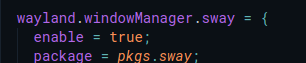
This is the sway config (using the home manager module, but with the package from nixpkgs):
And this is the channel I am using:

Algram
on 13 Aug 2020
That should work. You need to obtain some useful output then to track this down. E.g. with LIBGL_DEBUG=verbose like in https://github.com/NixOS/nixpkgs/issues/94315#issuecomment-667942575 (but use export LIBGL_DEBUG=verbose instead).
primeos
on 13 Aug 2020
@primeos you where right! My system had an old sway version running in parallel. I don't even know how that could happen, but after a nix-env -e sway and then another rebuild it is working now!
Algram
on 13 Aug 2020
This issue has been mentioned on NixOS Discourse. There might be relevant details there:
nixos-discourse
on 23 Aug 2020
This issue has been mentioned on NixOS Discourse. There might be relevant details there:
nixos-discourse
on 23 Aug 2020
I'm not at all new to nix, had this issue a while back, fixed it, and a month later, it's back after a revert to the newest MESA. It seems to be quite a widespread issue, what's going on with the mesa driver team that this was released like this for for so long?
I fixed it also by pinning nixpkgs in configuration.nix:
{
  nixpkgs.overlays = [
    (self: super:
      let
        nixpkgs-mesa = builtins.fetchTarball
          "https://github.com/nixos/nixpkgs/archive/bdac777becdbb8780c35be4f552c9d4518fe0bdb.tar.gz";
      in { mesa_drivers = (import nixpkgs-mesa { }).mesa_drivers; })
  ];

hardware.opengl.package = pkgs.mesa_drivers;
}
 monomadic
on 31 Oct 2020
monomadic
on 31 Oct 2020
Related issues
 yawnt
·
3Comments
yawnt
·
3Comments
 langston-barrett
·
3Comments
langston-barrett
·
3Comments
 rzetterberg
·
3Comments
rzetterberg
·
3Comments
 chris-martin
·
3Comments
chris-martin
·
3Comments
 retrry
·
3Comments
retrry
·
3Comments