Nixpkgs: nixos-minimal-17.09 fails to boot from USB
nixos-minimal-17.09.3205.12512f25e9e-i686-linux.iso
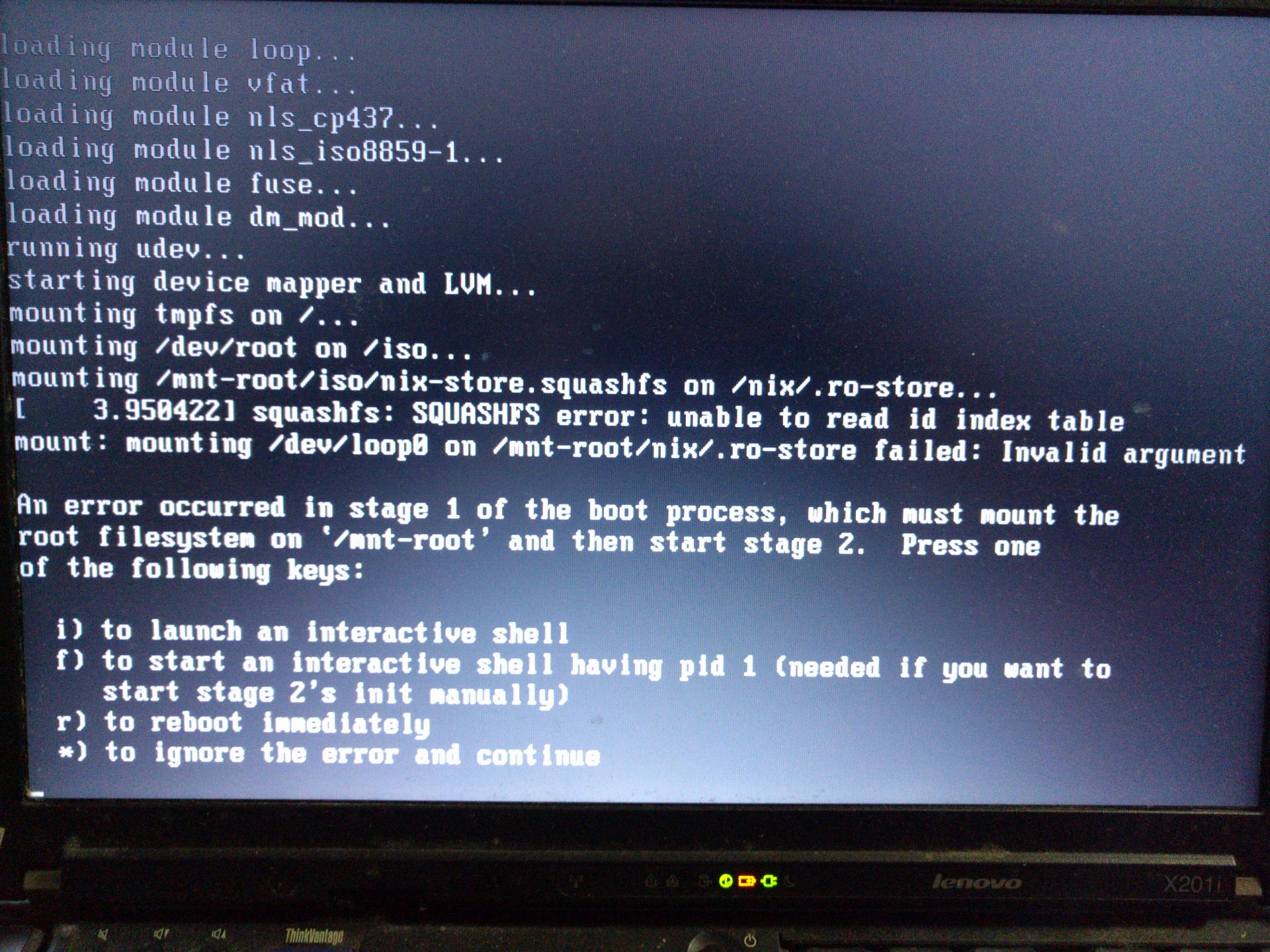
fails to boot from two different USB sticks, tried on two different laptops.
Disk label for stick is NIXOS_ISO.

 clayt0nk
All 14 comments
Can't reproduce. I downloaded the same iso from the website (with sha256sum 83b052831d82b421cf6bc6e639df0a8b4f7a7de5e7b2dd5d036711faa058af3b), booted in QEMU with qemu-system-x86_64 -boot d -cdrom nixos-minimal-17.09.3205.12512f25e9e-i686-linux.iso -m 512 and it boots normally all the way.
 dezgeg
on 30 Mar 2018
dezgeg
on 30 Mar 2018
I have the same sha256sum on my end. I was booting on real hardware, one laptop I tried on was native 32-bit, the other was a 64-bit machine. Same behavior on both machines. Both USB sticks are also devices I have used for a long time, multiple OS installs each.
Note that one does not need to follow through and do an actual install to test that the installer makes it through to the initial splash screen on real hardware.
clayt0nk
on 31 Mar 2018
@clayt0nk Have you tested the sticks for reliability?
I have several sticks that I disposed of because with the time they started to wear out and produce errors on transfer. Notice that @dezgeg has tested the image in VM and it worked. Some chances there is a problem with hardware.
I usually do this test prior to using the stick for images:
- mount the sticks into the system and format them with new fs
- lsblk (for the size of the sticks)
- dd if=/dev/zero of=~/testimg.img bs=1M count=xxxK ;where xxx=
- sync ;and wait.
after this:
- md5sum of the testimg.img on your sdd/hdd.
- cp the file into the usb and md5sum it there, compare
- rm the file from ~/testimg.img and cp it from usb to your ~. md5sum again.
all three md5sums should match. If they don't match, then stick can be disposed of.
 cx405
on 1 Apr 2018
cx405
on 1 Apr 2018
I guess the simple thing to try with the sticks is after the copying to unplug it, mount the ISO filesystem and run sha256sum nix-store.squashfs. I get 1b8ae9de66f02eda87e98967c7c01c85e11669f503a7fd7feef336120fe78593.
dezgeg
on 1 Apr 2018
Oh, this reminds me that Fedora/RHEL live CDs run self checksum on boot. I've been thinking we should do that too.
 bjornfor
on 1 Apr 2018
bjornfor
on 1 Apr 2018
@bjornfor That would be nice idea, would save from lots of problems in the future. An install is done once and checksumming is a read operation, thus should not impact flash life expectancy.
cx405
on 2 Apr 2018
Thanks for the encouragement and suggestions, guys, I am further along. The boot problem was procedural, I neglected to do a sync before removing the USB sticks and the result (per @dezgeg suggestion) was two different USB sticks with an incorrect nix-store.squashfs sha256sum. I think few people do OS installs so often as for it to become routine. I would suggest the documentation needs to list essential steps like doing a sync after writing the USB stick. Since most of the stick image is one file, a debugging footnote suggesting a sha256sum comparison of nix-store.squashfs on disk and on USB is a really elegant self-check.
clayt0nk
on 3 Apr 2018
Next issue I think is also documentation, so I will keep it here: per docs I used fdisk to create a very simple partitioning scheme for my first try: one swap partition and one partition for everything else. I then started the install and everything was great (if very, very slow) until near the end when I hit a grub error. I did not preserve the actual error text, but the gist was, by accepting fdisk's default suggestions for where to put the partitions, I ended up with no (or not enough) space between the MBR and the first partition. Apparently grub2 needs a bit of empty space there, and the install failed there. This also needs to be in the docs. So I modified the configuration to use grub1 instead, and that leads me to my next problem....
clayt0nk
on 3 Apr 2018
I live in China and the connectivity to your default repo through the Great FireWall (GFW) is very, very poor. It took literally all day yesterday to get a very minimal SSH-only install all the way through to the grub2 error above. I changed the config file to grub1 and re-invoked nixos-install and that seems to have provoked(?) a complete rebuild of everything(?) which ran all night and is still not done this morning. Most other Linux distros I am familiar with have multiple mirrors, including some inside the GFW. It is currently not clear to me that NixOS has any other repo mirrors, in or outside of the GFW, and how to select and use one if it exists.
clayt0nk
on 3 Apr 2018
I now have a minimal NixOS successfully booting. A grub 1 install repeatedly failed, so I redid the disk partitioning and started from scratch. I forget what the exact value of the fdisk default for the starting point of the first partition was, but I did calculate that it was only leaving about 1M empty at the beginning of the disk. I multiplied that by ten, ie. left about 10M, and this time grub2 was able to do it's thing without dying.
clayt0nk
on 4 Apr 2018
@clayt0nk I'm having a similar problem when I try to make a bootable NixOS USB stick. I followed the "Burning" to USB drive in the NixOS Installation Guide. Both the graphical and minimal iso(s) fail when I try to write the iso to my usb.
I tried both of these commands to write the graphical (and minimal) iso(s). Both resulting USB sticks simply immediately exit out of the boot process without any error message. Just jumping back to the boot loader.
What did you mean by "... do a sync before removing the USB"? What extra command did you do?
sudo dd if=~/Downloads/nixos-graphical-18.03.132847.aec217852f2-x86_64-linux.iso of=/dev/sda
sudo dd bs=1024 status=progress if=~/Downloads/nixos-graphical-18.03.132847.aec217852f2-x86_64-linux.iso of=/dev/sda
 twashing
on 11 Aug 2018
twashing
on 11 Aug 2018
@twashing Literally, in a terminal, execute a "sync" command. It seems modern hard disks and their drivers do a lot of caching, so dd may have exited, but some of what it just "wrote" still lingers in the cache and has not actually made it onto the disk. If you pull the USB out before that cache is written out, the result is corruption. The sync command simply causes all disk caches to be flushed immediately. When it returns, you should be good to pull out the stick.
clayt0nk
on 11 Aug 2018
@clayt0nk Hmm, interesting. My USB still fails, when calling sync after writing with dd. I also tried re-formatting the USB stick with fdisk, to just have 1 bootable partition. No dice.
Thanks for the feedback. I created an SO question, as there seems to be something particularly quirky about my setup. Dunno.
twashing
on 12 Aug 2018
Thank you for your contributions.
This has been automatically marked as stale because it has had no activity for 180 days.
If this is still important to you, we ask that you leave a comment below. Your comment can be as simple as "still important to me". This lets people see that at least one person still cares about this. Someone will have to do this at most twice a year if there is no other activity.
Here are suggestions that might help resolve this more quickly:
- Search for maintainers and people that previously touched the related code and @ mention them in a comment.
- Ask on the NixOS Discourse.
- Ask on the #nixos channel on irc.freenode.net.
![stale[bot] picture](https://avatars3.githubusercontent.com/in/1724?v=4&s=40) stale[bot]
on 4 Jun 2020
stale[bot]
on 4 Jun 2020
Related issues
 lverns
·
3Comments
lverns
·
3Comments
 chris-martin
·
3Comments
chris-martin
·
3Comments
 copumpkin
·
3Comments
copumpkin
·
3Comments
 rzetterberg
·
3Comments
rzetterberg
·
3Comments
 vaibhavsagar
·
3Comments
vaibhavsagar
·
3Comments
Most helpful comment
Oh, this reminds me that Fedora/RHEL live CDs run self checksum on boot. I've been thinking we should do that too.