Nixpkgs: Some icons (SVG?) are not displayed in Xfce in 16.09beta172
Issue description
I’ve tentatively updated my mother’s laptop—her DM is Xfce—to 16.09beta172 and some of the icons are gone:
- Chromium’s,
- battery applet,
- “Applications” menu in the corner of the display,
- LibreOffice.
Also, this might be of importance, gtk-update-icon-cache is gone from the PATH. It was there, previously.
Steps to reproduce
- Enable Xfce on 16.09beta172.
- Install, e.g., Chromium → no icon shown in Xfce.
Technical details
- System: 16.09beta172.e3bdf6b (Flounder)
- Nix version: nix-env (Nix) 1.11.4
- Nixpkgs version: "16.09beta172.e3bdf6b"
 michalrus
All 18 comments
Could you post your system config?
 rasendubi
on 12 Sep 2016
rasendubi
on 12 Sep 2016
@rasendubi, okay, but it’s not minimal. :blush:
It does import this one, here’s where Xfce is enabled:
Thank you for taking interest in this issue!
michalrus
on 13 Sep 2016
The same exact config with nix-channel switched back to 16.03 displays the icons correctly.
michalrus
on 13 Sep 2016
I'll try to reproduce the issue with VM at the weekend.
rasendubi
on 13 Sep 2016
Thank you!
michalrus
on 13 Sep 2016
I see the problem now. gtk-update-icon-cache is the key trigger. I've put it into the .dev output and that isn't installed by default, so the cache doesn't get (re)generated.
 vcunat
on 13 Sep 2016
vcunat
on 13 Sep 2016
The tool is so tiny that I think I shall put it into .out (again).
vcunat
on 13 Sep 2016
@vcunat has this been fixed?
rasendubi
on 27 Sep 2016
@rasendubi: I believe so. I didn't experience it in noticeable way recently, so I hope there wasn't something else also going on.
vcunat
on 27 Sep 2016
Cool. I'm closing this then.
@michalrus, feel free to reopen if you still experience this.
rasendubi
on 27 Sep 2016
I still have this issue, for example, with xfce.xfce4-power-manager_gtk3:
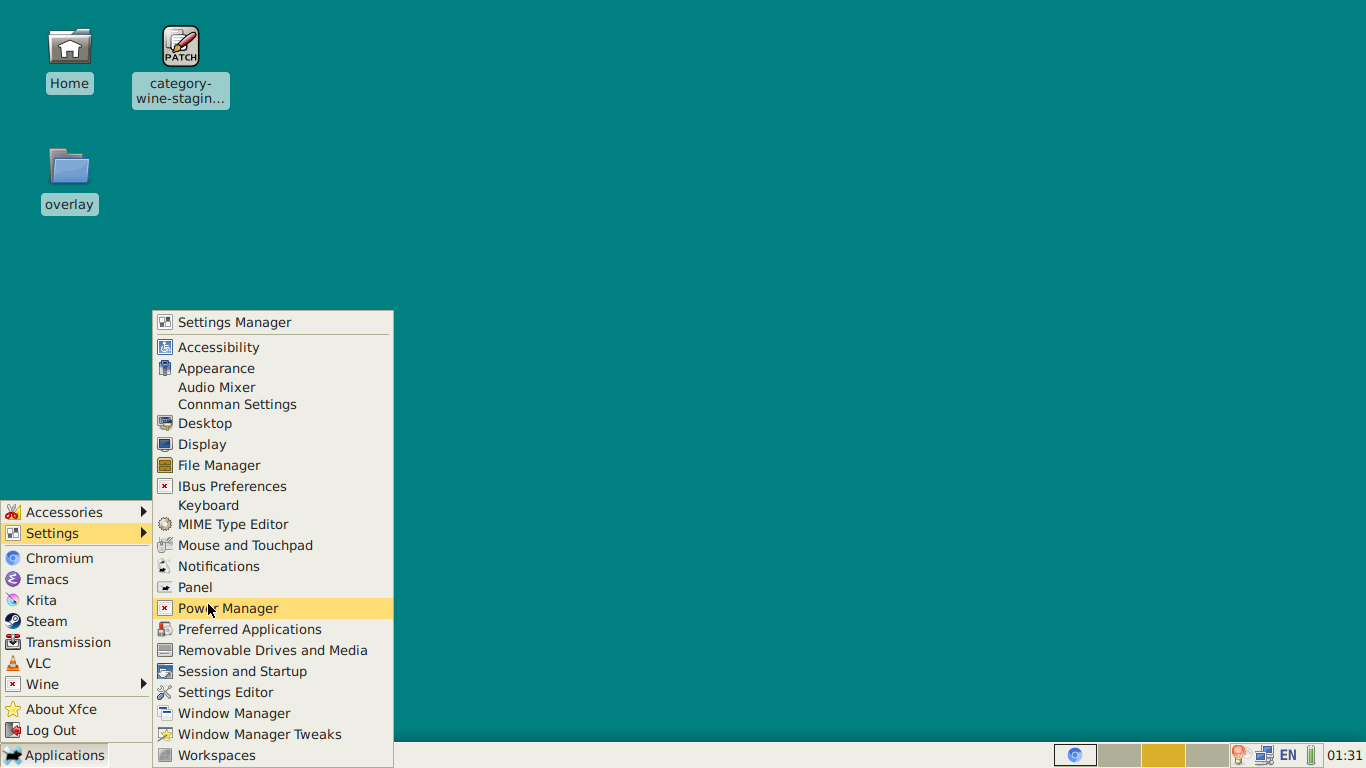
[chronos@yegatool:~]$ cat /run/current-system/sw/share/applications/xfce4-power-manager-settings.desktop
[Desktop Entry]
Version=1.0
Name=Power Manager
Comment=Settings for the Xfce Power Manager
Exec=xfce4-power-manager-settings
Icon=xfce4-power-manager-settings
Terminal=false
Type=Application
Categories=XFCE;GTK;Settings;DesktopSettings;X-XFCE-SettingsDialog;X-XFCE-HardwareSettings;
NotShowIn=GNOME;KDE;Unity;
StartupNotify=true
X-XfcePluggable=true
X-XfceHelpComponent=xfce4-power-manager
X-XfceHelpPage=start
[chronos@yegatool:~]$ ls /run/current-system/sw/share/icons/hicolor/scalable/status/xfce4-power-manager-settings.svg
/run/current-system/sw/share/icons/hicolor/scalable/status/xfce4-power-manager-settings.svg
If I copy some raster icon over to ~/.local/share/icons/hicolor/32x32/status/xfce4-power-manager-settings.png, it will appear in the applications menu. I've also tried adding librsvg to xfce.xfce4panel_gtk3 buildInputs, didn't help.
NixOS version: 18.03pre118287.0ce09afcfa (Impala), latest nixos-unstable
Config: https://github.com/yegortimoshenko/overlay/blob/master/modules/profiles/machines/yegatool.nix
 yegortimoshenko
on 22 Oct 2017
yegortimoshenko
on 22 Oct 2017
Oh, OK. This makes SVG icons work:
environment.extraInit = ''
    export GDK_PIXBUF_MODULE_FILE="$(echo ${pkgs.librsvg.out}/lib/gdk-pixbuf-2.0/*/loaders.cache)";
'';
Thanks to @Pitometsu https://github.com/NixOS/nixpkgs/issues/16268#issuecomment-226964988 and @joncfoo https://github.com/NixOS/nixpkgs/issues/13537#issuecomment-332327760.
yegortimoshenko
on 22 Oct 2017
I think this should be reopened since SVG icons indeed do not show up in XFCE.
yegortimoshenko
on 22 Oct 2017
Does the following configuration snippet fixes the issue?
{
  environment.pathsToLink = [ "/lib/gdk-pixbuf-2.0" ];
}
If it does, could you open a PR to add it to the following variable? https://github.com/NixOS/nixpkgs/blob/710973e354cc0f1c18a2d201f631d54420c6084a/nixos/modules/services/x11/desktop-managers/xfce.nix#L123-L124
EDIT: if it does not, try adding GDK_PIXBUF_MODULE_FILE like this: https://github.com/NixOS/nixpkgs/blob/710973e354cc0f1c18a2d201f631d54420c6084a/nixos/modules/services/x11/desktop-managers/xfce.nix#L126
rasendubi
on 23 Oct 2017
@rasendubi Neither snippet fixes the issue, unfortunately.
yegortimoshenko
on 31 Oct 2017
Adding this to my configuration fixes it for me. See in the linked issue.
  environment.variables = {
     GDK_PIXBUF_MODULE_FILE = "$(ls ${pkgs.librsvg.out}/lib/gdk-pixbuf-*/*/loaders.cache)";
  };
@yegortimoshenko could you test it?
 davidak
on 17 Dec 2017
davidak
on 17 Dec 2017
@davidak I already do that in https://github.com/NixOS/nixpkgs/issues/18536#issuecomment-338438919, it works.
yegortimoshenko
on 17 Dec 2017
Great. Then we should add it to Xfce.
davidak
on 17 Dec 2017
Related issues
 chris-martin
·
3Comments
chris-martin
·
3Comments
 ayyess
·
3Comments
ayyess
·
3Comments
 domenkozar
·
3Comments
domenkozar
·
3Comments
 copumpkin
·
3Comments
copumpkin
·
3Comments
 matthiasbeyer
·
3Comments
matthiasbeyer
·
3Comments
Most helpful comment
Cool. I'm closing this then.
@michalrus, feel free to reopen if you still experience this.