Hello,
Is there a way to change the colour of a key in each bar individually?
I have this bar plot below and I would like to represent the correct choice with maybe a green colour. My issue is that changing the hsl in the data object for each item does not change the colour. Each question has a different correct answer so I can't set the colour for key A to be green as that would set it for all the bars if that makes sense. Is there something that can be done and I am not aware of?
Should I just create new keys like "A Correct", "B correct" and so on and use those to represent the correct answer?
I specify that I am new to using this library. Please let me know if there's any code you'd like me to include. Thanks.
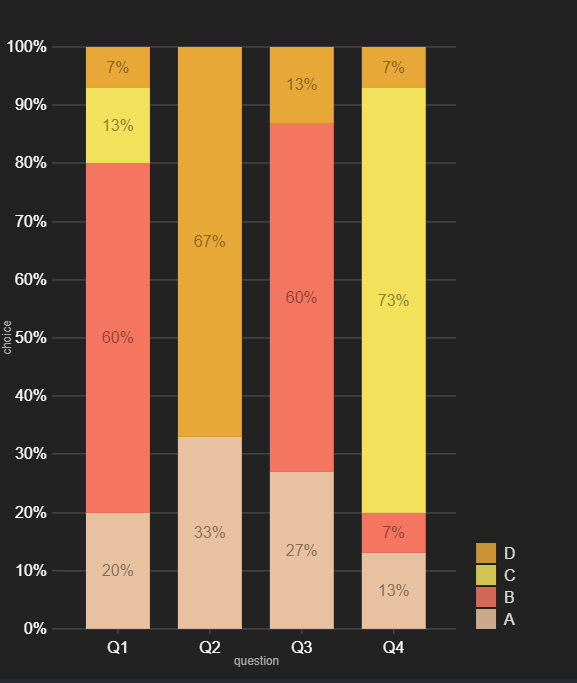
<ResponsiveBar
        data={this.props.data}
        keys={["A", "B", "C", "D"]}
        indexBy="question"
        margin={{ top: 50, right: 130, bottom: 50, left: 60 }}
        padding={0.3}
        valueScale={{ type: "linear" }}
        colors={{ scheme: "nivo" }}
        // defs={[
        //   {
        //     id: "dots",
        //     type: "patternDots",
        //     background: "inherit",
        //     color: "#38bcb2",
        //     size: 4,
        //     padding: 1,
        //     stagger: true,
        //   },
        //   {
        //     id: "lines",
        //     type: "patternLines",
        //     background: "inherit",
        //     color: "#eed312",
        //     rotation: -45,
        //     lineWidth: 6,
        //     spacing: 10,
        //   },
        // ]}
        // fill={[
        //   {
        //     match: {
        //       id: "A",
        //     },
        //     id: "lines",
        //   },
        // ]}
        borderColor={{ from: "color", modifiers: [["darker", 1.6]] }}
        axisTop={null}
        axisRight={null}
        axisBottom={{
          tickSize: 5,
          tickPadding: 5,
          tickRotation: 0,
          legend: "question",
          legendPosition: "middle",
          legendOffset: 32,
        }}
        axisLeft={{
          tickSize: 5,
          tickPadding: 5,
          tickRotation: 0,
          legend: "choice",
          legendPosition: "middle",
          legendOffset: -50,
          format,
        }}
        labelFormat={format}
        tooltipFormat={format}
        // axisLeft={{ legend: "choice", format }}
        labelSkipWidth={12}
        labelSkipHeight={12}
        labelTextColor={{ from: "color", modifiers: [["darker", 1.6]] }}
        legends={[
          {
            dataFrom: "keys",
            anchor: "bottom-right",
            direction: "column",
            justify: false,
            translateX: 120,
            translateY: 0,
            itemsSpacing: 2,
            itemWidth: 100,
            itemHeight: 20,
            itemDirection: "left-to-right",
            itemOpacity: 0.85,
            symbolSize: 20,
            effects: [
              {
                on: "hover",
                style: {
                  itemOpacity: 1,
                },
              },
            ],
          },
        ]}
        animate={true}
        motionStiffness={90}
        motionDamping={15}
        theme={theme}
      />
 erceamet
All 2 comments
You can use a custom function passed to colors prop and determine if the answer was correct or not and return the appropriate color. https://codesandbox.io/s/quirky-meadow-w23wz?file=/src/App.js
 wyze
on 4 Dec 2020
wyze
on 4 Dec 2020
You can use a custom function passed to
colorsprop and determine if the answer was correct or not and return the appropriate color. https://codesandbox.io/s/quirky-meadow-w23wz?file=/src/App.js
Thank you so much. That should solve it. You saved my day!
erceamet
on 4 Dec 2020
Related issues
 stahlmanDesign
·
3Comments
stahlmanDesign
·
3Comments
 gcloeval
·
3Comments
gcloeval
·
3Comments
 dubzzz
·
3Comments
dubzzz
·
3Comments
 luisrudge
·
3Comments
luisrudge
·
3Comments
 Buvaneshkumar7
·
3Comments
Buvaneshkumar7
·
3Comments